


LG G5 Review: modular marvel or bold blunder?
2016 has so far been a year of impressive flagship phones with perhaps the most unique of the bunch being the LG G5. LG was coming off a year of success with two wonderful flagships (the G4 and V10) receiving rave reviews. Many speculated that the G5 would be a fusion of the two devices – stealing the most innovative features of the V10 but in a smaller, easier to handle body.
What we got was something completely different. As early as January, we brought you news that the G5 was going to have a metal unibody that pulled apart at the bottom and featured a removable battery. No one has ever tried this combination before and our interest was piqued. More news leaked about a “magic slot” that would allow users to expand the phone’s functionality with modules. This was truly something new and unique to the market. We’ve seen some of this functionality in beta devices from Project Ara (now named just Ara), but never in a consumer device.
What we got was controversial. Is it metal unibody? Sure is, but it doesn’t remotely feel like it. Does it have a “magic slot”? Yep, but how much it expands the functionality of the phone is debatable.
The G5 matches up in terms of specs with every other flagship on the market, but phones are more than a sum of its parts. What matters is how those chips and that silicon perform and how engaging and easy to understand the software is. LG has had issues with these areas in the past, and they’ve held LG back from challenging Samsung for supremacy in the Android market in the United States. Can the fifth iteration of the G series finally make the leap from also-ran to front-runner?
Software
LG has always deployed one of the heaviest skins of any of the Android OEM’s currently producing flagship phones. This hasn’t changed for the LG G5. Actually, not much has changed from the LG G4’s software, to be honest. This year’s model does ship with the most recent version of Android 6.0.1 Marshmallow, but unless you were looking in the settings, you could be forgiven for not knowing that. There are little enhancements that Marshmallow brings present in the G5, but you’re going to get almost the exact same experience on last year’s G4.

The most notable change in LG’s software is removing the Application Drawer on the default launcher. I did receive an update during the review process that enabled a Home + App Drawer launcher, but for the first week or so, I was stuck without it since I wasn’t using a third-party home replacement like Nova Launcher.
Removing the Application Drawer is a bold move, and I honestly hated it. I have no idea what the purpose of such a move would be other than to be more like Apple. Throwing over 100 applications into folders and hoping I remember where I put them is not a fun experience. It doesn’t lend to finding an app quickly, which is very frustrating when you’re pressed for time.
I hope LG got this out of its system and never tries it again. If I wanted to put every application on my home screen, I could already do that. Forcing me to goes against what Android is all about: choice.
I miss the app drawer
1 of 3
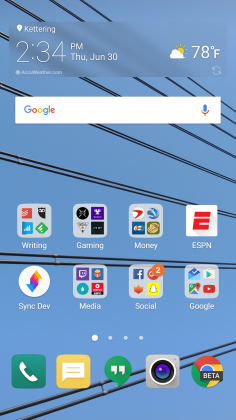

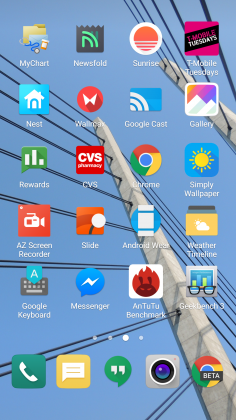
Luckily when I was living an App Drawer-less life, there wasn’t too much bloat to worry about. I am using an unlocked, unbranded version so there are no carrier-installed applications on the phone, but the suite of apps from LG wasn’t excessive. I had no use for apps like LG Friends manager, LG Health, Music, Quick Help, QuickMemo+, QuickRemote, SmartWorld, Tasks, but they were quickly hidden in a folder that I could forget about on a distant home screen.
Kudos to LG for not loading down the device with uninstallable crap from third parties. Android OEMs like to sign commercial deals where they add apps like Yellow Pages or Facebook to the phone to drive up profits, and I like that LG hasn’t sunk to that level.
Another huge win for LG is the quality of life improvements they made to the software. The ability to customize the navigation bar at the bottom of the phone is just smart. Not only can you choose on which side of the home button you want the back and recent apps buttons to be located, but you can add buttons for the QuickMemo+ app and one to drop the notification shade so you don’t have to reach the top of the phone. This is one of my favorite little features on any Android phone out there. LG has been including these options in its phones for a while now, and I hope it continues until Android makes them irrelevant.
You can see Marshmallow poking its head through occasionally. LG decided to keep the stock recent apps screen basically completely stock – clear apps button included. There’s also an always-on display that LG talked about a lot at its Mobile World Congress press conference that shows the time and some notifications. It’s a nice feature that I appreciate, but it’s nothing I think should influence your buying decision. This feature is becoming standard on most phones these days – the Samsung Galaxy S7, Moto X, OnePlus 3, and Nexus 6P all have various forms of this – and the inclusion of an LCD screen means that the G5 has to keep the entire screen on for this always-on display. It’s not ideal in its implementation, and I honestly don’t miss it when I’m not using the G5.
The puzzling choices LG made continue past using an LCD panel for an always-on display. The Settings app is a complete mess. The tabbed layout is confusing and frustrating. There is a reason that most phones use a longer list layout, and LG needs to get the memo that it’s a superior option. In fact, if it could use the stock Android settings menu and just add in the options it needs, do that. Google has made it pretty easy on OEM’s by including a great Settings app in AOSP, and yet, they keep screwing it up somehow.
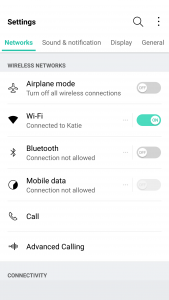
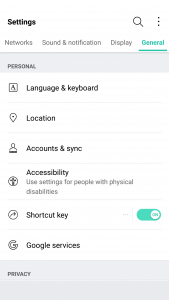
LG seems to put a lot of effort into its software to make it a true selling point. There are some great little features that no-one knows about like the phone composing a ringtone based on the number calling you. That’s not a feature that is going to make your life easier on a day-to-day basis, but it’s something innovative that people will love. It’s cute. I wish LG would focus on features like this instead of theming every inch of the OS with its own brand of color vomit. Stop messing with things that already work just to make them different.
Performance
The LG G5 has a Snapdragon 820 processor clocked at 2.15GHz with 4GB of RAM and an Adreno 530 GPU. This is the standard loadout for a flagship phone released in the first half of 2016, which includes the Samsung Galaxy S7, HTC 10, and LG G5.
As much as I complained about the software in the previous section, this set of hardware is easily able to power through it. LG had been notoriously bad about its home screens redrawing every time you hit the home button on the G4, but luckily I’ve never seen that happen in the several weeks I’ve spent with the G5.
There are no lags in long menus or the recent apps window and zero stutters when swiping through home screen pages. App loading times are on par with the Samsung Galaxy S7 Edge, with maybe the slightest advantage going to LG, but it’s nothing that you’ll notice unless you have the two phones sitting right next to each other.
Consecutive AnTuTu Benchmark runs
1 of 4
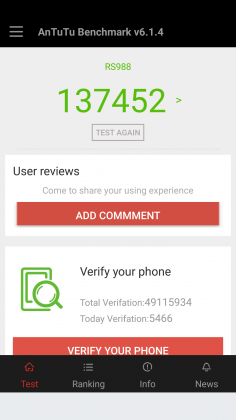

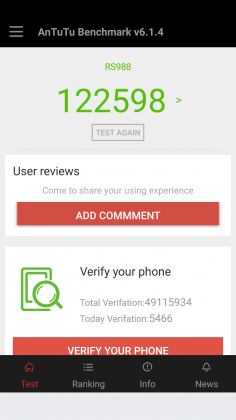

Since the G5 has a top of the line processor in it, expect it to power through extremely difficult tasks like 3D games and video editing. We’re living in 2016, and phones have gotten to the point where there is almost nothing you can throw at a flagship device that it can’t handle.
Benchmarks are always being blown up by the next generation of devices because of the giant leaps being made by companies like Qualcomm, and the G5 is no different. You can put it up against any device from last year and it’ll crush it. Will you see that performance gain in day-to-day use? The all depends on how you use your phone, but you shouldn’t be scared off from the G5 because you think something else can power through difficult tasks better. Everything is amazing these days.
Where you may run into some issues is with connecting to calls. I consistently had issues with phone calls taking forever to connect once I hit send. I am using T-Mobile in an excellent coverage area so there should be no issue. Tested next to other flagship devices, the LG G5 had significantly longer lag times between hitting the dial button and the phone beginning to ring. I don’t know where the issue is coming from. I think I can rule out T-Mobile because I tested it against other unlocked devices, but this just seems like a weird bug. Calls sound wonderful on both my end and the recipient once it actually connects, but I hope that LG is working on a fix for this because it was one of the most annoying issues that popped up while testing the G5.
The G5 does have one thing that most phones of today don’t, a removable battery. I consistently applaud OEM’s for including removable batteries in their devices due to the demands consumers are putting on their phones. The 2800mAh battery is smaller than last year’s flagship and it shows in the life, unfortunately.
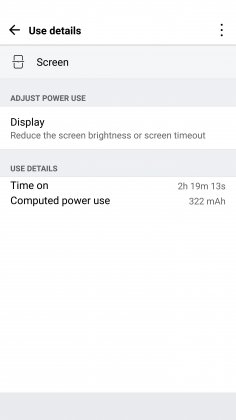
Time and again I had trouble passing three hours of Screen on Time. I’m not one who pushes my devices to the limit so those three hours were filled mostly with listening to music with Google Play Music, reading Reddit, and the occasional glimpse at Facebook along with the normal calling and texting. To say I was disappointed would be a bit of an understatement.
To engineer a device as forward thinking as the modular G5 to have it only have it held back by terrible battery life is frustrating. I used to have to charge my phone multiple times a day in 2014, I don’t expect to do so in 2016. At least I can trade out the battery or use quick charging around lunch to get through the rest of the day.
Screen on Time
1 of 4



Quick Charging really does save this phone. The G5 actually has the latest in Quick Charge 3.0 which will let you charge up your device about 60% in 30 minutes. If you get an hour for lunch and keep your phone on the charger while eating, you should be good to go for the rest of the day. It’s just disappointing how much I had to utilize this feature. You’ll notice the battery drop especially quick during intensive tasks like heavy games. During setup (installing all my applications and setting them up the way I want) the battery dropped from 78% to 16%. That is a pretty ridiculous drop for the little over an hour it took to get the phone up and running.
Screen
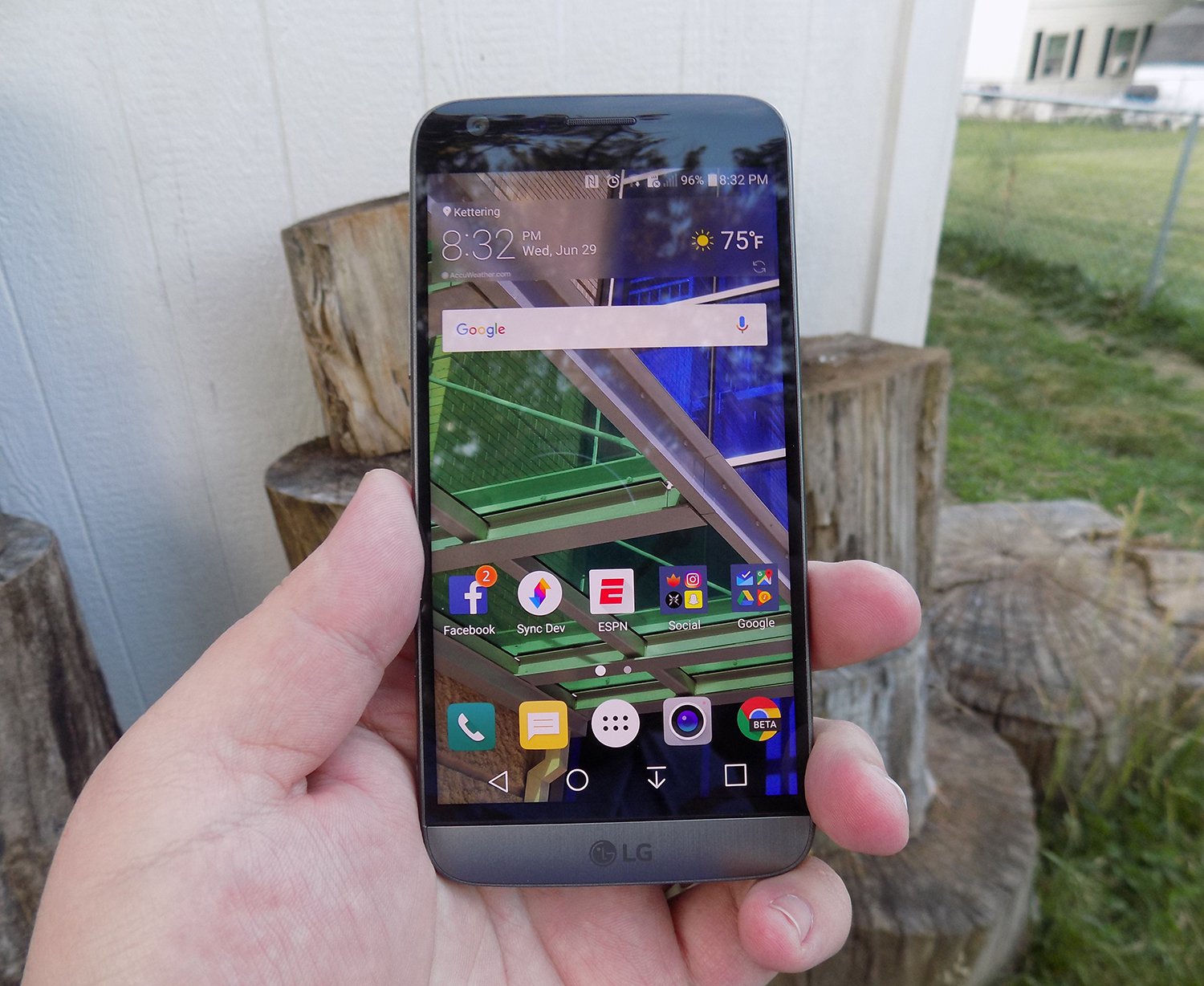
LG brings back another 2560 x 1440p display for the G5, which is now the standard for flagship phones in 2016. Whether you need all of those pixels is still being debated on message boards and in comments sections of reviews like this, but the truth of the matter is that we’re never going to go backward on resolution. It’s a selling point and people want the biggest and best, and higher numbers rule the day.
The fact of the matter is that the display on the G5 is nothing wonderful. Sure, it has a ton of pixels, but it does tend to skew blue and colors simply don’t pop like on Samsung devices. Samsung tends to over-saturate colors and has a superior contrast ratio due to using AMOLED displays, giving it a huge advantage.
The inclusion of an LCD display of the G5 is disappointing if I’m being honest. The always-on display begs for the battery friendly AMOLED display if nothing else. I think LG also overdid it with the auto-brightness again; this is an issue I’ve had with the G3, G4, and now the G5. It doesn’t matter how good the display looks if it’s never lit up high enough to actually see it clearly. Even at max brightness, the G5 cannot compete with other phones on the market.
While the display does have good viewing angles, we would like to see the ability to adjust the display levels and white balance through software. Unfortunately, it’s simply lacking from the phone. There’s also an issue of backlight bleed when the screen is dark that won’t bother you much, if at all, but is present.
Camera
The camera is much like the display, there are a lot of big numbers and plenty of fancy marketing lingo, but it doesn’t blow away its competitors like LG might have hoped. This year we got dual cameras: a wide-angle camera set to capture more of the world around you and a regular field-of-view camera meant to capture more true to life pictures.
The regular camera can shoot up to 16 MP, which is about standard for 2016, while the wide-angle camera sacrifices some megapixels (it tops out at 8MP) to gain the desired effect.

Both cameras are really good. They take comparable pictures to others on the market, but we’re getting to the point in mobile photography where almost everything is fine for what we end up using the pictures for, social media and sending picture messages. Is this my first choice for a camera on a phone? Nope, but it got the job done just fine.
1 of 2

Default Camera

Wide Angle Camera
The camera does tend to bring in lots of light. This is great for those low-light situations that tend to make up many pictures, but can have an adverse effect in well-lit pictures. Luckily, there is a robust manual mode that will let you decide exactly how bright you want the picture to be before you ever snap it.

Pictures provided by our own Josh Noriega. Check out his Flagship Phone Camera Shootout to see how the G5’s camera stacks up against the Samsung Galaxy S7 and HTC 10.
Hardware
The body of the G5 is made out of metal. It doesn’t look like it, and it certainly doesn’t feel like it. There was a controversy when the phone first came out that most reviewers were calling out LG for not actually producing a metal phone.
It was eventually confirmed that LG has covered the body of the phone with a coating to hide the antennas and thus giving a false impression of the phone being made out of plastic. Whatever the reason for, it still doesn’t change the fact that it just doesn’t feel great in the hand. The size is good, but it doesn’t feel like metal, which is really what you want if you’re buying a metal phone.

We’re seeing a bit of a resurgence of phones that feature the microSD card. Both the HTC 10 and the Samsung Galaxy S7 feature the card slot, and LG follows suit with an expandable storage slot of its own. You can expand your storage up to 256GB, and even though adoptable storage isn’t enabled out of the box, it’s only an easy command prompt away.
Part of the advantage of being a modular phone is the removable battery that LG placed in the G5. The 2800mAh battery is smaller than competitors and previous LG flagships, and it shows. As I discussed previously, battery life isn’t great, but you can buy an extra battery to easily swap out when you get low.
Also, since the G5 features Quick Charge 3.0, you can get back about 60% of your battery in a half hour if you happen to be close to a wall outlet and have your charger on you. It’s not a perfect solution to sub-par battery life, but if I believe most people will get through the day on a single charge and a top-off before bed.
Audio output is a bit of a mixed bag. The bottom firing speaker isn’t great. It doesn’t get the loudest and can distort at higher volumes. If you’re often listening to YouTube videos or music in crowded places, you’re probably annoying other people anyway. If you’re using it for speaker phone, it should get you by.
The audio output from the 3.5mm jack is another story. It easily stacks up with the Samsung Galaxy S7 for best output on the market. It’s loud and puts out a quality sound. Props to LG here.

The last thing I want to touch on here is LG’s removable bottom and “Friends”. Having the ability to add in functionality is a great idea. I’ve never been so excited after a product press conference as I was after watching LG’s show at Mobile World Congress 2016. But I’m extremely disappointed in the practical usage of the phone.
The bottom of the phone slides slot, but there’s still a gap at the bottom. Not only that but on my unit, it doesn’t even line up correctly. There is a sharp edge where the phone should be flush, not to mention that the sides where the metal band meets the body is decently sharp too. It won’t hurt, but it is annoying.

I don’t believe LG’s Friends initiative provide enough functionality to justify the design choices it had to make. Right now, it’s a closed system with no real third party modules you can buy and everything that you can buy can easily be duplicated on other phones with different accessories. There’s nothing exclusive about the LG G5, and that’s a shame.
Conclusion
I’ve brought up a lot of negatives about the LG G5 in this review. Maybe I tend to skew toward the negatives because every phone is amazing these days. What really sets them apart is what they can’t do.
The LG G5 can do pretty much what every other phone on the market can do right now. It’s extremely fast and fluid, it takes fine pictures, you can expand the storage with low-cost storage, and charge up the battery incredibly quick.
Where I think LG took a huge misstep were the compromises they had to make for their modular body. Due to this design, it can’t be water resistant like the Samsung Galaxy S7, it doesn’t feel excellent like the hand like the HTC 10 and it isn’t cost efficient (likely to R&D costs) like the OnePlus 3. The functionality it adds is little more than a gimmick, and it gave up major selling points to do it.
Our thanks to B&H Photo for making this review possible!
Huawei P9 Review – an iPhone by any other OS would still taste of Apple
Since I own and use a Huawei Nexus 6P as my daily driver, I find myself in the unique position of being able to compare these two phones – one crafted with direct input from Google, and one the result of Huawei when left to its own means – side by side. Many of my observations in this piece will be comparisons between the two, despite the piece as a whole being a review of the Huawei P9, specifically.
Build
The aluminum frame feels great in the hand. It’s got a slim profile and weighs next to nothing – a stark contrast to the Nexus 6P, which is bigger and noticeably heftier in-hand. Oddly, the P9 is only 0.3mm thinner than the 6P, but feels much smaller – perhaps because the 6P is 38 grams heavier. The P9 is so light, in fact, that when it slipped out of my pocket when I sat down and embedded itself in the couch cushion, I never noticed until I went to check it.
The downside to that all-aluminum body is that when the phone gets hot, it gets hot. A video call with my sister for a mere 15 minutes made the thing nigh-unholdable (that is not a word), lest I burn the fingerprints from the tips of my fingers.
Time to acknowledge the elephant in the room – the P9 looks just like an iPhone. From the shape, to the dimensions, to the random Torx screws on the bottom of the phone, it reeks of Apple design. I understand that people think Apple is the pinnacle of build quality, but ripping Apple’s aesthetic while using Google’s operating system seems so very wrong on so many levels.
Aside from looking like an iPhone, the rest of the phone is structured like a Nexus 6P – volume buttons and power button on the right side of the frame, fingerprint sensor on the back, Type-C USB on the bottom (although the headphone jack is on the bottom as well, not the top).

Screen
Quantitatively, the Nexus 6P is a superior screen – 0.5″ bigger on the diagonal (5.7″ AMOLED), a higher pixel density, and an oil resistant coating on top of corning Gorilla Glass 4 all work in the 6P’s favor. In practice, though I’ve found the P9’s display (5.2″ IPS LCD) to be equal or better in nearly every way.
The pixel density difference is not immediately obvious to the eye, and the supposed oleophobic coating on the 6P didn’t prevent it from picking up fingerprints at the same prodigious rate as the P9. The latter’s display is every bit as gorgeous as the former’s, despite the 6P’s AMOLED screen. In certain side-by-side instances, the colors on the P9 are even more vibrant. Either way, the P9’s screen is pretty damn good. I took a side-by-side shot of the two screens to show the difference – presented without comment.

Cameras
I’m gonna do this quick; like a bandaid, just tear it off – the P9’s camera blows the 6P out of the water. Badly. In all of my (amateur, highly unscientific and purely subjective) head-to-head comparisons, I preferred the P9 – both in terms of how easy it was to get the desired shot, and how the shot looked on its screen and on my computer. I’ve uploaded a gallery of images taken with the two phones for your perusal.

The P9’s camera software more robust than Google’s, and it seems more responsive. The options list for the P9’s camera is extensive, to say the least: Photo, Monochrome, “Beauty” mode, Video, HDR, Panorama, Nighjt Shot, Light Painting, Time-Lapse, Slow-Mo, Watermark, Audio Note, and Document Readjustment. Wow.
This software also features a pretty nifty feature that turns off the camera if you leave it open for too long without doing anything with it – this would undoubtedly save some accidental battery loss.
The focus of the P9 is far superior to the 6P’s, making taking close-up shots way easier to capture; take a look at the Lego closeup and the closeup of the gaming miniature to see what I’m talking about. Additionally, the shutter speed on the P9 seemed a lot snappier than the 6P, which was sluggish by comparison.
In terms of front facing cameras, the P9’s really picks up insane amounts of detail – to the point where I saw my own selfie and thought “ugh, dat skin tho.” In short, the P9’s selfie cam is straight up better. I video chatted a few times with the P9 as well to get a feel for if the quality was any better on the receiving end, but my partner in crime for those calls didn’t seem to notice a difference.
Battery Life
In terms of battery, the P9 performs about how you’d expect with a 3000mAH battery; I got less than a day of my usage, which is to say about 3 hours of screen on time streaming music, refreshing Twitter like mad and texting like crazy. For comparison, my Nexus 6P manages about 4 hours of screen-on time before I need to charge it. The P9 doesn’t quite have the same lasting power, but it’s also no chump. With some battery saving considerations, there’s no reason the battery couldn’t last most people until bed time.
The P9 does not support the 6P’s 3A charging speeds, but the smaller battery and Type-C USB port mean it still charges pretty quickly compared to other devices.
Data, Coverage, Etc.
It’s important to note that the P9 does not support CDMA bands, only GSM – which means Sprint and Verizon customers are out of luck in the US (note that it does support HSPA and LTE, however). My reception with my T-Mobile nano SIM was pretty flawless, with no connection drops and very good quality calls.
WiFi performed as expected – in my case, lots of drops and lag, because the internet in my neck of the woods is awful, and I need to yell at the AT&T guy again. At Starbucks, however, the WiFi was just fine.
Features
The fingerprint reader is arguably faster than the Nexus 6P’s, but I feel like the 6P’s registers my finger correctly more often – note that this may be because of the way I set up my fingerprint on the two devices, which has a margin of human error.
The speaker placement on the P9 isn’t ideal, especially in comparison to the front-facing dual speakers of the Nexus 6P. Holding the phone one-handed in my typical left-handed grip – index finger bracing the left side, middle finger supporting the back, pinky under the bottom of the frame – actually blocks the speaker, muffling the volume. When unimpeded by fat fingers, the volume can compete with the best of them, but the overall sound quality seems a bit hollow to me.
Firmware
Long story, short: if you like iOS’s launcher, or MIUI, this phone is for you. It eschews Google’s signature app drawer in favor of spreading each and every single icon of each and every single app you install on your homescreen. This, to me, results in way too many icons – especially if you start adding widgets.There are a number of cute options within the launcher: transition animations, auto-align icons, shake to align, and homescreen looping are among them.
In terms of performance, I ran into a number of jitters and hesitations when running around in the menus, but to its credit the P9 ran Android 6.0 admirably, and didn’t lag a whole lot; buttery smooth, for the most part. One area the P9 does struggle with, though, is the keyboard – I ran into a bunch of occasions where it would hesitate to input my keystrokes, resulting in many, many backtracks.
Final Thoughts
I had a really great time with this phone. It often felt as good, if not occasionally superior, to my Nexus 6P, especially in terms of how it felt in the hand. The launcher – and, indeed, Huawei’s modified OS in general – was not my bag, for I’m an AndroidGuy (I’m ashamed of that plug), not an Apple Guy.
Basic Spec Comparison
Phone: Huawei P9
Android Version: 6.0
Screen: 5.2″ IPS LCD
Resolution: 1080×1920 (401ppi)
CPU: HiSilicon 2.5ghz Octa-core
RAM: 3GB
Storage: 32GB internal (expandable)
Camera: 12mp duo camera
Battery: 3000mAh, Type C Charging
Price: 599.99 at Amazon
Phone: Huawei Nexus 6P
Android Version: 6.0
Screen: 5.7″ AMOLED
Resolution: 1440×2560 (518ppi)
CPU: 2Ghz Qualcomm Snapdragon 810
RAM: 3GB
Storage: Up to 128gb (nonexpandable)
Camera: 12.3mp
Battery: 3450mAh, Type C Charging
Price: 419.99-569.99 at Amazon
HTC 10 is among the best smartphones to date (Review)
Launched in spring of 2016, the HTC 10 is, at first blush, a simple evolution of the One series introduced a few years back. But, spend some time with the device and you’ll see that it’s not just another trip to the well for HTC. Indeed, this one sprinkles in a bit of revolution, too. The HTC 10 is a surprisingly strong contender for phone of the year.
The target demographic for the HTC 10 is a consumer looking for a powerful experience that offers up some of the latest and greatest in hardware. The specifications for the phone put it right in line with top models such as the Samsung Galaxy S7, LG G5, and Apple’s iPhone 6. If you’re the type who buys based on bullet points and fact tags, the HTC 10 should quickly rise to the top of the heap. In short, the HTC 10 is flagship through and through.

First Impressions
Let’s be honest here. It’s getting harder and harder to create a smartphone that physically stands out or doesn’t resemble every other handset on the market. For some companies that’s not really a problem and coming to market with a lookalike or slight variation on last year’s phone is okay. It seems to work for Apple and Samsung has been guilty of it for a few generations.
The 2016 crop of devices is somewhat different so far in that LG has shaken things up in the G5 and it’s not as similar to the G4 as it could have been. The Galaxy S7, for its part, is a departure from the Galaxy S6. As for HTC, this year’s model looks similar enough to the previous generations that you won’t mistake it for another brand. A few minutes of holding it, though, tells you things are different here, too.
I was pleased to see that the HTC 10 carries over some of the design language of its predecessors. There was nothing wrong with the M7, M7, and M9; they were just a little too close to each other. The HTC 10 brings forth a combination of that line as well as elements introduced in the One A9 last year.

The HTC 10 looks, and feels, like a premium phone. Thanks to a unibody aluminum chassis with chamfered edges, the handset is weighty and durable and has the air of a well thought out design. The brushed finish is a nice touch and plays nicely with any color variation. Pick the phone up and you immediately know that HTC isn’t messing around.
Like the One M models before it, this phone has a tapered design to the rear. It’s comfortable to hold in hand; the pronounced chamfered edges call for attention but also make for an easy grip around the edges. Tossing this into a pocket is fantastic as it simply slides along the curves. A word of caution, though, as it can feel slippery at times.
One of the things I like to do with every new phone is grab it from the ends and sort of twist or apply pressure. It’s here where you’ll sometimes figure out which phone is cheaply built. The HTC 10 did not creak or move, even under moderate pressure.
Design
Again, it’s kind of hard to reinvent yourself each year and there’s only so many ways to design a smartphone before it feels awkward. The HTC 10 doesn’t do anything strange with its button configuration or SIM card placement.

Looking straight on, the right side features the volume rocker about 3/4ths of the way up. Below that is the power button. As is the case with the One A9, the HTC 10’s power button has a textured feel to it. This makes it very easy to feel in the dark as there’s no mistaking it for the volume controls. All three buttons are responsive and let the user know for certain that they’re being pressed.
On the left side of the phone is where you’ll find the memory card and SIM card tray. Located near the top, it pops out to allow for access. Those of you who have a microSD card will be happy to know the HTC 10 supports up to 2 terabytes of external storage.
Down below the display you’ll locate the lone fingerprint reader which doubles as the home button. HTC has opted for capacitive buttons for this year’s model; the “back” is found on the left side while the “multitask” button is on the right. The fingerprint sensor is fast, accurate, and works well even if you’re fingers or the phone is slightly damp. It’s a little cramped down here as the button is ever so closer to the edge of the phone than the display.
At the very top of the front panel is a speaker grille and front-facing camera. There’s no dual-speaker setup this time around. The top is for the BoomSound tweeter while the other speaker is located below the phone next to the charging port.

We appreciate that HTC integrated a USB Type-C charging port for this model as it’s quickly becoming a standard. Moreover, the Quick Charge 3.0 support lets us plug in for fast recharges.
Around back we locate the rear camera with flash and antenna lines. The camera module does jut out from the phone a bit but the sapphire glass keeps things from getting scuffed. Getting back to the unibody design, the rear stays put. You’ll not be able to remove anything here, particularly a battery.
Display
At 5.2-inches, the HTC 10 is a great size for most smartphone users. Sure, we do get spoiled by those models that tread into the 5.5-inch and 5.7-inch space, but those phones are often unwieldy or hard to use with one hand.
The 2,560 x 1,440 pixel display is gorgeous and puts HTC back in the conversation of high resolution screens for a flagship phone. The Super LCD 3 panel is fantastic, represents colors very well, and can be pushed to a really bright image. Indoor, outdoor, it doesn’t really matter where you use it. Taking pictures in broad daylight is no challenge. Thanks to an oleophobic coating, the screen is built to withstand scuffs and scratches.
Call Quality
The model we reviewed was an unlocked variant which supports AT&T and T-Mobile here in the US. We used a T-Mobile SIM for the duration of our testing and found it connected about as good as other phones we’ve used in the same areas. There are spots where we’d see it display less bars on the screen than normal, but calls worked well nonetheless. Unfortunately, there are pockets where T-Mobile doesn’t pick up near the house so we had to rely on WiFi for calls. It seemed we had to use Wi-Fi a little more than other phones as of late but that could also be attributed to more trees and foliage at this time of year.
Sound
Placing a call on speaker phone was a pleasure with sound filling rooms clearly. Inside of an office is one thing, but even outside, with ambient noise and random traffic, worked well.
Whereas BoomSound stereo speakers typically shared the load equally between them, the HTC 10 is different. The top speaker provides the highs while the one below the phone gives the lows. If you’re holding the phone in portrait mode, you may find yourself somewhat covering the a speaker.
Place the phone on a table for music or for watching YouTube videos and you’ll find a loud sound. Playback is clear and crisp and it gets very loud. Speaking of which, you’ll want to keep that in mind when setting alarms. You surely don’t want to wake up to this phone at top levels.
We did find that holding a phone in landscape mode for video can also create a somewhat wonky listening experience. Given we naturally want to hold the edges of our phone, it’s pretty easy to cover half of the sound. Along those lines, it’s sometimes strange to watch longer videos with sound not balancing equally.

Camera
After taking a year off with the M9, HTC is back to using its “UltraPixel” camera for pictures. As some of you know, the number of pixels doesn’t necessarily equate to picture quality. To that end, don’t let the 12-megapixel sensor in the HTC 10 fool you into thinking it’s lesser quality than some other brands and their 16-megapixel, or higher, shooters. The ultra aspect means larger pixels with more light and improved low-light images.
The HTC 10 camera features optical image stabilization and a f/1.8 aperture. What does this mean to you? It means incredible pictures in a whole host of light settings.
We found the HTC 10 camera to be among the absolute best smartphone shooters we’ve ever tested. Time and again we were impressed with the shutter speed, focus, and colors. There are few things that we enjoy more about a handset’s camera than being able to set it on automatic and trust things would work. That’s exactly what we found with the camera in the HTC 10.

Very rarely did we move over to Pro (manual) mode to mess with some of the settings. And, even when we did, the options were clearly presented on the screen and the dials were intuitive. Don’t know what ISO or WB settings are as it pertains to your end result? Play with it a bit and watch how it impacts your picture.
If you’ve used an HTC phone from before, you’ll know that the camera app can be a tad overwhelming. That’s not the case this time around as HTC has trimmed the shooting modes down, rejiggered the layout, and generally simplified the experience. Hopping to and from video is quick; switching to manual mode, panoramic, or Zoe is also in the same place. We especially liked the convenience of toggling on and off the HDR.
The laser assisted focus is lightning fast and we found ourselves capturing the exact moments we wanted. You know that issue with phones where you have to snap the camera a hair sooner than what you really need? That’s not the case here. The HTC 10 grabs the photo you want the moment you take it – even with HDR on.
If we could be picky for a moment, the notifications that pop up for the laser focus can be a tad aggressive. Simply putting your finger up near the lens results in a notification. We get it – we shouldn’t cover it up. Please stop telling us.
Recording video is just as pleasurable; the phone allows for up to 4K capture. We’d recommend sticking to 1080p for your video unless you really wanna show off. Seeing as how not too many of us own 4K televisions yet we don’t see the need for the video. Also, if that’s what you want to do with your phone, make sure you’ve got a sizable external memory source because 4K files are huge.
Battery
At 3,000mAh, the battery is not quite as capacious as it would have been one year ago. We’re now expecting our flagship phones to have this much juice, especially if it’s an internal, non-removable unit.
HTC claims the battery can give users up to two days of normal usage. In our testing we deduced that for most people, this is more than enough capacity to get them through a full day’s use with extra to spare. A more aggressive person who likes to game, or enjoys videos on a regular basis… maybe a day.
As mentioned above, the phone employs support for Quick Charge 3.0. This means you’re going to charge up super quick. We’re talking almost to the point where you’re looking at your phone and watching it tick up.
Get about halfway through your day and need to insure the phone’s going to stay up late with you? Throw it on a charger for a half hour and you’re all set. A typical commute home from work is likely all you need to top off your phone with enough battery to see you through a long night.
You can squeeze more life out of your battery by enabling the Power Saver mode or Ultra Power Saver mode. Each can slow down CPU cycles, reduce screen brightness, adjust vibration settings, and more. One just happens to be way more aggressive than the other. Suffice it to say, we didn’t have to use the Ultra aspect once in the few weeks we’ve tested this device.
Software
Running Android 6.0 Marshmallow, the HTC 10 employs a custom launcher known as Sense UI. Around for the better part of a decade now, it is the handset maker’s way of delivering a user experience that it thinks is right for consumers. In the past it was knocked for being too heavy or bloated. As time went by it didn’t evolve much and became outdated feeling. The idea was right but the execution was not. This is not the case any longer.
 The Sense UI is much lighter than it was in the past and doesn’t come across as some branded agenda. You’ll find there’s still traces of customization and HTC-infused features, but nothing you’ll dread. If you’ve ever used an HTC Android phone in the past, we invite you to revisit the Sense experience. For those who have not, we venture to guess you’ll be hard-pressed to discern where stock Android ends and where HTC’s tweaks begin.
Users will have a variety of lock screen behaviors and settings to choose from, each with a slightly different setup. It’s possible to tailor how much information is present on the lock screen, keeping your important details hidden away if that’s your thing. Also present with the lock screen is the shortcut icons to launch quickly into various functions of the phone.
 As mentioned before, there’s a fingerprint scanner with the phone so there’s that extra layer of security, too. We trained the sensor to recognize multiple fingerprints; the phone is very quick to recognize the presses. It didn’t take long for us to prefer the fingerprint for unlocking the device.
The first time you load up the phone you’ll find two home screens, one of which is the BlinkFeed (social news aggregator). It’s quite easy to start customizing and tweaking the look and feel as HTC puts options in easy-to-discover places. Want to change the fonts, icons, and widgets? That’s no sweat with HTC’s software. Actually, that leads into the next aspect of the software experience: themes.
Like other recent models from the company, the HTC 10 lets users shop for custom themes. And, rather than sticking to your standard rows and columns, the Freestyle themes let you place stuff exactly where you want, without adhering to grids. The selection of themes has continually improved and there’s something for everyone. Minimal, futuristic, cartoon, professional, or another design, you’ll find a look you love.
There’s a new Boost+ app that comes loaded HTC which is designed to keep the phone running smoothly. With the app you’ll be able to perform quick checks on performance, free up RAM and storage, and uninstall unused apps. Additionally, Boost+ lets HTC 10 owners lock individual apps to where they’re only unlocked via a password or fingerprint.
Performance
Let’s just cut to the chase; the HTC 10 is going to handle anything you ask it to do. Not only that, but it’s gonna do it quickly and without hiccups. This is exactly what you’d expect when you pair 4GB RAM with the latest Qualcomm processor, the Snapdragon 820.
As a daily driver for typical users, the HTC 10 doesn’t even come close to tapping into its potential. Gamers and those who like to push their tech will be pleased with the performance of the handset. Whether it’s a first-person shooter, racing game, or something else with flashy graphics, the phone chews it right up.
One reason the HTC 10 might do so well is that it isn’t full of bloatware that runs in the background. Although we tested an unlocked model with nary a carrier app or service, HTC says the network-branded versions are light on clutter. The less there is sipping at the resources, the better. Oh, and let’s not discount the way Android 6.0 Marshmallow handles processes. All of these things provide a perfect storm, of sorts.

Conclusion
It’s very easy for us to recommend the HTC 10 for your flagship smartphone needs. It’s the perfect balance of performance and beauty; the handset is everything we want.
The metal design, chamfered edges, and brushed finish offer up one of the most physically appealing models available today. It’s somewhat ironic, then, that this phone is mostly an evolution of the previous One M line. There’s just enough different here to bring old M8 and M9 users back.
In previous years HTC was applauded for build quality when other companies were going the cheaper, polycarbonate route. Now that other brands seem to have caught on to using premium materials HTC’s effort might be construed as simply keeping pace. Is that the case? Perhaps. Does it stand out that much over some of the other flagships of the day in terms of build quality? Maybe. It’s a solid phone either way and there’s no denying HTC cared about the overall product. It’s certainly no less quality than any other phone.
We’re really impressed with the way HTC has managed to dial down the Sense UI yet still retain the custom experience. Although we love and prefer stock Android, HTC Sense UI is nowhere near as obnoxious or outdated as it was one or two generations ago. In fact, we’re kinda digging the stuff that’s present. Moreover, we’re not in a hurry to install a custom launcher now that the themes are where they are today.
Sure, we’ve come to love and expect the uniform approach of something like Nova Launcher, but we’re not everyone. The customization that comes with HTC’s themes are well-rounded and feature unique flavors to breathe new life into the UI. Best of all, however, is the simplicity in which they can be installed.
In terms of performance, it’s going to be hard to top the Snapdragon 820 processor and 4GB RAM. As of right now you can’t. There’s so much to love about the HTC 10 and its ability to handle tasks and games. Time and again we were throwing as much as we could at the phone and it never stuttered.
If you’re in the market for something powerful and finely crafted, the HTC 10 should be on your short list. Not everybody wants or needs to spend $500+ for a phone, but for those who do, this one certainly deserves your attention.
Computex 2016: It’s a wrap!
Just like that, Computex 2016 has come to an end. As in previous years, the show kicked off with ASUS’ big keynote presentation, but this time it wasn’t just laptops, tablets and smartphones — the company also unveiled its first home robot, Zenbo. We met up with Chairman Jonney Shih who gave us an exclusive demo of this $599 machine, so do check out our interview wit him. We also saw Intel launch its first 10-core desktop processor geared towards hardcore gamers, followed by yet another exclusive interview — this time with the company’s new consumer head, Navin Shenoy.
The rest of the show gave us a lot of opportunities to play around in virtual reality. HTC was there with several cool Vive demos; MSI showed off its Backpack PC; AMD announced its $199 Radeon RX480 graphics card to lower the entry barrier for VR; and even Microsoft is opening up its Windows Holographic platform to embrace the virtual world. Find all that and more in the video above.
ASUS’ $599 home robot is smarter than it looks
It goes without saying that ASUS’ first-ever home robot, Zenbo, stole the show at this year’s Computex. As soon as it rolled onto the stage during the keynote, everyone rushed to the front to get a good look at this cute little fella; and that was before Chairman Jonney Shih shocked the audience with its surprisingly attractive price point of just $599. Apart from its basic capabilities, little else was said about the machine, so we traveled all the way to ASUS’ headquarters to meet Shih for a detailed demo. During the process, we managed to pry a little more info out of the exec, including what’s inside this mysterious bot, the thinking behind its design and a target launch date around the holiday season.
For a robot that is about a meter tall and can move its head, wheel around, recognise people plus objects and do voice interaction, $599 is almost too cheap — that’s in the same league as some of the unlocked flagship smartphones. From what I could see, the BB-8-like machine runs on four wheels (two large rubber-tired ones and two small assistive ones), and it’s able to avoid bumping into objects or falling down the stairs by using an array of sensors around its body. There are also speakers, microphones and apparently a full-day battery tucked somewhere into the bot.
Unlike its spherical body, Zenbo’s face comes in a “paper clip” oval shape to accommodate a 10-inch touchscreen (we think the prototype had a 1080p LCD panel) that’s occupied by a cute animated cartoon face most of the time. You’ll also find a conventional camera and a depth camera — likely similar to the one ASUS made for Softbank’s Pepper — right above the screen, which are for face and object recognition, taking photos and surveillance. There’s a socket at the top left for future accessories, which could include a projector, according to Shih. While there’s no word on what processor is inside, it’s pretty obvious that Zenbo runs on Android — which is great for attracting developers to create apps for Zenbo.

As to how ASUS has managed to set such an affordable price point, again, Shih wasn’t willing to share the details. Instead, he went on to explain the design thinking that strictly focused on the essential features. For one, limbs and fingers would be too costly to make, nor would they be practical given today’s technology — they aren’t precise enough to pick up pills for the elderly, for instance. In Zenbo’s case, the wheels alone are sufficient for surveillance and basic remote assistance purposes.
There’s also a reason for why Zenbo is modeled as a cartoon-like character with a five-year-old personality: A realistic human-like robot would be a bit intimidating plus costly, which isn’t a good idea for a company’s first attempt in entering this market. On the contrary, a kid-like design would appeal to all ages. This is especially important for children, who will treat Zenbo as a playmate and dance with it, watch it act out a story or even try some kid-friendly programming to boost their logical thinking.
The seemingly intuitive voice commands — initiated by saying “hey Zenbo” to the bot — helps as well, and Shih said Zenbo’s natural language processing will only get better over time with machine learning. These make features like screen-sharing remote assistance and screen casting to TV a whole lot easier than digging them up in the menus, which can be challenging for elderly users. But more importantly, they will potentially benefit from Zenbo’s fall detection emergency feature: If a fall is detected by their wearable devices (in this case, a ZenWatch 2), Zenbo will automatically call a designated contact to start a video call and offer remote control via an app, so that said contact can go check on the users.

With just under half a year to go, it’ll be interesting to see what new features Zenbo will get by the time it launches. Regardless, we have a good feeling that this machine will sell like hot cake and make a fun home helper, but whether it’ll arrive on time or stick to the same $599 price point, that’s a whole different story.
Stay on top of all the latest news from Computex 2016 right here.
Up close with the ASUS ZenFone 3 series
Much like previous Computex shows, ASUS announced a bunch of new smartphones that won’t bust your wallet; only this time, the best-looking device turns out to be the base model: the ZenFone 3. We managed to get some hands-on time with this $249 device and to our surprise, it looks just as good in real life thanks to the spun-metal finish on the back. It also has a more premium feel than its predecessor due to the switch from a plastic body to a combination of metallic frame and 2.5D glass panels. At this price point (with 3GB of RAM and 32GB of storage), there’s little to complain about, but it’ll take some real-life usage to see if the mid-range Snapdragon 625 will suit your needs.
The high-end ZenFone 3 Deluxe isn’t far off, either. It comes with a metal unibody that’s subtly curved on the back for better ergonomics, and unlike most rivals’ metallic phones, the Deluxe manages to cover up most of its antenna bands — the remaining bits are just on the body’s chamfer. Still, we wouldn’t mind having the ZenFone 3’s body for the Deluxe as we’re more mesmerized by its concentric circles on the back, which is more effective than the same effect applied to the Deluxe’s chin and ear pillow on the front side. On a more positive note, the Deluxe’s Super AMOLED screen is visibly more vibrant, though we’ve yet to find out how well it performs under daylight. As for performance, we’re confident that the 6GB of RAM (at $499, with 32GB of storage) plus the Snapdragon 820 will keep things running smoothly, assuming the final software build won’t have any major bugs.

This leaves us with the 6.8-inch ZenFone 3 Ultra. Compared to its two smaller siblings, the Ultra has a less exciting design, featuring a flat metal unibody simply decorated with a chamfer, but at least it feels solid like the other two. As with the ZenFone 2, the Ultra’s volume keys are also placed on the back, which is a bit odd given that the other two ZenFone 3 models have them on the side. On a similar note, the Ultra’s fingerprint reader is located on the front side instead of the back like on its siblings, which perhaps makes more sense given that you’re less likely to be holding up the phablet as often; it is notably heavier, after all (233g instead of the Deluxe’s 170g), mainly because of the generous 4,600 mAh battery.
One thing we must praise is that those dual speakers at the bottom are super loud, which says a lot because even the single speaker on the lesser ZenFone 3 models is already pretty powerful. We just wish they were facing the front. $479 for this model gets you 4GB RAM and 64GB of storage, so even though it’s running on a Snapdragon 652 (which should be more than plenty for everyday use), it probably wouldn’t take much to convince those who are addicted to watching videos on the road. As to how big that market is, only time will time.

Based on our early hands-on, it’s safe to say that ASUS is generally headed in the right direction with its latest smartphones, but there are still questions remaining: Are the cameras as good as they claim to be? And how stable is the latest ZenUI? We’ll let you know when we find out later.
 AIVAnet