


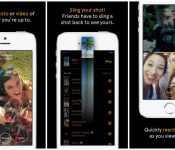
Facebook’s Snapchat competitor, Slingshot, lands in the Play Store

Facebook have developed a Snapchat like app called Slingshot after its failed attempts to purchase the App. Slingshot has now hit the Google Play Store for free allowing users to take photos and record videos to share with friends.
The way Slingshot works is that a friend needs to sling content back to you before they are able to see the original shared media. If you don’t care about what is being sent to you then you can simply swipe it away.
Check it out in Google Play for free.
The post Facebook’s Snapchat competitor, Slingshot, lands in the Play Store appeared first on AndroidGuys.
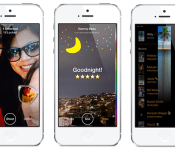
Facebook’s Slingshot is a Snapchat competitor that wants you to snap back

After accidentally releasing it to the world last week, Facebook has now officially unveiled Slingshot, a curious new app to come out of the company’s Creative Labs division. Widely rumored as a Snapchat competitor, Slingshot certainly has an ephemeral element — all of the photos and videos you send using it are easily removed with a simple swipe. But while Snapchat is a messaging service for one-on-one conversations, Slingshot is more about sharing that moment with lots of people at once. In a sense, it’s an impromptu social network that encourages spontaneous communications. But there’s a catch — if you want to see what your friends have shared with you on Slingshot, you’ll have to reciprocate and “sling” something back. It’s perhaps the only social app we’ve heard of that requires 100 percent active participation, and that’s at the core of what makes Slingshot so very unique.
Slingshot was started in one of Facebook’s December Hackathons last year, where employees were encouraged to come up with new Creative Labs apps. Creative Labs, if you don’t already know, is a division within Mark Zuckerberg’s domain that’s encouraged to come up with new and innovative apps that exist outside of the core Facebook ecosystem. It’s a way for the firm to explore new forms of social connections and see what sticks without mucking about with its bread and butter. Creative Labs’ first-ever product meant for such a mission was Paper, a dedicated newsreading app that seems to be more immersive and visually richer than the company’s primary offering. After testing it over the holidays, Facebook decided that Slingshot would be the second standalone app from the internal startup initiative and a team of 10 people started to work on it full-time in January. Six months later, it’s now ready for release.
“It’s an app where everybody’s a creator and nobody’s just a spectator,” Will Ruben, Slingshot’s product manager, tells us. “That sort of dynamic creates a space where there’s really low pressure to create, because when everybody’s a creator, there’s no pressure behind creating.” Another thing that he wanted to impress on us is that Slingshot is not a messaging app. “It’s an app for sharing with lots of people at once,” he says. “I frequently sling shots to not one or two people, but 20 or 30 or 40 people, because I have shots to unlock from them that I’m going to get to view and because for those whom I don’t have shots from, it’s me telling them that I want to hear what they’re up to, too.”
Here’s how it works. You sign up on Slingshot using your phone number, after which you can decide to find friends through your phone’s contacts list or through your Facebook login. Importantly, we’re told that you don’t need a Facebook account to sign up for the service, though obviously it’s easier to find friends if they’re all using the social network. You can also choose to find a friend on Slingshot through a username if you can’t find him or her through the other two methods.
Just like Snapchat and Taptalk, the first thing you see when you launch Slingshot is that it automatically starts the camera. The three standard camera controls are Flash, Shoot and Selfie, all of which are fairly self-explanatory. Once you snap a photo, you’re immediately taken to the retouch view, where you can reshoot, use the shot you’ve taken or add a caption or doodle to the image. Your username and the location and time of when the shot was taken are automatically added to the header. If you decide to enter a caption, you can either leave it in small text at the top, or you can drag and drop it to the body of the image to make the text larger. If you’re feeling creative, you can also tap Draw, which launches a color picker on the side. You can scrub up and down to change colors and left and right to resize the brush.
As you’re doodling around on your photo or video, you might also notice a soundtrack playing in the background. Joey Flynn, Slingshot’s product designer, explains that the team actually went the extra step to work with a sound designer to come up with a whole list of custom sounds for the app so that it feels like a “fun and enjoyable place to create.” Indeed, even the act of sending off a shot prompts a slingshot sound effect.
After you’re done creating your shot, you can hit “use,” which will bring up what the Slingshot team calls the “sling view.” It’s essentially a list of all your friends who use Slingshot, with the people who’ve slung shots to you listed at the very top. Remember what we said earlier about how you can’t view people’s shots until you’ve reciprocated? Well, those photos and videos that your friends sent are still “locked” and therefore appear pixelated. If your friend sent multiple pictures, a number will show on that thumbnail indicating how many of them remain unseen.
Now, here’s where the core “slingshot” action comes into play. If you want to unlock all of those images from all of your friends in one swoop, you can do so by sending just the one shot that you took. Of course, you can also send the photo or video to just a few friends, or to people who haven’t slung any shots to you as well. But the idea that you can unlock several images in one fell swoop is one of the reasons Slingshot is really more of a “blast” or group-feed app, rather than a simple messaging one. “You typically want this moment shared to a bunch of people — it’s how it works best,” says Flynn.
When you finally do get to unlock those shots, you’ll see those pixelated images dissipate, leaving behind a clear image of what your friend captured. Like many other ephemeral messaging apps, you can then swipe them to remove them for good. If you decide you want to react to a particular post, however, you can tap on it to send what’s called a reaction shot. It’ll bring up a half-screen view of a camera with the original still in the background. Unlike regular “slingshots,” these reaction shots are already unlocked and don’t need to be replied to in order to view them.
When asked why they thought the reciprocal part of the app was so important, Flynn explains it. “What it does is that it makes it so that everyone feels that they’re involved in the community. When you share something, you know you’re going to get some stuff back, and you’re also unlocking stuff … There’s this cool connectedness you get from that. It makes you feel close with the people you’re slinging shots with.”

“The blast dynamic where you’re sending to lots of people at once, these little moments that you share end up being shared experiences too,” says Ruben. Contrasting it to Instagram or other photo apps, he says, “What you share on Slingshot ends up becoming way more spontaneous and authentic. It’s something that you share in the moment. It’s not the best picture that you took, but it’s just [the] in-the-moment, spontaneous window into your life.” He adds that there’s also a storytelling element to it too, as you can also send multiple shots of a day at the zoo, for example, and have your friends relive that experience along with you.
We’ve only had a brief few minutes with the Slingshot app, but from what we’ve seen of it, it strikes us as a tremendously fun one, with animations and sound effects peppered throughout to make it as playful as possible. It remains to be seen if we can convince our friends to get on board the Slingshot train — one of our coworkers already mentioned that being forced to respond with a photo sounds more like a deterrent than an encouragement.
However, the addition of the Slingshot app to Facebook’s arsenal does signify that the company is willing to step outside the box. The fact that Slingshot doesn’t absolutely require a Facebook login is significant, and it shows that the firm is willing to experiment with alternative means of engaging with the community. If Creative Labs’ mantra is to discover new ways to share, Slingshot is most certainly that. It’s available on iOS and Android starting today.
Filed under: Internet
Source: Slingshot

UK spies using foreign loopholes to monitor Google, Facebook and Twitter users

GCHQ, the UK’s intelligence agency, has yet to confirm whether it taps undersea network cables to gather content from ISPs, but we now know how it would justify access if it did. Charles Farr, the Director General of the Office for Security and Counter Terrorism, revealed that spies could intercept British users’ Google searches, Facebook updates and Twitter posts when servers are located outside of the country. The information came to light after Privacy International, Liberty, Amnesty International and a number of civil liberties organizations issued a legal challenge against GCHQ in an attempt to unravel the secrets of agency’s Tempora data-tapping program, which were revealed as part of Edward Snowden’s NSA document leaks.
British law states that agencies do not have the right to spy on internal communications. However, the same restrictions are not applicable for foreign transmissions. Farr argues that if a Briton was to perform a Google search on a server that is located outside of the UK, it would be classed as an “external communication.” Facebook updates and Twitter posts would likely fall under the same classification, although direct communications like emails may be protected, as the sender and the recipient both reside in the UK.
Worryingly, if content is deemed to be an external communication, UK law states that it can be searched, read and eavesdropped upon, regardless of whether the people involved were suspected of any wrongdoing. Farr’s statement notes that the UK has for “many years faced a serious threat from terrorism,” and that the sharing of data has led to the prevention of terrorist attacks and other serious crimes. Microsoft has already begun blocking US government requests to access European data, and now that intelligence agencies are slowly starting to reveal their data access strategies, more companies could follow suit or begin locally hosting servers.
[Image credit: UK Ministry of Defense, Flickr]
Filed under: Internet, Google, Facebook
Source: Charles Farr Witness Statement (PDF), Privacy International
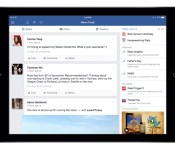
Facebook for iPad’s new sidebar wants you to play more games

Love Facebook, but hate your friends’ endless invitations to play Farmville? You might not like the social network’s latest iPad update. According to the Facebook developer blog, the company is testing out a new sidebar that offers users in landscape mode a sampling of trending topics, videos and other content. Most of this data is fairly personalized — consisting of upcoming birthdays, events, holidays and recently played games, but there’s also a special section reserved for advertising “popular” Facebook games. Fortunately, you aren’t guaranteed to see the latter element right away: the column’s layout is out based on individual use. If you don’t play Facebook games, you might not see advertisements for them.
According to a Facebook spokesperson, the app will always keep items like birthdays or events up top, but everything else in the column moves around based on how you use the social network. If you watch a lot of video, for instance, you’ll see a lot of trending videos on the top of the sidebar; if you’re addicted to Facebook games the column will be flush with recently played titles and recommendations. Content irrelevant to your interests might stick around though — Facebook says non-gamers can expect the “featured games” panel to live off-screen, available to users who scroll down to the bottom of the panel’s display. The update is currently only available to a small percentage of test users, but Facebook plans for the sidebar to become a permeant facet of its iPad experience.
Filed under: Internet, Facebook
Source: Facebook

Facebook Paper adds a trending section, hopes you’ll notice it

Remember Paper? That app for reading stuff from Facebook. It sure is pretty, but certainly has some issues in the functionality department. Well, last month it added some seemingly essential features that were missing from version 1.1, like event and birthday notifications. Today, to celebrate version 1.2, Facebook is adding support for hashtags, a trending posts section and photo tagging. Paper still isn’t anywhere near ready to replace the standard Facebook app but, now that you edit your profile or cover photo, you could rely on it for slightly longer. (Perhaps even tens of minutes!) There’s even autocomplete for friends names when you’re trying to tag them in post. Basically, Paper is coming into its awkward teenage phase. We can see the promise and the appeal — there’s glimmers of maturity beneath its awkward veneer. Perhaps most impressive is the fine grained controls that have been added for crafting and sharing updates. Switching between public and friends is just a tap away, even if you’ve already posted a missive to your wall. Between Home and Paper it’s easy to get a picture for how Facebook sees users interacting with its service in the future… unfortunately that future isn’t here yet.
Filed under: Software, Mobile, Facebook
Source: Facebook

Supreme Court will decide when threats made on social media become criminal

We’re still waiting to see what the Supreme Court has to say about Aereo and warrantless cellphone searches, but in the meantime there are more cases to be heard! Including Anthony Elonis v. United States, which the highest court in the nation just agreed to hear. The decision will end up setting a precedent for when violent comments made online cross from protected speech to criminal threats. In 2011 Elonis was sentenced to nearly four in jail for posting status updates and self-penned lyrics on his Facebook page wishing death on his wife, the police and others.
The story really begins back in 2010, when Elonis’ wife left him, taking their two children with her. Around the same time he lost his job at an amusement park in Allentown, PA. His Facebook wall quickly filled with angry updates, some of which painted vivid pictures of the violence he hoped would befall his estranged wife and coworkers. Many of the rather dark posts took the form of raps that Elonis wrote, which he claims were therapeutic and not meant as legitimate threats. His wife however, was uncomfortable about his public professions that his son should “dress up as matricide for Halloween” She obtained a protection from abuse order against him, but this only seemed to fuel his rage.
It wasn’t long after that the FBI caught wind of Elonis’ posts. He was visited by an agent, but not arrested initially. When following that meeting he posted lyrics detailing a fantasy in which he slit his wife’s throat, the agency decided it had seen enough and took Elonis in to custody.
Now the supreme court will have to decide whether or not the Facebook postings crossed a line. The normal standard set for such cases is whether or not a “reasonable person” would feel threatened by the actions. But Elonis’ attorneys argue that isn’t appropriate given the venue for the missives. The defendant’s wife isn’t his friend on Facebook and he did not send menacing messages to her directly, instead he posted them publicly on own wall. Essentially he never meant for her to see what he wrote, and those who saw his words might misinterpret them because they didn’t know him personally. The government’s counter argument is that the law is designed to prevent not just physical violence, but the anguish that perceived threats can cause. Elonis’ conviction has been upheld twice, and regardless of how the court finds, the decision will have widespread implications for free speech, cyber bullying and the internet in general.
Filed under: Internet
Via: The Verge

Facebook relaxes its policy on breastfeeding photos

Breastfeeding in public tends to bring out some strong opinions: For every person who believes there’s nothing raunchy about feeding one’s child, there’s someone who thinks women should keep it in their blouses unless behind closed doors. And while the debate rages on, Facebook, at least, has taken a stand: The company has quietly adopted a more lax approach to breastfeeding photos, wherein someone can post such a picture even if a breast is fully exposed (and that includes the one the baby isn’t nursing from). Mastectomy pictures are allowed too, though other images of topless women will still be removed.
The change came about two weeks ago, according to a Huffington Post UK report, but before that, Facebook treated breastfeeding pictures the same way it did any other photo containing nudity. Which is to say, they ran the chance of being removed under Facebook’s obscenity policy. According to a Facebook spokesperson, the company has never had a ban on breastfeeding photos. “[It’s] natural and beautiful and we know that it’s important for mothers to share their experiences with others on Facebook,” he said in a statement. And the ones that contain nudity? “It is very hard to consistently make the right call on every photo that may or may not contain nudity that is reported to us,” he said, “particularly when there are billions of photos and pieces of content being shared on Facebook everyday, and that has sometimes resulted in content being removed mistakenly.”
An understatement? Perhaps. In any case, the spokesperson did acknowledge that the company has changed the way it reviews reports of nudity “to help us better examine the context of the photo or image.” Translation: the actual process by which Facebook reviews flagged photos hasn’t changed. Now, though, if its screeners sees an exposed breast in a nursing photo, they’ll look the other way. (As should you — ever hear of the hide button?)
Filed under: Internet, Facebook
Via: Time
Source: Huffington Post UK

Iraq blocks Twitter, Google, YouTube and Facebook in effort to stifle insurgency

The Iraqi government has essentially shut off all social networking in the country in an effort to stem the rising tide of insurgent group Isis (Islamic State of Iraq and the Levant). The country has found itself thrown into chaos recently as the Islamist militants have overrun the cities of Mosul, Falluja and Ramadi in a march towards Baghdad. Isis, like many of the rebellions in the region recently, has made heavy use of social media for both propaganda and organization. In particular the group has spread its hard line religious and anti-western message via YouTube. Presumably prime minister Nouri al-Maliki has had the services blocked in an effort to disrupt Isis’s movement and planning, and perhaps give the government’s troops an opportunity to strike back.
Of course, it’s no surprise that the militants have turned to social media (just as it’s no surprise to see the government block it when under threat). Plenty of organizations have turned to YouTube as a means to spread their message, even if it is one hate. And uprisings that perhaps we’re more sympathetic too have relied on Twitter for organizing protests and drawing attention to government abuses. And often the response of those in power has been to block those lines of communication at any cost — even if that means taking an entire country offline. Hopefully any censorship in Iraq will prove to be short lived and citizens there can carry on Instagramming their lunch without fear of becoming yet another victim in this tireless conflict.
Update: Both Twitter and Youtube have said they are looking into the situation, confirming to VentureBeat that “some users are not able to access” the services in Iraq, according to YouTube. Facebook chimed in too, though its statement address the political situation more directly:
We are disturbed by reports of access issues in Iraq and are investigating. Limiting access to Internet services – essential for communication and commerce for millions of people – is a matter of concern for the global community.
Filed under: Internet, Google, Facebook
Source: International Business Times, VentureBeat

Social Sweepster mines your accounts for beer pong and bad words

I must have some uncanny ability to hide bottles whenever someone busts out a camera, because I know I’m tagged in more than a few drunken photos on Facebook. According to Social Sweepster, though, the most scandalous images of me online include an Engadget group photo — the caption “final group shot” raised a red flag — and a pic of my mom and I drinking out of skull-shaped glasses. Seriously.

Social Sweepster, currently in beta, is a web app that uses language-processing and its own algorithm to comb your social media profiles for photos and text with “incriminating potential.” It looks for beer bottles, bongs and other party paraphernalia, along with words that could be construed as “potty language.” You simply sign in, allow the site access to your Facebook and Twitter accounts and specify how far back in time you’d like to search. Tom McGrath, the founder and CEO, told me that the service will scan Instagram and other platforms down the line, but currently only the two social networks are supported.
When you receive an email with the results, you’ll see images and text divided by high, medium and low confidence, indicating how sure the site is that the content is objectionable. (Objectionable, of course, being a very subjective matter.) You can filter results to see only photos or text, and you can exclude results you’ve already seen. You’ll have the option to delete tweets directly, while you’ll have to hop over to Facebook if you want to scrub any photos or posts. Another useful tool: You can use Google’s reverse image search to see if any of your photos have landed elsewhere on the internet.
For high schoolers applying to college or anyone looking to maintain an online reputation, Social Sweepster is an easy way to find and erase bongs and beer bottles from their searchable past. And as recruiters increasingly turn to social media for screening potential employees, having a squeaky-clean profile’s become more important than ever. But for someone like me, whose worst offenses include tweeting about champagne brunch and a band called The Knife, it’s just plain hilarious. I’m 99.9 percent sure none of this activity would count as a dealbreaker in a potential employer’s eyes, but it’s always better to be on the safe side.

When I scanned my Facebook and Twitter accounts, Social Sweepster turned up 180 high-confidence results, mostly Facebook posts and tweets containing allegedly controversial words like punch, smoke, stolen and alcohol. (Most of those were actually in work-related tweets.) The German article “die” showed up among my results; as it turns out English is the only language that’s fully supported for now. Several Facebook photos with alcohol in the shot were all the way down in the “low confidence” results, too.
This is a product in beta, after all, and testers can help Social Sweepster improve its algorithm by indicating inappropriate items that escaped detection. As the company’s algorithm improves over time, results like the inoffensive Engadget photo will hopefully be eliminated. If you’re interested in taking the service for a test drive, you can apply to become a beta user. Social Sweepster’s sending invites to the first 10,000 applicants, so hustle to it. It’s unclear when the service will be available to the general public, but the fee will likely depend on how many photos you want scanned and how quickly you need the results. The service’s also offering demos to enterprise clients, so it’s possible that companies and universities could use this same technology for vetting purposes.
Finally, if you do nab an early invite, I suggest taking advantage of the slideshow tool for revisiting all those ill-advised college shenanigans. Just add a YouTube link for Green Day’s “Time of Your Life” and you’re set.
Filed under: Internet, Facebook
Source: Social Sweepster

Facebook Messenger now lets you instantly send video clips

Facebook Messenger used to lag behind other messaging apps like Line or Viber when it came to sending media files. The key phrase here is “used to,” because its developers just gave it an instant video-sending feature on top of the voice- and photo-sharing functions they added in April. Now, when you tap the camera icon and hold the Send button, you can automatically record and send short video clips to friends. If you change your mind while recording (because you realized you haven’t even combed yet… among other things), simply swipe your finger off the Send button or quickly press X in the middle of the video clip while it loads on the chat window. Facebook’s slowly rolling out this Messenger update to both iOS and Android devices, so don’t worry if it’s not showing up on your updates list yet. But when it does, it’ll also come with the capability to send bigger thumbs up icons, because, hey, why not?
Filed under: Misc, Mobile, Facebook
Source: iTunes, Google Play
 AIVAnet