


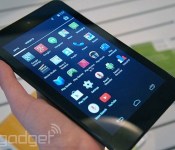
Dell adds two budget Android tablets to Venue lineup, prices start at $160

Dell’s just announced two new Android models in its Venue lineup of tablets, and though the new Venue 7 and Venue 8 cost a bit more than their predecessors, they still top out at just $200. Don’t expect any radical changes from the Venue Android tablets announced late last year; the biggest differences include processor updates and a step up to Android 4.4 KitKat.
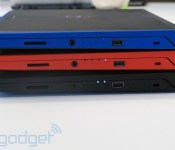
Dell’s Venue 7 — a 7-inch slate, as the naming convention suggests — supposedly offers a brighter viewing experience this time around, though its display resolution is still 1,280 x 800. Viewing angles and image quality are perfectly fine, though, especially for a tablet that costs $160. Dell only had a black version on hand when I got to check the product out, but the company will also offer the Venue 7 (and 8) in red. The requisite micro-SD card reader is on hand to supplement 16 gigs of on-board storage, and the whole package is super light, at just 0.64 pound.
The Venue 8, on the other hand, includes an HD (1,920 x 1,200) display and a slightly faster Intel Atom Z3480 processor for $40 more than the Venue 7. The 8-incher weighs a tad more, at 0.74 pound, and it sports a 2-MP front camera rather than the 1-MP unit on the Venue 7. (Both have a 5-MP shooter on the back.) Those differences aside, these devices are largely comparable, and they can be yours starting July 1st at Dell.com.
Filed under: Tablets
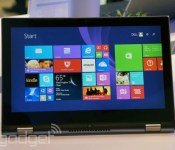
Dell aims for the mainstream with its two new Windows convertibles

Here’s the thing about Computex, the big computer show going on in Taiwan this week: though lots of PC makers are announcing products here, they’re almost all focusing on the low end. It’s almost as if computer companies realize PC sales are on the decline, and have to slash prices! Take Dell, for instance: The company is here in Taipei showing off two Windows convertibles, which run the gamut from budget-friendly to solidly mid-range. Both devices — the Inspiron 11 3000 series and the Inspiron 13 7000 series — have a Lenovo Yoga-like design, with a screen that flips back 360 degrees into tablet mode (and Tent mode, and Stand mode — you know the drill).
The difference between the two (aside from screen size) is that the 7000 series runs on Intel Core i3/i5 processors, with a passive stylus and up to a full HD display; the 3000 series, meanwhile, maxes out with Pentium-series Bay Trail CPUs and a 1,366 x 768 display. Based on our quick hands-on time, though, even the lower-end 3000-series model seems well-built, with a comfortable keyboard. The 3000 series will ship June 19th for $450, going head to head with devices like ASUS’ Transformer Book T100. The more mid-range 7000-series edition won’t come out until September, with the price to be announced sometime closer to the on-sale date. Until then, we’ve got a mix of hands-on and glossy press shots above — check it out.

IRL: Trading in the MacBook Pro for Dell’s Precision M3800 workstation

I know what you’re thinking: isn’t Dell’s Precision M3800 workstation for graphics pros or architects? Yes, but just look at it: it’s gorgeous in aluminum and carbon fiber, weighs a mere 4.15 pounds, has a fourth-gen Intel Core i7 chip with 16GB of RAM, NVIDIA Quadro K1100M pro graphics and — get this — a 3,200 x 1,800 touchscreen. The frosting on the gateau, as it were, is the price: it runs $2,554 with a 512GB SSD. If you were eyeing a Retina display MacBook Pro or another high-end 15-incher with discrete graphics, that’d be pretty tempting, right? Maybe yes and maybe not — let’s take a closer look.

For a machine with such a high level of performance, the M3800 is unbelievably light, and the carbon fiber bottom blocks heat that could singe your lap. That’s in contrast to the MacBook Pro, which can get uncomfortably hot on the bottom. The lid is aluminum, and after two weeks of fairly hard use showed zero sign of wear and tear. (Incidentally, the design of the M3800 is very similar to Dell’s consumer-oriented XPS 15, though it weighs about a third of a pound less.)
On to the screen: it’s everything a pro could want, with a bright panel, good contrast, a wide color gamut and that 3,200 x 1,800 pixel count, all tied to a muscular 2GB Quadro K1100M/Intel 4600 HD graphics setup. However, there’s a huge caveat here that isn’t even Dell’s fault: Windows 8 doesn’t scale certain apps properly on super-high-res screens, and some important ones like Photoshop and Premiere Pro CC actually scale terribly. As a result, you can barely read the teeny toolbars and command screens, let alone click on them. Some workarounds are available, but until companies like Adobe get around to supporting higher-res screens, this scaling issue effectively nullifies the M3800′s resolution advantage.
The chiclet keyboard, meanwhile, feels great, and worked well for typing this article. Unfortunately, I have to scold Dell for its middling trackpad. Regular pointing, clicking and multi-touch is hit-and-miss; I had to spread my fingers apart to get two-finger scrolling to work properly, for instance. You might say “then use a mouse, moron,” but the MacBook Pro’s trackpad is excellent, for one, and doesn’t force you to lug around an unneeded accessory.
Something the MBP won’t have any time soon, however, is a touchscreen. Using it on the M3800 with a program like Adobe Photoshop or Premiere Pro (after tweaking the scaling) is very intuitive, particularly when zooming photos or scrolling video. All the touch functions work flawlessly most of the time, but there’s another “gotcha.” This one has to do with Windows 8 again, as touch functions in certain apps lag or don’t work at all, particularly on dialog boxes. Using it with Chrome, for instance, was nearly pointless thanks to the delay.

Performance, on the other hand, is impeccable. Rendering a one-minute file in Premiere Pro CC to H.264 at full HD (from a Quicktime ProRes source) took fewer than 30 seconds at medium quality, handily besting most other laptops I’ve used. All told, the one area where performance trails is battery life. In our video rundown test, the M3800 Precision lasted 3.5 hours at best, less than half of what the MBP and many PCs are capable of. I’d partly chalk that up to the power-hungry QHD+ screen, not to mention the smallish 61Wh battery. There’s a larger 91Wh option that would effectively boost that figure by 50 percent, but even then, the battery life would still lag behind the MacBook Pro’s.
In sum, no other Windows laptop can match the M3800′s combination of power and weight, except for maybe its cousin, the XPS 15. Other candidates include Lenovo’s Thinkpad W540, the Gigabyte U35F and maybe a gaming rig like the MSI GE40. (Note that MSI’s GS60 Ghost, which came out after this review was finished, also looks promising.) However, they all suffer from either inferior graphics, lesser screen quality or too much bulk. That leaves the Retina Display MBP as its only real competition in the lightweight/powerful/high-res arena. And unfortunately, the M3800 falls down in key areas — namely battery life, trackpad reliability and high-res app support. Then again, the MBP makes do with slightly lower resolution and no touchscreen. Also, the 15-inch MBP’s discrete graphics package includes NVIDIA GeForce 750M/Intel IRIS GPUs, compared to the workstation-caliber Quadro Pro graphics on the M3800 Precision — though benchmarks suggest the 750M actually works better.
If you need a powerful, light Windows laptop with discrete graphics, I’d heartily recommend the Precision M3800 over other PCs. However, with the MacBook Pro in the mix, I’d personally choose that instead. Despite some excellent qualities, it’s the details that count the most.

Microsoft donates $1 billion to help US schools buy PCs

Microsoft isn’t just supporting White House’s ConnectED education program by lowering the cost of Windows — it’s also giving schools the cash they’ll need to buy Windows PCs. The company is donating $1 billion to make sure that students have the tech they’ll need for both getting online and learning technology skills. The funding comes alongside a new device pricing program that should make the PCs more affordable — to start with, it’s offering sub-$300 systems from Acer, ASUS, Dell, Fujitsu, HP, Lenovo, Panasonic and Toshiba.
The company isn’t shy about having a commercial incentive behind its generosity; its Education CTO, Cameron Evans, tells CNET that there’s a hope that kids will become loyal Windows fans down the road. However, he adds that any eventual sales are secondary to the more immediate focus on improving education. The influx of cash should reduce the technology gap for less fortunate students, many of whom could miss out on digital learning without a little help.
[Image credit: Getty Images]
Death of Windows XP can’t quite reverse slowing PC sales

The official end to Windows XP support may have sent many companies into a panic, but it was good news for PC manufacturers this winter… well, sort of. Both Gartner and IDC report a big increase in PC shipments during the first quarter thanks to companies scrambling to replace old XP computers at the last possible moment. However, the two analyst groups note that the sudden spike only managed to soften ongoing declines in PC shipments, rather than reverse them. Depending on which research firm you ask, the number of PCs on the market dropped between 1.7 percent to 4.4 percent year-over-year. That’s better than what system builders have seen over most of the past two years, but it’s not exactly a recovery.
As for the companies that came out on top, it’s a familiar story. Market share gains largely went to major players like Lenovo, Dell and HP, while the biggest blows came to a long-suffering Acer as well as small vendors. What happens next is less than certain, though. Gartner believes that the tablet boom isn’t hurting PCs as much as it used to, and expects upgrades from XP to help shipments over the course of 2014. IDC, meanwhile, isn’t so optimistic. Although the outfit sees the tablet market slowing down as it matures, it’s not anticipating a turnaround for computers any time soon.
[Image credit: AFP/Getty Images]


Filed under: Desktops, Laptops, Apple, ASUS, HP, Dell, Acer, Lenovo
Dell signs Android and Chrome royalty agreement with Microsoft
Dell has signed a patent-licensing deal with Microsoft which centers around the usage of Android and Chrome operating systems. Hardware maker Dell agrees to pay Microsoft for the integration of Google’s two platforms because Android employs some of Microsoft’s patents. This isn’t the first deal of its kind; plenty of other companies are doing the same with Microsoft. As for Motorola, however, that might not happen too soon. The Illinois-based company, which is now owned by Lenovo, contends their vast mobile patent library offsets any such scenario.
The post Dell signs Android and Chrome royalty agreement with Microsoft appeared first on AndroidGuys.
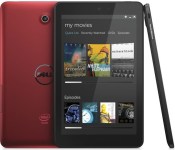
Dell and Microsoft sign mutually helpful Android licensing deal

Microsoft’s patent agreements with Android and Chrome OS device builders are usually one-sided: the manufacturers sign licensing deals, and Microsoft agrees not to sue them into oblivion. However, the crew in Redmond has just broken with that tradition by forging a cross-licensing pact with Dell. While Dell will still have to pay royalties whenever it sells Google-powered hardware, it’s also licensing patents to Microsoft for use in Xbox consoles. Just what the deal means for gamers (if anything) isn’t clear. It’s safe to presume, though, that Dell can continue to sell Android tablets and Chromebooks without fear of a legal firestorm.
Filed under: Cellphones, Tablets, Software, Microsoft, Dell
Via: ZDNet
Source: Microsoft
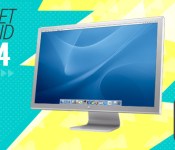
Gadget Rewind 2004: Apple Cinema HD display (30-inch)
It’s our 10th birthday, and to celebrate we’ll be revisiting some of the key devices of the last decade. So please be kind, rewind.

You managed to pick up one of the aluminum G5s or PowerBook G4s back in 2003, but that bubbly polycarbonate Cinema display was ruining the whole look. Enter Apple’s 2004 display refresh. This time the monitors were wrapped in a sexy anodized aluminum skin to harmonize your workstation’s vibe. The line included 20-, 23- and 30-inch models with varying resolutions, but the big boy of the bunch was rocking 2,560 x 1,600 and would vastly increase your screen real estate (and geek cred). Always the salesman, Steve Jobs said, “you can even run two of them side-by-side to get 8 million jaw-dropping pixels.” If you did that, you’d be down about $6,600 (the 30-incher was a wallet-scorching $3,299 at launch), but your digital workspace would look good.
There was little, if any, competition for 30-inch displays at the time. Apple claimed that its model was the “largest LCD ever designed for the personal computer.” And if you wanted to run one of these super-sized displays, you’d have to be in the Apple ecosystem. It would take a Power Mac G5 and an NVIDIA 6800 Ultra DDL graphics card to make that baby purr, but man, that screen was something you could get lost in. It took a little while for the competition to jump in, but Dell wasn’t going to be left out of the massive display party. It announced its own 30-incher called the UltraSharp 3007wfp at CES in 2006 and the media made immediate comparisons between the Dell and Apple offerings. While the 30-inch display niche was still rather bare, there were some high-resolution options if you were cool with a 23-inch form factor. Viewsonic had been offering an eye-bleeding 3,840 x 2,400 resolution model called the VP2290b since 2002, but the price for this degree of crystal clarity lay somewhere around the $7,000 mark.
Did you own a 2004 Apple Cinema HD display (30-inch)? Add it to your Engadget profile as a device you had (or still have) and join the discussion to reminisce or share photos of your device with other like-minded gadget fans.
Filed under: Apple
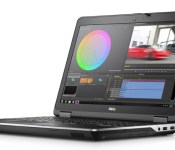
Dell’s Precision M2800 workstation is for prosumers who need performance on the cheap

We know, we know: we’re a consumer electronics blog. We get it. But when a workstation is cheap enough that even the most amateur of amateurs can afford it, it may as well be a consumer device. Today’s specimen is the Dell Precision M2800, a 15-inch notebook that starts at $1,199 — an aggressively low price for this class of product. In particular, specs include a Core i5 or i7 processor, a 2GB AMD FirePro W4170M GPU, up to 16GB of memory and up to 1TB of storage. As you can imagine, though, Dell had to cut corners somewhere, and that “somewhere” was clearly the display; for $1,119 you get a fairly low-res 1,366 x 768 screen. You can upgrade to a 1080p panel if you like but even then, a sharper 2K display is simply out of the question. If that’s a dealbreaker, you might want to check out the Precision M4800 instead, which can be configured with a 3,200 x 1,800 screen (albeit, for nearly twice the price). Otherwise, if all you really need is the horsepower, the M2800 will ship sometime this spring.
Dell’s ruggedized Latitude 13 laptop was designed to take abuse from kids

Dell may have just released its first Chromebook, but that doesn’t mean it’s counting on schools to make the switch to Chrome OS. The company just unveiled another education-focused laptop, and this time it runs good old-fashioned Windows. All told, the new Latitude 13 Education Series is cut from the same cloth as Dell’s business-y Latitude line, except it was built to withstand abuse from careless little children. In addition to meeting the military’s MIL-STD specification, it sports rubberized edges, a Gorilla Glass screen and a spill-resistant keyboard, along with a hinge that can fold back 180 degrees without snapping. In addition, the 13-inch notebook has a discreet LED indicator at the top of the lid shows internet connectivity — a handy way of telling if kids did as they were told and took a break from Facebook during class.
Given that this was designed to be used by children as young as kindergarteners, the entry specs are, as you’d expect, fairly modest. The Latitude 13 will start at $399 with a Celeron processor and no touchscreen, though you could, if you wanted, add a touch panel and go all the way up to a fourth-generation Core i5 CPU. Other options include 2GB to 8GB of RAM; a regular, hybrid or solid-state drive; and a four- or six-cell battery. What’s nice is that even a mid-specced $599 model with a Core i3 processor comes with a generous three-year warranty. And, you don’t have to be a school district to get one; there’s nothing stopping you from buying one off Dell’s site. So, if you’re a parent looking for a cheap, durable laptop for junior to play with, this could be a very nice deal indeed.
 AIVAnet