


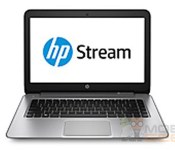
HP is building a $199 Windows laptop

Microsoft has been pushing hard for extra-cheap Windows computers that can take on Chromebooks, and it appears that HP is more than willing to hop on that bandwagon. Mobile Geeks has posted a leaked data sheet for the HP Stream 14, an upcoming $199 laptop that’s clearly meant to fight Google-powered PCs. The base 14-inch system should cut corners by using a low-powered AMD A4 Micro processor, 2GB of RAM, a 1,366 x 768 screen and 32GB of flash storage; apart from the capacity, it’d be a step down from the company’s $299 Chromebook 14. You’d have to pay more for brawnier parts like an A10 Micro chip, 64GB of space and a 1080p touchscreen. Not satisfied with the limited drive options? HP would try to make up for the shortfall by giving buyers 100GB of OneDrive cloud storage for two years, matching what you get with many Chrome OS devices. There’s no word on when the Stream 14 would make its debut, although the deluge of information hints that we could see this budget portable fairly soon.
Via: GigaOM
Source: Mobile Geeks (translated)
.CPlase_panel display:none;
Sound off! Can a Chromebook replace your everyday laptop?

When Google first unveiled its lineup of Chromebooks at Google I/O in 2011, it promised a new era of ultraportable computers that were affordable, had a healthy battery life and almost zero load times. Three years on, Google and its partners have continued to ship updates and we’ve found recent models that have offered some pretty impressive battery life and more powerful processors. But is that enough to make you buy one? Despite being insanely popular at places like Amazon, many of us have yet to be convinced of their utility. Do you have a Chromebook? Can it replace your normal computer for daily tasks? Let us know in the Engadget forums!
.CPlase_panel display:none;
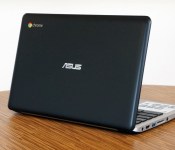
ASUS C200 review: The company’s first Chromebook is a battery life champ

Sorry, naysayers: You’re going to see a fair number of Chromebook reviews from us over the next few months. That’s mostly because sales of these inexpensive laptops have shot up — which means everyone and their mother is now making one, even companies that had previously shied away. The latest brand to join the fray is ASUS, which already has loads of experience building small, cheap notebooks. Indeed, ASUS’ 11-inch C200 Chromebook ($250) looks like a 2009-era EeePC brought back to life: The spacious keyboard feels eerily familiar, as does the long, 11-hour battery life. Even so, it’s not a perfect machine by any means — in fact, it has a pretty serious flaw — but if you’re in the market for a Chromebook, it couldn’t hurt to consider a company that seems to know what it’s doing.
Hardware

I know you’re tired of hearing Chromebooks compared to netbooks and, look, so am I. But hear me out: The reason some of you have even heard of ASUS in the first place is because it pioneered the mini-PC fad. By now, it probably knows a thing or two about making super-small, super-low-priced machines, right? Right. Mostly. The C200 is made of plastic, as you’d expect on a sub-$300 system, and indeed, it’s pretty unremarkable-looking. But, to ASUS’ credit, the build generally feels more solid than, say, Acer’s C720, which flexed when you grabbed it by the palm rest. There’s less bend here, though the screen wobbles when you set the laptop down on a table. It’s also fairly compact: At 0.8 inch thick, it has similar dimensions as the Acer C720, except it weighs just 2.5 pounds, versus 2.76 for the C720. Although both are perfectly easy to tote around, the C200 is noticeably lighter.
It’s on the keyboard that ASUS’ netbook expertise really shines through. The buttons here manage to be cushier than on most other Chromebooks, though the Dell Chromebook 11 and Toshiba Chromebook both rank pretty highly in that regard. Not only that, but also the keys are well-spaced, and none of the major buttons (Enter, Shift, etc.) have been shrunken down to fit the 12-inch-wide frame. The trackpad, meanwhile, is spacious compared to the one on the Acer C720, and does a precise job with single-finger tracking. No complaints there.

I wish I could say such nice things about the display, but this is one of the main areas where Chromebook makers cut corners. As on rival systems, the C200 rocks an 11.6-inch, 1,366 x 768 panel (non-touch), and as usual, the viewing angles are awful. Dip the lid forward even slightly and the screen washes out to the point of being unreadable. Unfortunately, even if you were to invest in a more expensive machine, the display quality would still be fairly crappy. Take the Samsung Chromebook 2, for instance: Even with a sharper, full HD screen, it still suffers from narrow viewing angles.
The C200 also offers the same exact port selection as other Chromebooks. This includes two USB connections (one of them 3.0), a full-sized HDMI socket, an SD card reader, a headphone jack and a lock slot.
Performance and battery life
| SunSpider v1.0.2 | Google Octane | Mozilla Kraken | |
|---|---|---|---|
| ASUS C200 (Celeron N2830, 2GB RAM) | 482.8ms |
7,197.7 |
4,291.4ms |
| Acer C720 (Core i3-4005U, 4GB RAM) | 289.4ms |
14,530.3 |
2,112.5ms |
| Acer C720 (Celeron 2955U, 2GB RAM) | 342.2ms |
11,502.0 |
2,614.3ms |
| Dell Chromebook 11 (Celeron 2955U, 4GB RAM) | 339.8ms |
11,533.3 |
2,621.9ms |
| Toshiba Chromebook (Celeron 2955U, 2GB RAM) | 323.6ms |
11,306.7 |
2,626.3ms |
|
*SunSpider and Kraken: Lower scores are better. **We regrettably didn’t run enough of these tests on the Samsung Chromebook 2 when we had a unit in our possession; otherwise, we would have included it in this table. |
|||
What a difference a processor makes. The C200 is one of the few Chromebooks that doesn’t use a dual-core Intel Celeron 2955U chip — instead, it packs the dual-core Celeron N2830. Given the common “Celeron” brand and the fact that the C200 is in the same price range as its competitors, I assumed the performance would be similar. In fact, though, the C200 is quite a bit slower than other models I’ve tested. The machine takes 12 seconds to cold-boot, for instance, compared with six or seven seconds for every other Celeron-based machine. And whereas most Chromebooks sign out in four seconds (this is a necessary step for switching to Guest Mode), the C200 takes six. That sluggishness is borne out in the benchmarks as well, with the C200 coming in dead last in every test, sometimes by a wide margin.
In everyday use, too, the C200 feels a bit poky, though that didn’t stop me from using it as my main machine, juggling email, HipChat, Facebook, Twitter and various blogs that I read. In the end, there wasn’t one big issue dragging down the performance — I never saw websites or games slow to a crawl, and I thankfully never suffered an outright crash. No, it was the little things. Deleting emails in Gmail sometimes took longer than it should have. Ditto for loading webpages, or comments at the bottom of news articles. I even noticed a slight delay whenever I hit the “View new Tweets” button on Twitter’s website. Sometimes, I would click a link to open something in a new tab, and then when I moved over to that tab, the machine would pause briefly. Most telling of all, I didn’t have any of these issues when I switched to a more powerful laptop connected to the same WiFi network.
|
Battery life |
|
|---|---|
| ASUS C200 | 11:19 |
| Dell Chromebook 11 | 8:37 |
| Samsung Chromebook 2 (13-inch) | 8:22 |
| Toshiba Chromebook | 8:15 |
| Acer C720 Chromebook (Intel Core i3) | 7:53 |
| Acer C720 Chromebook (Intel Celeron) | 7:49 |
| Samsung Chromebook (2012) | 6:33 |
| HP Chromebook 11 | 5:08 |
| Chromebook Pixel | 4:08 (WiFi)/3:34 (LTE) |
| HP Pavilion 14 Chromebook | 3:35 |
| Samsung Chromebook Series 5 550 | 3:23 |
| Acer C7 Chromebook | 3:16 |
Don’t worry, though, ASUS redeems itself somewhat with amazing battery life. In a field where almost every Celeron-powered Chromebook gets the same runtime (around eight hours), the C200 is a stand-out. All told, our review unit lasted through 11 hours and 19 minutes of continuous video playback, making it the longest-lasting Chrome OS machine we’ve seen yet. Now, does the best-in-class battery life make up for the worst-in-class performance? Not quite, if you ask me, but hey, it’s your shopping decision to make, not mine.
Software

Obviously, you’ll get the same Chrome OS experience regardless of which model you get, so that shouldn’t factor into your decision about whether to buy one Chromebook over another. But if you’re unsure if Chrome OS is a good idea in the first place, you might be wondering how much you can do with such a machine, and whether it’ll be enough to replace a “real” OS. As ever, it depends on what you need out of your computer. Since the first Chromebooks came out three years ago, Gmail and Google Drive are both usable offline, without an internet connection. The same is true of many third-party apps offered in the Chrome Web Store. Recently, too, Google started allowing folks to watch Google Play movies and TV shows offline, so you definitely don’t need an internet connection quite as desperately as you did when Chromebooks first came on the scene.
Like every other Chromebook, the C200 comes with 100GB of Google Drive space, free for two years, which should partially take the sting out of having just 16GB of built-in local storage. As for navigating the OS itself, having a desktop and windows you can close and resize continues to make Chrome OS feel like a more traditional operating system. The OS has also benefitted recently from other features that might seem like no-brainers — things like pinch-to-zoom, a more sophisticated file-management system and the ability to upload Google+ photos in the background.
Configuration options and the competition

What you see is what you get: The C200 goes for $250 (often less) and comes with the same specs as the unit I tested here, including a dual-core Intel Celeron N2830 processor, 2GB of RAM, a 1,366 x 768 display and 16GB of built-in storage. There’s also a 13-inch version, the C300, which features the same price and carries the same specs, with the exception of screen size and battery life (runtime is rated at up to 11 hours on the C200, and up to 10 hours on the C300).
As for competition, the C200 has plenty. If I had published this review last week, I would have compared this mainly to other Celeron-based models, like the Dell Chromebook 11, HP Chromebook 11, Acer C720 Chromebook, Toshiba Chromebook and the 11-inch Samsung Chromebook 2. I would have reminded you that the performance is just about the worst in its class, though the battery life is the best. The keyboard is nice, and the display, while poor, is at least on par with the competition. In other words, I would’ve told you it’s worth a look, though it’s hardly a slam dunk.
The problem is, even as I sat down to write this review, Acer announced the Chromebook 13, the first Chrome OS device to make use of NVIDIA’s Tegra K1 chip. I haven’t tested it yet, so I can’t vouch for the performance or say how it compares to the C200. If nothing else, though, the Chromebook 13 should excel at graphics-intensive tasks — things like browser gaming, movie streaming and interactive web apps. Meanwhile, the battery life is said to be as good as, if not better than, the C200: 13 hours if you get it with the 1,366 x 768 resolution screen, and 11 if you go with the full HD model. That’s another thing: The regular ol’ HD version starts at $279, just 30 bucks more than the C200, while the 1080p edition is priced at $299. If the Acer Chromebook 13 really performs as promised, with long battery life and impressive graphics muscle, then it’s priced uncomfortably close to the C200.
Unless you’re hankering for an 11-inch machine (or can’t spare the extra $30), the Chromebook 13 is shaping up to be a smarter buy. Even then, the Acer C720 can be had for a lower price (around $199) and the performance is guaranteed to be better. And besides, NVIDIA has made it clear there are other Tegra K1 Chromebooks in the works. Surely, an 11-inch one is on the way, right?
Wrap-up

How’s this for a ringing endorsement? The C200 isn’t totally without merit. Its battery life is easily best in class, and the spacious, cushy keyboard makes it one of the better Chromebooks for typing. Even so, its performance is actually worst in class, which is saying a lot considering its rivals aren’t exactly powerhouses themselves. Even today, there are Chromebooks on the market offering smoother performance for a similar price, while Acer’s forthcoming Chromebook 13 promises improved graphics muscle and equally long battery life for only $30 more. ASUS would do well to upgrade the C200′s processor, and maybe drop the price to better compete against other brands. Until that happens, this is an acceptable option, but hardly the best.
.CPlase_panel display:none;

Introducing the Acer Chromebook 13

The Chromebook line was created with a mobile life style in mind. At a low cost, they do everything the average user needs out of a laptop. They are portable and easy to work with and give users almost instant access to the internet. Today, a new Chromebook has joined the family. One that has… Read more »
The post Introducing the Acer Chromebook 13 appeared first on AndroidGuys.
.CPlase_panel display:none;
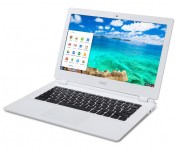
NVIDIA Tegra K1 packed inside the new Acer ChromeBook 13
The worlds first, but definitely not the last, NVIDIA Tegra K1 powered Chromebook has been announced today by Acer. In case you haven’t been following along with the Tegra K1, it is a 192 GPU core chip that is capable of bringing high-end desktop graphics to mobile friendly devices. NVIDIA announced the powerhouse back at CES in January of this year and have steadily been getting it into various products, like this Chromebook and the new NVIDIA Shield Tablet. The chip can even handle 64-bit systems.

As for the Acer ChromeBook 13, you are looking at the first Chromebook to be launched with this insane powerhouse chip. The name of the Chromebook does allude to the screen size being 13-inches, but it also offers up the expected battery life being 13 hours too. In terms of other Chromebook battery life, you have the Acer C720 at 8.5 hours, the Samsung Chromebook at 6.5 hours and the HP Chromebook advertising 6 ours. The NVIDIA Tegra K1 adoption and the battery life is probably the best aspect of this Chromebook, but the remaining specs sound pretty good too.
- 16GB internal storage that is expandable to 32GB
- 2GB of RAM that can be doubled to 4GB if so desired
- 2 USB 3.0 ports
- HMDI out
- SD card slot
- 18mm thick
The Chromebook 13 will be a Wi-Fi only model with no 3G or 4G options. That may or may not matter since many people tether or use a hotspot device anyways. Interestingly enough it will come in two different screen resolution options. A conservative 1366 x 768 that will run $279 and a 1920 x 1080 for $299. For $20 more (says Phandroid), it seems silly to not grab the HD variation. They don’t mention the weight, at least not that I could find, but with it only being 18mm thick it should be pretty light as well.
The Acer ChromeBook 13 is scheduled to go up for pre-orders later today via Amazon and Best Buy later today. We will keep checking in and be sure to let you all know when it becomes available. Until then, what do you guys think? Are we finally seeing some Chromebooks that are both affordable and powerful?
Via Nvidia blog
//<![CDATA[
ord = window.ord || Math.floor(Math.random()*1E16);
document.write('’);
//]]>
The post NVIDIA Tegra K1 packed inside the new Acer ChromeBook 13 appeared first on AndroidSPIN.
.CPlase_panel display:none;
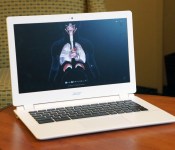
Acer’s Chromebook 13 lasts a stunning 13 hours on a charge

Until now, if you wanted a Chromebook with a full HD display, you only had one option: the 13-inch Samsung Chromebook 2. Want epic battery life? Yep, all roads lead to Samsung there, too. Well, not anymore, anyway. Acer just announced the Chromebook 13, and it matches Samsung nearly spec for spec with an optional 1080p display and NVIDIA’s quad-core Tegra K1 chip, promising up to 13 hours of runtime (details on that after the break). This is interesting for two reasons. First off, although this is essentially the same class of product as what Samsung is selling, it costs $100 less: $299, versus $400 for the Chromebook 2. Sounds good, right? What’s more, this is the first-ever Chrome OS device with an NVIDIA processor inside.
This is potentially good news even if you’re not a self-described chip geek: Tegra K1 offers long battery life, just like Samsung’s own Exynos chip, but the graphics should be better for things like gaming and interactive websites — the sorts of rich web apps frequently used in classrooms. And if you’ve ever used a Samsung Chromebook, you know there’s room for improvement there: For all of Samsung’s plus points (a crisp display, comfortable keyboard), the Chromebook 2 is relatively sluggish. But will this be more robust than those new Core i3 models we’re seeing? That remains to be seen.
On a superficial note, the Chromebook 13 is definitely more basic-looking than the Chromebook 2. Whereas Samsung’s model comes kitted out with a fake-leather lid, the Chromebook 13 is made of plain white plastic. It’s clear that if Acer made any sacrifices to reach that lower price point, this is it. Then again, this is a perfectly serviceable, if unexciting, design, and the full-sized keyboard is naturally more spacious than what you’ll find on Acer’s older 11-inch Chromebooks.
The Chromebook 13 is up for pre-order today, starting at $279 with a 1,366 x 768 display, and $299 for the full HD model. Of note: The full HD machine is rated for 11 hours of battery life, compared with 13 for the 1,366 x 767 version. In addition to the US, it will be sold in various European countries, including the UK, Netherlands, Belgium, Denmark, Sweden, Finland, Norway, France, Germany, Russia, Italy, Spain, South Africa and Switzerland. As a heads-up, the Chromebook 13 doesn’t have a touchscreen for now, though that could change: When we asked an NVIDIA rep if a touch edition was in the works, he winked and said “That’s an interesting idea.” Consider it confirmed, folks. Almost.
Filed under: Laptops, Google, Acer, NVIDIA
.CPlase_panel display:none;

Engadget Daily: the culture of leaks, surviving music festivals and more!

Today, we investigate the culture of leaks, learn how to enhance your music festival experience, review the first Chromebook to feature an i3 processor, watch a robot assemble itself and more. Read on for Engadget’s news highlights from the last 24 hours.
.CPlase_panel display:none;
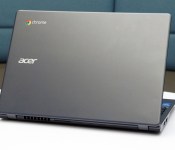
Acer C720 review (Core i3): a more powerful Chromebook

Whether rightly or wrongly, Chromebooks have earned a reputation for being the new netbooks. Slowly, though, things are starting to change. The designs are starting to feel less cheap — at least if you’re Samsung. Battery life is getting longer, sometimes even better than on full-fledged laptops. And now, performance is getting stronger, too: Acer just became the first company to release a Chromebook with a Core i3 processor, one that can better withstand multitasking, gaming and whatever rich websites you’re likely to visit. The C720, as it’s called, is actually the same 11-inch Chromebook Acer’s already been selling, just with a beefier CPU inside, and theoretically longer battery life — 8.5 hours, up from 7.5. As ever, though, Acer kept the price down: This guy starts at just $350, just a little more than what you’d pay for a much lower-powered system from some other brands. The question is: Does processing power trump everything else? And if it does, are you better off waiting for other Core i3 models to come out?
Hardware

I’m sure Acer will eventually redesign the C720 from the ground up, but for now, it’s clear the company’s main priority is to improve the performance — and be the first with a Core i3 Chromebook. For now, then, the C720 is as compact, plain-looking and — I hate to say it — netbook-like, as it always was. The entire thing is made of plastic, with a rough-feeling bottom edge and a palm rest that flexes when you grip it. The keys are made of scratchy plastic, too, and the underlying panel will bend a bit if you type vigorously enough. And indeed, you might well need to start pounding the keyboard: The buttons are so shallow that if you hit them too gently, you’re likely to suffer some missed key presses. There were instances when I had to type my long Google password as many as three times before I could successfully log in; unless you type everything slowly and deliberately, the keyboard probably won’t recognize every single keystroke.

On the inside, the 11.6-inch display has a category-standard resolution of 1,366 x 768. Want something sharper? Tough noogies, kiddos: There currently isn’t a single Chromebook this size with a sharper screen. What you might find elsewhere, perhaps, are better viewing angles. Before you settle in to stream a movie, you’ll want to adjust the angle very carefully; dip the screen too far forward, and everything very quickly becomes washed out. Fortunately, viewing angles are better from the side, and it helps that the (non-touch) panel has a low-glare, matte finish. On a similar note, the sound coming from the two speakers will do in a pinch, but if ever I had a second, more full-fledged laptop lying around, I’d use that for music playback in a heartbeat.
On the plus side, the machine’s smooth lid hasn’t picked up scratches yet on either of the units I’ve been testing, and it does a relatively good job masking fingerprints, too. The trackpad also works well — no small feat, given how often laptop makers seem to screw that up. Also, as shallow as the keyboard is, it’s at least more spacious than it used to be. Remember how cramped the original C7 was? Yeah, well, it’s probably good you forgot.

And now, we get to the part where I call a 2.76-pound laptop “heavy” and feel like a big jerk. And really, it’s not even heavy, per se; it’s just weighty compared to the competition. And slightly thicker, too. The C720 measures 0.8 inch thick, whereas rival machines from Samsung and HP weigh 2.65 and 2.26 pounds, respectively, and come in at 0.7 inch thick or less. Even the ASUS C200, which is also around 0.8 inch thick, is lighter at 2.5 pounds. That being said, none of this negates the fact that this is a compact system. It’s easy to stuff inside a backpack or even a shoulder bag, and carry from room to room. You want a light machine? Boom: You’ve got a light machine.
You’ve also got the usual array of ports. On board, you’ll find two USB connections (one 3.0, one 2.0), a full-sized HDMI socket, an SD card reader, a headphone jack and a standard lock slot — a must-have for school districts planning on locking these down inside computer labs. You’ll find the exact same spread on most other Chromebooks, so of all things, don’t let this sway your purchasing decision.
Performance and battery life
| SunSpider v1.0.2 | Google Octane | Mozilla Kraken | |
|---|---|---|---|
| Acer C720 (Core i3-4005U, 4GB RAM) | 289.4ms |
14,530.3 |
2,112.5ms |
| Acer C720 (Celeron 2955U, 2GB RAM) | 342.2ms |
11,502.0 |
2,614.3ms |
| Dell Chromebook 11 (Celeron 2955U, 4GB RAM) | 339.8ms |
11,533.3 |
2,621.9ms |
| ASUS C200 (Celeron N2830, 2GB RAM) | 482.8ms |
7,197.7 |
4,291.4ms |
| Toshiba Chromebook (Celeron 2955U, 2GB RAM) | 323.6ms |
11,306.7 |
2,626.3ms |
|
*SunSpider and Kraken: Lower scores are better. **We regrettably didn’t run enough of these tests on the Samsung Chromebook 2 when we had a unit in our possession; otherwise, we would have included it in this table. |
|||
For some time now, I’ve been saying Chromebook performance is good enough. Not great, but good enough. Even on the lowest-powered machines, you can get by checking email, surfing the web, working in Google Docs and streaming the occasional Netflix movie, all with a pretty low chance of a browser crash. And I still believe that. But here’s the thing: Some people like to push their machines harder than I do. Some people want to play games. Others — particularly teachers — will be interested in interactive web apps as a kind of modern-day textbook. For those folks, “good enough” is a nebulous concept. Plus, once you’ve had the chance to try a Chromebook with a little more kick, you might not want to go back.
That’s how I feel about the C720 with Core i3. It’s still not a perfect device by any means — Acer should really revisit that display and chintzy design — but the performance is noticeably stronger than anything else currently on the market. Everything just feels slightly faster. It boots up a few seconds faster, and is also quicker to sign out — a boon if you frequently let your boyfriend/girlfriend/roommate/whomever use your computer in guest mode. Browser games like Plants vs. Zombies feel a tad more responsive, and in rich websites like BioDigital Human, motions like zooming in and spinning 3D objects feel ever-so-slightly smoother. With the adventure game Assassin’s Creed: Pirates, game play was a touch choppier on the Celeron-based C720. The benchmarks tell a similar story: The Core i3 model swept its competitors, but the margins were modest.
In any case, I think you get the picture: Performance here is better, but the difference isn’t what I’d call dramatic. If you ripped the Core i3 machine out of my hands and told me I had to use the Celeron version, I’d carry on without suffering a huge impact in daily use. That said, if it were me shopping, and I saw a Core i3 machine as affordable as this one, I’d choose that in a heartbeat. Because if the price is reasonable, why would you say no to performance gains?
|
Battery life |
|
|---|---|
| Acer C720 Chromebook (Intel Core i3) | 7:53 |
| ASUS C200 | 11:19 |
| Dell Chromebook 11 | 8:37 |
| Samsung Chromebook 2 (13-inch) | 8:22 |
| Toshiba Chromebook | 8:15 |
| Acer C720 Chromebook (Intel Celeron) | 7:49 |
| Samsung Chromebook (2012) | 6:33 |
| HP Chromebook 11 | 5:08 |
| Chromebook Pixel | 4:08 (WiFi)/3:34 (LTE) |
| HP Pavilion 14 Chromebook | 3:35 |
| Samsung Chromebook Series 5 550 | 3:23 |
| Acer C7 Chromebook | 3:16 |
As you’d expect, a heavier-duty processor doesn’t exactly help battery life, but if these test results are any indication, it doesn’t hurt, either. With WiFi on and the display brightness set to 10 out of 16 bars, the C720 with Core i3 managed to last through seven hours and 53 minutes of continuous video playback. That’s not too far off Acer’s claim of 8.5 hours, and it basically matches the C720 with Intel Celeron. As for everything else on the market, most Celeron-based machines tend to cluster around the eight-hour mark, with the exception of the new ASUS C200, which somehow manages to last an insane 11 hours. Basically, then, if you go with a Core i3 Chromebook, you can expect roughly the same battery life as you’d get on a less powerful machine. Kind of a big deal, that.
Software
Surely you’ve heard by now: Chrome OS is basically like using a computer with only the Chrome browser installed. That’s frankly sort of true, but even so, I’d be doing you a disservice if I left it at that; Google continues to make lots of improvements to the software. In particular, many of you may be confused about how much you can do offline, without an internet connection. At this point, some three years after the first Chromebooks came out, you can use Gmail and Google Drive offline. Ditto for many third-party apps in the Chrome Web Store. As of two months ago, you can also watch Google Play Movies and TV offline, too. See? The list keeps growing, albeit at a fairly gradual rate.
Other new features include full pinch-to-zoom support (revolutionary!), improved file management and background uploading for Google+ photos. As ever, the ability to minimize and maximize windows, as well as launch apps from a desktop, makes this feel more like a “real” OS, even if it is based on the Chrome browser. If it weren’t for the fact that I prefer Skype to Google Hangouts, and need certain desktop apps like Photoshop, I might actually buy a Chromebook myself. As it is, I can see owning one as a secondary computer, maybe just for travel. And hey, depending on your needs, you might actually find a Chromebook is enough for everything. To each his own.
Configuration options and the competition

There are lots of different versions of the C720, including the older, lower-powered version I keep mentioning. For the Core i3 model, though, there are just two configurations to choose from: one with 2GB of RAM, for $350, and another with four gigs, for $380. Other than the memory, they have the same specs — namely, a Core i3 processor, 32GB of solid-state storage and an 11.6-inch, 1,366 x 768 display. Unfortunately, there aren’t any Core i3 models with a touchscreen, and Acer says it currently has no plans to release one either.
The Acer C720 already stood out for being one of the most affordable Chromebooks, despite being one of the only ones to include a touchscreen option. Now it’s among the first with a Core i3 processor and, yes, it’s still reasonably priced. Even more important: It’s the only Chromebook with that kind of horsepower that’s even available right now. Dell, for instance, will sell a Core i3 version of its Chromebook 11, but it’s not out yet. Ditto for Toshiba’s 13-inch Chromebook, which is also being refreshed with Core i3.
Otherwise, you’ll need to settle for something a little less powerful, and consider the trade-offs. These days, everyone and their mother is selling Chromebooks with Intel Celeron processors. They’re less robust than Core i3 machines, obviously, but they’re cheaper, and the battery life is often longer. Similar to Acer, Dell and Toshiba each sell Intel Celeron systems for around $300 (Acer’s is actually $200, though). Lenovo has a bevy of offerings too ($330 to $479), some with funky, rotating screens. Ditto for HP: The company has 11– and 14-inch models on offer, for $280 and $299-plus, respectively. Meanwhile, ASUS just entered the market with the 11-inch C200 and the 13-inch C300 (both around $250). The point is: You have no shortage of options here, so long as you’re willing to sacrifice a little power.
Or what about sacrificing a lot of power? The Samsung Chromebook 2 ($320-plus) has a tablet-grade chip inside, making it even lower-powered than Intel Celeron models. That said, you should still be giving it a close look. For starters, that mobile chip translates to best-in-class battery life — over eight hours, according to our tests. This Chromebook is also the best designed, with a comfy keyboard, reliable trackpad and a fake-leather lid that makes the whole thing feel less like a netbook and more like a proper laptop. And though the 11-inch model tops out at 1,366 x 768 resolution, the 13-incher goes up to 1080p, making it one of just two 13-inch Chrome OS devices, and the only one with a full HD display. And considering the performance is still good enough for basic tasks like web surfing, the weaker processing really needn’t be a dealbreaker.
But what about Windows laptops?
“But hey,” some of you are saying, “I can get a full-fledged Windows laptop for the same price.” Yes, you can. Just not one that’s this powerful and this portable. In my research, I mostly found 15-inch laptops at this price — bulkier machines with Celeron processors. So, you get lots of built-in storage and the ability to install any Windows app you like (performance limitations not withstanding). It’s all about your priorities. If you can do without a DVD burner and don’t tend to download lots of apps or media, you might appreciate the simplicity, portability and longer battery life of a Chromebook.
Still, there are a few exceptions. Dell’s 11-inch, Celeron-based Inspiron 11 brings a Yoga-like design with a lid that flips back into tablet mode. And at $400, it doesn’t cost that much more than a similarly specced Celeron Chromebook, though the design is much more interesting. It’s a similar story with HP. For $250, you can get the Pavilion 10z, which runs on an AMD E-series chip. Lenovo’s 11.6-inch S215 is similar: It starts at $379 with an AMD E1-2100 processor. In Acer’s own lineup, meanwhile, there’s the 11.6-inch Aspire E3 ($250), which runs on a Celeron CPU. Most compelling of all might be ASUS’ Transformer Book T100, a 10-inch tablet running full Windows that comes with a keyboard dock for $400. The performance on a Core i3 Chromebook like the C720 will naturally be superior to any of these alternatives, but there will of course be folks who need the full Windows experience. If that’s you, this is the best you can do at that price, at least in this size category.
Wrap-up

It seems I end almost every Chromebook review with the same disclaimer: They’re not for everyone. And I stand by that. As I wrote the above section on Windows alternatives, I was reminded that I cannot, in good faith, recommend a Chrome OS device to everyone. There will always be people who need to do more offline, and who need the flexibility to install whatever apps they want (Skype and iTunes come to mind).
But for folks who can get by doing everything in the browser — and using Google services like Hangout — Chromebooks are getting cheaper, more functional and more powerful. The refreshed C720 in particular is the fastest I’ve seen yet, with a Core i3 processor you simply won’t find on a Windows laptop at this price, especially not one this portable. The new C720 is also a bit snappier than older-gen Chromebooks, and yet the battery life doesn’t really take a hit on account of that heavier-duty CPU. And despite the improved processor, it’s still reasonably priced, at $350.
My one reservation in recommending this is that other PC makers are on the cusp of coming out with Core i3 Chromebooks, and in the meantime, Acer’s is held back by a poor-quality display and cheap, netbook-like design. I’m curious to see what other companies have to offer — perhaps someone else will present us with something a little more well-rounded. Even then, the price would have to be fairly low — the performance gains here aren’t so huge that laptop makers can get away with price gouging. Until those other models go on sale, though, the C720 remains a good value. And if its performance is any indication, we should have high hopes for everybody else, too.
Filed under: Laptops, Google, Intel, Acer
.CPlase_panel display:none;

Chrome OS adds pinch-to-zoom for regular users, Pixel owners rejoice

When Google launched the Chromebook Pixel, we weren’t really sure what to make of the premium device’s touchscreen. Sure, finger-friendly displays were trendy, but Chrome OS just wasn’t asking for the technologies: it didn’t feature many touch apps, the laptop didn’t launch with a gesture update and user’s couldn’t even pinch-zoom web pages. Now, that’s changing — to go along with more touch-enabled Chromebooks now on sale, the latest update to Chrome OS’ stable channel adds a touch-enabled window manager and pinch/zoom webpage scaling.
[Image credit: François Beaufort]
The updated touch features have been around for a while, but Chrome OS users had to be on the “Canary” release channel to play around with the system’s unfinished features until recently. Google’s also been experimenting with a on-screen keyboard for some time. Put together, these features could make Chrome OS a viable options for tablets (and in the near future, convertibles like Lenovo’s Yoga), though Google hasn’t announced anything of that nature. Check out the company’s official update notes at the source link below.
Source: Chrome Releases Blog
Chromebooks could get even cheaper soon thanks to support for MediaTek Processors
 Chromebooks are fantastic value for the type of people who just need a larger form factor device for surfing the internet at home, or in well-connected places. While some Chromebooks are a little expensive, most Chromebooks are extremely well priced around $200-300 USD. Well, that average may be set to drop after what has been spotted on the Chromium OS code review site. It appears that MediaTek, manufacturer of generally cheaper smartphone processors, has added code to Chromium OS, suggesting Chromebooks could get even cheaper than they are now if they were running MediaTek processors.
Having said that, the code contributed comes from a test device running an ARM Cortex-A7 processor, something which when compared to existing Chromebooks, could get a little slow. This would obviously cut down costs, though, and we could even see Chromebooks with MediaTek processors drop below the $200 mark. This marks the second time that MediaTek has been mentioned in relation to Google products; the first being their involvement in the development of Android One, Android’s new budget line of devices.
What do you think about cheaper Chromebooks running MediaTek processors? Let us know your thoughts below in the comments.
Source: Chromium OS via engadget
//<![CDATA[
ord = window.ord || Math.floor(Math.random()*1E16);
document.write('’);
//]]>
The post Chromebooks could get even cheaper soon thanks to support for MediaTek Processors appeared first on AndroidSPIN.
 AIVAnet