


The best alternatives to Google’s own Android apps

As Android has evolved, Google’s worked increasingly hard to keep users locked into its ecosystem. The search giant creates new apps, retains users by giving them a thoroughly decent out-of-the-box experience and then charges device makers for a license to embed them on their phones and tablets. Its constant iteration has helped it stay ahead of the pack for some of its services, but many fall short, leaving users to find something better. The official Gmail app: it’s fine, really it is, but if you want unified inbox support, productivity features or the ability to pull emails from more than one place, you’re left wanting. This sort of limitation can be found across Google’s stable of apps, from messaging to the calendar and camera interface. We’ve trawled Google Play to find software alternatives that — dare we say it — do a better job, at least with certain tasks. So please, whip out your phone and give them a go.
What we’re looking for here is an app that can deliver Google-style levels of reliability, while also being open to non-Google inboxes and offering enhanced features for power users. Luckily for us, there’s no shortage of apps that can do just that.
CloudMagic (Free)

The clue’s in the name, really. Capable of integrating Gmail, Exchange, Yahoo, Outlook, iCloud, Office 365 and IMAP accounts at once, this app uses its cloud algorithms to make your emails easier to find. Unlike Gmail, the clean interface on show here offers a unified inbox that lets you left-swipe emails to perform any one of three actions, a bit like Tinder for the office.
AquaMail (Free/$4.99)

Optimized for both smartphones and tablets, AquaMail offers multi-account support and a simple user interface. Yes, it does look like Gmail, but the team behind AquaMail has constantly refined the interface to make it as easy to use as possible. This includes a dedicated attachments tab at the top of each email, fullscreen modes and a smart inbox. Grabbing the paid version removes the two-account limit and drops the promotional signature attached to all outgoing messages.
We also like: Evomail, Solmail and MailDroid.
Messaging
With the launch of Android 4.4 KitKat, Google ditched its pre-loaded SMS app to let users choose their own. Hangouts became the de-facto starting place, but plenty dislike the app’s inability to properly unify chats and texts under one contact. So here are some solid alternatives.
Textra (Free)

In the migration away from Hangouts, some have resorted to Textra, a messaging app that offers deep customization for notifications and a time-saving quick-reply popup that lets you respond to messages without fully opening the app. Simple in design, Textra handles huge inboxes with no noticeable slowdown, something you’ll appreciate if your friends don’t use Whatsapp.
Hello SMS (Free)

Dropping the inbox for tab-based interface, Hello SMS’ minimalist design puts interactions first with contact names and photos on its left sidebar. If you find yourself in a never-ending group text, the app will intelligently combine messages from up to 15 contacts so you’re not left with a messy inbox. Hello SMS’ one-touch camera interface also lets you send selfies to your friends in double-quick time.
EvolveSMS (Free)

Like Hello SMS, EvolveSMS uses a tabbed interface to showcase your messages. It’s better looking than its rival and displays important information like names, numbers, call options and attachment options inside conversations. While group messaging, message popups, gesture support and notification customization come as standard, additional features are available via in-app purchases. If you decide to upgrade, you’ll get extra theme options, social cover photo integration, scheduled messaging and backup options.
We also like: 8sms and chomp SMS.
Calendar
Calendar apps have pushed forward on iOS in the past year, but Android users have seen little change compared to their Apple-loving counterparts. Google’s own is functional and intuitive, but lacks inspiration. If you’re looking for something that goes beyond the traditional grid-based format, check these apps out.
Cal (Free)

Any.do decided to take a different approach with Cal. Sure, it still features gCal support, but it also includes a number of social and productivity features that stand out thanks to its stylish UI. If you have a task listed in Any.do, it’ll pop up in your schedule beneath your planned events. Connect your Facebook account and you’ll be notified of everybody’s birthday, letting you send them a text, email or post on their wall in celebration.
SolCalendar (Free)

With stickers and various themed widgets, SolCalendar is certainly different than most calendar apps on the Play Store. It might not be to everyone’s taste, but it’ll let you add events with a single touch, litter them with birthday cakes and smiley emoticons and display them using any of its 40 home screen widgets. SolCalendar’s neat weather notification also checks the elements, giving you the chance to pack an umbrella before you head out the door.
Agenda ($2)

Coming to Android a little while after iOS, Agenda’s, erm, agenda, is to display all of your calendars in a single and easy-to-read feed of upcoming events. All of the traditional daily, weekly and monthly views are there, letting you create appointments with a single tap. The simple black-and-white interface might not be for some, but it’s certainly helpful if you like to mix work, play and everything else in between.
Keep an eye out for: Sunrise — expected to launch on Android in the coming months.
Camera
One of the weakest built-in Android apps is the default camera app. Google admited it isn’t as good as it should be, prompting it to improve the camera on the Nexus 5 and roll out additional photography settings on newer Android devices. If you’re stuck with an older phone or want to try something new, try these camera app replacements.
ProCapture (Free/$3.99)

Apps like ProCapture go heavy on features and skimp on glitzy UI to make your photos stand out. It offers a high-quality panorama mode, timer, burst, wide shot mode and noise reduction, keeping the focus on shooting modes instead of after-effects. The full version includes support for higher resolutions and touch-to-focus, so we’d recommend the upgrade.
Camera Awesome ($1.87)

SmugMug’s Camera Awesome looks a bit like Apple’s iOS 6 camera app and comes packed with clever features like two-finger focal adjustments. Even better, you can tweak the ISO, white balance and exposure settings all from the screen. Add in a full screen shutter button, burst shot, HDR mode, timer, panorama and social sharing and you’ve got yourself a whole lot of camera app for very little money.
Camera Zoom FX ($2.99)

If filters and after-effects are exactly what you’re looking for, Camera Zoom FX has more than you could possibly need. Without ruining your original images, the app features over 90 built-in filters, frames and effects that range from the sublime to the ridiculous. If you ever wanted to have a virtual photo taken with the Queen, look no further.
We also like: Instagram, VSCO Cam and Pixlr Express
Productivity
While Google’s Keep is a supremely fast and extensive app, self-confessed productivity nuts may feel its simple approach doesn’t deliver enough features. Although Android is overflowing with apps focusing on lists, notes and photos, many don’t hit the right notes. Here are our recommendations.
Evernote (Free)

Evernote is a heavyweight note-taking app, in terms of both features and actual size, supporting lengthy text input. It provides an easy way to add lists and save audio notes, indexing them for later searching. With apps on every major platform (including the web), you can tweak your grocery list anywhere there’s an internet connection.
Any.do (Free)

Any.do, a to-do list app from the makers of Cal, is an amazingly powerful to-do manager that offers cloud sync, time-saving gestures, missed call integration (ever wanted to turn them into reminders?) and auto-suggestion features as standard. Once you become a little more acquainted with the app, you should try its voice support: not only will it transcribe your words into text, but you can do so in a variety of languages.
We also like: Todoist, Microsoft OneNote, Springpad, Quip and Remember The Milk
Wrap-Up
Before we finish up here, we can’t resist a few more recommendations. Google’s done a great job of porting Chrome from the desktop to mobile, but Dolphin Browser and Mozilla Firefox both offer unique features not found in the search giant’s app. If you wake up one day and find you don’t like the default Clock app, we suggest you check out Timely, even if it is now owned by Google. Also be sure to take a look at QuickPic if you’re after a solid replacement for Google’s Gallery and Photos apps — just don’t ask us why Google decided it needed two apps to handle the same function.
If sampling the best Google Play has to offer isn’t for you, Android’s default apps are constantly being refreshed to deliver additional features. Apps are one of the reasons why the OS has passed one billion activations, after all. Developers focusing only on a handful of apps may be the first to innovate, but it often prompts Google to incorporate features it’s seen elsewhere. While this list won’t stay up-to-date forever, some of these apps have remained popular since Android’s early days and the newer suggestions still have plenty of life in them yet. If you think you have better app recommendations, we’d love to hear them.
Filed under: Cellphones, Tablets, Internet, Software, Mobile

Casio’s new EX-100 camera makes it harder to mess up the shot by taking nine different ones (hands-on)

Casio, famed creator of nostalgic digital watches, calculators and often unremarkable point-and-shoot cameras, just surprised us at Japan’s premier photography show. Its EXILIM EX-100 is arguably the most interesting compact camera we found on the CP+ show floor this year. Keeping a constant f/2.8 aperture while still offering 10.7x zoom should mean plenty of light reaches the point-and-shoot’s imaging sensor — good thing that the show floor had a suitably stylish demo area to zoom into and see how it faired. While we didn’t have samples to scrutinize fully, we were pleasantly surprised by the results we saw on the substantial 3.5-inch screen, which articulates in all the directions you’d expect it to. Underneath, there’s even an extra fold-out stand to prop the camera up both horizontally or vertically, although we’ll admit the device itself is a little chunky compared to the competition.
What really interested us was a new dual-bracketing setting that captures a shot nine times, varying two parameters (white balance, exposure, focus, color saturation, shutter speed) in the process. In short, making it harder to flub a shot if whoever’s holding the camera doesn’t quite get the fundamentals. While there are four presets, you can pick which variables are switched up within the “premium bracketing” mode. The camera launches at the end of March, but the decent fixed lens and unusual software talents don’t come cheap. 89,000 yen ($873) puts the EX-100 in a pricier… bracket than current favorites like Sony’s RX100M2 ($750), and a similarly-specced Olympus Stylus 1 ($700). For now, it also remains a Japan-only prospect.
Zach Honig contributed to this report.
Filed under: Cameras
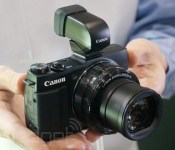
Canon’s burly PowerShot G1 X Mark II is a pleasure to use (hands-on)

This week, we met Canon’s G1 X Mark II. Judging by its nomenclature, we expected a straightforward update to 2012′s PowerShot flagship. Instead, this year’s model is only like its predecessor when it comes to size — the camera’s specifications and design have been refined significantly. There’s no longer an optical viewfinder and the 3-inch touchscreen tilts up and down instead of out to the side, but otherwise, the camera’s been modified for the better, with a more powerful 24-120mm f/2-3.9 zoom lens, a new 1.5-inch sensor and a faster DIGIC 6 processor. That powerful combo yields a much more capable point-and-shoot — with the Mark II, the G1 X can finally justify its $800 price.
We caught up with the Mark II at the annual CP+ trade show in Yokohama, Japan, and while we weren’t entirely convinced of the camera’s practicality based on press photos and a spec sheet, a few minutes of shooting helped seal the deal. This G1 X refresh was comfortable to use and very responsive, from the speedy zoom toggle to the super-fast focusing. The LCD was quite sharp and bright, and while we missed having an optical viewfinder to play with, the boosted functionality in other departments made the tradeoff worthwhile. (Canon’s also planning to offer an external electronic viewfinder — pictured above — which seems like a reasonable compromise.) We did struggle with focusing in macro mode, just as we did with the original X, but the lens performed quite nicely with subjects a bit more in the distance, so if you’re not planning to shoot close-ups of flowers, you should be fine. Video shooters beware: while there is support for 1080/30p captures, there’s no microphone input or headphone jack.
In this price range, we’re still inclined to recommend Sony’s RX100 Mark II, despite its slightly smaller 1-inch sensor. We haven’t had a chance to review full-res images from the Canon, but based on the Sony camera’s superior focusing and compact size, it’s likely the better choice for many photographers. That model’s available now for $700, while the $800 G1 X is expected in stores this April. Check out our hands-on video for a closer look.
Mat Smith contributed to this report.

Canon updates high-end PowerShot lineup with $799 G1 X Mark II

Canon introduced its PowerShot G1 X at 2012′s CES, and two years later, the pricey high-end point-and-shoot is ready for an update. This year’s iteration, the G1 X Mark II, includes a 12.8-megapixel CMOS sensor, and like its predecessor, this new chip measures 1.5 inches diagonally, enabling some pretty spectacular images. There’s a 24-120mm f/2-3.9 zoom lens, so you can expect shallow depth of field throughout the maximum-aperture range, and sharp shots even in low light. It includes a 1.04M-dot 3-inch tilting touchscreen, a DIGIC 6 processor, 12,800 top ISO and 1080/60p MP4 video capture. Additionally, you can pair the Mark II with Canon’s companion apps via WiFi and NFC for remote shooting and wireless image transfers. There will also be an XGA electronic viewfinder accessory that mounts on the hot shoe, should you prefer an EVF. Pricing for that add-on is TBA, but expect the G1 X Mark II to hit stores in April for $800.
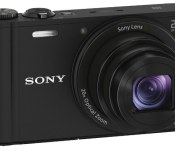
Sony debuts three superzooms and two compact Cyber-shots for CP+

Sony announced but one camera at CES, an entry-level mirrorless interchangeable-lens model called the Alpha 5000. With CP+ gearing up just outside Tokyo, however, it’s time to lift the point-and-shoot floodgates. There are three superzooms and two pocketable cams on the docket this year, in addition to the brilliant A6000. The HX400V and WX350 are arguably the most compelling offerings in each category, and they’re joined by alternatives that should appeal to a broad range of consumers — the H400, the H300 and the (relatively) petite W800. All but that last model include 3-inch LCDs (the W800′s display is 2.7 inches), but the similarities end there.
The HX400V ($500) features a 20.4-megapixel CMOS sensor, an f/2.8-6.3, 24-1200mm (50x) lens with OIS, a top sensitivity of ISO 12,800, a 10 fps burst mode, 1080p video and 4K still image output. There’s GPS, WiFi and NFC, a BIONZ X processor under the hood and a Multi Interface Shoe for connecting a variety of Sony add-ons. The H400 ($320), which shares a nearly identical model name, falls a bit short on the spec front. There’s a 20.1MP CCD sensor, an f/3.4-6.5, 24.5-1543mm (63x) lens with OIS, a 3200 top ISO, a 0.8 fps burst mode and 720p video capture. The H300 ($220), meanwhile, sports a 20.1-megapixel CCD sensor, an f/3-5.9, 25-875mm (35x) lens with OIS, a top ISO of 3200, a 0.8 fps burst mode and 720p video. That model runs on four AA batteries, while the other four are powered by Lithium-Ion cells.
Moving on to the compacts, the WX350 ($320) shares the BIONZ X processor of its larger sibling, the HX400V. There’s an 18.2-megapixel CMOS sensor, an f/3.5-6.5, 25-500mm (20x) G lens with OIS, a top sensitivity of ISO 12,800, a 10 fps burst mode, 1080p video capture and 4K still image output. It sports WiFi and NFC connectivity, and can fire off 470 shots on a single charge. Finally, if you’re on a very tight budget, the W800 ($80) covers the basics with a 20-megapixel CCD sensor, an f/3.2-6.4, 26-130mm (10x) lens, a top sensitivity of ISO 3200, a 1 fps burst mode and 720p video capture. You can pick up that model in March, along with the HX400V, H400 and WX350, while the H300 is expected in stores later this month.
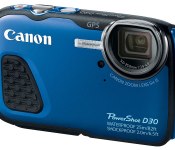
Head 82 feet below the surface with Canon’s waterproof PowerShot D30

It’s a very busy CP+ for Canon. The camera maker has a handful of new models for the show, including one of the waterproof variety. The PowerShot D30, which replaces 2012′s D20, boosts the waterproof rating from 33 feet to 82 feet, making it a suitable choice for all but the deepest scuba dives. There’s a 12.1-megapixel CMOS sensor, a DIGIC 5 processor and support for 1080/30p video. The 5x 28-140mm lens isn’t as fast as we’d like for dim underwater shoots, with an f/3.9-4.8 maximum aperture, but with the ISO bumped up a bit, it should perform decently. You can frame shots on the 3-inch 461k-dot LCD, which sports a sunlight mode for use in brighter conditions. The camera is shockproof and cold-resistant as well, and while there’s no WiFi on board, it does include GPS. The PowerShot D30 is expected in stores by mid-April with a $330 MSRP.


Canon PowerShot SX700 HS ships in March with 30x lens, WiFi, $350 price tag

In the market for a compact superzoom? Canon’s new PowerShot SX700 HS is definitely worth a look. This SX280 HS replacement includes a 16.1-megapixel CMOS sensor paired with a DIGIC 6 processor, an f3.2-6.9 25-750mm (30x) zoom lens and a 3-inch 922k-dot LCD. The camera’s small enough to tuck away in a jacket pocket, but it still includes a new extended hand grip on the front, making it comfortable to hold with the lens extended. It also supports 1080/60p video capture, and has WiFi and NFC on board, for remote app controls and wireless uploads to the web. Expect the SX700 to hit stores next month in black and red for $350.

Meet Canon’s latest budget PowerShots, a trio of ELPHs

Canon’s higher-end PowerShot cameras are certainly more compelling, but they’re also expensive. If you’re on a budget, you might want to settle for one of these ELPHs. Canon is introducing three new models this week, including the ELPH 150 IS, 140 IS and 135 — they’re priced at $150, $130 and $120, respectively. The latter duo replace the A2600 and A2500, while the 150 is a new addition to the lineup. That model includes a 20-megapixel CCD sensor, while the other two feature 16-megapixel CCDs. All three have DIGIC 4+ processors and 2.7-inch 230k-dot LCDs. They also shoot 720p video, which should certainly suffice for casual web use. The pricier two models include optical image stabilization — in fact, the 140 IS and 135 are identical, save for the 135′s lack of OIS. Those two include 8x optical zoom lenses, while the 150 IS packs a 10x zoom. All three cameras are scheduled to ship later this month.
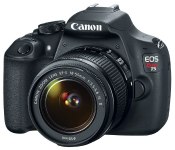
EOS Rebel T5 is Canon’s cheapest DSLR, priced at $550 with 18-55mm lens

If you’re on a tight budget and looking to buy a DSLR, we might suggest you consider a mirrorless camera instead. But if you’re dead set on building out your EOS lens collection, Canon’s Rebel T5 is at least a more capable choice than its predecessor, the 2011-era T3. This year’s model includes an 18-megapixel APS-C CMOS sensor, a DIGIC 4 processor, a sensitivity range of ISO 100-12,800 and 1080/30p video capture. There’s also a 9-point AF system and 3 frames-per-second continuous shooting — generally not much to write home about, but as a starter cam it’ll do just fine. The T3i will remain for sale, and can be had for $509 including a lens over at Amazon. The T5, for its part, is set to retail for $550 including an 18-55mm f/3.5-5.6 kit lens, or $450 for the body only. Expect to see it in stores next month.

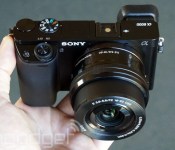
Sony’s A6000 is the mirrorless camera you’ll want to own, ships this April for $800 with lens

Well, Sony’s really done it this time — your still-crisp NEX-6 may now be marked for an early retirement. The A6000 is here to replace one of 2012′s most exceptional shooters, and despite the NEX-6′s success, this fresh 2014 model is the one to own. There’s a brand new 24.3-megapixel CMOS APS-C sensor paired with a BIONZ X processor at the core, enabling what Sony’s calling the “world’s fastest autofocus.” We’re talking lag of just 0.06 second, thanks to the 179 phase-detect and 25 contrast-detect AF points. You also get 11 fps continuous shooting with tracking AF. Those focusing improvements are most notable in our book, but the price drop is surely worth a mention, too. The A6000 will ship for $800 with a 16-50mm power-zoom kit lens, compared to the $1,000 Sony was commanding for the NEX-6 back in 2012.
Like other recent Alpha CSCs, the A6000 includes an OLED viewfinder with 100-percent frame coverage and a tilting 3-inch 921k-dot LCD. You have two interface options here: the love-or-hate-it six-tile NEX menu that dates back to 2010 with the NEX-3 and NEX-5, or the recently refreshed tab-style Alpha UI, which we prefer. There’s a pop-up flash, a Multi Interface Shoe, 1080/60p and 24p video capture with clean HDMI output, seven customizable buttons and 4K still image output to a compatible TV. Like its predecessor, the A6000 also includes WiFi and NFC, so you can shoot via the Android or iOS app, or transfer images from the camera to a smartphone or tablet. You also get a handful of apps on the camera itself, ranging from the free Direct Upload (for sharing images online) and Photo Retouch applications, to a few that you’ll need to purchase, such as Time-lapse and Lens Compensation (for minimizing lens distortion).
We had a few minutes to check out the A6000 ahead of CP+. We poked around the new interface, which we found to be a refreshing change from the NEX format of yesteryear. The A6000 is actually noticeably larger than the NEX-6, but not significantly so. The design aesthetic is similar, though the newer model has a slightly more premium look and feel than its predecessor. There are separate dials for shooting mode and settings adjustments, compared to the two-in-one control on the NEX, but the button layout is quite similar otherwise, and if you’re familiar with previous NEX cameras, you should feel at home here. You can try one out for yourself at retailers this April, or peruse our hands-on shots in the gallery below.
 AIVAnet