


Verizon and Samsung acknowledge Galaxy S5 camera bug, offers device Exchange
Both Samsung and Verizon are acknowledging that there is a camera bug that is floating around the Galaxy S5 that causes a “Warning: Camera Failed” message to appear. Samsung let The Verge know in an official statement that they are aware that a “limited number” of devices are experiencing the issue.
 Samsung says that anyone that is having this problematic situation can contact them at 1-888-987-4357 or visit a carrier store for an exchange. Verizon took to Twitter to saying people can contact them at @VZWsupport to resole the issue and that they will replace the device if needed.
We assume that other carriers are following suit since it seems to be a Galaxy S5 issue, not just a Verizon branded issue.
As of right now there isn’t a specif reason for the failure, but once the warning hits your device you are SOL for any photos as it renders the camera useless. If it is a hardware issue that will put Samsung on a pretty slippery slope with no other choice but to keep exchanging devices for ones that you hope will work. If it is a software glitch, then they have a chance to prevent it from costing them and the carriers a lot of money. Since Samsung is one of the remaining OEMs to not release their camera app to the Play Store, a full fledged OTA would be the only solution.
Anyone out there have the “Warning: Camera Failed” message bug ruin their memories?
Source: The Verge via AndroidandMe
//<![CDATA[
ord = window.ord || Math.floor(Math.random()*1E16);
document.write('’);
//]]>

Verizon Samsung Galaxy S5 cameras are failing spectacularly

Well, this is embarrassing: the Samsung Galaxy S5 has only been on the market for two weeks, and it’s already developed a major fault — at least for Verizon customers. “Warning,” the devices reads. “Camera failure.” The camera module appears to be failing outright, with no hope of being revived. Users have tried restarting their camera apps, rebooting devices and even performing factory resets, but nothing works. For now, the only working fix seems to be replacing a device, but some users are still holding out for a software fix.
Fortunately, Verizon and Samsung are both being fairly candid about the issue — both companies have acknowledged the faulty camera and are asking customers to contact support for troubleshooting and warranty replacements. Most of the failed devices seem to be coming from Verizon specifically, but BGR says it’s seen similar reports from Sprint customers, too. Have a faulty device? Skip past the break for Samsung’s official response and customer service instructions.
Samsung is committed to providing the best experience for customers. We have learned that a limited number of Galaxy S 5 devices may have an issue that causes “Camera Failure” pop-up error message. We ask that customers affected call 1-888-987-4357 or visit their carrier for service under Samsung’s standard limited warranty.
Galaxy S5 customers who see “Warning: Camera Failed” please contact @VZWsupport & we’ll work to resolve it, including replacing the device.
– Verizon Wireless (@VZWnews) April 25, 2014
Filed under: Cellphones, Verizon
Via: GSMArena, BGR, PhoneArena

Leica’s T mirrorless camera is built from a solid brick of aluminum
Leica‘s been making cameras for a full century this year, and to celebrate, it’s just now getting around to releasing an interchangeable-lens camera that you might actually be able to afford… until you factor in the glass. Priced around $1,850 (without a lens), the T looks like a camera that you might want to own. Its core is chiseled from a solid brick of aluminum, resulting in a beautiful body (that’s equally durable). There’s a 16-megapixel APS-C sensor, a 3.7-inch high-res touchscreen, a 12,500 top ISO, 1080p video capture, a 5 fps continuous shooting mode and a pair of top-mounted control wheels for adjusting exposure. There’s also integrated WiFi, and you can pop on an optional electronic viewfinder, if that’s your thing.
Of course, since there’s a new lens mount, you’ll need to add on a $395 adapter to use your M-mount glass. Or you can buy one of two T-mount lenses: an $1,750 18-56mm f/3.5-5.6 zoom or a 23mm f/2 prime lens that’ll retail for around the same price. Leica’s also planning to show off 11-23mm and 55-135mm zoom lenses at Photokina this September, so you’ll be able to drop a few more grand to complete your set sometime soon. A silver version of the camera is expected to hit stores next month, while a black model should be available in early August. Hit up our friends at DPReview for some early impressions of the Leica T (spoiler alert: they really seem to like it).
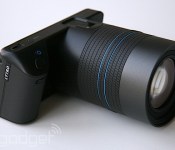
Lytro’s new light-field camera looks like an actual camera, costs $1,599

If Lytro’s first camera offered us a sneak peek at the promise of light field photography, the company’s second-generation product swings those doors wide open. A far cry from the toy-like appearance of its predecessor, the $1,599 Lytro Illum looks and feels like a genuine full-fledged camera meant for a more professional crowd. The innovation doesn’t stop at just looks either, as the Illum is a much more serious effort at light field photography, with cutting-edge optics, a larger sensor and a whole lot of computational power that might make the Illum the most technologically advanced camera to land in consumer hands.
When Lytro first introduced its light field camera two years ago, it shook up not just the world of photography, but of technology in general. Bundled inside a tiny rectangular block was a groundbreaking image sensor that could capture millions of rays of light along with their color, intensity and direction — a task that previously required hundreds of cameras and a supercomputer. That hardware combined with some complex software meant that you could not only get a 3D image from a single shot, but also the ability to refocus a photograph after you take it. It’s this latter trick that is arguably the Lytro camera’s most identifying characteristic, and the one that put it on the technological map.
Fast forward to 2014 however, and there are now several smartphones that can imitate this refocusing trickery, albeit via software and some clever workarounds. Nokia’s Refocus app, for example, snaps several photos in a row with varying depths of field and is then able to suss out focus after the fact. Others, like LG’s G Pro 2 and Samsung’s Galaxy S5 utilize software to blur out photos. Indeed, all Android phones with 4.4 KitKat and up can fake a bokeh thanks to a new Lens Blur option in Google’s default camera app. Rather than being upset by this phenomenon, however, Lytro sees it as a positive sign. Lytro CEO Jason Rosenthal and founder Dr. Ren Ng tells us they’re flattered and humbled by the fact that their technology has been emulated by some of the “largest, most powerful consumer electronics in the world.”

Thankfully, however, refocusing is hardly the only benefit light field photography brings to the table. “Light field photography is about capturing the richest information, fundamentally richer than we’ve ever had” said Ng. “This is so we can bring a whole new set of capabilities that were impossible before, because we can turn physics into software.” This means, Ng said, that they can now entrust once physical characteristics of cameras entirely to computation.
It is this capability that’s being introduced for the first time in the Lytro Illum and it’s been applied to the lens itself. What do we mean? Well, a classic Canon camera lens that has a zoom range of 70 to 200mm has about 22 pieces of glass. The Illum lens, on the other hand, has a zoom range of 30 to 250 mm with a very wide f/2 aperture across it — and only has 13 pieces of glass. That same Canon lens would likely weigh around eight pounds. The entire weight of the Illum? About a pound and a half. According to Ng, that’s because in the Canon lens, “a lot of the glass is used to work correcting aberrations in light. It needs the curvature of the light to make the photons land on the sensor to form the image that you want.” With the Lytro’s unique image sensor, however, it’s able to figure out the direction of the light ray using computation and software instead.

“It’s thinner, lighter, and it has a bigger zoom range and a bigger aperture than you could’ve ever gotten conventionally,” said Ng. “We’re doing in software what physical pieces of glass had historically had to do.” Ng added, “To design something like this with a conventional camera would essentially be impossible.”
And what a design it is. The Lytro Illum looks like something out of a museum or a designer piece from a Parisian fashion house. It’s a sleek and stylish thing, with a unibody magnesium chassis that’s attached to a gorgeous anodized aluminum lens barrel equipped with both zoom and focusing rings. The grip and aforementioned rings are wrapped in what appears to be silicone rubber, which is supple enough to be kind to our hands and fingers. Over on the top right by the grip is a large shutter button along with a Lytro button that offers a visual depth assist histogram (more on that later). Rounding out the physical controls are two adjustable dials (they default to setting the exposure and the ISO, but you can customize them), lock buttons for both autofocus and autoexposure and a couple of other programmable keys. Sitting atop the camera is a hot shoe that’ll fit any standard flash, while the SD card slot and USB 3.0 port are on the left side in a hidden compartment. The Illum has built-in WiFi for wirelessly transmitting those living light field images to Lytro’s servers, your desktop, or directly to your iOS device.
If you’re wondering why there’s a focusing ring on a camera that lets you refocus the image after the fact, well, it’s because depending on the depth of field, there might not be a lot of difference between the foreground and the background. If you turn on the Illum’s depth assist histogram, however, you’ll be able to see a depth overlay that color codes things that are up close and in the refocusing range in green, and things that are at the far edge of the range in orange. Ideally, what you want is a nice gradient of green to orange for the most amount of depth and maximize the drama in your shots.

What’s perhaps more astounding than the camera’s chassis, however, is the 4-inch touchscreen on the back. As we know, most DSLRs have a rather incomprehensible user interface for most camera newbies. The number of buttons and dials that you have to remember can be quite complicated, which is a stark contrast from the camera apps on most tablets and smartphones. Lytro, however, has taken a cue from those apps and have integrated that same simplistic usability approach to the interface on the Illum. All you have to do is tap on an image to autofocus, and toggling through the different settings is just a touch and a scroll away. Rosenthal tells us they’re still working out the kinks in the software, but right now it looks like you can change the artificial horizon, adjust the grid, switch from continuous to single shooting mode, set a self timer and change between Program, ISO, Shutter and Manual control.
On top of that, the entire touch screen is actually angled slightly so that the screen faces you when you hold the camera to your waist. “We think a new shooting style should naturally evolve,” said Rosenthal. “We’re so used to holding the camera to our face, or holding it away from us — we think that a natural evolution would be to hold the camera around hip height.” If you want to adjust the screen even more, however, you can actually pop the screen out and articulate it to even more angles. If you’re into selfies, however, you’re out of luck as the display doesn’t actually swivel all the way around.
At the heart of the Illum is a giant 40 Megaray light ray sensor, which means it’s able to capture 40 million rays of light (in contrast, the original only has 11 Megarays). This gives it about four times the area size, with a lot more light capture efficiency and more pixels and resolutions to play around with. The refocusing, for example, is much finer and more granular — we were able to focus in so tight on a labrador’s nozzle that we could see its pores. In addition, the Illum has a mechanical shutter with a speed of 1/4000ths of a second, which Rosenthal says would make it great for sports photography. He showed us an example of a Lytro image where it captured a cloud of dirt as a motorcycle went around a dirt track. If you’d rather shoot things up close, the Illum has an extremely close-up macro capability as well, allowing us to zoom in really close on a pair of jeans and hone in on the stitches. Powering it all is one of the highest performance chipsets available; Qualcomm’s Snapdragon 801, which is incidentally in Samsung’s new Galaxy S5 as well as the HTC One M8.

Of course, all images on the Illum are captured in the same light field format as before, and you’ll need to use Lytro’s own software to process them. You get all of the same software tricks as before, like 3D imaging and post-shot refocusing, but you’ll also now be able to adjust the depth of field in order to widen or narrow the focusing area. Additionally, Lytro has worked out a deal with Adobe and Apple so you can transfer those images to Lightroom, Photoshop or Aperture if you wish to work on them after you’ve adjusted the image’s focus and depth of field to your heart’s desire.
More than just taking a good photo, however, Rosenthal and Ng believes that light field photography allows for living art. It’s one of the reasons Lytro is also introducing something called Light Field Animations, which are video-like capabilities that essentially animate the effects of image refocusing. “If you think of how pictures work today online, it’s as if we took our parent’s photo albums, ripped out the 4 by 6 prints, and just shoved them up on the web,” said Ng. “We’re on this long term journey of taking these advanced hardware and software capabilities to just make storytelling and photography more immersive, more interesting and more interactive.”
As for who’s the target audience for the Illum, Rosenthal and Ng says that they’re aiming for a group of people they’re calling “creative pioneers.” These are people who’ve embraced the original Lytro for its unique capabilities, of course, but also folks who are willing to take a chance at a new way of looking at photos. The ideal audience for the lllum is someone who’s probably already well-versed in photography, but Rosenthal and Ng say the camera should also be simple enough for the curious amateur as the next step up from smartphones and point-and-shoots. In order to demonstrate this, Lytro has given an early version of the Illum to a group of professional photographers whose work you can see in the album above.
When asked if Lytro plans on selling the technology to a third-party camera manufacturer like a Canon or a Nikon, Rosenthal simply replied: “What we want to do, is focus on the transition from digital to computational. We want to deliver the most outstanding end-to-end consumer experience, so that they can pick it up and go ‘Wow’.” However, he did hint that there might come a time when light field will dominate as an imaging medium “that’ll enable other people to build cameras” similar to theirs, but “that time is still a ways from now.”
The Lytro Illum will be available starting July 15th for $1,599, which sounds expensive, but the closest professional camera with a similar lens will likely cost thousands more. And if you pre-order before that date, you can snag one for the introductory price of $1,499.
“If Camera 1.0 was film-based, and Camera 2.0 was the transition from film to digital, we’re at Camera 3.0. It’s about collecting very rich information about the world,” said Rosenthal. “We’re only just getting started. We can do much much more in the future.”
Filed under: Cameras
Source: Lytro

Optical zoom tipped to hit HTC handsets in 2015

Like most companies in the smartphone game, HTC wants to pack its top-of-the-range devices with powerful camera tech, and that’s no longer just a case of adding more megapixels. The new HTC One (M8), for instance, hosts a pair of Ultrapixel cameras on its rear that allow you manipulate depth-of-field, among other special features. Talking with UK carrier Vodafone on HTC’s roadmap for camera tech, imaging guru Symon Whitehorn claimed “we could be 4K ready now,” if it actually made sense to do so (burn, Sony). Whitehorn also mused that with phones well on their way to making point-and-shoot cameras obsolete, we could see performance encroach on DSLR territory within two years. To make that happen, however, handsets need to incorporate optical zooming, which according to Whitehorn “is not too far off at all for HTC.” He wouldn’t “give too much away,” he said, “but within 12-18 months we’ll see huge advances in phone optics.” If HTC is indeed this close to adding optical zoom to it camera tech repertoire, let’s hope it can keep things classy — something previous attempts have universally failed to do.
Filed under: Cellphones, Cameras, Mobile, HTC
Source: Vodafone

Toshiba’s ultra-fast microSD cards will let you shoot like a pro with small cameras

It’s easy to find fast storage if you have a big camera, but not so much if you have a very tiny mirrorless cam that uses microSD cards — more often than not, you’re stuck in the slow lane. You won’t be held back for much longer if Toshiba has its way, though. The company has just revealed the first-ever microSD cards to meet the speedy UHS-II spec, giving them the same performance as the quickest full-size SD storage — and up to eight times the write speed of Toshiba’s earlier microSD lineup. Data reads, meanwhile, are nearly three times faster.
The upgrade should help even smaller cameras and smartphones shoot burst photos as quickly as some pro hardware, and 4K video recording will be relatively pain-free. Toshiba is only providing samples of 32GB and 64GB cards to chip and gadget makers at this stage, and you’ll need to check that whatever device you get supports UHS-II before you splurge on the newer flash memory. However, it shouldn’t be long before you can get truly rapid-fire photography from a device that fits in your pocket.
Source: Toshiba

Install the Nokia X camera on your Android 4.1+ device

Whilst the Nokia X wasn’t exactly the flagship high-end spec’d out Android device we were hoping for from Nokia, the camera that is bundled with the device has some pretty nice settings, and we all know Nokia can make a pretty good camera (app).
If Google’s own camera app doesn’t quite do it for you, then the guys over at XDA Developers have managed to port the Nokia X camera software to pretty much any Android device running version 4.1 (Jelly Bean) or better.
These settings that the Nokia X camera app features include: ISO sensitivity control, the ability to display a live intensity histogram, configurable noise detection, redeye reduction, anti-banding, and more.
What’s more is you don’t even need ROOT access. Think this is something you fancy trying out? Download the file from here and install it on your Android device. Let us know what you think in the comments below.
The post Install the Nokia X camera on your Android 4.1+ device appeared first on AndroidGuys.

Eyefi’s new service sends your camera’s photos to the cloud as soon as you shoot

There are plenty of cameras that send their photos to your phone, but you frequently have to transfer those pictures yourself — and it’s another hassle to get the pics to other devices. Eyefi thinks it can solve these headaches by launching its own online service, Eyefi Cloud. If you’re using one of the company’s WiFi-equipped Mobi cards in your camera alongside new Android and iOS apps, any photos go both to your mobile device and Cloud right after you’ve hit the shutter button. You only need a browser to manage your shots, so you’re not stuck if you want to see your photos on a new PC.
Cloud costs $49 per year for an unlimited number of uploads, so it’s potentially superior to auto-syncing storage services like Dropbox or Google+ if you take a lot of snapshots. Don’t worry if you’re hesitant to pay up front, though. You’ll get three months of free service just by grabbing the app and signing in. The necessary Mobi cards start at a relatively high $49 for an 8GB model, but you may not have to worry about capacity now that there’s an easy way to back up images before you get home.
Filed under: Cellphones, Cameras, Storage, Internet, Mobile
Source: Eyefi

Google releases standalone camera app to the Play Store

It has been a trend for companies to put their standalone apps in the Play Store for quick updating. Google usually does this type of thing with all of their apps. One, however, has never been included in the Play Store… until today. They’ve finally added their camera app to Google Play.
The camera comes with a much-needed interface update, as well as a few new features. It has a huge shutter button, as well as hideaway camera options. Perhaps the biggest new feature in the app is Lens Blur. It does essentially what the HTC One (M8) does, but with software.

To take a Lens Blur shot, take the picture like normal, but move the camera slightly upwards to collect a bit more depth information. It takes a little while to render, but after it’s done, you can change the focus of the photo and adjust the blur intensity. We’ve managed to get some pretty nice shots from the Lens Blur feature so far.
The camera is available for download on devices that are running Android 4.4 Kit Kat, so it’s not for everybody quite yet. If you meet the requirements, head to the Play Store for the download!
The post Google releases standalone camera app to the Play Store appeared first on AndroidGuys.

Google Releases Stock Camera App to the Play Store, KitKat+ Only Devices
Today is not only hump day, but it also the day the Google usually updates app. Some updates are minor, others are major. Then you have something totally unexpected. Not to long ago we let you all know that Google was working on releasing the stock Android camera app to the Play Store. The launch date was never mentioned, just that it was in the works. However, there is good news regarding the stock camera app today as Google has just released it.


 The release of the app also pushes an update out with it that moves the camera app to version 2.1.037. It brings along a new interface and some new features like lens blur mode, which gives you SLR-like photos with a shallow depth of field.
Google Camera snaps quick and easy photos and videos, and has creative picture modes like Photo Sphere, Lens Blur and Panorama.
Features
• Photo Spheres for immersive 360º views
• Lens Blur mode for SLR-like photos with shallow depth of field
• Panorama mode with high resolution
• 100% viewfinder for getting the maximum resolution from the sensor (no dropped pixels)
• Updated UI that gets out of your way and is centered on an extra large capture button
• Works on phones and tablets running Android 4.4+ KitKat
You will probably notice that final bullet point in the apps description.
 If you happen to be sporting a device that sports anything below Android 4.4 you won’t be allowed to install it from the Play Store. :0( We will get our hands on the apk and give it a run on a few devices anyways and see what happens.
Until then, if you sport a Nexus or another device on Android 4.4+, feel free to hit the link below and go give it a shot.

Getting the APK now by the way, will update with the links shortly.
//<![CDATA[
ord = window.ord || Math.floor(Math.random()*1E16);
document.write('’);
//]]>
 AIVAnet