


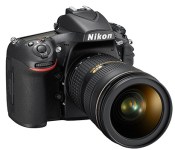
Nikon’s new D810 SLR favors evolution over revolution

It’s been two years since Nikon’s medium-format D800 and D800E SLRs hit the scene, and that’s just about an eternity for gadget nerds. What exactly has Nikon been doing since then? Well, aside from working on top-tier beauties like the D4 and D4S, it’s also been working on a proper successor to the D800 line. Surprise, surprise: it’s called the D810, and it’s about the sort of leap forward you’d expect from a modest model number jump.
Nikon didn’t reinvent the wheel as much as refined a formula that’s already served the company well. Consider the sensor at the heart of the affair: the ’810 sports a 36.3 megapixel sensor, but it’s a far cry from the ones spotted in its forebears despite the similar resolution. Nikon says it’s designed to produce sharper, clearer images, especially since it works in tandem with the company’s EXPEED 4 processing engine (which first debuted on last year’s D5300). Then there’s the fact that Nikon pulled out the optical low pass filter present in the D810′s most recent ancestor — the change means you’ll probably be able to squeeze even more nuance out of your shots, at the risk of possibly introducing moiré effects. Want more? Nikon has pumped up the ISO ceiling to 12,800 (or as high as 51,200 when you dip into Hi-2 mode), though we’ll see what sort of grain gets added to the mix.
Aside from those internal changes, the D810 is going to feel awfully familiar. The control cluster has been changed up a bit, and the 3.2-inch LCD has received a much-needed resolution bump. Alas, we’re halfway through 2014 and Nikon still decided against tricking this thing out with 4K video recording, though it’ll still handle 1080p footage at all the usual framerates. Interested? Who could blame you? Just be prepared to hear your wallet groan just a bit — the D810 will set you back a cool $3,300 sans lens when it hits store shelves some time this July.

GoPro cameras show what it’s like to endure a terrifying car crash

GoPro is trying to build a media empire by capturing moments that other video cameras sometimes miss, and it just might achieve that feat if its latest (and arguably most dramatic) footage is any indication. The company mounted its action cams in the car of Guerlain Chicherit hoping to catch a record-setting jump, but instead caught what it’s like to survive a horrifying crash. The clip is cringe-inducing, even if you’ve seen your fair share of in-car replays — Chicherit can’t do much more than prepare for the worst as his modified Mini tumbles end over end. He thankfully escaped with minor injuries, but the resulting movie is an especially stark reminder of just why stunt driving is so dangerous.
Filed under: Cameras, Transportation, Internet
Via: Huffington Post
Source: GoPro (YouTube)
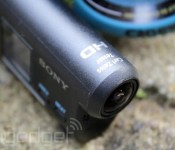
Sony Action Cams are ready to stream live internet video

Sony Action Cam owners: if you’re eager to share your sporting adventures with the world, your moment has come. The company has just rolled out a firmware update for the AS100V (installable on Macs or Windows) that lets you broadcast live video on Ustream, complete with social network alerts when you’re on the air. The higher-end camera also gets a new Motion Shot Mode that composites several photos into one, while burst shooting and self-timer modes are useful for both action-packed images and self-portraits.
You won’t get live streaming or high-speed photography if you’re using the more modest AS30V cam, but you’re not out of luck. It’s getting its own upgrade (available on Macs and Windows) that delivers multi-camera control through an optional remote, better automatic exposure and the use of WiFi without a memory card. Hit the source links if you’re ready to expand your cinematic repertoire.
Source: AS100V update (Mac), (Windows)

Autonomous camera drone lets you shoot your own action scenes

If you want to record a bike ride or some other adventure by yourself, you typically have to wear an action camera. Going that route is fine for a first-person view, but what if you want some more dramatic shots? That’s where Hexoplus’ crowdfunded Hexo+ camera drone comes into play. The robotic hexacopter captures aerial footage of your expeditions simply by detecting where you are (or rather, where your phone is) and following along — you only have to set a preferred distance. It’s fast (43MPH) and stabilized, too, so it should keep up even if you’re racing across hilly terrain.
Should you like the idea of starring in your own sports movie, you’ll need to pledge at least $499 if you want a Hexo+ and already have a GoPro camera on hand; $699 will get you both the craft and a camera. That’s a lot of money just to get yourself in the frame, but it might be worthwhile if it gives you the production quality you usually only see from a big studio. You’d better hope that the FAA gets its drone rules in order before Hexoplus’ planned May 2015 ship date, though. After all, you don’t want to get into a legal battle over your airborne magnum opus.
Source: Hexoplus, Kickstarter

Get features from the OnePlus One and CyanogenMod 11S on your device

It may be hard to come across an invite to buy the OnePlus One featuring the special edition CyanogenMod ROM, CM11S, but that doesn’t mean you can’t get some of the best features now.
The source code for the device has been released and a system dump has showed up online, so you can try out many of the apps, in addition to downloading the boot animation.
Over at XDA Developers forum, member iH8ra!n uploaded a system dump from CyanogenMod 11S build KVT49L_XNPH22Q, “a complete firmware dump of the OnePlus One” as well as some Nexus 4 compatible CM11S applications. iH8ra!n tested all of the apps on a Nexus 4, running the latest CM 11 nightly and said that all are working. It was also noted that you should be running a CM 11 build compiled on or after May 8, 2014.
Some of the apps include CameraNext, GalleryNext, Screencast, the Hexo theme (there are two APKs, one for the icons, the other for everything else such as the wallpaper, font, etc.) and the theme store, Theme Showcase. The app APKs are uploaded to Google Drive and can be downloaded here.
Not all of the apps worked on my Nexus 4 running the latest nightly, but the new CM camera is one that worked that’s pretty great and I’ve used the Hexo theme and GalleryNext.
If you would like to install the new Cyanogen boot animation, there are flashable .zip files at the source link below, as well as flashable zips for the apps if you would like to install them that way. Make sure when flashing the boot animation you download the right one for your device, according to your device’s screen resolution.
Although I wasn’t able to test them on another device, some may be able to be used on other devices, but that’s all up to you guys to try.
VIA: XDA


The post Get features from the OnePlus One and CyanogenMod 11S on your device appeared first on AndroidGuys.

Panasonic’s Lumix FZ1000 is a camera that wants to do it all

Since its beginnings, photo and video enthusiasts have been very fond of the GH4 camera. Now, as it looks to broaden its Lumix portfolio, Panasonic is introducing the FZ1000, a compact shooter that offers 4K (30fps) video-shooting capabilities to folks who may not want to spend too much money. Inside, there is a 1-inch, 20.1-megapixel “high-sensitivity” MOS sensor, paired with a 16x Leica DC Vario-Elmarit optical zoom lens. For $900, you’ll also get a 3-inch articulating LCD, WiFi features, a top ISO of 12,800 and a newly minted AF system which promises to “extremely fast focusing.” Panasonic says its Lumix FZ1000 is aimed at those wanting to shoot great pictures and video, but perhaps don’t have the need (or bank balance) for something as powerful as its $1,700 GH4. If you’re interested, the FZ1000 is set to go on sale late July.
Source: Panasonic
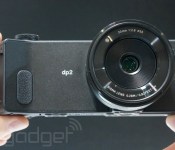
Sigma’s unique dp2 Quattro camera can be yours in August for $999

The dp2 Quattro is a strange looking camera. Its extra-wide design is quite unusual, but if Sigma’s CEO is to believed, the 29-megapixel shooter will deliver superior image quality thanks to its unique sensor design. The Quattro layers pixels in order to capture red, green and blue colors vertically — there’s no need for interpolation, resulting in shaper, more vibrant photos. The company claims that the dp2 can output an equivalent of 39 megapixels, based on tests that pit the chip against traditional sensors. The dp2 is expected to ship in early August for $999, including a fixed 30mm (45mm equivalent) f/2.8 lens. Pricing info for the dp1 and dp3, which come with permanently attached 19mm and 50mm lenses, respectively, is not yet available.
Filed under: Cameras
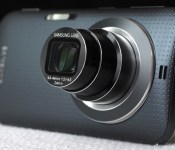
Galaxy K Zoom review: Samsung’s best cameraphone yet

Samsung is on a mission to build the perfect cameraphone. Low-quality fixed lenses and tiny smartphone sensors are clearly insufficient for photography enthusiasts, but while you always bring your phone to parties, sporting events and trips to the zoo, it’s often impractical to haul along a dedicated camera as well. The Galaxy K Zoom is Samsung’s response to this dilemma, marrying a 10x optical zoom lens with an otherwise ordinary Android handset. It’s hardly the best camera, or the best smartphone, but if you’re willing to make some compromises, this may just be the most compelling option yet.
Hardware

Last year’s iteration, the Galaxy S4 Zoom, was significantly underpowered, making for a generally unpleasant experience. The hybrid felt sluggish regardless of whether you were trying to take a picture, surf the web or make a phone call — it was a weak performer through and through. Fortunately, the K Zoom represents a step up from its 2013 predecessor. It’s hardly on par with the Galaxy S5 or flagship phones from other manufacturers, but it’s an improvement nonetheless. So if you’re looking to step up to a faster device with a similar feature set, you’ll get that here.
That said, you could certainly do better than the K Zoom in the sub-$700 price range. Samsung cut corners on specs in order to keep costs in check, and it shows. The device is powered by what the company’s calling a hexa-core processor, pairing a quad-core 1.3GHz Cortex-A7 with a dual-core 1.7GHz Cortex-A15 to make up Samsung’s Exynos 5 Hexa chipset. That sounds really great, doesn’t it? In practice, though, the device still feels sluggish, as I’ll explore further in the performance section below. You also get 2GB of RAM, 8 gigs of internal storage and support for up to 64GB microSD cards, which you’ll definitely need to add in if you plan on taking advantage of the photo functionality.
Also lacking is the 4.8-inch Super AMOLED display. It sports a 720p resolution, which just doesn’t quite cut it in this day and age. The screen size is adequate, and the smaller footprint does help to keep the K Zoom pocketable despite its rear-lens bulge, but Samsung really should have included a 1080p display here. Still, it’s a major step up from the S4 Zoom’s 4.3-inch, 960 x 540 panel, which, quite frankly, was an incredible disappointment. This year, details look sharp and the screen is bright enough for adjusting settings, verifying focus and reading text even in bright light, but there’s definitely still room for improvement.

Design-wise, the K Zoom has a slightly more premium look and feel than its predecessor. It’s clearly a hybrid of the Galaxy S4 and S5, with a front that’s more akin to the former and a removable, plastic back cover that’s nearly identical in appearance to what you get with Samsung’s 2014 flagship. It’s an attractive mash-up, no doubt, but it definitely lacks the high-end appeal of the HTC One M8, for example. Whereas the S4 Zoom looked more like a camera than a smartphone, with a pronounced grip on the rear, the K Zoom more closely resembles a phone. In fact, until you flip it around to reveal the lens, it looks like a slightly thicker Galaxy S4.
As for the hardware layout, there’s a home button below the display; a dedicated shutter button, power toggle and volume rocker on the right side; a headphone jack on the top; a micro-USB connector on the bottom; and a microSD slot on the left side. The microphones are positioned on the left and right of the K Zoom when held horizontally and, just as with the GS4 Zoom, they’re arranged in such a way that they can be easily blocked depending on your grip. The 10x, 24-240mm f/3.1-6.3 lens is positioned on the back, along with a slim, horizontal flash. Finally, there’s a 2,430mAh battery behind the removable cover with a micro-SIM slot underneath.
Software and user interface

The K Zoom ships with Android 4.4.2 (KitKat) and Samsung’s TouchWiz interface. I tested a model that’s being sold unlocked in Taiwan, so there are no carrier apps to speak of. You do get Samsung staples like S Voice and Dropbox pre-installed, and you can download more through Samsung Apps. Navigating the phone portion of the K Zoom was a breeze — the device is clearly powerful enough to handle basic tasks without issue, though I did run into some hiccups when using the camera.
You can launch photo mode by sliding the camera icon from the lock screen, by pressing down on the shutter release for one second or by opening the app directly. The three-tiered lens extends immediately, effectively doubling the K Zoom’s thickness at the widest focal length. You can zoom using the volume rocker (left to zoom in and right to zoom out), by pinching on the touchscreen or by using the on-screen zoom toggle. I found the first option to be most effective for still photos, while tapping the screen minimized shake when capturing video. The pinch-to-zoom option was the least precise of the bunch.

The camera includes a variety of shooting modes, including Auto (the default), Pro Suggest (which recommends a selection of filters depending on the scene), Program, Beauty Face, Shot and More (for burst shooting), Panorama, HDR, Night, Continuous Shot and Selfie Alarm (it automatically snaps a shot when it detects your face in the frame). There’s also an option to add more modes though the “Manage Modes” panel. Here you can choose from Kids Shot, Macro, Light Trace and Sunset, just to name a few.
There’s also a mode called Virtual Tour, which creates a walking photo tour of your surroundings. I could see this being useful for realtors and the like, but with poor in-camera stitching, the results are hardly professional. You even get a “Manual” mode, which lets you select the ISO, shutter speed and aperture, though oddly you’re only able to choose from the largest or smallest aperture available — nothing in between.

A main camera settings page enables more granular options. Here you can select the resolution, aspect ratio, compression quality, white balance, focus, drive mode, timer, flash mode (also accessible from the main shooting screen) and image effects. You can also activate geotagging, which tags each image with your GPS coordinates while also adding the nearest street to the filename, making it easy to identify shots from a specific location on the fly.
Camera and image quality

Let’s assume you’re buying the K Zoom because you like to take pictures. Besides the 20.7-megapixel, 1/2.3-inch sensor, which is on par with many lower-end point-and-shoots, the phone offers one distinguishing feature over similar handsets: a 10x optical zoom lens. You get less than half the range of the Galaxy Camera 2, which includes a 21x lens, but the 24-240mm range is still plenty generous, and far more versatile than what you’ll get on any current mainstream smartphone. That lens will let you zoom in very close to your subject, making for much more interesting Facebook posts and Instagrams.
Speaking of Instagram, you still can’t zoom directly from within the app. When we spoke to Samsung reps following the launch of the first Galaxy Camera, we were told full compatibility was on the way. That was nearly two years ago, so it’s probably safe to assume the tried-and-true method of capturing a photo first and then pulling it up in the Instagram app is going to be your only option for the life of this device. It’s hardly a dealbreaker, but considering instant social sharing is part of the K Zoom’s appeal, it’s disappointing nonetheless.
Getting into photo mode is also quite a hassle. Other cameras are ready to start shooting as soon as you hit the power button, but the K Zoom defaults to the home screen. Of course, you’ll probably be using this primarily as a phone, so that would be our preference too, but it does add a few seconds between when you decide you want to take a picture and when the camera’s ready to capture. If you’re looking to photograph a quick-moving subject, you’ll probably miss the shot. For selfies (there’s also a front-facing camera), shots of your food and the like, that’s not the end of the world, but considering it could take five seconds or longer just to snap an image, you’re bound to find this inconvenient at some point.
That brings me to another annoyance. The K Zoom defaults to a 16:9 aspect ratio, matching the phone’s display. Shots fill the screen entirely, which looks most natural on the device. But when you go to share photos or view them on a computer, you’ll probably be a bit frustrated, as I was after a few hours of shooting in the wrong format (as you’ll see in some samples below). At 15.1 megapixels, 16:9 photos also don’t take full advantage of the 4:3 sensor. You’ll need to switch into that mode to capture at the full 20 megapixels. There are also options to shoot at 3:2 (17.9MP) and 1:1 (8.3MP), if you prefer. For video, you can choose from 1080p at 60 or 30 frames per second, 720p at 60 or 30 fps or VGA.
Not that video is the K Zoom’s strong suit. Video quality is generally rather poor, particularly at longer focal lengths, where the absent image stabilization would have come in handy. You can tap to focus and expose, as you can when capturing stills, but brightness levels were often exaggerated, depending on the scene. Additionally, the camera reduces the microphone volume slightly whenever you zoom in or out, likely to avoid capturing sound from the lens motor. It’s effective in that regard, but the result is noticeably inconsistent audio.
Image quality is also hit or miss. Because of the large maximum aperture range, the lens performs much better at the wide angle than when you’re zoomed all the way in. The result is much sharper images at 24mm than you’ll get at 240mm, particularly when you’re shooting indoors, at night or on a cloudy day, as I did on my trip to the Taipei Zoo. The K Zoom’s biggest asset is its zoom lens, but image quality will definitely suffer if you try to take full advantage.

Assuming you plan to share images on social media straight from the camera, you’ll probably use the K Zoom to capture your food. Generally, the food photos I captured were properly exposed with good color balance (often a challenge in dim restaurants) and reasonable sharpness. Shooting in Auto, the camera opted for an exposure of f/6.0 and 1/32 second with a sensitivity of ISO 400. The image is mostly noise-free at a wider view, so it should be fine for sharing, though noise is clearly visible in the 1:1 inset.

The first few images I captured, including this one, the one above and the one below, were shot at the K Zoom’s default aspect ratio of 16:9. You can switch to a more common ratio very quickly through the settings menu, though, which I’d definitely recommend if you plan on sharing your photos. The image is roughly 1/2 stop underexposed, at f/4.9 and 1/20 second with a sensitivity of ISO 125. Text is legible, though you can see some artifacts in the 1:1 inset.

I switched over to Program mode for this shot, manually adjusting the sensitivity to ISO 3200 in order to capture sharp details in a dim room with a focal length of 240mm — in Auto, this f/6.3, 1/80-second capture would have been a blurry mess. The camera’s noise reduction filter stepped in here, effectively removing some noise, but flattening details in the process.

Typically, the K Zoom will top out at ISO 400 when you’re shooting in Auto mode, regardless of whether or not the situation requires a higher sensitivity. Details are surprisingly sharp in this f/4.4, 1/18-second handheld exposure, though noise is clearly visible in the 1:1 insets.

A 1/40-second exposure (at f/6.3) was clearly insufficient for this handheld shot at the camera’s maximum focal length of 240mm. Additionally, the K Zoom overexposed the scene slightly, washing out details in the trees in the background and the bear in the foreground. At ISO 160, noise is visible in the 1:1 inset, and details are soft due to blur. Image stabilization would have been a huge asset here.

This f/6.3, 1/40-second image is very slightly overexposed, with few washed-out details. Colors are accurate and details are reasonably sharp, with artifacts visible only in the 1:1 inset. The camera opted for a sensitivity of ISO 125 for this capture — noise is only barely visible when viewing the shot at 100 percent.

This is one of the K Zoom’s most successful captures. It’s properly exposed at f/4.7 and 1/90 second, and a sensitivity of ISO 100 helped to minimize noise, even when viewed at a 1:1 ratio. Colors are accurate and details are perfectly sharp for sharing on social media.

This final frame, also at ISO 100, was captured at f/4.6 and 1/54 second, yielding sharp details. Some elements are slightly overexposed, such as the man’s white shirt and the Chinese portion of the Taipei Zoo sign, but the vegetation is spot-on, with accurate colors throughout.
Performance and battery life

The K Zoom is hands-down a better camera and a better smartphone than the Galaxy S4 Zoom. Performance is significantly improved — the K Zoom is definitely in an entirely different class. It’s not, however, anywhere near as capable as flagship smartphones like the Galaxy S5, LG G3 and HTC One M8. Not that it needs to be. The Zoom handles basic tasks and apps with ease, and while it’s sluggish in camera mode at times, the biggest performance-related issue has to do with battery life.
| Galaxy K Zoom | Galaxy S4 Zoom | LG G3 | |
|---|---|---|---|
| Quadrant 2.0 | 14,633 | 4,828 | 25,548 |
| Vellamo 2.0 | 1,696 | 1,712 | 1,405 |
| 3DMark IS Unlimited | 9,359 | N/A | 16,662 |
| SunSpider 1.0.2 (ms) | 1,090 | N/A | 918 |
| GFXBench 3.0 Manhattan Offscreen (fps) | 3.6 | N/A | N/A |
| CF-Bench | 30,421 | 7,952 | 24,667 |
| SunSpider: Lower scores are better; results compiled on Chrome. | |||
On the surface, the K Zoom’s 2,430mAh battery performs very well. In our formal rundown test, the phone lasted for nearly 10 hours of 720p video playback with the display fixed at 50 percent. That’s actually on par with the Galaxy S5, which delivered roughly the same longevity with this particular test. That phone has a 2,800mAh cell on board, but it’s powering a much larger (5.1-inch) 1080p display. So, if you’re planning to use the Zoom for email, web browsing and consuming media, you should be able to make it through an entire day.

Capturing content is an entirely different story. My planned full-day outing was cut short when the battery died at 3:17 in the afternoon, having been chugging along since just before 9 o’clock that morning. During those six and a half hours, I spent about two hours shooting more than 350 photos and 15 minutes of HD video, an hour navigating Taipei using Google Maps, a few minutes uploading pictures to Instagram and Hangouts and the rest of the time idling, with the phone in standby mode in my pocket.
The depletion rate ranged from 10 percent per hour when using the K Zoom for ordinary smartphone activities to 60 percent when capturing 1080p video, so if you’re planning to shoot for more than an hour or so each day, you’ll absolutely need to bring along an extra battery. Assuming you’ll use the K Zoom as you would your current smartphone, capturing only the occasional still photo or video clip each day, you should do alright, but if you expect to snap hundreds of pictures each day on vacation, as many photographers do, the battery’s performance is unacceptable.
Wrap-up

Samsung has yet to announce US pricing and availability for the K Zoom, but it’s now available in Europe and select countries in Asia. In the UK, the phone is priced at £400, while elsewhere in Europe it can be had for €499. Considering both of those prices come in around $680, it wouldn’t be unreasonable to expect the Zoom to run upwards of 600 bucks if it ever hits American shores. That’s a lot of cash for a smartphone that lacks flagship specs.
With image quality on par with a sub-$200 camera (and inferior performance), you’ll probably be better off buying a separate camera and smartphone. There’s clearly appeal to having a two-in-one device like the K Zoom, and while Samsung’s made progress here, the hybrid Galaxy isn’t quite ready for prime time.
Filed under: Cellphones, Cameras, Mobile, Samsung

The Duo Camera-bearing HTC One E8 has been officially Announced
 Is the HTC One M8 a bit too full-on for you? Perhaps something a little bit less aluminium is a bit more up your alley. Well, if you are one of those people, the HTC One E8 that has been announced today may be the phone for you. The One E8 trades its aluminium metal unibody for a polycarbonate unibody (the same material used for phone cases) in the hopes of appealing to the “fashion-conscious” and will be available in “Polar White, Electric Crimson, Maldives Blue, and Misty Gray”.
 Not that many hardware details have been specified in the press release, but guessing from the fact that it has a 2,600mAh battery, BoomSound speakers and access to Sense 6.0 and Dot View cases, there will likely be more than a few similarities between the One E8 and One M8′s specifications. Probably the biggest similarity between the two devices is the inclusion of the Duo Camera, however while the One M8 had 4MP UltraPixel main camera, the One E8 instead just has a regular 13MP camera. Whether this means all the nifty features of the One M8 will no longer be available to the One E8 remains to be seen, but it’s very interesting that HTC has chosen to abandon UltraPixel for this new devices.
No pricing or specific region availability has been stated yet, however HTC says that the HTC One E8 will start becoming available in June. Hopefully changing the unibody to polycarbonate will make the device cheaper. Who’s interested in getting a HTC One E8? Let us know your thoughts in the comments.
Source: HTC
//<![CDATA[
ord = window.ord || Math.floor(Math.random()*1E16);
document.write('’);
//]]>

IRL: Trading in Fujifilm’s X-E1 camera for the X-E2

A quick look at my Engadget profile can confirm I’ve owned too many cameras over the years. For the most part, they’ve been unassuming tools that have helped me make a living. Fujifilm’s recent X-Trans cameras, however, have been something more — they’ve been conversation starters. From random passersby to billionaire CEOs, folks have often commented on the aesthetics and image quality of my previous X-100 and X-E1 models. Now that the X-E2 is here ($999 for the body), I expect that trend to continue.
To be fair, I found precious little to be wrong or lacking in the 16-megapixel X-E1. It was a compact mirrorless camera with fantastic image quality and eye-catching retro looks — so much so that it’s garnered a bit of a nickname as the “sexy one.” The few aspects I found wanting, like sluggish write times and fairly slow autofocus speeds, appear to have been handily fixed in this updated version. And really, the X-E2 is more of an update than a brand-new model; other than an improved LCD and some button rearranging, the exterior is nearly identical to the X-E1.
Most of the changes are on the inside, including an upgraded autofocus system that uses both contrast- and phase-detection AF (its predecessor used contrast AF only). The result is noticeably faster and more accurate autofocus, especially on lenses like the XF 35mm f/1.4, which tended to hunt for focus more often on the X-E1. While Fujifilm’s claims of having the “world’s fastest AF speed” are more marketing speak than anything else, the improvement in both speed and accuracy are certainly welcome. Write speeds are thankfully better as well.
Image quality remains a strong suit of the X-Trans sensor line and I have no reservations about taking photos at up to 6400 ISO. The lack of a low-pass filter, not to mention the strong lens lineup, allows for clean and sharp images throughout the native ISO range, though I would only use the optional, boosted 25,600 ISO option as a last resort.
As for the minor exterior changes, the 3-inch LCD has been bumped up to a 720 x 480 resolution (or roughly 1 million dots, as camera companies like to say). Exposure and focus lock can now be handled by separate buttons, a feature I loved on Nikon and Canon DSLRs. Unfortunately, the handy “Q” quick-settings button has been moved more toward the top-center of the body, which feels less convenient when you’re used to the X-E1′s placement.
Overall, the Fujifilm X-E2 fixes what few things I disliked about its predecessor, and for that, it’s a winner. Owners of the X-E1 will have to weigh the $999 body-only upgrade carefully to make sure those improvements are indeed worth the price. For those considering their first foray into the world of Fuji’s retro X-Trans gear, the X-E2 (or the companion X-T1) is the perfect place to start. It takes what made the X-E1 the “sexy one” and makes it, well, sexier. Which begs the question: Why isn’t it just called the “X-ER”?
Filed under: Cameras
 AIVAnet