


U.S. Mac Sales Grow 28.5% in Holiday Quarter, PC Market Suffers Worst Decline Ever
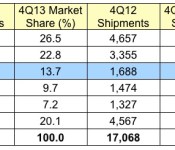
Apple saw its U.S. PC marketshare rise from 9.9 percent to 13.7 percent in the holiday quarter year-over-year, according to data just released from Gartner. The 28.5 percent rise shows a substantial increase in Mac sales, largely at the expense of HP and Toshiba.
Dell and Lenovo are the only other PC firms who saw significant rises in marketshare in the quarter.
In the U.S., PC shipments totaled 15.8 million units in the fourth quarter of 2013, a 7.5 percent decline from the fourth quarter of 2012 (see Table 2). Despite a 10.3 percent decline in shipments, HP continued to be the No. 1 vendor in the U.S., as it accounted for 26.5 percent of shipments.
“Holiday sales of technology products were strong in the U.S. market, but consumer spending during the holidays did not come back to PCs as tablets were one of the hottest holiday items,” said Ms. Kitagawa. “We think that the U.S. PC market has bottomed out. A variety of new form factors, such as hybrid notebooks, drew holiday shoppers’ attention, but the market size was very small at the time. Lowering the price point of thin and light products started encouraging the PC replacement and potentially some PC growth in 2014.”
 Gartner’s Preliminary U.S. PC Vendor Unit Shipment Estimates for 4Q13 (Thousands of Units)
The U.S. PC market fared slightly worse than the global market, dropping 7.5 percent in unit sales, from 17.07 million units last year to 15.8 million units this year. Continuing a trend from the last several quarters, tablets have continued to eat into PC sales and though hybrid tablet-notebooks have appealed to some shoppers, the market size for those devices remains very small. As a result of the demand for tablets, the overall PC market saw its worst unit decline in history.
 Apple’s U.S. Market Share Trend: 1Q06-4Q13 (Gartner)
It’s important to note that this data is preliminary — last year, Gartner revised its preliminary Apple numbers from 12.3% down to 9.9%, likely because last year the newly introduced iMac was in extremely short supply.
Apple’s US PC marketshare has seen consistent growth over the past seven years, rising from just under 5 percent to the current 13.7 percent.
     |

These Cookoo analog smartwatches take a minimalistic approach to viewing notifications

Looking for a nice-looking smartwatch but not interested in having the kitchen sink? Cookoo’s new set of analog timepieces are about as minimalistic as you can get without removing the “smart” element entirely. The Cognito lineup consists of two models, and although there really isn’t much difference between the two, the more expensive one is the more elegant option. The watches promise to be extensions of the phone, rather than replacements, and each features a series of LED icons that light up when you have a notification waiting for you on your handset. The company believes this is the ideal use for a smartwatch, since many people don’t care to interact with the notifications that start buzzing on their wrists.
The higher-end Cognito differs from its counterpart by offering Caller ID and giving you the option to mute incoming calls, as well as the ability to tap the watch to light it up so you can see your alerts. Cookoo reps boasted that both watches will easily last up to a year before you need to replace the battery, a remarkable length of time that’s likely the result of Bluetooth 4.0+LE support. The watches are compatible with iOS 7 and Android 4.3+, and watch (pun not intended but welcome) for the Cognito Pop to come out near the end of next month for $129, and the Cognito original mid-March for $179.
Joseph Volpe contributed to this post.
Filed under: Cellphones, Wearables, Wireless, Mobile

Macintosh 30th Anniversary Celebration Event Planned for January 25 [Mac Blog]
The original Macintosh Development Team, along with the Computer History Museum, is leading a special event at the Flint Center in Cupertino, California on January 25 to celebrate the thirtieth anniversary of the introduction of the Macintosh. The Flint Center is the since renovated auditorium where Steve Jobs first introduced the Mac.

In a series of panel discussions, members of the original team will share memories about the conception, birth and coming of age of the Apple Macintosh. Previously unreleased video will recreate those early days. And Ridley Scott will participate regarding the iconic “1984″ commercial conceived by Steve Hayden, Brent Thomas and Lee Clow. Stage events, testimonials and surprise guests will offer a treasure trove of recollections about the era.
In some of the evening’s highlights, Mike Markkula will be part of a presentation acknowledging the unsung heroes of the computer revolution—the original Mac team. Currently there are 7 of the 10 single digit original Apple Employees confirmed and over 17 double digit badge numbers.
The team behind the event, led by Daniel Kottke, is asking for images and anecdotes from early Macintosh developers to feature at the show. More details can be found on the 30th Anniversary Celebration website.
Tickets are available via Ticketmaster starting at $109.75 each. All proceeds after expenses will be donated to charity.
| |

‘7 Minute Workout Challenge’ Available for free From Apple Store App [iOS Blog]
Apple today updated its Apple Store app in the U.S., replacing the previously available Holiday Playlist with a new free app, the 7 Minute Workout Challenge. Seven minute workouts gained popularity in 2013 as a quick way to complete a rigorous workout, and 7 Minute Workout Challenge is one of the more popular fitness apps in the category, with a 4.5 star rating and a $1.99 price tag.

The app includes a random selection of 12 different exercises that are each performed for 30 seconds with 10 second rest intervals in between. According to research, this seven minute workout is the equivalent of working out for more than an hour and it requires no specialized equipment.
There are both male and female trainers that guide app users through exercises using video, audio, images, and text. There’s also an included weight tracker and activity calendar to keep track of fitness levels, and the app includes achievements to motivate its users.
To get a free copy of 7 Minute Workout Challenge, iPhone owners will need to download the Apple Store app and click on the “Jump into the new year” section. This will take users to the iTunes Store, automatically inputting a code for the app download.
7 Minute Workout Challenge will be available until February 20, 2014, before being replaced with a new offering. The free app is limited to the iPhone version of the Apple Store app and is not available in the iPad version.
The Apple Store app can be downloaded from the App Store for free. [Direct Link]
| |

‘Super Stickman Golf 2’ Available for Free for a Limited Time [iOS Blog]
Noodlecake’s popular game Super Stickman Golf 2 is currently available for free for the first time since its March 2013 release.
Super Stickman Golf 2, which is normally priced at $2.99, is a golf-based physics puzzler where players navigate through wacky mini golf courses aiming to land their ball in the hole in as few swings as possible.
The game includes 30 different golf courses, a range of customizable characters, and multiple achievements to earn. It also offers two different multiplayer modes, including turn-based and race mode. Our sister site Touch Arcade reviewed Super Stickman Golf 2 when it was first released and called it both “awesome” and a “fun and compelling puzzler.”
Super Stickman Golf 2 is at its best once you’ve unlocked a few different ball types and set foot in the more challenging courses. You might need to smack an ice ball against the wall to send it arcing over your avatar and sailing into the pond below, which freezes over, setting up your next shot. On another occasion, you could use the sticky ball to pull a Spider-Man and take your next shot hanging from a wall or ceiling, or use the magnets adorning the walls to repel your ball straight to the hole. Pursuing and finally capturing elusive hole-in-ones is addictive, and you’ll often find yourself playing courses over and over to knock a single point off your total score.
Super Stickman Golf 2 can be downloaded from the App Store at no cost for a limited time. [Direct Link]
| |
Half of iPhone 6 Orders Expected to Go to Pegatron
Apple supplier Pegatron is expected to win a contract that will see it manufacturing half of Apple’s iPhone 6 supplies, according to a report from Taiwan’s Liberty Times [Google Translate] as shared by AFP. Currently, Pegatron is responsible for assembling Apple’s iPad mini and iPhone 5c while main Apple supplier Foxconn manages iPhone 5s assembly.
The report does not specify which supplier will take care of the other half of iPhone 6 orders, but it is likely that responsibility will fall to Foxconn. It is also unclear how manufacturing of the iPhone 6 will be split, as it is not yet known if Apple will continue on with its bifurcated product lineup that currently includes both the flagship iPhone 5s and the mid-range iPhone 5c.
Rumors have suggested that Apple could produce two versions of the iPhone 6 in two different sizes ranging from 4.7 to 5.7 inches and likely at two different price points, keeping with its new two-phone lineup.
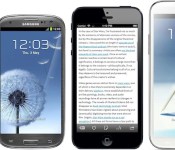
 Left to right: iPhone 5, Galaxy S III, “5-inch iPhone Plus”, Galaxy Note II (Source: Marco Arment)
While Pegatron has long been a manufacturing partner for Apple, the Cupertino-based company shifted iPhone 5c production to Pegatron in 2013 in order to improve supply chain risk management, allowing Apple to expand its product lines and prevent potential supply chain disasters. Pegatron will reportedly build a new plant in Kunshan, China to keep up with demand.
In order to meet the demand, Pegatron has started building a new plant at Kunshan, a satellite city near Shanghai where all its iPhones are assembled, the Liberty Times said without identifying its source.
The paper said the Kunshan plant is scheduled to become operational in the middle of the year and start mass production late this year, when Apple is expected to roll out its iPhone 6.
Along with a larger screen up to 5.7 inches, Apple’s iPhone 6 is also rumored to include a curved display and a faster and more efficient A8 chip. A report from this morning also suggested that the phone will continue to use an 8-megapixel camera sensor. Though it is not known when Apple will release the next-generation iPhone, fall of 2014 is a likely candidate given Apple’s past device release history.
| |

Seven Years Ago Today, Steve Jobs Introduced the iPhone
Today marks the seventh anniversary of the introduction of the iPhone, a presentation that took place as part of the keynote of Macworld Expo 2007 in San Francisco. While the device would not launch until over six months later, that presentation offered the public the first glimpse of what Steve Jobs introduced as three devices in one: a touchscreen iPod, a phone, and an Internet communicator.
Today, we’re introducing three revolutionary products. The first one is a widescreen iPod with touch controls. The second is a revolutionary mobile phone. And the third is a breakthrough Internet communications device. So, three things: a widescreen iPod with touch controls, a revolutionary mobile phone, and a breakthrough Internet communications device. An iPod, a phone, and an Internet communicator. An iPod, a phone…are you getting it? These are not three separate devices. This is one device. And we are calling it iPhone. Today, Apple is going to reinvent the phone.
Late last year, former Apple engineer Andy Grignon, who was in charge of the radios on the original iPhone, gave behind-the-scenes look at how Apple patched together demos for the introduction, with Steve Jobs showing off developmental devices full of buggy software and hardware issues. The iPhone team knew that everything had to go just right for the live iPhone demos to succeed, and they did, turning the smartphone industry on its head even as Apple continue to scramble to finish work on the iPhone.
Apple had actually been interested first in developing a tablet known as “Safari Pad”, but as noted by a number of sources including Steve Jobs himself, the company shifted gears once it became clear how revolutionary the multi-touch interface developed for the tablet could be for a smartphone. Apple’s tablet wouldn’t surface until the launch of the iPad in 2010, three years after the introduction of the iPhone.
Seven years after the famous Macworld 2007 keynote, the iPhone has seen significant enhancements in every area, but the original iPhone remains recognizable as Apple has maintained the overall look of a sleek design with a larger touchscreen and a single round home button on the face of the device.
| |

Apple’s Lunar New Year Sale Includes Discounts on iPhone and Retina iPad Mini [Mac Blog]
Apple’s Lunar New Year sale kicked off today in several Asian countries, with discounts available on a wide range of Apple products.
Unlike the Black Friday sale in held in the United States and other countries in November, today’s sale includes price cuts on both the iPhone 4s/5c/5s and the Retina iPad mini. Apple does not typically offer discounts on its iPhones, making this year’s Lunar New Year sale somewhat unusual.

Lunar New Year discounts are cash-based rather than gift-card based like the Black Friday sales in the United States. For that reason, the deals are slightly more modest, similar to the cash deals that were available in Europe.
Apple is offering a discount of HK$ 390 off of full-priced iPhones, which equates to approximately $50 off. The iPad Air is available at a discount of HK$ 310 ($40) and the Retina iPad mini is HK$ 230 off ($30). There are also slight discounts available for the iPad mini and the iPad 2, of HK$ 150 ($19) and HK$ 230 ($30).
Macs are also on sale, with a flat discount of HK$ 770 ($99) available on all models. There are also minor discounts available for the iPod nano, the iPod touch, the Apple TV, and several other Apple accessories including headphones, iPhone/iPad cases, and more.
The Lunar New Year sale is one day only in several Asian countries including China, Hong Kong, Malaysia, Singapore, South Korea, Taiwan, and Thailand.
| |

Social calendar app Sunrise finally comes to iPad

Launching on iPhone in February 2013, Sunrise changed our perception of calendar apps with its ability to provide more context to daily events. By connecting to Google, iCloud, Facebook, LinkedIn and Foursquare accounts, Sunrise can intelligently integrate appointments, birthdays and even checkins into its slick calendar UI, giving users a complete picture of what they’ve done in the past and the things they need to do in the future.
Despite its iPhone-only availability, the free app has grown to become one of the most popular third-party iOS calendar apps, consistently ranking in the App Store’s top 100 productivity apps in the final quarter of last year. Almost a year on, Sunrise developers Pierre Valade and Jeremy Le Van have decided it’s finally time to bring the stylish calendar app to iPad, complete with visualization and synchronization improvements.
Like its iPhone counterpart, the Sunrise iPad app will immediately request that you connect your cloud accounts when you open it for the first time, helping to feed it with information it’ll need to remind you about later. Valade says the team has worked hard to bring the best Sunrise experience to the iPad, and so it’s created two new weekly and monthly views that “make it easier to plan from your iPad and navigate in time quickly.”

If you’ve used Google Calendar or Apple’s Mac Calendar.app, you’ll be familiar with Sunrise’s time-based views, although Sunrise will deliver more information at-a-glance. If you see that you have a particularly busy day coming up, the week view will let you dive deeper and see how much free time you have outside of those events. The new week view has also been ported to the iPhone app and can be selected by tapping the week icon next to the new event button.

Tapping on a day will generate a new pop-up tab that displays all of your appointments and reminders. Drawing from the original iPhone UI, Sunrise for iPad not only chronologically lists events, it also categorizes them by assigning them a small icon related to the activity you have planned (or the service they are connected to). As you can see from the screenshot above, if you’ve planned a movie night, the app will assign a little movie ticket icon to the entry. If there’s a location attached to an appointment, Sunrise will provide directions, although Apple Maps, Google Maps or Waze will do the heavy lifting. It’s little things like this that make this that make Sunrise really stand out from other calendar apps.
In the past, if you wanted to ensure Sunrise had an up-to-date list of your upcoming appointments, you’d have to open the app and have it download them, which is especially annoying if you add events from different devices. Sunrise version 2.1 eliminates that frustration by integrating background updates that will synchronize all of your connected cloud accounts every hour by default, or at 30 or 15 minute intervals (if you need tasks to show up a little quicker).
While there’s no shortage of productivity apps on the App Store, Sunrise’s slick user interface and iterative features consistently continue to push the bar for iOS calendar apps. Soon, Apple users won’t be the only ones enjoying the app: desktop and Android versions are expected later this year. Today’s update, however, sees the app go universal while remaining free to download — hit the source link below to try it for your yourself.
Filed under: Tablets, Internet, Software, Mobile, Apple, Google
Via: Sunrise Blog
Source: Sunrise Calendar (App Store)

Sunrise Calendar Updated with Full iPad Support, Background Updates [iOS Blog]
Smart calendar app Sunrise Calendar has received an update today, bringing full support for the iPad, a new week view for the iPhone that allows users to view three days at once, and automatic background refreshes for events and notifications.
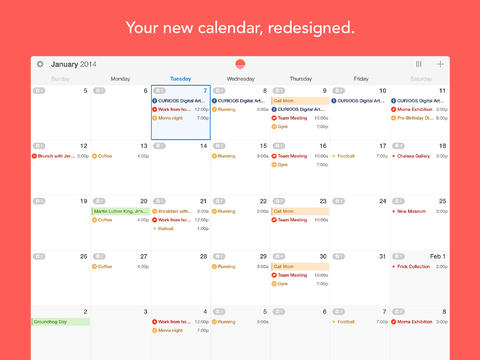
iPad
We’ve worked hard to bring the best Sunrise experience to your iPad. It’s the most beautiful calendar everywhere now.
We are introducing two new visualisations: Week and Month. They make it easier to make plans from your iPad and navigate in time quickly.Week View (for iPhone too!)
This new visualisation makes it easier to see free-time between events, see your day at-a-glance, or find a time to get dinner with a friend next week.
Tap on the week icon next to the new event button to reveal it. The best part: it works perfectly in portrait mode.
A lot of people have tried to design a week view before, but we think that you’ll enjoy the design of Sunrise better!Background Updates
Sunrise will now update in the background (every hour by default), so you won’t need to open Sunrise to get the latest changes. Notifications will always be up to date.
The app originally launched in February after being developed by former Foursquare engineers, and offers a feed populated with Google Calendar, iCloud, and Facebook events in addition to birthdays and weather information.
Users can also navigate around using swipe gestures for quick switching between calendar days, and like Fantastical, allows for colloquial language when entering events. For example, typing “Dinner with Michelle at 8pm tomorrow” will schedule the appropriate event in the calendar.
Sunrise Calendar is a free universal app and can be downloaded from the App Store. [Direct Link]

| |

