


Engadget giveaway: win an iPhone 5s courtesy of TurboTax!

It’s that time of year again, when you have to try and wrestle back as many of those hard-earned dollars as you can from the insatiable gaping maw of the tax beast. In an effort to assuage that annual suffering, the folks at TurboTax created the free SnapTax app for 1040EZ/A returns and this year they’ve upped the ante for one lucky Engadget reader by offering an unlocked gold iPhone 5s so they can file on the go. Available for iOS and Android, the SnapTax app lets users file by simply snapping a photo of their W-2, answering a few questions and clicking “file my return.” This is one little slab of gold that you won’t want to stash in a safety deposit box, so head on down to the Rafflecopter widget for up to three chances at winning. And don’t forget: It’s time to do those taxes!
- Entries are handled through the Rafflecopter widget above. Comments are no longer accepted as valid methods of entry. You may enter without any obligation to social media accounts, though we may offer them as opportunities for extra entries. Your email address is required so we can get in touch with you if you win, but it will not be given to third parties.
- Contest is open to all residents of the 50 States, the District of Columbia, and Canada (excluding Quebec), 18 or older! Sorry, we don’t make this rule (we hate excluding anyone), so direct your anger at our lawyers and contest laws if you have to be mad.
- Winners will be chosen randomly. One (1) winner will receive one (1) Apple iPhone 5S (Gold, 16GB, GSM (sim-free, unlocked) ME298LL/A).
- If you are chosen, you will be notified by email. Winners must respond within three days of being contacted. If you do not respond within that period, another winner will be chosen. Make sure that the account you use to enter the contest includes your real name and a contact email or Facebook login. We do not track any of this information for marketing or third-party purposes.
- This unit is purely for promotional giveaway. Apple, TurboTax and Engadget / AOL are not held liable to honor warranties, exchanges or customer service.
- The full list of rules, in all its legalese glory, can be found here.
- Entries can be submitted until March 12th at 11:59PM ET. Good luck!
Filed under: Announcements, HD, Mobile, Alt, Apple
Former Apple Engineer Recalls Steve Jobs’ Great Displeasure with Multi-Button Mouse Concepts [Mac Blog]
Steve Jobs’ great displeasure about the the idea of a multi-button mouse was apparently the driving force behind Apple’s push to greatly innovate in the area of input devices, according to a new interview with Apple’s former Senior Mechanical Engineer of Product Design Abraham Farag (via Cult of Mac).
Farag, who is the current owner of product development firm Sparkfactor Design, says that he was brought onboard to Apple in 1999 to design a successor to the original Apple USB “hockey puck” mouse, which shipped with the iMac G3 in 1998 and garnered heavy criticism for its small size, short cord, and tendency to rotate in a user’s hand.

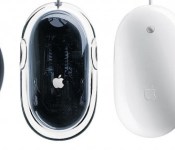
From left to right: Apple’s USB “Hockey Puck” Mouse, Pro Mouse, Mighty Mouse, and Magic Mouse
The designer said that Apple’s design team had worked on five complete prototypes to show Jobs, complete with lines cut for buttons and different plastic parts. Farag noted that the team made a last-minute choice to work on one more prototype model, which resembled the Apple Desktop Bus Mouse II.
However, that last prototype was not finished as Jobs entered the room to look at the group of potential mice, which led to an encounter between the CEO and the design team:
“It looked like a grey blob,” Farag says. “We were going to put that model into a box so people wouldn’t see it.” However, when Jobs turned up things went awry.
“Steve looked at the lineup of potential forms and made straight for the unfinished one,” Farag says.
“That’s genius,” he said. “We don’t want to have any buttons.”
“That’s right, Steve,” someone else piped up. “No buttons at all.”
The meeting, it seemed, was over.“[Afterwards], Bart Andre, Brian Huppi and I left the room and huddled outside with each other, [saying] ‘how are we going to do that?’” Farag recalls. “Because of that unfinished model we had to invent a way to make a mouse with no buttons.”
The unfinished model that Jobs designated as his choice eventually became the Apple Pro Mouse, and began shipping in 2000. Farag believed Apple was the first to create a mouse that used an LED for optical tracking in place of a rubber ball, as the team looked toward building a successor worthy of the Apple Pro Mouse. Once again, Apple’s design team wanted to create a mouse with multiple buttons, as Farag recalled a meeting with Apple design chief Jony Ive in which multiple prototypes were being discussed.
“Steve wasn’t invited to the meeting,” Farag recalls. “Not because he wasn’t allowed — he could go anywhere in the company — but just because it wasn’t something we were pitching to him yet.
…Suddenly Jobs happened to walk by, on his way back from another meeting. Seeing prototypes on the table, he stopped and came over.
“What morons have you working on this project?” he asked as he realized what he was looking at.“There was just a total hush,” Farag recalls. “No one was going to fess up to being the moron in the room. Eventually I said, ‘Well, this was asked for by the marketing division. It’s a multi-button mouse. It’s been approved through Apple’s process channels, and so we’ve been working on it.”
Jobs stared at him.
“I’m Marketing,” he said. “It’s a marketing team of one. And we’re not doing that product.” With that, he turned and stalked off.
Farag notes that it was Jobs’ persistence to create a mouse unlike anything on the market that helped Apple in the long run, and that the concept of built-in capacitive sensors to emulate the presence of multiple buttons eventually changed the former CEO’s mind about multi-function mice.
Apple then went on to produce the Mighty Mouse, which was the company’s first mouse to ditch the one-button philosophy, and followed it up with the Magic Mouse, which features multi-touch gesture controls and is currently included with every new iMac.
     |
Apple’s iTunes Radio Becomes Third Most Popular U.S. Music Streaming Service
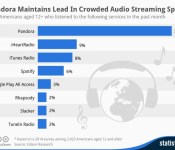
Less than six months after its launch alongside iOS 7 last September, Apple’s iTunes Radio has become the third most popular music streaming service in the United States, according to a new report from Edison Research and Statista (via Fortune).

While Pandora and iHeartRadio took first and second place with a 31% and 9% share of the market respectively, iTunes Radio accounted for an 8% share with over 20 million users, passing Spotify’s 6%. Apple’s streaming service also passed the likes of competitors such as Google Play All Access, Rhapsody, Slacker, and TuneIn Radio.
While users can hop between services freely (and at least one report has suggested that 92 percent of iTunes Radio listeners also find time for Pandora), that figure would suggest that iTunes Radio is growing at the fastest rate of the top three services, and is likely to overtake iHeartRadio in the next quarter or two.
Apple launched iTunes Radio in Australia last month, as the company looks to ultimately have the service “in more than 100 countries,” according to senior vice president of Internet software and services Eddy Cue. The company will be able to roll out its service to additional countries more quickly than competitors due to its existing international rights deals with Universal Music Group and other record companies.
| |
iOS 7.1 Makes the iPhone 4 Snappier
Last September, when Apple released iOS 7 to the public, the iPhone 4 was the oldest model supported by the operating system. However, many iPhone 4 users found their devices to be slow and unresponsive, something Apple was likely aware of because there were a number of iOS 7 features that didn’t work at all on the iPhone 4, including Siri, AirDrop, AirPlay Mirroring, and a number of special effects across the user interface including parallax, some translucency effects, and live wallpapers.
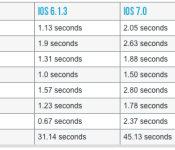
Today, with the release of iOS 7.1, Apple has much improved the experience of iPhone 4 users on iOS 7, though not entirely back to what users saw in iOS 6.1.3. According to Ars Technica, there is a measurable improvement in iOS 7.1 across a number of native iOS apps, including the speed at which the apps open from the home screen:

There’s a measurable improvement over iOS 7.0 across all of these apps, some more noticeable than others. In a few instances, iOS 7.1 very nearly catches up with iOS 6.1.3, which is impressive given the gap between the two operating systems in some of these apps. It’s not a complete recovery from the original iOS 7.0 release, but it’s about as good as Apple can do with hardware this old. The small speed improvements are present throughout the operating system, and this makes the iPhone 4 feel more responsive than it did, if not always as responsive as it once was.
iOS 7.1 also helps with the UI jerkiness that was all over the place in 7.0. It’s easiest to capture the difference in video—actions like launching apps or pulling up the Control Center shade are always visibly jerky in iOS 7.0, but they’re smooth (or at least smoother) in the new update.
As Ars notes, iOS 7.1 may well be the final major iOS release for the iPhone 4, as Apple generally removes support for the last generation of iPhones when it releases a new operating system each year. Ars says iOS 7.1 makes the experience good enough that using the iPhone 4 is no longer “unbearable”, but that there are “unmistakable” benefits to moving to a faster phone.
| |

Apple Credits ‘Evad3rs’ Jailbreak Team for Discovering Security Issues Fixed in iOS 7.1 [iOS Blog]
Apple has credited the evad3rs jailbreak team with discovering several security issues, according to a new Knowledge Base article that details security issues fixed in iOS 7.1 today. The company also credits a number of individual researchers — including one named Roboboi99 — as well as corporate security specialists from Google and FireEye, among other companies.

As is common at many tech companies, Apple credits security researchers who discover vulnerabilities in its products after it fixes them, though the company does not offer a bounty program to financially reward researchers like many other companies do.
In iOS 7.1, Apple fixed security issues with Backup, the Certificate Trust Policy, Configuration Profiles, CoreCapture, Crash Reporting, dyld, FaceTime, ImageIO, IOKit HID Event, iTunes Store, Kernel, Office Viewer, Photos Backend, Profiles, Safari, Settings, SpringBoard, SpringBoard Lock Screen, the TelephonyUI Framework, USB Host, Video Driver, and WebKit.
Of course, with Apple fixing the security issues that the jailbreak team discovered, it has also closed the loopholes that allowed a jailbreak in the first place. For now, the last version of iOS that can be jailbroken is iOS 7.0.6.
| |

Apple Improves Loyalty Discounts for Business and Education Customers [Mac Blog]
Apple recently implemented changes to its loyalty program designed for organizations like schools and businesses, improving the discounts given to those customers, reports TechCrunch.
Customers are eligible to receive discounts through Apple Retail’s Business Team after spending more than $5,000. Apple’s particular program is three-tiered, offering increasingly greater discounts at $5,000, $35,000, and $200,000. Given the amounts spent, the program is typically limited to businesses and educational facilities that purchase Apple devices in bulk.

With the changes made to the program, Apple has upped the discounts buyers receive on Macs, iOS devices, and accessories.
With last week’s changes, Apple has improved the discounts of several items across all of these tiers. Almost all of the discounts have been improved a couple percent. We’re hearing, for instance, that Mac has gone from 5% to 6% in the lower tier and as much as 8% at the higher tier.
Third-party accessory discounts, for example, have risen from 5 percent to 10 percent for the lowest loyalty program tier, and even higher for other tiers, while iPads are discounted by two to four percent based on model and quantity.
Along with increased discounts on the above listed items, the program has been expanded for the first time to include both unlocked iPhones and Apple TVs. As noted by TechCrunch, Apple TVs have become increasingly important for schools and businesses that rely heavily on iOS and Mac devices as they work well with AirPlay as a way to avoid traditional projectors.
Apple’s efforts to deploy iPads in both educational institutions and businesses have ramped up over the course of the last several years. The company often highlights its enterprise performance during quarterly earnings calls and a February survey suggested Apple accounted for 73 percent of all enterprise mobile device activations in the fourth quarter of 2013.
Two weeks ago, Apple launched new enterprise tools for large device deployments, offering several new features for mobile device management, including over-the-air tools to allow IT administrators to set up devices without the need for the Apple Configurator software.
| |

Daily Roundup: Titanfall’s secret weapon, Edward Snowden talks encryption, and more!

You might say the day is never really done in consumer technology news. Your workday, however, hopefully draws to a close at some point. This is the Daily Roundup on Engadget, a quick peek back at the top headlines for the past 24 hours — all handpicked by the editors here at the site. Click on through the break, and enjoy.

A closer look at Titanfall’s not-so-secret weapon: Microsoft’s cloud
Tomorrow, Titanfall’s bringing more computing power to your Xbox One than it can handle, all thanks to Microsoft’s Azure cloud infrastructure. Read on as Engadget’s Timothy Seppala explores the inner workings responsible for the title’s resource-intensive AI technology.

Snowden says encryption and oversight are key to protecting the public from surveillance
Edward Snowden made an appearance at SXSW this morning where he reiterated the importance of end-to-end encryption in protecting user’s private data. What’s more, the whistleblower spoke through a Google Hangout, which passed through seven proxies on its way from Russia.

Shaquille O’Neal talks Fitbit, Google Glass and smartphones at SXSW
Are you a Fitbit user? So is Shaquille O’Neal. We managed to sit down with the NBA superstar at SXSW 2014 and chat about how fitness wearables play a big part in keeping us healthy and active. Click on through to watch the conversation.

Apple releases iOS 7.1 with CarPlay support
Apple unveiled its CarPlay interface last week at the Geneva Auto Show, and now its complimentary iOS 7.1 update is ready for action. In addition to CarPlay functionality, 7.1 brings a lengthy list of bug fixes and and a couple of clever Siri improvements. So head on over to your settings menu and get downloading.
You also might like:
Filed under: Misc

Video Walkthrough iOS 7.1 Visual Tweaks and Improvements
iOS 7.1, released this morning, includes several notable features, like support for CarPlay, a fix that improves the reliability of Touch ID, and a fix for a bug that caused crashes to the home screen.
Along with those major enhancements, the update also offers a slew of minor visual tweaks and improvements to the operating system, such as refined icons for the Phone, FaceTime, and Messages apps, along with revamped shift and caps locks keys and a new look for elements of the Phone app.
YouTube channel iTwe4kz has posted a handy overview of the new update, which shows off all of the new features that iOS 7.1 has to offer. The video has a detailed walkthrough of all the visual changes and enhancements, which is well worth watching for users who want a quick guide on what’s new.
The full set of changes to the operating system were detailed in our initial post on iOS 7.1, which has a list of release notes directly from Apple and information on other app updates that were released today, including Xcode 5.1 and Remote.
As noted in the video, iOS 7.1 officially disables the iOS 7 evasi0n jailbreak by patching a key kernel exploit. iOS 7.1 is now available for all users via an over-the-air-update.
| |

Apple TV update hides unwatched channels with ease

Alongside the release of iOS 7.1, Apple TV also received a software update today. Most notable among the changes? An easier method for hiding those channels that you don’t watch. Before now, you had to take a trip to the Settings menu and hide each option from a list. After installing Apple TV version 6.1, pick a channel from the main menu and hold the Select button to make the icons dance. Once they start to jiggle, use the directional buttons to move around before hitting the Play/Pause button to hide that content source. This certainly isn’t a major leap, but it’s sure you save some time and extra navigating for tidying up that primary menu.
Filed under: Home Entertainment, HD, Apple
Via: iMore

4.7-Inch ‘iPhone Air’ Shown Off In New Concept Video [iOS Blog]
The upcoming iPhone 6 has been incorporated into a new concept video by designer Sam Beckett, which was initially posted to The Verge forums. According to the dimensions Beckett provides, his “iPhone Air” concept includes a 4.7-inch display, a 1920 by 1080 resolution and 468 pixels per inch.
Beckett’s concept is 8 percent larger than the iPhone 5s and 9 percent thinner. The slimmer profile is in line with previous iPhone 6 rumors, which have suggested Apple has improved its backlighting technology to allow for thinner devices.
The phone is only 8% larger than the existing iPhone 5S, this increase is to accommodate the larger screen. Some extra space could be potentially utilised by reducing the width of the side bezels and by also slimming down the top and bottom of the phone frame too. The depth of the iPhone Air is 7mm, coming in 0.6mm smaller than it’s predecessor. This modest reduction in the device depth and larger increase in the width and height could help create a bigger space for the battery and other components.
Like several other iPhone 6 concepts, Beckett’s design keeps the same general size and shape of the existing iPhone 5s while doing away with thick side bezels. The design incorporates thinner side bezels with a sapphire crystal display, both features the phone is rumored to include.
Beckett also draws on a number of other rumors for the video, suggesting the iPhone 6 will include a 10-megapixel sensor with an aperture of f/1.8 and a faster A8 chip, which is reportedly already in production with TSMC.
As with any concept, it is unclear if these ideas and rumors will make it into the next-generation iPhone, but the video does imagine how a larger iPhone could possibly look. Apple is said to be developing two larger iPhones for release in 2014, one near 4.7 inches and one quite a bit larger at approximately 5.5 inches.
| |

