


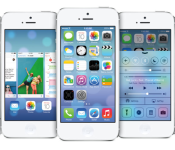
Steve Jobs’ Infamous Temper Lives on at Apple in Bug-Wrangler Kim Vorrath [Mac Blog]
Steve Jobs was infamous for his temper, with a famous story about him blowing up at the MobileMe team following a rocky rollout of that service in 2008.
However, Jobs isn’t the only employee at Apple with a short fuse. A profile in The Information studies Kim Vorrath, Apple’s vice president in charge of “program management” for both iOS and OS X. She supervises Apple’s thorough testing process to discover bugs and is the final arbiter of deadlines to ensure that software updates come out on time.
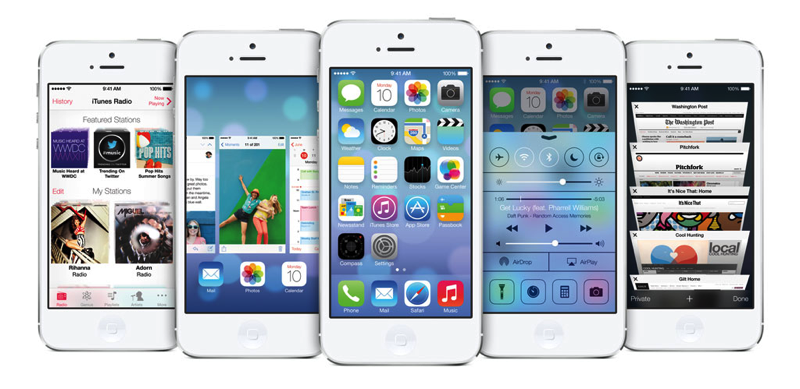
One story in particular, relayed by Business Insider, tells of Vorrath’s displeasure when she found out a co-worker was leaving work early before the launch of the first iPhone in 2007.
Ms. Vorrath, who has worked on all seven iOS releases, generally operates by asking lots of questions of engineers, sticking to the facts and getting them to explain in plain English why a particular feature should be included in the operating system. She’s easy to get along with, say former colleagues, who recall playfully mocking her 1990s feathered hairstyle and late 1980s fashion sense. But she isn’t known for chitchat and has been known to “blow up” on occasion when people miss deadlines or make excuses, colleagues say.
During a tense time before the first release of iOS software in 2007, Ms. Vorrath grew irate when a colleague was heading home early before another marathon weekend meeting. She slammed her office door so hard that the door knob broke, and she locked herself in. Mr. Forstall grabbed a baseball bat to try to break her out, people who worked at Apple at the time recall.
The Information says Vorrath has been working at Apple since 1987, starting as an intern and eventually becoming chief of staff for Scott Forstall. Now, she is said to be working directly beneath Apple executive Craig Federighi, who is in charge of Apple’s software engineering teams.

Google Covering Defense Costs and Damage Awards for Four Patents in Apple/Samsung Case
Google is covering lawyer fees and potential damage awards with regards to four patents in the ongoing Apple/Samsung patent case, according to a report from Re/code, quoting deposition testimony from a Google attorney that Apple introduced in court today.
Google’s contractual obligations to defend Samsung relate to a “Mobile Application Distribution Agreement” between the two companies related to the distribution of Google applications, including Gmail on Samsung’s Android devices. Samsung called several Google employees as witnesses as part of its defense.
The case between Apple and Samsung is seen by many as a proxy for the larger battle between Google and Apple over the company’s respective mobile operating systems.

Apple played deposition testimony from Google lawyer James Mccoun, who verified e-mail in which Google agreed to provide partial or full indemnity with regards to four patents as well as to take over defense of those claims.
A Samsung representative said he could not immediately say which if any claims in the case for which Google is in fact providing the defense and indemnity.
Yesterday, Samsung argued that, if it lost at trial, it would only owe Apple $40 million in damages, substantially less than the $2 billion that Apple says it is owed for infringement of five of its patents.
Apple Releases AirPort Extreme and Time Capsule Firmware Update 7.7.3 With Heartbleed Fix [Mac Blog]
 Apple today released AirPort Extreme and AirPort Time Capsule Firmware Update 7.7.3 for AirPorts with 802.11ac. The update includes security improvements related to SSL/TLS.
AirPort Base Station Firmware Update 7.7.3
Available for: AirPort Extreme and AirPort Time Capsule base stations with 802.11acImpact: An attacker in a privileged network position may obtain memory contents
Description: An out-of-bounds read issue existed in the OpenSSL library when handling TLS heartbeat extension packets. An attacker in a privileged network position could obtain information from process memory. This issue was addressed through additional bounds checking. Only AirPort Extreme and AirPort Time Capsule base stations with 802.11ac are affected, and only if they have Back to My Mac or Send Diagnostics enabled. Other AirPort base stations are not impacted by this issue.
Earlier this month, an OpenSSL bug known as Heartbleed made headlines, with Apple releasing a statement noting that iOS, OS X, and its “key web services” were unaffected by the security flaw, but it appears that the company’s AirPort Extreme and AirPort Time Capsule were vulnerable.
The 7.7.3 update is recommended for all models of the AirPort Extreme and Time Capsule that support 802.11ac Wi-Fi, other AirPort base stations do not need to be updated.

Apple’s OS X beta testing is now open to the public

Apple has released public beta tests of individual Mac apps in recent years, but OS X itself has largely been off-limits unless you’ve registered as a developer. That changes now that Apple has launched the OS X Beta Seed Program. Starting with OS X 10.9.3, you can try pre-release operating system updates by signing in with a garden variety Apple ID; oddly enough, you still have to sign a developer-style agreement promising to keep some details a secret. We wouldn’t sign up solely because of the upcoming Mavericks update, but the program represents an all too rare opportunity to both preview features and provide direct feedback as an everyday user. If you’re willing to live with a few bugs, you can start with your first beta at the source link.
Source: Apple
iOS 7.1.1 Now Labels Apps with ‘In-App Purchases’ in Top Charts and Featured Sections
As part of iOS 7.1.1, released earlier today, Apple has implemented some minor changes to the iOS App Store to make it more clear which apps offer in-app purchases.
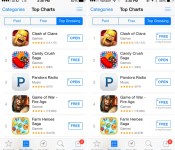
Apple has provided an “Offers In-App Purchases” disclosure on individual app detail pages since March of 2013, but now the App Store has been updated to include a small “In-App Purchases” notification for apps in Top Charts listings and on specific featured apps listings, such as in the “Great Free Games” category.
 Old Top Charts view on left, new Top Charts view with in-app purchase disclosure on right
This expanded in-app purchase view allows users to determine which apps on the Top Free, Paid, and Grossing charts offer in-app purchases. The disclosure is also available on top category listings as well.
Apple’s new in-app purchase warnings come following a January settlement with the FTC that saw Apple providing $32 million in refunds to parents whose children purchased unauthorized in-app items. Apple was also required to obtain express consent from consumers before billing them for an in-app purchase, a measure that it initially implemented with iOS 7.1.
In-app purchases have long been an issue for Apple, first landing the company in hot water with the FTC in 2011 after multiple parental complaints over children over-spending within apps. Apple has made many updates to its in-app purchase policies since that time, including requiring a separate passcode entry for initiating an in-app purchase and providing multiple notifications before a purchase is made.
Along with changes to the App Store, iOS 7.1.1 also includes improvements to Touch ID, Safari support for top-level domains such as .photo, and a few bug fixes. It can be downloaded over-the-air via the Software Update tool in the Settings menu.
Apple Allowing Non-Developers to Apply for OS X Beta Program
Alongside iOS 7.1.1, Apple has introduced a new OS X beta program that will see non-developers given an opportunity to download OS X betas before they are released to the public. Previously, participating in OS X betas required a developer account, priced at $99 per year.
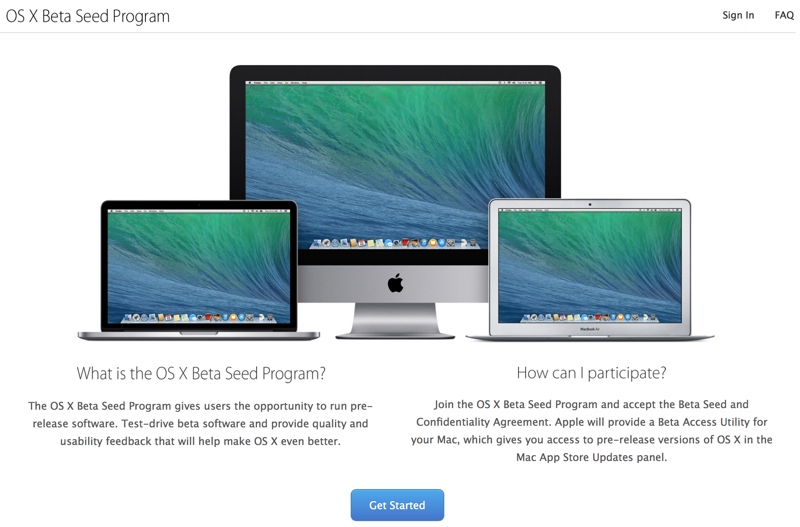
Join the OS X Beta Seed Program and accept the Beta Seed and Confidentiality Agreement. Apple will provide a Beta Access Utility for your Mac, which gives you access to pre-release versions of OS X in the Mac App Store Updates panel.
Users can apply to join the beta program on Apple’s new Appleseed Beta website, which allows users to apply using an Apple ID.Apple requires everyone who signs up to sign a confidentiality agreement, which prevents users from disclosing, publishing, or disseminating confidential information to anyone not also enrolled in the Appleseed program.
After agreeing to keep beta information confidential, Apple asks users to make a backup on their Macs before downloading a special Beta Access Utility App which allows a Mac to be enrolled for beta software updates. All updates will be delivered via the Mac App Store, similar to standard OS X updates.

ElevationLab Debuts Aluminum Elevation Stand for iMac and Apple Displays [Mac Blog]
ElevationLab today launched a new Kickstarter project for the Elevation Stand, an aluminum stand designed for the iMac and Apple displays. Aimed at improving posture, the Elevation Stand is milled from a single piece of aluminum to match the seamless look of the iMac and Apple’s displays.

According to ElevationLab, the Elevation Stand has the smallest footprint of available iMac stands, along with a minimalistic design that hides extras like hard drives, USB hubs, cables, and more. It raises the monitor by 68mm, encouraging users to sit up straighter.
The company is also debuting the Elevation Anchor, made to keep headphones out of sight but within reach. Constructed from medical-grade silicone, it mounts under a desk to hide headphones.
ElevationLab previously produced the Elevation Dock, an aluminum iPhone dock that raised more than 1.4 million dollars.
The Elevation Stand can be preordered via a Kickstarter pledge of $59, while the Elevation Anchor can be preordered for $25. A $79 pledge gets backers a Stand and two Anchors, while additional colors are available at $85 and $99 price points. All products are expected to ship in September of 2014.

Apple Releases OS X Security Update for Mavericks, Mountain Lion, and Lion Users [Mac Blog]
Alongside iOS 7.1.1, Apple today released Security Update 2014–002 for Mavericks, Mountain Lion, and Lion users. The update includes fixes for several operating system vulnerabilities, detailed on Apple’s support page.

Apple recommends that all users download the update, which can be acquired via the Software Update tool in the Mac App Store or through the following links:
– Security Update 2014–002 (Mavericks) (80.5 MB)
– Security Update 2014–002 (Mountain Lion) (135.9 MB)
– Security Update 2014–002 (Lion) (126.9 MB)
– Security Update 2014–002 Server (Lion) (177.2 MB)
First Generation Apple TVs Once Again Able to Connect to iTunes [Mac Blog]
 Over the weekend, Apple’s first-generation Apple TVs were unable to access iTunes, an issue that affected Apple TV owners worldwide.
It appears that Apple has resolved the problem as of Tuesday, with many first-generation Apple TV owners reporting on Apple’s Support Communities that their Apple TVs are once again able to access iTunes.
Some iOS users have speculated that the Apple TV downtime, along with the downtime for FaceTime on iOS 6, could be caused by internal communication upgrades related to the Heartbleed security issue, but Apple denied that any of its “key services” were affected by Heartbleed.
Though the first-generation Apple TV appears to be functioning once again, many iOS 6 users are continue to be unable to access FaceTime.

Logitech Adds Multi-Angle Viewing to Ultrathin Keyboard, Launches New iPad Cases [iOS Blog]
Logitech today announced a new version of its Logitech Ultrathin keyboard cover for the iPad Air, iPad mini, and iPad mini with Retina display, offering a new design that includes a flexible multi-angle slot that allows the iPad to be adjusted to different viewing angles.
The Logitech Ultrathin improves the flexibility and design of its predecessor with an even thinner and lighter keyboard cover and new flexible multi-angle slot that allows you to magnetically clip your iPad into the perfect viewing angle.
Like previous versions of the keyboard, the new Logitech Ultrathin is just a fraction of the weight of the iPad, measuring in at 6.4mm thick. It is designed from aluminum to match Apple’s iPads and the keyboard includes iOS shortcuts and keys spaced for optimal typing.
Alongside the updated version of the Ultrathin keyboard, Logitech has also announced several new protective cases for Apple’s iPads, including the Hinge, the Big Bang, and the Turnaround.
 Logitech Big Bang, Turnaround, and Hinge
The Logitech Hinge is an ultra flexible case designed to offer a wide array of viewing angles, while the Big Bang is an ultra-protective, rugged case designed to protect the iPad from drops, spills, and scratches. The Turnaround, like the Hinge, is a multi-angle stand that also allows the iPad to be rotated from portrait to landscape mode and folds up into a stylish clutch.
All of Logitech’s new products can be preordered from the Logitech website, at the following price points:
– Ultrathin for iPad Air – $99.99
– Ultrathin for iPad mini/Retina mini – $89.99
– Big Bang for iPad Air – $99.99
– Big Bang for iPad mini/Retina mini – $79.99
– Hinge for iPad Air – $59.99
– Hinge for iPad mini/Retina mini – $49.99
– Turnaround for iPad Air – $59.99
– Turnaround for iPad mini/Retina mini – $49.99

