Hands-On First Impressions of Apple’s New Payment Initiative, Apple Pay
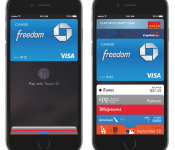
Alongside the Apple Watch and iPhone 6, Apple today unveiled Apple Pay, its mobile payments initiative that allows users to pay for items either by waving their iPhone or Apple Watch at a checkout counter or by using Touch ID after clicking the Apple Pay button in an app like Uber. Following that event, Apple invited members of the press to try out the new payment service with the iPhone 6 and iPhone 6 Plus.
According to The Verge, the system worked “remarkably smooth” and was the “smoothest payment system” they’ve seen. They note that Touch ID adds a “real sense of security” and that the entire process is cohesive. However, they do wonder whether it’ll work the same in the opening months of the service when retailers are adjusting to the process and the software is in early days.
The phone was loaded up with a handful of credit cards, and holding the top of the phone about an inch from the card reader with my thumb on the TouchID home button triggered a payment from the default card in about five to 10 seconds. If you want to use a different card, just leave your finger off the home button and you’ll see a Passbook-style card stack at the bottom of the screen, which you can tap on to bring up the full list and pick the card you want. Then you just put your finger on the reader and you’re good to go.
Slashgear agrees that the process is “pretty darn easy”, noting that using the iPhone to pay for something is far more of a swift experience than pulling out a credit card, swiping it, and typing in a pin or signing a receipt. Users can add credit cards to Apple Pay by taking a photo of their card.
Setup involves either granting Apple Pay access to whatever existing credit card you have on file with iTunes or adding a second card: you can do that by taking a photo of the card itself. We’ve seen the same system used in Uber’s app, among others, and generally it does a solid job of recognizing characters.
In an interview with ABC’s David Muir, Tim Cook commented that Apple Pay is “incredibly safe” and that Apple is setting a high bar with Apple Pay. Cook went on to say that “it’s the most secure thing out there” when told by Muir that some people’s confidence in the company’s security might be shaken after celebrities iCloud accounts were hacked.
Muir also asked Cook whether he thought Apple killed the credit card with the announcement of Apple Pay. Smiling, Cook replied that Apple “stuck a dagger in it”. The Apple CEO finished his interview by noting that components from either the iPhone 6 or Apple Watch were built in 22 of the 50 states in America.
Apple Pay will roll out to 222,000 retail locations across the country. The service will launch next month as a part of iOS 8.
.CPlase_panel display:none;
Apple Watch: Much ado about nothing

I don’t get it. Based on my demographic standing; by sheer dint of my position within the tech press; as someone who grew up with the first Macintosh in his house and a subscription to Macworld, I should be standing and applauding and ferociously tweeting my awe and amazement at the unveiling of Apple Watch. Yet, I am not. Apple did not save wearables, as many thought it would. Apple caved to the incredibly high bar of expectations set by the public. Apple unveiled something, at best, lukewarm. At most, it’s prettier than the smartwatches that’ve come before, and that’s likely its greatest innovation.
My stance on the smartwatch as a viable mobile accessory is unambiguous; I’ve argued my case before. As a category, it needs to replace — needs to completely replace our need for a cellphone. Otherwise, it’s just one more thing to remember to charge throughout our busy days. To date, there’s nothing any of these thinly veiled, proof-of-concept, wrist-worn devices can do that the smartphone already in your hand can’t. Apple, I once thought, would prove me wrong. It would be the one to come along and actually make the strongest argument for wearables by analyzing the use cases and delivering that missing core functionality intuitively. Apple’s perfectionism would be the hallelujah wearables so desperately needed.

Gamers communicate using hand-drawn images on Nintendo’s DS portable.
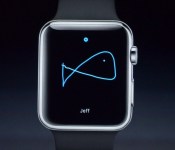
Instead, at today’s Cupertino, California, event, we — the press, the world at large — were treated to a beautifully designed smartwatch (e.g., those interchangeable straps) laden with an embarrassing slew of useless gimmicks. With Apple Watch, you can view the phases of the moon or the positions of the planets; you can draw crude pictures with your finger and send them to friends (a feature eerily reminiscent of Nintendo’s PictoChat for the DS) or even send them your heartbeat. Cheap tricks that consumers will tire of after a few weeks. But let’s not forget the saddest part: Apple Watch will also tell you when you’ve been sitting too long and need to stand up. Hang your collective head, humanity — it’s a poor reflection on us all.
To date, there’s nothing any of these thinly veiled, proof-of-concept, wrist-worn devices can do that the smartphone already in your hand can’t.
Then there’s the Digital Crown (once simply known as the “crown”), a hardware feature Apple spent several minutes of its slickly produced intro video praising the genius of, as part of its effort to redefine the smartwatch UI. The extensive engineering self-congratulations almost had me fooled: “What was this new UI that obliterated the need for a touchscreen?” I wondered. And then Kevin Lynch, the Apple VP overseeing Watch, came out on stage to demo this revolutionary feature… and wound up mostly using his finger to touch the screen. That app cloud, though — now, that deserves a nod. Rather than lazily recreate the app grid from iOS, Apple reimagined it as a dynamically expanding mosaic for the stuffy confines of a watch face. And it did so beautifully.
Don’t get me wrong: Apple Watch does appear to have some actually useful features, but the bulk of them come from third-party apps. Starwood Hotels, the hotel group that counts bougie faves like the W amongst its portfolio, has an app to let you open your hotel room door with a wave of your wrist. And American Airlines has an app that’ll push all your flight info to your Watch for easy boarding. Even BMW’s making a play for the Watch space: Its haute clientele will be able to check on the status of their car’s charge and location. All of which is very interesting and yet Apple covered each with nary more than a blip of time within its presentation.
To Apple’s credit, I do very much want a Taptic mapping experience (read: a much more marketable name for haptic feedback) that’ll guide me along my designated route solely with vibrations. (I’d mention Apple Pay, but that distinction really belongs to the new iPhones and Touch ID, not this Watch.) Fitness tracking is in there, too, but that’s so old hat by now; it’s just expected. If you don’t mind, I’ll hold my applause.
Will Apple Watch fail? Doubtful. There’s too much of a persistent, lingering Jobsian-halo surrounding the Apple brand to let that product fall on its (watch) face. It’ll get better with time; most things/people/products inevitably do. It could even make wearables slightly more palatable for the mainstream. But it’s not a revolution and it’s not what any of us really expected. It’s lipstick on a smartwatch. It’s an accessory and nothing more.
[Image credit: Kaptain Kobold/Flickr]
.CPlase_panel display:none;
Hands-On First Impressions of the New iPhone 6 and iPhone 6 Plus
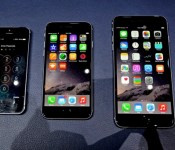
After today’s media event saw the introduction of two new iPhones and Apple’s first wearable device, members of the press were invited to go hands-on with all of Apple’s new products. Several sites are now posting hands-on first impressions of both the new iPhone 6 and iPhone 6 Plus, which we’ve gathered up below to give users an overall picture of the look and feel of the larger-screened phones.
Jared Nelson from our sister site TouchArcade took a look at both the iPhone 6 and the iPhone 6 Plus. According to Nelson, the 5.5-inch iPhone 6 Plus is actually “manageably large” and the screen is “amazing” for tasks like watching videos, reading texts, and gaming. He says the new Retina Display HD screens look “absolutely incredible” in person.
The Verge says the screen of the 4.7-inch iPhone 6 “looks great” and that the device feels like a “hybrid of iPhone and iPod touch.” Though it’s bigger, it “doesn’t really feel big,” and it’s “remarkably light and incredibly thin.” Sentiments are similar for the larger 5.5-inch iPhone 6 Plus, but the site noted that even the larger version is “much smaller in the hand” than expected, with the rounded edges making it “somewhat easier to hold.”

The protruding camera is a indeed a bit strange; I can’t help but wish Apple would ease up on its relentless pursuit of thinness in favor of a slightly thicker phone with longer battery life, but like I said, the thinness is what makes the large size manageable.
And that large size is pretty key; this is the phone that’s going to force Apple to turn the iPad into a true laptop competitor. I have an iPad mini that will never come out again once I get this phone; I have an iPad Air that will need a better reason to come out than simply the size of its screen.
Engadget has similar thoughts about the 5.5-inch iPhone 6 Plus, also noting that the phone’s curved edges are “easier to grip” than originally expected.” Though the 5.5-inch iPhone 6 has a resolution of 1920×1080, Engadget says there wasn’t much difference between the displays of the 4.7 and 5.5-inch iPhones. The site also points out a few of the differences between the two phones, including the 0.2mm difference in thickness (4.7 is 6.9mm, 5.5 is 7.1mm) and the increased battery life of the larger phone.
With it being a brief hands-on, I wasn’t able to notice a large enough difference between the two; both looked sharp, clean and had great viewing angles. I’ll be able to go into more detail when review units grace my desk, but for now, I’m satisfied enough with the visual quality, and I doubt the difference in pixel density will be a critical factor when choosing between the two sizes.
Gizmodo‘s first note on the 4.7-inch iPhone 6 is that it “feels like an iPhone.” The site was not a fan of the antenna bands on the back, which it says are “not all that pretty,” but it did like the Retina HD screen on the device, saying its “brilliant.” As for the larger iPhone 6 Plus, Gizmodo called it “HUGE!”

It’s amazingly thin, and incredibly solid, but it barely fits into my hand at all. Just see how those fingers struggle to grasp the new iPhone in the picture above.
Combined with those slick, beautifully machined metal edges, now rounded like an iPod touch or iPad mini instead of chamfered, I was honestly scared I would drop and break the giant handset right there in the Apple tent.
Gizmodo also delves into Apple’s one-handed mode, which shrinks anything on the phone’s screen into thumb’s reach with a double tap on the Touch ID home button.

But if you do want to use it one-handed, then boy does Apple have a smart solution for that. Double-tap the Touch ID sensor (don’t press it, I learned the hard way) from LITERALLY ANYWHERE in the entire iPhone interface, including the homescreen, and everything on the top half of the phone’s screen, every icon, will shrink down to put itself within your thumb’s easy reach.
Apple’s iPhone 6 and iPhone 6 Plus have nearly identical specifications. Aside from the difference in screen size, the larger iPhone has a longer battery life and optical image stabilization to differentiate it. It also comes with a $100 price premium.
Apple’s two iPhones will be available beginning on Friday, September 19, with pre-orders for the devices starting this Friday, September 12. Prices for the 4.7-inch version start at $199, while prices for the 5.5-inch version start at $299.
.CPlase_panel display:none;
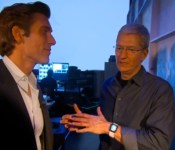
Tim Cook: Steve Jobs’ DNA Will Always be the Foundation of Apple
Following today’s media event that saw Apple revealing two new iPhones, a wearable device, and its payments initiative, Tim Cook did an exclusive one-on-one interview with ABC News’ David Muir.
In a clip of the interview shared by ABC News, Muir asks Cook if he was thinking about Steve Jobs’ during today’s event, which took place at the Flint Center at De Anza College, the same location where Jobs unveiled the original Mac in 1984. Cook responded that he thinks of Jobs all the time, and that he believes Jobs would be “incredibly proud” to see the company today.

I think about Steve a lot. I love Steve dearly. There’s not a day that goes by that I don’t think of him. This morning, being here, I especially thought about him and I think he would be incredibly proud to see the company that he left us — which I think was one of his greatest gifts to mankind, the company itself — be doing what it’s doing today. I think he’s smiling right now.
Jobs apparently was not aware that an Apple Watch was coming, as Apple began work on the device after his passing. According to Cook, though, the “foundation” that Jobs left can be seen in all of the work that Apple is doing today
.
His thinking and his taste and his incredible perfectionist kind of view, and his view that you should always innovate, all of those things are alive and well in the company. And I think they always will be. I think his DNA will always be the foundation of Apple.
More of Tim Cook’s exclusive interview with David Muir will be available on World News Tonight later today.
.CPlase_panel display:none;
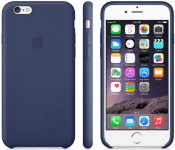
Apple Selling New Leather/Silicone Cases for iPhone 6, iPhone 6 Plus [iOS Blog]
During today’s unveiling of the iPhone 6, the iPhone 6 Plus and the Apple Watch, Apple also announced plans to introduce new cases for both of the new iPhones. First of all, the company will be continuing the leather line of cases that it first introduced for the iPhone 5s, offering cases that will fit both the iPhone 6 and the iPhone 6 Plus.
The cases are crafted from hand-selected leather that’s been treated with aniline dye, and they feature a microfiber interior to protect the phone and its new protruding lens. The leather cases are available in Black, Olive Brown, Midnight Blue, Soft Pink, and Product (RED).

Along with the leather cases, Apple is also offering custom-fit silicone cases for the iPhone 6 and the iPhone 6 Plus, which offer protection while “maintaining their incredibly slim form.” The silicone cases come in Black, White, Pink, Blue, Green, and Product (RED).

New custom-fit silicone cases cover iPhone 6 and iPhone 6 Plus while maintaining their incredibly slim form. The camera stays protected just beneath the case, while a soft microfiber lining cushions the entire iPhone. Each perfectly form-fitting case has a smooth finish that feels as good as it looks.
Leather cases for the 4.7-inch iPhone 6 are priced at $45, while leather cases for the 5.5-inch version are priced at $49. Silicone cases for the 4.7-inch iPhone 6 are priced at $35, and 5.5-inch silicone cases are $39.
Cases for the iPhone 6 and the iPhone 6 Plus are listed on Apple’s website and will presumably be purchasable beginning on Friday, September 19, when the iPhones hit stores. Pre-orders for the iPhone 6 and the iPhone 6 Plus will begin on Friday, September 12.
.CPlase_panel display:none;
Apple Releases iTunes 11.4 for Mavericks With Support for iOS 8 [Mac Blog]
Apple today released iTunes 11.4 for OS X Mavericks, bringing support for iOS 8. According to the release notes, the update adds the ability for users to sync movies, music, and more to devices running iOS 8.

iTunes 11.4 can be downloaded via the Software Update Mechanism in the Mac App Store or through Apple’s iTunes website.
The release of iTunes 11.4 comes just over a week ahead of iOS 8’s public release date. Apple has plans to launch the software on Wednesday, September 17, two days before the iPhone 6 and the iPhone 6 Plus are available in stores.
.CPlase_panel display:none;
Apple Watch will unlock your hotel room door, guide you home and more: the app roundup

You’re at the Westin Grand in Berlin having a luxurious vacation. After finishing a delicious bowl of mushroom consommé — chanterelles are in season, after all — you stroll up the lavish center staircase toward your room. Having left wallets in the past, you simply hover your Apple Watch over the door. “Click!” And that’s that. Magnetic plastic cards are so uncivilized.
This is the future Apple imagines for you with its new Watch, and it’s working with Starwood Hotels (the group that owns Westin, among others) to make that future a reality. And that’s just one of several scenarios for Apple Watch that were introduced by Apple VP Kevin Lynch during a third-party app demo on stage in Cupertino, California.
Beyond Starwood, American Airlines is also working on Apple Watch — both are using WatchKit, the software toolkit Apple built for third-party app development. The specific context wasn’t given for its use with American, but one can easily imagine using Apple Watch as your electronic boarding pass.

City Mapper, a popular transit app on mobile, is getting an Apple Watch version, as are home-automation apps from Lutron and Honeywell. BMW is apparently creating a tool for finding your car with the Watch. These are the “internet of things” applications for Apple Watch — home automation, location guidance, personal-object retrieval, etc.
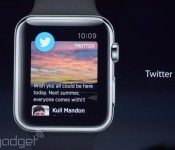
And then, of course, there’s stuff like Twitter and Pinterest. Twitter is relatively fully featured from the looks of the brief demo shown: You can tweet from it, as well as browse your timeline and such. Pinterest acts more like a reminder list, letting you know when you’re physically close to something you’ve pinned.
We’ll assuredly hear more about Apple Watch apps as the trio of watches launch sometime in early 2015. And hey, maybe you’re making a really cool app? Or you know of one that’s in the works? Don’t hesitate to let us know!
Filed under: Peripherals, Wearables, Mobile, Apple
.CPlase_panel display:none;
Apple reveals new iCloud pricing, but you still only get 5GB of space for free

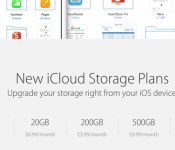
It used to be that if you compared iCloud pricing to other online storage services, Apple didn’t look so hot. (Twenty bucks a year for 10GB?! Bye, Felicia.) Now, in a bid to better compete with bigwigs like Google Drive and Microsoft OneDrive, Apple is revising its iCloud plans so that they’re a little more affordable. Now, 20GB costs 99 cents a month; 200GB costs $4; 500GB is $10; and 1TB is $20 a month. All told, that’s an improvement — at least compared to the Apple of years past. It must be noted, though, that the free storage plan still only includes 5GB of space — a bit stingy considering Google and Microsoft both offer 15GB gratis. Also, as low as Apple’s prices are compared to the olden days, Google’s are still better: Google charges $10 a month for 1TB, not $20, and it also offers a more inexpensive 100GB option, which Apple doesn’t do.
Via: 9to5Mac
.CPlase_panel display:none;
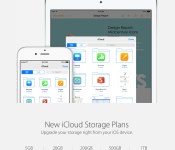
Apple’s New iCloud Pricing Announced: 20GB for $0.99, 200GB for $3.99 and 1TB for $19.99 [Mac Blog]
Following today’s media event that saw Apple unveil both the Apple Watch and two new versions of the iPhone 6, the company has updated its website to provide additional information on its iCloud pricing, ahead of the launch of both iOS 8 and OS X Yosemite.
Apple has a new range of iCloud Storage Plans available with prices that are highly competitive with other cloud storage companies. Customers will continue to get 5GB of storage for free, with 20GB available for $0.99 per month.

200GB of storage costs $3.99 per month, and 500GB is $9.99 per month. Apple’s top tier storage, 1TB, costs just $19.99 per month, slightly more than Dropbox’s new $9.99/month price for 1TB storage.
The launch of iOS 8 and OS X Yosemite will see the official debut of iCloud Drive, Apple’s new cloud storage initiative. With iCloud Drive, users can store any type of document, including presentations, spreadsheets, PDFs, images, and more, and then access them from any iOS device, Mac, or PC.
.CPlase_panel display:none;
Apple Launches Redesigned Mobile Website [iOS Blog]
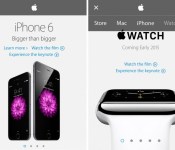
Following today’s announcements of the iPhone 6, iPhone 6 Plus, and Apple Watch, Apple has launched a redesigned website with a brand-new interface for mobile devices. The new interface emphasizes a flat design aesthetic, which includes a drop-down menu bar that allows users to scroll through Apple’s product line.

Individual product pages have also been formatted to fit mobile devices, as text and images fit inside a single column. Apple displayed the full, desktop version of its site on its mobile devices prior to today’s announcements.

Apple also redesigned its Apple Store App last week, making it universal for both the iPhone and iPad and allowing users to start shopping on one device and finish it on another, including a Mac or PC.
.CPlase_panel display:none;