


iFixit Tears Down iPad Air 2, Confirms Smaller Battery, A8X Chip, and 2GB RAM
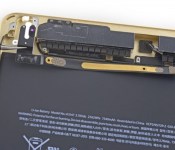
Now that the iPad Air 2 is being delivered to customers and showing up in retail Apple Stores, iFixit has acquired one of the new tablets and has begun one of its traditional teardowns to see just what’s inside Apple’s thinner, more powerful iPad Air 2.
According to iFixit, the “gapless” front panel is more rigid than previous iPad models, and feels sturdier when it’s being pried up with the company’s proprietary iOpener. As with all iPads, the glued down display is the only access point to the tablet.
As noted in reviews, the iPad Air 2 has a smaller battery than the original iPad Air, coming in at 27.62 Whr and 7,340 mAh. The first generation tablet had a 8,827 mAh/32.9 Whr battery life.

iFixit’s teardown confirms the existence of both the more powerful A8X processor and 2GB of Elpida F8164A3MD RAM. The iPad Air 2’s logic board includes two separate 1GB RAM chips located in on either side of the A8X processor.

The iPad Air 2’s Touch ID sensor cable appears to be very similar to the sensor cable found in the new iPhones, and the Touch ID sensor itself was made by NXP Semiconductors. The 8-megapixel camera is similar to the camera in the iPhone 6 and 6 Plus as well, but they are not identical. The iPad Air 2’s ambient light sensor has been split into two sensors, with one now located on the headphone jack, possibly for improved accuracy.
Along with the repositioning of several internal microphone and camera components, the Wi-Fi model’s antennas, previously located at the bottom of the tablet, have been moved to the top of the iPad.
Apple’s iPad Air 2 is currently available for order online, with new orders shipping in two to four days. Wi-Fi only models are also available in retail stores as of today, with Wi-Fi + Cellular models coming at a later date. Prices for the new iPad Air 2 start at $499.
iFixit’s teardown is still ongoing and we will add any additional information here.
Bank of America issues refunds after double-charging Apple Pay users

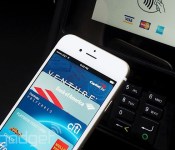
Went on a spending spree with your Bank of America debit card the moment Apple Pay hit your iPhone? You might be in for a (brief) shock. The bank is now issuing refunds after it charged at least some Apple Pay users twice when they made purchases at retail shops. While it hasn’t said what triggered the glitch, the issue doesn’t appear to involve Apple’s software — there haven’t been widespread reports of problems with other cards, and Apple itself doesn’t process transactions. Whatever was the cause, it’s not surprising that a major mobile payment service would run into some hiccups just after launch. Let’s just hope that things go more smoothly from here on out.
Filed under: Cellphones, Mobile, Apple
Source: Cult of Mac

Apple Encouraging Chrome and Firefox Users to Try Safari After Installing Yosemite
Chrome and Firefox users that install OS X Yosemite are receiving notifications suggesting they give Safari a try, according to multiple reports on Twitter (via Tom Davenport). After upgrading to Yosemite, Apple is sending popups that read “Try the new Safari. Fast, energy efficient, and with a beautiful new design.”
The interactive notification comes with “Later” and “Try Now” options, and it seems that users may be receiving the messages when opening Chrome or Firefox for the first time after installing the operating system update.

Apple made several updates to Safari in OS X Yosemite, including adding a new “blazing-fast [Nitro] JavaScript engine” and energy saving technologies to make Safari both faster and more energy efficient. According to Apple, Safari is significantly faster than both Firefox and Chrome, a claim that was tested by CNET and received mixed results.

Safari did better on Apple’s JetStream and Speedometer benchmarks that measure JavaScript performance, and it also outperformed Chrome and Firefox using JSBench, but CNET‘s testing saw it perform worse on Google’s Octane benchmark and Mozilla’s Kraken benchmark.
The new Safari 8 did demonstrate significant improvements over Safari 7, scoring 81 percent better on JetStream and 89 percent better on Speedometer, suggesting Apple has indeed made some major under-the-hood improvements to the browser.
Along with speed improvements, Safari gained some new security features, including DuckDuckGo support and isolated Private Browsing windows that allow users to have a non-private browsing window open at the same time as a private browsing window. The browser also continues to offer third-party cookie blocking, malware monitoring, and sandboxing for websites.
Safari received a complete visual overhaul in OS X Yosemite, introducing a new streamlined look that does away with the favorites bar by default and a revamped Tab View that displays all open tabs in a tiled arrangement, much like iOS.

Safari has also benefitted from Handoff, a Continuity feature that allows users to open a webpage on a Mac and seamlessly continue browsing on an iOS device (or vice versa), and the browser natively supports Netflix, providing two extra hours of battery life when watching movies or TV shows.
Built into OS X Yosemite, Safari 8 is automatically installed alongside the new operating system. Released on October 16, Yosemite is estimated to be installed on approximately 20 percent of Macs at this point in time.
iPad Air 2, iPad Mini 3 Now Available In Stores via Personal Pickup
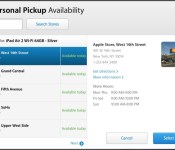
Apple’s new iPad Air 2 and iPad mini 3 have begun hitting retail stores, as we reported earlier, and the tablets are now available for in-store pickup for a limited number of retail locations that have received shipments. It appears that in-store availability is limited to Wi-Fi only tablets at this time.
Many stores on the east coast of the United States are showing wide availability of both tablets as stores receive shipments and unpack boxes. Availability on the west coast is still limited as it is earlier in the day and stores are not yet prepared to begin retail sales.

Apple store employees appear to be unaware that stores are receiving stock today, as several phone calls placed by MacRumors resulted in responses suggesting the tablets would not arrive in stores until later in the week or early next week.
The iPad Air 2 is still showing shipping estimates of two to four days when ordered online, and some rumors have suggested that supplies are limited, which explains the tablet’s quiet in-store release. At announcement, Apple declined to state when the iPad Air 2 and the iPad mini 3 would be available in retail stores.
Apple’s iPad mini 3, meanwhile, appears to be available in greater supply, displaying shipping estimates of 24 hours. iPad mini 3 pricing starts at $399 for the entry-level model, while iPad Air 2 pricing starts at $499.
While the iPad mini 3 received only Touch ID and a gold color option, the iPad Air 2 has seen significant updates including a thinner design, a new “gapless” display, an anti-reflective coating, 2GB of RAM, an A8X processor, and an upgraded 8-megapixel camera.
Working Apple 1 Computer Sells for Record $905,000 at Auction [Mac Blog]
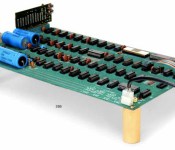
A rare working Apple 1 computer has sold for a record $905,000 at a Bonhams auction in New York, reports Reuters. Estimates suggested the motherboard might fetch between $300,000 and $500,000, but it ended up selling for far more.

The motherboard is believed to be one of approximately 50 Apple 1 computers that were originally constructed by Apple co-founder Steve Wozniak in Steve Jobs’ garage for sale in The Byte Shop. The motherboard is numbered “01-0070.”
http://content.jwplatform.com/players/XsKNUiWJ-uJeNAjNM.html
Few Apple 1 computers survive today, and the one sold at the New York auction has fetched the highest price seen yet. The buyer of the computer remains unknown. Each Apple 1 originally sold for $666.66, and approximately 200 total units were produced.
Last year, two working Apple 1 computers complete with their original cardboard box were sold by German auction house Breker. One of the machines sold for $330,000, while a second fully functional Apple 1 computer sold for $671,400 as it included a letter from Steve Jobs intended for its original owner.
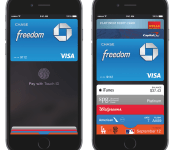
Apple Pay Glitch Causes Bank of America Customers to Be Charged Twice for Purchases
With Apple Pay positioned as a brand new service that requires banks, credit card companies, and vendors to all work together, it seems that some glitches in the system are inevitable.
Some Bank of America customers have been running into a serious problem when using Apple Pay to make purchases, with two charges showing up on their credit card statements. A CNN report from this morning first suggested that multiple Bank of America customers had been double charged, which Bloomberg later confirmed. Hundreds of customers are said to be affected.
 A Bank of America representative contacted by CNN said that the issue was on Apple Pay’s end and after some confusion about who should be contacted for a refund, Bank of America was able to refund the money.
Bank of America transferred me to Apple Pay customer support. The only problem: Apple’s representative reminded me that for security’s sake — as promised — Apple keeps no records of names or amounts for any of the transactions.
That meant there’s nothing Apple could do, the representative told me. So Apple told me to call Bank of America. It was every consumer’s worst nightmare: customer service for two companies telling you to call the other.
Thank God for three-way calling. I got Apple and Bank of America on the same line and let them sort it out.
BofA was smart enough to refund me the money, because they said it was obvious to them that these were duplicate charges for the same exact amount.
Bank of America is planning to issue refunds to all Apple Pay customers who were double charged, and according to CNN, a fix for the problem is expected to be released at some point on Wednesday.
“We apologize for the inconvenience and are working to correct the issue. All customers have been made whole,” said Tara Burke, a spokeswoman for Bank of America. “We are always here for our customers and resolve any issues they have.”
Banking issues aren’t the only problem Apple Pay users are facing. According to a quick test conducted by Business Insider at eleven different retailers, many employees have little knowledge about Apple Pay. At eight separate locations, store clerks did not know whether or not they accepted Apple Pay, and only employees McDonald’s, Whole Foods, and American Eagle Outfitters were aware of the service.
The site had considerably difficulty conducting a return at American Eagle Outfitters, as the store cashiers had not been taught how to do them, but a refund was received “after a period of trial-and-error.”
There’s also a minor Apple Pay glitch that’s causing some credit cards to display the wrong card design within the Passbook app, affecting some Chase and Citibank card users, but a fix for that issue is said to be in the works, according to 9to5Mac.
Many of the kinks with Apple Pay will be worked out over the coming weeks, as retail employees adapt to the new payments service and banks and credit cards work out remaining bugs and issues. According to Apple’s Eddy Cue, Apple Pay will be a “game changer.” “There’s a lot to do here and we have a lot of work to do, but it should be huge,” he said in an interview.
Rolled out on Monday through an update to iOS 8.1, Apple Pay is accepted at more than 200,000 retail locations, wherever NFC contactless payments are available. It is also available in an array of apps that have adopted the Apple Pay API, including Uber, Target, and Apple’s own Apple Store app.

MasterCard Airs ‘Priceless Surprises’ World Series Ads Featuring Apple Pay
Earlier this week, Major League Baseball and MasterCard announced a partnership that has seen Apple Pay support roll out at concession stands at ballparks in San Francisco and Kansas City for the World Series. As part of its World Series promotional push, MasterCard also debuted a pair of television ads during last night’s Game 1, featuring Apple Pay and the company’s “Priceless Surprises” program that has seen cardholders surprised with various rewards.
One spot features former New York Yankees star Mariano Rivera and longtime Los Angeles Dodgers manager Tommy Lasorda, while the second features Kansas City Royals legend George Brett, with MasterCard promoting surprises such as meet-and-greets with the stars and tickets to World Series games.
On its Priceless Surprises website, MasterCard notes it has surprised over 70,000 cardholders with various rewards, and now Apple Pay gives users more ways to win.
Apple launched its Apple Pay mobile payments service on Monday with the debut of iOS 8.1, with the iPhone 6 and 6 Plus supporting the service in-store and in apps, while the new iPad Air 2 and iPad mini 3 support it for in-app purchases only.
MasterCard, Visa, and American Express have all signed onto the program, as have over 500 banks and a number of major retailers. Launching first in the United States, Apple Pay is now accepted at over 200,000 points of sale and the cards and banks responsible for the vast majority of U.S. credit card spending are compatible with the service.
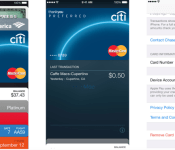
Amazon Confirms Plans to Support Apple Pay on Visa Rewards Card in the Future [iOS Blog]
Following the launch of Apple Pay earlier this week, a number of users were disappointed to discover that the Amazon Rewards Card offered by Chase was not supported, although the reason for the omission was unclear given that many other Chase cards do support Apple Pay. Amazon has, however, now confirmed to GeekWire that it does plan to support Apple Pay with the card in the future. Amazon reportedly is working to enable the service for launch at an undisclosed date.
But an Amazon spokesman confirmed to GeekWire this evening it is working to enable the Amazon.com Rewards Visa Card for use on Apple Pay, although declined to say when it would be available.
Canceling our http://t.co/flDZ0A06VL Visa since it doesn’t do ApplePay. @amazonsupport @ChaseSupport
— Blake Seely (@blakeseely) October 21, 2014
Chase representatives reportedly confirmed that Amazon opted out of Apple Pay and was the only consumer Chase card that was not compatible with the payment service. The reason for this non-participation was not provided, sparking rumors that Amazon was deliberately rebuffing Apple’s mobile payment efforts for competitive reasons.

Apple launched Apple Pay on Monday with the support of high-profile retailers such as Walgreens and major credit card companies including Visa, Master Card, and American Express. Apple Pay works with the iPhone 6 and 6 Plus, both of which include an NFC chip to process the transactions wirelessly at compatible point-of-sale terminals. The new iPad Air 2 and iPad mini 3 are also compatible with Apple Pay, but only for in-app purchases.
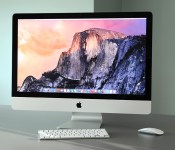
iMac with Retina display review: A best-in-class screen makes it worth the high price

When Apple held one of its big keynotes last week, it was easy to think of it as “iPad day.” Sure enough, the company announced some upgraded tablets, but it was a desktop, of all things, that stole the show. Though the new 27-inch iMac with Retina display has the same overall design as Apple’s previous all-in-ones, it ushers in a 14.7-million-pixel 5K display with screen resolution of 5,120 x 2,880. That’s seven times as many pixels as 1080p, and 67 percent more than you’ll find even on a 4K panel. I’m not exaggerating when I say there’s nothing like it. As it is, you’d be hard-pressed to find a 4K all-in-one, and meanwhile, here’s this machine from Apple, with enough pixels to view a 4K video at full resolution, and still have room left onscreen for other stuff, like the Final Cut Pro dashboard. Needless to say, it’s in a league — and price class — of its own. Starting at $2,499, it’s more expensive than almost any other all-in-one on the market, even the supposedly high-end ones. As it turns out, though, if it’s this kind of screen quality you’re after, this might well be your only choice.
Look and feel

I’ll make this part quick. With the exception of that gorgeous 5K screen, the Retina display iMac has the same design and dimensions as the regular 27-inch model, which came out back in 2012. As ever, the bezel measures just 5mm thick, making for one thin screen. Of course, you won’t notice the slim frame unless you view it from the sides. And besides, the rest of the machine isn’t nearly as skinny — the desktop still puffs out behind the display where all the components live, and you’ll need to budget enough room on your desk to fit a machine that measures 25.6 inches wide. The metal stand in the back naturally adds to that footprint, though Apple smartly put a keyhole in there to allow for tidier cable management. Throughout, the machine is fashioned out of the same smooth aluminum as the MacBook line, making for a premium design.
All in all, I dig the aesthetic here, and always have. When Apple first unveiled it two years ago, though, I was adamant that thin bezels alone weren’t a good enough reason to buy a new iMac. I still feel that way, though there have always been other reasons you might want one. In this case, that stunner of a display. That’s an excellent excuse to spend twice as much on an all-in-one as you normally would.

Speaking of the sort, I promise I’ll get to the display in just a minute. First, though, let’s go over the ports, just to be thorough. All of the ports and openings are located on the backside toward the bottom, with everything arranged in a neat row. This includes a headphone jack, SDXC slot, four USB 3.0 ports, two Thunderbolt 2 sockets and a Gigabit Ethernet jack. There’s also a Kensington lock slot and the all-important power port, which is located right behind the stand, making it easier to just thread the power cable through the keyhole.
One thing you won’t notice are the speakers, but believe me, they’re there — two of ‘em. Specifically, Apple squeezed them into the chambers on either side of the screen, with the sound firing downward through the lower bezel. For a sound setup you can’t even see, it’s actually quite robust. Finally, the iMac ships with the same, old wireless keyboard, along with your choice of an Apple Mouse, Magic Mouse (gesture-enabled) or Magic Trackpad. As ever, the keyboard is comfortable to type on, if a tad flat, and I like the Magic Mouse and Magic Trackpad equally. You can’t go wrong with either, though you can also buy both for an extra $69 if you’re worried about missing out.
Display

“I just wanna stare at it.”
That’s what a colleague said when he first saw the Retina iMac, and even now that I’ve been playing with it for a few days, I feel the same way. The best way I can describe it is this: Unboxing it is kind of like setting up your first HDTV. I didn’t want to do anything for the first few minutes; I just wanted to swap in new desktop backgrounds, each sharper than the last, and see how many details I could pick out. Even the flat new icons in OS X Yosemite look great, but you’re probably going to need some 4K video or high-res photos if you want to make the most of the screen. (I imagine the photo and video enthusiasts this machine is aimed at will have that on hand anyway.) If you can get yourself some nice test pictures, maybe a few shot by professionals, you’ll notice extraordinary detail in everything from leather to reptilian skin. Macro shots, in particular, are about as close as you can get to feeling like you’re looking out a window. (“That’s not OK,” a different colleague said as I showed him this image of an eyeball.) Given the right image, one with accurate colors and impeccable sharpness, there’s little separating that collection of pixels from the real thing.
But it’s not just the resolution that makes this a best-in-class display — the image quality is also top-notch. For starters, Apple used Oxide TFT (thin-film transistor) technology to keep the brightness even throughout the 27-inch panel. Apple also added a so-called compensation film for viewing angles. Indeed, colors stay pungent even from severe off-angles — unrealistically wide angles, I mean. The truth is, though, that the last two years of iMacs had wide viewing angles as well, with relatively little glare, so whatever Apple did here, it feels more like it fine-tuned an already-excellent display. Ditto for the colors: They’re vivid and lifelike, but then again, I said the same thing about the last generation of iMacs.

Additionally, Apple borrowed the same “organic passivation” technique it uses on its Retina iPads, which has a positive effect on both image clarity and power consumption. Speaking of the sort, Apple says this model uses 30 percent less power than the previous-gen of iMacs, which is important because no one wants a display this pixel-dense to overheat. Behind it all, there’s a custom Apple-designed timing controller chip to tell each pixel what to do.
All told, my biggest complaint about the display is that you can’t use it as a second screen. While the last-generation iMacs could work as standalone monitors, the 5K iMac is designed to be used as an all-in-one only. Unfortunately, too, there’s currently no standalone 5K Cinema Display, though I wouldn’t be surprised if one were in the works. For now, though, that means if you already own a new Mac Pro and want a super-sharp display to play back 4K content, you’ll need to look to other brands.
Performance
| Geekbench (multi-core) | Xbench | Blackmagic (average read/write speeds) | |
|---|---|---|---|
| iMac (2014, 3.5GHz Core i5, 8GB RAM, 2GB AMD Radeon R9 M290X) | 11,344 (32-bit) / 12,394 (64-bit) | 643.65 | 659.0/311.5 MB/s |
| Mac Pro (2013, 3.7GHz Intel Xeon E5-1620, dual 2GB AMD FirePro D300) | 12,650 (32-bit) / 14,207 (64-bit) | 601.98 | 918.6/761.2 MB/s |
| iMac (2013, 27-inch, 3.4GHz Core i5, 8GB RAM, 2GB NVIDIA GeForce GTX 775M) | 10,920 (32-bit) / 11,867 (64-bit) |
539.73 |
667.9/318.1 MB/s |
| iMac (2012, 27-inch, 3.4GHz Core i7, 8GB RAM, 2GB NVIDIA GeForce GTX 680MX) | 13,045 (32-bit) |
560.44 |
409.6/320.1 MB/s |
| iMac (2012, 21.5-inch, 3.1GHz Core i7, 16GB RAM, 512MB NVIDIA GeForce GT 650M) | 12,577 (32-bit) |
531.91 |
409.6/320.1 MB/s |
Though the display is really the big story here, we can’t forget that this is a $2,499 machine. And you do want to know how that $2,499 machine performs, don’tcha? Of course you do. For the purposes of my review, I tested the entry-level model, which comes with a 3.5GHz quad-core Core i5 processor, 8GB of RAM, a 1TB Fusion Drive and a 2GB AMD Radeon R9 M290X GPU. In general-performance benchmarks like Geekbench and Xbench, I saw a slight bump over last year’s iMac, which ran on a slightly lower-clocked Intel Core i5 processor and a different GPU. Meanwhile, on Cinebench, my OpenGL test, results rose slightly from 80.18 frames per second to 90.54 fps, while the CPU score saw a slight increase from 525 to 540.
At the same time, because both of my test units had a Fusion Drive combining a 128GB SSD with a 1TB 7,200RPM hard drive, things like disk speeds and startup times were roughly the same. This time around, for instance, I got average read speeds of 659 MB/s compared with 668 MB/s, and write speeds of 311.5 MB/s versus 318.1. Not a big difference. It’s a similar story with the boot-up: It took about 15 seconds here, compared with 13 the last time around. Very similar results, all around.
| Read speeds | Write speeds | |
|---|---|---|
| 1GB | 665.15 MB/s | 315.53 MB/s |
| 2GB | 666.71 MB/s | 310.79 MB/s |
| 3GB | 655.09 MB/s | 309.14 MB/s |
| 4GB | 651.65 MB/s | 309.01 MB/s |
| 5GB | 656.34 MB/s | 312.99 MB/s |
But enough about benchmarks — let’s talk about 4K. I mean, that’s what this machine was built for, right? And how. To put the new iMac through its paces, I loaded up Final Cut Pro with around 10 gigabytes of 4K video clips, and then got to work editing. Much like the newest Mac Pro, which came out last year, the Retina iMac has enough horsepower that you can quickly add effects to 4K files in Final Cut Pro, even while the file is playing back. Whether it was the “camcorder” effect or a black-and-white filter, I saw my clips transform immediately, with no wait time and no pause in the playback.
Speaking of the sort, to ensure smooth playback, I enabled a setting in Final Cut Pro that causes the clip to pause when a frame drops. I’m happy to say the playback never actually paused. Oh, and in case you’re wondering, it took four minutes and 53 seconds to export that 10GB project as a 1080p file, optimized for Apple devices. I have nothing to compare that export time to, but I will say that’s the only time the iMac ever got noisy. Not loud, really, but I could definitely hear the fans start to kick in. Aside from performance potential, that’s one of the bigger differences between this and the higher-end Mac Pro: The Pro stays whisper-quiet under even heavier loads.
Though the Retina display iMac wasn’t built for gaming, specifically, I decided to try my hand anyway. After all, a $2,499 machine with discrete graphics should be able to turn in a respectable showing, ya know? In any case, it is indeed respectable. Even at native resolution (5,120 x 2,880), I got frame rates of up to 26 fps (average of 22 fps) in the three-year-old Batman: Arkham City. That’s with details and anti-aliasing both set on medium. Once I turned off anti-aliasing and dropped the resolution to 4,096 x 2,304, the average frame rate climbed to 34 fps. At 3,200 x 1,800, it jumped to 52 fps. And at 2,560 x 1,440 — the same resolution as most other high-end all-in-ones — the game purred along at 78 frames per second. Again, I’m not saying the iMac is a gaming phenom, but the fact that it’s playable at resolutions not even offered on other all-in-ones bodes well for the graphics muscle. What’s that? You’d prefer to play at max settings? Let’s be real: You’re probably not seriously considering buying this anyway.
Software

The Retina display iMac arrives alongside OS X Yosemite, Apple’s latest desktop operating system, which became available to the general public last week following a large beta program. If you’re interested in every painstaking detail, you really should read my review, but in case you don’t wanna open another article right now, I’ll do my best to condense everything into a few hundred words. Basically, the most important thing you need to know is that while OS X will run on any relatively recent Mac, you’ll need an iDevice of some sort to make the most of the operating system. With this latest update, you can make and receive calls on your Mac, as well as send and receive text messages, and use your iPhone as an auto-connecting hotspot. You can also start using an app like Pages on your mobile device and pick it up on your computer, or vice versa. Likewise, you can remotely open and close Safari tabs on your iOS device, as well as view your entire iCloud search history.
To do any of this, though, you need an iPhone, or maybe an iPad or iPod touch. In some cases, too, you need to be using Apple’s own apps, like Safari or Mail, instead of third-party ones like Gmail. If, like many users, you own an Android phone, or use Google Drive or OneDrive for cloud storage, many of the best new features will be useless to you. For those people, the main appeal will be the much-improved Spotlight search, some new Mail features (if you even use the Mail app) and a flat, iOS-inspired design. And even that has been a source of controversy among the Mac faithful. Then again, why grouse? It’s a perfectly fine operating system, and besides, it’s not like you even have a choice: If you buy the new 5K iMac, this is what you’re going to get.
Configuration options

The Retina display iMac starts at $2,499 with a 3.5GHz quad-core Core i5 processor, 8GB of RAM, a 1TB Fusion Drive and AMD Radeon R9 M290X graphics with 2GB of GDDR5 video memory. From there, you’ve got a few upgrade options. On the CPU side, you can step up to a 4.0GHz quad-core Core i7 chip to the tune of $250. You can increase the RAM to either 16GB ($200) or 32GB ($600). For $250, you also have the option of adding a beefier GPU (the AMD R9 M295X), which comes with four gigs of VRAM, not two. Finally, let’s talk storage. For the same starting price of $2,499, you can get a 256GB SSD instead of that 1TB Fusion Drive. Alternatively, you can choose a 3TB disk ($150), a 512GB solid-state drive ($300) or a 1TB SSD ($800). Do you have $800 to spend on a 1TB SSD, by the way? Well, then. I’m jealous of you.
The competition

If you ask Apple, the Retina display iMac’s main competition doesn’t necessarily come from other all-in-ones, but rather, standalone 4K displays. It’s a fair point: Dedicated monitors sometimes run thousands of dollars, and that’s without a full computer inside. As I’ve already said, though, this is a slightly misleading argument, since the 5K iMac can’t be used as a secondary display. So, if you already own a powerhouse machine and just want a stunning monitor to go with it, then the iMac’s price is irrelevant; you’re still going to have to pay market value for a 4K screen.
Speaking of which, not all 4K and Ultra HD displays are created (or priced) equal. You could, for instance, buy the 32-inch Sharp PNK-321 for $4,795 (though current prices are hovering around $3,600); Dell’s forthcoming 5K display, which will cost $2,500; or ASUS’ 31.5-inch PQ321Q, which has a list price of $3,000 (with several retailers offering it for around $2,100). But they’re not all that expensive. On the other side of the spectrum, there’s the 28-inch Dell P2815Q, which has 4K resolution (not 5K) and goes for $600, before any instant-sale pricing. Similarly, Samsung’s 28-inch U28D590D also costs $600, and has an identical resolution of 3,840 X 2,160. In any case, Apple’s marketing people are probably correct that the best-quality 4K displays cost thousands of dollars, but you definitely don’t need to spend three grand for a monitor with that resolution.

And what if you do want an all-in-one with a 4K display? How much is that gonna cost? Obviously, if you’re dead-set on Mac OS, this is your only option — that is, unless you’re willing to settle for the regular iMac, which has either 1,920 x 1,080 or 2,560 x 1,440 resolution, depending on whether you get the 21.5 or 27-inch model. Across the aisle, in the world of Windows PCs, it’s slim pickings, unfortunately — at least if you want a screen anywhere close to the Retina iMac’s.
Dell’s XPS 27 starts at a lower price of $1,600, but its 2,560 x 1,440 resolution falls short of 4K, let alone the 5K Apple is offering. Ditto for the ASUS ET2702IGTH and Lenovo’s 27-inch A730 all-in-one, which is said on the company’s site to be “coming soon” with a 2,560 x 1,440 screen. Over at HP, meanwhile, the highest-end desktop you can find is the $1,400 Envy Recline 27, and even that tops out at 1080p resolution. So yes, the new iMac is “expensive,” in the sense that it costs more than its rivals. But you’re also getting a much sharper screen, one that belongs in its own league. Seriously, those other models don’t even come close.
Wrap-up

The Retina display iMac is the best all-in-one desktop you can buy right now, and yes, the $2,499 seems fair, considering the amazing display. That said, precisely because it’s twice as expensive as some rival machines, I wouldn’t recommend it to everyone. There are casual users — web surfers, Facebookers — who will be perfectly satisfied with the regular iMac, which starts at $1,099. But for people who are serious about their photos, and serious about their videos, this new model is in a class of its own. There’s simply nothing else like it — no other 5K all-in-one, not even a 4K machine that would come sort of close.
In particular, I’d recommend this to someone who couldn’t quite justify the Mac Pro, which starts at $2,999 without a monitor. Even the entry-level, $2,499 Retina iMac handles 4K video editing smoothly and remember, you don’t have to pay extra for a super-high-res screen. Now, if you already own a Mac Pro and want that 5K display, well, the best you can do is look on with envy — and hope Apple gets around to releasing a standalone 5K Cinema Display sooner rather than later.
Photos by Will Lipman.
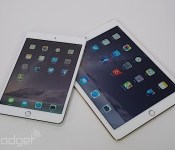
iPad Air 2 and iPad mini 3 now available in certain UK stores

Apple began accepting online orders for the iPad Air 2 and iPad mini 3 shortly after the new tablets were announced last week, but if you’d rather not wait for a delivery, you can pick one up in-store as of today. Apple’s own retail outlets now have the new generation of slates in stock, as do select John Lewis locations, including the flagship London Oxford Street, High Wycombe and Edinburgh stores. Be aware this is the very first batch to hit the UK, so shops might not be able to hook you up with the exact hardware configuration and colour scheme you so desperately want. The iPad Air 2 and mini 3 start at £399 and £319, respectively, with prices increasing based on storage capacity and/or the addition of LTE connectivity. If you’d prefer to spread the cost of new iPad across the term of a mobile data contract, O2 and EE are currently accepting preorders for both tablets, with Three and Vodafone saying they’ll joining the fray soon.
Via: Digital Spy

