


OS X Yosemite update tackles ‘surprise’ Mac security flaws

You know those unpatched Mac security exploits that Google revealed a few days ago? You probably won’t have to worry about them any more. Apple has released OS X Yosemite 10.10.2, a hefty update that fixes those vulnerabilities, which let an intruder hijack your system in the right circumstances. There’s also a solution for Thunderstrike, a nasty (if unlikely) attack that would compromise your computer through a malicious Thunderbolt device. Most of the other 10.10.2 tweaks aren’t huge, although you’ll probably like having access to iCloud Drive storage in your Time Machine backups. You’ll definitely want to grab the upgrade, even if you don’t need some of the smaller perks — it should go quite some distance toward safeguarding your Mac.
Filed under: Desktops, Laptops, Software, Apple, Google
Source: MacRumors

Pushbullet launches apps for iPad, Mac and Safari

Pushbullet has revealed its latest suite of applications, but this time they’re designed purely for iPad, Mac, and Safari. Just like its Android client, these apps for Apple products allow users to copy and paste text across multiple devices, mirror notifications from their smartphone to their computer, and instantly transfer files, links and photographs between hardware regardless of its operating system.
Hit the break below to see Pushbullet’s new apps in action.
Click here to view the embedded video.
We’d love to know what you think of the new apps — so be sure to drop us a comment in the section below.
Download: iPad, Mac and Safari.
Source: Pushbullet
Come comment on this article: Pushbullet launches apps for iPad, Mac and Safari

Apple Releases iOS 8.1.3 With Bug Fixes, Storage Size Reduction
Apple today released iOS 8.1.3 to the public, with a range of bug fixes including a fix for an issue that prevented some users from entering their Apple ID passwords for Messages and FaceTime, a bug that caused Spotlight to stop displaying app results, and a problem that prevented multitasking gestures from working on the iPad.
iOS 8.1.3 also reduces the amount of storage space required to perform an iOS update and adds new configuration options for education standardized testing.
iOS 8.1.3, much like iOS 8.1.2, was a minor release that was not seeded to developers before being released to the public. The software is available immediately as an over-the-air download.

The first hints of iOS 8.1.3 first appeared in early December after devices running the updated operating system began visiting the MacRumors website, and usage picked up last week after iOS 8.1.3 was seeded to Apple retail employees for testing purposes. Apple appears to be expanding its OS X employee testing program to iOS, and iOS 8.1.3 marks the first iOS beta that’s been tested by retail workers.
iOS 8.1.3 is a minor update that includes only under-the-hood bug fixes, but Apple is also working on iOS 8.2, which will bring more drastic changes to the operating system as it contains both the WatchKit SDK and features that will allow the iPhone to integrate with the Apple Watch. It is not clear when Apple plans to release iOS 8.2, but it could come alongside the launch of the Apple Watch, which is currently rumored to be in March.

Apple Releases OS X Yosemite 10.10.2 With Security Fixes, iCloud Drive Browsing Options in Time Machine
Apple today released OS X Yosemite 10.10.2, marking the second update the operating system has received since its October release. Testing for OS X 10.10.2 began in late November, with Apple seeding six betas to developers before releasing the update to the public.
The OS X 10.10.2 update can be downloaded through the Software Update mechanism in the Mac App Store.

According to the release notes, OS X 10.10.2 solves lingering issues with Wi-Fi, fixes issues with Safari web pages loading slowly, improves VoiceOver, improves audio and video syncing when using Bluetooth headphones, and adds the ability to browse through iCloud Drive in Time Machine.
The update also fixes several notable security flaws, including an issue that caused Spotlight to load remote email content even when the Mail preference was disabled, vulnerabilities detected by Google’s Project Zero, and the “Thunderstrike” hardware exploit affecting Thunderbolt-equipped Macs.
‘Alfred Remote’ Turns iOS Devices Into Remote Controls for Macs [iOS Blog]
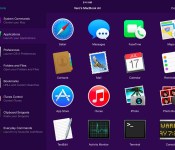
Running with Crayons today announced Alfred Remote, an iOS app that turns an iPhone or iPad into a remote control for various tasks on a user’s Mac, from controlling a screensaver to launching apps (via The Verge).
Designed with parity of the Alfred app on the Mac App Store in mind, Alfred for iOS also allows users to expand into systemwide interactions with their desktop computers. Users with a Powerpack addition to their Alfred 2 experience, which costs about $25, can then use the Remote to control Powerpack-exclusive features via iOS.

These include iTunes playback, copying and pasting from iOS to OS X, running user-defined scripts, AppleScripts, and terminal commands, and creating and controlling custom Workflows for enhanced productivity. Normal features like opening websites and setting a screensaver are available to all users.
With a single touch on your iOS device, you can control many Alfred 2 actions on your Mac, including:
– Show Alfred 2 on your Mac
– System Commands: Lock, restart, shut down, log out or sleep your Mac, eject all devices, quit all apps and empty trash
– Launch Applications and System Preferences on your Mac
– Open files and folders you’ve defined on your Mac
– Open websites and bookmarks, or pop up Alfred with a custom search filled in
– Replace hard to remember hotkey combinations and keywords with icons on iOS
To be able to fully use the features of each app, users will need both Alfred 2 for Mac and Alfred Remote for iOS, and have both of them running on the same Wi-Fi connection.
Alfred Remote can be purchased from the App Store for $4.99. [Direct Link]
Version 2 of the Alfred Mac App is available from the App Store for free, with an option to upgrade with the Powerpack options. [Direct Link]
Apple is the reason for no Fingerprint sensor on Nexus 6
It’s no big deal to expect a fingerprint sensor on a flagship device of this generation given that there are some previous generation devices already rocking one. But to my and many other’s surprise, the Nexus 6 didn’t come with one. On investigation, it was found that Motorola originally had an intent but stepped back at the last instant. The purported location of the fingerprint was inside the Motorola’s trademark dimple.
The plan was disturbed by Apple and was a result of the buyout of AuthenTec in 2012, a pioneer company in fingerprinting technology for use in Apple’s Touch ID sensor. Motorola was working closely with AuthenTec from way back in 2011 to integrate the technology in its smartphone like the one on Motorola Atrix 4G.
Former CEO of Motorola Mobility revealed in an interview with The Telegraph:
The secret behind that is that it was supposed to be fingerprint recognition, and Apple bought the best supplier. So the second best supplier was the only one available to everyone else in the industry and they weren’t there yet.
An in-depth look at the Nexus 6 firmware files suggests that fingerprint support was originally implemented but later removed because of the unintuitive “swipe” scanning type hardware. It was a right thing to do in my opinion. It’s better to leave something than fail badly at it.
Source: Android Central
The post Apple is the reason for no Fingerprint sensor on Nexus 6 appeared first on AndroidGuys.

Apple TV Updated with Sports Illustrated’s New 120 SPORTS Channel [iOS Blog]
Apple has updated the Apple TV today with a new channel for Sports Illustrated’s 120 SPORTS network. 120 SPORTS was launched last year as a streaming platform for major sports networks, including the MLB, NHL, NBA, Nascar and leading college leagues. As of today, the channel provides sports fans with a collection of recent in-game highlights and replays from its partner leagues.

MacRumors can confirm that 120 SPORTS was added to the third-generation Apple TV, although it has yet to appear on the second-generation set-top box.

The new channel arrives just a few weeks after the Apple TV was refreshed with Tennis Channel Everywhere, providing access to live court streaming and other on-demand coverage.

Apple’s iPhone gaining on Samsung sales
 The iPhone 6 is doing abundantly well when it comes to sales. So well, in fact, the phone is closing in on Samsung‘s top smartphone maker title. It’s a title that the Korean company took from Apple in the third quarter of 2011 and one that it has held onto since. However, given the iPhone’s strong sales and Samsung’s market share decrease of 34 percent in 2013 to 25 percent this past year after only shipping 78 million smartphones in the third quarter, it appears that Samsung may not hold the title for that much longer.
Apple’s success is in large part to the larger screened iPhone 6 and 6 plus with analysts believing that Apple sold 66.5 million iPhones in the quarter that ended on Dec. 27, an increase of 30 percent to the year before. Exact numbers won’t be known until Apple releases its iPhone sales tomorrow but the company is forecasted to post a revenue of $67.5 billion, up by 17 percent from last year. Coupled with options for larger amounts of internal memory the phones have also benefitted from being released with new carriers in China that included China Mobile LTD and NTT DoCoMo Inc.
As a result of the falling shares and sales for Samsung, the company is looking at restructuring management and design aspects in order to curb the loss of sales. Even so, Samsung is expected to see a drop in sales, but not one as drastic as 2014. That said, as always, we’ll just have to wait and see.
source: Wall Street Journal
Come comment on this article: Apple’s iPhone gaining on Samsung sales
OS X 10.10.2 Includes Fix for ‘Thunderstrike’ Hardware Exploit Affecting Macs
Apple is readying a fix in OS X 10.10.2 for the so-called “Thunderstrike” hardware exploit targeting Macs equipped with Thunderbolt ports, iMore has learned. According to the report, Apple patched the vulnerability by making code changes in the upcoming software update that prevent a Mac’s bootrom from being replaced or rolled back to a previous state in which it could be attacked.
To secure against Thunderstrike, Apple had to change the code to not only prevent the Mac’s boot ROM from being replaced, but also to prevent it from being rolled back to a state where the attack would be possible again. According to people with access to the latest beta of OS X 10.10.2 who are familiar with Thunderstrike and how it works, that’s exactly the deep, layered process that’s been completed.
Thunderstrike is a serious vulnerability discovered earlier this year by security researcher Trammell Hudson, enabling an attacker to replace a Mac’s bootrom with malicious code without a user knowing. Since the malicious code is stored in a low level inaccessible to the user, the problem would remain even if the bootrom was replaced.

The proof-of-concept attack is limited in scope, however, as an attacker would require physical access to the Mac or savvy social engineering skills in order to trick a user into attacking his or her Mac themselves. Apple has already addressed the issue in its latest hardware, including the iMac with Retina 5K Display and new Mac mini.
OS X 10.10.2 has been in pre-release testing for over two months and should be made available to the public in the coming days. The most recent OS X 10.10.2 beta was seeded to developers for testing last Wednesday. In addition to the Thunderstrike fix, the upcoming software update addresses security vulnerabilities exposed by Google’s Project Zero security team last week.
According to 9to5Mac, the latest OS X Yosemite release will also add iCloud Drive in Time Machine and resolve issues related to Wi-Fi, VoiceOver and security. In particular, a recently identified glitch causing Spotlight on OS X to expose system information to spammers through remote content loading will reportedly be patched. Safari will also gain improved performance and security.
No public instances of Thunderstrike attacks have yet to be reported.

‘Bowling Central’ Expands Wii-Style Gaming on Apple TV [iOS Blog]
Back in 2013, Rolocule debuted Motion Tennis, an iPhone game that brought Wii-style gaming to the Apple TV via AirPlay. Using AirPlay Mirroring, users could display the game on an Apple TV while using an iPhone as a tennis racket. The setup drew natural comparisons to Nintendo’s Wii Sports, with the iPhone playing the role of the Wii Remote.
Motion Tennis wasn’t perfect, as it did suffer from minor lag and there were naturally concerns about users accidentally throwing their iPhones across the room or into their televisions, but it did serve as an interesting glimpse of both the potential of AirPlay and the possibilities for Apple TV gaming.
Rolocule is now back with an addition to its sports-themed Apple TV games, earlier this month debuting Bowling Central. The game itself is fairly simple, allowing users to bowl a classic game of 3, 6, or 10 frames, or take on a challenge mode that currently offers 30 stages with various stationary and/or moving blockers in the way of the pins.
Bowling Central is by no means the first bowling game for iOS, nor even necessarily the best or most realistic, but once again the selling point is Apple TV compatibility via AirPlay. When in AirPlay mode, the user can wave his or her iPhone side to side to set the release point and then swing the device to bowl the ball, even imparting spin depending on the trajectory of the swing.
In our testing, we found very little lag when playing via Apple TV, an important factor considering the need to accurately time throws in challenge mode. Throws also felt natural with the iPhone after a bit of practice that involved getting used to keeping a thumb on the screen during the throw rather than releasing as on Wii Sports. Rolocule co-founder Anuj Tandon notes the controls were specifically designed to keep the thumb in place during throws in order to maintain better control of the device and minimize the chances of accidentally throwing it.
We did experience some crashing problems when AirPlaying to a second-generation Apple TV, although these appear to be due more to AirPlay issues on the older set-top box than an app problem. No such issues were seen with a third-generation Apple TV.
Overall, Bowling Central is a fairly straightforward bowling game with limited gameplay options so far. For example, there is no live multiplayer option and the 30 challenge levels can be completed rather quickly, although it can take a bit longer to achieve “three-pin” ratings on each.
More challenge levels appear to be in the works, however, and the Apple TV compatibility is what makes Bowling Central an interesting concept as party entertainment. With Apple yet to allow games or any sort of App Store for the Apple TV, Rolocule’s AirPlay implementation gives a nice impression of the potential for the set-top box should Apple ultimately decide to open it up to third-party developers.
Bowling Central is available now in the App Store for $2.99. [Direct Link]

