


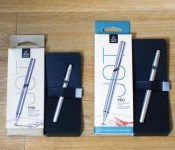
Hands-On Review of the Revamped Adonit Jot Pro and Jot Mini Styluses [iOS Blog]
Apple has never shown much interest in styluses, even as companies like Samsung and Microsoft have embraced them as major selling points for smartphones and tablets. Former Apple CEO Steve Jobs even went as far as saying “If you see a stylus, they blew it,” on one occasion, and at Macworld in 2007, he asked “Who wants a stylus? Nobody wants a stylus.”
Apple’s focus on the fingertip as the best input method doesn’t mean styluses are entirely pointless — they can be useful for taking notes, making sketches, creating artwork, and in dozens of other situations. Luckily, Apple’s disinterest in the stylus hasn’t stopped third-party accessory makers from developing them, and eight years after the iPhone first debuted, there are a range of stylus options on the market.
Adonit is a company that got into the stylus game early, debuting its first stylus on Kickstarter in 2011. The Adonit Jot was one of the first styluses to incorporate a thin plastic precision disc, doing away with a rubber tip to let users see more of the screen while writing. Since then, Adonit has gone on to make a range of styluses, some that even connect via Bluetooth to incorporate pressure sensitivity.
The company’s newest styluses, the Jot Pro and the Jot Mini, are standard non-connected styluses, but they’re the culmination of years of work perfecting the stylus based on customer feedback and they’re some of the nicest writing utensils that Adonit has produced yet. Get a quick look at the Jot Pro or Jot Mini in the video below, or keep reading to see our full thoughts on the two styluses.
What’s in the Box
The Jot Pro and the Jot Mini come nicely packaged in an outer cardboard box and a plastic insert with an adhesive strap that holds them in place during shipping. They arrive with caps in place to keep the tip from being damaged and are ready to use once the cap is removed and affixed to the bottom of the stylus.

Design and Features
Both the Jot Pro and the Jot Mini are made from a lightweight aluminum in black or silver that matches the aluminum backing of the silver/space gray iPad and iPhone. Each comes with a screw-off cap that connects to both ends of the stylus and serves two purposes — keeping the stylus safe during transport in a bag or pocket and extending the size of the stylus when in use.
Each version comes with a built-in clip at the end that allows the stylus to clip onto a shirt pocket or bag and they both have the same plastic tip.

The larger Jot Pro has a few features not found in the miniature version. In addition to being both larger and heavier (123mm and 20 grams vs 98.7mm and 13 grams), it comes with a textured grip to make it easier to hold and a cushion at the tip that gives it a bit more flexibility against the screen for quieter writing.
Functionality
When it comes to styluses, some of the most important elements to consider are the tip of the device, the weight, and how it feels in the hand, as all of these can impact the writing or sketching experience.
The major benefit of the plastic tip of the Jot Pro and Jot Mini is the ability to see the entire screen when you’re writing or sketching. With a larger rubber-tipped stylus, the screen is obscured so you can’t see the point where the stylus connects to the screen. The plastic tip of the Jot isn’t inherently more accurate than a rubber tip, but it can feel more precise because you can see what you’re doing.

Writing with a rubber-tipped stylus can sometimes cause overcompensation resulting in distortion because it’s difficult to see the letters being formed, but the Jot Pro alleviates that problem for writing that’s clearer, especially when writing small letters.
The downside is that there’s more resistance against the screen with the Jot Pro, which means that the writing experience is not quite as smooth. This is more evident when attempting to sketch, but it’s definitely noticeable when writing too. This extra drag isn’t a deal breaker by any means due to the fact that it’s fairly subtle, but it’s something to be aware of when choosing a stylus.
Earlier Jot styluses had some issues with pivoting and the plastic tip popping off, but those problems seem to been resolved. The tip of both the Jot Mini and the Jot Pro pivoted smoothly and allowed for uninterrupted writing at any angle.
One major con of both styluses and of the plastic tip in general is the noise. When writing or drawing, there’s a distinctive click that’s similar to the tap of a fingernail against the screen. The larger Jot Pro has a cushioned tip that provides a somewhat smoother writing experience and a slight dampening of the sound, but the click is still very much audible with either stylus.
Weight and hand feel may not seem like important factors when picking a stylus, but these elements can have an impact on the fluidity of writing and the feel of your hand after writing for a long period of time.

The Jot Pro is slightly thicker than your standard pen, and about as heavy as a nice quality pen you might buy for $40 or $50. It has a textured grip and overall, it feels nice in the hand. The extra weight helps make writing somewhat smoother, and its pen-like feel makes it comfortable to use for long note taking or drawing sessions.
The Jot Mini is smaller, lighter, and thinner than the Jot Pro. The build quality is great, but its small size means that it is slightly less comfortable to hold. Its compact size and light weight make it a great travel stylus for occasional use.
Who’s it For?
With the Jot Pro and the Jot Mini, you’re getting precision at the cost of a bit of drag on the screen and a clicking sound that might be annoying to some. It’s an excellent all around stylus and it really shines in precision writing and drawing situations due to its ability to allow its user to see the entire screen.

Unless you need something portable and low cost, the Jot Pro is the better pick over the Jot Mini. It’s larger size means it’s more comfortable to use for long periods of time, and its cushioned tip offers a smoother, quieter writing experience.
Pros
- Full field of view
- Very precise feel
- Excellent form factor
Cons
- Pricer than most rubber-tipped styluses
- Clicking sound on screen
- Slight drag compared to rubber tip
How to Buy
The Jot Mini is available from the Adonit website for $19.99. The Jot Pro is also available from the website, but priced slightly higher at $29.99.
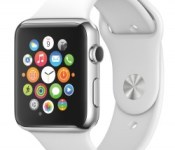
Apple Asking Some Developers to Have Apple Watch Apps Ready by Mid-February
 Apple appears to be asking some high profile app developers and partners to have their Apple Watch-compatible iPhone apps prepared and ready to launch in the App Store in mid-February. According to a source that spoke to MacRumors, Apple has asked its one of its biggest Apple Pay partners to prepare an iOS application with WatchKit support that’s ready to launch in the App Store by February 12.
It is unclear if Apple asking the same of other developers, but it is possible the company is hoping to test some third-party Apple Watch apps with employees ahead of the device’s launch to get a better feel for battery life when using non-Apple apps. As we detailed earlier today, thousands of Apple employees in the Cupertino area are wearing and testing the device on a daily basis to work out final kinks ahead of an April launch.
It’s also possible that Apple could use this high-profile partner’s app in an upcoming demonstration or launch event to show off how Apple Pay works on the Apple Watch. Apple Pay will be a key function of the Apple Watch, letting users authorize credit card payments right from their wrists. As has been outlined in the past, the Apple Watch will authenticate payments biometrically, requiring a passcode when the device is first placed on a wrist and again if it loses skin contact.
Apple CEO Tim Cook said earlier this week that Apple Watch development is on track and that the device will launch at some point in April. Pricing for the Apple Watch is largely unknown, but will start at $349 for the least expensive option.

Apple Watch Sightings Picking Up Ahead of Official Launch
With just three months to go until the Apple Watch’s April release, Apple is hard at work field testing the device, and hundreds of Apple engineers, employees, and testers are wearing the Apple Watch on a regular basis to help Apple iron out last minute bugs and issues.
Due to the large number of employees testing the device, Apple Watch sightings in the wild have become more common over the course of the last few weeks. On the MacRumors forums, readers are aggregating photos and stories of device sightings, giving us an in-use look at the device that will be attached to many of our wrists in just a few short months.
One of the first major Apple Watch sightings occurred several weeks ago, when Vogue Editor Suzy Menkes snapped a photo of someone wearing the device. Rumors and speculation have suggested the arm in the photo could belong to Marc Newson, the designer who now works at Apple part time alongside Jony Ive.
 Image via Suzy Menkes
A second less-clear image of what is likely an Apple Watch was shared on Twitter earlier this week, with the photo being snapped in San Francisco’s Marina area.
 Image via RaceJohnson
If you happen to live in the Cupertino area, it’s quite possible you might run into an Apple employee who is wearing one of the watches. VentureBeat‘s Mark Sullivan recently shared a story of an Apple Watch he spotted while commuting on Caltrain. Sullivan got a bit more than a glimpse — he had the opportunity to see the Apple Watch in action for several minutes and his account on how it was used is a great read for those who want to learn a bit about how it integrates into daily life.
According to Sullivan, the man’s Apple Watch “looked proportionate” to his wrist and had a traditional look that didn’t “scream for attention.” Sullivan saw a text reminder pop up on the screen, accompanied by a map, and he got the impression that the Apple Watch had become an essential part of this person’s life.
I want one, and I didn’t even really see much of what the thing could do. But I got the distinct impression that the Watch has already become integrated into the daily life of this user. I could see it as a powerful personal assistant that’s always just an arm’s lift away to help you make sense of the minutiae of daily life: the schedules and reminders and appointments and social media and everything else we all have to process every minute of every day.
Apple CEO Tim Cook said earlier this week that the Apple Watch is on track to launch in April, but he did not offer a narrower timeframe that would hit at when the release could come during the month. As we creep closer to April, though, we can expect to see a lot more of the Apple Watch in the wild as employees continue testing the device.

‘Vine Kids’ for iOS Launches With Streamlined Interface and Focus on Kid-Friendly Content [iOS Blog]
Six-second video sharing service Vine today announced Vine Kids, an app that skews towards a younger generation and is meant to act as a hub for kid-friendly content that may be harder to discover on the original app.
In the announcement, Carolyn Penner, Head of Communications and Marketing at Vine, states the idea for the app came from a colleague’s daughter and her infatuation with the video-clip sharing service. The idea came to her during Vine’s “Hack Week,” a period where the company encourages employees to set aside normal duties and begin brainstorming and working on brand-new ideas.

The easy-to-use app doesn’t require an account for a user to follow anyone else, offering a newsfeed-style curated list of six-second videos picked by the Vine team that kids can easily swipe left and right through.
We’ve seen for ourselves – and heard from parents, siblings and others – that kids love Vine. So, we built Vine Kids, a simple new app that gives young children a fun way to watch Vines. Through adorable animated characters, kids can watch videos that are appropriate for a young audience. Swiping right or left shows a new Vine, and you can tap the screen to hear quirky sounds.
Acquired by Twitter in the summer of 2012, Vine has seen a handful of updates over the years, slowly adding more functionality to its camera suite and social features. The Twitter-owned service met a few scandals early-on when a sexually explicit Vine accidentally became an “Editor’s Pick” on the service, violating Apple’s terms of service.
Vine Kids is available to download for free from the App Store. [Direct Link]
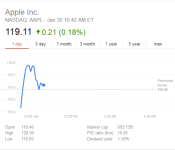
Apple Shares Reach New Highpoint Following Record-Breaking Quarter [Mac Blog]
After opening Friday morning, shares of Apple stock briefly grazed the $120 per share mark, setting a new record high for the company in the market (via AppleInsider). AAPL is currently trading around the $119 mark as of writing, giving the iPhone maker a nearly $700 billion market cap.
Apple announced its earnings for the first fiscal quarter of 2015 on Tuesday, reporting $74.6 billion revenue and 74.5 million iPhones sold on the strength of the iPhone 6 and iPhone 6 Plus. Apple shares previously almost hit today’s record high, with a $119.75 price per share, in November of 2014, but regressed down to around $110 in the weeks since.

Many analysts remain bullish on Apple’s stock, predicting that the company’s shares are undervalued and could trade for up to $130 or higher within the next year. With the immense popularity of the iPhone 6 and 6 Plus only growing, and the confirmation of the Apple Watch’s launch this April, such predictions may not be far off.

New Photos of Chongqing Apple Store Set to Open Tomorrow [Mac Blog]
Preparing to open its doors around 10 AM local time in Jiefangbei Square in Chongqing, China tomorrow, Apple has allowed a few members of the Chinese press inside the new store before the grand opening (via MacX).

Bearing a strong resemblance to the Pudong store in Shangai and the Fifth Avenue store in New York, the majority of the new Chongqing location resides under street level, with a massive glass structure, featuring the Apple logo, hiding a staircase down to lower levels. The company is timing the new location’s opening, and a handful of others, to coincide with the Chinese New Year festivities hitting next month.

Apple has been steadily opening more and more retail locations across China, pushing unique marketing campaigns – like the Hangzhou store’s calligraphy video or Chongqing’s own art mural – to drum up more overseas interest in Apple. In a statement made last October, Tim Cook said the company hopes to open 25 Apple Stores in China within the next two years.
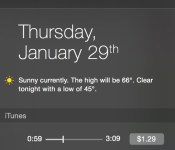
Apple Releases iTunes 12.1 With New Yosemite Notification Center Widget
Apple today released iTunes 12.1 for OS X Yosemite, introducing a new iTunes widget for the Notification Center. With the widget, it’s possible to see what song is playing, skip ahead, and favorite. When listening to iTunes Radio, there’s an option to purchase the song that’s being played, right within the widget. Today’s update also includes performance improvements when syncing an iPhone, iPad, or iPod touch to iTunes.
iTunes 12.1 can be downloaded via the Software Update Mechanism in the Mac App Store.

This update introduces a new iTunes widget for Notification Center in OS X Yosemite. See what’s playing, skip ahead, and even buy songs while listening to iTunes Radio — right from Notification Center. This update also improves performance when syncing when your iPhone, iPad, or iPod touch.
iTunes 12.1 is the first major update to iTunes 12, which was introduced alongside OS X Yosemite. iTunes 12 brought a new design with Yosemite-style translucency elements to improve depth, a streamlined toolbar, and the melding of the iTunes Store and the personal Library to make it easier to navigate between owned content and what’s available in the store.
Apple Launches ‘Get Productive’ Promotion for iOS and Mac With Discounted Productivity Apps [iOS Blog]
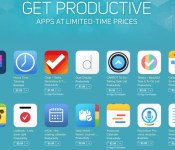
Apple’s iOS and Mac App Stores were today updated with new “Get Productive” sections, offering discounted prices on many popular productivity apps for iOS devices and Macs.
In the iOS App Store, the 19 discounted apps include Fantastical 2 for iPhone and iPad, Workflow, Clear, Duet Display, Calendars 5, and more. Apps are available for up to 60 percent off their regular prices.

In the Mac App Store, there are 20 apps available at discounted prices up to 75 percent off, including popular offerings like Day One, Byword, iA Writer Pro, iTranslate, mSecure, iStudiez Pro, Notability, and more.
Apple has also named ProCam 2 as its App of the Week, and as a result, the camera and photo editing app is available at no cost, instead of at its regular $1.99 price. [Direct Link]
The iPad version of the app, ProCam XL 2 is also free. [Direct Link]
Elgato Recalls Some Smart Power Battery Packs Due to Overheating [iOS Blog]
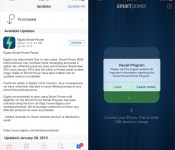
Elgato recently announced that it is recalling some of its Smart Power 6000 mAh battery packs, as they can overheat while recharging. The company sent out notices to app users today, letting them know about the recall.

For those unfamiliar, the $99 Elgato Smart Power battery pack is a compact 6000 mAh external battery that integrated with an iOS app, a neat feature that allowed users to wireless monitor the charge level of the device and receive notifications when the battery was low or needed recharging. MacRumors went hands-on with the Smart Power back in December and found it’s app integration to be highly useful.

According to the company, affected Smart Power battery packs were sold between September 2014 and January 2015 and “fall within a limited serial number range.” Affected customers can check if their product is affected by entering their serial number on Elgato’s website.
Elgato has ceased selling the Smart Power until it can release an updated version, and all current owners of affected products will receive a full refund. The company recommends that users cease using their battery packs until they’re able to check whether they have a product with overheating issues, and Elgato also encourages all customers to return affected products “as soon as possible.”
MacBook Buyer’s Guide: Choosing the Best Apple Notebook for Your Needs [Mac Blog]
From Apple’s Mac lineup, the company sells many more laptops than desktop computers, part of a trend that has been in place for years. Apple’s laptops are well made, they offer more than enough performance for a majority of users, and you can take the laptop with you wherever you go.
Apple’s laptop lineup consists of two models: the MacBook Pro and the MacBook Air. There are some obvious and nuanced differences between the two models that you need to consider while shopping for a Mac laptop. In this guide, we’ll take a look at the specifics, the differences, and the performance of the MacBook Pro and MacBook Air to help you decide which laptop is best for you.
Why you should pick a MacBook Pro
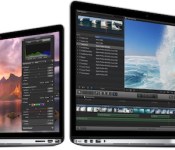
Of the two laptop lineups, the MacBook Pro is the one outfitted with a Retina display. These displays have many more pixels than the MacBook Air displays, which means images and text will look very sharp and clean — it’s a pleasing aesthetic if you’re spending all day at the computer. The high resolution is also great for anyone who’s working in HD video, allowing you to work in actual size and still have room for your app’s interface.
Apple’s definition of “Retina” is when a user, at a typical usage distance, cannot see the individual pixels on the screen. The 13-inch Retina MacBook Pro has a resolution of 2560 x 1600, while the 15-inch Retina MacBook Pro has a resolution of 2880 x 1800. In comparison, the non-Retina MacBook Air has a 1366 x 768 (11-inch) or 1440 x 900 (13-inch) resolution, so you can see there’s quite a difference between the displays of Apple’s two notebook lines.

The MacBook Pro is positioned as a computer than’s just as good performance-wise as a desktop computer. In general, the MacBook Pro is quite a bit faster than the MacBook Air, with the stock 13-inch models offering 2.6GHz to 2.8GHz dual-core processors and the stock 15-inch models offering 2.2GHz to 2.5GHz quad-core processors. Apps that take advantage of multiple cores, like Final Cut Pro, Photoshop, Logic Pro X, and more, are especially well suited to the 15-inch Retina MacBook Pro.
You’re going to want to choose a Retina MacBook Pro if you’re big on gaming. The MacBook Pros have superior GPUs, and the top-of-the-line $2,499 15-inch version even has a dedicated Nvidia GeForce GT 750M graphics card along with integrated Iris Pro graphics like the rest of the MacBook Pro lineup. It’ll switch between the two cards to maximize performance and battery life.

All of Apple’s newest MacBooks have amazing battery life. The 13-inch Retina MacBook Pro offers 9 hours of web browsing or iTunes playback, while the 15-inch model offers 8 hours of web browsing/iTunes playback. One thing to keep in mind though, the less powerful MacBook Air has the best battery life out of any of Apple’s notebooks — the 13-inch version lasts for up to 12 hours when browsing the web or when playing a video.
On the downside, the MacBook Pro is quite a bit heavier than the MacBook Air. Both the 13 and 15-inch models are under five pounds, with the latter weighing in at 3.46 pounds and the former at 4.46 pounds. That might not sound like a lot, but after an hour or two of schlepping a MacBook Pro around, 3 to 5 pounds can feel like 20.
You’re basically picking processing power and display over superior portability when you choose a Retina MacBook Pro, and you’re sacrificing a little bit of battery life. MacBook Pros are also the more expensive of the two notebook lines, with the entry-level 13-inch model priced at $1,299 and the entry-level 15-inch model priced at $1,999 — these are considered desktop replacements, after all.
Learn about the specifications of the MacBook Pro.
Why you should pick a MacBook Air
Travel is the forte of the MacBook Air. It’s lightweight (under three pounds) and won’t take up a lot of space in a bag. The smaller size comes with compromises, such as smaller non-Retina screens and slower performance, but if you’re using your laptop in meetings, a classroom, or a coffee shop for relatively simple tasks, those compromises may not matter too much.

Apple’s most affordable laptops are MacBook Airs with prices that start at $899, but that’s not to say that the MacBook Air offers entry-level performance — these are machines that can handle all of your day to day tasks. If your workload consists mostly of productivity tasks that use single-core apps (web, email, word processors, spreadsheets, presentations, etc.) and you’re frequently on-the-go, you’ll be happy with the performance of the MacBook Air. There’s nothing stopping you from using a pro-level app, but the 1.4GHz dual-core processor limits the performance.
If you’re a heavy user of apps that are really designed more for multi-core machines, like Final Cut Pro, Photoshop, or Logic Pro X, you may not be satisfied with the performance that a MacBook Air offers.

There’s a reason that the MacBook Air is one of Apple’s most popular offerings — they’re amazingly portable. The 11-inch model weighs just 2.38 pounds while the 13-inch model weighs 2.96, and both models are just 0.68 inches thick. Battery life is another major draw. The 11-inch model will last for nine hours when browsing the web or watching videos, and the 13-inch model will last for a whopping 12 hours during the same tasks. That’s enough battery life to more than make it through a full work day.
If you already read through the MacBook Pro section of this guide, you know the major trade off when choosing a MacBook Air — you’re losing out on that gorgeous Retina screen. You’re also missing out on faster performance, but if you need a machine for travel purposes, you won’t go wrong with a MacBook Air.
Get more information about the MacBook Air specifications.
Why you might want to wait
You’ve done your research, you’ve got your credit card out, and you’re ready to buy — but you might want to wait, especially if you want to buy a MacBook Air.
The current MacBook Air was released in April of 2014, so there’s a real possibility a new MacBook Air could come out soon. Recently, Intel announced its new Broadwell processors, which could be used in a new MacBook Air. Not only are the processors new, but they also feature improved integrated graphics. According to a report by AnandTech, the first computers using the new 15-watt Broadwell-U chips — the ones that could be used in a MacBook Air — are expected at the end of January.

A little more sensational is the rumor of a 12-inch MacBook Air, which could have a Retina display. The 12-inch MacBook Air will feature a complete redesign that introduces an ultra slim body that might do away with several existing ports, including the MagSafe, relying instead on a USB Type-C connector for charging and peripherals. It’s also rumored to have slimmer display bezels and an edge-to-edge keyboard design. It’s not clear exactly when the 12-inch MacBook Air might launch, but current rumors suggest it’s already in production for a spring to early summer launch.
 Rendering of the 12-inch MacBook by Martin Hajek
As for the MacBook Pro, the current version was released in July of 2014 and it looks like Broadwell Retina MacBook Pro machines may not be ready for a few months yet. The 28-watt Broadwell-U processors with the new Iris 6100 integrated graphics appropriate for the 13-inch Retina MacBook Pro are available, but chips appropriate for the 15-inch MacBook Pro will not be released in quantity until July or August, making an update before that time unlikely.
Of course, if you need a new laptop now, then buy one. If you have a Core 2 Duo-based MacBook, you’ll benefit greatly from the current offerings. If your laptop is two or three years old, you should probably wait, since you’ll see a better price/performance improvement with the new Broadwell-based MacBooks.
Which Mac laptop should you buy?
So you want to buy a MacBook Pro for its performance and Retina display. Which one should you get? The $1,499 13-inch MacBook Pro hits a sweet spot, offering more storage capacity (256GB) than the $1,299 model. And it’s only a few percentage points slower than the $1,799 model, which is your only option if you want a 13-inch MacBook Pro with 512GB of storage.
If you prefer a 15-inch laptop, you should get the $2,499 MacBook Pro if you use a lot of pro apps — you’ll benefit from the 512GB of storage and the discrete Nvidia graphics subsystem.
The MacBook Air is great for users who need a computer for productivity tasks while traveling. If you can afford it, opt for a model with 256GB of flash storage — not only do you get more room to store files, but you also get a slight speed boost as the 256GB model is a bit faster, according to speed tests. Remember, you don’t get as many ports as you would on a MacBook Pro, so make sure you have the proper adapters.
Apple also makes a $1,099 non-Retina MacBook Pro that we didn’t mention in this guide, but that’s not really worth purchasing unless you desperately need dedicated FireWire, Ethernet and/or a SuperDrive. The non-Retina MacBook is old, slow, and will probably be discontinued in the near future.

