


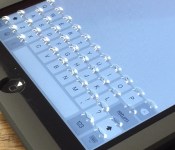
‘Phorm’ Case Adds Morphing Tactile Keyboard to iPad Mini
For the last several years, Tactus Technology has been working on displays that take advantage of microfluidic technology, with buttons that raise up and disappear on demand for a superior touchscreen typing experience.
As of today, the company is ready to unveil its first product to the world, an iPad mini case called “Phorm.” An all-in-one case, keyboard, and screen protector, Phorm can dynamically add and remove tactile buttons on the iPad mini’s screen to add texture to the on-screen keyboard.
As seen in the video above, sliding the bar on the back of the Phorm case to the right causes small fluid-filled physical buttons to pop up on the screen protector portion of the case, giving users a tactile typing experience while still allowing them to use the default iOS keyboard. Shifting the bar to the left causes the buttons to disappear again, allowing the touchscreen to be used as normal.

Here’s how it works: there are a series of small channels filled with fluid behind an elastomeric panel (aka the screen protector portion of the case) and when activated by the slider, pressure is introduced, causing the fluid to come up through the channels and into holes, where it presses against the elastomer, physically changing and morphing the display portion of the case to create buttons. In the opposite slider position, the pressure is released and the buttons disappear as the liquid is dispersed back into the channels.

According to Tactus Technology CEO Craig Ciesla and CTO Micah Yairi, who spoke to MacRumors ahead of Phorm’s launch, the case uses a tiny amount of fluid that poses no harm to an iPad should it be dropped or damaged in some way. In fact, the Tactus team extensively tested the Phorm, performing drop tests, scratch tests, and more, and found that the case and its protective front panel provide solid protection for an iPad and can potentially keep the glass from shattering if dropped.
Ciesla and Yairi said that usability was one of the most important aspects Tactus considered when developing the Phorm case. In internal and third-party testing with people aged 19-70 with a wide range of hand sizes, 70 percent preferred the Tactus solution to a touchscreen.

The Phorm case is meant to stay on an iPad all the time, alleviating the need to switch cases and accessories regularly to accommodate different tasks. As Ciesla and Yairi pointed out, the Phorm offers several benefits over a Bluetooth keyboard — there’s no battery drain, there’s no need to charge it, and it provides access to all built-in iOS keyboard features like word prediction and spell correction, with the addition of tactile feedback for faster typing.
“We built Phorm so tablet users will never again have to choose between thin stylish devices with touchscreens and amazing usability,” said Dr. Craig Ciesla, CEO and co-founder of Tactus. “Typing on a flat touchscreen is still a really unnatural user experience. Adding a tactile dimension to an otherwise flat surface changes the way we will interact with all the screens in our lives. This is just the beginning.”
The Phorm case for the iPad mini can be pre-ordered today from the Phorm website for the introductory price of $99, and orders are expected to ship in the summer of 2015. There are two colors available — slate gray, designed for the space gray iPad mini, and sky gray, designed for the silver iPad mini.
Currently, Phorm is only available for the iPad mini, but the Tactus Technology team has plans to launch an Phone 6 Plus Phorm case in the near future. Phorm cases for iPad Air 2 and iPhone 6 are also in the product pipeline.
Buyer’s Guide Valentine’s Day Edition: Discounts on iPad, iPhone, Apple Accessories, and More [Mac Blog]
With Valentine’s Day on the horizon, retailers are offering some decent discounts on the iPad and the iPhone, and there are some deals on the MacBook Air and the Retina MacBook Pro.
Many online sites are also giving customers limited time site wide deals on a range of Apple accessories in honor of the holiday, so if you need a last minute gift, make sure to check out this week’s Buyer’s Guide.
iPhone
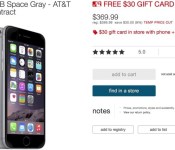
Target is offering a $30 discount on its stock of Apple iPhone 6 and 6 Plus devices, dropping the price of the entry-level 16GB iPhone 6 to $169.99 (with 2-year contract).
All iPhone 6 and 6 Plus purchases will also come with an additional $30 Target gift card. The promotion expires on February 14.

iPad Air 2 and iPad mini 3
Target is offering a $50 Target gift card with the purchase of any iPad Air 2 or iPad mini 3, along with a $20 discount on the purchase of MS Office 365. iPad Air 2 prices start at $499 and iPad mini 3 prices start at $399.
The gift card with purchase deal will be available until 11:59 PM PT on February 14.

Best Buy is offering a straight $50 discount on its entire stock of iPad Air 2 models dropping the price of the entry-level Wi-Fi only 16GB iPad Air 2 to $449. Best Buy is also offering $50 off its 16GB iPad mini 3 models, both cellular and Wi-Fi, dropping the price of the entry-level Wi-Fi only model to $349.
B&H Photo is also offering discounts of up to $50 on its stock of iPad Air 2 models and discounts of $10 to $30 on its stock of iPad mini 2 and iPad mini 3 tablets.
Retina MacBook Pro
– 13-inch 2.6GHz/8GB/128GB (Adorama) – $1,189, $100 off
– 13-inch 2.6GHz/8GB/256GB (B&H Photo) (B&H Photo) (Adorama) – $1,399, $100 off
– 13-inch 2.8GHz/8GB/512GB (Adorama) (B&H Photo) – $1,599, $200 off
– 15-inch 2.2GHz/16GB/256GB (Adorama) – $1,769.99, $230 off
– 15-inch 2.5GHz/16GB/512GB – (Adorama) – $2,219.99, $280 off

MacBook Air
– 11-inch 1.4GHz/4GB/128GB (B&H Photo) (Adorama)- $819, $50 off
– 11-inch 1.4GHz/4GB/256GB (B&H Photo) (Adorama) – $999, $100 off
– 13-inch 1.4GHz/4GB/128GB (B&H Photo (Adorama) – $919, $80 off
– 13-inch 1.4GHz/4GB/256GB (B&H Photo) (Adorama) – $1,099, $100 off

Non-Retina iMac
– 21.5-inch 1.4Ghz/8GB/500GB (Adorama) – $1,019, $80 off
– 21.5-inch 2.7GHz/8GB/1TB (Adorama) – $1,189, $110 off
– 21.5-inch 2.9GHz/8GB/1TB (Best Buy) (B&H Photo) – $1,399, $100 off
– 27-inch 3.2GHz/8GB/1TB (Best Buy) (B&H Photo) – $1,689, $110 off
– 27-inch 3.4GHz/8GB/1TB (Amazon) (B&H Photo) – $1,799, $200 off

Mac Pro
– 8-core 3.0GHz/32GB/512GB/FirePro D700 Mac Pro (MacMall) – $6,149, $650 off
Apps
As always, there are quite a few apps that are on sale at discounted prices or available for free for a limited time. We’ll highlight a few here, but make sure to check out our sister site AppShopper for a complete list.
Board game Ticket to Ride is available for $2.99 this week, down from $6.99. Note Rocket sketchpad is available for free, down from $1.99. WeatherPro is available for $0.99, down from $2.99. Pomodoro Time is available for free this week, down from $1.99. Those Days is available for free, down from $2.99.
Apple Accessories
Groupon is selling the Griffin GuitarConnect Cable for iOS devices for $19.99, down from $29.99. The ‘Prep Pad’ Smart Food Scale and Nutrition Tracker is available from StackSocial for $112, down from $149.

Beats by Dre Solo2 headphones are available for $159.99 from Groupon, down from $199. StackSocial is selling the Sesame 2 Wireless Auto-Lock for Mac for $29.99, $10 off the regular price. A refurbished Mophie powerstation duo or PRO is available for $39.99 from Groupon, down from $99.

MacMall is selling a refurbished LaCie Rugged 1TB Thunderbolt hard drive for $89.99, $110 off the regular price. MacMall also has a refurbished 2TB Quadra LaCie hard drive for $119.99, $80 off the regular price.
Fluxmob, a site that sells super portable Bolt 3,000 mAh portable batteries is offering 20 percent off site wide through February 15. iPhone accessory maker Speck is offering 20 percent off site wide through today with the promo code SWEETHEART.

Incase is offering a 40 percent off coupon code for its online store when signing up for the company newsletter. Cablejive, a site with a range of iPhone chargers and cables, is offering 20 percent off site wide with the coupon code LOVE.
MacRumors is an affiliate partner with some of these vendors. 

Apple Reverses Course, Allows Marijuana Apps in Marijuana-Legal States [iOS Blog]
Just two weeks after Apple pulled marijuana user social app MassRoots from the App Store, the Cupertino company has reversed course and allowed the app in the App Store as long as its geo-restricted to the 23 states where marijuana is legal, MassRoots founder Isaac Dietrich told the San Francisco Chronicle.
 Photo via MassRoots
“A few hours ago, an Apple representative called to notify us that our efforts were successful: the App Store is permitting cannabis social apps that are geo-restricted to the 23 states that have legalized medicinal cannabis. MassRoots is available for download in the App Store,” Dietrich said.
In a blog post on its website, MassRoots notes that it will be “implementing new features to strengthen our compliance even beyond what is currently required.”
Currently, the app requires users to login to their account to use the app. When a user registers a new account within the app, it requires location access to verify that the user is in one of the 23 states where marijuana is legal. However, users who register for a MassRoots account on its website and then log into the app do not undergo the state check, opening the possibility for users to lie about which state they’re residing in.
The Chronicle notes that MassRoots is one of a dozen marijuana-related companies to see their social media apps pulled from the App Store. While MassRoots was able to reach a deal with the Cupertino company, the others are still in discussions.
MassRoots for iPhone is available in the App Store for free. [Direct Link]

Apple Rejecting Violent App Screenshots for Infringing Long-Standing Policy
Apple has been rejecting a number of apps with screenshots that depict violence or guns from being released or updated on the App Store, as reported by Pocket Gamer. As a result, developers have been forced to modify their app screenshots to either completely remove or blur any violent materials in order to get through the approval process.
 A screenshot with a blurred gun to adhere to Apple’s guidelines
Apple has long required developers to ensure all front-facing App Store materials are appropriate for children, although it has been more aggressively enforcing its stance against violent screenshots in recent weeks. Earlier today, Instapaper developer Marco Arment pointed towards language in the App Store Review Guidelines that clearly spells out Apple’s kid-friendly requirements.
“The App Store has parental controls and requires all apps to bear age-appropriate content ratings. While violence, etc. has always been permitted in apps, Apple has always required that all app metadata — title, description, icon, and screenshots — be kid-proof with the lowest rating. […] It’s right there in the rules: 3.6 Apps with App icons, screenshots, and previews that do not adhere to the 4+ age rating will be rejected”
Nevertheless, it is clear that Apple has been quite inconsistent with enforcing its App Store review guidelines over the years. Look no further than Modern Combat 4: Zero Hour [Direct Link], which heavily features violence in its promotional images. Developers have expressed frustration over strict guidelines since the App Store launched in 2008, but Apple remains committed to exercising fine-tuned control over the storefront to ensure the best experience possible for all users.
“We’re really trying our best to create the best platform in the world for you to express your talents and make a living too. If it sounds like we’re control freaks, well, maybe it’s because we’re so committed to our users and making sure they have a quality experience with our products. Just like almost all of you are, too.”
The tighter enforcement comes on the heels of Apple increasing the maximum app size from 2GB to 4GB. Developers that have apps rejected for sensitive content are permitted to resubmit for approval after making the necessary changes.

Apple Increases Maximum App Size from 2GB to 4GB
 Apple today announced that it is increasing the maximum app size from 2GB to 4GB, letting developers release apps that are up to 4GB in size. The extended limits will likely be useful for high-quality game titles that need the extra space to introduce improved graphical effects or longer playtimes.
The size limit of an app package submitted through iTunes Connect has increased from 2 GB to 4 GB, so you can include more media in your submission and provide a more complete, rich user experience upon installation. Please keep in mind that this change does not affect the cellular network delivery size limit of 100 MB.
Apple’s 2GB size limit has been in place since the App Store first launched, so today’s new 4GB limit marks the first-ever size increase. The 2GB size limitation has prevented some games from being available on the App Store, such as Final Fantasy VII. In 2013, Square Enix producer Takashi Tokita said that a version of Final Fantasy VII was “years away” due to the 2GB iOS app size limit.
Over the last several years, as iPhone and iPad displays have improved in quality, developers have needed to increase the size of app assets to create content suitable for Retina screens. The new 4GB limit will give developers more freedom when it comes to content creation and it also paves the way for higher-resolution displays that may require even larger apps.
Though the maximum app size has increased to 4GB, Apple is still enforcing the 100MB over-the-air download limit introduced in 2013.

Apple Introduces TestFlight Groups for Organizing Beta Testers [iOS Blog]
 Apple on Thursday announced TestFlight Groups, a new feature that gives developers more control over organizing external beta testers into groups. TestFlight Groups enables developers to distribute specific builds of pre-release apps, deliver separate instructions for focus areas and apply an action to multiple testers at once
Now it’s easier than ever to manage external testers in TestFlight. Organize your testers into groups to quickly send specific builds, provide separate instructions on where to focus, and apply an action to several testers at once in TestFlight.
TestFlight is a beta testing service provided through iTunes Connect, allowing for registered developers to iron out any significant bugs or issues in their apps before making them available on the App Store. Following the integration of TestFlight into iTunes Connect last September, Apple recently confirmed that it will be shutting down the standalone TestFlight website on February 26.

Report: Android Lollipop experiences less app crashes than iOS 8

Android 5.0 Lollipop may not feel like the most stable operating system Google has ever put out, though a new report seems to claim otherwise. According to data from mobile application performance management solution Crittercism, application crash rates are .2% lower on devices running Lollipop than devices running iOS 8.
According to the report, Android Lollipop’s app crash rate is at a mere 2%, while the app crash rate on iOS 8 is 2.2%. The data also shows that iOS 8 has a higher app crash rate than iOS 7, with only a 1.9% rate. When talking specifically of Android, Lollipop’s crash rate is significantly less than previous versions of Android. Apps on KitKat and Ice Cream Sandwich both crash the same amount at 2.6%. Unfortunately, there was no information regarding the crash rates of devices running Jelly Bean.
This data seems to be proven true for previous iterations of each OS in the past. Back in 2012, we saw the same case. When comparing Android versus iOS apps crashing, Android versions 1.6 to 4.0.1 crashed significantly less than iOS versions 3.1.3 to 5.1.
No matter what side you’re on, a 2.2% or lower app crash rate is pretty good. Of course, a 0% rate would be best, but you likely won’t experience many crashes with either of these operating systems. Just remember, you might experience different results when comparing Lollipop and iOS 8 since all of this depends on which specific apps you’re using. Applications can crash for a number of different reasons: OS issues, device specific issues and many more.
Have you experienced any app crashes on your Lollipop or iOS 8 device? Let us know what you think in the comments.

Apple Two-Step Verification Now Available for iMessage and FaceTime
 Apple’s two-step verification system now covers FaceTime and iMessage, reports The Guardian. Signing into an iMessage or FaceTime account will ask users to input an authentication code from a verified device on accounts that have two-factor verification enabled to prevent unauthorized entry attempts.
Two-factor verification is an opt-in system that was first introduced in March of 2013 to increase the security of Apple ID accounts. Prior to today, a verification code was only required for making changes to an account, signing into iCloud, or making iTunes/App Store purchases from a new device.
Two-factor authentication for iCloud is a recent addition that was implemented in September following the breach of several celebrity iCloud accounts, leading to a slew of leaked photos. The hacking incident led Apple to improve the security of iCloud and it also prompted the company to send out security emails when a device is restored, iCloud is accessed, or a password change is attempted.
Last month, a Medium post highlighting some of the remaining shortcomings of two-factor authentication was shared by several technology sites, which may have inspired Apple to update the service to protect iMessage and FaceTime accounts. The post pointed out that it was still possible to log into iMessage, FaceTime, iTunes, the App Store, and into the website using an account with two-factor authentication enabled without being asked for a verification code.
It seems two-factor authentication for iMessage and FaceTime may still be rolling out to users, as MacRumors was able to log into iMessage and FaceTime accounts with two-factor authentication enabled without a code.
Seagate Seven Review: Hands-On With a 7mm Thick Portable Hard Drive [Mac Blog]
Seagate debuted several new products at CES this year, including the candy-colored Seagate Wireless portable hard drive and the Seagate Personal Cloud, a NAS (network attached storage) option for home users, but the company’s most attention-grabbing offering was the Seagate Seven.
Described as the world’s thinnest 500GB portable hard drive, the USB 3.0 Seagate Seven is only 7mm thick, as its name implies, which means it easily fits into a pocket or purse, and it’s fairly affordable at $99.
What’s in the Box?
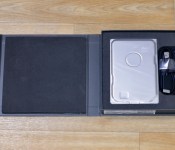
The Seagate Seven ships in a slim, padded box that contains the hard drive, a black fabric-covered USB cord to connect the drive to a computer, and a Quick Start Guide.

Design
Seagate describes the Seven as the culmination of 35 years of experience creating hard drives. Inside the Seven is Seagate’s ultra thin 5mm hard drive, which is encased in 2mm of 100 percent stainless steel for protection.
At first glance the Seagate Seven might be mistaken for an internal drive due to its slimness and its industrial design, but it is a standalone portable drive. Without touching the Seven, it can be hard to imagine just how thin it is, but if you own an iPhone 6 or an iPhone 6 Plus, that is a good approximation of thickness.

At 7mm, the Seven is slightly thicker than the 6.9mm iPhone 6 and slightly thinner than the 7.1mm iPhone 6 Plus. It weighs 6.3 ounces (178 grams), which makes it just about the same weight as the 6.07 ounce iPhone 6 Plus (172 grams).
The Seven is 4.8 inches tall and 3.2 inches wide, which means it fits in a pocket as well as the iPhone 6 Plus. In the simplest of terms, it’s really, really thin.

Its stainless steel design is simple but may not be appealing to all people due to its minimal, unfinished look, and it’s worth noting that the casing has a tendency to attract fingerprints. The drive itself feels well-built and it can withstand scratches and wear and tear, but it’s still susceptible to drops.
Read more 

Apple Promotes Games Without In-App Purchases in App Store
Apple today made one of its weekly updates to the App Store, adding a new featured category that highlights “Pay Once & Play” games in the App Store. As noted by MacStories, the section includes a list of popular game titles that do not include in-app purchases. The new feature has appeared in European App Stores already and should be making its way to other countries as the weekly update propagates.

“Pay Once & Play” offers a range of titles that are organized into the following categories: Recent Releases, Blockbuster Games, and App Store Originals. Some of the featured titles include Thomas Was Alone, Minecraft – Pocket Edition, Hero Emblems, Threes, Blek, and Goblin Sword.
Games and apps with in-app purchases have gotten Apple into trouble on multiple occasions over the past few years, leading to a 2011 lawsuit and a $32 million settlement with the FTC after children racked up hundreds of dollars in purchases without parental knowledge.
Apple has made several changes to the App Store since the original lawsuit was filed. Apps with in-app purchases are clearly labeled, Apple obtains express permission for an in-app purchase in the form of a pop up, and it notifies users that making an in-app purchase authorizes additional in-app purchases for 15 minutes.
Most recently, Apple changed the “Free” wording on purchase buttons to “Get” to make it clear that apps with in-app purchases are not truly free.

