


It takes two: A visual history of dual-camera mobile phones
With the recent launches of the iPhone 7 Plus and the LG V20, the dual-lens smartphone camera is once again a hot topic. Of course, many other companies will want to remind you that they were there first, except some have long since given up on the technology. So what happened? And why isn’t this yet a standard feature on all flagship smartphones? For those intrigued, it’s worth taking a trip seven years back in time.
Apple releases iOS 10 and watchOS 3
You no longer have to be a guinea pig to give Apple’s latest software upgrades a try — as promised, the Cupertino crew has released the finished versions of iOS 10 and watchOS 3. As before, iOS’ biggest improvements are in communication — Messages gets apps, hand-drawn images, secret messages and stickers (among many other additions), while Siri now offers you control over third-party apps. You’ll also see major interface revamps in Maps (which now offers proactive suggestions) and Music, a Home app to manage smart household gadgets, lock screen widgets and wider use of 3D Touch on supporting hardware.
As for watchOS 3? It’s nothing less than a major rethink of the platform. Your favorite apps will not only load much faster (as they’re stored in memory), but the side button has changed from its original focus on contacts to bringing up favorite apps. You can also hand-draw replies, quickly access common settings and share activities to get some extra motivation. A Breathe app reminds you to relax, and iOS 10’s Home app gets a wrist-worn counterpart.
And Apple TV fans, you’re included too… although the upgrades aren’t as dramatic. The newly launched tvOS 10 update primarily introduces a dark mode for those late-night movies, a single sign-on to spare you from signing into umpteen services and Siri voice search for YouTube. You’ll need a fourth-generation Apple TV to see any of these differences.
Apple Releases iOS 10 With Redesigned Lock Screen, New Messages Features, Third-Party Siri, and More
Apple today released iOS 10, the latest operating system designed for the iPad, iPhone, and iPod touch, to the public. iOS 10 can be downloaded on the iPhone 5 and later, the iPad mini and later, the iPad 2 and later, and the 6th generation iPod touch.
The update is available on all eligible devices through iTunes or over-the-air in the Settings app. To access the update, go to Settings –> General –> Software update. As with all major software releases, it may take a few minutes for the update to propagate due to high user demand.
According to Apple, iOS 10 is the “biggest release ever” for iOS devices, with major updates for Messages, Siri, Photos, Maps, Apple Music, Apple Pay, and the iOS interface.
iOS 10 features a redesigned Lock screen experience with 3D Touch-enabled notifications, a more easily accessible camera, and a widgets screen. A revamped Control Center also offers 3D Touch support along with new controls for music and HomeKit devices. Raise to Wake, a new feature for the latest devices, wakes up the iPhone without bypassing notifications.

Messages has been entirely overhauled with new features like background animations, bubble effects, rich links, and Digital Touch, and there’s even a full Messages App Store that can add almost unlimited capabilities to messages, from sending stickers and GIFs to making payments or placing collaborative dinner orders.

A new Siri SDK lets developers build support into their apps, and a dedicated “Home” app gives users a central place to control HomeKit devices. Photos features impressive facial and object recognition capabilities, and a new Memories feature allows you to discover forgotten memories.

Maps and Apple Music have both been redesigned with cleaner, simpler interfaces, with Maps gaining proactive suggestions and integrated third-party apps and Music gaining better content discovery features and a new focus on lyrics.
There’s a new feature that lets stock iOS apps be hidden from sight, and the QuickType keyboard is smarter with new contextual predictions, including emoji predictions. Apple Pay is available on the web starting today, and Game Center has been largely eliminated.
For full details on the new features included in iOS 10, make sure to check out our complete iOS 10 roundup.
Discuss this article in our forums
Apple Releases Swift Playgrounds Coding App for iPad
Alongside iOS 10, tvOS 10, and watchOS 3, Apple today officially released Swift Playgrounds, a new app aimed at teaching both children and adults how to code through simple interactive coding exercises. It’s meant to make learning to code “easy and fun” for everyone.
First announced in June at WWDC, Swift Playgrounds is meant for beginners who have no experience with coding, and it will be deployed in numerous schools around the world as standard curriculum.
“Everyone should have the opportunity to learn coding, and we are excited to bring Swift Playgrounds to the next generation of programmers looking for a fun and easy way to explore key coding concepts using real code,” said Craig Federighi, Apple’s senior vice president of Software Engineering. “More than 100 schools around the world have already committed to adding Swift Playgrounds to their fall curriculum, and we can’t wait to see what students create with it.”
Swift Playgrounds is organized into a series of lessons that introduce new concepts and guide users through challenges and puzzles. It’s centered on three characters that need to be guided through a graphical world using coding concepts like issuing commands, creating functions, performing loops, and using conditional code and variables. Apple plans to release new lessons on a regular basis.
The app also includes built-in templates that can be modified to create customized programs that can be shared with friends and family, and Swift Playgrounds code can be exported directly to Xcode to be turned into a full iOS or Mac app.
Swift Playgrounds is compatible with all iPad Air and iPad Pro models, along with the iPad mini 2 and later. iOS 10 is required to download the app, which is available for free from the App Store.
Discuss this article in our forums
iPhone 7 and 7 Plus review: Apple (mostly) plays it safe
Tick-tock. Tick-tock. That clockwork rhythm has more or less defined Apple’s iPhone road map since the days of the 3GS. One year we’d get a new iPhone with a new look and loads of features to agonize over and opine about. Then, the following year, we’d get the same general design with a faster chipset and a few new tricks. The rhythm was almost comforting in its regularity, which made Apple’s unveiling of the new iPhone 7 and 7 Plus such an anomaly. It’s easy to look at these devices as another year’s worth of modest updates crammed into a familiar body, but trust me: It’s a little more complicated than that. What Apple ultimately did was create two world-class smartphones that skew more toward “safe” than “state of the art”. The big question here is whether a bunch of relatively unexciting changes add up to greatness.
Hardware

You don’t need me to tell you that this year’s iPhones look an awful lot like last year’s. Like it or not, Apple believed there was still room to improve the phone design we’ve been using for two years, so it focused on that instead of cooking up a brand-new aesthetic. It’s tempting to say Apple’s current design philosophy boils down to “if it ain’t broke, don’t fix it,” but that’s not really true either: The company actually fixed a lot this year.
Some changes are subtler than others. The 7 and 7 Plus’s antenna bands swoop around the phones’ curves instead of cutting across their backs. The iPhone’s 12-megapixel camera (or cameras, in the case of the 7 Plus) is surrounded by an aluminum hump, rather than just jutting out like in the old days. Apple finally made 32GB the new storage baseline and gave the 7 and 7 Plus a seriously spacious 256GB option. Both models are the exact same size as the models that preceded them, but the 7 and 7 Plus have each shed a couple of grams here and there. The loss of a few paper clips’ worth of weight isn’t nothing, though, especially when we’re talking about devices that we hardly ever put down.
From there, the list of changes starts to look more substantial. If you’re lucky, you’ll never need to know that the 7 and 7 Plus meet IP67 water-resistance standards. In other words, they’re built to withstand dust ingress and, more important, submersion in up to a meter of water for 30 minutes. Apple’s rivals have made big strides in making their smartphones more life-proof, so all I can really say is: It’s. About. Time. Finally, we get iPhones that’ll survive when you drop them in puddles, get caught in the rain or intentionally dunk them in beer. (Note: liquid damage still isn’t covered by Apple’s warranty.) Catching up to the competition has never been so welcome, or so tasty.

Meanwhile, the all-too-familiar home button isn’t a physical button anymore. It’s a solid-state affair that makes the phone taptically throb when you push it. This wound up being way more divisive a tweak than I expected; when I showed it off to colleagues, just about all of them recoiled at first press. As a longtime iPhone user, I can’t quite explain how off the sensation felt at first, but it only took about a day for me to get over it. Now it’s a little weird to press an older iPhone’s home button and not get the little bzzt of feedback from the Taptic Engine; but I digress.
The phones come in new colors too: a matte black and “jet black.” The former looks exactly what you’d expect a black iPhone to look like, though the dark finish does a good job obscuring those antenna bands. Jet black, meanwhile, is at once lovely and a bit of a bummer. When I say lovely, I really mean it: The moment I touched one, I couldn’t believe it was made of the same 7000 series aluminum as the others. In fact, it doesn’t feel like metal at all, thanks to Apple’s lengthy anodization and polishing process. Jet black iPhone bodies feel just as glossy and slick to the touch as their glass screens, and that unity makes them feel like seamless, cohesive wholes. The entire thing is seriously impressive, even if it feels sort of plasticky.
Then the scratches and smudges appear. I’m not a case person, but I take good care of my things and exercised what felt like a more than reasonable level of caution carrying these new phones around. It didn’t even take 24 hours for the first batch of scratches to appear on my jet black iPhone 7’s back, which was either the result of placing it on a bar’s granite countertop or repeatedly shoving it into my empty jeans pocket. Those little nicks have only multiplied, which could be an understandable deal-breaker for some of you.
And now we’ve come to the elephant in the room. Neither the iPhone 7 nor the iPhone 7 Plus has a traditional 3.5mm headphone jack. To hear Apple tell the tale, getting rid of that decades-old standard wasn’t just a practical move to make waterproofing and increased battery life possible — it was also an act of “courage.” Here’s a bit of unsolicited advice for Apple: I get that changing the world is sort of your thing, but maybe go easy on the hubris next time. Anyway. I’ll dig into audio quality in just a moment, but suffice to say that the toughest part of not having a headphone jack is trying to break all my old listening habits. I can’t tell you the number of times I tried to plug a regular pair of earbuds into these phones before — d’oh! — remembering that doesn’t work and then having to root around for the included Lightning-to-3.5mm adapter.

This also means you can forget about charging your phone while listening to music at the same time — unless you have wireless headphones or are willing to buy a third-party adapter to split that Lightning port. (When asked if the company planned to release its own splitter, an Apple spokesperson said they had “nothing to announce.”) The iPhone 7 and 7 Plus have better batteries than the models that came before them, so charging and listening honestly hasn’t been a big issue, but still, no one would fault you for crying foul. Either way, Apple isn’t the only company to have signed the headphone jack’s death warrant. Motorola released two flagship phones this year that used their USB Type-C ports for audio, though it did so at least partially because it expected Apple to ditch that jack, too.
Display and sound

Once again, the smaller iPhone 7 has a 4.7-inch Retina HD screen, while the Plus has a 5.5-inch display. The resolution and pixel density are the same too, so you’re not going to be seeing anything more crisply now than you did in 2015. Rather than chase other companies squeezing higher-res displays into their phones, Apple chose to focus on a more fundamental part of these screens: how they render color. The 7 and 7 Plus support the DCI-P3 wide color gamut, which — long story short — means they’re capable of reproducing more colors than the standard sRGB color range. Put another way, they’re able to display more vivid, nuanced images than the iPhones that came before them, thanks to a color space that’s standard in the film industry.
So what does that mean for your day-to-day life? Well, it kind of depends on how good your eyes are. The difference between these displays and the ones we got last year aren’t always obvious. Colors are often a touch brighter, and you can see subtle shades that help images feel more lifelike: Skies are bluer, sunsets are warmer and people’s skin looks more lively. Then again, changes that seemed subtle to me were more pronounced to others, so maybe my eyes are a little dim.

The screens in the iPhone 7 and 7 Plus are also notably brighter than on last year’s models, and they’ve gained a new trick for when you’re outdoors. Apple says it uses the 7 and 7 Plus’s ambient light sensor to tell if you’re inside; if not, the screen can get even brighter to compensate for sunlight. That’s right: Not all maximum brightness levels are created equal. That being the case, I’m a little surprised Apple didn’t bring the 9.7-inch iPad Pro’s TrueTone color-temperature-tweaking system to the 7 and 7 Plus. My guess is they couldn’t squeeze it into these phones’ smaller bodies.
Here’s another first: The 7 and 7 Plus are the first iPhones to feature stereo audio (another trick Android phone makers have dabbled with for ages). Why it took so long for Apple to try this eludes me; they’re a huge addition to the iPhone formula. Movies, podcasts and speakerphone calls sound dramatically better now, though the stereo separation doesn’t seem quite as pronounced as on devices like the old HTC Ones. That’s thanks to Apple’s speaker setup — rather than stick two speakers right on these iPhones’ faces, sound springs forth from the main earpiece and the speaker on the bottom-right edge. I’ll take it.
If you’re still bristling about the whole needing-an-adapter-for-your-headphones thing, well, at least the sound quality doesn’t suffer in the process. I used my go-to headphones (a pair of Samsung Level On PROs) to listen to the same music on the 6s and on an iPhone 7 with the Lightning adapter, and couldn’t tell any difference at all. Ditto for a blind listen-off between the 6s and the 7 Plus: They sounded identical to me.
Camera
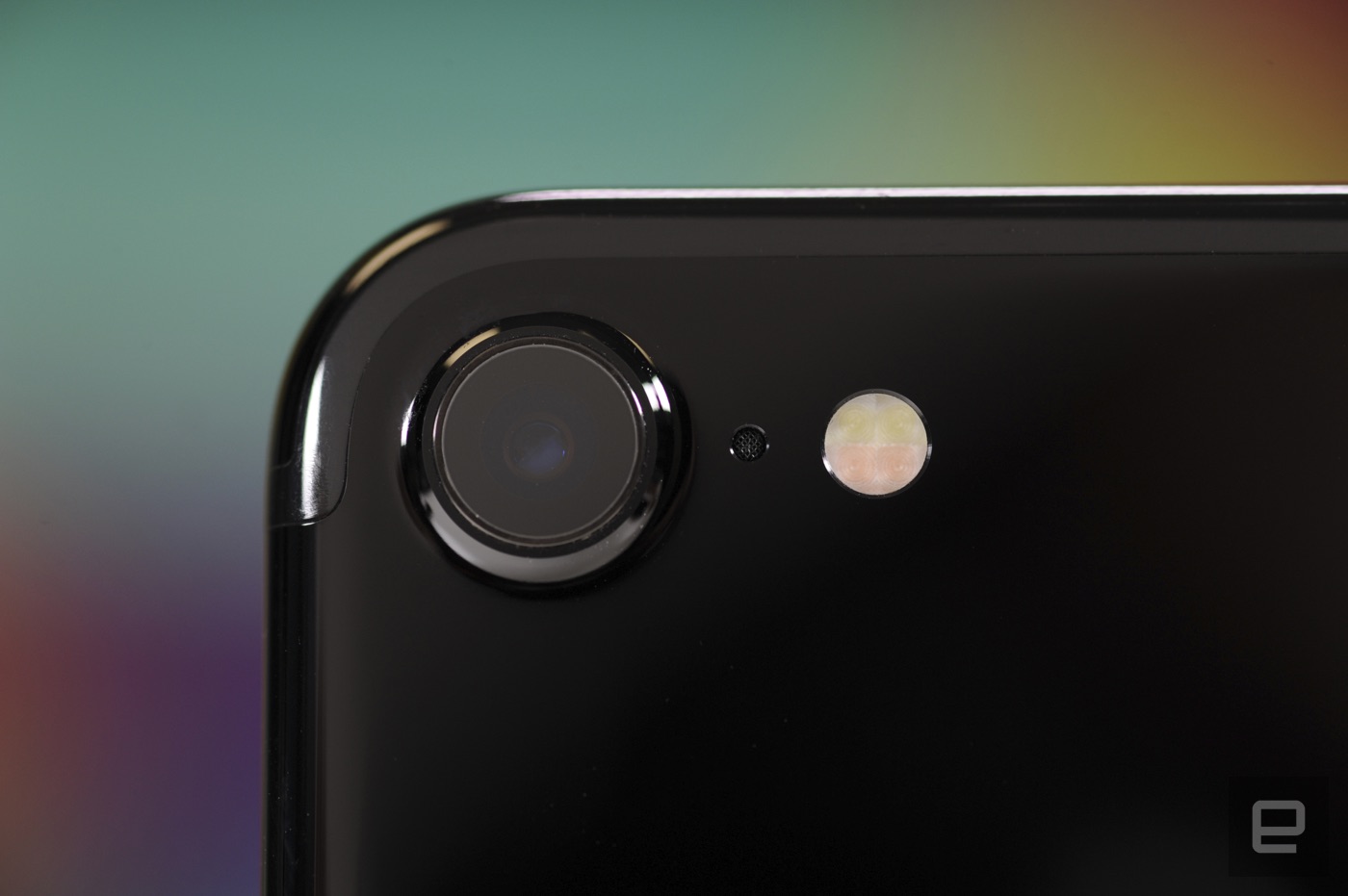
This is where things get really interesting. By now you know the iPhone 7 has a single 12-megapixel camera on its back, and guess what — it’s a damned good one. That’s saying something, considering there’s been no resolution boost since last year, and the pixels on that new sensor haven’t gotten bigger either. And yet the photos they capture come out significantly better; there wasn’t a big difference in how much detail was captured, but colors looked more vibrant and true to life than on the iPhone 6s Plus.
Surprised? You shouldn’t be. The iPhone 7’s camera captures more color data than previous ones (the better to view on that wide-color-gamut display), and the results are pretty great. In fact, I generally preferred shots taken with the iPhone 7 and 7 Plus to ones captured with a Galaxy S7 Edge. The latter captured a wider field of view and was sometimes better accurately rendering green landscapes, but the iPhone’s leg up on colors meant their photos tended to look nicer (to me, anyway). Test shots taken with the iPhone 7 were also generally better exposed than similar shots taken with the 6s, which in my case usually meant fewer blown-out skies washing out my photos. But every smartphone camera does well when it’s bright outside. What about when things get dim?
It’s a toss-up. The inclusion of optical image stabilization across both versions of the iPhone 7 helps, as does the main camera’s f/1.8 aperture. Props to Samsung: Photos taken with the S7 Edge did indeed look brighter, but the iPhone 7 and 7 Plus offered more natural colors. Before today I would’ve said the S7s and the Note 7s had the best all-around smartphone cameras, but now Apple is right there, neck and neck with the best of them. The iPhone 7’s front-facing camera has also received a major upgrade. It’s been bumped up to seven megapixels and inherited some of the architecture that made the rear cameras so formidable. Long story short, your selfies are going to look lovely. Oh, and videos look really nice too, since they exhibit the same accurate colors as stills. Go forth and vlog, you pioneer.
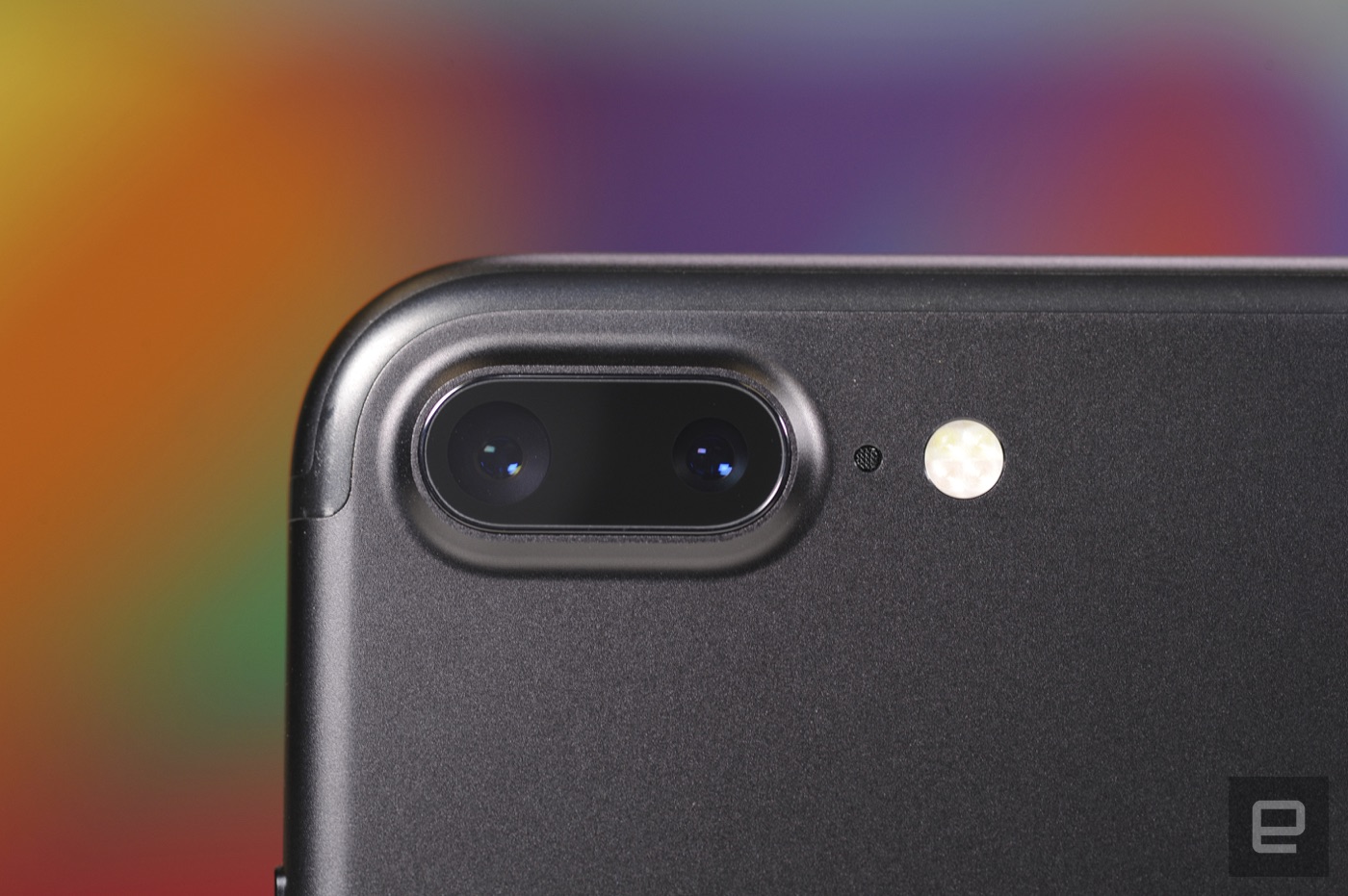
Then, of course, there’s the iPhone 7 Plus’s dual camera setup, which pairs a 12-megapixel wide-angle shooter with a 12-megapixel telephoto camera to give the Plus an actual zoom. Apple isn’t the first to dabble in dual cameras, nor is it the first company to attempt this zooming configuration; LG tried it earlier this year with half-decent results. Apple’s approach feels more elegant, though — with a quick tap you can switch between 1x and 2x zoom modes, or you can drag a slider or pinch with two fingers for more precise control. By the way, you’ll probably want to stay at 1x or 2x zoom (or somewhere in between). Apple added digital zoom up to 10x, and the closer you get to that ceiling, the noisier and more indistinct things get. That’s not surprising, though.

This whole thing might sound like a gimmick, and it sort of feels like one for a few minutes. After that, the “what do I do with this?” factor falls away and the optical zoom just becomes a handy trick to have at your disposal. The photos turned out great too, though you might notice some differences in the colors and exposure if you take comparison shots with both of the iPhone 7 Plus’s cameras. The secondary telephoto camera still shoots 12-megapixel photos, but it has a slightly wider f/2.8 aperture. Basically, it doesn’t let as much light in, so the photos come out a little different. Avid photographers might take issue with these minute changes; everyone else need not worry. For now, this is the only trick the 7 Plus has that the smaller 7 doesn’t, but that’ll change soon. Apple’s going to update it with a feature that lets you play with depth of field when you’re shooting portraits, so you can get a little more bokeh going on.
Software

The iPhone 7 and 7 Plus might not seem like the most exciting hardware updates, but there’s plenty to get excited about in iOS 10. Granted, very little of it will come as a surprise, since it’s been available as a public beta for months now. Our full review is coming soon, and I’ve already detailed some of the new features, so I’ll just recap the highlights here.
It took a while for me to get used to the revamped Photos app, but I sort of love it now. The app’s original form was really basic: You could sift through your photos by “Moment” and poke around in albums, shared or otherwise. The iOS 10 version, meanwhile, uses machine learning to sort photos into themed “memories” based on where you’ve been and when you’ve done things. The best part: searching through all your photos by keyword, since iOS 10 uses AI to identify what’s in your picture. As it turns out, I have 14 pictures with bibs in them despite not being a parent.
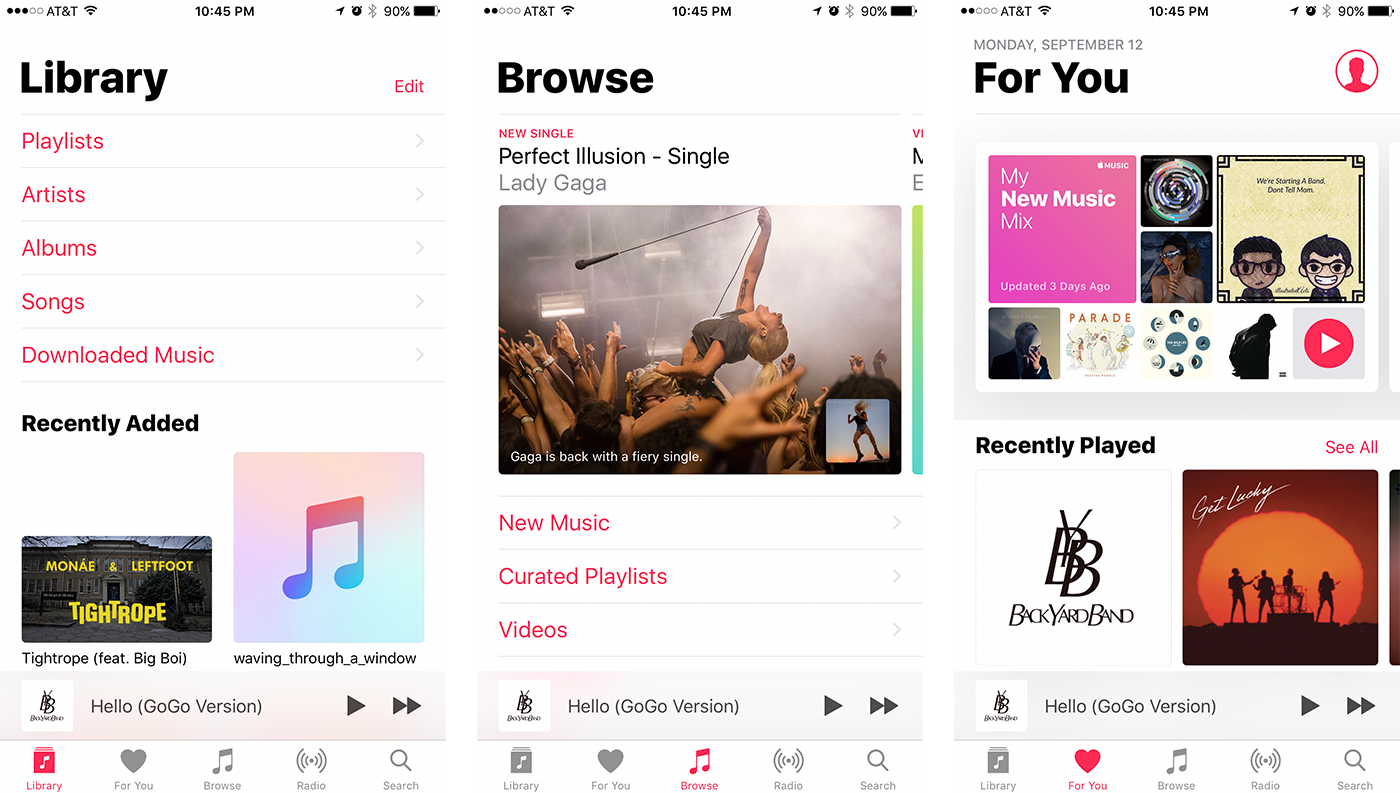
Apple’s bright, bold new Music app was easier to jump right into, and I’m a fan now. The first time you launch the app, you’re dropped right inside your music library (which is how it should be). All of the touch targets are bigger and easier to hit, even when I was glancing down at them mid-run. It’s also satisfying to see 3D Touch finally get more use. I wrote in my iPhone 6s review that using that pressure-sensitive screen was something I eventually wanted to do all the time; too bad iOS 9’s never tapped into its full potential. Not anymore. It feels like 3D Touch is connected more strongly to iOS 10’s core; I’ve been using it to expand notifications, bring up contextual menus in Apple Music and glance at widgets for first-party apps like the dialer and Weather.
Apple is also making better use of the Taptic Engine this time around, so you’ll feel it all over the place — literally. The prominent examples are the ones you’d expect, like 3D-Touching notifications and using the home button, but you’ll also feel a brief thud when you flick the Control Center open. Skimming your Apple Music collection for a specific song? Sliding your finger down the alphabet on the side of the screen feels like running your finger down a washboard, allowing you to more easily stop on a letter.
Oh, by the way, the process of forcing your 7 or 7 Plus to restart is totally different. Instead of holding down the power and home buttons like we have been for a decade, the new process requires you to hold down the power and volume down keys.

And now for some bad news: I still haven’t been able to test some of iOS 10’s headline features. Siri’s intelligence is poised to get a big upgrade thanks to third-party apps, but I couldn’t yet ask her to call me an Uber or send my friend $20 via Venmo. And while I’m also a little obsessed with sending these weird new iMessages, it’s too bad that at time of writing, the iMessage app store was still virtually barren. I’ll update this review as the store comes online and I get to play with more weird stuff.
Performance and battery life

Another year, another high-powered A-series chip to play with. The iPhone 7 and 7 Plus both run the company’s new A10 Fusion, a quad-core chipset that pairs two speedy CPU cores with two longer-lasting ones that use 20 percent of the power the others do. It’s easily the fastest chip Apple has ever stuck in a mobile device, beating out even the 9.7-inch iPad Pro’s A9X processor. More important, there’s basically zero difference in performance between the 7 and 7 Plus, even though the smaller version has 2GB of RAM, versus 3GB on the Plus.
I restored the new iPhones from backups of our 6s and the differences were immediately clear. There’s almost no delay from when you tap an app icon to when it launches, and popping in and out of apps was noticeably faster too. Both the 7 and 7 Plus were also able to handle graphically demanding games like Warhammer 40,000: Freeblade, Submerged and Mortal Kombat X without breaking a sweat.
In fairness, the 6s and 6s Plus played these nearly as well, but the 7 and 7 Plus’s batteries don’t get depleted as much in the process. Part of that is likely due to the 6s’s battery deteriorating over time, but the A10 Fusion’s GPU is also more power-efficient. Ultimately, what might be most telling is that when it came to day-to-day use, I stopped thinking about performance completely.
| 3DMark Unlimited IS | 37,663 | 37,784 | 24,601 | 27,542 |
| Geekbench 3 (multi-core) | 5,544 | 5,660 | 4,427 | 4,289 |
| Basemark OS II | 3,639 | 3,751 | 2,354 | 2,428 |
We can’t talk performance without delving into the 7 and 7 Plus’s batteries, and thankfully they’re an improvement over last year. One of the few upsides to removing that headphone jack was that it freed up more space to make these batteries a little bigger — 14 percent larger in the iPhone 7 and 5 percent in the 7 Plus. In our standard video rundown test (in which the phones are connected to WiFi with a video looping at 50 percent brightness), the 7 lasted for 12 hours and 18 minutes, or just about two hours longer than the 6s. The 7 Plus, meanwhile, looped Whiplash for 14 hours and 10 minutes, or about an hour and a half longer than the 6s Plus. That’s also on par with Samsung’s Galaxy Note 7. Not bad at all.
Eventually, though, I had to give up on bingeing on a raw jazz thriller and get some actual work done. These days, my usual routine involves lots of Slack messages, emails, Spotify playlists and marathon Hearthstone sessions. When put through that very specific kind of wringer, the iPhone 7 usually stuck around for a full workday and often survived until mid-morning the following day. The 7 Plus, meanwhile, frequently lasted through nearly two days of mixed use and downtime, a notable improvement over the 6s Plus. Obviously, your mileage will vary, but here’s hoping that these upgraded batteries stay this good over time. (We’ll see about that.)
The competition

Under normal circumstances, the Galaxy Note 7 would be at the top of this list, but, well … you know. While Samsung continues its global recall over exploding batteries, you should consider the Galaxy S7 and S7 Edge in the Note’s place. They share the same Snapdragon 820 chip and 4GB of RAM, not to mention the same lovely 12-megapixel cameras that rival the sensor Apple used this year. If you’re a screen snob, Samsung’s displays might be more appealing, since they run at a higher resolution and also support a wider color gamut than the sRGB standard. Apple and Android fans often tussle over which platform is superior, but make no mistake: The newest iPhones and the newest Galaxies are all truly excellent smartphones.
Looking for impeccable build quality and equally good sound? Consider HTC’s underrated 10. It’s easily the most impressive phone the company has crafted in years, and with support for hi-res audio and a headphone jack, it’s arguably a more versatile media machine. Speaking of HTC, it’s rumored to be working on the two most anticipated Android devices of the moment. We’re not entirely sure if they’ll be called Nexus phones or Pixel phones or something else entirely — either way, Google is said to be prepping for an October 4 unveiling. Codenamed “Sailfish” and “Marlin,” both are expected to pack quad-core Qualcomm chipsets (either the Snapdragon 820 or 821) with 4GB of RAM and 12-megapixel main cameras.
The biggest difference is reportedly the size of their screens, with the smaller Sailfish sporting a 5-inch or 5.2-inch 1080p display, while the Marlin runs with a 5.5-inch Quad HD screen. If you don’t care about smartphones as much as you care about getting the best phone, period, you might want to wait and see what Google has up its sleeve.
Wrap-up

The iPhone 7 and 7 Plus are at once the most technically impressive smartphones Apple has ever made and the most divisive. After all, they’re excellent because of Apple’s renewed attention to the basics: the speed, the camera, the screen, the battery. None of these improvements on their own are terribly exciting, but together they make for a pair of phones that are more than the sum of their parts. Then again, where’s the envelope-pushing? Where’s the Apple that upended an industry? It’s surely still there, locked behind closed doors that won’t be opened again for another year. In the meantime, we’re left to consider this year’s work.
If you can get over the all-too-familiar design and the no-headphone-jack thing, then the iPhone 7 and 7 Plus are serious contenders for best smartphones, period. Note that I used the word “best,” not “most innovative” — neither of these devices is groundbreaking. We’ve seen many of these features (or features like them) pop up in rival phones already. That headphone jack thing aside, most of the choices made in the iPhone 7 and 7 Plus feel like safe ones. There’s nothing wrong with that, but no matter how good the iPhone 7 and 7 Plus are (answer: very, very good), Apple already has us all wondering what next year’s iPhone is going to be like.
Apple’s AirPods aren’t a must-buy — yet
The iPhone 7 goes on sale in a few days, and with it comes another nail in the headphone jack’s proverbial coffin. Included in the box you’ll find a pair of Lightning-tipped EarPods and a Lightning-to-3.5mm adapter for your analog headphones, but to hear Apple tell it, the future of music is wireless. That’s where the $159 AirPods come in: the company’s totally cordless earbuds are slated for an October launch, and they promise elegance, ease of use and great sound. They deliver … some of that, but after about a week of testing, they often felt as confusing as they did cool.
Getting started

When you open the packaging for the first time, you’re met with a rounded white mass that looks similar to a container of dental floss. That’s the charging case, and it’s where the AirPods are going to spend most of their time. It’s almost completely nondescript, save for a chrome-accented hinge, a Lightning port on the bottom and a small button on the back — you’ll need that to pair the AirPods for the first time. Side note: You don’t need to be an iOS devotee to use these things. They paired just fine with a Galaxy S7 Edge, but all of the fun stuff basically evaporated; all you can do is listen to music and take calls.
Speaking of pairing, it’s a cinch if you’re using the AirPods with iPhones running iOS 10, though you’ll get an error if you try connecting them to a phone still on iOS 9. (The AirPods are also compatible with Apple Watches running watchOS 3 and Macs on macOS Sierra, but I didn’t have anything like that lying around.) Just open the charging case near the phone, et voilà: A window will pop up on the screen prompting you to connect the AirPods. Hold down the button and that’s it — you’re ready to let the tunes flow. Granted, it was never all that hard to get things connected via Bluetooth, but this simplicity is one of the best parts of using AirPods. They just work.
Design

Naturally, ease of use doesn’t mean a thing if you’re not comfortable having these in your ears. In brief, if you hated the way Apple’s wired EarPods looked or felt in your ears, these aren’t going to do anything for you. I never minded them myself — they were fine for when I went on runs, and I never had problems with them falling out of my ears. That streak continued nicely with the AirPods, but I know a ton of people for whom EarPods just never fit. Still others could get EarPods in their ears but couldn’t use them for long because they’d just fall out. Sound familiar? You probably shouldn’t take a chance on these.
They also just look sort of awkward, as though you popped in some EarPods and immediately snipped the cords off. My colleague Andy might have said it best: When I strolled into our San Francisco office wearing them, he said I looked like I had broken Q-Tips off in my ears. He had a point. In fairness, I’m stunned Apple squeezed as much tech into the AirPods as they did; there’s a pair of batteries to keep everything working, plus accelerometers and an optical sensor to determine whether the AirPods are in your ears.
Powering all that is a tiny chip called the W1 that manages the connection between the AirPods and the device they’re connected to. Apple has said this silicon will wind up in Beats wireless headphones soon too, though I’ll bite my tongue and not make jokes about Beats’ audio quality until I actually get a chance to try them. Oh, here’s a quick (and probably obvious) pro tip. The AirPods are prone to the same absentminded goofs that could spell doom for other completely wireless earbuds. In fact, just before I sat down to write this sentence, I rushed to my laundry room to fish the AirPods out of a pair of jeans I had just thrown in the hamper. Don’t be like me, people. Always put them back in the case.
In use

After popping in the ‘Pods and hearing the instrumental confirmation sound, things are ready to happen. Now we’re getting to the meaty part: How do these things actually sound? Not bad, but ultimately not much better than the EarPods we know and love. That’s not to say there aren’t any improvements. In general, the AirPods gave mids a little more meat than EarPods did, and drum fills felt crisper and more precise. My test tracks — which these days include a lot of jazz and EDM — came across warmer than I would have expected, which was a pleasant surprise.
That said, the all-too-familiar design means the AirPods inherit my biggest pet peeve with the EarPods — how airy they make my music sound. Songs that go heavy on the highs and lows tend to sound a little toothless, which, again, is natural for this design. I’m just frustrated that Apple couldn’t have tweaked it to achieve a little more oomph.
I also wish we had the option to customize the AirPods’ controls more. By default, double-tapping one of the buds wakes Siri up, and she can do all the things you’d expect. You can change these controls so that a double tap pauses and plays the current track, but that’s really about it. (You can also just remove an earbud to pause your music, which seems like the more natural way to go anyway.) The thing is, if you want to change tracks or tweak the volume, you have to either ask Siri to do it or reach for your phone. That’s it. Years of using Apple’s white earbuds have ingrained in me the double click to skip a song and a triple click to go back. It seems odd that there’s no way to program these common controls.

Lest you think I’m being needlessly picky, know that the AirPods actually work really well for voice calls. The stems that point down from the buds house the antenna and microphone, and no one I spoke to over the course of the week had any complaints about audio quality. The battery life has generally been impressive too, with the AirPods typically lasting a little over the five hours Apple said to expect. Frequent trips to the charging case help in a pinch too, since it can extend the Pods’ runtime by up to three hours with a 15-minute charge. I’ve plugged in the whole pod-and-case package just once since I received these things a week ago and the case is still sitting pretty with 33 percent battery life. Not bad at all.
Wrap-up

When I first encountered the AirPods, I said I didn’t think they’d be a must-have. One week later, that’s still where my head is: The Pods are smart, and their integration with iOS 10 is first-rate, but they fall short in some important ways — sound quality could have been better, and I wish the controls had some more nuance. That said, I’m intrigued by the possibilities they present. If Apple had made the software and controls a little more flexible, this review might have taken a very different turn. If you’re reading this, Apple, this was a solid first attempt. Don’t give up on the concept, because I believe future AirPods could be great.
Apple’s AirPods get a $10 tether (so maybe you won’t lose them)
Apple’s incoming AirPods are a technical marvel, cramming a load of tech into the same teeny tiny earbud cases that have been packaged with iPhones for years. While we wait to test a pair out for ourselves, accessory makers have wasted no time in correcting possible design faults in Apple’s new headphones. Spigen has taken it upon itself to announce a ten-dollar tangle-free strap to keep the ‘phones together — and, well, un-wireless them.
The AirPods Strap is already listed on Amazon and — patent pending — is set to ship October 17th, when you’ll maybe already fear misplacing one half of the $150 pair. It is very much simply a glorified tether: there’s no electronics or wiring inside, but it really does defeat the purpose of the darn things. Almost like a headphone converter.
Via: CNET
Source: Amazon
iMessage App Store adds stickers and games to iOS 10 texting
iOS 10 beta users can now explore a whole new world of add-ons for iMessage, according to 9to5mac. Cupertino has launched its new iMessage App Store for iOS 10 beta, and you can use it to download games and apps like OpenTable and SquareMoney. You can also download sticker packs from the store — hey, it won’t be complete without cute stickers in the mix — some of which come from big-name companies like Disney, Bandai Namco and Sanrio. Some of the apps are tied to ones you’ll have to get from the main App Store, but others are completely independent. If you’re not a beta tester, don’t worry: check your Settings app’s Update section tomorrow, September 13th, to download and install iOS 10.

[Image credit: 9to5mac]
Source: 9to5mac
Text ‘Call Me Maybe’ to your crush with Genius Lyric Messages
Genius is where the internet turns for rap lyrics (mostly) and song annotations, and tomorrow you’ll be able to send those to your pals without leaving iMessage. The way the press release describes it, the process sounds fairly simple. And even a bit GBoard-like with its card structure. “Users can create Genius Lyric Messages for any song available on Genius, regardless of artist, genre, language, year or chart popularity,” the press release reads. From there you can customize the card’s background image and send it to whoever you want, be it via iMessage or your preferred social apps. Don’t use iMessage? You can send lyrics from within the iOS-exclusive (for now) Genius app itself.
This wouldn’t be possible had Apple kept iMessage a closed ecosystem. But with tomorrow’s impending iOS 10 update, that’s all set to change. Just try your best to not accidentally shoot Grandma a selfie with the lyrics to Snoop Dogg’s “Ain’t No Fun” laid over the top. Trust me.

Source: Genius
Nintendo’s Super Mario Run Sticker Pack Launches Ahead of iOS 10
Nintendo today released its promised Super Mario Run sticker pack designed for the Messages App Store, offering Nintendo fans a selection of high-quality Super Mario stickers to share.
The Super Mario Run sticker pack can be downloaded on an iOS device, but it is not listed in the dedicated Messages App Store nor can it be installed on a device running an iOS 10 beta or the iOS 10 golden master.
When iOS 10 becomes available to the public tomorrow morning, the Super Mario Run sticker pack, along with other sticker packs, will be accessible. We expect to see iOS 10 released right around 10:00 a.m. Pacific Time on September 13.
Unveiled at Apple’s September 9 event, Super Mario Run is an upcoming Mario-themed endless runner. In the game, Mario runs forward continuously while players jump to collect coins and avoid enemies, and there’s also a “Toad Rally” battle mode for competing against other players.
Apple is promoting Super Mario Run heavily, including offering a new “Notify” system in the App Store that will let players know when it’s released. According to the Super Mario Run Stickers app, Super Mario Run will see an official launch in December of 2016.
Discuss this article in our forums
 AIVAnet