


A first look at iOS 9: Little changes add up to something big

Apple’s still pretty new to this whole public beta thing, but that didn’t stop it from dropping two consumer previews today. We’ve already taken a closer look at Apple’s latest desktop OS, so it’s high time we dug a little deeper into what it’s like using an early version of iOS 9. Spoiler alert: It’s pretty damned solid.
Before we go any further, though, keep this in mind: As stable as the iOS 9 beta seems right now, it’s still not ideal for use as a daily driver. If you’re itching to taste the future, you might want to use a spare, sacrificial iDevice just in case. I’m testing this build on an iPad Air 2, which has a few tweaks that won’t show up on the iPhone, so I’ll flag those when the time is right. Ready? Let’s go.
If you’ve used an iOS device in the past two years, the post-install setup process doesn’t won’t present many curveballs. The biggest one ties into Apple’s push for greater mobile security this year: If you prefer to lock down your iDevice, your passcode will need to be six digits instead of four. Restoring your settings from an existing iOS backup lets you keep your four digit code by default, but it doesn’t look like you’ll get the option to create another short code if you ever decide to change things up. Security side note: iOS 9 also brings support for two-factor authentication, just to make sure no one’s futzing with your gear without permission.
Once that’s all done, you’re dropped right into the familiar iOS homescreen… except it might not look as familiar as it used to. True to its word, Apple has swapped the lithe Helvetica Neue as the system font with the chunkier San Francisco typeface that debuted on the Apple Watch. If you’re a word nerd like me you might find the change a little jarring at first, but it quickly becomes obvious that this was the right move; text looks fresher and more spacious than it used to.
Right, now that we’re fully set up, let’s do some more digging.
Getting your productivity on

Go ahead, double tap that home button. It’ll bring up the revamped app switcher, which layers cards on top of each other so you can see more of them from the get-go. It’s a minor change, for sure, but it does mean you can kill, jump into or escape an app just a little faster than you could before. Of course, now we can do more than just jump between running apps.
If you’ve got an iPad Air, Air 2, Mini 2 or Mini 3, you can swipe over from the right edge of the screen to bring up the Slide Over menu. You’ll be treated to a vertical list of Apple-only apps that you can run within that window. You probably won’t use these for that long, though: The focus shifts from the main app to the one running in miniature, and they’re best suited for handling quick tasks. Want to see an iMessage thread before you respond? Or get a quick dose of news while you’re pecking out an email? Slide Over’s going to be your buddy.

Assuming you’ve got the right hardware, you can pull those apps over to run split-screen with the app you were originally using. Well, sometimes, anyway; you can’t split-screen an app while you’re in Apple Music, for example. It takes a little time to get used to the gesture, but it’s fast, fluid and you’re able to fiddle with both apps simultaneously. (A bummer of a reminder: Those split-screen views only work properly on the iPad Air 2.) The only time that really changes is when you need to type something, as the keyboard spans the length of the screen. Speaking of the keyboard, the version we’ve got on the iPad is much smarter than it used to be. There are finally some discrete cut, copy and paste buttons so we don’t have to touch-and-hold-and-wait like we used to, and swiping two fingers together across that sea of keys lets you precisely place the cursor. Hallelujah.
A smarter iOS

Apple was awfully fond of the word “intelligence” when it first showed off iOS 9 and you’ll start getting sense of how much contextual awareness is at play when you swipe to the left from the home screen. That will bring up a dedicated search screen that offers up suggestions for who to talk to and apps you might need at this very moment. A handful of news stories (from the new News app, more on that later) sits below that, as do buttons that’ll display nearby restaurants, movie theaters and stores. It’ll probably take some time for these disparate mechanisms to really crack my daily routine, but it seems clear Apple wants you spending a lot of time here.
Siri’s gotten a bit more capable too, since she (or he depending on your locale) can handle more complex questions and statements. We got a peek at these smarts with iOS 8.4, where Siri correctly played the top songs of 1988 for me, but she now does a great job of ferreting out my photos from Hong Kong — or Thailand, or Pittsburgh or wherever — when I ask. Asking for reminders when I’m halfway through a New York Times article or sifting through messages is super helpful, too, since Siri can figure out what I’m looking at and file away for when I have more time.
Maps

Remember the days when Apple Maps used to be a laughingstock? We’ve come a long way, and with iOS 9 it’s finally getting one crucial piece of the puzzle for city-dwellers: transit directions. It used to be that you could only get driving and walking routes (along with the healthy warning for the latter) but so far Maps is just peachy when it came to planning out routes criss-crossing Manhattan. This bit strikes pretty close to home for me: as a suburban New Jerseyite, I have a pretty terrible grasp of New York City’s subways and buses, so dead-simple transit instructions mean a lot to me. It should be noted that Google Maps is wonderful at this, but Apple Maps is finally starting to close the gap.
New and familiar faces

The biggest of the new preloaded apps is basically straight out of the oven; News first went live in the third iOS 9 developer beta which dropped all of 24 hours ago. Considering the work that goes into building a news-reading platform from nothing, it’s not a surprise we’re only seeing it now, or that it’s not all that pretty yet. Actually, let me rephrase: Some of the stories look great, as a handful of news providers have been working with Apple on a handsome design format. The ones that don’t however, are often just a headline and some body text (at least, that’s how Engadget’s stories look). Still, you can tell there’s something important brewing here: It offers some solid-looking stories right out of the gate, and there’s a plenty of depth when it comes to choosing your go-to news sources. It might just seem like a Flipboard clone for now, but I suspect the finished product will be worth keeping an eye on.

Meanwhile, the formerly no-frills Notes app has finally gotten some attention. It still works exactly the same if you want it to, but you can now add checklists and photos if you’re particularly fastidious. Hell, you can doodle diagrams right in your notes too; a three-finger swipe to the left undoes the latest stroke, while a swipe in the other direction brings them back. Sure, you just hit the undo/redo buttons at the top of the screen, but where’s the fun in that? Alas, there are no brush size controls here what we’ve got will do just fine for some off-the-cuff flowcharts.
Oh, remember that Podcasts app that plenty of people hated? It got a nice, flat, spartan sort of facelift, though it doesn’t seem like enough of a change to lure away me away from the epic PocketCasts. Speaking of audio, the public beta also comes with Apple Music (which we’ve already dissected pretty thoroughly). The biggest difference? All that extra screen space on the iPad means Apple could squeeze in a separate area for your playlists so you’re not forever swiping right from all your tracks.
And all the other bits:
There’s a lot more to iOS 9 than just the flagship features, so here’s a quick run through what I’m most fond of:
- iPhones get a low-power mode that’ll throttle performance when you need more juice. Sadly, this doesn’t seem to exist on the iPad.
- The default folders in the Photos app now include one strictly for selfies!
- If you jump into one app from another, the signal indicator in the top left corner of the screen becomes a shortcut to where you came from.
- You can search for items within the Settings app, in case you can’t suss out what you’re looking for normally
In the end…
You don’t need me to remind you that iOS 9 isn’t ready for the masses, but here’s the thing: It feels pretty damned close. Even the mildly brave could go on an installing spree and be spared any game-breaking flakiness. Unlike the scattershot, hodge-podge feeling I got from Apple Music, this far-from-finished version of iOS 9 already feels focused and elegant. Does it add features we’ve never seen before? Not really, but it goes a long way in making iOS as a platform feel more complete, and for that, Apple deserves some kudos.
Apple Adds Five New Videos to ‘Shot on iPhone 6’ Gallery
Apple today updated its “Shot on iPhone 6” site to add five new videos to the film section of the gallery. First added to the site in early June, the gallery showcases videos that were created using the iPhone 6 and 6 Plus, incorporating camera features like Slo-Mo, Time-Lapse, and more.
Shot on iPhone 6 video taken in Papua New Guinea
In addition to featuring these videos on its site, Apple also uploads them to YouTube and shows them on television. At least one of the videos added to the site today was previously used in a television commercial. Videos that Apple uploads come from iPhone users around the world, and today’s videos are from Bolivia, Alaska, Hawaii, and Papua New Guinea, with two videos coming from the last location.
The first video features a car racing across salt flats in Salar de Uyuni, Bolivia, while the second depicts a train in Anchorage, Alaska. All of the videos have music playing in the background, which is listed in the videos description, and they each end with the tagline “Shot on iPhone 6.”
A third video features a massive wave cresting in Haleiwa, Hawaii, while two videos from Papua New Guinea depict a Time-Lapse sunrise and an underwater shot of a school of fish near a coral reef.
Apple’s Shot on iPhone 6 series has been running since March and has featured photographs and videos from more than 70 photographers in 24 countries. The image have been used in print media, transit posters, billboards, and television commercials around the world.
Just recently, Apple’s Shot on iPhone 6 campaign won an Outdoor Lions Grand Prix award in advertising during the Cannes Lions International Festivity of Creativity, with one of the judges saying, “It’s not just a great idea. It’s a game changer. It’s really opening a new way of doing things and changing behavior.

Apple Launches Public Betas of iOS 9 and OS X El Capitan
Just a day after releasing a new set of developer builds for iOS 9 and OS X El Capitan, Apple today launched its public beta program for both upcoming operating systems. Apple had announced at WWDC last month that it would launch the public betas in July, and a new support document published yesterday regarding changes to two-factor authentication hinted a launch was imminent.
iOS and Mac users interested in trying out the public betas can sign up on Apple’s beta software program page.
We’ll be looking for any changes specific to the public beta versions, but they are almost certainly essentially identical to the developer seeds released yesterday.
iOS 9 is the first major version of Apple’s mobile operating system to see a public beta release, as the company did not initiate the program for iOS until iOS 8.3 earlier this year. OS X users may already be familiar with the public beta process, as a similar program was in place for OS X Yosemite last year.

iOS 9 public beta is here

If you’re eager to get your hands on Apple’s latest mobile OS, and you don’t mind running unfinished software, you can now snag an iOS 9 public beta for your iPhone and iPad. To refresh, iOS 9 includes a significantly smarter version of Siri (which seems a lot like Google Now, at this point); better system-level privacy; and split-screen multitasking on the iPad. And of course, there will be a slew of other performance upgrades. This slightly more polished beta — which supports the iPhone 4S, iPad 2 and later devices — comes after developers have had a chance to test out iOS 9 over the past month. That means most of the major issues have hopefully been ironed out. If you haven’t yet, you can sign up for the iOS 9 public beta on Apple’s website. As always, we can expect the final version of iOS 9 to land alongside new iPhones later this fall. We downloaded the beta here at Engadget HQ, so if you’re feeling adventurous, you should be able to do the same from the source link below.

[Lead photo credit: Justin Sullivan/Getty Images]
Filed under: Software, Mobile, Apple
Source: Apple
Apple’s public beta of OS X El Capitan arrives today

Just as it did with Mavericks, Apple is going to let the public try a beta version of OS X El Capitan. And that begins today, the Cupertino company has announced. Naturally, Apple wants people to know this is an early build of its latest operating system, so there might be some applications that don’t work as expected. You should probably back up your Mac too, in case anything goes wrong with the installation process or during the actual testing phase. If you’re feeling up for it, though, the El Capitan public beta is scheduled to roll out in about an hour — at which point, you can download it from Apple’s Software Program site.
Filed under: Desktops, Laptops, Software, Apple
Source: Apple
Microsoft Releases Office 2016 for Mac With Updated Versions of Word, Excel, PowerPoint, and More
Following a beta testing period that began in March, Microsoft today announced the official launch of its next-generation office software designed for Mac users, Office 2016. The new Office 2016 software is the first major Mac release since Office 2011, and it brings new versions of Word, Excel, and PowerPoint with redesigned, Retina optimized interfaces, new features, and a focus on collaboration and cloud integration.

If you already use Office on a PC or iPad, you will find yourself right at home in Office 2016 for Mac. It works the way you expect, with the familiar Ribbon interface and powerful Task panes. Mac users will appreciate the modernized Office experience and the integration of Mac capabilities like Full Screen view and Multi-Touch gestures. With full Retina display support, your Office documents look sharper and more vibrant than ever.
Office for Mac 2016 has adopted many elements previously found in the Windows version of Office and the mobile Office apps for better cross-platform familiarity. For example, Office for Mac now uses the Ribbon to organize tools and formatting options, plus there’s a task pane for improved graphics customization in all three of the main Office apps, along with new themes and styles.
The software includes a new Yosemite-style design that takes advantage of features like full-screen support, Retina displays, and multi-touch gestures, while cloud integration makes all Microsoft files available across a range of devices.
Word 2016 for Mac includes a new Design tab for quickly customizing layouts, colors, and fonts while working on a document, and the multi-author experience has been improved. There’s a sharing interface at the top right of the app that allows multiple people to work on the same document at once, with threaded comments to communicate.

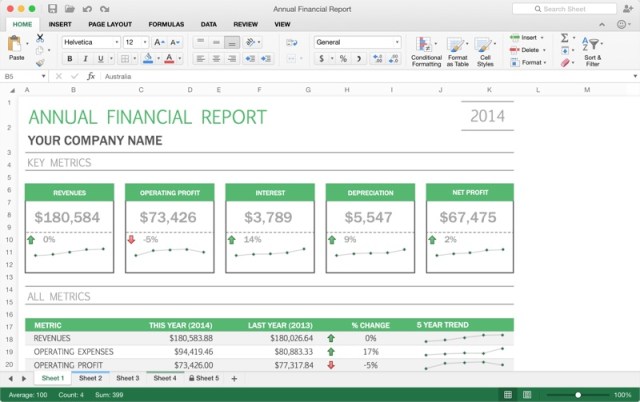
Excel 2016 for Mac’s chart preview feature suggests the charts that best fit a set of data and it adds deeper data analysis functionality with PivotTable slicers for dealing with large amounts of data to find patterns. Shortcuts within Excel and the other Office apps have been updated to match their Windows counterparts, and there’s improved autocomplete and a better formula builder that makes it easier to create spreadsheets and add data.
PowerPoint 2016 for Mac includes an improved Presenter view that shows current slide, next slide, speaker notes, and a timer, much like the PowerPoint for iOS app. In the top left, the presenter sees exactly what the audience sees, including animations in real time, for a better idea of how a presentation is going. There’s also a new animation pane for designing and tweaking animations, plus new slide transitions.

Outlook for Mac, released last October, is also designed to work with the new Office apps, with push mail support, an improved conversation view, and message previews, as is OneNote for Mac, released in March of 2014.
According to Microsoft, several major changes like improved Mail Merge for Word, Propose New Time in Outlook, and support for External Data Connections in Excel were added based on user feedback during the beta testing program. Microsoft plans to introduce new updates to the software at least once per quarter going forward.
Office 2016 for Mac is available for all Office 365 subscribers users beginning today, and is officially supported on machines running the latest version of OS X, Yosemite. Office for Mac will also be available as a one-time purchase in September.
Office 365 Personal, which includes Office access for 1 computer, 1 phone, and 1 tablet, is priced at $69.99 per year or $6.99 per month. Office 365 Home, with access for 5 computers, 5 tablets, and 5 phones is priced at $99.99 per year or $9.99 per month. There are also Office 365 plans designed for students and businesses at different price points.

‘Trackbuster’ Service Aims to Strip Tracking Information From Incoming Emails
Trackbuster is a new service that’s designed to remove invisible tracking codes from incoming emails, preventing companies and marketers from tracking information like the time an email was opened, IP address of the recipient, which links were clicked, and more.
Many of the popular email marketing tools on the market include tools for tracking various metrics of emails that are sent out, embedding cookies and web beacons, which are tiny tracking images that let the sender know when an email has been opened. Links or attachments that are clicked within an email are also often tracked using tracking codes.
There are often few options for blocking trackers embedded in emails and these involve feature-limiting functions like removing all images, but Trackbuster plans to change that by working in the background to analyze and remove hidden tracking codes from emails to prevent users from unwittingly sharing information.

Trackbuster is currently in beta and limited to Gmail and email accounts managed via Google Apps. The Trackbuster service can be connected to a Gmail account, where it scans for specific tracking strings. According to the team behind Trackbuster, the service only scans for codes within email addresses and it does not store, host, or read the content of emails. No data is shared and no data associated with the email is kept by Trackbuster.
After an email account is connected to Trackbuster, the service will analyze the last 100 emails received and all new emails going forward. Incoming emails with tracking codes are filtered into a [Bustedbox] folder, the code is removed, an [Untracked] label is added to the email and it goes into a dedicated [Untracked] folder.
Because it works by connecting directly to a Gmail or Google Apps account, Trackbuster works in web browsers and with any mail software on any device, from Macs to iOS devices.
Trackbuster will be available today in a closed beta for a limited number of beta testers, who can sign up on the Trackbuster website. The company plans to continue adding additional beta testers throughout the summer.

Facebook Planning Music Streaming Service to Compete With Apple Music and Others
 Facebook is in the early stages of planning a dedicated music streaming service, with the intention of competing against the just-released Apple Music along with other industry heavyweights like Spotify and Rdio (via Music Ally).
A few reports earlier in the month tied the company to record labels with the idea of creating an ad-supported native video service, but according to sources speaking to Music Ally off the record, the bigger picture is to build an in-house music streaming service for Facebook users across the globe.
Sources told Music Ally that talks for the music-video side of things are at an advanced stage, with a rollout expected to happen in the next few months.
It’s Facebook’s plans to build on this with a Spotify-style audio streaming service that are making waves within the music industry, even though the launch date and specifics of the business model and payout formula have yet to be nailed down. Sources have told Music Ally that an audio service is very much on Facebook’s roadmap, but that both the social network and rightsholders realise that it has to get the monetised-video service right first.
Given Facebook’s history of acquiring various technology companies into itself — Oculus, Instagram, WhatsApp — it’s easy to see the social media giant doing the same in attempting to build its own streaming service. All the same, Music Ally‘s sources suggest Facebook wants to “build rather than buy,” but at this point nothing is “set in stone.”
Competition in the music streaming business is beginning to heat up with the launch of Apple Music. Just yesterday, Spotify began encouraging customers to cancel their subscriptions made through the App Store and to sign up again on its website to save $3.

Facebook iOS App Introducing ‘See First’ Option for a More Customizable News Feed
Facebook’s News Feed has gone through a number of changes over the years, with the company attempting to streamline the best way for users to visualize the content they care most about right at the top of the social media site. Today, Facebook hopes to be one step closer to that goal, with the roll out of a new “See First” option to its iOS app that will allow users to choose up to 30 people or fan pages that will automatically appear at the top of their News Feed every time they check the site (via Re/code).

Photo via The Verge
As Re/code reports, Facebook promises that any pages or people added to a user’s See First list won’t be used to target customers with ads. In fact, Facebook hopes that the more streamlined experience will encourage users to visit the site more often, and perhaps counterbalance the fact that users may generate less ad income for the company thanks to not needing to scroll through the News Feed for as long anymore.
“It sounds counterintuitive, but the worse we do on rankings, the more we make people try and scroll through, the more likely they are to just go away,” a company spokesperson told Re/code. “If we show you the stuff you really really want first, you’ll come back more often.”
The update will present users with possible suggestions for following pages and people when initially beginning the process to set-up a See First list, and also allow users to unfollow friends and pages from within the app, which you could only do on the web in the past. The update for Facebook [Direct Link] will begin rolling out throughout the day today, with the company promising the same features will be coming to Android and the web sometime soon.

Apple’s Fourth Retail Store in Hong Kong Nearing Completion
As construction continues on what will be Apple’s fourth retail store in Hong Kong, located in the upscale shopping area of Canton Road, new pictures of the store’s facade with an Apple logo shared by iMag on Facebook officially confirm that the Cupertino-based company will soon be opening up shop in the area. The store has been planned since at least August 2013 and under renovation for the past several months.

The new Canton Road location is expected to be one of the biggest Apple Stores in Asia and will mark the fourth store in Hong Kong alongside Causeway Bay, Festival Walk and IFC Mall locations. It remains unknown when the new store will open to customers, but Apple appears to be in the final stages of construction and should announce grand opening details on its website in the coming weeks or months.

 AIVAnet