


iPad Mini 4 Likely to Support Split View Multitasking
Files within OS X El Capitan indicate the upcoming iPad mini 4 will support full Split View multitasking, suggesting its internal specs will be on par with the iPad Air 2. An OS X El Capitan resource file first located by developer Hamza Sood and 9to5Mac from the Safari 9 browser depicts an iPad mini with two apps side-by-side, which is how the Split View feature works.

Responsive design mode, which gives developers a way to test different layouts in Safari 9, also allows developers to simulate a Split View layout on an iPad mini 3. The iPad mini 3 does not support Split View, offering further proof that the iPad mini 4 is likely to be the tablet that uses Split View multitasking.

iOS 9 introduces multitasking for the iPad, and while two of the features, Picture-in-Picture and Slide Over, are available on the iPad Air, iPad Air 2, iPad mini 2, and iPad mini 3, the true Split View multitasking feature is only available on the iPad Air 2 because it has 2GB of RAM and a robust A8X processor.
To support Split View, the upcoming iPad mini 4 will need to have internal specs that match or exceed those of the iPad Air 2. It’s likely the device will include Apple’s A8X processor or the A9 processor that’s being used in its 2015 iOS devices, with 2GB of RAM also being a strong possibility.
Multitasking on the iPad in iOS 9
Specs for the iPad mini 4 have not yet been confirmed, as rumors have focused primarily on the external design of the device. It’s expected to look like a smaller version of the iPad Air 2, with a much slimmer 6.1mm body and iPad Air 2-style design features.

Apple Store App Updated With Support for Gift Card Purchases
Apple today updated its Apple Store app for iOS with a minor but important change, adding the ability to make purchases using an Apple Store Gift Card. Prior to today’s update, customers who wanted to purchase an iOS device or an accessory using an Apple Store gift card had to use the Apple website.
The app previously had no way to enter a gift card at checkout, so the only available option was to use a credit or debit card. Following the update to version 3.4, users can tap “Buy with other payment options,” which has a new section for entering a gift card.

Gift cards can be scanned with the camera on an iPhone or iPad or imported from the Passbook app, with the gift card total then applied to the order total.
What’s New in Version 3.4
You can now make purchases with an Apple Store Gift Card. Use the built-in Camera to scan new Gift Cards or import existing Gift Cards from Passbook.
The Apple Store app can be downloaded from the App Store for free. [Direct Link]

Apple Adds New Flyover Locations Around the World to Maps
Apple today added 20 new Flyover locations to Apple Maps on Mac and iOS, highlighting new cities and landmarks in the United States, Austria, Denmark, Netherlands, Italy, Hungary, Spain, France, Mexico, Sweden, Puerto Rico, and Japan. With the new additions, there are now more than 150 Flyover locations available in Apple Maps.
For those unfamiliar with the Flyover feature in Maps, it lets users see photo-realistic 3D videos of select areas, which they can zoom, pan, and rotate through to get a close up look at notable landmarks and points of interest. Some of the locations below were previously available as Flyover destinations, but have just been officially added to Apple’s list of Flyover locations.
 Budapest, Hungary
Here’s a full list of the new Flyover destinations:
– Graz, Austria
– Aarhus, Denmark
– Rotterdam, Netherlands
– Bobbio, Italy
– Turin, Italy
– Budapest, Hungary
– Cádiz, Spain
– Chenonxeaux, France
– Dijon, France
– Millau, France
– Nice, France
– Strasbourg, France
– Omaha Beach
– Ensenada, Mexico
– Loreto, Mexico
– Gothenburg, Sweden
– Malmö, Sweden
– Mayagüez, Puerto Rico
– Sapporo, Japan
– Rapid City, SD
Flyover was first introduced alongside iOS 6 in 2012, and over the course of the last three years, Apple has been steadily adding new Flyover locations to the Maps app. As of February, some Flyover locations have been updated with real-time animated landmarks, making the Flyover experience more immersive, and many Flyover locations have an additional City Tour feature that walks users through different landmarks.

Apple Adds New Flyover Locations Around the World to Maps
Apple today added 20 new Flyover locations to Apple Maps on Mac and iOS, highlighting new cities and landmarks in the United States, Austria, Denmark, Netherlands, Italy, Hungary, Spain, France, Mexico, Sweden, Puerto Rico, and Japan. With the new additions, there are now more than 150 Flyover locations available in Apple Maps.
For those unfamiliar with the Flyover feature in Maps, it lets users see photo-realistic 3D videos of select areas, which they can zoom, pan, and rotate through to get a close up look at notable landmarks and points of interest. Some of the locations below were previously available as Flyover destinations, but have just been officially added to Apple’s list of Flyover locations.
Budapest, Hungary
Here’s a full list of the new Flyover destinations:
– Graz, Austria
– Aarhus, Denmark
– Rotterdam, Netherlands
– Bobbio, Italy
– Turin, Italy
– Budapest, Hungary
– Cádiz, Spain
– Chenonxeaux, France
– Dijon, France
– Millau, France
– Nice, France
– Strasbourg, France
– Omaha Beach
– Ensenada, Mexico
– Loreto, Mexico
– Gothenburg, Sweden
– Malmö, Sweden
– Mayagüez, Puerto Rico
– Sapporo, Japan
– Rapid City, SD
Flyover was first introduced alongside iOS 6 in 2012, and over the course of the last three years, Apple has been steadily adding new Flyover locations to the Maps app. As of February, some Flyover locations have been updated with real-time animated landmarks, making the Flyover experience more immersive, and many Flyover locations have an additional City Tour feature that walks users through different landmarks.
Intel’s Skylake Processor Lineup for MacBook Air Unveiled
Details on Intel’s upcoming 15-watt 6200U – 6600U Skylake processor lineup were shared today by Fanless Tech, giving us a look at what we can expect from the processors that will likely be used in Apple’s next MacBook Air update.
 Click to view larger version
The 2.3GHz i5-6200U and the 2.4GHz i5-6300U chips are appropriate for the lower-end MacBook Air models, while the 2.5GHz i7-6500U and the 2.6GHz i7-6600U would be used in the higher-end MacBook Air models. All four chips include Intel HD 520 graphics. With Skylake, Intel has opted to simplify its graphics naming scheme, adopting 3-digit numbers instead of 4-digit numbers.
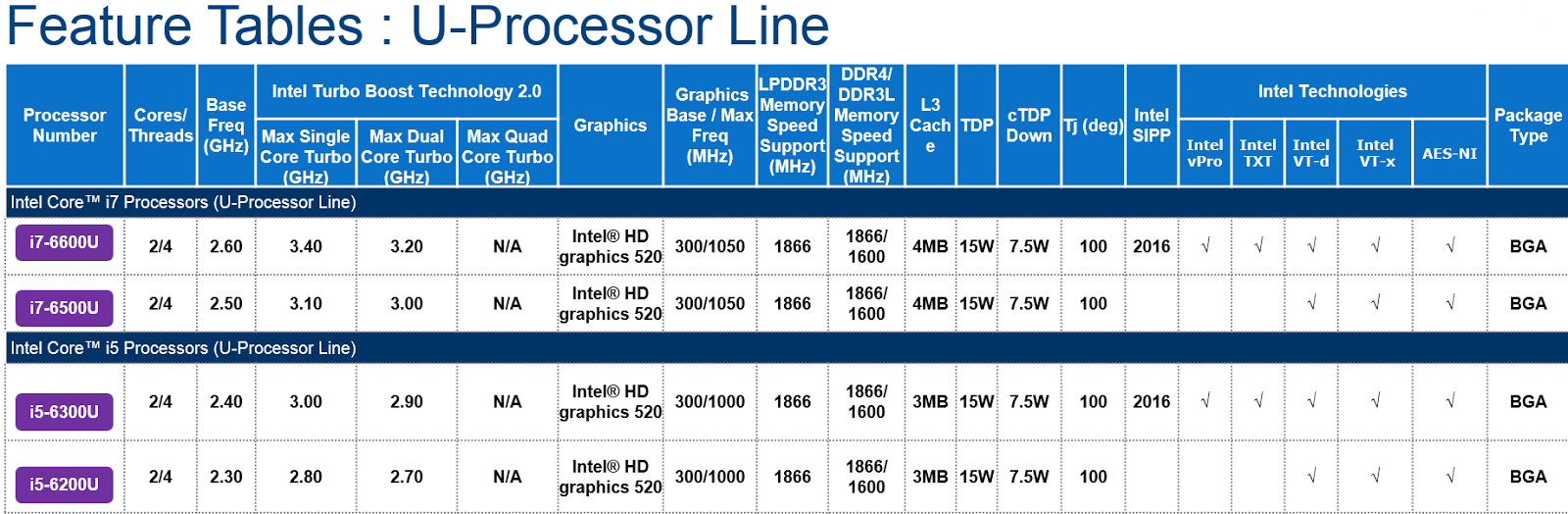 Click to view larger version
It is not clear when Intel plans to release the Skylake chips appropriate for the MacBook Air, but with full specs now available, it seems launch is imminent, perhaps planned for next week’s Intel Developer Forum.
According to the information available, 28-watt chips appropriate for the 13-inch Retina MacBook Pro will not be launching until 2016. Launch dates are equally unclear for the rest of the Skylake lineup, as today’s leak only covers chips that would be used in the MacBook Air.
 Click to view larger version
Intel’s Skylake processors are expected to offer a 10 to 20 percent boost in CPU performance over Broadwell, plus lower power consumption and improved Intel HD integrated graphics performance. Better energy efficiency will also lead to up to 30 percent longer battery life.

Two New iPhones Spotted in Analytics Data Cast Doubt on Possible iPhone 6c Launch
Ahead of the launch of the iPhone 6s and iPhone 6s Plus, mobile app marketing platform Fiksu saw just two new iPhones in its data logs in July, casting doubt on this morning’s rumors suggesting an iPhone 6c launch is still a possibility.
Last month, Fisku began seeing two unknown iPhone models in its logs, with the identifiers “iphone8,1″ and “iphone8,2,” which likely correspond to the next-generation 4.7-inch iPhone and the next-generation larger-screened 5.5-inch iPhone, expected to be called the “iPhone 6s” and the “iPhone 6s Plus,” respectively. The current iPhone 6 Plus is “iphone7,1,” while the iPhone 6 “iphone 7,2.”
Fiksu’s data includes 87 unique “iphone 8,1″ devices and 67 unique “iPhone 8,2″ devices, with no hints of a third unidentified model that might represent the rumored smaller-screened iPhone 6c, suggesting such a device is not being tested. While the absence of a third iPhone model in Fiksu’s data does not entirely rule out the possibility of an iPhone 6c launch, when combined with previous rumors, the release of such a device alongside the iPhone 6s and the 6s Plus seems unlikely.

Rumors indicate that while Apple did initially consider launching a 4-inch iPhone 6c in 2015, those plans were scrapped due to concerns the device could cannibalize sales of the iPhone 6 and 6 Plus, which Apple wants to offer as a lower-cost solution when the next-generation iPhones are released. Other rumors have suggested the iPhone 6c was never intended for 2015, with Apple perhaps planning to launch a smaller-screened phone in 2016.
Despite rumors that have seemingly ruled out an iPhone 6c launch, well-known mobile phone leaker Evan Blass or @evleaks sent out a tweet last night hinting that Apple might still release an iPhone 6c. “Sounds like iPhone 6s, 6s Plus, and 6c will all arrive concurrently,” he wrote, without providing additional information.
According to Fiksu’s data, the “iphone8,1″ and “iphone8,2″ in its logs are using a wide range of apps, including travel, games, and lifestyle apps. While the majority of usage is coming from the US, the site has also seen hits from Germany and Brazil.
Apple is expected to launch its next-generation iPhones in September, likely on September 9. The iPhone event may also see the debut of new iPads and it is said to include the new Apple TV.

AT&T WiFi Calling Now Available for Some iOS 9 Users
The most recent iOS 9 beta added WiFi calling options for AT&T subscribers, but when the beta was released last week, the feature was not functional.
As of today, some users in the MacRumors forums who are running iOS 9 noticed a different message when attempting to activate the feature, and just hours later, WiFi calling began working for a limited number of AT&T subscribers.
When attempting to activate WiFi calling in the Settings app, users who have access to the feature are receiving a welcome screen, a disclaimer, and a notice that WiFi calling has been activated and should be available within a few minutes. During the setup period, users are required to enter an address that emergency services will visit as a caller’s location cannot be determined from a WiFi call.

Following a short waiting period, WiFi calling becomes ready for use with the “Wi-Fi calling on This iPhone” option toggled on. While a few of our readers have had success getting the WiFi calling feature working, several other users do not have access, suggesting AT&T may be testing the feature in a limited number of areas ahead of launch.

WiFi calling was first introduced with iOS 8, and shortly after the feature debuted, AT&T announced plans to support it. The company has not made any further announcements, but it is likely an official launch will come after iOS 9 is released to the public in September. An AT&T employee who is also a MacRumors reader says that his store has not received word on an upcoming launch, so official word on further availability of WiFi calling may still be a few weeks off.
WiFi calling is a feature that lets calls be placed over a wireless connection when cellular connectivity is poor. It is similar in function to Apple’s own FaceTime audio feature, and has thus far been limited to T-Mobile and Sprint users.

A Real-World Look at Proactive Suggestions on iOS 9
Apple aims to take on Google Now with the addition of several new intuitive features on iOS 9 for iPhone and iPad, including Proactive Suggestions, which provides contextually-aware recommendations for music, email, reminders, calendar events and more based on apps that you frequently open and the time of the day.
With iOS 9 currently available in beta, ahead of a public release in September, several readers have shared their real-world experiences with Proactive Suggestions within the MacRumors discussion forums, providing a closer look at the new-and-improved assistant that will be available to all users next month.
Music and Maps

When you connect your iPhone to your car via Bluetooth, iOS 9 can automatically make suggestions for you based on your common tasks while driving. For example, if you often listen to music while driving, it is likely that playback controls or a suggested playlist will be displayed on the Lock screen. Read more 
iOS and Android Retain Loyal Users at Similar Rates
The smartphone market is largely dominated by Android and iOS, dividing smartphone users into two camps: those who stick with the Android operating system and those who use Apple’s iPhones.
Major players in the smartphone market like Apple, Google, and Samsung all aim to lure “switchers” with dedicated websites and tools for switching platforms, but new data from Consumer Intelligence Research Partners [PDF] suggests getting loyal smartphone users to change operating systems is a tough task.
Over the course of the last two years, from 3Q 2013 to 2Q 2015, CIRP has learned that Android and Apple have both retained users at approximately the same rate, with Google having a slight edge. When choosing a new phone, 82 percent of Android users stuck with Android, and 78 percent of iOS users chose to continue using an iPhone.

The data also suggests that Apple users switched over to Android at a slightly higher rate. 20 percent of new Android users previously had an iPhone, while 16 percent of new iOS users previously had an Android device. Customers purchasing their first smartphone were more likely to choose Android devices, with 62 percent of first time buyers picking Android and 24 percent of picking iOS.
“The dynamic between Apple iOS and Google Android is not well-understood,” said Josh Lowitz, Partner and Co-Founder of CIRP. “Even the basic loyalty rate, the measure of how each operating system retains its own users, is not widely known. Conventional wisdom says the Apple ‘ecosystem’ promotes loyalty, while Android readily gives up users to iOS. Our analysis has a more nuanced view on operating system selection, and indicates Android user loyalty has caught up and even exceeds that of iOS.”
Among customers who switched to a new mobile carrier at the same time as switching smartphones, the numbers were in Android’s favor. 79 percent of Android users stuck with Android, while only 51 percent of iPhone users who swapped carriers chose an iPhone.

According to CIRP, switching from Android to iOS is more common when customers switch to AT&T or Verizon, while switching from iOS to Android is associated with a switch to T-Mobile or Sprint. CIRP attributes the high number of iPhone to Android switchers to T-Mobile and Sprint’s “aggressive contracts and pricing.”
Apple often talks about the number of users switching from Android to iOS during its earnings calls and events, but Android vendors, like Google and Samsung, rarely mention the number of customers who switch from iOS to Android, so it often seems like Android customers are switching at a higher rate. CIRP’s data, however, suggests the retainment rates and switching rates between iOS and Android are close, with customers largely remaining loyal to their platform of choice.
During the company’s last earnings call, Apple CEO Tim Cook said the company was seeing its highest switcher rate from Android that it had “ever measured.”
CIRP’s data was gathered from quarterly surveys of 4,000 U.S. subjects that activated a mobile phone from July 2013 to July 2015.

Rite Aid to start accepting Apple Pay and other mobile payments

Nearly a year after shutting off support for Apple Pay and other NFC-based payments, Rite Aid has announced that will be changing soon. On August 15th, the drug store is set to begin accepting mobile checkouts at around 4,600 locations across the US. This includes Apple Pay, Google Wallet and, in the future, Android Pay. Last year, Rite Aid along with CVS pulled support for these type of payment solutions due to contractual ties with the Merchant Customer Exchange, a retailer group that has its own wallet system called CurrentC — though it relies on QR codes, which is arguably an outdated method in 2015. Now there’s an excuse to pull out your Apple Watch the next time you’re at Rite Aid, buying shampoo or whatever it is you get there.
[Image credits: Associated Press]
Filed under:
Cellphones, Software, Mobile, Apple, Google
Source:
Rite Aid
Tags: Android Pay, AndroidPay, Apple Pay, ApplePay, Google Wallet, GoogleWallet, mobilepostcross, Rite Aid, RiteAid

