



Tilt Brush is a virtual reality app that lets you paint with light

We’ve seen some pretty nifty uses for virtual reality since the Oculus Rift hit the scene (bird-simulator, anyone?), but nothing quite like Tilt Brush. At its core, the app is a 3D painting program. Boiling it down to that is a little disingenuous, though. Making art with the Rift looks absurdly cool and you aren’t limited to making a two-dimensional scene with Roy G. Biv — Tilt Brush allows for painting with light, smoke and stars too. As The Creators Project points out, you can even export your masterpiece as a GIF. We aren’t entirely responsible for the one above, that actually came from the video we’ve embedded just after the break. Considering that Oculus recently released the source code from its first development kit to the public, we can only hope more excellent VR applications like this are on the horizon.
Filed under: Desktops, Gaming, Home Entertainment, HD
Via: Kotaku
Source: Tilt Brush
.CPlase_panel display:none;

FXNow delivers its on-demand streaming to Apple TV

Just before Simpsons World arrives offering access to that entire series, FXNow has arrived on Apple TV set-top boxes. While Bart and Lisa make their way to the on-demand repository, the channel serves up FX series like Sons of Anarchy, The Americans, Justified, Archer and more. If you’re not into those selections, movies and more from FX, FXX and FXM networks are available — so long as you have a required cable subscription. As you may recall, FXNow is already streaming its content on Xbox One, iOS, Android, Windows 8, smart TVs and on the web.
Filed under: Home Entertainment, Software, HD, Apple
Via: 9to5Mac
.CPlase_panel display:none;

In time for Ryder Cup, Samsung lets golf fans in on new TV app

This year’s Ryder Cup won’t have Tiger Woods representing the US, although some people argue that this isn’t necessarily a bad thing. Regardless, the tournament, which begins today, must go on. To make the experience better for golf enthusiasts, Samsung has teamed up with the PGA and Turner Sports to release a Ryder Cup app for its smart TVs, allowing viewers to switch between live video feeds (provided by NBC and the Golf Channel), see an up-to-the-minute leaderboard right on the screen and easily keep up with either Team USA or the European Team.
There are also second-screen features in tow, thanks to a companion Android app that lets users do things like watch different streams on their smartphone or tablet. The Ryder Cup application is friendly with most 2013 and 2014 models of Samsung’s smart televisions, and it will continue to work even after the tournament ends on September 28th. Which is to say, you can keep watching highlights over and over, as is the case with the PGA Championship app the company released last month.
Filed under: Home Entertainment, HD
Source: Samsung
.CPlase_panel display:none;

Google Chrome plugs into iOS 8 app extensions

Enjoy how Chrome and other apps share data back and forth on Android? Now you can get that feeling on iOS, since Google has updated Chrome to take advantage of the app extensions supported by iOS 8. That doesn’t mean you’ll be able to install any of Chrome’s desktop extensions — it just means links can be shared directly to any other apps on your iDevice, as long as they also support the feature. The update is rocking “iOS 8 compatibility” but no tweaks for the extra size of the iPhone 6 family have appeared yet.
Filed under: Software, Mobile, Apple, Google
Source: Chrome (iTunes)
.CPlase_panel display:none;

Organize your life with Centrallo

Introduction
I have had the great fortune to be a beta tester for a service new to Android, Centrallo. Centrallo is a cross platform organization app focused on productivity. You are given a space in which you can create lists within lists within lists. You can have an unlimited number of lists within lists to organize what matters to you.
I have used Centrallo for the past few weeks to organize what I am expected to do for various organizations. It has helped me keep my projects separate and made sure that I completed them on time.
Centrallo is a great solution for a number of different problems. It can help you take those quick notes about things that you are likely to forget, you can organize projects, and you can organize your life. Now let’s look into where Centrallo shines and where it falls short. Here is a look into why Centrallo will remain installed on all of my devices after this review is finished.
Positives
I am as scatterbrained as they come. I can forget things two seconds after they occur. With Centrallo, I can quickly type up notes about things that need to be remembered. It works great as a note taking app.
While it takes a while to get it set up, after you have a few entries under your belt, note taking becomes quick and simple. The quick add feature is perfect for this type of usage. It allows you to make a text entry, set a reminder, save a photo, make a voice note and more! Great for the forgetful types such as myself.
The app is also great for project management. I have multiple different obligations that fall under multiple different organizations. The lists in lists feature allows me to keep everything separate in an orderly fashion.
Probably the best feature a developer can provide for their app is support. In the time that I first reviewed their beta to their initial public release, a lot of additional features have been added and a lot of my gripes have been fixed. You will notice update tags after a lot of the points that I make in this post. Those are all things that the development team at Centrallo added or fixed after the initial review after they were brought to their attention.
Upcoming Features
The dark theme can be a bit much. It is dark and I personally feel it slightly depressing. At the time of this review, there is an option in the settings to change the background color, but you can’t actually change the color just yet. Centrallo has assured me that there will be additional themes added into the app, so that is something to look forward to.
Update: A lighter theme has been added in the settings. It looks just as clean as the dark theme, but with a white background base.
While the app is running great on my Moto X, I could not install it on my Nexus 7. The reason for this is that I am running the Android L developer preview. The current beta that I am using does not support Android L currently, but I was told that Android L support will be coming shortly and will definitely be ready when Android L hits full release.
Update: Android L is now supported, however, my untrained eye did not see any material design elements just yet. Hopefully those are still to come!
Negatives
There are many good things to look forward to in the Centrallo app release, but there are also some things that could be improved. It is a long list, but they are very minor inconveniences that are quickly remedied.
Tips are too bloated. While it is great for starting off, there is just too much to go through. It shows off the lists in lists feature quite nicely, but it takes too much time to go through them all. It would be better if they were to just create a tutorial that pops up in the first running of the app along with an option to run through the tutorial again in the settings if it is required. This would make learning how to use the app less of a pain and get users off to a quicker start.
This leads into my next quarrel. Storage restrictions. The initial restriction makes sense. 100MB for a lightweight user free with an option to purchase more storage space for about $5 a month. However, the premium subscription only gets you 1GB of storage. There is no option for unlimited storage. Even though that I have not used even 1MB of my 100, this still doesn’t make sense to me. There will always be that heavy user that uses way more space then one would ever think possible. The premium subscription should get you unlimited storage. If I can’t touch my 100MB, then it is doubtful Centrallo will lose much by letting people have unlimited storage verses the 1GB limit.
My last bone to pick is with the user interface. The ui is clean and works well after you have played with it for a good amount of time. It takes a bit of fiddling to figure out how everything works and during that learning process, I lost a good number of my lists. Again, this is where a tutorial in the first boot up of the app would come in handy.
Lacking Features
The app has its faults, but I believe that it can be made perfect (for my usage) with a few additional features. In my opinion, these features should be already implemented. Keep in mind that I am using a beta release, so that these features might actually be in development and could be present in the final release.
Hyperlinks. Centrallo has added a very helpful feature where you can share links from your web browser to Centrallo to save the link as a listing in the app. A quick note to remember a site that will be useful later on, but not enough to bookmark it. The only thing missing is hyperlinks. You can’t just tap the link to open up your web browser. You have to manually copy the link and paste it into your browser of choice. This is an unneeded annoyance and time waster.
Update: Hyperlinks are now supported!
Another issue is the sharing feature. While you can share individual items, the recipient has to have a Centrallo account or will have to create one to receive the shared item. There should be a function where you can share whatever is saved in that particular note through text, email or social networking. An additional feature that would be great is if you could send an entire list of lists instead of the individual item through the same manner.
Update: Lists can now be shared
Conclusion
Centrallo is a great concept and a great app. It is important to remember that I am using a beta release, so it is not a completed product just yet. The app and service has great potential and will be a great benefit to users who need something to organize their lives. The world is a busy place and I plan on using Centrallo to help me manage my workings in this busy world.


Deals, Discounts, Freebies, and More! Click here to save today!
The post Organize your life with Centrallo appeared first on AndroidGuys.
.CPlase_panel display:none;

Samsung introduces My KNOX app for better business security

Samsung has just launched a new App aimed at the Enterprise to enhance their KNOX mobile security offering.
The new App called My KNOX is designed to offer better protection for employees who use Samsung devices for their work.
The My KNOX App currently only works on the Samsung Galaxy S5 and the Galaxy Note 4 and also requires a free Microsoft account.
In addition, Samsung is offering a tiered subscription service with KNOX that sees a free KNOX Express to offer basic security features, with a paid premium KNOX to enhance the security feature-set.
Could this be the beginning of kickstarting Android in the Enterprise?
Deals, Discounts, Freebies, and More! Click here to save today!
The post Samsung introduces My KNOX app for better business security appeared first on AndroidGuys.
.CPlase_panel display:none;

Starbucks’ shake-to-pay and tips now work on Android too

Love Starbucks but hate feeling left out of the shake-to-pay fun because the device in your pocket is running Android instead of iOS? Those days are over, my caffeine-craving friend. An updated version of the titular app has hit Google Play and it’s packing the aforementioned payment option as well as digital tipping. The coffee juggernaut’s rewards system is now on the payment screen too — all in time for the Seattle outfit’s declaration that autumn is officially here.

Filed under: Cellphones, Wireless, Mobile, Google
Via: Android Community
Source: Google Play
.CPlase_panel display:none;

Twitter’s iOS 8 upgrade brings a new look for profiles

If (for some reason) you absolutely hate how profiles look on Twitter for the iPhone, you may want to fire up the App Store and download the latest update. It comes with a brand new design for profiles, which brings your bio front and center (no more swiping needed to see it) and adds separate timelines for your uploaded photos/inevitable GIFs) and favorite tweets. This new profile will show up for both iOS 7 and iOS 8 users, so you can already enjoy it even if you don’t want to delete apps and make room for Apple’s new mobile platform just yet. You do, however, get something extra if you’ve already upgraded: the power to retweet, follow and favorite posts right from the notification center.

Filed under: Cellphones, Mobile, Apple
.CPlase_panel display:none;
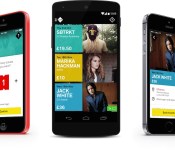
Dice cuts the crap to change the way you buy concert tickets

While you might own every single release your favourite band has put out, nothing beats going to see them live. If that’s something you do regularly, you know that you’ll not only have to fight it out with any number of like-minded fans to get your ticket, but you’ll also have to run the gauntlet of booking via one of the major ticketing providers, which often includes submitting captchas, paying any number of booking fees or printing fees and running the risk that you won’t come away with what you actually wanted.
Dice wants to change that. Launching today after 18 months of development, Dice is 100 percent mobile, cutting all of the crap that traditional ticket sellers normally try to force upon you. You pay the ticket price, and that’s it. But how does it work? Once you’ve installed either the iOS or Android app, Dice will immediately load a full listing of gigs and concerts (over 100 at the time of launching) it has in its database. Currently, gigs are limited to London, but the company intends to embark on a global expansion in the coming months.
What you see is exactly what you’ll pay, so when you do, you’ll immediately be given an app-based e-ticket that will get you inside the venue with the minimum of fuss. If, for whatever reason, the gig has sold out or you came to the party too late, you can also choose to sit on a waiting list. While that might be the last thing you want to do, Dice has a very unique way of turning this to your advantage.

Firstly, venues and promoters have access to ticket sales (but not personal information), allowing them to gauge whether there’s enough demand to lay on a new tour date. Secondly, and this can’t be understated, it allows anyone who has bought a ticket and suddenly realised they’re not able to make the gig, to sell their ticket back to Dice, which in turn can then sell it to the first person in the waiting line. Those waiting will be alerted via text message or email, depending on their contact preference. It eliminates the need for secondary ticket sales, and it ensures music fans don’t pay over the odds to see their favourite musicians perform.
The app is a joint-venture between Phil Hutcheon, a music industry veteran who’s run record labels for over a decade, and ustwo, the insanely talented creative team behind smash hit puzzle game Monument Valley. Realising that 80 percent of people use a website to book tickets, they sought to create a mobile app that removed the friction from paying to see live acts. This is evident when you buy a ticket and you don’t have to waste time filling in your details, completing captchas or race to complete the purchase within a set amount of time. “It gets the ticket in the hand of the fan as quickly as possible,” says Hutcheon.
At launch, the majority of shows are for indie bands and musicians, but there are some big names there too. Jack White, Little Dragon, alt-j, Basement Jaxx, Bugged Out and Ministry of Sound are all present, filling arenas like the O2 and the Shepherds Bush Empire, but the Dice team also works hard to curate a list of more intimate gigs at local pubs and smaller venues to help users discover music they might never had heard before. It’s an intimate way of working that benefits artists as they’re able to get more people to come to their events, and venues are able to work closely with the team to allocate more tickets.

Because there are no hidden fees or booking charges, Dice offers customers up to 30 percent off the price of a show from a rival service. In fact, the more you use it, the app will begin to learn your musical tastes, delivering more relevant suggestions as time moves on. The idea, after all, isn’t to just sell you tickets for bands or musicians you’ve already seen, but to connect people with upcoming talent that could one day go on to do a global arena tour.
Hutcheon tells me that the Dice app you see today does exactly what it needs to do to launch, but that’s it. With investment and guidance from Google Deepmind, Robbie Williams’ management and many others, the company intends to make good on its promise to launch globally, but also introduce new features that help music fans get more from the app. This includes a new reservation feature that will let a user put aside a number of tickets for friends. The app will then email those people and invite them to pay for their own tickets, ensuring the organiser doesn’t go alone, but also isn’t left out of pocket (which has happened to this author in the past).
Future versions of the app may also include YouTube and Spotify playback, allowing users to get an idea of who they’re looking to see before they buy their ticket. It already has the functionality to handle 70,000 tickets per minute (meaning it could sell out Wembley Stadium in just 60 seconds), ensuring that it can handle significant demand when it needs to. Dice believes it has the potential to become the Uber of the music space, which may mean it moves to a freemium model in the future, but from what we’ve seen, it’s already off to a very good start.
Filed under: Cellphones, Internet, Mobile
Source: Dice (App Store), (Google Play)
.CPlase_panel display:none;

What the ‘Bleep’; Private and secure voice and text app goes to public Alpha from BitTorrent
Privacy concerns are probably at an all time high as of late. While it was probably always in the back of your mind that someone, somewhere, was somehow watching, listening and stealing all your stuff, it doesn’t always seem real until it makes the news. The efforts of a number of companies have lead to some great apps and software that keeps your stuff safe, and most importantly, private. BitTorrent is one that is doing its part to help keep you, and your communications, a little further off the radar.

Today BitTorrent has opened up the public release of the alpha version of a new communications, voice and SMS, app called Bleep. The alpha app is available for Windows, Mac and Android in its current state with iOS on the horizon. BitTorrent is utilizing the same principals of BitTorrent technology to connect people directly without any form of centralized connection to a server or a cloud.

Here are the latest options and features in the Bleep Alpha:
- Sign-up with email, mobile number or incognito (no Personally Identifiable Information needed)
- Make voice calls or send text to online contacts only
- The option to import your Google address book contacts
- Invite friends using their email address, SMS, or their public key
- Move an existing desktop account to a mobile device (new)
- Receive inbound messages on all devices (new)
- Messages are sent fully encrypted and stored locally (on your device)
- Easily delete your encrypted message history
- Deleting contacts is now possible on Android and Windows (new)
As with any alpha, you can expect some hiccups, glitches and potential problems. It could still be worth checking out if privacy is a huge concern of yours. If you are an extremely technical person you may want to check out the BitTorrent Engineering blog about how it all works. If you are more interested in getting in on the alpha and trying it out for yourself, then head to the alpha download page. You can grab Bleep for Windows and Mac there. They link to Android as well, but it just directs you to the Play Store to download it.
//<![CDATA[
ord = window.ord || Math.floor(Math.random()*1E16);
document.write('‘);
//]]>
The post What the ‘Bleep’; Private and secure voice and text app goes to public Alpha from BitTorrent appeared first on AndroidSPIN.
.CPlase_panel display:none;
 AIVAnet