


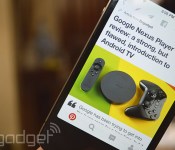
A cleaner, faster Pinterest lands on iPhones and iPads

Pinterest has just released version 4.0 for iOS, and while it doesn’t come with another big feature like the addition of private messaging from August, it dresses up the app in a simpler interface. The fresh, minimal interface boasts bigger images and a cleaner description section underneath the pics. According to its developers, they also gave the app a boost so it launches more quickly when you fire it up, and we did notice that starting Pinterest on the iPhone is now significantly faster. Finally, you’ll find buttons somewhere near the top of your profile page, which will let you upload new pins or search through old ones. In Pinterest’s announcement post, software engineer Steven Ramkumar said the company’s merely bringing these changes to iOS first, so other platforms will eventually get the update in the future.
Source: Pinterest
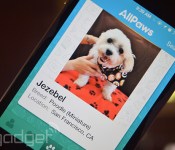
Tinder for pets helps you give shelter animals forever homes

This new addition to the growing number of Tinder-like apps out there is possibly the cutest one yet — it lets you browse dogs, cats and other animals in shelters looking for their forever home. The Tinder for pets we’re talking about was developed by adoption website AllPaws, which isn’t new to taking cues from dating services. In fact, the website itself looks more like online dating portals instead of traditional pet adoption haunts on the web. Just like Tinder, you need to swipe left or right to browse through contenders and message a shelter through the app when you find one that tugs at your heartstrings.
The app lists 200,000 adoptable animals at the moment, and while we can all look at dog and cat pics all day, you can also filter them based on breed and on your geographical location to easily find viable candidates. Of course, nobody should ever adopt pets based on looks alone, but apps like this help entice people to go to shelters — many might even end up going home with another dog or cat than the one they originally wanted. You can now download the AllPaws app from iTunes and finally find someone who’ll love you more than you love him/her.
Via: Huffington Post, Slate
Source: iTunes
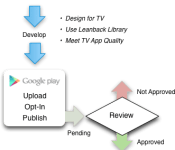
Bringing an app to Android TV is pretty simple, Google shows how
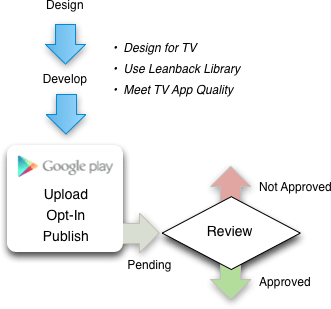
There is a lot riding on Android TV considering how Google TV flopped and drifted away. To ensure its success, Google wants to make it as simple as possible for developers to take their apps and games and bring them over to Android TV. Its Nexus Player is on the market, so consumers are going to expect content for consumption.
These are the steps necessary to distribute your app or game with Android TV:
- Understand guidelines and requirements
- Develop a great app for TV
- Test for TV App Quality
- Opt-in to Android TV and publish
- Track your review and approval
As always, Google wants developers to follow the recommended guidelines because everything should be familiar for an Android TV user. Tailoring an app or game for a television is vital because that is the platform’s go-to display. Scaling has to be just right. Then, the developer must aligns what it is publishing with Google’s TV App Quality test. From there, the developer has to submit the app or game and wait to see if Google approves upon review.
Source: Android Developers
Come comment on this article: Bringing an app to Android TV is pretty simple, Google shows how
Starbucks planning to deliver coffee through updated mobile app

The Starbucks app has long provided a way to pay for your coffee with just your phone, but the company has much bigger plans for its mobile counterpart. Starting soon the coffee giant will start testing a new app that allows you to not only order from your mobile device but also get your coffee delivered. There are already numerous delivery service apps, but until now none of them included Starbucks. Details are still hazy but the thought of having Starbucks delivered is tantalizing to say the least. Starbucks founder Charles Shulz says the service could launch to Starbucks Loyalty customers in Portland as soon as next month. Let us know your thoughts in the comments and if you’ll be taking advantage of the upcoming service. This is even cooler than paying for coffee with your smartwatch.
Source: CNBC
Come comment on this article: Starbucks planning to deliver coffee through updated mobile app
Android Wear will soon be a remote control for your Sonos speakers

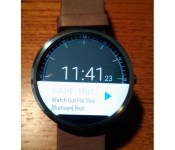
Picture the scene: you’re throwing a house party with guests sipping at your expensive whiskey and a good time is being had by all. Suddenly, unexpectedly, the Hamster Dance pops up on the Sonos – curse your eclectic music tastes – and the atmosphere suddenly turns restless. Never fear, because soon you’ll be able to nudge the track to something more suitable just by banging a finger on your Moto 360. Sonos has revealed that it’s currently beta-testing a control app for Android Wear devices that’ll enable you to play DJ from the comfort of your wrist. iOS users are also apparently getting some love, too, since Zatz Not Funny is reporting that an iPhone lock screen widget is also being hammered out in the company’s secret testing labs. Now you just need to move the Hamster Dance off your number one party playlist and you’ll be sorted.
[Image Credit: Robert / Sonos Forums]
Filed under: Home Entertainment, Wearables
Via: Gizmodo, Zatz Not Funny
Gmail for Android is ready to handle all your email accounts

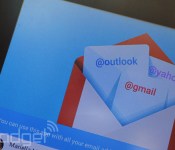
The new version of Gmail for Android is slated to make its way to Google Play in the near future, but if you cannot wait to use it, you can download the APK right now and load it up. You’ll notice some major changes the moment you launch it, since it’ll ask what kind of email addresses you’d like to add: version 5 works not only with Gmail addresses, but also with Outlook, Yahoo and any IMAP- or Exchange-based email accounts. To choose the inbox you want to check, simply tap one of your accounts on the left-hand menu. Also, it comes with a Material Design interface makeover (there’s a lot more red now) and a thread email system similar to what you get through Inbox. We can’t say which Android flavors it’s compatible with exactly, but we’ve installed it on an Ice Cream Sandwich tablet, so it’ll likely work with all newer platforms. To find out for yourself, or to take a break from Google’s busy Inbox app, head over to Android Police to download the file.

Filed under: Misc, Internet, Software, Mobile, Google
Source: Android Police
Reserve’s restaurant concierge app lets you forget about the bill

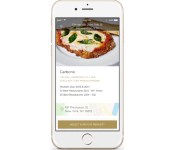
You can already organize fine dining excursions through a single app like OpenTable, but you still have to pull out your phone or wallet to pay when the night’s over. You won’t have to worry about the bill with Reserve’s new concierge service, though. The currently iOS-only platform lets you not only find and book tables based on your preferences, but automatically bills you after each meal (tip and all); you’ll be charged a $5 fee for the convenience, but that’s tiny in the world of haute cuisine. If your favorite eatery is busy, you can even offer to pay more than usual in hopes of securing a spot. Want to give it a whirl? You’ll have to eat in Boston, New York City or Los Angeles during the current beta testing phase, although San Franciscans will get to try it relatively soon.
Filed under: Cellphones, Internet, Mobile
Via: VentureBeat
Source: Reserve
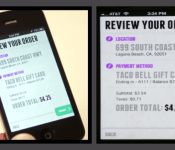
Taco Bell accepting orders sent from its new app

The folks at Taco Bell know exactly who their audience is. The fast-food company has launched mobile ordering for customers wanting to speed-up the process. From within its app available in the Play Store, you can place an order and pick it up. That way, the food is waiting for you instead of it being the other way around. Taco Bell did not stop with straightforward ordering, though. The revamped app lets customers select exactly what the want in the way they want it. Once an order is complete, it can be saved for a later date. Taco Bell also bundled a rewards program for frequent customers.
Hit the break for a video and download links.
Click here to view the embedded video.
Come comment on this article: Taco Bell accepting orders sent from its new app
Amazon folds Appstore into standard Android app

Amazon is doing everything they can to make their mark in the mobile market. Their unsuccessful Fire Phone most likely showed them they needed a new strategy, and that is provide the content they’ve worked hard to build to other platforms. So they have quietly placed their mobile app store in the Android Amazon app.
App Store within Amazon app
While you’ve always been able to download the Amazon App Store onto Android, it was a harder process of finding the download page, letting Android accept .apk from Unknown Sources, and then installing the Amazon App Store. You still need to allow installation of .apk from Unknown Sources, but the Amazon app makes it a much more seamless experience, taking you directly the page in your settings, and then pressing back and being done with the set up process. After that, you’re all set!
What’s interesting is this was evidently implemented way back on September 9th, with supposedly it being included in their announcement about access to Prime Instant Video. They’ve likely been quiet about it to avoid unnecessary attention from Google. Either way, hit the widget below to download the Amazon app to access the Amazon App Store from the list of “Departments”, in a category called “Apps & Games”.
Will you use the hidden App Store?
Source: TechCrunch
The post Amazon folds Appstore into standard Android app appeared first on AndroidGuys.

Google Fit for Android is ready to compile all of your fitness stats

Filed under: Software, Mobile, Google
Via: The Next Web
Source: Google Play, Android Official Blog
 AIVAnet