



Adobe Lightroom mobile comes to Android, but it’s only for phones

Last spring, Adobe brought a version of its Lightroom photo-editing software to the iPad making for some convenient editing on the go. Months later, a version of the app is ready for Android devices and it brings all of the key features from the iOS version to those handsets running Google’s mobile OS. You’ll notice that I said “handsets” there, and that’s an important caveat. The app is designed for use on phones, and not tablets. Adobe says a version that’s optimized for tablets is on the way, but for now, the app is meant to be used on phones. If you’ll recall, the iPad version preceded the iPhone app, which, you know, makes sense. While this new Lightroom mobile equips devices running Android 4.1 (Jelly Bean) and later with its toolbox of tweaks (more on that in a minute), the creative software company recommends that you have at least 8GB of free space on your device to keep things running smoothly.
Just like the iOS version, the Android app is a free download, but you’ll need a Creative Cloud subscription to use it. You don’t need the full membership though, as the photography-specific plan is now a permanent fixture at $10 a month. Lightroom mobile syncs edits, metadata and collections with Lightroom 5.4 (or higher) on both Windows and Mac. It also automatically imports shots from your phone and allows you to access Creative Cloud-stored files for editing while your away from that work machine. Don’t expect the full set of tools, as the mobile software is limited to much of what’s in the Basic Panel and cropping tools. Options like color temperature, exposure, highlights and contrast are available, but those handy presets that you’ve created, or purchased from the likes of VSCO, won’t be accessible. Adobe says that expanded preset support is something it’s working on, but there’s no timeline for when they’ll be added to the mobile apps.

Just like the iPad app, Lightroom mobile uses the RAW file to create a compressed preview version that’s only about 5 percent of the original size (around one to two megabytes). The original is maintained, and a 2,560-pixel wide image ensures that the collection you edit during your evening commute doesn’t take forever to download or take up all of your storage space. As we’ve already mentioned, Adobe says you’ll need 8GB of internal storage (not extra space you’ve added on a microSD card) to move the files back and forth, along with a minimum 1.7GHz quad-core CPU.
Remember when I said most of the key features from iOS made it over to Android? Well, the one difference is Lightroom’s commenting system is absent on this version, but Adobe says it will be part of a future update. You can, however, still like, flag and reject images as needed. My biggest gripe here is the lack of tablet support. I’ve used Lightroom mobile on an iPad, and the app seems much better served with the larger display of a slate. Here’s to hoping Adobe’s plan to outfit Android tablets is just around the corner, but until then, those who prefer Google’s software will have to settle for using smaller screens.
Source: Adobe, Google Play
Facebook takes its Internet.org app to Colombia

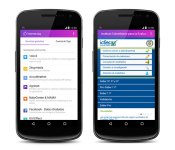
Facebook took it’s Internet.org app to Zambia back in July, and now it’s heading to Latin America. The social network announced today that folks in Colombia would now be able to use a handful of connected tools free of charge. Tigo customers can access Instituto Colombiano para la Evaluación de la Educación (an education service) and Agronet (agriculture and rural development info) at no cost, as well as things like Facebook, Messenger, UNICEF, Wikipedia, AccuWeather and more. In addition to the initial 16 services, more will be added in the future as Internet.org continues to expand its reach to other parts of the world. While a load of useful tools have been a part of the free app for a while, the version that’s launching in Colombia is the first to offer access to government services.
During a Q&A in Bogotá, CEO Mark Zuckerberg said that due to the infrastructure required to do so, giving folks in developing areas access to the entire internet for free may never happen. However, through the Internet.org project, handy apps for searching job listings, speaking with a doctor and getting local news will help give users info they usually wouldn’t have access to. Zuckerberg also noted that by removing the data plan requirement, only the cost of a phone is the barrier to access, and the one-time cost of the device itself is much cheaper. What’s more, once Internet.org reaches more locales, further reducing the cost of those handsets is a goal for the future.
Filed under: Cellphones, Internet, Software, Mobile
Source: Facebook

Google details Ara Manager app for wrangling all your modules

We’ve known that there’ll be an Ara Manager app to help Android users grok their shiny, new modular toys, but we’ve just gotten a better sense of how it’ll actually work when Ara devices trickle into the wild later this year. At its most basic, the app — which should come pre-loaded on Ara phones — allows users to lock and unlock the modules currently slotted into the phone by using a bit of current to disengage the electro-permanent magnets holding them in place. We knew that already, though: What’s new?
Well, what about when you’ve got multiple, similar modules slotted into a phone’s endo, like a regular camera and a thermal camera? You’ll be able to use the app to determine which one you want to use at any given time, though it’s not exactly clear how the interface will let you do that. Oh, and seeing as how there’s firmware specific to each module, the app will also let you manage the updates and “support packages” that’ll assuredly become available as developers refine their modules. Beyond the mechanics of managing an Ara phone, the app will provide users will status information (think battery levels, vendor details and the like), but maybe the app’s most important role is a sherpa of sorts, a guide to help people figure out their devices by flagging potential issues and offering suggestions for optimal module spots. Linaro CEO George Grey hinted that slipping hardware into certain slots would lead to less-than-ideal performance, but sadly, he didn’t dive into what exactly that meant.
Filed under: Mobile

Google moves one step closer to becoming a universal translator

Even with the assistance of modern technology, holding a conversation in two different languages can be difficult. Google Translate allows you to speak with someone and have each utterance translated as text and audio, but until now you had to manually toggle every time the other person talked. As expected, Google is speeding up the process with smarter language recognition and speaker switching, which comes as part of a new update. So when you boot up the app and press the microphone icon, it’ll recognise which of the two languages is being spoken, offer a translation and then automatically alternate whenever the conversation flips over. No more tapping on the screen again and again.
In addition, Google has revamped its camera mode to quickly translate words and phrases directly on your screen. So if an important sign on the Paris Metro has you stumped, you should be able to just grab your smartphone, tap the camera icon and wait for a translation to appear augmented reality-style. The feature currently works for English, French, German, Italian, Russian, Portuguese and Spanish words, and Google says it’ll be adding support for additional languages over time. Of course, this is hardly a new idea — Word Lens had a similar proposition, and ever since Google acquired its developer Quest Visual we’ve been waiting patiently for its inevitable debut.

Filed under: Cellphones, Google
Source: Google
Use your iPhone to access Google’s Chrome Remote Desktop

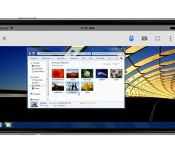
Google said it would allow both iOS and Android users to leverage its Chrome Remote Desktop feature on-the-go, but Apple faithful have yet to get the chance… until today. Once you’ve installed the desktop app from the Chrome Web Store, access to that machine with an iPhone or iPad is a few taps away. The Android version rolled out last April, and despite a lengthy wait, those who prefer iOS can now make use of the tool. Looking to take it for a spin? The app is available for download at iTunes.
Filed under: Software, Mobile, Google
Source: Google Chrome (Google+), iTunes

Funb3rs review: a fun, challenging math game

There are hundreds of math games found in the Play Store, but Funb3rs brings a challenge that I have not seen in those other games. Funb3rs in a 2-player math game where your addition, critical thinking, and quick judgement skills are put to the ultimate test. You are presented with a 4×4 grid of numbers ranging from 1 to 9. At the top, you are given a target number that you need to reach. Dragging your finger across each digit will add up all the numbers, and your goal is to add up numbers to reach the target number. After reaching the target number, another number for you to reach is generated. Each game has three rounds and the scores from each round are added up to determine a final winner. The concept is simple, but the two minute time limit and often large target numbers cause you to have to think several numbers ahead. Similar to Scrabble, there are some numbers that increase the value of numbers and chains. Also, you are given different power-ups that can really help you get ahead of your opponent.

After playing Funb3rs for a few days, I have really enjoyed it. The graphics are okay, it is nothing spectacular to look at but it does not detract for the game at all. The gameplay is challenging which was a welcome surprise since I thought the game would be simple. The competition from other players is also very intense. I have only won a few times and almost every game has been extremely close. However, since the game is relatively small, there are not many active users. So I constantly find myself playing the same people over and over again. This is a minor quirk because the game is still fun and more people will join as the game grows. Another dislike I have with Funb3rs is that there is no option to play as a guest and you are required to sign in to play with other users. This would not be too bad if I could sign in with my Google account. Unfortunately, you are only given the option of signing in with Facebook or creating a Mixel account. I am one of the few people who does not have a Facebook and creating a Mixel account just gives me another username and password to memorize. My last complaint is with in app purchases. This is by no means a pay to win game, but I do not like the way IAPs are handled in Funb3rs. Each one costs $1.11 and does a different thing. There are several that give you in-game power-ups, but there are others that remove ads and add features to the app itself. Buying all the non-powerups would cost you $7.77 and there is no option to make a one time purchase at a discounted price.
With all this in mind, Funb3rs is still a fun game that gives a challenge I have yet to encounter with other games. If you want to check Funb3rs out, you can grab it for free in the Play Store.
What I liked:
- challenging gameplay
- unique idea
- intense competition
What I did not like:
- small number of users
- no option to play as a guest
- no Google account integration
- In app purchases can get expensive.
FEATURED POSTS


The post Funb3rs review: a fun, challenging math game appeared first on AndroidGuys.
Hyundai set to launch Blue Link app at CES 2015

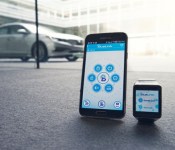
One of the big technology trends we expect to see at CES 2015 is increased convergence between mobile devices and automobiles. Today Hyundai announced that they will be releasing the next generation of their Blue Link System on 2016 Elantra GT and Veloster models. Along with the announcement about the next generation of the system, Hyundai also announced they will be releasing a new Blue Link smartwatch app to make it even easier for car owners to interact with their vehicles.
The new smartwatch app will give users the ability to access features like door unlocking, remote starting or even access service information via their smartwatch devices. Hyundai’s executive director Barry Ratzlaff says the new features in Blue Link,
“expands Hyundai’s exploration into how wearable technology and Blue Link fit into a customer’s lifestyle. Connecting to your car through a smartwatch and voice recognition was previously something seen only in science fiction movies. Now, we can provide this capability to owners of Hyundai vehicles equipped with Blue Link.”
Along with tapping their smartwatch to access features, Hyundai owners will also be able to use voice activated commands through their smartwatch or smartphone, to perform actions like:
- Remote Engine Start
- Remote Engine Stop (Only available when vehicle is in remote engine start mode)
- Remote Door Lock / Unlock
- Remote Flash Lights / Honk Horn
- Car Finder
- Call Roadside
- Call Blue Link
On top of these, with the next generation of the Blue Link app, Hyundai says users will be able to access functions like a destination search and receive maintenance alerts when new vehicles are released that support these features.
Hyundai says they will be on hand at CES 2015 to demonstrate the Blue Link smartwatch app on Samsung, Motorola, Sony and LG smartwatches. They also indicate Android Wear users will be able to download the app from Google Play during the first quarter of 2015.
Be sure to check back here next week for our coverage of CES 2015 and see if we are able to get some hands on time with the Hyundai Blue Link system.

source: Hyundai
Come comment on this article: Hyundai set to launch Blue Link app at CES 2015

Amazon app now adds support for Android Wear

The popularity and practicality of smartwatches is rising everyday, which leads to support from bigger companies. The titan of online sales, Amazon, has now updated their app to be fully compatible with Android Wear.
The app now adds the ability for Android Wear users to use their voice to search for products, buy with one-click, and add items to their wish list. There is no second app that needs to be downloaded, it comes with the newly updated version of the Amazon, which can be downloaded below. You can access Amazon on your Android Wear device through the Start Menu. As of now, support is only available in the United States.

For other smartwatch related news/rumors, be sure to check out our site SmarterWatching.

The post Amazon app now adds support for Android Wear appeared first on AndroidGuys.

Civilization Revolution 2 Game Review

Finally the award-winning franchise for PC Sid Meier’s Civilization has hit the gaming world with a brand new exclusive sequel, Civilization Revolution 2 which is only available for mobile devices. This turned based strategy war game is gaining its popularity with a host of new and old fans alike. And we here at AndroidGuys have put this title under our finely tuned microscope in today’s review.
Ready to dig right in and hear all about Civilization Revolution 2 ? Yes…Thought you might say so.
Well let’s get to it and start off by saying hands down this game has become a force to be reckoned with! Having packed all new 3D graphics unleashing your devices full potential will have you in the zone for hours. That’s not all there is to offer, this exclusive mobile download has also amped up its entire gaming experience with this title. That being said all that new content has to fit somewhere so be ready for the whooping 447MB download that comes with this file. Also a $15 price tag you’ll want to be sure you’re getting the most bang for your buck. Well lucky you we here at AndroidGuys have footed the bill to give you all you need to know on this hot title. And don’t worry people developer 2K Games made sure to treat fans with explosive new content and is leading itself as having NO IN-APP PURCHASES !!
Want to rule a nation through the ages? How about building your nation of wooden huts into a thriving megatropolis. Civilization Revolution 2 has made that possible. Within the first hour of gameplay I was already hooked on the amazing 3D graphics and superb control layout. It has an easy to use interface along with a host of new content that will have you jammed up with endless options.
Yes folks it is still a good old fashion turned based strategy which usually can get tiresome and repetitive at times in between turns but wait…remember all that action packed content I was talking about? Well developer 2K Games made sure to ease those problems by introducing loads of character animations and city management options to develop and keep you occupied while you wait. All be it those animations can get repetitive and sound quite familiar to a Sim’s character but it is definitely a break from the ordinary hurry up and wait.
After hours of gameplay I definitely keep my device powered on and ready to go. Pick your leaders from a wealthy list of new choices from Abraham Lincoln to Ganges Khan and rule your nation the way you want. Ready to build a massive army full of countless new units and have a bloody all out world war than that’s your prerogative. Or how about building a small Aztec village into a world super power by advancements or force. There is also historic campaigns allowing you to replay exact historic scenarios, along with a random game set up simulator so that way you can play how you want when you want. All new technologies to advance your nation along with new events to keep you on your toes every time you end your turn.
WHAT WE LIKED:
- Amazing 3D graphics
- Hours of entertaining animations
- Random advanced AI
- Easy to learn interface
- Historically accurate scenarios
- No IN APP purchases required
WHAT WE DIDNT LIKE:
- Drains battery quickly
- Large file download
- New title so there is regular bug fixes and freezing.
- No easy to use tutorials
- Repetitive animations
- Skilled learning curve for new users
The post Civilization Revolution 2 Game Review appeared first on AndroidGuys.

Could Scout be the solution to “Generation Tardy”?

Telenav, developers of the app Scout that aims to streamline event creation by making it easier to manage and keep in contact with your invitees, have recently unveiled the results of a recent consumer survey targeted towards revealing the “common pain points of get-togethers” that the recently updated Scout app will aim to alleviate.
Perhaps unsurprisingly given the short-attention span of the young adult generation (thanks to new information/games, and therefore potential distractions, being available at any and all times (I too unfortunately fall into this category, hard)), it is the “millenials” who struggle most of all to arrive on time to events. According to the survey, 1/3 of this age group said that as many as half of their friends tend to arrive late to events and meet-ups. As much as 30% of the general population, and nearly 50% of what Telenav dub “Generation Tardy” admit to telling their friends they’re mere minutes from the destination when they are in fact much further out.
The survey also backs up what many will likely hear from their parents on a frequently recurring basis, that they sleep too much, with 70% of the young adults having been late to a social gathering due to over sleeping (I once was meant to meet friends at a station an hour away at 2pm, and woke up at 3pm) compared to only 40% of the general population. The second most common cause of tardiness is eating, something 40% of the millenials have given as their reason, while only 22% of the general population admit to being late for this reason. The survey also proves that sex has become a higher priority for this generation of young adults than ever before, as 30% of respondents admitted to being late to a social event for this reason, twice as many as the general population.
Telenav, knowing that this generation spends most of their time glued to their smartphone (if you’re reading this on one I think I’ve proved my point), developed the app “Scout” to help prevent these problems from happening by allowing the creation of an event page that contains all the relevant information (much like Facebook’s Events page) as well as producing a group message thread to help keep everyone in contact. The app also features turn-by-turn directions and, what will appeal most of all to nervous hosts, uses location services to display each attendees’ ETA so your friends can never lie to you about how far away they truly are ever again.
Unfortunately one of the coolest features, from a party-goer’s standpoint, is only available on iOS at the current time. This features predictive traffic reports which will inform them of potential travel problems and offer an alternate route. However if you use Google Now, never fear! Simply input the event date and location in Google’s Calendar application, and the handy assistant will notify you when you need to leave, and inform you of the fastest way to get there using latest traffic reports.
If you want to give Scout a shot, and can convince all your friends to do the same, click the widget below to find it on the Play Store
The post Could Scout be the solution to “Generation Tardy”? appeared first on AndroidGuys.
 AIVAnet