


Marshall Major II Bluetooth Headphones: Live for music (review)
Marshall has been in the sound game for a long time – longer than most brands you’re familiar with. The recognizable Marshall logo is seen everywhere from concerts to garages. It’s only fitting that the iconic company decided to make its own branded headphones. The Marshall Major II wired headphones were a hit which paved the way for its wireless brother, Marshall Major II Bluetooth headphones.
Iconic Build
The package comes with Marshall Major II headphones, USB-charging cable, and a detachable coiled 3.5 mm cord.
The Marshall Major II Bluetooth design is very similar to its wired predecessor, the Major II, with a few added features. The headphones come in a variety of colors: black, brown, and white. Marshall went with a lightweight and portable design. The earpieces are connected by a flexible hinge that allow it to fold up in a compact package for portability.
 The outside of the earpieces features Marshall’s trademark logo and textured design seen on its amplifiers. The earpieces feature a very comfortable padding that ensures a secure fit onto your ears. The left and right sides are labeled in big gold letters on the inside of the headphones to make sure you are wearing them the proper way.
The bottom right earpiece features a 3.5 mm jack, power and Bluetooth pairing button, and a micro-USB port to charge your headphones. Powering on the device is done by long-pressing the round black button, while double-tapping will execute the Bluetooth pairing. Charging is easily done by connecting the micro-USB into a USB power source.
 Underneath the left earpiece features a familiar brass knob seen on many other Marshall equipment. The knob functions like a joystick to control in-line commands. Pushing it left or right will control skipping or repeating music. Up or down will control the volume levels. This is a welcome addition seeing as how it was omitted in the wired version of the Major II. Play and pause are controlled by pressing the knob.
 Comfort
I have to confess, I am not a big fan of on-ear headphones. My ears will throb after wearing on-ear headphones for longer than 30 minutes. I found out about this right after I bought a pair of on-ear Bose headphones from my friend. Needless to say, he wouldn’t give me my money back. I need new friends.
Anyways, I was really surprised at how comfortable the padding is on the earpieces. I used them all day, walking around the lab and sitting at my desk. The secure fit ensured that no noise leaked out of the headphones, which is great because I’ve been binge listening to Nickelback. I hate headphones that leak music because I listen to embarrassing music constantly.
 Sound
Sound
The Major II headphones comes with aptX technology which uses a unique, compression algorithm to produce CD-like quality audio over Bluetooth. This is huge for Bluetooth devices which have been known for lower sound quality due to its limited bandwidth.
The bass absolutely slaps coming from the 40 mm dynamic drivers. The full-sounding lows create a warm sound experience, perfect for listeners who need that extra oomph from the bass. I love Pound Cake by Drake and listening to this song on the Major II’s did not disappoint. I found the vocals and highs to be clear giving it a detailed sound.
These headphones can get loud. I turned the volume up to 100% and did not hear any sound distortion. However, the bass can get a bit overwhelming but that could be because I prefer a balanced sound rather than a bass-focused one.
Usage
I work in a research lab so Bluetooth headphones are a staple in my life. I stopped using wired headphones because I would always get it caught on something and either knock it over or get minor whiplash. I replaced my usual Bose Bluetooth headphones with these for the past couple of weeks and I got to say it hasn’t been a difficult transition.
The battery on the Major II’s is absolutely absurd. It claims you can get around 30 hours of playtime. I stopped keeping track after 30 hours, but I think I was getting in the ballpark of around 40-45 hours. I used these headphones at 60-70% volume and they lasted a week and a half of frequent use before I had to charge it.
My favorite part of the headphones was the brass knob to control music. It’s such a simple function that’s neglected from many other headphone makers. The unique in-line controls are intuitive and have an array of functions for only one button. Answering and ending phone calls are also done through the brass knob simply by pressing it down.
Another great feature is the use of the 3.5mm jack on the left earpiece. You can plug in your audio cable if you run out of battery. or let a friend plug in their 3.5 mm cable and listen to music with you. Not a bad excuse to get your crush to sit close to you, wink wink.
 I would recommend getting a case for these headphones. The lightweight design makes these headphones less durable than others.
Conclusion
Marshall changed the sound game with its well-known guitar amplifiers. Its technology allowed music to be loud enough to be heard and enjoyed by huge crowds. You can’t go to a rock concert without seeing Marshall everywhere.
Marshall’s Major II Bluetooth headphones retain the same caliber high performance that the company has always been known for. The 40mm dynamic drivers will produce huge bass, with clear mids and highs. You can be comforted knowing that these headphones will rarely die on you with a battery life of over 30 hours. If you do forget to charge it, you can always listen via audio cable. The addition of a unique brass knob to control music will allow you to change music effortlessly or pick up a call.
Marshall’s Major II Bluetooth headphones can be found on the Marshall site for $149. However, Amazon has the headphones on sale for only $114.98 with free shipping. This is an absolute steal for overall quality of these Bluetooth headphones. The extra functionality of being wireless and having in-line music controls makes this a considerable upgrade from its wired predecessor.

Google collaborated with over 1200 museums, galleries and institutions to bring you Arts & Culture (app review)
Do you know where the term “Impressionism” is derived from?
If you answered from Claude Monet’s painting Impression, soleil levant, which was exhibited in 1874 in the first of the independent exhibitions mounted by Monet and his friends as an alternative to the Salon de Parism, then you were right. I learned that from Google Arts & Cultures.
Arts
Art was a requirement in my schooling growing up, but I never truly appreciated it. I always saw or read about it in books that never did it justice. It was only until I was in my late twenties when I started to travel the world and see art in person when I developed a deep appreciation for it. Also, now in my thirties and living a life immersed in science and technology, I have an even deeper appreciation for art. Technology is a world of creating products that improve our lives, but also might distract us a little too much.
While science pays the bills for my lifestyle, it is a process that requires little emotion. That’s why I like to expand my horizon and appreciate art.
 A Sunday on La Grande Jatte
Georges Seurat1884-1886
Art stands the test of time because it is universally accepted for its beauty and emotional response.
Google collaborated with over 1200 museums, galleries and institutions to bring art to you the history of art and culture on your smartphone, tablet and computer. It’s available for free at the official website, or as an App for Android and iOS.
There you can learn about some of the most influential artists in documented history.

You can learn about specific artists or movements and how they impacted society. You can even educate yourself about specific paintings like the featured image, Water Lilies.
 This app is great for all ages. If you’re a middle aged adult like me, you can revisit art if you missed it growing up. It’s almost impossible to see all of this artwork in person since the cost of travel is so high.
There’s no cost to view or educate yourself on any of the works. That’s something most museums can’t even offer.
If you’re looking for wallpapers of art you can download the entire gallery of art I’ve collected here.
Culture
The second half of the app/website is Culture. It’s a great way to learn about historical figures and events that helped shape the world we live in today.
Imagine what kind of world this would be if the US had lost the Revolutionary War to England. We might be eating tea and biscuits with our pinkies pointed up in the air. Could the war have been won without George Washington? Probably not.

There are hundreds of historical events documented in Google Arts & Culture and thousands of places to visit around the world too.
In a world obsessed with social media, streaming videos, and games, sometimes it’s nice to learn about where we have come from and what shaped the world we live in now.
I love technology as much as any of you. However as much as I love it, I also like to take a break from it. That means turning off Clash Royale, Netflix, and Twitter. It’s nice to put on some music and read about historical events while browsing through art that gives me a different appreciation on life.
I highly recommend checking out the official Google Arts & Culture website here, or downloading the free iOS or Android apps.
App Features
– Zoom Views – Experience every detail of the world’s greatest treasures
– Virtual Reality – Grab your Google Cardboard viewer and immerse yourself in arts and culture
– Browse by time and color – Explore artworks by filtering them by color or time period
– Virtual tours – Step inside the most famous museums in the world and visit iconic landmarks
– Personal collection – Save your favorite artworks and share your collections with friends
– Nearby – Find museums and cultural events around you
– Exhibits – Take guided tours curated by experts
– Daily digest – Learn something new every time you open the app
BlitzWolf 5-port USB Desktop Charger review

Pretty much every portable gadget we have today requires some sort of occasional recharging. Whether it’s multiple phones in the family, or a gaming controller, or tablet, we find ourselves unplugging one device to plug in another. It’s time to get smart about things; it’s time to make better use of the wall outlets.
One device that does such a thing is the BlitzWolf 5-port desktop charger. As the name implies, it takes one wall outlet and turns it into five USB ports. Certified by Qualcomm, it provides Quick Charge 3.0 capability in one of its ports. Moreover, the other four ports also allow for 5V/2.4A output so that means they’re pretty darn fast, too.

We’ve had one of these in our office for the last couple of weeks and have come to really appreciate it. Rather than getting behind the desk and filing cabinet to plug and unplug various devices, we’ve put the BlitzWolf in place. The cord is roughly four feet long so there is plenty of length to put in on the desk. Now, all we do is plug in the various cables when we need to.
- QC3.0 mode: Variable 3.6V-12V with 200mV incremental dynamic regulation
- QC2.0 mode: Stepped 5v/2.4A ,9V/2A and 12V/1.5A . Rated at 18W but can peak at up to 12V/2A~24W.
- Standard Fast 4.4A Mode: 5V/4.4A. Rated at 22W.

With five ports to play with in total, we’ve taken to leaving a handful of cables dangling back behind the printer. Whenever we need something charged, we reach back and plug it in. And, because they’re relatively fast, we don’t have to stay at the desk for long.
Our main desk is glass so the tiny rubber boots on the bottom of the charger stick very well. Tucked out of the way, it stays put whenever we plug in or remove a cable. The rubber grips also work well on most other materials, too.
The charger travels extremely well, thanks to both its small stature and Velcro cord wrap. It takes all of ten seconds to pull this one apart and wrap the cord up for tossing in a bag or suitcase.

Unlike most tech gadgets and accessories, the BlitzWolf comes with an 18-month warranty. And, lest you think it adds to the cost of the unit, we’d like to point out that it’s only $23.99.
The BlitzWolf charger not only supports Quick Charge 3.0 fast charge technology, but is backwards compatible with all previous versions (1.0, 2.0 & 3.0). Yes, it is also fully compatible with USB Type-C cables and can also provide standard charging for non-Quick Charge devices.
Where to Buy
If you’re looking to score one of these — and we think you should — grab one from Banggood today. When ordering, pick out the proper plug for your market. Indeed, there are four options to choose from. While you are there, be sure to check out some of the other fine accessories from BlitzWolf, too.
DU Speed Booster: Does what it claims, but can be intrusive (review)

 If you have a middle-aged Android device that seems to be working a little too hard nowadays, or if you fancy yourself a power user of multiple apps, you may find yourself looking into possibly installing a “speed-booster” type of app.
These app market themselves as being useful in cleaning up your RAM, trash, security, and other functions to maximize performance. These aren’t games or productivity apps, but function more as utilities, working with your operating system to keep it running smooth and light.
One very popular option in the Play Store is DU Speed Booster, from DU Apps Studio. This is a free app available for download in the Play Store. They also offer other apps including standalone anti-virus, emoji keyboard, browser (really!), and photo editor.
DU Speed Booster offers multiple “boost” functions within a very clean, easy-to-use interface.
DU Speed Booster offers the following options in increase the speed of your device:
- Phone Boost: Clears up RAM space. RAM is your fast, short-term memory; vital for running your apps and games.
- Trash Cleaner: Cleans out your cache, system trash, and assorted downloaded files.
- App Manager: Closes out apps running in the background, using up RAM and battery. Lots of common apps stay running in the background, searching for updates and notifications.
- Security: Virus checker. Pretty self-explanatory.
- Battery Saver: Combines the above to extend your battery’s life until needed charge.
- Smart Charge: Visually shows your device’s charge level and charging speed (also shows ads).
- Quiet Notifications: Silences your device’s beeps and chimes during time periods you define.
There’s a couple more additional features that are offered within DU Speed Booster that I’d like to expand upon:
The first is ‘Game Booster’; this feature maximizes your device’s capability to run your  favorite (and often resource-intensive). It does this by closing other apps that may be running in the background and such, to clear up RAM space for your game of choice. When you download the DU Speed Booster app, you actually get a second icon on your home screen for this Game Booster feature.
This is a bit interesting, because as it adds a second icon, it’s not really a second/separate app. By opening this icon you get the exact same interface and functions that are available in the Speed Booster app’s main menu screen. I am not sure I care for additional icons being forced onto you home screen (imagine Facebook automatically adding a Messenger icon upon downloading).
The second is ‘Network Booster’, which is a bit of a misnomer. This feature doesn’t  really boost anything; rather, it is a speed test app built within. Upon activating, it sends ping, download, and upload tokens out to the internet to quantify your current network speed (to see if you’re getting what you pay for).
These tests, while interesting, are truly a moment-in-time snapshot and not really a true measure of your network’s speed….so use these (not just this one) with a bit of caution.
For one, your day and/or time-of-day of testing can play a big part on your network’s performance. Example: My home network is fairly OK during the day, but once late evening comes along my speeds accelerate to at or above it’s advertised speed (check out the adjacent screenshot as an example).
Also, data is by its nature very bursty (is that a word?), meaning that data signals don’t send a continuous stream of 0’s and 1’s but, instead, will send a small pile of data for a very short period of time and then could go quiet for a bit. So, if you were to start this test while others in your home/office are enjoying a Netflix or YouTube session, you could see your speed numbers plummet (especially if QoS is implemented, giving video a priority in the network).
OK, soapbox moment over, back to the review.
 As stated earlier, the overall interface of this app is very clean and good-looking. Upon opening you are greeted with a menu screen. Here you can either pick and choose which features to utilize (see bullet point list above), or there is a very large “OVERALL BOOST” button in the top-center to press, activating all speed-boosting functions on your device.
That’s really all there is to it in terms of app usage. There is a ‘settings’ menu, but it’s pretty limited. The best part of this menu is the “Phone Menu”; pressing this analyzes your device, and in a very short period of time, it presents you with a ‘task-manager’-style screen that shows you your CPU use %, RAM usage meter, ROM meter, SD card fill, phone signal level (in dbm)….plus the Android OS version, IMEI number, and handful of other secondary metrics. I found this to be one of the most interesting/useful portions of this app.
 Which goes to the question: does the app work as advertised? I use an Alcatel Idol 4 as my daily driver, which isn’t a powerhouse phone by any standards. But, it does what I need it to do well. And, using a speed boost app, including DU Speed Booster, didn’t provide any visible performance improvement, no matter what app I was using at the time. It didn’t hurt my phone’s performance either, so in my experience it was pretty much a net-zero for me.
One big thing I must mention in this review that I didn’t care for is the amount of ads 
throughout this app. Running just about any function within this app results in a ‘results’ screen, and in addition to showing how much speed/memory is saved, there is a list of various ads running below.
The more you explore the app, the more ads you will find, as well. I understand this a free app, and this is how the developer generates their revenue, but the amount of ads was a bit of a turn-off for me.
Another negative was a recurring set of app notifications regularity popping up on my phone, warning me of how much performance I could be improving if I just used the app. I can be a bit OCD when it comes to keeping my phone and screen “clean”, but his may be even more irritating than the in-app ads. And, to make things more aggravating, I couldn’t find a way to disable these, either. Again, nothing life-altering here, but something I can definitely live without.
 Also, the need for a “speed booster” type of app on your Android device nowadays can be a bit of a questionable topic. The more current versions of Android all are built to assign and monitor RAM as efficiently as possible.
Moreover, one feature of Android requires apps running in the background (to allow for real-time info and notifications) so manually closing apps will be a very temporary endeavor. Android and/or the apps themselves will just re-start themselves to continue operations as normal anyways. So, beyond the very-short-term you’re likely not getting a whole lot of value these days.
That said, if you are having problems with speed, memory, and/or performance of your Android device (especially if it’s an older model or OS version), you aren’t risking anything by trying DU Speed Booster. It’s at least worth checking out, and the clean interface makes it easy to do just that. Just be ready for some additional icons in your notification tray from time to time. If you can live with that, then you should be able to live with this app without issue.
Nixon Mission Android Wear: One of the best smartwatches to date (review)
Smartwatches never really lived up to analyst’s expectations. Many predicted they would be the next major growth market as devices like laptops and tablets lost ground. When the first generation smartwatches were released a couple of years ago, we were left unimpressed with the offerings. Many tech manufacturers jumped head first into the watch industry thinking they could replicate the look and feel of the timeless accessory. As we can look back at history, we realize that part of the failure of the smartwatch industry was the lack of attention to design. No one really wanted devices that looked like mini personal computers on their wrists. The trade offs for minimal features simply wasn’t worth the aesthetic downgrade or cost.
Luckily for those of us who love watches, we have several true watch makers who are joining the mix. The watch I’ve been wearing for almost a month now is the Nixon Mission Android Wear.
A real watch designed for surf and snow
I’ve lived in San Diego half of my life and know Nixon as a surfer’s watch maker. It’s an ultra popular brand here, especially with its headquarters in Encinitas, which is located in north county San Diego. It has drawn success from making functional and fashion forward watches for almost 20 years.
Its first Android Wear device is nothing short of Nixon designed. You’d never know it was a smartwatch until you turned the display on.

Make no mistake, this is a watch first. It’s also a big watch. The 400×400 AMOLED display measures 48mm across, with a total crown diameter of 50mm. It measures at 16mm thick which might not be suitable for everyone. I usually wear watches with a 44mm crown, but after 30 minutes of wearing the Mission, I stopped noticing the large size of the watch. It’s surprisingly comfortable.
With that size you get true water resistance. Not the measly type of water resistance that you can drop in a toilet, or possibly wear it in the shower. The Mission is capable of maintaining water resistance down to 100m which means it qualifies as a real dive watch.
For residents of San Diego, we would probably use it surfing and that is what Nixon’s purpose of the Mission was designed for. It has an app unique to the Mission, that keeps track of the tide information in the area you choose or based on your location services.

I wore the Nixon Mission on my week long trip to Maui and wear it everyday in San Diego where the water is apart of our lifestyle. It survived several surf mornings in Maui where the waves rolled me over on more incidents that I would have liked. Even in the image above, you can see the salt crystals which are nearly impossible to wipe off.
 My dog and I visit the beach every single weekend in Del Mar. She loves to swim and play fetch in the cold ocean water with me. Not once did I ever fear that the watch would fail to the water as I own several Nixon watches that have kept up with my active lifestyle.

Being a watch first, and one designed for active people, Nixon included its patented interlocking band to keep it secure to your wrist. It might seem like a little feature, but it’s a real necessity for surfers.
Residents of Southern California love to take advantage of the wide range of climate in our region. Just two hours away, at Big Bear Lake, we can go skiing or snowboarding in the mountains. The Nixon app also keeps track of the snow pack and weather conditions for those who love to surf on the snow.
What I love about the Mission is Nixon’s commitment to staying true to its customers. It didn’t try to create a smartwatch to compete with all watches, instead it created a purposeful watch that looks incredible while supporting the active lifestyle.
It’s also a real Android Wear device too
Inside of the surgical grade stainless steel case, is where you will find the standard internals commonly found in Android Wear.
- Qualcomm Snapdragon 2100 processor
- 4GB Memory
- 512MB RAM
- Bluetooth
- Wi-Fi
- 400mAh battery
For those of you who are familiar with Android Wear, the Nixon Mission offers nothing really different in the software other than device specific watch faces and the Mission app which keeps track of surf and ski conditions.

The Nixon watch faces are very much in fashion of its analog watches and looks damn good on the full display AMOLED display.

For those of you who don’t know Android Wear, it can perform functions such as provide notifications, keep track of emails and texts, take phone calls, provide map location, control music or store music for true wireless freedom, check the weather, keep track of your daily activities, and of course give you the time.

Battery life was on par with other smartwatches I’ve used recently. It gets roughly 24-36 hours of usage away from a charger. If you use it for music or maps, expect that life to drop to 12-18 hours.
Charging the Nixon Mission was very easy with the magnetic cable. In true Nixon fashion, it even braided the charging cable in black and orange nylon that helps it stand out. The Snapdragon 2100 processor also charges faster than the previous generation.

Verdict: It’s the first Android Wear device I truly love
We are fortunate on the Google side of the fence where we have dozens of options to choose from when it comes to Android Wear. We aren’t stuck with a rectangular shaped watch like iOS consumers are, and we have real watch makers like Tag Heuer and Nixon in the mix.
The Nixon Mission Android Wear is fairly priced at $399 and comes in three standard colors: Black, Grey, and Orange. It’s a real watch first that includes Android Wear to make it better than traditional offerings. Performance is nothing short of flawless, as I have yet to experience a slow down or glitch in three weeks of daily usage.
The Mission can also be custom designed to your liking at Nixon.com where you can select different bezels, cases, and watch bands. Nixon proved that smartwatches don’t have to look like personal wrist computers. They can withstand the high fashion of Southern California while resisting snow and salt water with the best of them.
Check out the Nixon Mission at Nixon, Amazon, Best Buy and Google.
If you would like to see more photos of the Nixon Mission, check out this Google Photos Gallery.

Secret’s anonymous sharing is coming back as a response to Trump
Secret’s air-your-dirty-laundry service collapsed about as quickly as it rose to prominence, but it looks like it’s poised for a comeback thanks to the new political climate. Co-creator David Byttow has vowed that “Secret V2” is on the way as an explicit answer to Donald Trump winning the US election — “it’s too important not to exist,” he says. In a chat with our friends at TechCrunch, he paints it as a way to both encourage authenticity and bridge political divides. The US can’t “heal and work together” if people aren’t comfortable being themselves and aren’t self-aware, Byttow argues. This wouldn’t be a simple matter of turning the servers back on and re-releasing the apps, though.
The developer won’t actually create the new Secret himself, to begin with. He’s currently running an enterprise startup, Bold, and would hire a new team that operates under his watch. Also, Byttow wants to be cautious this time around, avoiding the mistakes that plagued Secret in its brief original existence. He’ll consult with many other people to make sure it’s done well.
Version 2 could be a long time in coming. Byttow doesn’t have a timetable, and he won’t be leaning on venture capital to build the new app. This isn’t a profit-making endeavor, he stresses — if there are any profits, they’ll go directly to good causes. Still, the revival is good news for anyone who saw Secret as a tool for promoting free speech and healthy discussion, not just a rumor mill.
Source: TechCrunch
Origem combo Bluetooth LED light bulb/speaker: A party all on its own (review)
We review quite a few accessories here at AndroidGuys and some of my favorites are the ones that are unexpectedly fun. I’ve been using a Bluetooth combo led light and speaker from a company called Origem and think it’s worth your consideration.
Let’s check out the Origem Magic Lamp.
Design
 The Origem Magic Lamp is a combination LED lightbulb and wireless speaker. It’s a bit larger than regular light bulbs, since it houses a speaker, but uses the same standard E27 threading that almost all of your bulbs use. It’s intended to be used in lamps, light fixtures or anywhere else that has a light socket.

The speaker sits inside of the housing with the LED light ring at the top. You don’t typically see combination products like this in big box stores such as Best Buy or Walmart which is why this review is fun for me.
Features:
- 16M color LED lights
- E27 Base
- Bluetooth speaker/light combo
- 300 Lumens
- 7.4 x 4.9 x 4.6 inches
Usage

For the sake of this review, I installed the Origem Magic Lamp into my photo light fixture in my office. However, I used the Magic Lamp on my patio for the duration of this review, since San Diego pretty much has year around good weather where I can sit outside and enjoy music.
The Magic Lamp connects over Bluetooth once screwed in and powered on. You can download the iLight app at the Google Play Store for Android or the iOS App Store for Apple devices. Once paired to a smartphone or tablet over Bluetooth, you can then open the iLight app and control the light and speaker independently.

The app is very intuitive and easy to use. In the center of the app is where you will find the color wheel that allows you to change the LEDs up to 16M different colors. Or you could simply select the four preset colors at the bottom and the light will change to them. At the top is where you will find different modes for enjoying your light – Normal (solid), Rhythm which flickers to the beat of the music, Rainbow which changes the light to the light spectrum, Pulse which changes at a regular frequency and Candle which makes the light mimic a candle flickering in the wind.

I didn’t think the light features would excite me much, but to be honest the change in light made for a great mood setter. I found myself using the light modes and different colors when I had friends over for drinks. It was quite the conversation starter, but luckily, it was too high for them to unscrew and take home since they all wanted it for themselves.
The internal speaker is surprisingly loud in the Magic Lamp. It’s certainly loud enough to hear in other rooms when played at maximum volume. When sitting under it on the patio, it can be played at 50-75% of maximum for comfortable listening. There isn’t an excess of bass with the speaker, however the mids and highs are detailed enough to make it more than acceptable to listen, to no matter the room.
At 300 lumens you shouldn’t expect it to be the brightest light in the room. While I use the Magic Lamp as a patio light, it might be best suited in a desk or night stand lamp. It provides enough white light to read a book under, or colorful mood lighting when the room is dark.
It’s a great combination of two wireless devices that helps keep things simple.
Summary

The Origem Magic Lamp is a fun Bluetooth speaker/LED light combo that is well worth its price tag of $29.88 at Amazon. If you separated the two you would have a solid LED light and an above average mini speaker, but combining them makes them a fun accessory.
The included app for the iLight makes the experience of using the lamp very easy and simple. It only took me about two minutes to get the light screwed in, connected and flickering all without reading the instructions. You might have difficulty locating the app since it isn’t listed in words, instead it is listed as a 2D barcode on the side. I’ll list the app links below to make things easier for you if you get the Magic Lamp, or you can simply search for iLight in the Google Play Store or iOS App Store.
It’s a fun lamp and speaker that I enjoy regularly on my patio. This will make a great gift at the reasonable price of $29.88.
Check out the Origem Magic Lamp at Amazon today.
- Android iLight App here
- iOS iLight App here

Samsung: Please, somebody, make mobile apps for Tizen
Samsung is eager to get developers to build applications for its Tizen smartphones. In an effort to drive up interest, the company has created the Tizen Mobile App Incentive Program, which will offer $9 million in cash prizes from February through October of 2017. According to Samsung, devs with apps that end up in the top 100 chart can earn $10,000 per app — definitely not a bad way to lure people in. Those who want to participate in the program can register starting in “early” January.
While Samsung obviously wouldn’t admit to it, it’s easy to wonder whether the company is doing this as a reaction to Google making its own phones. Because let’s face it, without the Note 7 around, the Pixel and Pixel XL are the Android handsets to beat. Sure, Google’s never said it plans to leave mobile partners behind, but it still makes sense for Samsung to want to further invest on its own ecosystem.
Either way, if you’re a developer who wants to give it a shot, the tech giant says target devices are the Samsung Z1, Samsung Z2 and Samsung Z3, as well as other undisclosed Tizen smartphones expected to launch next year.
Via: VentureBeat
Source: Samsung
Weatherbug: An oldie but goodie that gets better with time (Review)

With so many apps available these days, it’s easier than ever to stay on top of everything that’s important to you. If it’s sports, entertainment, or the weather, that you are most interested in, mobile apps are there to keep you informed and make your life much more convenient.
 One of the best weather apps out there is WeatherBug. You have likely used these kinds of apps in the past, but they probably just gave you information and a weekly outlook, and not much else. With WeatherBug, however, you can go a step further and see how the weather will impact your day-to-day life. If you’re interested in knowing all things weather, then WeatherBug is for you.
The best part of WeatherBug is that it comes from a trusted source. The app has been downloaded over ten million times, and it’s completely free to download and install. You can get up and running in minutes, and anyone can use this app, as long as they know how to navigate the easy-to-follow menu.
Setting It Up
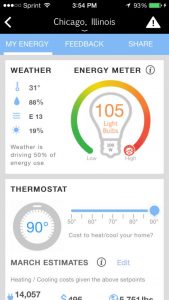 WeatherBug is pretty straightforward. After you download and install it, you open it up, and it will ask you to agree to the terms and conditions. After you accept, you will find yourself on the home page. The app is available for as both a Android weather app and IOS weather app.
At first, the app will search for your general location. However, if you want to save multiple spots or have a more precise reading, you will need to sign up with your contact information. You can do so by signing up with your Facebook login or via email. If you do go through email, you will need to verify it once you’ve entered it. The only information needed is your gender and birthday, and once again you will need to agree to terms and conditions.
App Details
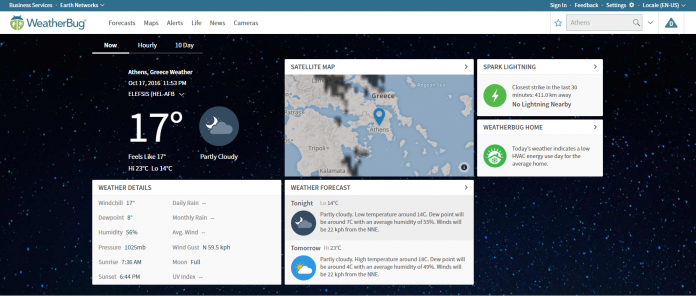
On the main page, the app is set up with a set of widgets that you can arrange to your liking. The top shows your current location, with time, temperature, cloudiness level, real feel temperature, and the high and low for the day. Below that you have a list of widgets, including:
- Wind and rain meter
- Home energy usage meter
- Weather news (for the country and your state)
- Spark widget (checks lightning nearby)
- Photos
- Outlook for the week, including videos
- Live cams nearby
- Lifestyle widget
 The most useful widgets that are available are home energy use, weather news, outlook, and lifestyle. Spark is most useful if you live in an area with a lot of lightning, and the live cams are helpful if you want to check traffic before you head anywhere.
Highlighted Features
Lifestyle
Our favorite widget is the lifestyle because it will tell you how the weather will impact your daily routine. Want to mow the lawn? This app will show you the best time to do it. Want to know when allergies are at their peak? You can find out here. This widget enables you to take the data provided and apply it in a way that affects you.
Home Energy Usage
This is another powerful tool if you want to save money on your utility bills and conserve energy. Based on the weather in your area, you can sync up your home’s thermostat and find out what the ideal temperature range is for you.
Weekly Outlook
This is another valuable tool if you want to get an overview of the week. With this option, you get a comprehensive view of the days to come, rather than just a list of highs and lows. Here you will find what expert meteorologists have to say about the weather on any given week.
Other Notable Features
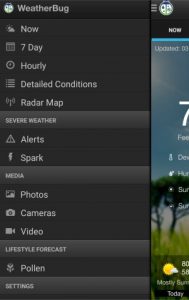 The WeatherBug app gives you the ability to save multiple locations, has customizable settings, includes a temperature readout in your status bar, and hosts interactive maps so you can see what the weather looks like around you visually, rather than numerically.
Conclusion
WeatherBug is a practical app to monitor the weather. We especially like that you can see how the weather impacts your utility bills, your lifestyle, and the traffic. And to top it off, it’s conveniently customizable for your needs.
iBooks StoryTime app narrates children’s stories on your Apple TV
To encourage parents and kids to read together, Apple has debuted a new app for tvOS. The iBooks StoryTime app features “Read-Aloud” tool that narrates books and flips pages automatically. For the times when you’d rather read to your child yourself, you can turn the feature off and turn to the next page by swiping with the Apple TV remote.
Selections include books with Sesame Street characters and stories from other children’s favorites like Teenage Mutant Ninja Turtles. You can purchase iBooks from any Apple device and the Read-Aloud stories will sync automatically in the library on your Apple TV. iBooks StoryTime for tvOS is free and it comes with Dora’s Big Buddy Race Read-Along Storybook at no extra charge so you can test drive the app without having to hand over any funds.

Via: The Verge
Source: App Store
 AIVAnet