


Karhoo takes on Uber with a price-comparing taxi app
Since Uber launched, taxi-booking companies have scrambled to create their own mobile-first services that give customers plenty of options, but ultimately lock customers to their fleet of drivers. A new entrant, Karhoo, launches as yet another of those types of apps, but it’s playing things a little differently from Uber and its rivals. It’s signed up 80,000 drivers of licensed black cabs, minicabs and executive cars (a third of which are in London) to provide a price comparison service for taxis across the UK.
Unlike Hailo and Gett, which exclusively deal with black cabs, and Kabbee, which currently partners with private car companies, Karhoo operates an open platform that lets any company (except Uber) connect their own systems to the app. In London, ComCab — provider of licensed taxis and black cabs — has already plugged into the service, as has Addison Lee, KV Cars, Swiss Cottage Cars and Mornington Cars.

When launched, Karhoo determines a user’s location and shows the availability of cars in their area. Journeys can be sorted by price, estimated time of arrival or type of vehicle, if there’s a need for luxury or a few additional seats. Because its system enables real-time data sharing, Karhoo can also tell supporting cab companies where demand is, allowing them to direct their fleet to wherever is busiest.
One key thing Karhoo has over Uber, however, is that it also provides the ability to pre-book a taxi, whether it’s on the same day or up to a year in advance. That’s something that Transport for London (TfL) considered forcing Uber to do in the capital, but later decided against it.
Although Karhoo is launching in London today, the company plans to expand to New York and Singapore by 2017. It predicts that within a year it’ll allow customers to book through its app in 100 cities across the world.
Having a large number of vehicles on its app is one thing, but Uber has managed to squeeze its traditional counterparts by offering good service at a low price. Customers will ultimately decide whether Karhoo’s (and its partners’) service is up to scratch, but taxi companies may have just got a leg up in their fight against their app-based rivals.
Source: Karhoo
Swiftly Switch – Edge Gesture: A multitasker’s dream

Overview
Swiftly Switch – Edge Gesture is a handy root-free multitasking tool that makes handling large phones easy and switching apps a breeze.
Developer: de-studio
Cost: Free ($1.99 Pro version)
Highlights
- Simple to set up (no root required)
- Highly customizable
- Easy to use
Setup
Setup is nice and straightforward, with no rooting required. Once you download and install the app, you can play with the settings and set up favorites. Once you have it where you like, just tap the edge to trigger the shortcut.
Impressions
With the screens on new phones getting ever larger, and the bodies ever thinner, people have been having a hard time getting a grip. Using large phones with one hand easily is becoming a challenge for many nowadays, especially for those with small hands. Swiftly Switch is an app that aims to help those who struggle with one-handed phone use, as well as power app users who jump between screens frequently.
Swiftly Switch is a multitasking app that allows you to bring up a menu of recently used apps in a shortcut on the side of your screen, kind of emulating the 3D Touch multitasking of the iPhone 6S line. You tap or swipe from the edge of the screen where you placed the trigger zone, and the menu pops up. It also has a handy shortcut menu for your favorite apps, as well as navigation buttons and access to settings like a wi-fi toggle and expanding the notification shade.
The app is highly customizable, even in the free version. You can adjust the visibility, size, position, and sensitivity of the shortcut, as well as customize the color that overlays the screen when you activate it. There is a clock and battery percentage widget that pops up when you trigger the shortcut, but that’s able to be turned off as well. In the paid version, you get the option of two different edge zones as well as support for icon packs and pinning apps to the menu.
On the downside, The Pro version of the app doesn’t add much functionality of note, and I can’t really justify the two dollars unless you really want that second edge zone. Beside that, using the app takes some getting used to. For the first few days I sometimes forgot it was even there, and resorted back to the traditional recent apps button on the navigation bar. Also, getting the shortcut in just the right placement and sensitivity takes some trial and error. Once you get the hang of it, however, the action becomes second nature.
Conclusion
Swiftly Switch is one of those utility apps that you can just effortlessly implement into your life and wonder how you lived without it. It makes jumping from app to app a breeze, and allows me to keep my huge Nexus 6P flat in my hand instead of having to shift it around to reach the navigation buttons and app drawer. I’d definitely recommend this app to anyone who struggles with larger phones, or the power user who wants to bring their multitasking to the next level.
Download Swiftly Switch – Edge Gesture on the Google Play Store
Keep track of your Kids phone and tablet habits with Familoop (Review)

Overview
In our protective world, parents are always looking for ways to keep tabs on their children; we (or they, depending on your age) always want to know when, where, how, and who in regards to their children’s lives. In comes Familoop, a parental control app that lets you keep up with what your kids are doing on the web, as well as where they are and what pictures they take.
Developer: Familoop
Cost: Free, 10-day trial (two different pay tiers of $39.99 and $69.99)
Setup
 Login Screen
After signing up for an account, simply download the app to the device you want to monitor. Once installed and in the app, click the “Parent” tab and sign in. Once you have set up the device for monitoring, you can then monitor it via the Familoop Hub.
Review
The initial setup was a little daunting, but once I figured out that you install the app on the device you want to control (and not your own as well) it was easy from there. I hadn’t realized that you couldn’t monitor from the app, but instead from your phone or computer via browser. I have reached out to the developers and confirmed they are working on bringing this functionality to the app.
There are numerous features that this app offers, which include but not limited to:
- An in-depth look at how many hours per day the device is used, broken down by apps
- What kinds of searches are being performed
- Who is being contacted via Phone and Texting
- Pictures that are being taken
- Where the device is going
- My personal favorite: Time-Out Mode
It’s worth talking about a couple of these features a bit more. “Safe Zones” are GPS locations that trigger notifications when the tracked device enters or leaves.
 Set Safe Zones
Another neat feature I really like is your ability to use protections based on age. Not all children are the same – a 16-year old is dramatically different from an eight-year old, for instance – so the ability to filter apps by age is extremely useful. It can get a bit extreme (like blocking YouTube for children under 13), but manually adding or subtracting apps from the built-in whitelist is a breeze.
Conclusion
While Familoop is not fool-proof (anyone with children knows that they can break into or out of anything), it’s one of the best options out there for tracking the little ones in your life. If you really want to monitor your kid’s tablet time, see where they’re going, or perhaps most importantly, make sure they aren’t taking inappropriate pictures, this is a very good option.
Download Familoop from the Play Store.
1 of 18


NatulaRays Outdoor Bluetooth Speaker – A fantastic little speaker that can survive serious abuse! (Review)
In this ever burgeoning digital age, we as a society have become almost 100% dependent on technology. Most of us are incapable of leaving our homes without some form of technology on our person. This need and necessity we have for tech and gadgets drives our innovation as a people. As our needs grow, so does our technology.
With the advent of the MP3, portable music has become a mainstay. These days, we just load our music on our phone and go. But what if you want to take the music outdoors? The real outdoors. The elements can pose quite a problem for your pricey phone. On top of that, what if you want others to be able to hear your music? A phone is not going to have the sound capabilities to meet this need for you. Thankfully, a company in China that goes by the name, “NatulaRays,” has developed and offers a solution for you. They call it the “NatulaRays Outdoor Bluetooth Ultra-Portable Speaker.”
Technical Specifications
Product Size: 7.4″ x 2″x 2″
Bluetooth Compliance: Bluetooth V3.0
Playback time: 8-9 hours
Charging time: 3 hours
Battery: 3.7V/400 MAH
Connection range: up to 30 feet
Frequency Response: 80Hz – 20KHz
Voice Distortion: 5%
Output Power: 3W
Net Weight: 2.3 ounces
Water resistance level: IPX5
Design
The NaturalRay’s speaker is one of the more bizarre looking devices I’ve had the opportunity to lay my eyes on. The speaker itself is housed in a spherical, rubber coated shell with a stainless steel speaker grill on the front. Behind this sphere is a rubber tail with a loop on the end, that you can use to hang or attach the speaker to objects with.

The rubber that houses the speaker’s internals has a very smooth, soft feel that is pleasing to the touch. Despite how soft and pleasant it may feel, you also get the sense that this rubber can take a beating without any compromise in its structural integrity.
Under a small rubber cover, you will find a micro USB port used for charging the speaker, as well as a micro SD card slot that allows you to play MP3 files directly from an SD card, eliminating the need for connecting the speaker to a Bluetooth device.

On the top of the speaker (well, what could be considered the top, I guess) are three function keys. The two outside keys are for volume up, volume down, and are also used to skip tracks. The middle key is for play/pause functionality. The play/pause key also acts as the speaker’s on/off switch. Because this speaker has no display of any kind, NatulaRays has placed a blue LED in the base of its tail that will illuminate when you have successfully paired the speaker with a Bluetooth device. NatulaRays has also designed this speaker to automatically detect what mode it should be in, be it SD card mode, Bluetooth, Aux, etc. By default, the speaker is in Bluetooth pairing mode when you power it on.

Function
It’s all well and nice that a product looks good, but the real question is: “Does it work?” The answer is: YES!
On the Bluetooth side of things, the NatulaRays speaker was solid. Other than the occasional stutter (which I’ve found to be normal with most Bluetooth devices), the speaker stayed paired with my devices, even at great distances, with no issues.
Sound wise, the NatulaRays speaker is decent. It’s not anything to write home about, but for a speaker this small and this cheap, it sounds great. You won’t notice a great deal of punch in the sound this speaker produces, but it has the ability to play very loudly without a great deal of distortion. The highs, mids, and lows are pretty balanced with each other. You will find that the Bass this speaker produces is quite weak, but it’s easy to overlook when you consider what this device is designed for and how inexpensive it is. For a speaker that is this small, and this cheap, I have a hard time finding something to complain about with the sound.
Durability

What this speaker lacks in sound, it makes up for in sheer durability. NatulaRays claims that this device is water and shock proof. To be totally honest, I had zero confidence in this speaker surviving a dunk test. Thankfully, I was very, very wrong.
Water Testing
When it came to water, I put this speaker through its paces. My first test involved immersing the speaker in a 16oz cup of water for 60 seconds while the speaker was on and playing music. To my surprise, this didn’t kill it. Even while immersed in water, the speaker continued to play music with very little interference in its Bluetooth connection with my tablet. After removing the speaker from the water, it continued to play without a hitch and with no further hiccups in the Bluetooth connection.
I now had to take things to the next level. Would this speaker survive a shower? Surely not. I had to find out. I hanged the speaker from my shower head, connected it to my tablet, started blasting Queen over Spotify, and then commenced with taking a shower. It survived. This $30 speaker actually survived a 15 minute shower. Not only that, I let it play for 30 more minutes after the shower and it never skipped a beat. I was absolutely blown away.
Drop Testing
While not as exciting as the water tests, I also had resounding success with my drop tests. With the speaker playing music, I raised it above my head and dropped it two times onto my kitchen floor. That’s a drop of over six feet. During and after both drops, the speaker never once skipped or stuttered.
My next test was to literally just throw the speaker at a wall. Same result. It kept playing. Didn’t skip.
Conclusion
I was flabbergasted at how well this little $30 speaker performed. While it may not have the greatest sound quality, it’s not terrible by any stretch, and this speaker is capable of being quite loud. Above all of that, this thing can survive water immersion, a shower, six foot drops, and even being thrown against a wall. Something this durable for $30, with decent sound, is a steal! The NatulaRays Outdoor Bluetooth Speaker is that steal.
NatulaRays Outdoor Bluetooth Speaker – Amazon.com
1 of 5


Tap into Alexa from your iPhone with a $5 app
We’ve seen support for Amazon’s Alexa virtual assistant arrive on a variety of devices, and iOS gadgets are next. That’s by way of the Lexi app. The Next Web reports that the application mirrors Alexa’s functionality on the Echo speaker and lets you place orders, control smart devices and do other general stuff like ask about the weather and movie listings. Unfortunately, it sounds like you’ll still need an Echo if you want to take advantage of stuff like Amazon Prime Music or its book service.
Oh, and the whole thing costs $5. But even then, that’s at least $175 cheaper than Amazon’s original smart speaker, so if you’re budget-minded perhaps the trade-offs won’t bother you too much.
Via: The Next Web
Source: iTunes
Poppet – a 2D game for players of all ages (review)

Overview
Poppet, a 2D scrolling game, welcomes you with a colorful purple character wearing goggles into what looks like a scene out of a food-induced slumber in the woods. The colors are bright and the animation is seamless, but simple. The music is generic in an unobtrusive way, which fits the game.
 Different levels offer different ways to navigate the game.
Game options
- Price: Free
- System: Android 4.0+
- Size: 34.2mb
- Market link: Poppet: magic miracle of fairy
Review
Poppet has two modes: simple and normal. Upon selecting the mode, you are instructed to tap on the right-side of your screen to jump up and to tap on the left-side to duck. This is only for the first level.
Upon successful completion, a new level opens. Poppet takes the scrolling game concept from level one and changes it a bit, with some levels scrolling horizontally and others vertically, with the user tapping left and right to avoid obstacles, bounce off clouds, and collect acorns.
The objective is to collect acorns and other valuables while avoiding obstacles. The game begins with six hearts on the upper left-hand screen. Each heart is akin to a life, as one is deducted every time an obstacle is not avoided. Obstacles change from level to level: thorn bushes, snowballs, and other less-than-lethal obstacles appear throughout.
Gameplay
 Swim underwater & jump on clouds.
Gameplay is smooth… but a bit too slow. Playing in simple mode felt like time was moving backwards. Each jump initiated leaves your character lingering in the air waiting on gravity to do its job. You can also press down to hasten your drop, but it’s still sluggish. Normal play is a little faster but still leaves the user anticipating the end of each level instead of enjoying the game.
To ensure that this was not my experience, I let my elementary school aged kids play and they reported the same thing: the game is way too slow and easy, even in normal mode. The difficulty does rise with each level, but your patience will be tested by the first few levels and their anemic play. As such, I think this game will do just fine with toddlers but not with older kids or adults.
 Navigate by jumping, ducking or from side to side, based on the screen’s orientation.
Conclusion
Poppet is a cute and fun game. The gameplay speed is a bit too slow for the average user, but this is perfect for kids or new Android gamers. The different levels and the different ways you interact with Poppet and your environment make it a worthwhile game for all, but especially for younger or inexperienced Android users.
Monoprice’s new USB type-C cables are fun, colorful and safe (review)
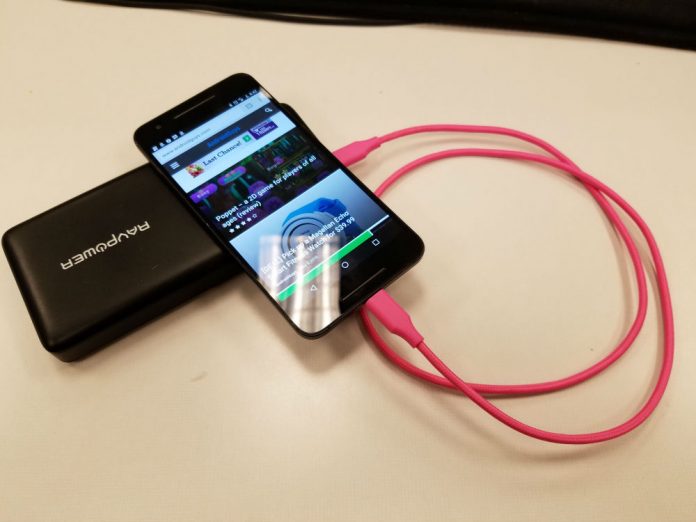
Monoprice recently announced its new Palette series of USB type-C cables. With an increasing number of devices featuring type-C ports, we thought it important to take a look at them to find out if they’re safe for your device and how they stack up against the competition.
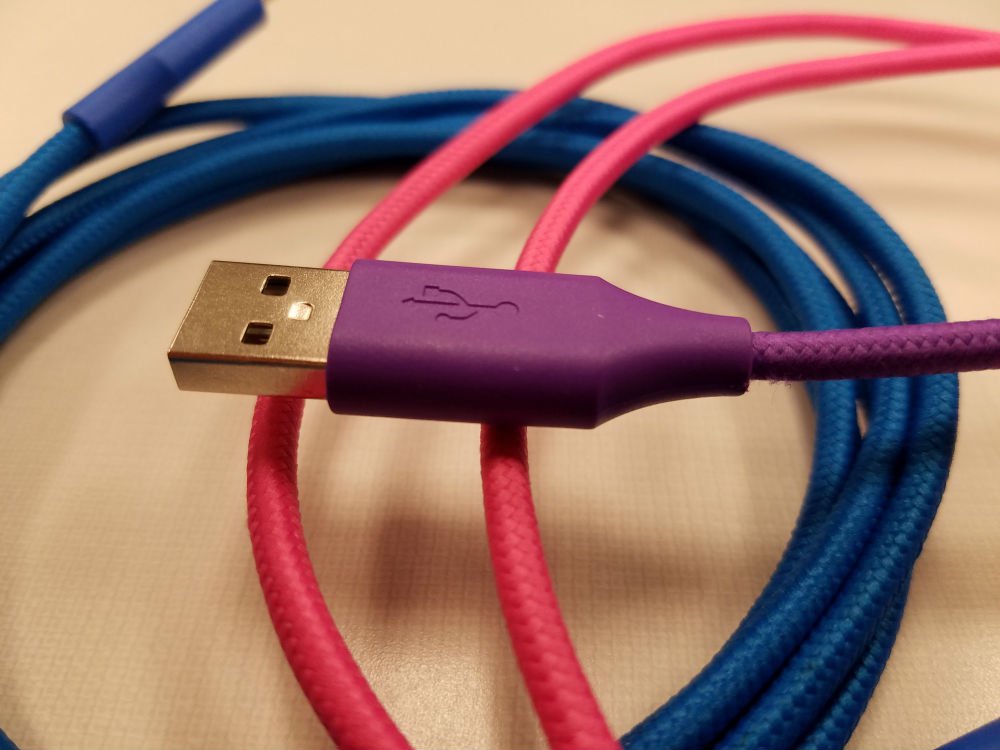
The new line of cables comes in many sizes and flavors. You can pick from black, blue, green, gray, pink, purple, red, and white. They’re bright and colorful which I like to buy because brightly colored cables are easier to identify. The Palette series definitely stands out.

In addition to a number of colors, you also have several options in lengths and connectors. Monoprice sent over a six-inch, three-foot, and two six-foot long cables, but you can also get them in 18-inch and three-foot lengths. The cables come in type-C to type-C, type-C to type-B , type-C to mini type-B and type-C to type-A (male and female) combinations.
The construction of the cables is fantastic. All of the cables in the Palette series are covered in a braided nylon jacket that keeps them safe from nicks and cuts, as well as keeping them tangle free. The connectors are held by a hard plastic head that should last even when being beat-up in your bag. If they don’t, Monoprice offers a limited lifetime warranty.

Charging times are good. The cables can support up to 2.4A of power which puts this in rapid charging territory. Data transmission caps out at 480Mbps. These cables are all USB 2.0 cables so they can’t take advantage of USB 3.0 or 3.1 features, but Monoprice has informed us that they’re working on a design to incorporate USB 3.0 into its next lineup of cables.
Monoprice has ensured that the new Palette series falls under compliance with USB-IF standards. While these cables aren’t currently listed as compliant, they soon should be. Famed Googler Benson Leung, who has taken to reviewing USB type-C cables on Amazon and pointing out non-compliant cables, gave Monoprice’s previous USB type-C series, the Select Series, his stamp of approval. The new Palette series is currently for sale on Amazon, which very publicly stated that they would no longer sell out of spec cables.
When it comes to price, Monoprice is right in the ball game, with everyone else, and most of the time beats its competitors. A search of Amazon finds these results:
Six-inch USB type-C to USB type-A
Amazon: $6.49 vs. Monoprice: $3.99
Three-foot USB type-C to USB type-A
Amazon: $9.99 vs Monoprice: $4.99
Six-foot USB type-C to USB type-C
Amazon: $7.99 vs Monoprice: $6.99
If you’re interested in picking up any of Monoprice’s Palette series of cables, be sure to check out its website or its listings on Amazon.
Apple Music’s social features are reportedly taking a backseat
Earlier this week, reports surfaced that an Apple Music redesign is in the works for WWDC in June. 9to5Mac is now reporting that the massive overhaul also includes less focus on Connect: the service’s social feature that allows artists and fans to interact. When Apple Music was first announced, the app’s tools that would allow musicians to publish updates to listeners was a key part of the reveal. Connect was meant to be a place artists could share exclusive tracks, tour photos and more behind-the-scenes content. However, it doesn’t look like the feature ever became popular among subscribers.
As part of the demotion, 9to5Mac notes that access to Connect will no longer be part of the main menu tab along the bottom of the Apple Music UI. Instead, the feature will reside in the “For You” section along with other recommendations. Artist pages will still display the content as they do now, but no new features are said to be in the works for that socially-focused tool as part of the larger redesign.
This isn’t the first time Apple tried to incorporate social features inside its music apps. Back in 2010, the company announced iTunes Ping, a social network that allowed users to follow friends (and artists), post comments, view custom song/album charts and concert listings. Ping lasted a little over two years before Apple pulled the plug on it.
Source: 9to5Mac
Evernote enhances document scanning and annotation on Android
It’s now much easier to scan documents using Evernote for Android. The app’s latest update adds an automatic mode that determines a document’s size and type the moment you point your camera at it. Evernote even automatically crops and adjusts the resulting image to get the best copy possible. Just like Scannable for iOS, which is a standalone Evernote app, the Android application temporarily keeps scanned documents in a gallery. You can delete anything you don’t want and save everything else to the service, so they don’t take up space on your phone’s gallery.
Any image you load adjusts to the width of the screen for optimal viewing. And if you want to annotate or scribble on it, you can now draw arrows and shapes on the photo, and even type in text. Besides these new features, the update also adds a couple of abilities if you have a Premium account. First is the capability to detect a business card if you’re scanning one and instantly saving its details as a note. Plus, having a Premium account means you can annotate PDF files attached to notes the same way you can annotate images.

Source: Evernote
Columns Jungle: It’s a start (Review)

Overview
Match three gems in a row in this puzzle style game by switching the order of the color columns while they fall. But don’t let it catch up with you and fill up the play area.
Developer: Simply Apps
Cost: Free (Ad-free version is available)
Gameplay
There are four controls: left, right, down and rotate. You must use these controls to move the color columns around so you can try to get three of the same color in a row either horizontally, vertically or diagonally. There are also three game modes: arcade, timer, and play with friends – which play about as you’d expect.
Review
 Profile
When I started playing this game, I thought it reminded me of Tetris meets match-three games, but my wife correctly pointed out to me that it was more Dr. Mario meets match-three games, except with three color columns instead of two. The first thing I noticed is the graphics. They aren’t horrible, but they don’t stick out as awesome, just mediocre.
Controls… Are a little wonky. There are four buttons, two on each side of the play area. There are so many games that use swipe to play and I really wanted to swipe. It wouldn’t take much to swipe left and right for moving and tapping the screen to change the colors around.
I never had the chance to play online against someone else, but I suspect that will take time for a user base to build. I must give kudos for not making the ads annoying. They are very unintrusive.
 Gameplay
Conclusion
When it’s all said and done, Columns Jungle is off to a good start. A couple of tweaks to the game could really go a long way in making a very popular title. I would recommend this to puzzle gamers.
Download Columns Jungle in the Play Store
 AIVAnet