


Join by joaoapps: Best thing since Pushbullet (Review)
Overview
When Pushbullet went paid, everyone freaked out. Every well-known tech site scrambled to get something along the lines of “Best alternatives to Pushbullet” on their page. Some people just went ahead and paid like it was no big deal. Long story short, the only reason I still have Pushbullet on my device now is so I can be notified when there are new TeamBlackOut apps. I now use Join for all my file pushing, notification mirroring, and clipboard sharing needs. Join is brought to you by joaomgcd, the same person who brought Tasker users AutoVoice, AutoInput, and AutoWear. Here are the features that the app brings to the table:
- Respond to SMS from other devices
- Sync notifications
- Share clipboard
- Push files
- Locate devices
- Send Tasker commands
- Many, many more
Impressions
Setup
Setting up Join is very simple and took me less than 30 seconds. The intro screen takes you through adding your account and enabling Join’s SMS service. After that, you can enable Join’s accessibility service so it can write to your clipboard. You can also activate notification access, so your notifications can sync to your other devices. After that, you can go through the same process on your other devices such as:
- Windows 10 devices
- Browsers via web app
- Chrome via extension
- Other Android devices
- Firefox (still being worked on)
User Interface
Join is a very minimalistic app with devices listed on the front page and a hamburger menu for other options. Everything is very fluid and pushing between devices is almost instantaneous. Join is an option in Android’s native share menu, and that is taken a step further with Direct share support, which allows you to specifically select a device to share your content to.
Ad Obtrusiveness
Join has very minimal adverts that do not hinder the app in any way. If they still bother you, you can disable them after paying for the app. That being said, there is an option to still show ads after you paid, just in case you want to help out the dev that little bit more.
Pricing
Join for Android has a one-time in-app purchase of four dollars to remove ads and enable all features. However, getting Join on Windows 10 is an additional $1.49. I don’t think this is expensive at all considering all the functionality that comes with Join, and I’d much rather pay $5.49 once than three or more dollars a month (Pushbullet).
Conclusion
Join is a wonderful app with a bunch of functionality. You can share your notifications, respond to SMS, and share your clipboard, but there is so much more. Join offers far more control over your devices than Pushbullet does, at a fraction of the cost.
Download and install Join from the Google Play Store.
Newton Drop Dash!: Watch out for that… Bird (Review)

Developer: AshCorp
Category: Games
Price: Free w/ads
How to Play
In Newton Drop Dash!, you are an apple trying to get to the bottom and hit Newton on the head so he can discover gravity. There are three lanes, and one or more will be open for you to move through. Alternatively, one or two will have obstacles that want to smash our little apple friend.  Hit one of the obstacles and SPLAT! Game over.
You will need to avoid trees of all shapes and sizes, as well as those pesky penguin-looking birds that fly across the screen from time to time. Tapping on one of the three lanes moves the apple into that lane. Move quick enough and you will avoid even the peskiest PengBIRD!

While falling and avoiding the trees and birds, you will want to collect as many coins as you can. Bronze coins are worth one, silver are worth two and gold are worth five.
There is also a red bar at the top called the fever bar. The bar fills up as you collect coins. In theory, once full, it will trigger FEVER time. However, in my time playing the game, I have never collected enough coins to fill it. Coins will also help you buy things in the store. More on that later.
So, as we are still falling… We see trees, pengBIRDS, coins, and… Power-ups! Because what falling apple couldn’t use a few power-ups, right? Rockets, magnets and helmets OH MY!
The rocket power-up speeds this little apple up and allows you to blow right through any obstacle in your way for a short time.  The magnet pulls all the coins that are on the screen to you for a short time so that you don’t have to move to collect them. The helmet gives you the win over the next obstacle you encounter by not making the apple go splat when you hit it. These three power-ups give your apple an advantage over the obstacles in your quest to get to Newton.
As we fall further down the map on this journey to the bottom, the seasons will change. I have only gotten far enough to see summer and autumn but I am sure winter and spring are down there waiting for me somewhere.
Remember I told you we would come back to buying things with all the coins we collect? Here you go. There are many things in the store that you can buy. Want to make that rocket blast last longer so you can make it further while not having to worry about any obstacles getting in the way? 
 Just collect enough coins and you can make that happen.
There are also wings that make you move faster side-to-side. Other power-ups are also here and you can make them more powerful by spending coins.
We also have the ability to dress the little apple up in cleverly-named skins. My favorite is Luke SkywApple. These things add to the game’s fun factor and make it worth playing to get coins.
The Good
This game is really fun. It is hard, but not so hard that makes me want to give up. I find that I would drop a certain distance and then the next few times, I would get a lower score. Immediately after that, I would beat my previous longest drop out of nowhere.
The power-ups are fun to get and buying new ones to make them better is also a nice way to keep me playing. The fact that it only takes a few minutes max to play a few rounds is good too because I still have stuff like work and family to attend to.
The Bad
The first bad thing I noticed about this game is the ads. They pop up every few games and are mostly the same ad for Mobile Strike. This was really annoying for the first little bit when I was playing. But there is only a six-second wait, and then you can close the ad. I would rather not see ads, but, since the game is free, I understand the developer needing to put them in there. One other bad aspect of this game is the menu. It is a little confusing and takes some getting used to.
Conclusion
All in all, this is a fun game that will keep you entertained for a while. It’s hard, but not too hard. The use of 6-second ad is annoying, but I understand why they have to be there.
Download and install Newton Drop Dash! from the Google Play Store.
Credit: Credit AshCorp for the screenshots.
[App Review] Polarr Photo Editor: We’ve come a long way

In April 2015, when I used to write for a website called TechDissected, I discovered a web app on Chrome OS called Polarr. I needed a tool on my Chromebook that could actually compare to professional tools like Photoshop and Lightroom. To be blunt, about 95% of photo editing apps on Chrome OS are a joke. But I found that Polarr was able to meet almost all of my post processing needs on my laptop and smartphone.
Since then, it’s been great to watch Polarr grow from a lesser-known web app into a powerful tool found on Windows, Mac OS X, iOS, Android, Chrome OS and even Linux. Polarr even has a digital magazine now called Pixel Magazine, found on Medium. The Android version recently got a big update to version 2.0, which is what I’ll be reviewing.

Features
- RAW editing – probably one of the biggest new features, you can finally edit RAW files with Polarr
- Custom filters – users have been able to create their own filters with Polarr since the beginning, but now you can share them with a QR code
- Color masking – this is a powerful feature that lets you color edit only certain parts of your photo, like making the sun more saturated in a landscape shot
- 2 new local adjustments – blurring and pixelation
- Gradient masks – now your gradient masks can be reflected
- Portrait mode orientation for editing
- Click-and-drag to customize your toolbar
- Newly-designed curve, color toning and cropping tools

As you can see, this is a huge update that makes Polarr even more powerful. RAW editing is great, and it’s rare to find this in a mobile tool. It’s fun to create my own filters, and I can easily share the generated QR code on Instagram or even in a text message.
Speaking of filters, Polarr has recently partnered with Unsplash, a good source for free and high-quality stock photos, to create The Unsplash Collection, which is a collection of ten filters created by the professional photographers of Unsplash.
Although not part of Unsplash, my favorite filter is Film, which is a small group of free filters that emulate the style of traditional film cameras to give your photos an attractive, subtle vintage style.
Polarr is a free app, with in-app purchases to unlock more filters and pro features. I highly recommend buying the pro features, if only to support the awesome team behind the app.
Polarr: Web | Twitter | Instagram | Medium | Facebook
Mortal Skies 3: Excruciating difficulty on top of a fun game (Review)

Overview
 There are a lot of things waiting to destroy your aircraft.
Mortal Skies 3: World War 1 puts you in the seat of your own aircraft, with only one goal in mind: to destroy all your enemies while avoiding your own death. Developer Erwin Jansen also added several elements to make the gameplay more fun and varied, such as power-ups, different types of ships and epic boss fights.
Features
The game’s premise is so simple that you don’t even need a tutorial for it. You control a plane in a top-down field that is constantly firing, and your goal is to destroy as many enemies as you can before they take away the three lives the game gives you.
Normal enemy planes come in packs of four. Fortunately for you, most of them never fire at you directly. When you destroy the whole group, they may drop either coins or power-ups. Coins are used to buy new ships and guns, while power-ups have a temporary effect on your ship. You can get gun upgrades, missiles, fireballs, and even a couple of friendly ships beside you blasting at enemies.
 If you reach the end of a level (good luck with that), the game will show everything you’ve destroyed.
Ships can also drop some special items, like napalm (which creates two big fireballs that destroy everything they touch) and a bomb that annihilates everything in sight.
Sadly for you, planes aren’t the only things that want you dead. There are some towers hidden behind walls that are ready to take you down. Also, elements like tanks, helicopters, and bunkers are ready to help the enemy in case everything else fails. Some of these enemies even shoot missiles instead of normal bullets, making it really hard to survive if you don’t annihilate them quickly.
Also, at the end of the match, you may get experience points, which can be applied to specific parts of your aircraft. There’s no apparent way of getting these back, so you’ll have to use them consciously.
General Impressions
I will repeat what I said in the title: the difficulty in this game is out of this world. I’m pretty sure even the developer acknowledges it, since there’s a slider for increasing (hell no) and decreasing the difficulty. Power-ups definitely help, but you don’t get them all the time, so you’re mostly on your own.
 Huge boss fights await you.
Other than that, the game is really fun. There are very few moments where you can rest; most of the time, you’re just dealing with the increasing amount of things going on. There are planes coming from everywhere, helicopters shooting you consistently, and huge bosses. On top of that, you have to deal with towers, bunkers, missiles, and everything in between. All of these factors combined result in an immensely fun game that will not forgive any kind of mistake or oversight.
Another thing I want to point out is that the game performs really well. Even when there’s a lot of ships, missiles and bullets flying around, I never saw the game stutter or drop frames, so kudos to the developer for optimizing the game.
Options
 There’s actually a slider to change the difficulty level.
As previously said, the biggest (and most peculiar) option is a slider to change the game’s difficulty level. It defaults at 100%, but it can go as low as 75% or, if you’re into masochism, as high as 250%. You can also change the music’s volume (but not the sound effects’ volume).
Graphics and Sound
The game itself has barely appropriate graphics. Enemies’ planes (and your own) are bright and sufficiently detailed, while the explosions are decent. The background looks a little blurry, but there’s the possibility that the developer did this on purpose.
The biggest problem lies in everything that comes before. The game tries to adhere closely to a very old-fashioned theme involving wood and bolts (which may sound good on paper), but it turns out looking cluttered and unpolished. Also, there are some resources that are not big enough for high-res screens, so they appear pixelated on my Nexus 6. Since there are several phones with the 1440p resolution the big ol’ Shamu boasts, it’s not something that can be overlooked.
 There are several ships you can buy with coins.
Music in the game is very upbeat. When I first heard the tunes, my immediate thought was “these tunes would fit in a Pokemon game.” There are very few songs, and the ones available are rather short, so they may start to annoy you after a while. Fortunately, you can turn it off altogether in settings. A little thing that bothers me is that you can clearly hear the moment where the tune loops, since it’s not as seamless as it should be.
Sound effects are also adequate. For the most part, they are well done and add a lot to the atmosphere, but there are also some of them that sound really dull (like explosions you would hear on a SNES game) and are not believable at all.
What we like:
- Very easy to play.
- A lot of elements and twists.
- Several aircraft to choose from.
Room for improvement:
- Difficulty is sometimes too much.
- Some pixelated graphics and bad interface overall.
- A couple of sound effects are really bad.
Conclusion
Behind the torturous difficulty, Mortal Skies 3: World War 1 is an easy-to-play game that’s full of twists and surprises. Unfortunately, outside of the core experience, there’s an interface that’s bordering on unfinished, and the music + sound effects combo is nothing to write home about. If you are prepared to overlook some glaring flaws, like some pixelated graphics here and there, and a couple of really bad sound effects, then you can definitely get some fun out of Mortal Skies 3.
Download and install from the Google Play Store.
Microsoft’s news bot finds stories based on your interests
Bots are all the rage these days, and to help you keep pace with news stories that interest you, Microsoft has one named Rowe. Inside the News Pro app from Microsoft Garage, Rowe goes to work gathering those articles that you’ll want to read when you ask it to make a recommendation. What’s more, the bot will also serve up news for you or for people who look like you when you send it a selfie. And yes, you can also upload other images and Rowe will search for stories based on the content of the photo.
News Pro has some pretty standard reader features as well. By logging in with Facebook or LinkedIn, the app is able to “personalize” the links it pulls in. There’s a Highlights feed that breaks down articles based on your interests or those related to your job. You can also add friends and group them so that you’re sharing with with like-minded folks and colleagues in your office. If you’re looking another way to keep up with daily happenings, the News Pro app is available for iOS devices via the iTunes App Store.
Source: Microsoft Garage, YouTube
Roundup: LG G5 cases from MobileFun

It’s great that as soon as a new smartphone drops, there’s already a sea of cases to choose from. But with that said, narrowing down the perfect case can take some effort. There are so many styles, colors, and sizes (depending on the extent of protection).
Sometimes promo pics don’t tell the whole story, so hopefully we can help. MobileFun is an online accessory retailer that reached out to us to let us try a few LG G5 cases on for size. If you’re shopping for a way to keep your G5 safe, let’s see if one of these cases tickle your fancy.
Official Mesh Folio Quick Cover Case (Silver)


In case you didn’t know, LG has its own “official” case for the LG G5. It’s called the Mesh Folio Quick Cover Case, and as implied, has a flap/cover that goes over the G5’s display. If you’re not a fan of this style of case, hold up. The flap has a window cutout that allows the G5’s Always-On information to be displayed. Certainly nifty.

All the aesthetics of around the case are nice. The cover is made from this metallic mesh material, while the back tray mimics the G5’s metal shell. The two pieces are connected by a shimmery silver fabric that wraps around the phone’s side. LG put a “+” and “-” where the volume are located.

I loved the feel of the case, and that the screen turns on/off as you open/close the cover. The fit is immaculate. However, I was hugely bugged that the cover doesn’t get secured somehow. It’s just left to flap around. It’s an oversight, in my eyes, and I’m sure the screen unintentionally turning on and off will impact battery life somewhat.
LG Folio Mesh Quick Cover Case
1 of 6


LG G5 Official Mesh Folio Quick Cover Case link
Obliq Flex Pro Case (Black)

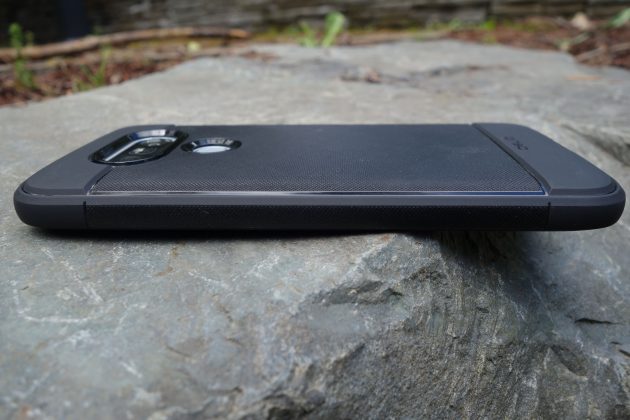
The Obliq Flex Pro case is more tuned for those who care about protection. It adds sizable thickness to the G5 (but not like an Otterbox). I really like the material. It’s not hard plastic; the entire case is rubbery. It wraps around nicely to engulf the phone with protection.


The Flex Pro case is also super grippy. There’s texturing all over, which not only looks classy, but should help out the most buttery of hands. There’s a good amount of lip around the front of the phone, for additional peace of mind that you’re well protected.
LG G5 Obliq Flex Pro Case
1 of 6




LG G5 Obliq Flex Pro Case link
Caseology Skyfall Series Case (Black/Clear)


Caseology is another long-standing case manufacturer. The Skyfall series also provides ample protection, and the clear case model that we have allows the G5’s chassis to shine. Sure, there are tons of clear cases out there, but Caseology tries to one-up them with a trick.

The Skyfall Series is dual-layered, and the top layer can be removed if you wish to change it up. The “layer” is really a black frame that clips onto the core, TPU-like material. It surrounds the perimeter of the case, which means that it doubles up the protection if the phone ever meets the ground.

The primary case material feels robust on its own. It’s more slim than thick, but covers the phone from every corner (and makes an ease-of-mind lip around the entire front of the phone).
LG G5 Caseology Skyfall Series Case
1 of 4


LG G5 Caseology Skyfall Series Case link
MobileFun has a ton of other compelling cases for the LG G5, check them out!
Ultimate Ears UE900s in-ear headphone review: Solid universal from a “Pro” brand
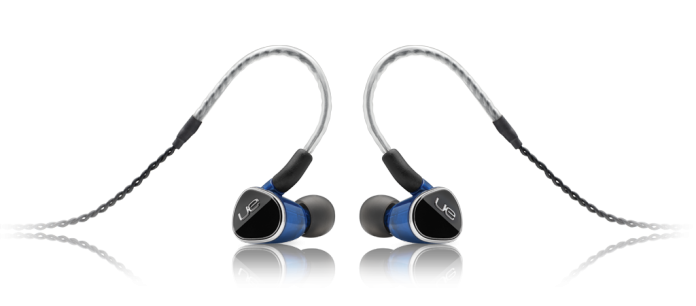
Ultimate Ears is probably more recognized by its successful UE Boom line of Bluetooth speakers. But the company actually started out in the niche market of high-end custom in-ear monitors (IEMs). That fortunately still continues today. While the main Ultimate Ears webpage headlines its speaker devices, you’ll be able to find a portal to the manufacturer’s “Pro” page, where its custom IEM practice is alive and well.
But that isn’t what we’re reviewing today. Ultimate Ears doesn’t forget about the more traditional universal in-ear that most people are comfortable with. Our friends over there were kind enough to let us sample its latest model – the UE 900s.

Let’s find out if it can stand out from the crowd and maintain Ultimate Ear’s audio prowess.
Design
The UE900 is quite a unique looking earphone. As soon as you unpack it, you’ll receive an eyeful of blue.
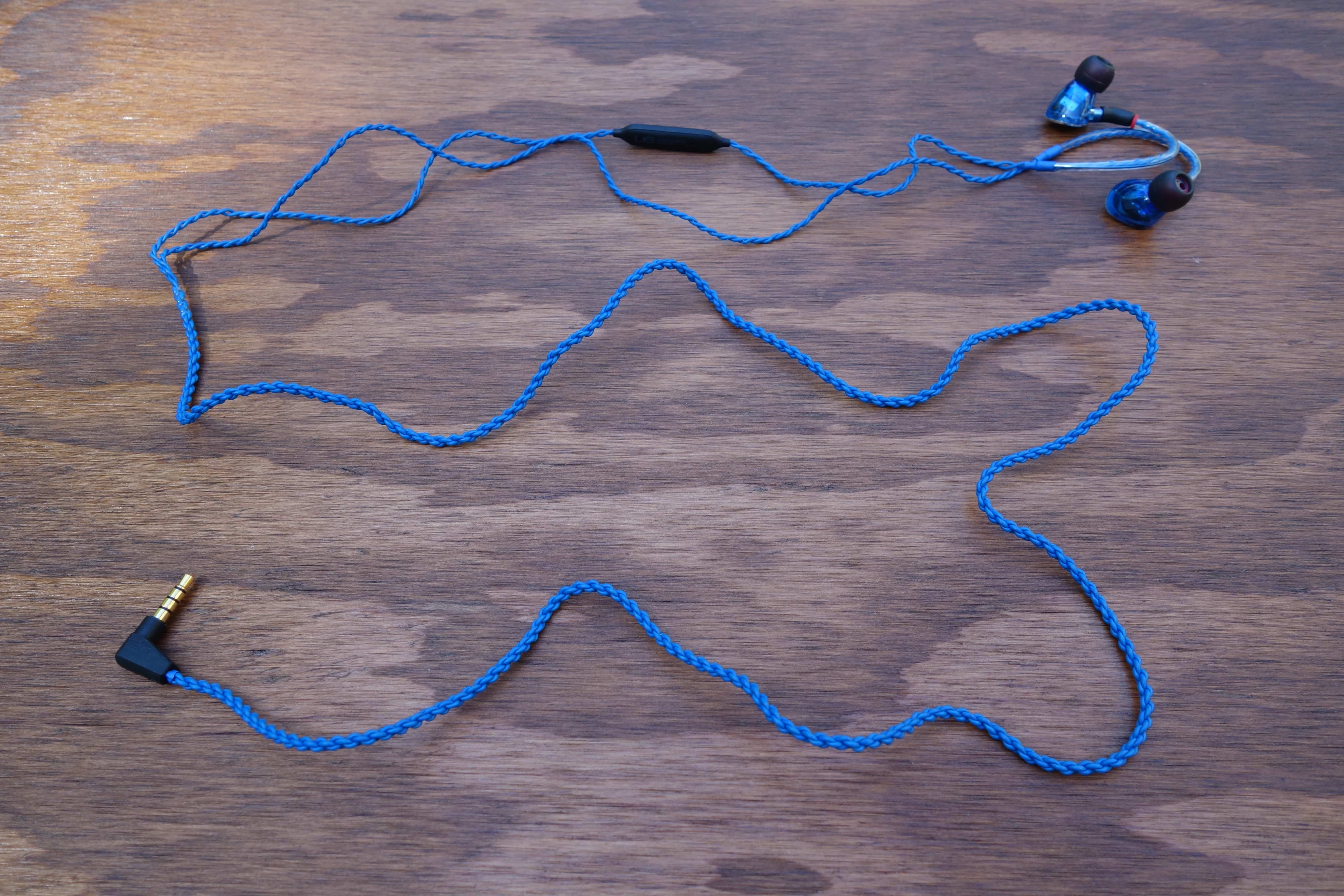
Its braided cable is not shy whatsoever; it dominates the presentation. I will say that you have to have a taste for it. I know many users prefer a non-flashy headphone.
The earpieces are a bit more understated, but still look cool. They have a triangular shape and the construction is two-piece between a transparent, blue plastic shell and a glossy black cap. The cap bears the UE logo and a nice silver trim.


The transparency allows you to peek at the tiny driver electronics within. I love when manufacturers to this. It’s a subtle touch that looks neat and allows the earphones to speak for themselves. That said, I wasn’t very impressed with the plastic material. It feels cheap in-hand. It’s good that it makes the UE900s super lightweight, but I question the durability. Also, at the sizable price, I’d expect more premium considerations.

 Removing the eartip shows a fairly typical nozzle. Except, if you look closely, the nozzle bore isn’t so standard. Instead of one large hole, there is a large and a small one. Ultimate Ear’s design choice was to separate the high/mid and the low-end frequency streams. The UE900s use a system of quad balanced armature drivers: one for highs, one for mids, and two for lows (sub-bass and bass). So you essentially have two drivers outputting out of each bore, which seems like a good way to do things.
I’m glad to report that Ultimate Ears included detachability in the UE900s’ design. The earpieces use an efficient MMCX connection, so you can easily pop them off the cable.
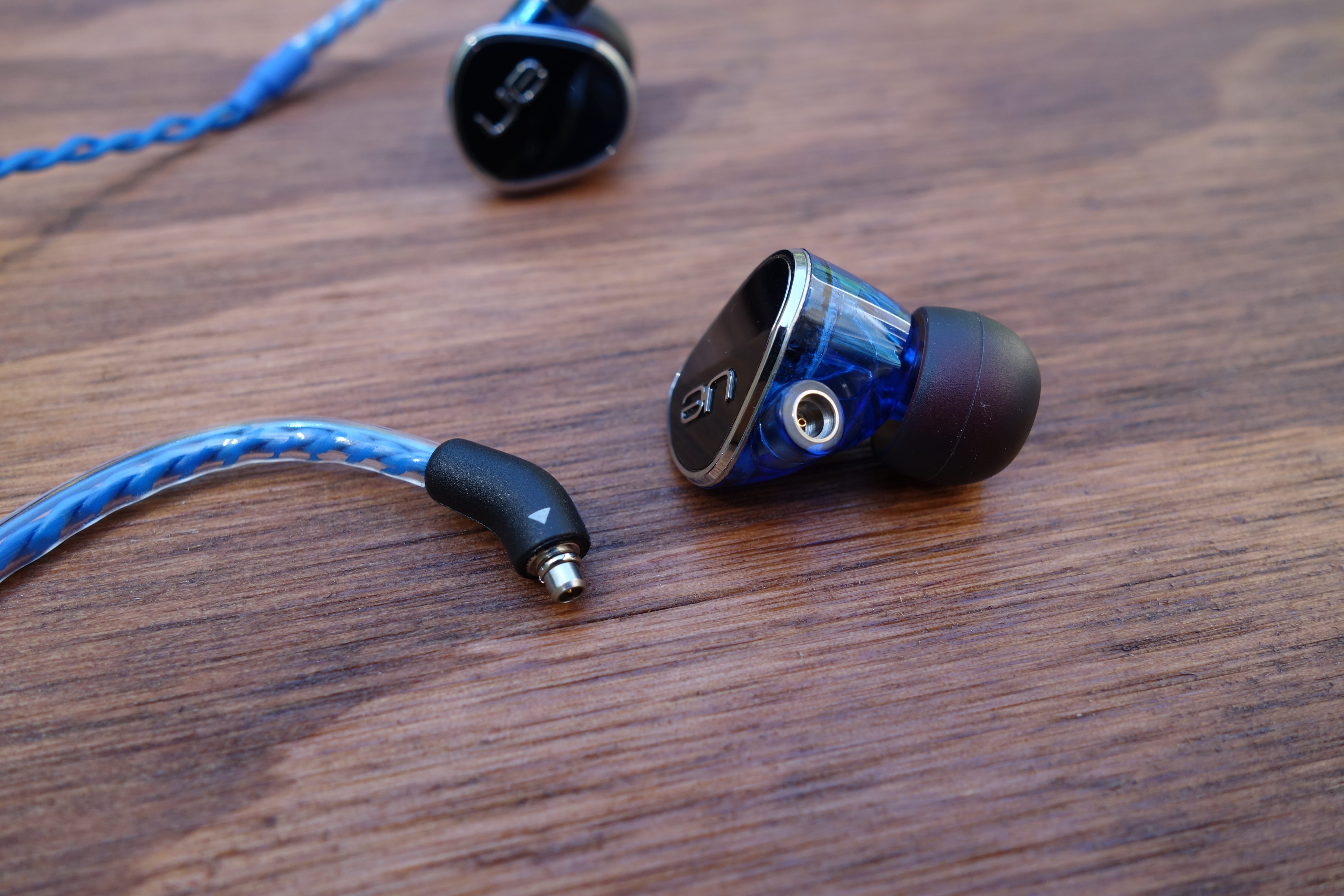
The benefit of this capability is that you can switch to a different cable (there are lots of third-party MMCX cables) or replace the stock one if it goes bad (instead of having to replace the headphones).
The cable is also lightweight. Two very thin cables braid out of each earpiece, then they combine at the y-split (which is just a shrink-wrapped plastic strip). It’s a simple but interesting look. Down the right earpiece, there’s an in-line remote/mic unit. Ultimate Ears also includes a detachable clip, if you want to keep things tidy.

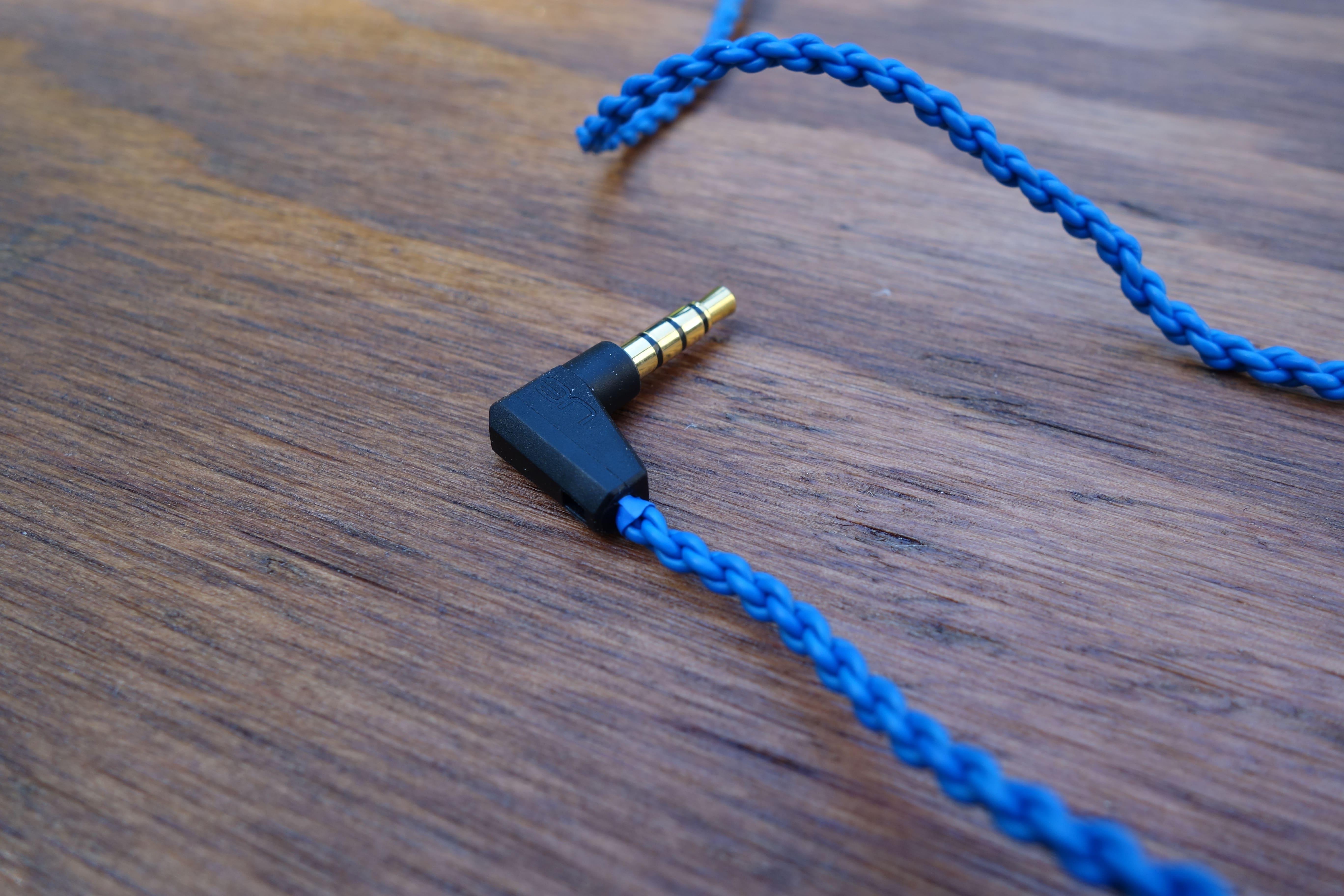
The end of the wire is terminated by a standard-looking, right angle 3.5mm jack.
Usability
I was impressed with the range of eartips that Ultimate Ears packed. There are a whopping six different sizes. What’s more, three of those also include foam tips. This is very considerate, and you should have no problem finding a suitable fit.

Though, it’s interesting that the tips don’t have a protective mesh, to catch ear wax that tries to get inside the nozzle. I’m guessing that UE forewent them because the bores are thin, but I’m still suspicious.
I found the fit of the UE900s to be satisfyingly comfy. If you haven’t been introduced to this type of wear, upon donning the earpieces, you route the cable around and down your ear. Many high-end earphones follow this design, as it’s a more secure fit and reduces microphonics (noise from the cable rubbing on you).
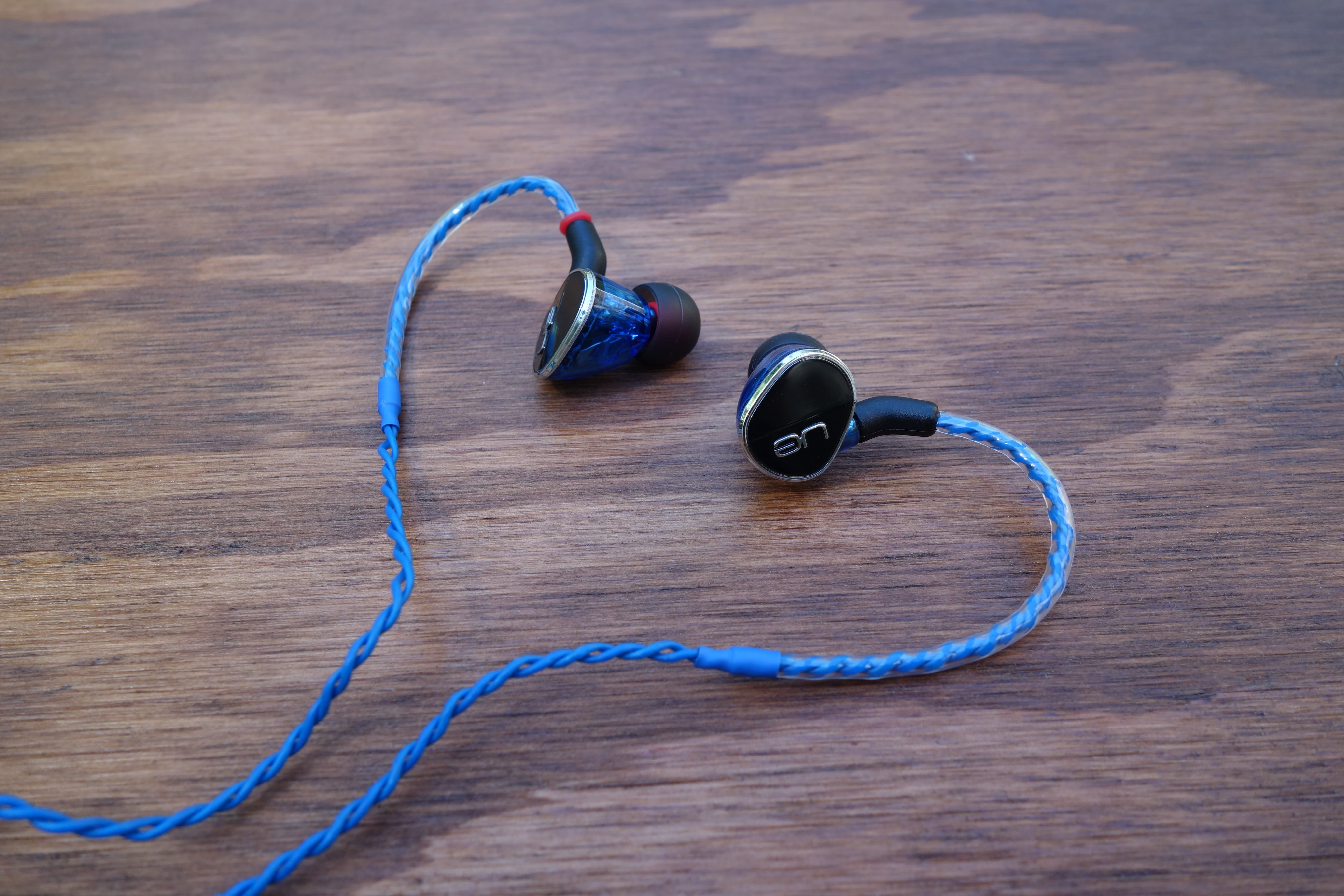
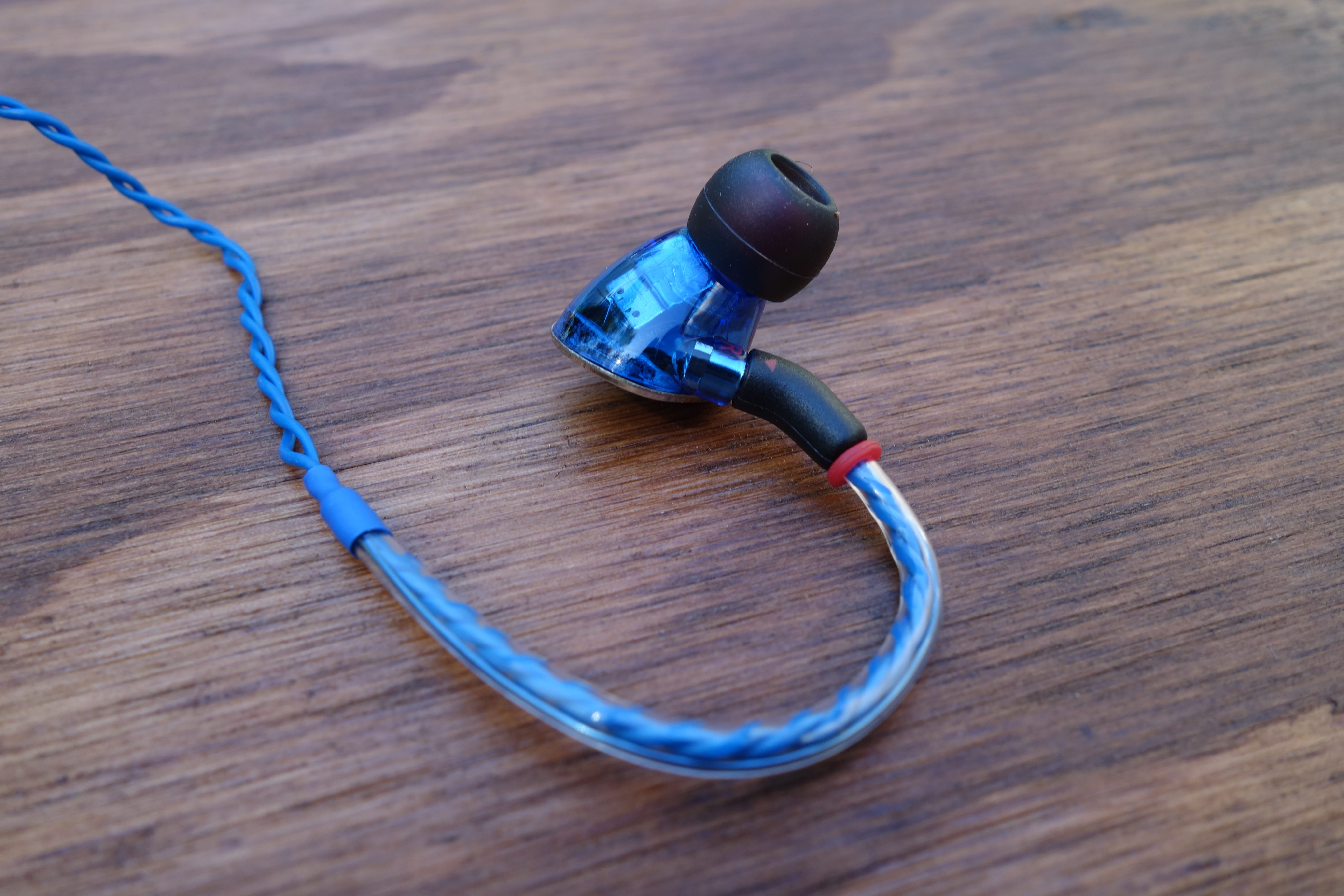
This also means that a short section from the earpiece is wrapped with stiff plastic. This “memory wire” is meant to help guide the cable nicely around your ear. Some can be thick and annoying, but I like UE’s implementation. It’s not uncomfortable and maintains its shape really well.
The downside of the braided cable is that it’s not tangle-resistant. Quite the opposite, actually. It tangles really easily. At least UE didn’t skimp on the length. You’ll get about 15″ from the end of the memory wire to the y-split, and then 33″ to the jack.
The playback remote is fairly standard. You have three buttons – the middle is play/pause and the top and bottom can change the track or volume. Holding down the middle button will also toggle the mobile device’s voice function (i.e. Google Now). Regarding usability, I think the buttons could be better defined. It’s kind of hard to tell them apart (you can’t see it with the headphones on). But that’s something you can get used to.
Sound
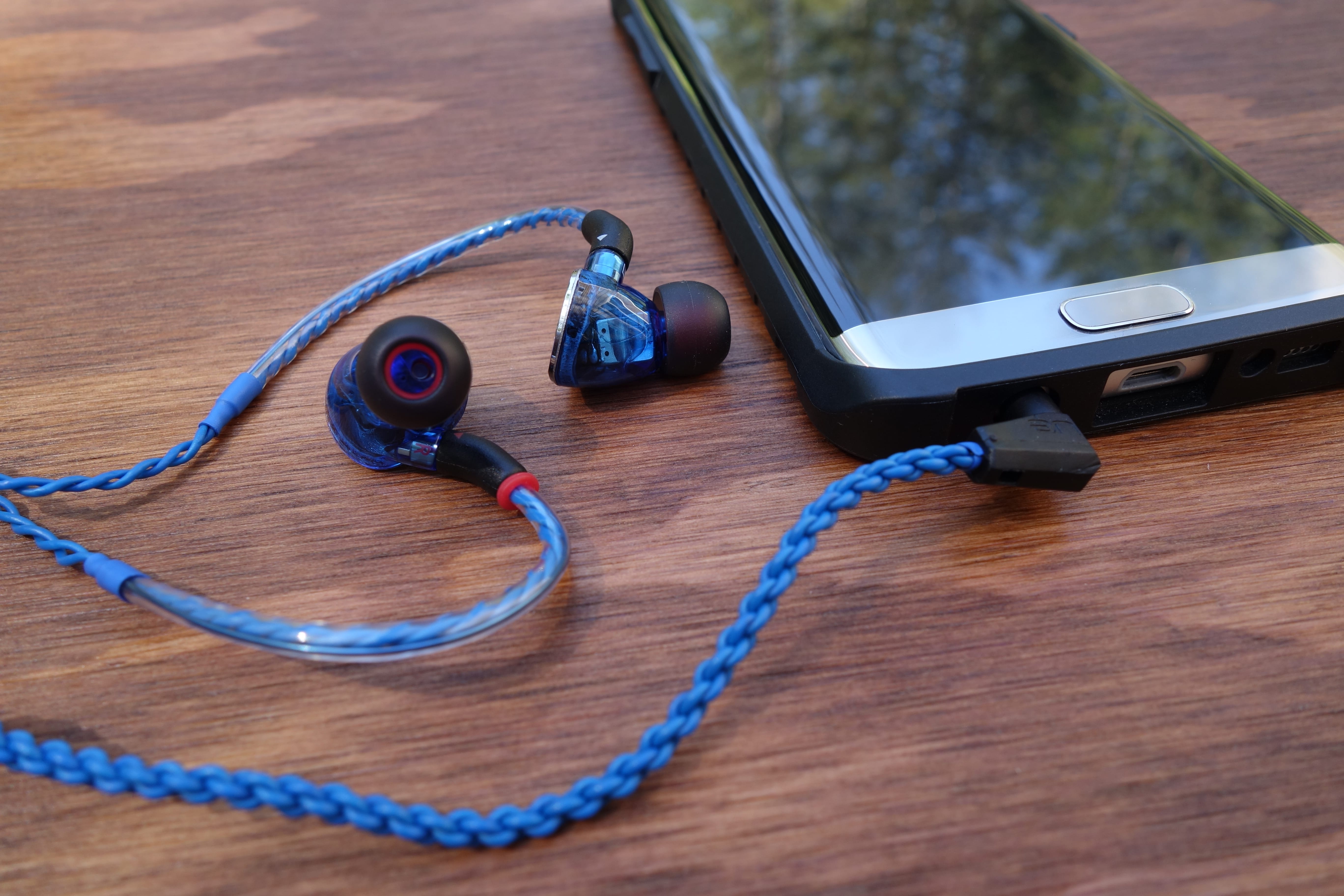
In my mind, the UE900s has a lot to live up to. This is mostly because of the brand name that it carries (Ultimate Ears has positioned its name to mean excellence), but also because it’s the only universal in-ear in the company’s lineup. It has to justify its existence among a slew of intimidating custom IEMs.
In short, the UE900s make me a believer. There’s a lot of satisfaction to be found in this sound. One of the first things that stood out to me was the imaging. Despite being an in-ear, different elements of the sound manage to have clear variation of placement within the simulated space. Sure, most high-end earphones do this to an extent. But on the UE900s, the imaging also has depth. It feels like the sounds echo and fill the space, making the listening experience satisfyingly encompassing.
I own a couple high-end earphones, and likewise, get the sense that Ultimate Ears knows what its doing. From an audiophile-grade perspective, I wouldn’t say that this is perfection. The soundstage (perceived distancing of sounds) could be wider, and the mid-range could be stronger. But gawd are these engaging and fun.
The UE900s’ treble is magnificent. It’s prominent, clear, and highly detailed. The bass is also good, but I feel like it could be a mixed bag for people. It has an emphasized oomph that will satisfy bassheads, but it can lean on boomy territory (risking definition for impact). So to my ears, it can steal some spotlight from the mids, making the sound signature slightly V-shaped.
But with all this said, I feel like the UE900s’ skillful audio delivery makes up for it. When I stop being analytical and just listen, it’s one of the most satisfying reproductions I’ve heard.
Final Thoughts
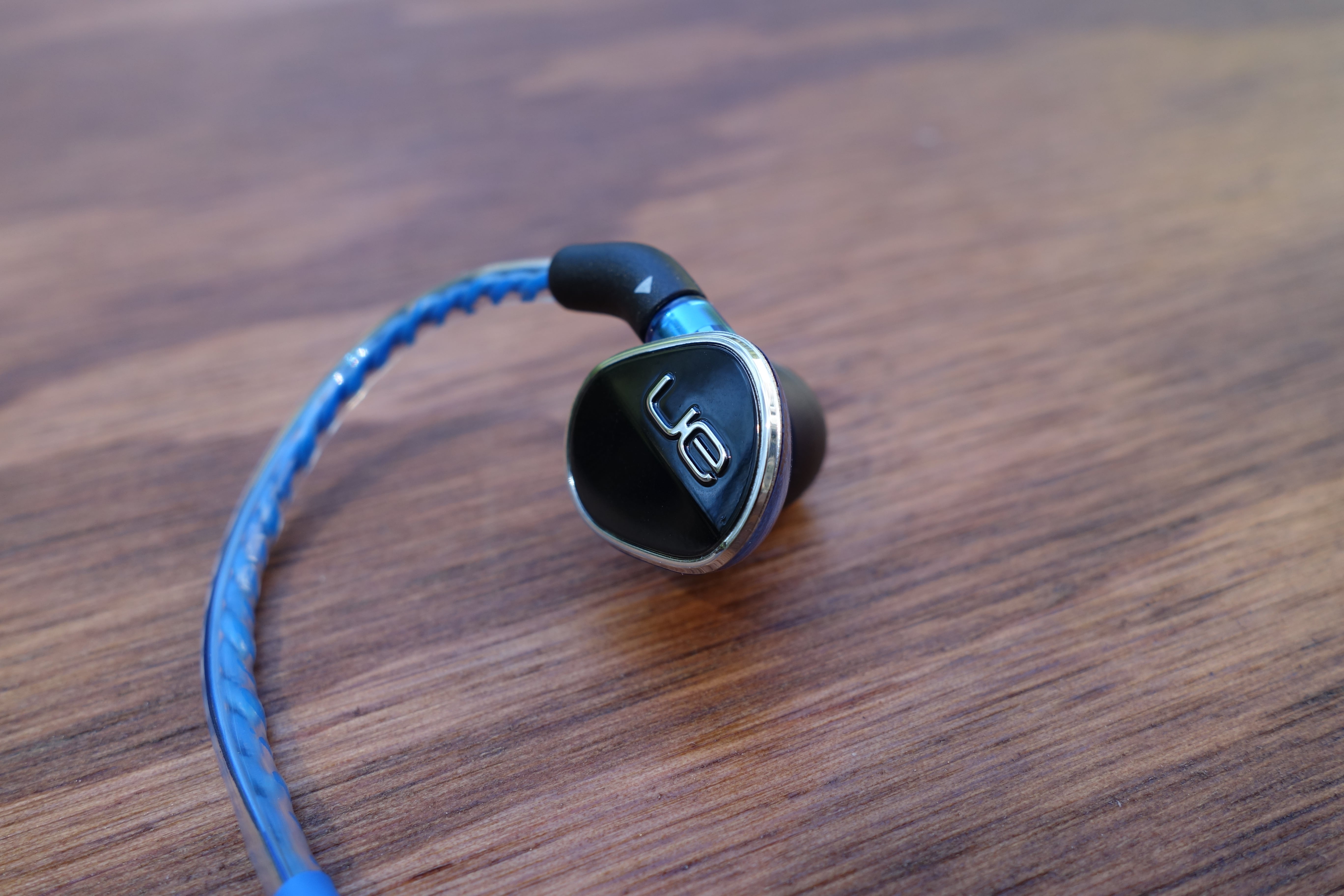
The UE900s aren’t perfect, but I feel like they do much more right than wrong – and what they do right is bangin’. Its audio quality brings UE’s expertise and delivers a super enjoyable listening experience. The fit and detachable cable considerations are also great things.
I certainly feel like the UE900s are worth the price (currently at $279 on Amazon). I’m glad that Ultimate Ears has a killer universal earphone that can stand up with its high-end lineup.
UE 900s product page
AUKEY’s 5-port Type C and Quick Charge 3.0 charging block is the most advanced charger you can get today (review)

In the last couple of years we have seen advancements in charging specs and hardware. Generally faster charging speeds and reversible plugs are a good thing, but for most of us this change is a pain in the rear. USB type C brings us a fully reversible plug which is very nice to have, but almost all of our products still use microUSB.
Mix in compatibility or quality issues, and it just makes for a mess for us consumers who need to sort out who makes good third party accessories for our devices.
I can tell you with 100% certainty that AUKEY is one of the brands I use and recommend without hesitation. From headphones, to portable batteries, to chargers, AUKEY is a brand I rely on heavily.
I’ve been using AUKEY’s 5-port charging block with USB Type-C and Quick Charge 3.0, and am here to tell you why you should consider picking one up for your own needs.

Specs
- $42.99 at Amazon
- Quick Charge 2.0 and 3.0 compatible
- 4 standard USB type A ports
- 1 USB type C port compatible with devices like the HTC 10, LG G5, and Nexus 6P
- Includes one USB type C cable
- 5.7 x 5.6 x 1.5 inches
Design and Usage
Being an Android blogger means I have dozens of devices to plug in and charge. Single port chargers aren’t an option for me, and many of you are in the same boat. Smartwatch, tablet, smartphone, wireless speaker, portable battery, etc. Charged separately and you would need five wall plugs which is a wire mess. Also there is a good chance that all five chargers are not the same – some might be older and some might be made for type C. Simply put, it’s just easier with a charging station.
While many flagship smartphones are making the switch to USB type C, the biggest one of all, the Samsung Galaxy S7, decided to stick with microUSB. Not to mention that almost no mobile accessories have made the switch – it’s a pain in the rear.
That’s why I love using AUKEY’s 5-port charger with USB type C. It suits all of my needs, does it with a nice compact build, and it charges all of my type C devices without issue. I’ve charged the HTC 10, LG G5, Pixel C, Xiaomi Mi5, and Nexbit Robin with the USB type C port on the AUKEY charger and it worked flawlessly. No fried devices. It also charged my LG G5 in the fastest way possible, where it went from 0-80% in about 30 minutes. The AUKEY 5-port charger is also compatible with my Samsung Galaxy S7 edge and fast charges it as well.
Like all of AUKEY’s products I use, the 5-port charging block is built to the highest standards. Seams and lines are exactly where they should be, and there is no question AUKEY takes pride in the quality of its products.

Summary
AUKEY is a brand that I trust wholeheartedly. I’ve been using its products for many years and am still in love with what they have to offer. The 5-port charging block costs $42.99 at Amazon and comes with free Prime shipping.
It’s built incredibly well and has the latest charging standards that should get you through the next few years. I highly recommend this 5-port charging block from AUKEY.
Get the AUKEY 5-port charging station from Amazon for $42.99.
Learn more about AUKEY and its products at http://www.aukey.com.
DJI drones can start streaming live aerial videos on Facebook
DJI has updated its Go app to add a feature it promised in April: the capability to stream videos over Facebook Live using compatible drones, including the latest Phantom and Inspire. Sure, you can already stream aerial footage of sprawling landscapes, events and whatever you usually cover on YouTube. But the new feature could help expose your work to even more people — plus, Facebook’s probably the best venue to show your videos to your parents and grandparents. Android users will have to wait a bit for the update to go live, but iOS users can update their apps and access the feature right now. In case you’d rather stream via Twitter, though, compatible DJI drones can do live broadcasts via Periscope, as well.
Source: DJI
Jaybird set a new bar for the competition with the incredible Freedom Wireless earbuds (launch and review)
Jaybird is a company that was founded in 2006 with a goal to bring us the best wireless earbuds. It’s founder and CEO, Judd Armstrong, has made sure to hold his company to that goal. Today Jaybird met the goal again with the Jaybird Freedom Wireless buds. Jaybird continues to innovate and push the limits of wireless technology just like the athletes it partners with.
Judd Armstrong knew, a decade ago, there was a need for accessories that could keep up with our lifestyles. While many of us were happy with our wired headphones, Judd was not. From Crossfit, to beach volleyball, to training in a gym, Judd wanted wireless headphones that would stay out of our way while still maintaining durability and sound quality above all else.
Since 2006 Jaybird has defined what all wireless headphones should be given the limits of technology. A new definition has been set with the Jaybird Freedom Wireless buds which officially launched today. All other manufacturers will be telling their designers to keep up or else…
Features
- Wireless music + calls
- Micro-sized premium metal buds
- Eight hour playtime
- MySound App
- Sweat-proof
- Voice prompts
Design

The Jaybird Freedom Wireless earbuds are smaller than any wireless earbuds you have ever seen. Jaybird redesigned wireless earbuds with the Freedom by moving all of the electronics inside of three button in-line remote. This redesign allowed for the extremely small earbuds that can fit anyone’s ears. They’re also small enough to be worn inside of a motorcycle helmet, another first for wireless earbuds.

What is also nice is the feel of the earbuds which are mostly made from metal. They are extremely sturdy and even cold to the touch. The three button in-line remote control has five openings on the back which allows for charging through a clip on connector.
The clip on connector is where you will find the microUSB charging port. Other wireless earbuds have a rubber cover over the microUSB charging port which makes for difficult charging since you have to pry it open. The Jaybird connector is a nice touch for those who are just getting home from a workout, and simply want to drop their wireless earbuds into a charger. If you’ve ever pushed yourself hard enough, you would know that after a hard workout your hands are probably shaking and plugging in a microUSB cable into a small port is not easy to do.

Better yet, you can even bring the charging adapter along as it has enough power in it to get you double the advertised play/talk time. It’s a micro sized portable battery.

Even the cable that connects the earbuds together is high-quality. It isn’t as thick as other cables I have seen or used before, but it is durable with a nice tangle free rubber coating.
Included in the box are silicone ear tips, which come in S, M, and L. There are also sport foam ear tips from Comply which provide a more comfortable fit depending on your preference. Clips to shorten the cable are in the box as well as a clip to pin the cable to your collar. Jaybird thought of everything even with included ear fins which hold the earbuds firmly in place. Although these earbuds are so small and light-weight that you might not need them.
Jaybird literally thought of everything with the Freedom, from build to accessories, you won’t find a better designed set of wireless earbuds.
Usability
Up until now, all wireless earbuds packed all of the electronics into the ear pieces. This has made for large earbuds that require hooks or fins to stay in your ear. It’s also limited them to people with average to large sized ears, leaving those with smaller ears and ear canals to fend for themselves.
The Freedom wireless earbuds are so small and light-weight that you can keep them in your ear without anything to keep them in place. If you’re going to use the Freedoms in a beach volleyball setting, you can wrap them around your ear or use the included ear fins. You will not find a better designed and built set of earbuds on the planet.

With as much focus on the build that Jaybird put into the Freedom, it’s easy to think the engineers may have sacrificed sound quality to jam pack everything into such a small package. Yet Jaybird may have made the best sounding wireless earbuds with the Freedom.
Sound over Bluetooth can be underwhelming, and has been for the most part over the past decade. Bluetooth was not originally developed for music, instead it was designed to transmit voice calls with minimal data to preserve power. There has been recent developments like the aptX driver which improves sound quality, but Jaybird decided to one-up the competition again. It developed an Android and iOS app called MySound which allows users to control the EQ settings on their Freedom wireless buds.

If you’re the type who loves bass, simply touch your mobile device EQ and drag up on the low range. Or if you prefer detail and clarity, you can emphasize the mid and high range. No matter which setting I tried, I actually felt like I was listening to wired headphones. Jaybird gives users multiple EQ presets – modes like Bring the Bass, Workout, Warmth, or even Kerri Walsh’s preferred settings are all available if you don’t want to custom set your own sound.

Wired headphones typically have more detail and power, but Jaybird managed to get all of that with the Freedom buds. The test songs I like to use as references are Get Lucky by Daft Punk, and Jack of Speed by Steely Dan, and they sound extremely clean with the Freedom buds. The Freedom buds also have a great sound stage, which is difficult to get with such small enclosures. The song Melody by the Rolling Stones separated the instruments and vocals incredibly well, and I could imagine the group on stage playing just for me. Brass Monkey by the Beastie Boys, and Morning by Beck were used to test the bass capacity of the Freedom buds, and they performed extremely well. Those two songs have incredible amounts of bass, and can sound annoying on headphones with too much emphasis on the low end. But the Freedom buds separated all of the low range cleanly and ultimately sounded as good as anything I have listened to wirelessly.
Overall, sound quality is top notch and covers a wide range of music.
Within the MySound app, you can also see exactly how much power you have stored in the buds. That’s extremely nice to have as the last thing you want in the middle of your workout is to run out of power. Nothing gets you out of your groove when lifting weights or running when your music cuts out. Jaybird advertises four hours of usage on a single charge, yet I managed to get 5-6 hours on a regular basis. When I did run out of power, I simply connected the included charging cradle, and got another 5-6 hours without connecting it to a wired microUSB cable. I got through a full week of use without actually needing to charge the Freedom buds from a wall outlet.

One last nice feature is the great call quality I got with the Freedom buds. I usually call my parents at night when I go for a walk with my dog. On the walk there are usually cars and wind I have to deal with, but none of those sounds came through on the other end of the call. The Bluetooth connection the Freedom buds have with my S7 edge is extremely strong. The only time they cut out on me are when I left my phone in the office and I left the house.
The Freedom buds have set a new bar for its small size, top notch sound quality, and excellent battery life.
Summary

When technology makes advances like this it totally geeks me out. There’s maybe one or two times a year where mobile products make changes so dramatically that they set the standard for the competition. Jaybird did just that with the Freedom buds.
The incredible build quality, small size, great battery life, and excellent sound reproduction don’t come cheap with a price tag of $199.95. Yet if you want to free yourselves from wires, you will not find a better set of earbuds than the Jaybird Freedom Wireless buds.
Get the MySound app from the Google Play Store here.
You can purchase the Jaybird Freedom Wireless buds exclusively through Best Buy, BestBuy.com or at Jaybirdsport.com. They come in four colors, Gold, Carbon (Black), Blaze (Red), and Ocean (Blue).
 AIVAnet