


Restokitch Recipes & Cookbook is an ambitious cooking app and foodie social network

Overview:
Restokitch is a recipe sharing app and foodie social network that offers a primarily Indian menu and some ambitious features.
Developer: Restokitch
Cost: Free
Impressions:
Restokitch is a recipe app that does a bit more than just offer some interesting and simple dishes. It also markets itself as a sort of social network for aspiring foodies and professional chefs, sort of like an Instagram or Twitter for cooks only. Features like followers and a hotline for answering user questions make this app stand out from other such recipe apps on Google Play. Restokitch primarily focuses on Indian cuisine, but there are some Western dishes mixed in as well.
Most of the recipes are fairly simple to prepare and feature readily available ingredients that you can find at your local supermarket. However, some recipes can stretch a bit long for a smartphone screen, so you may have to scroll down to read more, not ideal when cooking and your hands are full of food, I would have liked to see a better format for small screen reading to avoid this issue.
The social features of Restokitch are what make it stand out but
unfortunately, they aren’t very robust yet. The Hotline feature, a forum for asking questions or seeking tips about cooking, doesn’t have a ton of activity as of now- a lot of recent questions have gone unanswered after more than a week. The app also boasts cooking contests that are live and global, but there has only been one and it was in March 2016.
 For professional chefs and food bloggers, Restokitch offers a
channel where you can post your own recipes, and gather followers and Trust, a sort of reputation system. This is by far the most fleshed out feature of the app, with a good number of frequent posters and all of them with a few hundred followers each. I would have liked to see even more social features incorporated with this, but for what it is, it works more or less fine.
One complaint I do have is the requirement to log in with Facebook. I would have preferred an anonymous option or at least some varied log in choices so I’m not forced to attach my Facebook account to the app just to read some recipes.
Conclusion:
I would recommend Restokitch to someone who was very interested in learning to cook Indian cuisine, or who just loves to eat it. The amount of diverse and quality recipes alone justifies the download for those interested, but the lackluster social aspect makes this app just another face in the crowd.
Download Restokitch from the Google Play Store
NYNE Edge review: Portable, bike-ready, and more than enough sound

As the weather continues to get nicer by the week, many of us find ourselves outside for various reasons. Be it for some basic yard work, poolside chilling, family time at the park, or something else, there’s plenty of reason to get out and in the world.
I love nothing more than to spend a few hours riding a bicycle and unplugging from everything. Typically, that means plugging in some headphones or pairing earbuds. Lately, however, I’ve been using the NYNE Edge Bluetooth speaker. And, while it’s certainly not a private listening experience, it’s one I’ve enjoyed.

Designed exactly like a shrunken, miniature version of the NYNE Rock, the NYNE Edge fits easily into your hand. The contoured shape lends itself nicely to portability and the soft materials feel great. It’s very convenient to pick up and take it to the deck to listen to a ball game.
If there were one word to describe to size of the speaker, it would have to be deceiving. The sounds that comes of this guy is downright incredible. To be sure, it’s louder than anything I need considering its primary function. More than capable of filling a room, it’s plenty of sound to liven up a patio party. You can really crank the speaker up before you start to hear sort of distortion. In my testing, I’ve never had a reason to turn the NYNE Edge up over halfway.
The NYNE Edge, while nice to have in the traditional speaker sense, really shines when you use it on a bike. Indeed, the speaker comes with a universal handlebar bicycle clamp accessory that lets one take the speaker on the road. And when I say “shines” I mean that literally, too. The rear of the unit houses an LED flashlight with four light effects: low, high, flashing, and SOS.

I’ve found that regardless of what I am listening to, I simply don’t need to harness the full power of the NYNE Edge while biking. Sure, it faces me for the most part, but it’s still rich enough sound that pedestrians and other riders are hearing things. This is fantastic, however, if you like to ride in groups and share similar listening habits. Maybe it’s my own insecurities, but I feel like the people around me are judging me for my podcast or music selection. Personally, I’ve come to love the sound and quality of the speaker for all-purposes reasons.
Like its much bigger sibling, the NYNE Edge is waterproof and offers up a couple of convenient features. You’ll find NFC for quick pairing, a built-in battery and USB port for charging, and a 3.5mm headphone jack. Moreover, there’s a five-light indicator that lets you know how much juice is left in the speaker.
Battery life is listed at up to 15 hours on the NYNE website. I found this to be accurate for the most part. Understanding the size and capabilities, I might have liked a couple more hours but that’s really just me being picky. Note that charging your phone through the speaker and using the light will naturally affect how long the battery lasts.
1 of 9


In terms of buttons, the NYNE Edge comes with the usual fare. You’ll find power, volume up and down and buttons to skip or go back on tracks. The play and pause button also lets users take phone calls, too. Yep, you can chat up the wife while riding around town… if that’s your thing. Rounding things out is the flashlight button which cycles through the four aforementioned modes.
If you’re looking for a very portable speaker that delivers tremendous sound and plays nicely with bikes, you’re gonna spend roughly a hundred bucks or so. That’s exactly the price point you’ll find with the NYNE Edge. Considering it comes with the bike clamp I would have pegged the price to be $120 or so. At $99.99 it’s a terrific value. Pick one up from NYNE’s website, Amazon, or eBay today.
LogMeOnce: Safe, fast, and secure password management (Review)

Overview
For some, password managers are an essential part of life. For others, they’re quite unnecessary. Personally, prior to doing this post, I was in the second camp. Why would I want to give my passwords to some company I had never heard of and then shell out money for a glorified password journal? That is, I felt this way until LogMeOnce made me reconsider.
Impressions
User Interface
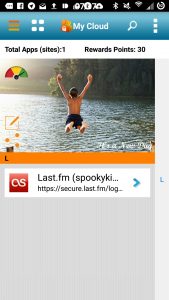 LogMeOnce is a great app, but its UI leaves a lot to be desired. The app feels like little more than a bookmark shortcut. After this initial turn-off, however, I noticed a few things.The app is very fast and responsive, with no need to double and triple-tap just to get something to work. Logging into the app takes only 4 seconds, though logging in every time gets a little tedious. I guess there’s just some sacrifices you have to make for the sake of security.
Setup
Initial sign up for LogMeOnce was a breeze. After typing my basic info, I got an email to confirm my account and bam, I was ready to add passwords. Adding my first password (and only one for the sake of this review) took maybe 30 seconds. All I had to do was go into the secure browser, navigate to the page, login, and LogMeOnce did the rest.
Features
 Just a few of LogMeOnce’s features are password randomization, single sign-on, X.509 certificate authentication, backup and restore, and much more. However, there’s one feature that makes it stand out: Mugshot. This feature makes it so that when someone attempts to log into your LogMeOnce and fails, it takes a photo of them and collects their IP. If the login attempt wasn’t you, there’s an easy option to report it. As you can see in my screenshot to the right of this, my failed attempt was captured with a front and back facing photo, device info, my IP at the moment, and the exact date and time it happened. I should’ve reported myself but I got the login right on the second try, so all was good with the world.
Pricing
 LogMeOnce has three levels: Free (Premium), $1/month (Professional), and $3.25/month (Ultimate). Just as a little comparison, Dashlane premium costs $39.99 a year, which is the same price as LogMeOnce Ultimate. Lastpass is $12 a year, which is the same as LogMeOnce Professional. So LogMeOnce is in the same range as others and is definitely a good option for enterprises.
Conclusion
LogMeOnce is a great app that definitely has the right idea when it comes to security. Users can add their logins easily and even produce a random password for it. It’s always accessible and, if anyone tries to log in wrongfully, Mugshot will capture them and their IP. As soon as the UI is made to look a little easier on the eyes, it will easily be able to rise to popularity.
Download and install LogMeOnce from the Google Play Store.
Wallhub – Tempting Wallpapers (Review) (Updated)

(Update) The developer has since patched the app to fix the problems. Review has been updated to reflect this.
Overview
Wallhub is a wallpaper archive app with a search and filter option for finding the perfect image for your device..
Developer: Mindsparkk
Cost: Free ($4 premium version)
Highlights
- Material design
- Puzzle game for added fun
- Has potential if it works
Impressions
Wallhub – Tempting Wallpapers is useful for finding a new look for you phone or tablet. Despite some issues initially, the app has since been fixed and is now functioning correctly.
Wallhub has a nice pseudo-Material design to it, that makes for an attractive interface, and a nifty animation for opening the menu. Beyond that, it is essentially just a grid of photos sorted into a few categories with a tag and search function. Pretty standard fare.
The images on offer are decent, if a bit limited in scope. Many of the pictures featured have a bit of a geeky flavor, with a lot of anime and gaming inspired art, along with some more diverse content. They have a good number of quality high-resolution photos, and a simple method of delivering them to your device. It can automatically set your wallpaper, download the image, or share it to another app or contact.
Wallhub features a search function, as well as a filter system to sort by resolution size, so you can find the image you want in the size you want, which is handy.
The app also includes a puzzle game, which is a nice touch to make the app have some character. You assemble a puzzle based off of a randomly selected wallpaper image. I do wish it was more prominently displayed, as its hidden in the menus.
Conclusion
There isn’t much else to say about Wallhub. When I initially reviewed the app, it was in an unusable state. It is now functioning fine but is still a rather average wallpaper app. The premium price is still too steep for what the app offers, and the free version does enough to make it unnecessary. It does some things well, and has a nice added puzzle game for some flavor, but there are certainly better options out there for wallpapers.
Download and install Wallhub from the Google Play Store.
Jumpy Ninja: Through a fine line between simple and incomplete (Review)

Remember when Flappy Bird’s popularity exploded? You saw people playing instead of working. You saw people trying to improve their high scores instead of paying attention to class. You saw reporters talking about it instead of broadcasting actual news. It was everywhere.
If mobile games weren’t simple enough, Flappy Bird demonstrated developers that a game doesn’t have to be complex in order to garner attention from players. With it came a lot of games with similar premises: a very simple game, basic controls, but unforgiving difficulty. Jumpy Ninja is the latest addition to that trend, with some twists to make it a little bit different from the highly-successful Flappy Bird.
Developer: AllThatTek
Price: Free
Features
 Move your ninja across the bricks and avoid falling.
Seriously, this game is as simple as it gets. You control a ninja that is constantly jumping. Tap on the left of the screen to move your character to the left. The same goes if you want to move your little character to the right. That’s it. You have to move your jumpy ninja across some floating bricks. If you fail to land on a brick, it’s game over.
The difficulty in the game comes primarily from the camera. It does not move with you, but at a pace determined by the game. It also tends to go faster the longer you play without dying. This gives you very few moments to actually think through your next movement. Thus, you get a sense of urgency and peril on each decision you take, making the game much more fun.
Unfortunately, that’s where the features end. There’s no Google Play Games integration, no options, no difficulty levels, no other modes, nothing. It stores your highest score, at least. One thing to note is that the game gives you the choice of toggling the ads banner at the top. Kudos to the developer for giving the option to turn off ads in an ecosystem notorious for its pesky ads and questionable monetization methods.
General Impressions
 You’ll see this screen a lot.
It amazes me how simple some games are, and, even though their mechanics are straightforward and forgettable, people still flock to them. Just like Flappy Bird, the game’s difficulty is its main selling point, since it creates a need to improve your previous high score. However, just like its inspiration, when the novelty wears out, you are left with just another simple game with a lot of missing features.
The lack of Google Play Games integration is a real shame since the social aspect of trying to improve your friends’ scores would fit right into the theme of beating your high score constantly.
You could argue about the rest of lacking features, but there’s a fine line between a simple game and an incomplete game, and, in my opinion, this game falls on the latter. I mean, there’s not even a pause button. There’s no music to be heard. There’s not a real sense of progression, just a high score you must beat. Also, my ninja has sometimes stopped jumping, resulting in me dying much sooner than expected, and for reasons that I can’t control.
Playing the game itself is really straightforward, although I had a lot of problems with the controls at the beginning. When you are moving your character to the right and then you press the left area of the screen, the character defies the laws of physics and stops its movement almost immediately in order to follow your commands. I was expecting a more natural-feeling control scheme, and having to adapt myself to the abrupt change of direction did take some enjoyment out of the first rounds.
 You’ll need to be precise if you want to get a good score.
What we like
- Simple controls
- No lag or hiccups
- Option to turn off ads
Room for improvement
- Huge lack of features and replay value
- Controls could be tuned to feel more natural
- No sounds at all
Conclusion
In an attempt to emulate Flappy Bird’s tremendous success, Jumpy Ninja offers an equally simple game with a soft learning curve, but with a tough difficulty level. However, it ends up being way too simple for its own good. It’s not that we’re dealing with a unpolished game (although some minor annoyances regarding your character’s jump slash some points out of the performance department), it’s that, after playing, you end up wondering if that’s really it. Unfortunately, it is.
Download and install from the Google Play Store.
The Turcom HR-903 Acoustoshock Bluetooth speaker is built like a tank and has sound quality to match (review)
Wireless speakers are a dime a dozen these days. They’re so commonplace that you can buy speaker at every major retailer, and you can even find them at places like the airport. In general most speakers are pretty much the same, but occasionally we come across different types of speakers that cross into other categories outside of technology.
If you love the outdoors, the water, and music, we have just the speaker for you. The Turcom HR-903 Acoustoshock Bluetooth rugged wireless speaker is built like a tank and has powerful sound to back it up. It’s built to withstand the elements yet provide loud and clear sound while you’re in an open environment.
 The Turcom HR-903 even has treads like a tank.
Specs
- Dual driver set-up with 30 watts of power
- Bluetooth 4.0, 33 feet connection range
- IPX5 water-resistance rating, dust-proof, shock-proof
- Eight hours of playtime
- Dimensions: 10″ x 3.8″ x 4.7″
- Weight: 58.5 oz.
Build

In the image above, you can see the rubber treads that protect the outside of the speaker. Instead of moving the speaker like the tracks on a tank do, the rubber exterior of the speaker serves as protection against drops. That protection puts the Turcom HR-903 in the “tough” class of portable speakers, where there are few options available from the likes of Fugoo and Braven. Having another portable speaker in this category is fantastic especially as many people upgrade their home wireless speakers to the kind that streams music over WiFi.
The Turcom HR-903 speaker is pretty big at 10″ long, but it’s large so you can hear it in wide-open spaces like the outdoors. It has two large 2.75″ diameter drivers, matched with an even larger subwoofer rated to handle 30 watts of power. To run the drivers is a massive 8000mAh battery that can also serve as an energy source for your other USB powered devices like an Android smartphone. Most Android smartphones have a battery capacity around 3,000mAh and that means you can easily get two full recharges from the Turcom HR-903 when you’re out on the trails.

On top of the Turcom HR-903 is where you will find the controls and NFC chip for easy pairing. Bluetooth, fast forward/rewind, play/pause, answer call/hang up and volume controls are all touch enabled meaning you will not get physical feedback from the buttons. This is a great way to keep the electronics inside sealed to protect the speaker from dust and water which is why the Turcom HR-903 comes with an IPX5 rating.
The Turcom HR-903 is a very well built machine. With a very rugged exterior, touch controls, and a cover over the charging port, the HR-903 is designed to take on the toughest lifestyles.
Usage
The Turcom Hr-903 holds up very well to the elements. I took it to the beach, rolled it around in the sand and washed it all off when I got home. Some sand got stuck behind the grill, but it didn’t affect the performance of the speaker.
The speaker is what really shines. For $129.99, I wasn’t expecting much in terms of sound quality but the HR-903 is very crisp and detailed. Even at low volumes, where you can lose a lot of detail, the speaker played music very clearly. Only when I had the speaker at 100% volume is when I discovered a “concert hall” type effect where it sounded a little echoey. The Turcom HR-903 is great for outdoor use – the 30 watts really drive the speaker to volumes most other Bluetooth speakers cannot attain. This is essential for wide open spaces since there are no walls to keep the sound contained. Loudness was never an issue on hikes, at the beach, and hanging out at the park.

It was also nice to have the speaker double up as a portable battery too. When I was at the beach all Sunday, I needed to recharge my S7 edge due to the weak signal that drained my battery. I simply lifted the cover that protects the USB port and charged my phone in about 1.5 hours.
The advertised playback time is seven hours, but I frequently saw eight hours of use in-between charges. I also didn’t play my music much louder than 50% because it is a loud speaker and didn’t need to push it that hard.
Overall, the only issue I had with the speaker was its large size. It isn’t as portable as others, but it needs the size to pump out loud volumes for wide open spaces. So if you plan on hanging out at the beach, camping, or a bonfire, this speaker is perfect for your needs. However if you plan on taking it hiking, be prepared to carry a bit of extra weight.
 Integrated carry handle.
Summary
With a retail price of $129.99, the Turcom HR-903 is a great option if you want a speaker you can use outdoors and indoors. The build quality is top notch, and it is designed to withstand the elements. The speaker is also refined to handle the quiet controlled environment of your home, and can pump out clear and crisp sound at almost any volume level.
I highly recommend the Turcom HR-903 Acoustoshock to anyone who doesn’t need to worry about carrying a portable speaker in your pocket. It’s a great value for all of the features it delivers.
Learn more and order the Turcom HR-903 Acoustoshock direct from the manufacturer here.
Or order the Turcom HR-903 Acoustoshock from Amazon.
Apps for saving and sharing your files (Roundup)

A couple weeks ago I spoke about setting up a Box account to get yourself 10GB of free cloud storage. To that point, we thought it would be a good idea to bring you a list of 5 great options for free cloud storage for your mobile and desktop needs.
All of the apps below allow you to upload/download files to/from your cloud account and open editable files on apps installed on your mobile device. To prevent any more needless jabber on my part, I present you 5 cloud storage solutions for you mobile and desktop needs in order of my personal preference.
PrevNext
5. One Drive

If you have ever been forced to create a Microsoft account (Xbox Live, Windows 8.0/8.1/10, Windows Live Mail, etc.) then you have a One Drive account. Microsoft provides you with 5GB of free storage simply for creating your account. This allows you to easily upload and edit files from directly inside your Microsoft office applications.
If you are an Office 365 subscriber, Microsoft has pumped your storage capacity to 1TB which, unless you are storing large images or video, should suffice for most users.
Expansion options
If you are not a subscriber to Office 365 you can purchase an additional 50GB for $1.99 per month
Download the One Drive app
4. Amazon Drive

Unknown to me until a few weeks ago, Amazon offers cloud storage to its Prime members (seriously, if you shop on Amazon you need to sign up for Prime). With any Prime subscription, you get UNLIMITED storage for photos and 5GB for “videos & files”. All the music I have stored in my Amazon Music app also shows up in the file manager and does not seem to take up any of that 5GB of space.
Expansion options
Amazon also offers an “Unlimited Everything” plan for $59.99 per year, which is a really good deal if it is truly unlimited.
Download the Amazon Drive app
3. Dropbox

Dropbox is one of the more popular cloud storage solutions. It boasts Office365 integration for live editing of shared files. Many of its tools rival those of the previously listed apps, but the reason Dropbox is sitting at number 3 is the amount of free storage they provide, a meager 2GB. This is enough for someone that is trying to simply share some files or collaborate on a project, but this will not cut it for high-resolution photos, video, or high-quality audio.
Expansion Options
If you like the service that Dropbox provides but simply require more storage space you can upgrade to their “Pro” account which gives you 1TB of storage for $9.99 per month.
Download the Dropbox app
2. Box

Yes, this is a different app. Box is geared more towards business applications and customers. They have professional tools like a DICOM viewer (medical imaging) and FREE Office 365 integration so you can edit your files from any browser. It plays well with other apps and has a similar feel in the UI. The major difference here is that Box gives you 10GB or free storage. If you need north of 5GB of cloud storage and don’t want to pay, I would give Box a shot.
Expansion options
Box does offer an expansion of your storage for a fee. You can purchase 100GB of storage for $10 per month. (If you are wanting to pay for extra storage, I would suggest one of the other providers)
Download the Box app
1. Google Drive

How could I even attempt to talk about cloud storage without talking about Google Drive. Google is the most generous of our list, providing 15GB of storage to the basic user, and it seems like this number grows every few years. As many of you may know, Google has also created Google Docs which will allow you to create and edit their proprietary document format and Microsoft Word files from any current browser or smartphone with the corresponding app. This storage limit also takes your Google Photo storage into account (unless you are using their free photo backup feature for your mobile pictures).
Expansion options
Google does provide competitive expansions options ranging from $1.99 per month for 100GB up to $299.99 per month for 30TB of storage.
Download the Google Drive app
Download the Google Photos app
Download the Google Docs app
EasyAcc Quick Charge 3.0 20,000mAh Power Bank review [with discount code!]

EasyAcc is a quality mobile accessory manufacturer of things like external batteries, chargers, cases, and headphones. Recently, I got a chance to review one of its sweet power banks with a huge 20,000mAh capacity and rugged build. One of my complaints on it was that it was not Quick Charge capable – a feature that many of us are used to nowadays.
EasyAcc was quick to respond with guns blazing. Its now has a Quick Charge 3.0 battery pack in its lineup, with the same immense 20,000mAh battery capacity.

Although, this one isn’t rugged. It actually goes the opposite way, to a premium metal build. Let’s find out if this should be your end-all power bank.
Design
The EasyAcc QC 3.0 Power Bank bears a pretty simplistic design, and rather, lets the material do the talking. We’ve come to expect premium metal builds on our smartphones, so why not their accessories as well?

The casing is a rounded Aluminum that completely wraps around the charger. It certainly feels the part – cold to the touch and a smooth anodized finish.
I was happy to see that although the QC 3.0 Power Bank carries the same capacity as the rugged solution I recently reviewed, it’s MUCH slimmer – almost half the width. Though, the metal does mean that it has some heft to it (400 grams).
On each end, there are essentially plastic caps. All the I/O happens on the right side, while the left side just lays out all the specs.

This is a two-port charger, and only one is enabled for Quick Charge 3.0. Nearby, there’s just a microUSB port for charging and a power button.
On the top, opposite the logo, you’ll find a four-LED battery indicator.

Nothing too extraordinary in regard to design. EasyAcc goes with nice materials and simplicity.
Functionality
I was surprised at this Power Bank’s slimness knowing that it packs a whopping 20,000mAh battery pack.

But the star of the show is of course Quick Charging. Many chargers don’t consider that smartphones have moved on from the slowness of standard charging. Fortunately, this one not only incorporates it, but does so for the very latest standard – Quick Charge version 3.0. As a reminder, QC 3.0 can get from 0 to 80% in about 35 minutes.

Although, only one of the ports is QC 3.0 capable; but we’ll take it. The other port maxes out at 2.4A (still better than yesteryear’s 2A rate). There is also over-current protection and Smart technology that adjusts current depending on the connected device.

When using the charger, I’d caution about its potential physical contact with the connected devices. Now that it’s metal, it can scratch your devices, or even worse if you drop one on the other.
Final Thoughts
I definitely recommend the Quick Charge 3.0 Power Bank. It’s not only built sturdily, but with a simplistic attractiveness. There’s not a lot of battery packs out there with a metal build or capable of Quick Charging. It’s also very slim for what it packs.
The price ain’t bad either, at $39.99. But EasyAcc is making the deal even sweeter with a $10 off promo. Enter the code “SCAI5QH9” on Amazon to claim the discount (expires on June 30th).
EasyAcc Quick Charge 3.0 Power Bank product page
PayPal is killing its Windows Phone, BlackBerry and Amazon apps
On June 30th, PayPal is forcing all its Android and iOS users to update their apps to version 6 if they haven’t yet. Notice how Windows Phone, BlackBerry and Android Fire users aren’t included in that list? That’s because the company is killing its apps for those platforms on the same day. PayPal didn’t explain why it decided on shutting down its non-Android and non-iOS applications. In her announcement post, PayPal VP Joanna Lambert only mentioned that everyone can still access the mobile website and that it’s still possible to send P2P payments via BBM or to send money from their inbox on Outlook.
The announcement post also said:
“It was a difficult decision to no longer support the PayPal app on these mobile platforms, but we believe it’s the right thing to ensure we are investing our resources in creating the very best experiences for our customers. We remain committed to partnering with mobile device providers, and we apologize for any inconvenience this may cause our customers.”
Whatever the service’s reason is, you can say goodbye to those apps — we doubt the company will change its mind before the end of June.
Source: PayPal
Periscope broadcasts are now permanently saved by default
Earlier this month, Twitter’s live-streaming app Periscope began testing saving broadcasts for more than 24 hours. During that beta phase, you had to include #save to trigger the feature. Permanent saves are now available for everyone by default, and you won’t need to use that hashtag to make it work. Likes and comments are saved along with the video footage, so you’ll be able to gauge reactions afterwards as well.
If you still want those video to disappear after a day, don’t worry: you can still do that. You’ll need to adjust the save settings inside the app, but the temporary option is still available if you prefer it. The new method for saving follows improved search and streaming from DJI drones, all of which were first announced at the beginning of May.
It’s here! Update your Periscope app to permanently save your broadcasts by default (no #save needed). pic.twitter.com/Tv8O48jImQ
— Periscope (@periscopeco) May 25, 2016
Source: Periscope (Twitter)
 AIVAnet