


Chord Mojo review: The mobile DAC to beat

In the world of HiFi audio, there are select manufacturers associated with undisputed excellence. Chord Electronics is one of those. Its specialty is the dedicated sound processor, or digital-to-analog converter (DAC). The company delve into the mobile space with the Chord Hugo in 2014, which did spectacularly in the market. Only, the price made it a pipe dream for the majority of audio lovers.
Fortunately, Chord didn’t take too long to follow up with an alternative, dubbed the Mojo. The name may be humorous, but this compact DAC is all serious when it comes to performance. Despite being a fraction of the size and cost of the Hugo, there’s little in the way of compromise in sound quality. Quite an achievement. Let’s examine if Chord’s Mojo is the real deal.
Design
Mobile audiophiles will be pleasantly surprised when they open the Mojo’s box. Serious DACs are known to be sizable (high-end manufacturers typically put sound quality above all else), so to see one smaller than a deck of cards from a company like Chord is surprising. We’ll see if its ambition paid off in our audio discussion later in the review.

The Mojo’s design is fairly basic but with some nice, original flare. It’s a rectangular block, made from Aluminum and a smooth, black finish. The edges are rounded for an even more refined look and great in-hand feel. There are these swooping cutouts on the top for the buttons and Chord logo, and the Mojo’s signature is front and center.

Bottom of Mojo has rubber feet at each corner.
The buttons are an interesting design choice. All three (volume up/down and power) are semi-transparent balls that light up to indicate statuses (we’ll talk about that the functionality shortly). They sure look cool and snazzy in person, but may be too flashy for folks who prefer discretion. I’m just glad that Chord realized to recess them slightly in the chassis, to reduce the chance of accidental presses (although, it does happen occasionally with handling).
The Mojo is laid out with output on one end and input on the other. The compact and mobile nature of the Mojo means that the 3.5mm headphone jack is the only means of output. Considerately, Chord packs in two ports, so that you can share the audio experience with a friend.

On the input side, we have a few more options. The standard digital input is handled by a microUSB port. There is an additional microUSB port, as a dedicated charging port. This is great, because you’ll still be able to use the Mojo if it runs out of battery (assuming that you have a power source nearby). Since it’s microUSB, you’ll be able to use the same power bank that you carry around for your phone/tablet. The other input options are Optical or Coax.

Under the charging port is a small LED light that remains lit in use and indicates three different statuses – charging (white), good battery (green), low battery (red).
Functionality

The Mojo is made for mobile use, so this means that support for Android and Apple devices are in tow. As long as your Android phone has no problem outputting audio via OTG (there should be no worry with newer phones) and you have a microUSB-to-microUSB cable that can do it, then you’re ready to just plug in and go. Unfortunately, Chord doesn’t include said cable, which is a bit of an oversight in my eyes. Such a mobile-focused device should include it. Instead, you get a short USB-to-microUSB. Fortunately, cables are generally cheap (or you can buy a USB-to-microUSB adapter). But still.
The Mojo isn’t complicated to use, but there is a bit more than meets the eye. When you turn it on (holding down the power button for a couple seconds), you’ll see what may be an intimidating display of lights from the round buttons. It’s important to know that the volume has a wide range of fine tuning, and the colors are the visual indication of where you are. Some may question Chord’s design, but there’s a method to the madness. A volume knob wouldn’t give you as much fine control. A huge benefit of this is the Mojo’s power support. It can minimize its output to suit super sensitive headphones (like the Shure SE846) or be powerful enough for demanding full-size headphones (like the Sennheiser HD 800). That’s very impressive, especially when you think about the device’s size.
A drawback can be that there’s a lot of volume steps to go through, but Chord also thought about this. You can hold down on a volume button to quickly move through the range. But a problem with the color indication is that you’ll have to get used to what colors mean what volume. Chord separates the range by 10 different colors, starting at red and ending in white.

There are a lot more volume steps than that, though. So each color gets a couple steps (indicated by a change in brightness) until to moves to the next color. What’s more, there are two full cycles between the minimum and maximum volume. In the first cycle, the “+” volume ball will remain one color (red), while the “-” ball will cycle through the set of colors. Then after it hits white, the second cycle begins, indicated by both balls cycling through the colors simultaneously.

First volume cycle

Second volume cycle
This system may sound complicated, but it’s really not. And the DAC remains at the volume you leave it at, so unless you’re switching headphones, it shouldn’t matter. Still, I’m not a fan of the ball system and feel like it should be more intuitive. And there’s a couple problems with the implementation. The balls are free to spin, for no reason at all. That results in an unflattering rattle when you handle the unit. Additionally, you can’t turn off the lights. Chord lets you switch between two different brightness levels (by simultaneously pressing the two volume balls), but even the lower setting is way too bright in a dark environment. I listen to music in bed and it’s quite annoying.
When you plug in your source and fire the music up, you’ll also see the power button turn a certain color as well. This is a visual indication of the sampling frequency that your source outputs. The color range is the same as discussed before, red for a low frequency (44 kHz) and up to 768 kHz/DSD rates on white. You’ll have to check the manual to know what color means what specific frequency, if you care about that kind of thing.
I also feel it’s important to mention that the unit can emit considerable heat. It’s warm in normal use, but if it’s a bag/case, the temperature can jump up pretty quickly. The worst is when you’re using it while charging at the same time. It doesn’t get hot enough to burn you, but it is quite alarming. I’m surprised it can operate with that kind of heat.
The Mojo’s battery life is decent and more or less what I’d expect from a device this size. It’s said to provide up to 10 hours of playback, but of course, that depends on your volume level. I use sensitive earphones (so I don’t ask for that much power) and I saw around 8-9 hours of life. My beef is with the charging. It charges at only a 1A rate, so it takes a whole 4 hours to get from empty to full. It’s even slower if you’re using the DAC while charging at the same time. The 1A standard also means that the charging port doesn’t play nice with a lot of today’s mobile device chargers (it rejects ones it doesn’t like). I don’t always want to charge the DAC from my computer.
Sound
*I used the Shure SE846 and Sennheiser IE 800 earphones for my review.
When we’re talking about a DAC, what ultimately matters is the audio quality. I’ll straight-up say that the Mojo’s sound overshadows any of my complaints about the design. The Mojo is simply a wonder. Let’s talk about what that means.
The immediate term that most reviewers expel when describing the Mojo’s sound is “musical”, and I see why. According to Head-Fi.org’s sound glossary, “Musical” is defined as “A sense of cohesion and subjective ‘rightness’ in the sound”. That “rightness” in sound is precisely the standout feature of the Mojo. The thing is that regardless of how detailed a DAC can be, many fail to capture music’s true essence. The nature of sound in a live performance is much different than what audio gear reproduces, no matter how good it is. But that’s the goal, and that’s the aim that Chord takes. I’m not saying that Chord’s devices can fully do that (none can), but its effort is very noticeable and a huge differentiating factor from other DACs out there. There’s substantial pleasure in a sound that’s not only detailed, but sounds “right”. I’ve never felt so engaged in music from my headphones, and I fell in love instantly.
That said, the lushness of sounds isn’t the only thing done right, but their imaging is spread out wonderfully. I don’t think the Mojo has the widest reaching soundstage out there, but when all the dynamics are filling the space around you, it’s of little consequence. Details are equally excellent across the spectrum as far as I can tell. I would say that the iFi Micro iDSD portable DAC I’ve reviewed (a strong competitor) is slightly more detailed towards the upper end of the spectrum, but really, at this point it’s hard to tell. I think the musicality factor is much more a plus.
I want to call the Mojo’s sound signature slightly warm (slight emphasis on bass), but that may be a result of its musical nature. The bass is strong/impactful, but it in no way overshadows. No frequency range in the spectrum is recessed; they all shine with detail and depth. But I have to say that not everyone likes a strong bass, and there’s no analog bass control on the unit.
Final Thoughts

To sum up the Mojo: A solidly built, compact, portable DAC with some questionable design choices that get overshadowed by stupendous, somewhat unrivaled sound. Chord Electronics did a magnificent thing here, and despite some distinct and valid complaints in the design, this is simply the best DAC on the market that you can take on the go.
The Mojo does cost a pretty penny, at $600, but this is the kind of DAC for an end-all setup (assuming you have invested in a high-end headphone). You won’t regret the Mojo.
Facebook Live will be able to stream Masquerade face swaps
Facebook Live is rolling out a handful of nice update these coming weeks, starting with the ability to broadcast straight from MSQRD (Masquerade). Fidji Simo, the social network’s director of product, has announced at VidCon that you’ll be able to choose the audience you want to show your face-swapping shenanigans to within the app itself. For instance, you could only make a video visible to close friends rather than to everyone. You’ll also be able to choose your first mask before going live and to keep changing it throughout the show.
MSQRD, if you’re not familiar, is a Snapchat-like video app with live filters that the social network snapped up in March after face-swapping skyrocketed in popularity. Simo said iOS users around the globe will be able to take advantage of Facebook Live integration these next few weeks. Unfortunately, he didn’t say when the feature will come out for Android users.
Simo has also revealed that viewers will be able to join a broadcast that’s already airing, so you can go live with friends or fans to host talk shows, debates and discussions. Finally, when you schedule a video, viewers will be given the choice to be notified when it starts airing or to join a lobby where they can chat with other fans. The bad news is that only Verified Pages will get both these features in the near future, though Facebook plans to eventually make them widely available.

Gentle Wakeup: Let’s wake up in a better mood (Review)
Overview
Let’s face it, waking up in the morning is no fun. That moment the sound of the alarm clock meets your eardrums, your ready to fight. Of course, that could be more to do with having to go to work, either way, traditional alarms aren’t very popular. To that end, more developers are finding new ways to wake people up. There are apps that make you do math while there are some that make you take a selfie. Heck, there is even on that lets you receive a call from a total stranger. But today we are gonna talk about one that gently wakes you up with the simulation of the sun…Gentle Wakeup.
Developer: Dr. Alexander Rieger
Cost: Free with a $3.99 upgrade to Pro
Review
Gentle Wakeup is a unique take on the alarm clock. It mimics what nature intended by waking you up with a gentle light. We need to first understand the process Gentle Wakeup uses. When setting your alarm you should know the process starts 20 minutes before your alarm time. So setting your alarm at for 7:30 am will have the process starting at 7:10 am.
Once the alarm process starts your screen turns on with a very dim yellow glow. As the minutes tick it gradually gets brighter. Once it’s time for your alarm, the screen is at full brightness and hopefully you are awake. This will likely work only if you have the phone or tablet placed in a way that it is on your face.
Now that we understand the process, let’s go over some of the options available in the settings. Most of the normal features are included such as repeat alarms, snooze, multiple alarms and naming those alarms. Now I mentioned that the process starts 20 minutes before you alarm time, but that can be adjusted to a more suitable time if that fits your individual preference.
Other features include having a vibration going when the alarm starts with numerous configurations to fit your needs. You can also have the clock showing if you choose. If you feel the need for a morning pick me up, you can set a message to display for yourself to start it off right. Gentle Wakeup also gives you the option to set a maximum duration for the alarm to last ranging from five minutes to two hours.
Displaying on the main screen of Gentle Wakeup is your clock. Did you expect something else? You can customize that down to the second…literally. Extra stuff that you may want to display include next alarm set and notification in your action bar.
Now you may wonder why I haven’t talked about sounds, well that’s because it’s in the Pro version. For an upgrade fee of $3.99 you can add sounds. These aren’t your normal sounds, no sir. Well, there is one normal annoying sound, but mostly you have roosters, birds chirping, white noise and more.
1 of 6


Summary
This is a unique take on the alarm. I’m not sure most people will be able to use it as we are more accustom to annoying noises and music these days. I would definitely not use this as a primary alarm until you’re sure you can wake up to it. But if you’re a person who could handle this then you should. Who doesn’t like waking up to a pleasant sunrise.
Download Gentle Wakeup from the Play Store
Choetech Qualcomm Quick Charge 3.0 & USB C Ports: Charging in the car (Review)
We have become heavily reliant on our smartphones in today’s world. For most people these devices are a must. Real Estate agents, Insurance adjusters, and more professions are on the go in their cars going from place to place conducting all sorts of business. Most of that business takes place on their phones, whether it’s emails, texting, or old fashion phone calls. Since these phones get used a lot, that means it needs charging. Enter Choetech Qualcomm Quick Charge 3.0 car charger for $22.

Review
Choetech’s car charger come with two ports to cover a variety of devices. The first port is the USB C charging port. This type of port covers a range of different devices such as the Nexus 6P, Nexus 5X, Lumia 950, Lumia 950XL, and more. You can find a list of supported devices here, but it’s likely you know if your phone’s in this category.
The other port is the more common USB port. The difference in this versus traditional car chargers is it’s Qualcomm 3.0 support. So if your phone has fast charge technology, then it’s compatible no matter which version of Quick charge it is. When I charged my Note Edge, It was charged in just under and hour and a half from 35%.
One additional feature is its built-in fuse to prevent overheating and overcharging. The people at Choetech feel so confident in their product that they offer an 18-month warranty, so should problems arise, they will have no problem clearing it up.

Summary
This is another solid product from the people at Choetech. It’s great for many different devices at a price that is good for that it offers. You can buy this with confidence that you will get your monies worth.
Buy Qualcomm Quick Charge 3.0 & USB C Ports
Rock Jaw Alfa Genus V2 review: A new standard in earphone value
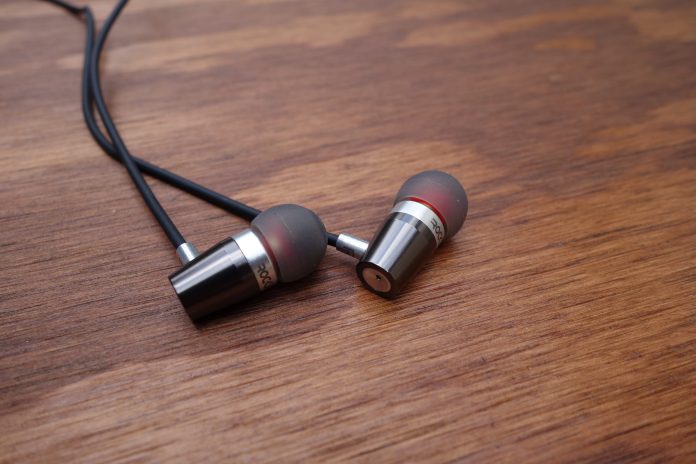
I was contacted by Rock Jaw Audio about an opportunity to review its flagship earphone, the Alfa Genus V2. I hadn’t heard of the company before, attributed to the fact that it is an underdog British audio manufacturer. But the rave reviews I was seeing really caught my eye. What could this company be doing to get such good word?
Upon opening the packaging, I could see a couple differentiating factors for earphones in this price bracket (£44 retail, or about $65). Namely, a metal build and frequency tuning filters – features you’ll only really find on high-end earphones. Let’s check out if the Alfa Genus V2 can hit all the right notes.
Design
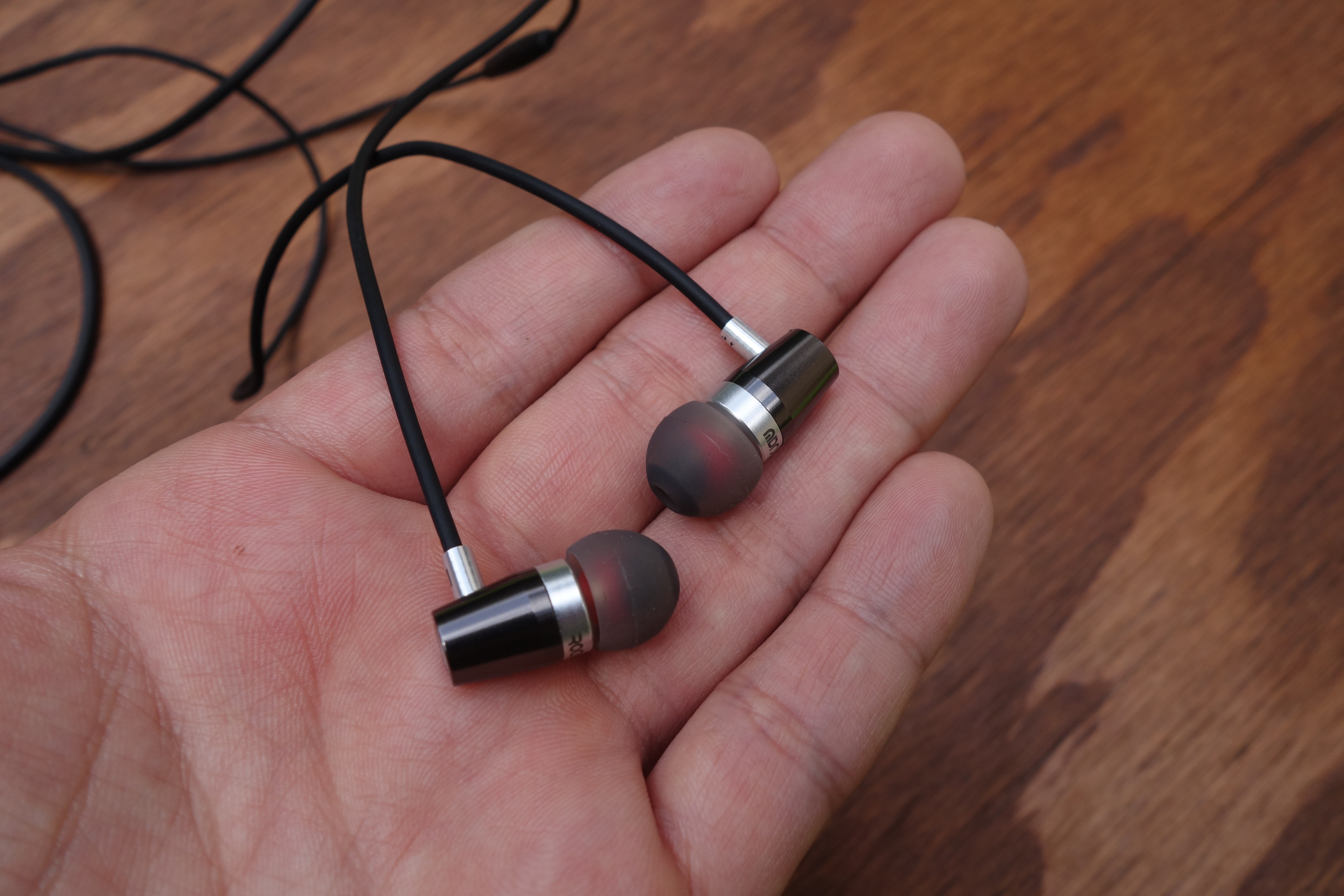
From afar, the Alfa Genus V2 look unassuming. The earpiece design is cylindrical, with a slight taper. But up close, you’ll notice some nice design cues.
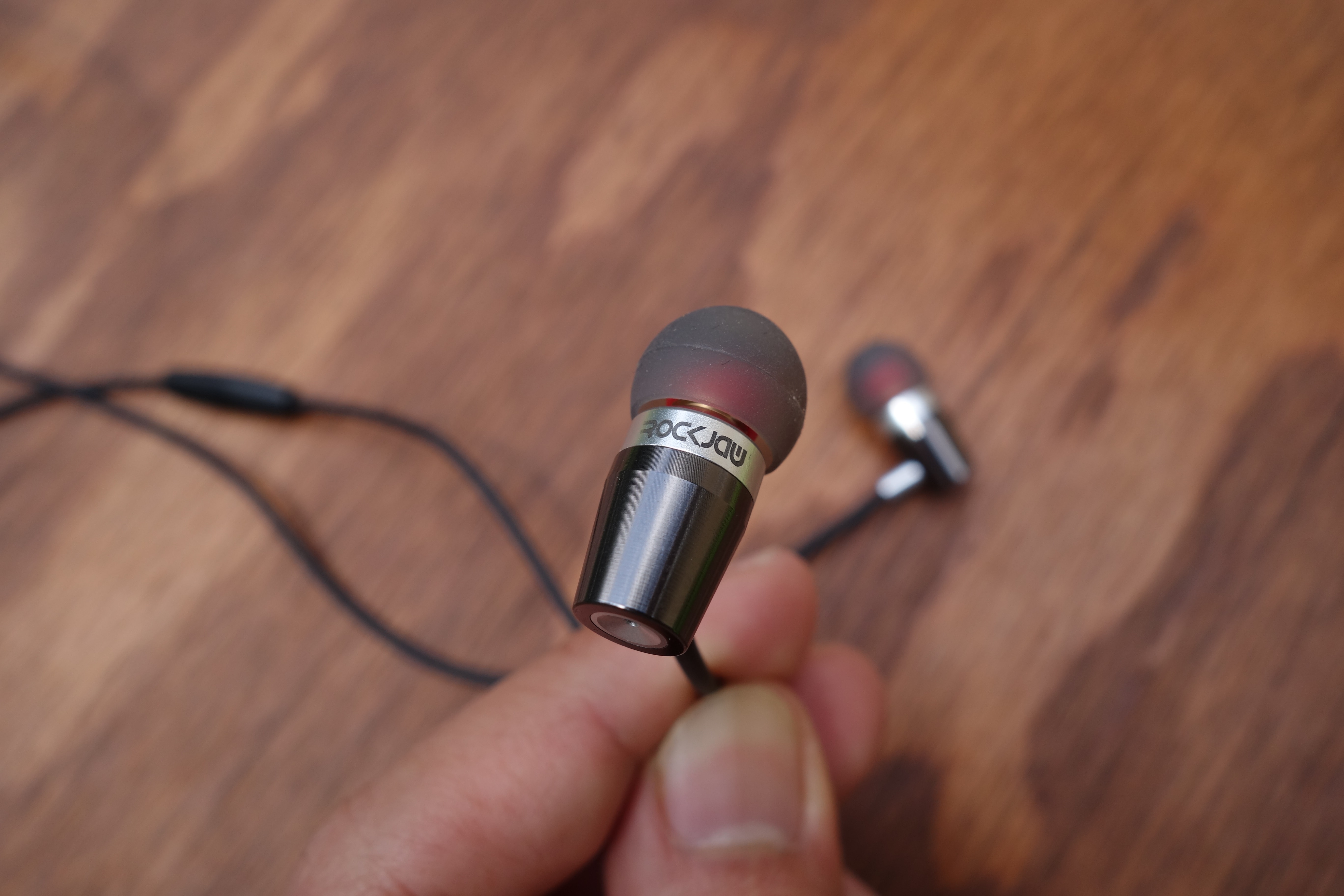
The lightweight Aluminum casing is surrounded by a glossy finish with the slightest ridged texture (you’ll only see it up close). There are accents of the true metal color at the front portion of the chassis, the cable stem, and rear cap.
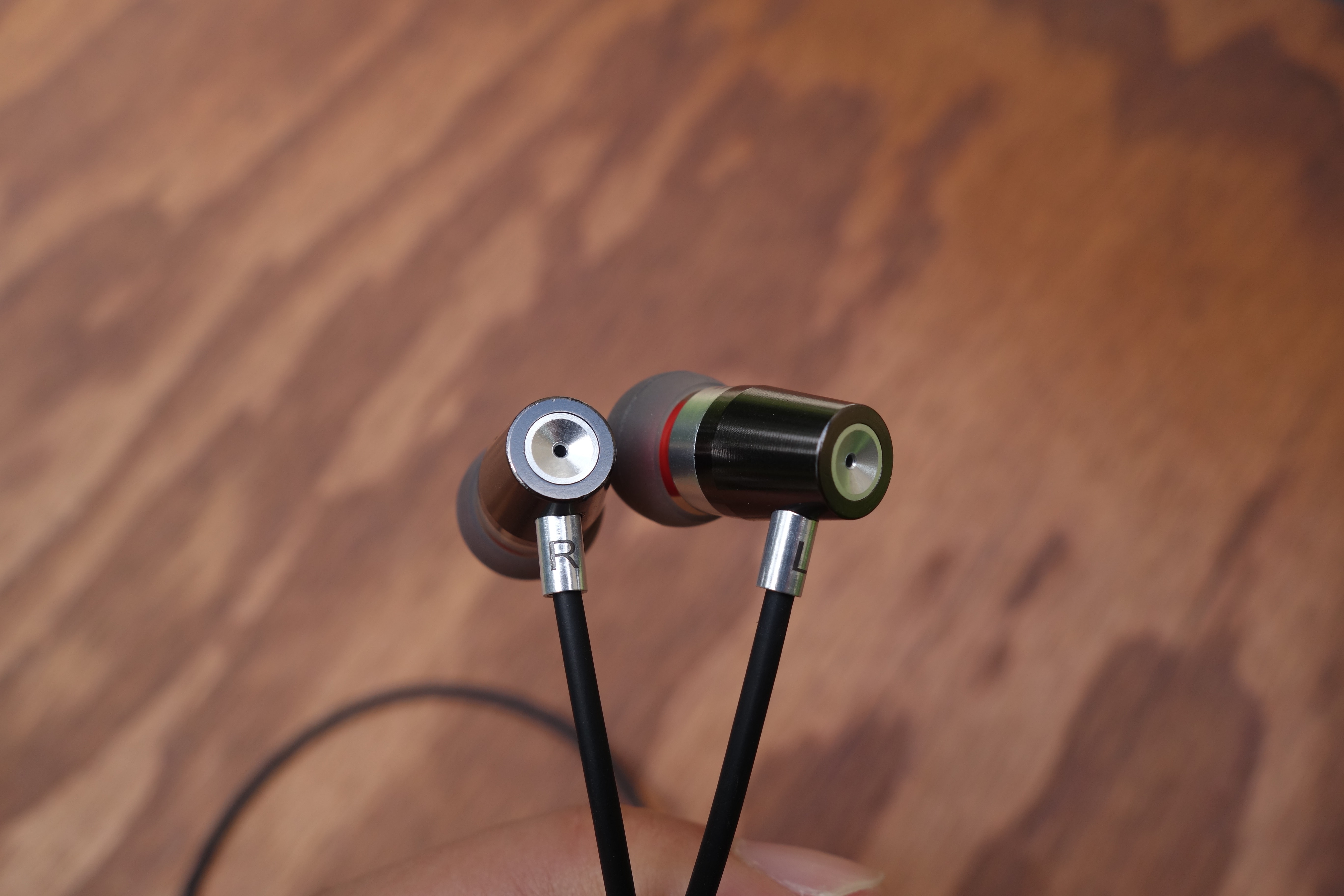
A subtle but interesting aspect is that the back end concaves and there’s a tiny opening at the center. I think that this is a bass port, like on the Sennheiser IE 800, to improve the sub-bass response. When I cover the holes with my fingers, I notice that the sub-bass is dampened. You don’t really find this extent of audio detail on earphones at this price range, resulting in a deep and well-defined low-end. But we’ll talk about the audio quality a little further in the review.
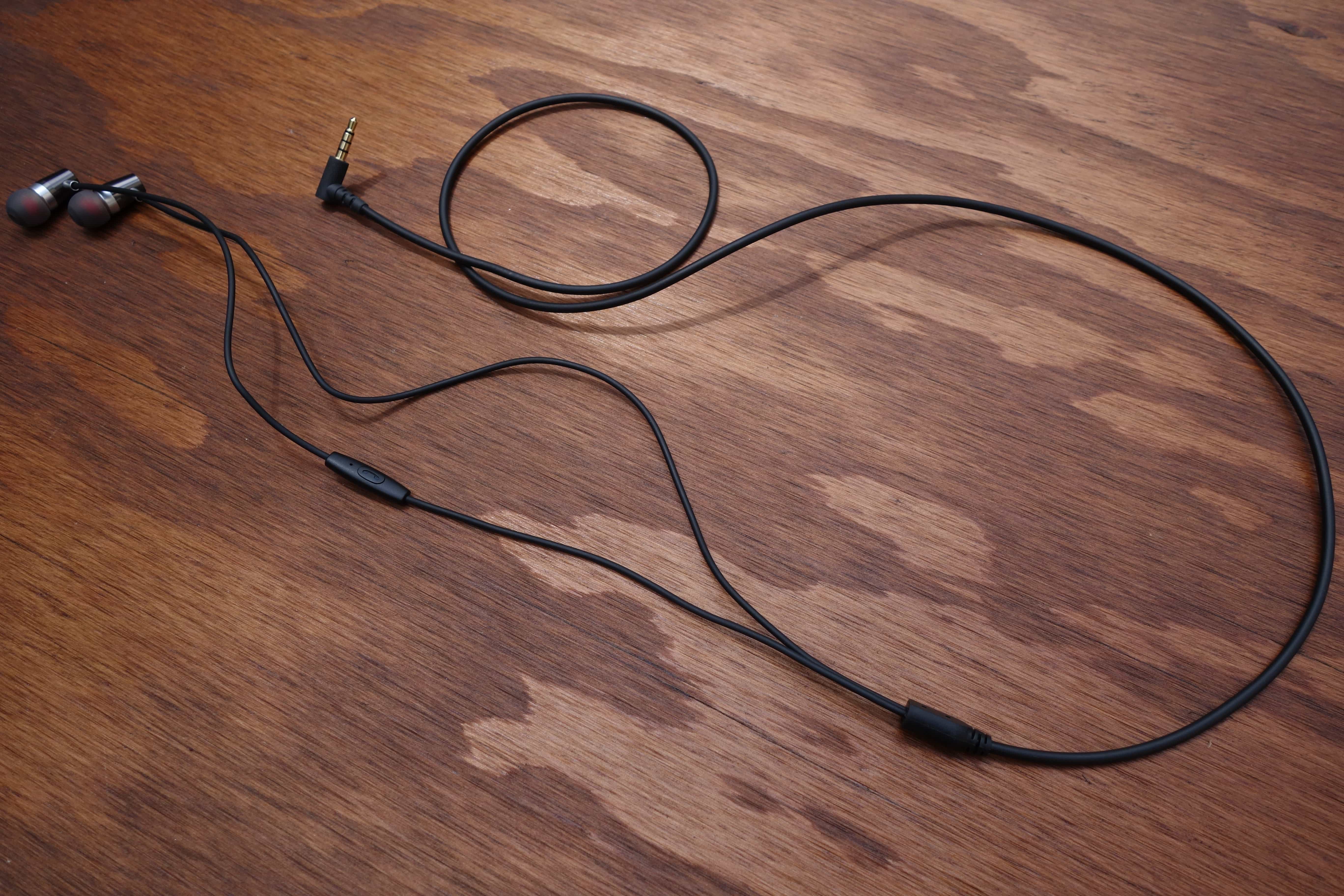
The cable is fairly basic, but is done well. It’s made of a firm, rubbery wrapping, and close to 4 ft. in length. It’s a little on the thick-side, but the benefit is resistance to tangles. Shortly down the left earpiece wire is a simple one-button remote. There’s a mic for picking up calls, but the button can also switch tracks with multiple presses.
Usability
Rock Jaw is very considerate with the V2’s packaging. You’ll get four sets of silicone eartips (small, large, and 2x medium), a double flange pair, and two sizes of foam tips. There’s also a small drawstring pouch to carry it all.
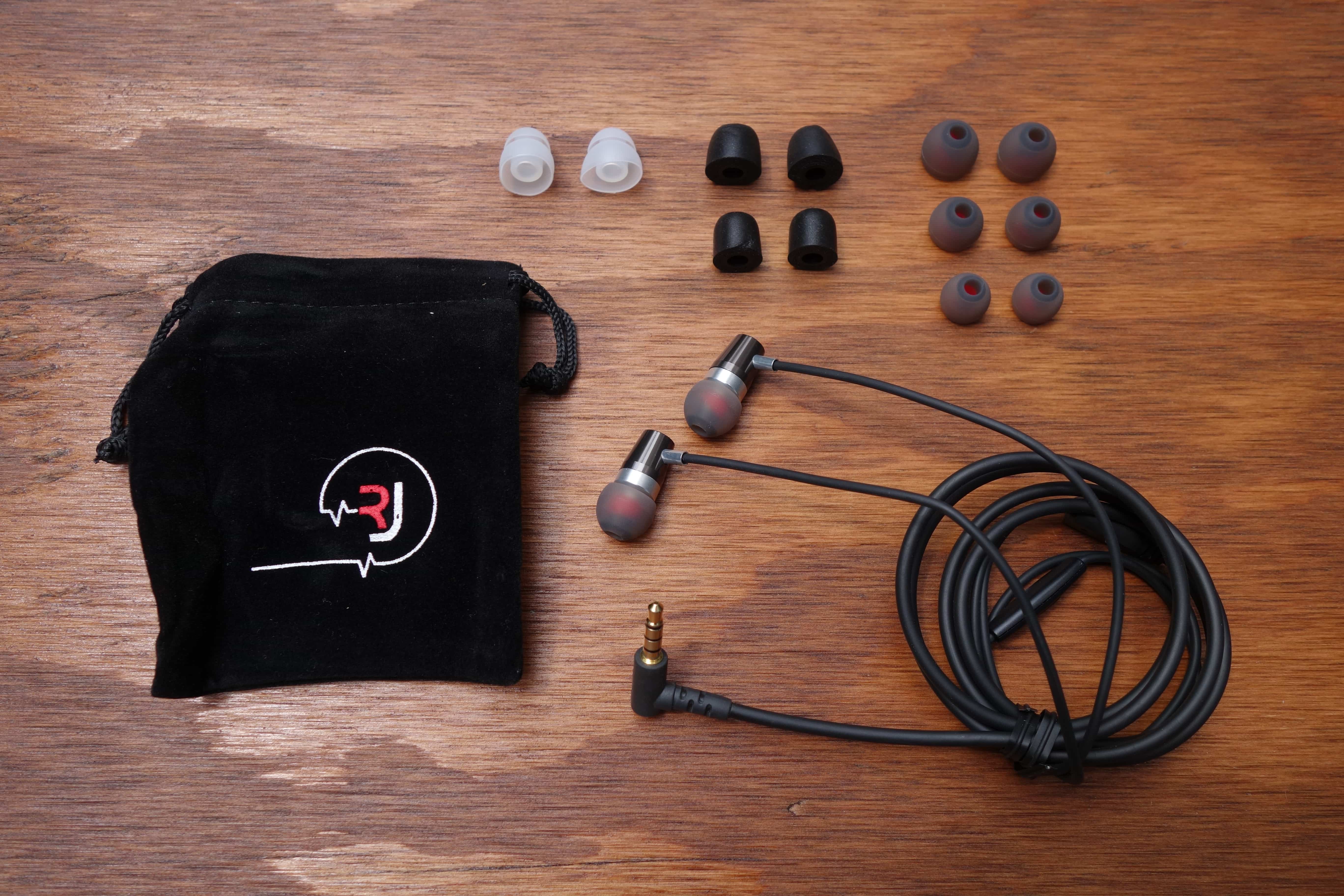
I found the fit to be fantastic out of the box (medium silicone tips are pre-installed). It easily seals and stays in place. Isolation for silicone tips is decent too, but it’s great that Rock Jaw includes foam tips to improve it further.
The cable is also decently resistant against microphonics (noise from cord rubbing). Although, unlike most manufacturers, Rock Jaw didn’t put a chin slider above the y-splitter. I don’t know why it wouldn’t; it’s not like there’s much to it (just a small attachment that keeps the cords tidy.
I really praise Rock Jaw for incorporating an interchangeable filter system into the Alfa Genus V2. This isn’t a feature I’d expect on sub-$100 earphones; I’ve only seen it on high-end models. It works like most do, where you get three different ways to tune the sound signature: neutral (balanced), bass, or treble emphasis.
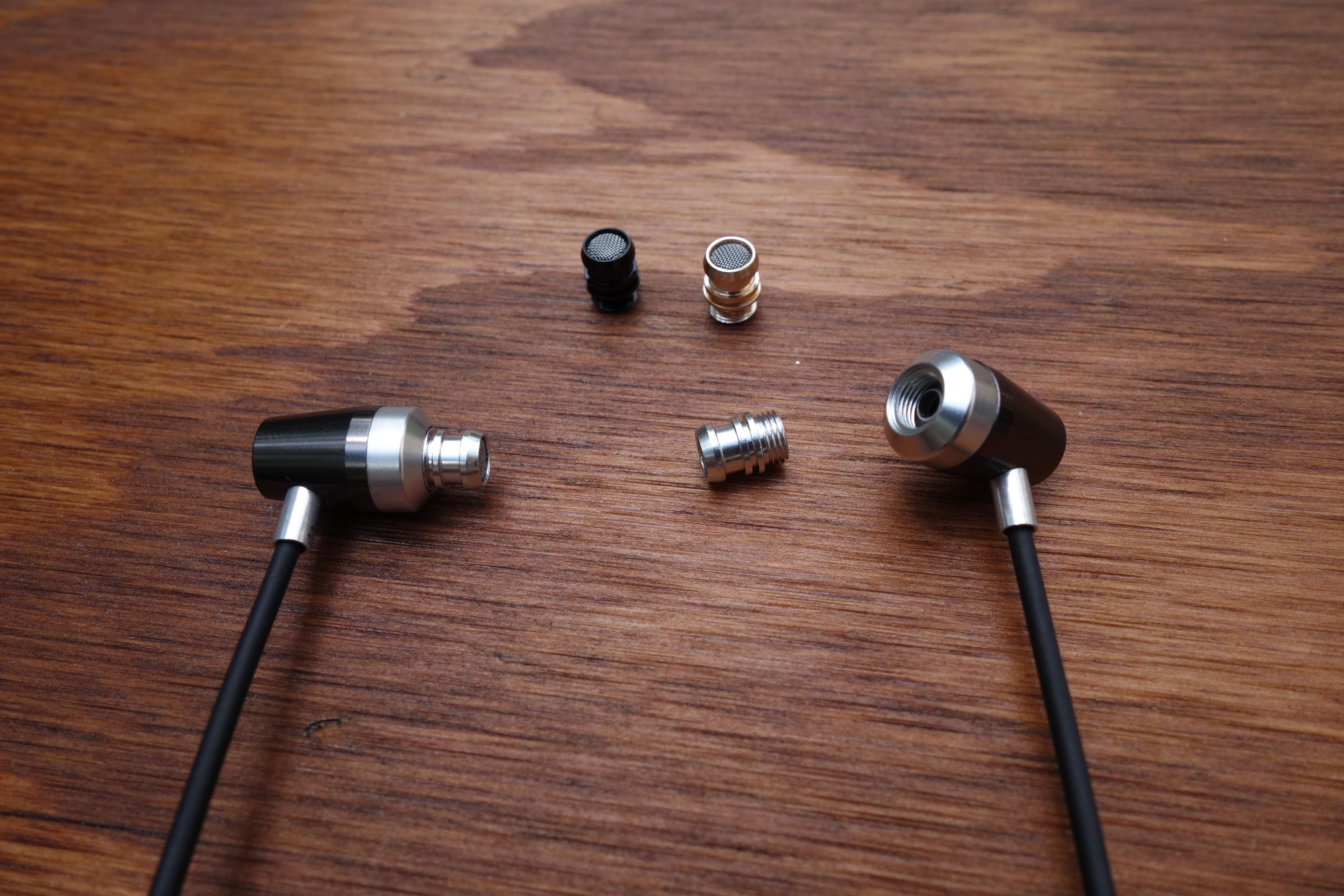
The different nozzles are color-coded: Silver for enhanced bass, Gold for neutral, and Black for enhanced treble.
Changing the filters simply involves unscrewing the nozzles and screwing in one of the three included pairs. Super easy. The V2 comes with the bass filters pre-installed. It’s a little baffling why they don’t come with the neutral setting, for those who don’t care about messing with the true sound.
Sound
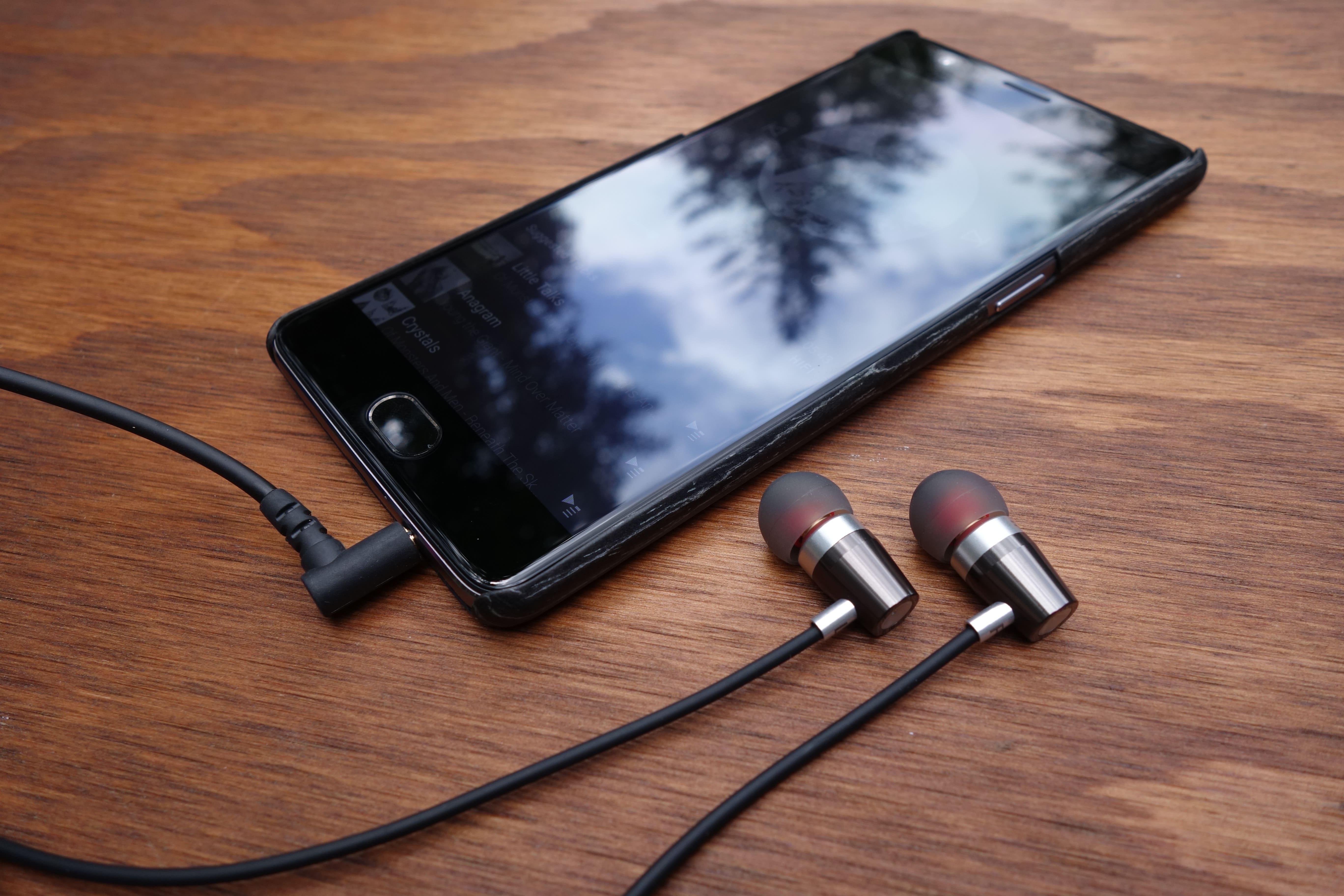
*I’ll be primarily be commenting about the neutral sound filter.
I’ll cut to the chase and say that I was very impressed with the sound quality of the Alfa Genus V2. When you’ve heard as many headphones as I have, you come into an expectation at a price bracket. Frankly, the V2 blew away my expectation for a sub-$100 earphone. This is the type of earphone that makes you regret spending so much on your daily driver investment.
Let’s talk about what that means. First, the V2’s articulation is notably clean. Cheaper headphones typically suffer from muddiness more or less throughout the spectrum, and while the V2 isn’t completely absent from it, it is surprisingly crisp for the price-point. Not only that, but the sounds have encompassing depth, and do a great job filling out the perceived 3D space around you (aka soundstage).
Earlier, I also suggested an excellent bass response. Particularly, the deep sub-bass is like what you’d find on much pricier earphones (assumingly due to the port on the back of the earpiece). However, it leads to a hard-hitting, punchy mid-bass, which may not be for everyone (and this is with the neutral filter). This is my biggest complaint about the sound signature, as the bass tends to overshadow. You must be a huge basshead to prefer the bass filter, as things become severely bloated at that point.
I loved the mid-range of the V2. Even with the prominent bass, it’s forward enough to still be appreciated. Things like vocals and guitar strums have a lushness and airy-ness, after the likes of Shure’s reproduction. The treble is also not just pushed to the background. It can crank out some decent detail, although, I could use more upper-end sparkle.
Final Thoughts
I am super impressed with the Alfa Genus V2. Not to sound like a snob, but I don’t expect much from sub-$100 headphones. Rock Jaw has shown me that gems are out there. No, it’s not perfect, and no, I won’t tell you there isn’t value in high-end earphones. But these challenge the price gap very well, and they’re my new go-to when recommending the best bang for your buck earphone.
The Alfa Genus V2 is sold through Rock Jaw’s UK site, but I was told that they’ll be on Amazon.com next week!
Alfa Genus V2 product page
Instagram adds a translation feature for text inside the app
On the heels of announcing it amassed 500 million users, Instagram is adding a new feature to help its global audience better understand each other. The filter-driven photo and video app will get a translation tool “in the coming month.” When it arrives, you’ll be able to tap a “See Translation” link to make sure you know exactly what a bio, caption or comment says. Instagram currently supports 24 languages, but it did explain that older comments and captions may not be privy to the update.
Other social networks, like Twitter, offer a similar translation method for keeping pace with users around the world. While Instagram specified the feature was rolling out, some of us here at Engadget are already seeing it inside the app, so you may not have to wait long to use it. Now you’ll really know exactly what someone thinks about your brunch pics.
In the coming month, you’ll see a translation button on feed stories and profile bios written in languages different from your own. The Instagram community has grown faster and become more global than we ever imagined. And we’re excited that you’ll soon be able to understand the full story of a moment, no matter what language you speak. To learn more about translation on Instagram, check out help.instagram.com.
A photo posted by Instagram (@instagram) on Jun 22, 2016 at 10:00am PDT
Source: Instagram (1), (2)
Match the Three Stooges is exactly what you think it is (review)

The venerable “match-3” puzzle games run in the dozens in the Play Store; with the main point of variation being theme of which the blocks or items represent, along with the corresponding background, music, and sounds effects.
Well, in case you’ve been searching for a match-3 showcasing the timeless comedy and visual appeal that is the Three Stooges, you are now in luck. Available for free in the Play Store, Match the Three Stooges from the developer Polyslab Games provides authentic Stooge music, dialogue, and sound effects while you move through 100 different levels of match-3 action.
Gameplay
 No surprises here: the game plays exactly like almost every other match-3 puzzler out there. A maze of mismatched Three Stooges faces and symbols are arranged on screen; your job is to move one block one space (up, down, left, or right) to match up three in a row. Upon doing so these three blocks disappear dropping down the blocks from above. This can and will cause a domino effect as these falling blocks create three-in-a-rows of their own, help you to clear the screen in the limited number of moves each level provides.
You have access to several ‘weapons’ you can purchase with  currency earned through the game, and through real money via your Google account. These include pies in the face (takes out all items of the same color), bombs (blows away whole chunks of your board), and other assorted ordinance.
At the end of each level you are graded (one to three stars) based on how efficient you were in clearing your board.
Controls work fairly well, though this game is better-suited for a tablet device. The blocks on my Galaxy S5 were a bit small to accurately grab and drag where I wanted them to go.
Music, Sound Effects, and Visuals
The music, while actually fairly well done (a mix of classic stooge-esque goofy tunes and more modern rock instrumentals), does get old rather quickly, especially if you’re playing in a public space. The star of the game in my opinion is the sound effects, which are full-on snippets from a lot of the classic Three Stooges skits. These run pretty constantly through the game, whether you’re making a move, deliberating quietly, or during a board-clearing domino effect.
 The visuals run in between these two extremes; good but not great, though they certainly won’t make you want to turn the game off.
Verdict
Again, if you’re looking for a match-3 puzzle game, you have a  plethora of choices in the Play Store. If you’re looking for this type of game and are a huge Three Stooges fan, then you just hit a small, free lottery, my friend. Enjoy.
Google will teach you to write Android apps
Learning to make your own Android apps isn’t easy, especially if it’s your first time programming anything. Do you find a tutorial and hope for the best? Sign up for classes at the local college? Google might have a better way. It’s introducing a free Android Basics nanodegree at Udacity that has Google experts teaching you how to write simple Android apps, even if you don’t know a lick of code. The online course guides you far enough through Android Studio that you’ll have an “entire portfolio” of programs by the time you’re done — you may not write the next Instagram, but you should be comfortable.
You can pay for coaching, career counseling and other help if you like, and Google is encouraging you to to move on to the Career-track Android nanodegree if you see development as your calling in life. It’ll even give you a scholarship for that mini-degree if you’re one of the first 50 people to complete the Basics course. No, Google isn’t giving things away out of sheer generosity (it wants to foster the next big Android hit). However, this is still an important gesture. While many operating system creators will gladly give you the tools to get started, it’s rare that they show you how to use those tools when you’re an absolute rookie.
Source: Udacity
IdeaUSA W205: The Gateway to a starter wireless multi-speaker system (review)

At $69.99, the IdeaUSA W205 is a versatile smart speaker that connects and streams music in a variety of ways, from Bluetooth to wi-fi. It’s portable, lightweight, with good sound quality. And it’s a nice starter piece for building a home wireless speaker system at an affordable price.
Many Options for Streaming Music
Like most wireless speakers in the under $100 price range, the W205 streams music using Bluetooth, micro SD card (TF), Airplay, or connects physically with an audio cable. It also connects to wi-fi with the help of the free IdeaHome app. The app has the ability to connect and control other IdeaUSA speakers, creating a multi-room audio system. The speakers can play independent of one another, playing different music in separate rooms, or in tandem. (Sometimes IdeaUSA offers a discount when two or more speakers are purchased at the same time.)

I had no problems connecting the speaker using all of the previously mentioned methods with the exception of wi-fi. Even though my router meets the minimum required 2.4 GHz 802.11 b/g/n, I was not able to connect after several attempts. I was too lazy to contact customer support, which seems responsive based on a few customer reviews that cited similar issues. Most people didn’t seem to have a problem connecting to wi-fi, though.
Solid Performance
I performed the usual music tests, listening to classical, country, rock, pop, R&B, jazz, and podcasts, playing the speaker for about eight hours without needing to recharge. I even blasted “Game of Thrones” when I was testing out the ability to connect to my tablet.
The W205 performed solidly considering its size; the two subwoofers do a good job helping to project the sound. No surprise that it doesn’t handle deep bass very well, either sounding muddled or non-existent. As noted in many of my reviews, speakers in this price range usually perform well in the mid-range.
Unobtrusive Design
Simply designed with a wraparound grill, the W205 is unobtrusive with a 5-inch squareish sized ovoid, dent resistant, hard plastic/metal body. Available in either red or dark silver, its rounded edges make it easy to hold and carry from room-to-room or to the outdoors.
Controls are located on top: power, wi-fi/Bluetooth, six programmable playlist buttons, volume, play, back/forward. There’s no mic, which is not a surprise since IdeaUSA markets this as a home speaker. There are indicator lights for wi-fi, Bluetooth, TF card (micro SD), aux, charging mode, and battery level.

I’m not sure why IdeaUSA chose to use a combination of synthesized chimes and an affected British-Asian (?) accent male voice to alert users when a function has been turned on. I am not a fan of the booming voice announcing “Bluetooth mode has been on” (sic) every time I touch the button. It actually startled my dog a few times when I booted up the Bluetooth.
Summary
The W205 is a good affordable wireless speaker and especially worthy of consideration if you’re in the market for a reasonably priced multi-room system.
Check out the IdeaUSA W205 Wireless speaker at Amazon for $69.99.
Key Specs & Other Information
Dimensions: 5” x 5.3” x 2”
Weight: 1.1 lbs
Speaker output: 2 x 3W
Bluetooth: v. 2.1
Wi-fi: 2.4G, 802.11 b/g/n
Lithium ion battery, lasts 8-10 hours on one charge
Speaker comes with USB cable and 2.5 mm aux-in cable
Warranty: 1 year + 30 day money back guarantee
VLC for Android now plays videos from your local network
VLC for Android just became much, much more useful if you like full control over how and where you play your videos. The newly released VLC 2.0 rolls in a few big features that you may well have missed, most notably network browsing. Yes, you can find that elusive movie on your home media server. The upgrade also brings a pop-up video window that’s helpful for tablet owners eager to multitask.
Other big improvements? The Android TV version has a fresh interface (and has merged with the regular mobile app). You can create video playlists, and it doesn’t need as many permissions to play nicely with your device. All told, VLC has matured enough that it’s worth considering if your existing Android media app just isn’t cutting it.
Via: VideoLAN (Twitter)
Source: Google Play, JB Kempf
 AIVAnet