


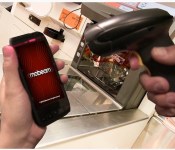
Shopping app lets you beam payments to old-fashioned cash registers

Remember Mobeam’s barcode scanning trick? It looks like it just found a new home: the Clutch app. The digital shopping app can now beam credit card numbers, ticket info, coupons and gift card data to the regular laser scanners used at most retailers. The catch is, of course, that this feature only works on the few devices that support Mobeam — namely the Samsung Galaxy S 4 and the Note 3. Although the feature is limited by device, it’s unique because it puts the burden on the customer, unlike options like Square that require retailers to abandon traditional payment systems for new technology. Mobeam actually released a similar app of its own sometime ago, but hey, when your technology is supported by just a couple of phones, even partnering with the competition is a good way to reach more people.
Filed under: Cellphones, Mobile
Source: Clutch

Path finally brings video to its Android app more than three years after iOS

In the fast and frenetic world of mobile, a three year wait for a simple feature Apple users already have might put you off using one of your favorite apps. But that’s exactly what happened with Path, the once popular semi-private social network, which has taken an extraordinarily long time to bring video to its Android app. Following the launch of Path 3.4 on Google Play, Android users finally now have the option to record 30 second movies and apply a range of pre-selected filters, which can be shared to their private timeline alongside text, photo, location and other updates. While iPhone owners may welcome an influx of video shares by their Android counterparts, the fact it took over three years to roll out one Android feature and six months to fine-tune a new Windows Phone app means Path’s recent mobile launches aren’t likely to register on blip on Vine and Instagram’s radar.
Filed under: Internet, Software, Mobile
Via: Path Blog
Source: Path (Google Play)
FiftyThree Files for Trademark on ‘Paper’ After Facebook App Release [iOS Blog]
 FiftyThree, the company behind popular iPad sketching app Paper, has filed for a trademark on the term “Paper” following the announcement of Facebook’s magazine-style news curation tool, also named Paper.
First discovered by TechCrunch, the trademark was filed with the United States Patent and Trademark Office on January 30, the same day Facebook initially unveiled its new app. As noted by FiftyThree co-founder Georg Petschnigg in an open letter, FiftyThree was not given advanced notice of Facebook’s plans and was taken by surprise by the app release.
Though FiftyThree previously filed for a trademark on the term “Paper by FiftyThree” it did not have a trademark for “Paper” at the time that Facebook created its app. According to two trademark lawyers that spoke to TechCrunch, while the trademark is newly filed, FiftyThree could have a case if it proceeds with a lawsuit as trademarks are partially use-based and it has been using the Paper app name since early 2012.
Trademarks, to a degree, are use-based. This means that “just by using a mark in a particular field, you’ve got rights,” said Cardona. “Some are state-based and some are federal-based, but if I start using a mark before you in the same area of goods or services, I’ve got rights to the mark over you.”
It remains unclear whether FiftyThree will win the trademark, as paper is a term used by many other products, apps, and services that predate even its own app. FiftyThree has not said whether it will pursue legal action against Facebook, but Petschnigg says the company is “keeping its options open.”
For now, FiftyThree has asked Facebook to “build a brand name of their own” and to stop “using our brand name.”
Paper by FiftyThree can be downloaded from the App Store for free. [Direct Link]
Paper by Facebook can be downloaded from the App Store for free. [Direct Link]
     |

Pacemaker DJ app for iPad swaps your record bag for your Spotify password

Third time lucky? The team behind Pacemaker clearly thinks so. What was originally ambitious hardware, had to reinvent itself as an app after a complex business arrangement meant things didn’t work out. Sadly, the app chose a platform that limited its scope, when it launched as a BlackBerry-only offering. Today, Pacemaker is back, and perhaps where it most logically belongs — as an iPad app. The totally reinvented interface is much cleaner than before, and operates on a freemium model (unlock extra features like effects at a small cost). Most notable though, is the partnership with Spotify, giving you instant access to the streaming service’s entire library. You’ll need a premium account, but there’s a free trial included in the app. This is something that was attempted before, albeit in breach of Spotify’s terms and conditions. Perhaps the most pleasing part of the story though — at least for owners of the original hardware — is that Pacemaker the device hasn’t been forgotten. Today, it receives a new firmware update which brings new features and improvements to the now, cult gadget. So whether you’re hardware or software, it’s time to dig out those headphones.
Filed under: Tablets
Source: Pacemaker device, iTunes

Paper news-reading app makes Facebook prettier, a bit less functional (hands-on)

Upon installing Facebook’s newest app, you’re greeted by a friendly female voice. “Welcome to Paper,” she says. And, for many folks, Paper will be a welcome change indeed. But, before we tell you why Paper may be preferable to the full Facebook app, let’s establish just what Paper is — it’s only been a few days since it was revealed to the world, after all. Generally, Paper is a news-reading app that shows users the stuff they already get in their News Feed, in addition to stories pulled from content partners (including Engadget, of course) by Facebook’s in-house team of tastemakers.
After its verbal welcome, Paper shows you a beautifully shot, superfluous bit of marketing video. (We’ve already downloaded the app, right? We don’t need to be sold on it a second time.) It then tells you how to set things up. Should you already have Facebook installed on your phone, there’s no need to punch in your login info again; Paper knows who you are and takes you straight into your notifications. We thought that was a bit odd, but we suppose seeing your notifications first is something that some users might appreciate.

Regardless, upon dismissing the notifications window, the app then asks you to select the sources of news that you’d like to see. Your News Feed is, of course, selected by default, but you also get 19 other topics to choose from. Most are the usual subjects — news, tech, sports, food, photography, etc. — but there are some more unique choices, such as Ideas, which Facebook describes as “a daily, in-depth look at one standout idea, event or personality,” and Equalize, which is news about eliminating gender bias and discrimination. Naturally, you can shuffle these topics any time you want in the settings, and you can also arrange them in any order you prefer.
Once you’ve chosen the stuff you want to read about, Paper takes you to its central navigation screen. The top half is occupied by the aforementioned topics, and will be very familiar to users of Facebook Home’s Cover Feed. It cycles through stories from a particular feed every five seconds, and a tap takes you directly to the full post, where you can like, share or comment on it. The lower half is made up of a series of cards that are the full feed for a particular topic. Navigating through topics and individual stories is accomplished by swiping left to right, and switching back from individual stories to the main feed is done by swiping down from the top of the screen. After the app informed us how to navigate, it became second nature within a few minutes. We found the UI to be well thought out and intuitive. Our only quibble? We wished we could navigate among the posts that were cycling through the topic pane, instead of having to wait for the seemingly endless seconds required for the app to show posts we wanted to read, but missed the first time round.
In the lower carousel, individual stories are presented in a trio of ways: a white card with a tap-able link and an image, a card that is all image (truncated, à la Facebook Home) or a white card with a sub card that can be unfolded to view the full story. We’ve been unable to detect any rhyme or reason as to which posts get which stylistic treatment, and each type of card behaves a little differently. For instance, the two types of white cards look similar — the only differences are that the first type I mentioned has a grayed-out “Continue Reading” link and there’s an absence of text immediately beneath the image — but they behave differently enough to be annoying. The first style requires tapping on the link to open up the full story on its associated web page, while swiping up on the picture simply moves the image around until you release, whereupon you get the full, non-truncated version of the image. Performing the swipe on the second style of white card allows you to unfold the story into its web page directly (similar to its competition, Flipboard).
Meanwhile, the full-image cards incorporate some motion control: Users can tilt their phones left and right to see the undisplayed portions of the picture. It’s a largely useless addition to the app, in our opinion, simply because you have to turn the screen away from your eyes to view the far edges of an image, which means you’re seeing it at an oblique angle. Plus, you can simply tap the image or turn your phone (or iPod touch, in this editor’s case) to landscape mode to see the full picture head-on.

Aside from providing you with news to read, Paper also gives you limited access to Facebook in general. You can post to the social network, of course, and it lets you view your and your friends’ photos, pages and posts. There’s also search functionality and access to Groups, Events, notifications, messages and friend requests. Plus, you can change your account and privacy settings from within Paper, too.
We think that for many folks, Paper can serve as a main mobile Facebook access portal. As far as its UI is concerned, Paper puts the regular Facebook app to shame. Its swipe-based navigation is easy to use, and Paper reduces the amount of visual clutter on screen to a fraction of what you see in the full FB app. Because of that, it’s better able to highlight the content that most users come to Facebook to see in the first place. That being said, Paper doesn’t give power users full access to FB — we couldn’t find a way to access our Groups and apps, or Pages we administer, and that’s just the shortcomings we found in our first few hours using the app.
In short, Paper’s perfect if you’re looking for a more beautiful way to consume News Feed content, but it may not suit your all your needs if you require more out of your social networking app.

Scentee’s smelly smartphone notifications are now available worldwide

If you were crestfallen when you heard that Scentee’s fragrance-emitting smartphone add-on would be hard to get outside of Japan, you can relax — it’s now available worldwide through the company’s site. The perfume plug-in sells for $35 by itself (plus a whopping $30 in shipping), while scent packs for coffee, lavender, rose, rosemary and strawberry will cost you $5 each. That’s quite a lot to pay for smell-based notifications on your Android device or iPhone, but Scentee is at least more practical than some of the other novelty imports that we’ve seen as of late.
Filed under: Cellphones, Peripherals, Mobile
Via: Electronista
Source: Scentee

Cinemagram update takes all the work out of making animated gifs

Playing around with Cinemagram’s moving photo feature is pretty darn fun, but it comes at a cost: effort. Unlike publishing a Vine or an Instagram video, you need to think about it; what part of this photo do you want to animate? Did you map out the moving area correctly? It’s a lot of work. Well, it used to be. The app’s latest iOS update takes all the guesswork out of creativity, adding a new camera mode that automatically creates Cinemagrams without your input. Presumably, the update will make it easier to snap and share moving pictures on the fly, giving you a reason to pick it over its competitors. The update gives users the ability to add captions to Cines as well as the ability to share to Pintrest – unfortunately, the app hasn’t automated that just yet.
Filed under: Cellphones, Software, Mobile

New Microsoft app brings recipes and grocery lists to your Windows Phone

The Bing Food & Drink app for Windows 8.1 is handy if you need to look up a recipe on your PC, but what if you’re searching for ingredients at the store? Never fear, as Microsoft has quietly released a beta Windows Phone version of its culinary software. Much like its desktop counterpart, the mobile port will let you both search for great meals and create grocery lists. Microsoft makes full use of its own platform by syncing selections with the desktop app, putting a Live Tile on the home screen and making it easy to share favorites. Lumia-toting amateur chefs will want to grab the app today from the Windows Store.
Filed under: Cellphones, Mobile, Microsoft
Via: WPCentral
Source: Windows Phone Store

Leaked Samsung app aims to catalog everything you do on your smartphone

Samsung could become the latest company to jump aboard the lifelogging bandwagon with its new “Life Times” app. Judging by leaked screenshots shared with SamMobile, Samsung wants to automatically log phone and app usage on Galaxy smartphones, cataloguing photos, emails, location, music, messages and social network updates, displaying all of that data in a daily digest. Samsung’s Story Album app already offers similar features for photos, based on common details such as location and time, but Life Times appears to function more as a diary app, like Day Journal for Android or Day One on iOS.
It does, however, fly in the face of reports suggesting Samsung is working with Google to scale down its Android customizations and reduce the number of in-house apps. Given the wording used in some of the screenshots, we reserve a healthy amount of scepticism while understanding the app could also be in early development. Samsung has rolled out new apps and services with its new flagship smartphones in the past, leading us to wonder if Life Times, if it is real, could make an appearance with the unveiling of a certain new Galaxy S handset.
Filed under: Cellphones, Internet, Software, Mobile
Source: SamMobile

Mint now lets you keep track of Bitcoins with its personal finance apps

Now that Bitcoin has taken root in daily financial transactions, those who fancy the digital currency need a way to easily keep an eye on the tally. Well, for the folks that meet that criteria, Mint now lets users keep track of transactions with the help of Coinbase. This means that Bitcoin Wallet figures can be viewed alongside other banking, credit card and investment accounts. The integration also automatically converts the account balance to US dollars to keep the mental math at a minimum.

Filed under: Internet, Software
Source: Mint
 AIVAnet