


Microsoft OneDrive adds sharing and organization features for Android

If you’re a Microsoft OneDrive user on Android, sharing and organizing files just got a bit easier while on the move. Thanks to an update to version 2.5, the cloud-storage option allows those with Google-powered mobile devices to share via invite, link or sending files to an outside app. You can also download multiple files at once, while moving and sorting individual items and folders as needed. There are some new additions on the desktop side too, including adding items to a previously shared stash, publishing video content to Facebook, custom album covers and more. The new version of the Android app is available now in Google Play and the desktop features are rolling out to users “over the coming days.”
Source: Microsoft (OneDrive Blog), Google Play

Google Maps gets offline mode, lane assist, and more

Google has just deployed a huge update to its Map application which brings offline mode, lane assistance, and Uber integration.
Updated for both Android and iOS, the new Maps app brings the following new functionality:
Don’t miss your next turn or exit. The Google Maps app now shows you which lane to stay in or move to so you’ll never find yourself driving for miles down the wrong road. You’ll also have easy access to alternate routes while you’re navigating, so you can choose the best drive for you.
Don’t worry if you’re not online. Before setting off on your next vacation, hike, or roadtrip, search for an area and tap on its place info sheet, then when available, you can select “Save map to use offline”.
Don’t be late for last call. With new filters, you can browse through restaurants, bars and hotels by opening hours, rating, price, and more.
Don’t limit your options. Frequent Uber rider? If you have the Uber app installed, you can now compare your ride with transit and walking directions right from Google Maps in some cities.
Don’t miss that train. With more than a million public transit stops on Google Maps, you’ll get reliable information to help you get where you’re going.
Don’t forget the park you wanted to visit. See places you’ve saved on Google Maps across all your devices when you’re signed in.
Don’t wait to explore your next vacation spot. Search for your ideal destination—anywhere from the Gateway Arch to the Taj Mahal—then tap on the place card to dive into Street View where available.
The post Google Maps gets offline mode, lane assist, and more appeared first on AndroidGuys.

Tumblr’s mobile apps finally get full-on customization tools

While Tumblr has had mobile apps for years, it hasn’t been easy to truly cut the PC cord; you’ve had to retreat to your computer to fine-tune every aspect of your blog’s look. You won’t be held back any more, though. The social service has rolled out new Android and iOS apps that offer the same editing powers you have on the web. You can now change colors, images and anything else that was once desktop-only, and your color pick will even change the interface’s look on others’ devices.
Tumblr sees personalization as both a way to accommodate its increasingly mobile audience (now half of all users) as well as a way to one-up rival social networks. As the company explains to Mashable, many profiles elsewhere (ahem, Instagram) are locked in a “cookie cutter layout” — the look doesn’t change much from person to person. It’s hard to say if this customization strategy will pay off, but you’ll want to check out the new app if you’re keen on standing out from the crowd.
Filed under: Cellphones, Internet, Mobile
Via: Tumblr Staff
Source: App Store, Google Play
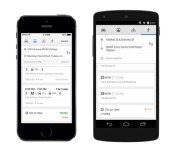
Major Google Maps update adds Uber integration, better transit info and more

Today Google announced a pretty hefty update to its Maps app, with improved navigation instructions, new search options and even the ability to jump into the Uber app to order a ride. Available for download now via Google Play and the App Store, the update includes lane guidance and easier access to alternate routes when you’re already in navigation mode. Another new feature lets you search for a specific area, such as Toronto, and save that place info sheet for offline use. For those traveling to a new city, there’s the ability to view places saved on Google Maps across all devices. You’ll also be able to star new locales to keep them bookmarked for the future.
Google’s added new filters to assist in your search for restaurants, bars and other places of interest. Sorting options include opening hours, rating and price, among others. And for those who are taking public transportation, the Google Maps update brings enhanced route options, with the ability to select “last train home” so you don’t get stranded. And finally, there’s that Uber integration we mentioned earlier — in addition to letting you order a ride, Maps will compare Uber’s options with transit and walking routes. Check it out for yourself via the download links below.
Via: Google Maps (Google Play), Google Maps (iTunes)
Source: Google Maps

Google Classroom helps teachers easily organize assignments, offer feedback

In doing its part to celebrate Teacher Appreciation Day, Google has announced a preview of Classroom: a simple system for course work organization. The free software is nestled inside Google Apps for Education and serves up a quick and easy way to create/organize assignments, give feedback and communicate in real time with students. As you might expect, Classroom leverages Google Docs, Drive and Gmail in order to complete the aforementioned tasks, automatically creating folders in the cloud-based repository for each student when there’s a new assignment. “Classroom is based on the principle that educational tools should be simple and easy to use, and is designed to give teachers more time to teach and students more time to learn,” writes product manager Zach Yeskel. If you’re an educator that’s interested if giving it a shot, you can apply to be part of a limited preview. Google plans to release Classroom to any school using is education-minded apps program in September — just in time for the fall semester.

Filed under: Software
Source: Google
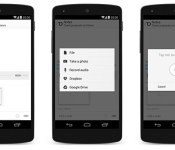
Todoist adds Dropbox and Google Drive support, audio notes for premium users

Todoist added key collaboration tools earlier this year, and now it’s going one step further for paid users. Users opting for premium account status will get Dropbox and Google Drive support to include cloud-stored files and documents with task lists. There’s support for native files too, as you can now record/play audio files and attach photos via the web or mobile apps. Alongside the aforementioned task and project sharing tools, folks using free accounts will can access the new features when they’re invited to work on a paid user’s assignment. The company says that real-time collaboration and this new file-sharing add-on is filling its productivity quiver to launch a dedicated enterprise version in the near future. If combining your storage repository with your to-do list sounds like something you’d like to add to your workflow, there’s a 30 percent discount on the $29 annual asking price for the next two days.
Filed under: Internet, Software
Source: Todoist

TicketZen lets you pay off parking tickets with a smartphone

Getting a parking ticket sucks, but paying for it shouldn’t have to be. That’s what the folks at Boston’s Terrible Labs think anyway — they built an app called TicketZen to take the trouble out of giving the state your money, and we took at peek at TechCrunch Disrupt NY today. Here’s the gist of it: once you’ve installed the iOS or Android app, you can use it to scan a barcode on your parking ticket to import all the pertinent data and pay it off with a touch.
Don’t see a barcode? That’s fine, too. Not every town is that forward-thinking, so you can punch in the violation number instead. The process of actually paying the ticket from the app can be as short as a few moments once your credit card info is stored, and in the worst case founder Cort Johnson says payments will clear overnight. It all comes down to how often each municipality submits their tickets, which is why users get a push notification when the city gets around to processing it. Speaking of different municipalities, using TicketZen to wipe away your vehicular indiscretions comes at a price — you’ll be paying the startup a small fee (between $1 and $3) depending on where you are. Got a few tickets of your own to quietly get rid of? The iOS app is usable in Los Angeles, San Francisco, Washington D.C., Chicago, Boston, Cambridge, State College and now New York City. Alas, you Android fans can only use the app in Boston, so be careful where you park everywhere else.
Dana Wollman contributed to this report.

Frontback – A Photo Sharing App for the Selfie Generation

There is no shortage of great social networks that are focused on sharing pictures. Frontback (which initially gained popularity on iOS some time ago) has made the leap to Android, and brings with it all the goodies that you would expect.
Frontback, at its core, is an application that utilizes the front and back cameras on your Android devices, and stitches them together into one fun image.You need to create an account to join in on the fun, and Frontback has made that easy by making login with Google a possibility. After login, Frontback will suggest some popular users in its community of over 1 million users, and you’re off. You can begin snapping your front and back photos to your hearts desire, and share them on Frontback’s network, Facebook, Instagram, Twitter, and Tumblr.
Some of Frontback’s features include the ability to switch between cameras, retake photos, set a self-timer, and flip images. The practical implications are great, but there are also some wildly creative and fun ways to utilize both cameras. You can check out the staff picks to get some creative ideas!
For a free app, Frontback is well made, and will continue to grow. The community is active and the photos are great! I definitely recommend checking this one out.
The post Frontback – A Photo Sharing App for the Selfie Generation appeared first on AndroidGuys.

You’ve selected Mad Men? Moviefone redesign tacks on TV listings

Earlier this year, AOL shuttered Moviefone’s call-in directory service. The brand lives on though, and today it outed a new look, with a retooled web site and mobile apps in tow. Chief amongst the changes? The addition of TV. Now, episode listings, cast info, curated Watch Lists and other details are baked in alongside a handy list of viewing options — if you’re itching to stream a selection right this second. There’s an emphasis on search, too. A query box now appears at the top of every page you’ll swipe or click to, and the results now include those Watch Lists — allowing for theme- or occasion-based title hunting. Moviefone has also ditched its iconic red paint scheme for blue as a part of the UI makeover. What’s more, the outfit is looking for a new voice, so if you’ve ever wanted to follow in Kramer’s footsteps, now could be you chance to do so. Perhaps now the only thing left to do is to come up with more accurate name for the service. “Videofone” gets our vote.
Filed under: Software, HD, Mobile
Via: Recode
Source: Moviefone

John McAfee’s latest project is yet another secure messaging app

Now that John McAfee’s days of running from the law appear to be over, he’s been left with plenty of time to slam the company he founded and mull over products that originally made him famous. We’ve already heard about DeCentral, a pocket-sized device that’s designed to block government agencies by creating secure private networks (that we’ve yet to lay eyes on), but the anti-virus pioneer has also been working on some new software tools too. One of those is Chadder, a secure messaging app that joins a long list of existing encryption-toting messaging services (think Wickr or Telegram) that promise to stop your communications from being spied upon by the NSA and other nefarious types.
What makes it different from its rivals? At the moment, nothing. Its design is basic, users aren’t afforded many customization options and the app’s friend-finding tools make it extremely difficult to do exactly that. It does have a engaging tagline though: “Say what you want! (We can’t see it anyway!)” McAfee and co. will hope the personal touch will kickstart downloads of the beta app, which is available on both Google Play and the Windows Phone Store. Expect to see it go live on the App Store “in the coming weeks.”
Via: Business Insider
Source: Chadder, (Google Play), (Windows Phone)
 AIVAnet