



Snapchat settles with FTC for misrepresenting its ephemeral nature, gathering user data

Snapchat has been a popular choice for those looking to send temporary messages that will soon disappear forever. Well, the auto-erase feature wasn’t without flaws, and now the mobile outfit has settled with the Federal Trade Commission over it. The FTC has announced that it had reached an agreement with Snapchat for misleading users about the ephemeral focus of the app, after the commission found that users could easily save messages with third-party apps and other tricks. Despite claims to the contrary, the complaint alleges that the software gobbled up location details and other user info (like contacts) which allowed researchers to build a database of over four million user names and their matching phone numbers.
Snapchat was also accused of storing sent videos on recipients’ devices in a repository outside of the app’s auto-clearing sandbox, making them accessible when connected to a computer and searching the file directory. “If a company markets privacy and security as key selling points in pitching its service to consumers, it is critical that it keep those promises,” said FTC Chairwoman Edith Ramirez. “Any company that makes misrepresentations to consumers about its privacy and security practices risks FTC action.” As part of the settlement, Snapchat also faces monitoring from an “independent privacy professional” for the next 20 years.

Facebook says it only needs Moves’ data to help build the app

When Facebook initially addressed concerns about Moves’ new privacy policy, it raised more questions than it answered: just what does it mean when it says Moves will share data? Does that mean advertisers will see your fitness routine? Well, the company has since given us a clarification — and it looks like the sharing is more innocuous than it seemed at first blush. The new policy only exists so that Facebook staffers can “actually work on building the app.” The social network needs access so that it can bolster Moves’ small development team and maintain the software as necessary.
Meanwhile, the social network has also elaborated on the “commingling” it wants to avoid. Simply put, there are “no plans” to bring any data from Moves into your Facebook account. The company doesn’t want to identify people who use both services and open the door to a myriad of privacy issues. You shouldn’t see unusually well-targeted running shoe ads in your News Feed, then, but it would have been great to have this clarity from the get-go.
Filed under: Cellphones, Internet, Mobile, Facebook

Litely looks to improve mobile photo editing by focusing on simplicity

“The best photos don’t look edited; it’s all about the story and the moment,” photographer Cole Rise quips while walking me through his new mobile image editor. You may not recognize his name, but if you’ve used Instagram, you’ve seen some of his work. Rise created the Hudson, Sierra, Sutro and Rise filters for the popular social snapshooting app. But he’s quick to tell you that the features in Instagram and other mobile editing software help mask bad photos and are generally too heavy-handed to churn out truly compelling images. So with that in mind, and with a library of presets for Lightroom, Photoshop and Aperture already in his toolbox, he set out to make a non-destructive editor with a simple UI and subtle tools. Something to make film-like tweaks good photos rather than improve mediocre ones. He created Litely for iOS.
When you first fire up Litely, you’re greeted with a photo library to which you can add shots from your Photo Stream and other iCloud folders. Of course, you can take a new shot as well, and the app leverages the iPhone’s (or iPad’s, should you so choose) built-in camera chops to do so. Ever notice how photos look better in some apps as compared to others? Well, that’s largely a software issue and having spent some time at Apple, Rise is quite familiar with the camera on the 5s. That said, Litely doesn’t employ its own tweaks behind the scenes here, but rather it lets the native hardware do the heavy lifting. This means that you can snap a load of images with the phone’s camera and save the editing for later on it or an iPad, thanks to easy access to the cloud-stored files. Or you could drop a few JPGs from a DSLR and edit them slate-style whilst on the train.

Upon selecting a file, you’re launched into the main edit screen. The overall design of the app keeps its promise of simplicity, and that’s definitely evidenced here. While you can certainly swipe up and down on the list to toggle the presets, doing so on the image itself achieves the same result. Each of the options is applied at 50 percent by default (again, subtlety) and a slider appears above the list allowing for adjustment. “That’s important because subtlety means longevity. I wanted to create an app that enhances your photos today, but keeps them looking just as beautiful and timeless in 50 years’ time,” Rise notes. What’s more, if you swipe across the image with two fingers, you can gaze at a before/after split-screen preview.
“Subtlety means longevity.”
The presets are also colored-coded to give you an idea of the hues they employ and each has a regular, high-contrast and faded setting for further editing options. A single tap on the image serves up a zoomed-in view, which can be panned around using the gyroscope of an iOS device. Not only can you take a closer look, but also you can maneuver around the edges of the photo for a better view of all the edits. During my time with Litely, I found that I preferred my iPad mini over the iPhone 5s if I had some time to sit down to edit. The increased screen real estate was more comfortable and enhanced the use of the aforementioned movement. Of course, the smartphone was the choice if I needed to take a quick shot to edit before beaming out to Twitter.
Along the bottom of the UI are menu items for corrective adjustments, a crop tool and sharing options. Once inside that secondary editor, exposure, sharpen, vibrance and vignette tweaks are all there, with another intensity slider for each. During our chat, Rise dwelled upon that last feature for a few minutes. He says that while the vignette option in most apps just adds black to the outside of the image, Litely actually adjusts the exposure for the desired effect. “It’s technically right,” he adds.

Perhaps the most compelling feature is the way the software handles files. Litely is non-destructive, allowing you to step back from an edit and start fresh. It also makes adjustments to the full-resolution images and allows the exporting of those files without losing quality — a must for photographers needing to keep photos as large as possible for later use. When you’re all done, the app offers sharing to AirDrop, iMessage, Mail, Twitter, Facebook or just saving out that full-size file. If you’re looking to share images to Instagram or another social outlet, you’ll have to save ‘em and then open the desired shot in that app. While this is an inconvenience, Rise maintains that Litely isn’t meant to be social, but rather a tool focused on editing.
For those that aren’t after the more detailed tweaks that Adobe Lightroom for mobile offers, this could be an attractive option. That more pro-minded app requires a monthly subscription though, and is really more of a complement to the full-on desktop software. At launch, the free version of Litely for iPhone and iPad will house nine presets and users will have the option of making in-app purchases of a dozen at time for $1.99 per pack.
Filed under: Cellphones, Cameras, Tablets, Software, Mobile
Source: Litely (iTunes)

Yahoo brings its personalised Sports app for iOS and Android to the UK

There’s no shortage of sport-related apps available on iOS and Android, but when a major online player outs one for the UK, it’s certainly worth a look. Having served US audiences for a little while now, Yahoo Sports today came to the App Store and Google Play on this side of the Atlantic, launching alongside a new Android version of Yahoo’s News Digest app. Sports offers personalised news, scores, goal alerts, results, team updates and, for some, the ability to capture cheeky own goals in animated GIF form. Football, rugby, cricket, tennis, golf, F1 and all major US sports are represented, giving the BBC’s updated sport apps a bit of healthy competition.
Filed under: Cellphones, Internet, Software, Mobile
Via: Yahoo UK
Source: Yahoo Sports (Google Play), (App Store)

Google Maps Updates to Verison 8! Google Camera Adds Much Needed Feature! – App Updates

Happy Hump Day gang, and when it’s Hump Day; Google starts humping away with updates. Quite a few this week. Google Maps probably gets the most significant update, by updating to version 8. The Google Camera gets that taking photos while taking video feature which will please a lot of you All updates are down below, so get them on your devices.
App Updates
Google Maps 8.0.0
Google Play Services 4.4
Google Camera
Google Wallet
All other updates here
//<![CDATA[
ord = window.ord || Math.floor(Math.random()*1E16);
document.write('’);
//]]>

Adobe Voice lets amateurs make videos like a pro (sort of)

Whether you’re doing a book report or trying to show someone how to boil an egg: video can make it a heck of a lot easier for you to get your point across. Adobe’s new iPad app, Voice, hopes to make the often time-consuming experience of creating your own such videos a lot faster and easier. The app guides you through making a sharable vid, from the conception of your idea to the finished product. We’ve had a chance to try it out for the past week. We found that the app makes it easy to create some pretty professional looking stuff without having any special skills or a lot of time, but there’s just one thing missing.
To kick things off with Voice, you’ll need to pick a topic and a story type. Once you do, the app will launch a project for your video — complete with instructional cards that give you an idea of how to tell your tale. The app is broken into several types of stories, which you may not realize are formulaic, but they are. For instance, a “Hero’s Journey” will start with a Setup Card, followed by a Call to Adventure, Challenge, Climax and finally, a Resolution. Each card provides a bit of detail on what you should be saying (and showing) on each card. It seems a bit elementary at first, but it’s surprising how that little bit of direction can help you stay on track and create a video someone is actually going to be able to follow and want to watch.
Simple is the name of the game with Voice. The app’s instructions are really easy to follow, as is adding desired elements to your story. Tapping on a card opens it up for editing. For each part of your story you can add a still photo, text or an icon from the app’s built-in library. Voice doesn’t support video elements (yet), which keeps things simple, but is a huge downer for someone who wants to include, you know, some actual moving pictures in their project. That said, the built-in photos and the icons are really great looking — we considered them an asset rather than something we had to settle for. All of the (over 100,000!) images you can access from within the app are available under a Creative Commons license, so you’re free to add them as you please. Even better, Adobe keeps track of everything you use, and includes proper attribution in the credits at the end of your video.
Rather than recording audio for the full video at once, Voice does it one card at at a time. Once you’re done, Adobe enhances your voiceover to make it sound like it was recorded in a studio rather than on your iPad. It also adds a soundtrack to your monologue from its library. Track options are organized by the type of emotion they’re intended to evoke — i.e. playful, relaxed — and are mixed in like the score to a good movie, so you barely notice them. Each video also gets the benefit of one of 32 different themes. Built by graphic artists, the themes take a page from Adobe’s professional motion graphics program After Effects, and handle things like timing and transitions for your vid. The end result is a polished, professional-looking job (seriously) suitable for your business, or just making all the others kids in class look like rank amateurs.
Filed under: Cellphones, Wireless, Mobile

Google Wallet on Android now juggles all your internet accounts

As good as Google Wallet might be for payments, you’ve so far been locked into one Google account; that’s not so hot if family member need to borrow your phone to send some cash. That won’t be an issue after today, since Google has updated Wallet’s Android app with a tweaked interface that lets you use multiple Google accounts. You’ll also get shipment updates for orders from distant retailers.
There’s also an under-the-hood upgrade that should affect other apps you use. A Google Play Services refresh makes it easier for developers to put Google Wallet Instant Buy buttons in their titles; when they do, it’ll be trivial to buy something on a whim. That’s not great news if you’re an impulsive shopper, but we suspect that those with a good handle on their finances will be happy with the improvements.
Filed under: Cellphones, Internet, Mobile, Google
Source: Google Play, Android Developers
Microsoft updates OneDrive app for Android

For those who have come to count on the cloud as a baseline file storage method, Microsoft’s OneDrive (formerly SkyDrive) is a very competitive option, offering 7GB of online storage and transparent Office integration.
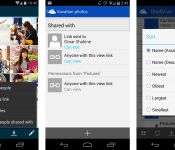
Now the Microsoft OneDrive team, by way of their blog, has provided several updates to their app lineup, including the Android version. Sticking with Android here, with version 2.5 of OneDrive app (for Android 4.0+ devices) one can now:
- Share files and/or folders with others using links or sending files to another app for sharing purposes.
- Adjust viewing and editing abilities right from your Android device.
- Select multiple files to download at once.
- Move and sort files and/or folders.
This update brings much more functionality to OneDrive on Android, especially via the file sharing aspect. While Office documents are still held tied to Office/OneDrive support only (via Office web apps), one can hope that this at least a small step in the right direction to freeing Office files to all apps.
The post Microsoft updates OneDrive app for Android appeared first on AndroidGuys.

Don’t go to North Korea, but do check out this travel app

When we think of the places we’d rather not go, a Whole Foods on a Tuesday night before Thanksgiving or your great-grandparents’ windowless basement apartment come to mind. And then there’s also North Korea, bastion of human rights violations and the favored destination of one Dennis Rodman. If, for some reason, you’ve always wanted to plan your own trip to the “most secretive nation” in the world, but felt it was too complicated, well, now there’s a 99-cent app for that. Yeah. But it doesn’t come from the genius minds of the Democratic People’s Republic of Korea’s propagandists. It hails from Uniquely.Travel, a London-based startup specializing in trips to difficult destinations and Magora Systems, a Russian software maker.
The app appears well-designed enough, with over 350 points of interest, slick menus, hi-res imagery and even recommendations from a tour guide with 10 years of experience traveling in the land that time (and justice forgot). The sights are helpfully mapped out and available for offline access should you need a handy reference while casually strolling through Pyongyang looking for that hot new Tapas bar. And the intrepid among you can even use it to customize your itineraries, compare price quotes from different travel agencies and book travel.
But, really, why would you?
Filed under: Cellphones, Software, Mobile
Via: Washington Post
Source: North Korea Travel

Moves will share fitness data with Facebook after all
When Facebook bought Moves, the companies swore that they wouldn’t “commingle” data and raise hackles among privacy-minded users. Many took that to mean that Facebook would take a largely hands-off approach to the fitness tracker. However, it now looks like the two companies may have just been wording their plans very carefully — Moves has updated its privacy policy to say that it will share information with Facebook to “help provide, understand, and improve” services. On the surface, that sounds like the very data mixing that wasn’t supposed to happen. What gives?
Facebook isn’t clarifying things much: a spokeswoman reiterated to the Wall Street Journal that there wouldn’t be any mingling, but also acknowledged that Moves would be sharing info. The truth, as Ars Technica suggests, may be complicated. While Facebook may not may be incorporating Moves’ data with its own, the phrasing would let it pass statistics along to advertisers; there’s a concern that companies might cross-reference Moves content with Facebook users and target their ads accordingly. If you start getting a lot of pitches for running shoes on your news feed, you’ll know what’s up.
Filed under: Cellphones, Internet, Mobile, Facebook
Via: Ars Technica, The Verge
Source: Moves, Wall Street Journal
 AIVAnet