



Titanfall’s second-screen app is neat, if you ever remember to look at it

The companion app for Xbox One’s Titanfall is finally available, free of charge, over at the the App Store and Play store. Ironically, it offers a second-screen gaming experience without any need for Microsoft’s Smartglass app, which was originally meant to be a hub for this sort of thing. Anyway, we’ve just whiled away two hours some time with the Android version and it all seems to work pretty smoothly — although it hasn’t done anything much for our K/D ratios.
We loaded the up the hefty (612MB) app and, for some reason, had to inform it the Xbox One’s IP address (accessed via Settings — Network — Advanced Settings), because it wasn’t automatically detected on the network. Once connected, the main screen on your mobile device offers access to a wiki about the game and to your all-important personal stats. It’s only when you load up the game on your console that the second-screen function kicks in, showing a zoom-able live map of the entire arena, including the names of players on your squad.

EA Mobile reckons the extra info on this map could give second-screen users an advantage, but for this writer it was more of a distraction, and it was quickly forgotten about in the midst of an overriding desire to not get killed in the “real” game playing out on the main screen. If you have any tips on how to actually make use of this thing, do us all a favor and them in the comments, otherwise we’ll just have to hold out for compelling second-screen app for a slower-paced game.
Filed under: Cellphones, Gaming, Tablets, Software, Mobile, Microsoft
Source: Google Play, Apple App Store

Microsoft brings home automation app and devices to the Windows Store

Unlike Google with its new $3.2 billion Nest, Microsoft doesn’t have a lot of home automation products yet despite some interesting research. Redmond has now made a move to stock its shelves, albeit indirectly, via a partnership with home automation specialist Insteon. The pair just announced that an enhanced Insteon app will soon be available on Windows and Windows Phone 8.1 devices. It’ll feature multiple, full-screen video feeds, device control, a visitor mode to give limited control to others and Live Tile integration for status updates. In addition, Insteon will sell standalone devices in the Windows Store including a leak sensor, LED bulb and WiFi camera for $30 – $80, with kits starting at $200. Unlike Nest Products or the Philips Hue, Insteon’s system uses RF frequency and your home’s existing wiring (PowerLine) to communicate with devices. The app will arrive on June 1st, with the devices hitting Windows Stores in July, complete with educational demos and displays.
Filed under: Wireless, Microsoft
Via: CNET
Source: Insteon
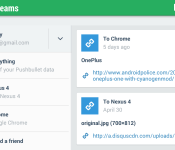
Push links, files, locations and more with Pushbullet! [App of the Day]

It’s always fun to see what kinds of apps are out there that push the boundaries of what our devices can do. For those of you who want to be able to share things between your smartphone and laptop or desktop computer, you should absolutely try Pushbullet. It’s a neat app that makes it easy to “push” a link, file attachment, street address, list, or a quick message between your phone and computer, and it’s all possible by downloading the app, creating an account, signing into that account on your computer, and voila! You are then able to quickly push all sorts of stuff from your laptops’s web browser to your phone and vice versa.

There are a number of situations that make Pushbullet very handy, such as pushing websites to your phone as you’re about to leave your desktop, or pushing a cool photo you took with your phone to your laptop for editing, or even pushing a street address really fast to a friend who you can add to your send list.
Probably my favorite part of the app is the mirroring feature, which displays your phones notifications at the bottom left corner of your computer when you get them. This allows you to see your phones activity while on your laptop, so you don’t miss something important while your phone is somewhere else. This is a great app that binds your smartphone to your computer or other devices so you don’t have to sweat about transferring data the hard way.
The post Push links, files, locations and more with Pushbullet! [App of the Day] appeared first on AndroidGuys.
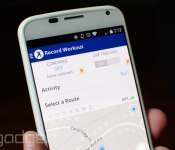
MapMyFitness brings coaching and improved post-workout stats to Android

After being nabbed up by Under Armour late last year, things have been relatively quiet for MapMyFitness and its activity tracking app. That all changed this week though, as the outfit has rolled out a totally redesigned version of its Android software with a host of new features. On top of the UI refresh, you can now compare stats with friends from Facebook, Twitter and your contacts list from within. Improved data and mobile graphs make bragging about your progress post-workout a bit easier as well. Route recording received a boost, adding Google Maps 3D tech for navigating the course with tilt and compass functions that update in real time as you run or ride. For MVP members, a coaching option is now built in for a dose of extra motivation. This serves up audio cues according to time, pace, speed, distance and duration goals that you’ve dialed in. Of course, that voice to keep you going comes at a cost of $5.99 a month or $30 annually.

Podcasts for iOS is now properly outfitted for Siri and CarPlay

Folks that spin favorites through Podcasts on iOS to endure the workday can nab an update that should boost listening sessions. Version 2.1 of the standalone app boasts improved browsing by episode, complete with Unplayed and Feed (available for download or stream) tabs for easy access. You can also save favorites for offline enjoyment and tweak the settings to automatically delete selections once you’ve listened. Siri integration finally makes its debut as well, allowing voice-activated commands like “play podcasts” or specific stations with “play Stuff You Should Know” for the virtual assistant. There’s also CarPlay support added in to prep for its arrival in autos in the months to come. If you haven’t been alerted to the new version just yet, hit the source link that follows to snatch it up.
Via: MacRumors
Source: iTunes
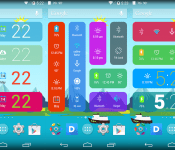
New Kairo and Colourform HD Widgets Themes go live as the app reaches 100% Saturation
Over the last few weeks cloud.tv has been rolling out the mega rebuilt update of HD widgets to version 4 for all users. It was a slow process, but one that needed to happen to help ensure minimal issues across devices and OS versions. Now that the rollout is 100% complete, cloud.tv can kick in the theme packs that they intended to release when the update started. There are two pack, both have a free option and a paid option.
First up is the new Kairo:
 Kairo offers up 40+ new colorful Android-style widgets that work and look great on phone and tablets. They are designed with todays ultra HD screens in mind with crisp fonts and vivid color choices. Kairo is free with 40+ widgets to choose from, but you can grab Kairo Xp for $0.99 and get access to over 60 widgets and a few other perks.
Next up is the new Colourform.
 This one offers up 30 color widget options and is free. There is Colourform XP paid version that is also just $0.99. The paid version offers up 50+ widgets to choose from and various other editing perks. Each of the new themes requires you to have HD Widgets 4.0 or newer installed, they have a 4.0.5 version floating about right now, and you must be on Android 4.0+. Feel free to check them out and let us know what you think.
HD Widgets ($1.99) – Play Store Link
Kairo – Play Store Link
Kairo XP ($0.99) – Play Store Link
Coulourform – Play Store Link
Colourform XP ($0.99) – Play Store Link
//<![CDATA[
ord = window.ord || Math.floor(Math.random()*1E16);
document.write('’);
//]]>

Flappy Bird is coming back as a ‘less addictive’ multiplayer in August

If you got hooked on Flappy Bird just in time for the game to be pulled, you’re in luck. Creator Dong Nguyen told CNBC today that he’ll put the title back in the App Store in August. When it does return, Nguyen says it’ll be less addictive thanks to a new multi-player mode. And there are entirely new games the way too, including one that features a man hoping from building to building. No word on how he plans to keep folks from getting hooked on those just yet.
Flappy Bird’s Dong Nguyen: Flappy Bird is coming back. Multiplayer. August. @CNBC
– Kelly Evans (@Kelly_Evans) May 14, 2014
Flappy Bird creator Dong Nguyen tells @Kelly_Evans that he’s bringing back Flappy Birds, but not soon; it’ll have a multi-player feature.
– CNBC Social Team (@CNBCSocial) May 14, 2014
#Flappybird creator says he is creating lots of #games. Next one guy jumping from building to buildings. #CNBC
– Donna Burton (@DonnaBurton) May 14, 2014
Filed under: Gaming, Software, Mobile
Via: Business Insider
Source: CNBC (Twitter), @Kelly_Evans, @DonnaBurton

Jawbone and Automatic can now log runs and road trips in one place

Jawbone makes an activity tracker that goes on your wrist. Automatic makes an activity tracker that plugs into your car. The opportunities for synergy there just seem endless, don’t they? Thanks to a little inspiration from a well-received hackathon project, these two tracking tech companies have partnered up to put all your movement data Jawbone’s iOS and Android companion apps.
Should you own both devices and install Automatic’s software from the Jawbone App Gallery, all the driving data the dongle collects (think trip time, average MPG, start/stop locations and more) will appear in your Jawbone feed. Why? Well, there’s the sheer utility of it, for one — users of both devices now have a single location that highlights their day’s back-and-forth. There’s also a more contemplative angle, too. By seeing your movement in one shot, you’ll also get a sense of how your time is split between being active and cussing at others from behind the wheel. With any luck, you’ll start to reconsider which of your trips require a car in the first place. That’s potentially great news for your body and the environment… though Automatic’ll probably be a little sad you’re not zipping around as much as you used to.
Source: Automatic

Conquer the forces of evil: BogeyWogey Ghostbusters 3D [App of the Day]

Today’s app of the day is BogeyWogey Ghostbusters 3D. It is a very simple and funny 3rd person shooter that revolves around a blonde headed character setting out to defend his village from the “Ghostly” menace.
When you initially start the game you are prompted with a tutorial and some very retro Super Mario Bros. music in the background. The tutorial is a basic walkthrough of how to throw your magical fireballs and to maneuver around the game. Once your training is complete, you start at level 1 and as you progress through the levels, more Ghostly menaces and evil lanterns appear which can kill you faster.
You can earn more points by understanding the collision of different objects. For example, if there is a big ghost of top of 3 boxes and I hit the bottom box, hopefully the other boxes will fall onto the other ghost and kill them as well, earning more points! In-app purchases are available, but the game itself is free. 
The game was made with fun in mind and after you master the controls, you will be well on your way to destroying the Ghostly menace and taking back your village!
The post Conquer the forces of evil: BogeyWogey Ghostbusters 3D [App of the Day] appeared first on AndroidGuys.
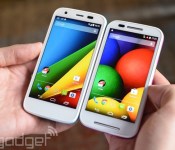
Motorola’s smartphones can now alert your close contacts in an emergency

You’ll usually want to call emergency services if you’re in truly dire straits, but the odds are that your friends and family also want to know if you need help. How do you reach them quickly? If you pick up the Moto E or Moto G LTE, you’ll have Motorola Alert at your disposal. The new app lets you trigger an emergency mode that sends regular alerts and location updates to important contacts. You can also tell people to meet up (at a shelter, for instance), and you can define your home or workplace to let people know that you’re in a familiar area. Alert won’t work on the Moto X or original Moto G until an update arrives in the near future, but you can still get a peek at it on Google Play if you’re curious.

Filed under: Cellphones, Mobile, Google, Lenovo
Via: Phone Arena, Mobile Syrup
Source: Google Play
 AIVAnet