


Angry Birds Epic: Rovio’s RPG may actually hook you [App of the Day]

I am willing to bet that most of you have tried at least one game out of Rovio’s workshop. Nearly all of them are Angry Birds games and most of them work on the same principles. Others, however, employ a completely different gameplay (Bad Piggies, Angry Birds Go). Their latest effort, Angry Birds Epic, definitely belongs in the latter category for sure.
Angry Birds Epic throws you in a well-known world of the everlasting Birds vs. Pigs battle but in a turn-based RPG. Once again, pigs steal birds’ eggs and the war begins. This time, though, you’re not springing birds in the air and crushing down pigs. No, you’re going to bash them in with different weapons and attacks, relying on shields to defend against attacks.
After you start the game you’ll see a map throughout which you can advance. As I’ve mentioned, the game is turn-based and as you progress in the game you’ll be able to add multiple birds to your side and battle a number of pigs all at the same time. Sometimes there will be a dozen characters on the screen at once.
Like other titles in the Rovio portfolio, the game is free to play with in-app purchases.


Let us know what you think, we liked the game, it was somewhat refreshing and… well, quite fun.
The post Angry Birds Epic: Rovio’s RPG may actually hook you [App of the Day] appeared first on AndroidGuys.

iOS 8 Simplifies App Login Process with Safari Password Sharing
Logging into and setting up apps will be easier in iOS 8 thanks to new Continuity APIs Apple has introduced to allow iOS apps to access Safari’s stored usernames and passwords. The feature, announced at a developer session at WWDC (via 9to5Mac), will let users quickly log in to an app that is associated with a website they have previously visited.
For example, if a user has accessed Gmail in Safari for Mac or iOS and opted to store a password, that password can then be used to log in to Google’s Gmail iOS app with a single tap, greatly speeding up and streamlining the login process. During the session, Apple demonstrated with a test website and app called “Shiny.”

The functionality is available to all developers and has the potential to be built into any third-party app with an accompanying website. Developers will need to associate a website with their app, which will then give them the option to request credentials saved in Safari, offering the option at login.
The process also works both ways. Apps that have an associated website that a user has not visited will be able to store login information to Safari, later letting a user access that stored information on the web when browsing to the site associated with the app.
As part of Continuity, the new Safari/app integration is designed to make it easier to seamlessly switch between devices, cutting down on the frustration of logging into an app. Apple also hopes the new system will increase security, as users can now select Safari’s randomized suggested passwords for both apps and websites.

Facebook Messenger now lets you instantly send video clips

Facebook Messenger used to lag behind other messaging apps like Line or Viber when it came to sending media files. The key phrase here is “used to,” because its developers just gave it an instant video-sending feature on top of the voice- and photo-sharing functions they added in April. Now, when you tap the camera icon and hold the Send button, you can automatically record and send short video clips to friends. If you change your mind while recording (because you realized you haven’t even combed yet… among other things), simply swipe your finger off the Send button or quickly press X in the middle of the video clip while it loads on the chat window. Facebook’s slowly rolling out this Messenger update to both iOS and Android devices, so don’t worry if it’s not showing up on your updates list yet. But when it does, it’ll also come with the capability to send bigger thumbs up icons, because, hey, why not?
Filed under: Misc, Mobile, Facebook
Source: iTunes, Google Play

Twitter App Gets World Cup ‘Timelines’ in New Update [iOS Blog]
 Twitter has updated its iOS app with a feature called “World Cup Timelines”, which allows users to see relevant tweets about all the games during the month-long 2014 FIFA World Cup.
New for World Cup:
The World Cup Timeline is where all the action happens. In addition to Tweets from your network, you will see relevant Tweets from teams, players, coaches, press, venues, and celebs.
Are you watching the match? Follow it on Twitter and take a peek behind the scenes. See Tweets about the match from teams, players, coaches, press, venues, and celebs from inside and outside the stadium.
The new features mirror changes Twitter has made to its web interface, which allow users to follow Twitter timelines for specific games featuring tweets by relevant fans, journalists, analysts and more. A couple days ago, Twitter also re-introduced “Hashflags”, which automatically insert flags from the countries participating in the World Cup when certain hashtags, like “#BRA” for Brazil, are used.
Twitter is also planning to roll out Timelines for individual teams, including lists of each countries’ players and match scorecards that update scores live.
Twitter is a free universal app that’s available on the App Store. [Direct Link]

Facebook Updates Messaging App with 15-Second Videos, ‘Big Likes’ [iOS Blog]
 Facebook has updated its popular Facebook Messenger app with 15-second videos and “big likes”, adding more ways for users to interact with their friends.
What’s New
Instant Video Sending: Shoot and play 15-second video messages from the camera right in the appBig Likes: Press and hold to send an even bigger thumbs up when you really, really like something.
Easy video sharing has been a popular new feature for messaging apps, with Snapchat getting updated with live video in May and Facebook-owned WhatsApp planning to add video calling. At WWDC, Apple announced that its Messages app would be receiving in-line video messages in iOS 8. However, Facebook Messenger’s Instant Video feature is more similar to Apple’s implementation of video rather than Snapchat or WhatsApp.
Facebook Messenger is available in the App Store for free. [Direct Link]
Apple Introduces New ‘Browse by Category’ Collection in App Store [iOS Blog]
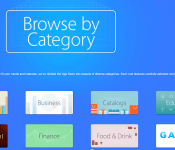
Apple has introduced a new “Browse by Category” section in the featured section of both the desktop and iOS App Store, allowing users to easily browse the store via categories in a more visually appealing way than before. Previously, users had to click on “Categories” in the upper-left corner of the App Store and choose from a drop-down list.

The new collection is yet another move by Apple to increase the discoverability of apps in the App Store. For instance, searches in the App Store were altered to compensate for misspellings, making it easier for users to find what they could be looking for. At WWDC, the company also announced that the App Store would be getting a new “Explore” tab, trending searches and related searches in iOS 8.

SwiftKey is now free, adds in-app premium features

SwiftKey is probably the most popular 3rd party keyboard for Android and rightfully so. It has an amazing prediction algorithms along with a bunch of other capabilities which make it so popular. SwiftKey got updated and along with that update came some nifty features along with a 100% price cut.
Yes, you read that right, SwiftKey is now free. This is great news if you’ve been contemplating if you should purchase the app or not. Though they didn’t get rid of payment altogether, SwiftKey now sports in-app purchases. But wait! Not the bad kind, at least in our opinion. The only thing you’ll be able to purchase in the app are the themes, which is great considering themes only influence the look of the keyboard not the functionality itself.
Speaking of themes, SwiftKey updated its theme database to include a whole bunch fo new themes. You’ll be able to change the look of the keyboard to pretty much anything you want and some themes are even free. New update also brings over 800 emojis along with the addition of a dedicated number row. These have been available in beta version of the app for a while now. They have also updated their auto correct algorithms to be smarter and also incorporate emojis when predicting your typing.
This is a great update if you ask us, but what do you think? Do you use Swiftkey?
SOURCE: Google Play Store
The post SwiftKey is now free, adds in-app premium features appeared first on AndroidGuys.

Outlook Web App finally debuts on Android, but only for ‘small’ devices

Been looking forward to a native Outlook Web App for your Android device? You just might have to wait a little longer: the freshly launched OWA Android app is only available on ‘select devices.’ Microsoft says this pre-release version can do everything its iOS counterpart can and automatically update its address book whenever the user makes a chance to their device contacts, but it’s not ready for a full roll-out. Still, if you’re sporting a device with Android 4.4 KitKat and Google’s OS standards categorize your phone as “small” or “normal,” the app’s inaugural releases is yours for the taking. Have something else? Check out OWA’s support page: Microsoft is taking suggestions on what devices to support next.
Filed under: Cellphones, Mobile, Microsoft
Source: Google Play, Office 365
Create simple yet gorgeous gradient wallpapers with Mixt [App of the Day]

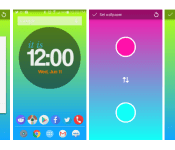
Looking to add a nice, minimal wallpaper to your Android and really dig the gradient effect? Today’s app recommendation makes that drop dead simple. No, we’re not talking about a bundle of predesigned wallpapers that somebody else put together. This free app lets you pick and choose the exact color combination you love most and set it as your own wallpaper.
Using Mixt is as about as straightforward as it gets: tap a circle and pick a color and then repeat. Set as wallpaper and you’re done! You won’t find the wallpapers in your normal setting; the app is accessed through your app tray.
Mix and match some of these designs with some fantastic minimal icon packs (like KooGoo, for example) and you’ll have an instant refresh for your home screen.
It’s free, easy as pie, and works wonders.
The post Create simple yet gorgeous gradient wallpapers with Mixt [App of the Day] appeared first on AndroidGuys.

1Password for Android can now be your only account manager

For the longest time, AgileBits’ 1Password for Android was just a pale shadow of its desktop and iOS counterparts. Besides the ancient interface, you couldn’t add anything — if you signed up for a service, you had to turn on another device just to put the new account behind 1Password’s secure walls. As of today, though, the app has caught up. The redesigned 1Password 4 for Android has both a modern interface and true independence; you can add passwords, credit cards and other sensitive info without touching any other hardware. Data syncs like it does on other platforms (including to folders, if you dislike the cloud), and there’s a built-in browser if you want to log in as quickly as possible.
AgileBits wants to spur adoption, so it’s making the Android version completely free to use from now through August 1st. After that, it’ll switch to a read-only mode for free users. The company hasn’t yet determined how much it will cost to unlock full access, although it wouldn’t be surprising if the price comes close to the $18 of the iOS version.
Filed under: Cellphones, Tablets, Internet, Mobile
Via: The Verge
Source: Google Play, Agile Blog
 AIVAnet