



eBay Valet sells your stuff for you, for a (steep) price

eBay has offered Sell for Me, a service does most of the heavy lifting for you, for sometime. But, it hasn’t been widely used. The company seems to think its lack of success might be a combination of poor branding and inconvenience (Sell for Me is only accessible from the desktop site). So today it got a new name and a mobile app, eBay Valet, that lets iPhone users sell their stuff without lifting a finger. (Ok, not literally, since you’ll have to lift a finger to operate the app… but you get the idea.) Basically you snap a few photos of whatever it is you want to sell. A representative will give you an estimate of its worth, and if you’re still interested, the company will send you a box with a pre-paid shipping label. The eBay will take some pro-quality snaps of your goods, create a listing, send you a notification when it goes live and ship it to the winner when everything is over. Or return the item to you if it fails to sell. For its trouble eBay will take a 30 percent cut of the sale price, however. It’s not ideal if you’re actually looking to make money, but it sounds like a godsend for the lazy among us just looking to ditch some clutter.
Source: eBay Valet (iTunes), TechCrunch
iOS 8 Beta 2 Tidbits: Permanent Podcasts App, QuickType Keyboard for iPad, and More
Apple today released the second beta of iOS 8, which brings a number of improvements, changes, and bug fixes to the beta software that was introduced on June 2.
iOS 8 beta 2 also includes several minor interface tweaks and modifications that make the beta feel both faster and more polished. We’ve gathered a list of the enhancements that have been bundled into the release below.
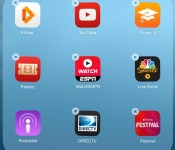
Podcasts: Following iOS 8 beta 2, the Podcasts app is a default iOS app that comes pre-installed on iOS devices. This means it can no longer be deleted.

Safari: According to the release notes, Safari will now block ads from automatically redirecting to the App Store without user interaction. Safari also includes a new pinch to tab view.
App Store Purchases: Apps in the App Store’s purchased tab are once again sorted by purchase date. In iOS 8 beta 1, they were sorted alphabetically. It’s also possible to leave reviews in the App Store again, a feature unavailable in beta 1 due to a bug, and the App Store now displays Family Purchases.

QuickType Keyboard: Apple’s QuickType keyboard is now available on the iPad as well as the iPhone, but does not appear to be available on the iPad 2.
Brightness: In beta 1, the Brightness toggle in the Settings menu under Wallpaper and Brightness was broken. It is now functional again.
Messages: Icons for the camera and the microphone in Messages are now gray rather than blue and there’s a new setting to mark all messages read.

Settings: There’s a new “Raise to Listen” setting for Messages.
Privacy: There’s a new Home Data section within the Privacy menu of the Settings app.

iCloud Photos: When entering the Photos app, there’s a new “iCloud Photos” popup that activates Apple’s new iCloud Photos feature, replacing a user’s existing Photo Stream settings.

Additional features in iOS 8 beta 2 will be added here as they are discovered. Apple is likely to continue pushing regular updates to iOS 8, bringing minor performance boosts and changes ahead of the operating system’s public release, which is expected to come in the fall. For more information on iOS 8′s features, big and small, make sure to check out our roundups.

Cyanogen Theme Showcase launches on the Google Play Store

If you like to theme your device then the new Cyanogen Theme Showcase app may be of interest to you as it’s now launched in the Google Play Store.
The app acts as a portal to access Cyanogemod themes on Google Play to the theme switcher included in the CM ROM.
Developers are being encouraged to submit their creations into the app and it supports a variety of icon packs from Nova, LauncherPro, Trebuchet, ADW, and Go Launcher.
Check it out on Google Play for free.
The post Cyanogen Theme Showcase launches on the Google Play Store appeared first on AndroidGuys.

Terrain Android launcher helps you organize and find your content

Samsung’s Accelerator division has just spawned a new Android launcher that aims to help you see and find everything on your phone. Called Terrain, it resembles a stock Android home screen at first glance, but from there you can launch the three main features. The first is the Sidebar which brings up your content in familiar card form with a swipe from the left, letting you glance your top Spotify songs, Facebook news feed, Instagram pictures, Reddit threads and more. You can then tap each card for a deeper dive. The Phone Search option checks all your apps and contacts and also searches the web, Google Maps, Play or Yelp, to name a few. Finally, there’s the alphabetically organized All Apps drawer to see your programs at a glance. So how well does it work? Read on for more.
I’ve played with a lot of launchers, including Nova and Aviate, and Terrain seems quite robust for a first release. It was fairly simple to add and edit content from the sidebar, helped along by the initial launch suggestions. After a little time, I had a sidebar showing Facebook feeds, favorite contacts, a calendar, Spotify tracks, my Instagram feed and for lulz, the xkcd cartoon, all organized how I wanted. There are 60 content cards in total from categories like utilities, local (weather and traffic), social and news. Searching contacts was more convenient than using Samsung’s stock contact app and let me dial or send a text message without fussing. It was also arguably quicker to search less-used apps that weren’t on my home page, like Vivino. Finally, the app seemed just as fluid as my go-to launcher, Nova.
Though reasonably glitch-free, it was occasionally a bit slow to find feeds like technology (which include feeds from Engadget, Re/Code, CNET and the Verge). In addition, it was missing a few key social apps like Vine and requires you to download separate apps to pull feeds from Instagram and Spotify — a bit of a kludge. But it seemed stable on my last-gen Galaxy Note II with KitKat and came with enough news, social and entertainment apps to be useful right away — and the folks behind it said that more cards and content are rolling out soon. If you feel like giving it a try yourself, check Terrain’s home page or download it from Play.
Filed under: Cellphones, Software, Mobile
Source: Terrain
Lock down your Apps with Lockdown Pro [App of the Day]

Everyone appreciates privacy, and sometimes just having a pin code or unlock pattern on your device is not satisfactory enough to feel like your information contained within your device is protected enough – especially if you’re wife insists on knowing that unlock code!
This is where Lockdown Pro steps in as it provides a way of restricting access to certain apps and information such as emails, messages, and even photos.
In addition to being able to lock down specific apps, it can also restrict installing/un-installing apps, and even incoming calls.
Lockdown Pro features include:
- One-tap to lock Apps.
- Auto lock new-install app.
- Taking pictures after wrong password.
- Auto send email with some info and pictures of the person who wants to access your phone.
- Auto lock & unlock when you get in/out your setting locations.
- Auto lock & unlock when connect/disconnect with wifi.
- Active lock apps with a SMS
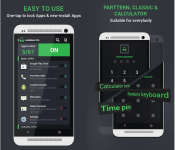
- Three password modes: Pattern Lock, Classic Lock & Calculator Lock
- Fake Error Message (Distract from unauthorized access.).
- Random keyboard password
- Time pin password (Ex: If the time is 13:12, your PIN will be 1312)
- Themes store (so many beautiful themes for your choice)
- Screen timeout: The screen will never turn off when running registered app
- Auto-Rotate: The screen of your device will not auto-rotate when running registered app.
- Prevent uninstall Lockdown Pro & clear the memory on some devices (Activate Device administrator)
- Lock Deactive Device administrator
- Hide Lockdown Pro icon (Remove Lockdown Pro icon on App Draw & Home screen)
Lockdown Pro is completely free and isn’t even ad-supported. So if you’re wanting to restrict certain parts of your Android device from prying eyes, then check out Lockdown Pro in the Google Play Store.
The post Lock down your Apps with Lockdown Pro [App of the Day] appeared first on AndroidGuys.
Parallels’ new remote desktop apps let you control your PC like a phone

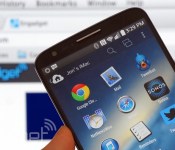
Remote desktop apps have an easier time working on tablets, where you have a lot of display area to work with, but they’re frequently awkward on smartphones. Wouldn’t it be nice if you could control a PC at home like it was just another phone app? Parallels is tackling that challenge head-on with smartphone-friendly versions of its Access app for both Android and the iPhone. Much like the earlier iPad release, the new titles give you a remote view of your Mac or Windows PC that’s optimized for your mobile platform of choice. You can launch programs, select text and type almost as if the computer’s software were built for a small screen. On the Android client (which also handles tablets), Parallels will even let you create shortcuts to jump directly into favorite desktop apps.
The wider support comes alongside a bundle of fairly hefty upgrades. It’s now possible to wake up your computer in some circumstances, so you won’t have to always leave it running for Access to work. You can also choose from extra screen resolutions if you need to see more of your desktop at a glance, and apps can borrow your device microphone for speech recognition or a quick voice chat. Those on iOS have the added perk of a file browser that makes it easier to track down that all-important presentation.
For some, the biggest change may be the cost of entry. Parallels has cut its personal subscription price from $80 to $20 for one year, and $35 for two years ($30 if you sign up by the end of June). That’s obviously a much better value, particularly if you only occasionally need to reach your PC. There’s also a new business tier that lets companies hook up five people for $50 per year. All the new apps are free to try for a couple of weeks, so it won’t hurt to give them a shakedown. Who knows — they might save your bacon the next time you leave your laptop at home.
Filed under: Cellphones, Tablets, Software, Mobile
Source: Parallels

iHeartRadio’s new “For You” feature tries to find music you’ll love

Tired of picking your iHeartRadio stations based on whatever mood passes your fancy? Now you’ve got other options — starting with iHeartRadio’s latest update, the app will offer users a curated list of stations based on their favorite genres and listening habits. The app’s new “For You” feature is front and center in its 5.0 update, tasking users to pick out their favorite music genres to give the recommendation engine a nudge in the right direction. The app combines that feedback with your listening history, location and music you previously thumbed up to create a custom list of stations culled just for you. Cute, isn’t it? The app also sports an updated UI, but the real exciting stuff is coming in a few months: today iHeartRadio announced that Chromecast support is on the way. Check out the latest update in Google Play. On iOS? Sit tight: the update should land on the App Store in about a week.
Filed under: Cellphones, Internet
Source: Google Play

Autobirds and Deceptihogs coming soon with Rovio’s newest game

Rovio may have just launched Angry Birds Epic and announced its new series, Angry Birds Stella, but that isn’t stopping the company from teasing an upcoming game in the franchise, Angry Birds Transformers.
The company teased the game on Twitter and setup a website for the game. According to the website, all we know is that the birds and hogs are going to look like characters from Transformers, including Optimus Prime, Megatron and Bumblebee, and it’s coming to app stores soon.
Stay tuned to the Rovio’s Angry Birds Transformers website and social media accounts for more information.
Angry Birds Transformers via Twitter
The post Autobirds and Deceptihogs coming soon with Rovio’s newest game appeared first on AndroidGuys.

Ecommerce mobile app development: Is it worth the money?
With news that mobile viewing is set to over take desktop viewing this year, it is no surprise that many ecommerce businesses are gearing up their mobile strategies. Whilst many business owners understand the benefits of mobile-friendly and responsive web designs, very few consider the advantages of developing a mobile app. Here we will examine the benefits of ecommerce mobile app development to help you decide whether it is worth the money.

Mobile users prefer using apps to their device’s internet browsers.
Image source: https://farm3.staticflickr.com/2176/1955464307_2daa2fa068.jpg
Increase customer engagement
According to a study by Nielsen released in May this year, mobile users spend more time using apps than searching the internet. The study found that eighty six per cent of users were spending their time using apps, rather than their mobile internet browsers. With so many people using smartphone apps to do everything from making shopping lists to making actual purchases, it seems like far too good of an opportunity for ecommerce businesses to miss out on.
Using an ecommerce mobile app, businesses can deepen and personalise their engagement with customers. One of the ways they can do this is through using push notifications. These are messages that pop up on users’ phones. You can use them to communicate all sorts of information to your target audience, such as the fact your summer sale has now started or that you are offering free delivery, to entice them to re-visit your app and re-engage with your business.
Improve user experience for customers
Another advantage of mobile apps for ecommerce businesses is that providing they have been designed well, they can offer a greater user experience for customers than a desktop or mobile website can. This is due to the fact that they are optimised for the users’ phone model and tailored to meet their needs and requirements. Mobile apps also tend to load and run faster than traditional websites, allowing them to offer an even better user experience for customers. Allowing customers to make purchases quickly and easily, using your app, is a great way to increase your sales figures.
Learn more about your target audience
Having a mobile app developed for your ecommerce business will also allow you to learn more about your target audience. Just like websites, mobile apps can be integrated with analytics tools so you can see who is using the app, when they are using it and what for. Knowing this information will allow you to make better decisions for your business.

Mobile apps can be integrated with analytics tools so you can get to know your target audience better.
Image source: https://farm4.staticflickr.com/3346/3542294246_0f5de61b48_o.jpg
Create a whole new revenue stream for your business
Although mobile apps are certainly not cheap to design and develop, providing they are made to a high standard, they should prove to offer a great return on investment. If you think about it, you are essentially creating a brand new revenue stream for your business. Run it alongside your traditional ecommerce website and you will stand the best chance at increasing your profits.
Conclusion
Although there are many advantages to building a mobile version of your ecommerce store or designing a responsive website that can adapt to all devices, there are also many benefits to developing a mobile app. Whilst many ecommerce business owners assume that a mobile app will be too expensive, it is worth considering the potential it has to increase customer engagement and generate higher levels of sales.
The results from the Nielsen survey are proof enough that mobile users prefer mobile apps. With this in mind, it only seems sensible that you cater for your customers’ needs by providing them with a mobile app version of your ecommerce store. An ecommerce mobile app will allow them to make their purchases quickly and easily, whether they are in the comfort of their own house or on the go.
Image credits:Marco Arment&Search Engine People Blog
Honeywell thermostat lets you set the temperature using your Pebble smartwatch

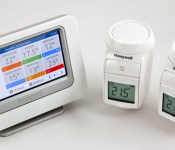
Honeywell may now be looking to take on Nest with a new sleek and stylish thermostat, but it’s still making sure that users of its other connected systems enjoy updates too. In a bid to make things a little easier for owners of it evohome smart zoning thermostat, the company has extended support to the Pebble smartwatch, offering up room-by-room heating control from the comfort of your wrist. Honeywell’s new smart bundle allows you to set the temperature of in each zone (or room) in your home and turn the heating on or off with the push of a button. The app can also immediately enable or disable any of the preset evohome quick actions, which is especially helpful if you’ve forgotten to shut off the heating before you fly off on holiday. If you’ve installed Honeywell’s zoning thermostat and also own a Pebble, you can grab the new app and watchface from Pebble’s app store using either your iOS or Android device.
 AIVAnet