


Roku’s remote control app comes to Windows Phones and tablets

This is not a great day for developers of the various third-party Roku apps available at the Windows Store. It’s an excellent day, however, for those who’ve been waiting on a free remote control app direct from the company itself. The app is compatible with Windows Phones as well touchscreen Windows 8 and RT tablets, but it’s not designed for mouse n’ keyboard setups. Just like the iOS and Android versions, it’ll scan your network and (hopefully) find all your players and channels, at which point it’ll act just like a regular remote, although it does appear to be missing the new enhanced search function found elsewhere. One other thing you might find lacking is the ability to stream your own choice of web files (.mov, .mp3 etc.) to your Roku box — you’ll still need an unofficial app for wild stuff like that.
Filed under: Cellphones, Home Entertainment, Tablets, Mobile, Microsoft
Source: Windows Phone Store, Windows Store

Twitter’s latest experiment rethinks the retweet

Twitter already made the move to allow tweets inside tweets, but it appears the 140-character social stream is looking to revamp the way we all retweet, too. According to TechCrunch, a new feature being labeled as “retweet with comment” that enables users to better participate in the on-going convo by adding proper context could be on the way. Currently, in the company’s own app there are options for a straight retweet and quoting the musing to be recast. Rumor has it that the new method could replace that latter choice, and in the process allow for a proper comment where the ol’ RT text count doesn’t eat into your precious character allotment. That original tweet will likely appear in card form — much like the embeded option — but hopefully via a single button press rather than the current copy/paste method.
Filed under: Internet, Software, Mobile
Source: TechCrunch

San Francisco bans apps that let you buy and sell public parking spots

Anyone who’s ever driven in San Francisco knows that parking in the city can be a nightmare — garages are often expensive and street spaces are almost impossible to find, especially during peak hours. Several parking apps have cropped up to resolve that issue, a few by allowing folks to auction or sell their spots to others. Sounds like a neat way to make money, right? Well, there’s a very important snag: buying and selling public parking spaces like that is illegal. San Francisco City Attorney Dennis Herrera has just issued a cease-and-desist demand today to Monkey Parking, an iOS app that lets users bid for other people’s parking spaces. The letter cites San Francisco Police Code section 63(c) that states: “It shall be unlawful for any person, firm or corporation to enter into a lease, rental agreement or contract of any kind, written or oral, with or without compensation, for the use of any street or sidewalk.”
Individual drivers who violate the law can face up to $300 per violation, and as Monkey Parking’s entire business is based on an illegal premise, the city is requesting that the Rome, Italy-based company end operations in San Francisco altogether. The firm has until July 11th to do so before further legal action is taken — it could be sued for up to $2,500 per infraction under California’s Unfair Competition Law. The city also sent warnings to two other parking apps — Sweetch and Parkmodo — both of which also let you buy and sell parking spots. Sweetch users can pay $5 for a spot from another user and get paid $4 if they help them park and Parkmodo, which has yet to launch, has been offering people $13 an hour to occupy parking spots that they’ll then get to sell. While disruptive services like Uber and Airbnb have run up against city law and survived, the fact that these parking apps charge for already-public spaces likely mean they’re dead in the water.
[Image credit: Getty Images]
Source: SF City Attorney, WSJ

Hailo launches in Manchester a month later than Uber

App-based taxi services are the subject of anger and frustration over in London, but Manchester looks set to become the next major battleground for two of the UK’s biggest. Hailo, which has served around 12,000 of London’s black cabs since 2011, today went live in the north west (its first city outside of the capital), just a month after Uber officially opened its (virtual) doors to customers there. While Hailo’s app currently books registered taxis for customers, the company recently announced that it was becoming a fully-featured Uber rival, which saw disgruntled London black cab drivers vandalise the company’s headquarters and leave the service in their droves. According to the Manchester Evening News, 300 drivers have already signed up, but the company expects that number to grow rapidly. Nothing like a fresh competitor, it seems, to stop you resting on your laurels.
Source: Manchester Evening News

Wink wants to simplify the smart home with a universal app and $80 hub

You’ve probably never heard of Wink, but you may soon encounter its logo (“Wink app ready”) or its smart home router (the “Wink Hub”) the next time you go shopping at Home Depot. The logo will appear on a range of WiFi-connected devices from different manufacturers, including air conditioners from GE and thermostats from Honeywell, signifying that they can all be controlled via the Wink app for Android and iOS. The hub unit, which will go on sale July 7th priced at $80, will act as a secondary router for Wink-compatible devices that communicate over Bluetooth, Z-Wave or Zigbee wireless protocols instead of regular WiFi — it’s something Wink describes as a reluctant but necessary addition in order for these other sorts of devices to be easily controlled via its platform
Speaking of smart home “platforms,” now might seem like a strange time for a newcomer to try to build one, what with Google creating its own empire out of Nest and Dropcam, Apple pushing HomeKit, not to mention other eager players like Revolv and SmartThings also getting into the mix. But Wink isn’t any back-of-an-envelope startup. It’s an offshoot of Quirky, which is already producing hoardes of Wink-compatible devices, plus the platform has some major partners on board: the aforemention GE and Honeywell, plus Philips, Rachio and around ten others. Besides, if future devices can happily support numerous platforms, without forcing consumers to pick one and stick to it, then a bit of jostling between rivals could be a very good thing.
Filed under: Household, Wireless
Source: NY Times

Upgrade your calender to Sunrise Calender [App of the Day]

I’m always a fan of switching up my routine apps, including the default message app, email app, file manager, etc… But now I’d like to switch it up with the new Sunrise Calender app, which promises a new experience and will make your life easier.
The app connects to your Google Calender and you can also connect with Facebook and a number of other apps for a full range of events and deadlines. Coonected with Facebook, I can see all the upcoming birthdays and graduation parties, and I can even RSVP to them right from the app.
Features of the app include
- A flat, redesigned calender experience showing the perfect amount of information.
- A simplified 3-day view shows when you are busy and when you are free.
- A beautiful transparent widget.
- Events and birthdays of the people you know as well as integrated Map locations.
- Available on the desktop as well
- Compatibility with Evernote so all your reminders will show up on Sunrise
The post Upgrade your calender to Sunrise Calender [App of the Day] appeared first on AndroidGuys.

Facebook’s company trip to Africa leads to more efficient Android app

Facebook recently rolled out an update for Android devices that’s supposed to speed things up for users. If that update delivered on its promise, then you’ve got the company’s trip to Africa to thank — that’s how Facebook’s engineers got a taste of how slow the app can be on low-end phones with developing nations’ internet speeds. One of the social network’s engineers, Alex Sourov, detailed in a blog post how they bought several low-end Android phones in Africa to test out their app, which didn’t only crash repeatedly, but also loaded really slowly. Even worse, they ended up consuming a month’s worth of data plan within 40 just minutes trying to use the app. It became apparent that they needed to give their Android app an overhaul if the social network wants to reach even more people around the globe — so they did.
In order for Facebook to load faster on single-core devices, the engineers tweaked the app so its features don’t load all at once when you launch it, and cached News Feed entries load up much earlier. Then, they decided to move away from JPEG and PNGs and transmit Facebook images using Google’s WebP format, which consumes a lot less data. The app now also only loads images in resolutions and sizes that match the device’s screen size — it doesn’t automatically download a full-size high-res pic, for instance, unless you specifically click on it. Finally, Facebook has reduced its app size by 65 percent in hopes that it’ll play better with phones and tablets with small RAM sizes and limited storage capacities.
[Image credit: Marco Paköeningrat/Flickr]
Filed under: Misc, Mobile, Facebook
Source: Facebook

Intel launches messaging app that lets you speak through video avatars

It’s easy to think of Intel as a hardware company, the sort of chip-making giant that helps build wearables, cable-free laptops, smart baby onesies. Today, though, the company is showing off software, for a change. The chip maker just unveiled Pocket Avatars, a mobile messaging app that lets you send video messages to friends. Actually, “video messages” doesn’t really describe it. These aren’t so much videos as 3D avatars that happen to speak in your voice. In particular, the app makes use of facial recognition — a pet project of Intel’s — to mimic gestures like nodding, blinking, sticking out your tongue, and raising your eyebrows. All told, it’s a lot of real-time processing, which means the messages are going to be fairly short: You’ve got 15 seconds to say what you want to say.
The app, available today for iOS and Android, includes an avatar store of sorts, where you can download 45 avatars, either for free or 99 cents. Of the bunch, you’ll find some familiar characters, including those from the Lego series, Gumby, Care Bear and The Jim Henson Company (gotta give Intel credit for being thorough in its avatar-making deals, we suppose). In addition to sending to folks in your contact list, you can also post your clips to the usual services — Facebook, Twitter, et cetera. That doesn’t mean you should (we might unfollow you), but hey, at least it sounds less annoying than Slingshot.

Stock Email Android App Makes its Way into the Play Store [APK Download]

Google continues to place their stock apps into the Play Store, and we can now add the stock email app to the list. Some of the features added to the app include, extra security for Gmail accounts, printing to the app, improved account setup, and of course, bug fixes.
Sadly the app can’t be placed on all devices out there. As of now, Nexus devices are compatible with the update and that is about it. This is just one more app to add to the list that Google has pulled from the base Android OS to better support consumers without having to mass release a device update to solve an Email issue. We have the apk download for you below, so like everything you download and place on your device, install at your own risk. Let us know how it runs.
//<![CDATA[
ord = window.ord || Math.floor(Math.random()*1E16);
document.write('’);
//]]>
Get a bit more organized using a Terrain Home launcher [App of the Day]

There are a lot of launchers in the Android space that you can choose from. Some of the most popular ones are Nova, Smart Launcher, Aviate and Action Launcher. Each of these is unique in its own way, as is the one we’re going to talk about today, Terrain Home: Sidebar & Search.
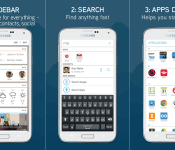
Terrain Home comes from Samsung’s Accelerator division which is an innovation center. This launcher is somewhat unique and quite productive. When you launch it and get through the tutorial you’ll be greeted with the start screen that looks like any other Android launcher. There are 3 white icons on it that will probably catch your attention though, sidebar, search and apps. This is where Terrain Home gets different and kind of cool. You can click on each icon to launch a certain action or just swipe away to do it. If you swipe from left to right you’ll access the sidebar feature, the other way around will get you to an alphabetical list of your apps and if you swipe up you’ll get to search feature.
Sidebar is the most useful out of the bunch, in our opinion at least. It resembles Google Now when it comes to the design. You’ll find a bunch of white cards here which you can set up the way you want, from your favorite contacts and Facebook feed to weather and stock information. There are a lot of options you can fit here and that’s what makes it so useful.
Search feature is also rather useful, considering you can swipe up and search away whether you want to find something locally on your phone or online.
You can get Terrain Home from Google Play as we speak, although note that the launcher is still in beta so there might be some glitches along the way, although it worked rather well in our testing. This app is also geographically limited at the moment, so it might not be available on your location, but it seems that it has a rather wide range of availability even though there’s no precise information on this thus far.
The post Get a bit more organized using a Terrain Home launcher [App of the Day] appeared first on AndroidGuys.
 AIVAnet