



Get the lyrics to your favorite songs with musiXmatch [App of the Day]

You thought you knew all the words to your favorite song until you were singing loud and proud one day, and had to be corrected by someone who actually knew the song. musiXmatch makes it so you never have to worry about that again.
musiXmatch gives you lyrics that play along with music from your favorite apps so you always know your songs word for word. musiXmatch plays lyrics for its own app as well as Spotify, Rhapsody, Play Music, and rdio. You can also use the music ID feature to find out what song is playing on the radio, like Shazam.
The app is compatible with Chromecast so you can turn your next party into karaoke night.
With several more awesome features, it’s no wonder this app scores a 4.4 with a little less than a quarter of a million ratings
So go ahead and learn the real words to your songs
The post Get the lyrics to your favorite songs with musiXmatch [App of the Day] appeared first on AndroidGuys.
If you like having your apps neatly organized, check out 9 Cards Home Launcher [App of the Day]

There are lots of launchers for Android devices and that’s the beauty of Android. Different people prefer different things. You might be content with the launcher you got with your device, on the other hand you might want a different approach to Android, which is fine, more than fine actually. 9 Cards Home Launcher is one of those launchers which complement the current launcher you’re using.
After you install and run this app it will ask you which Gmail account you’d like to use after which it will start sorting your apps and what not. After it’s done you’ll see a grid of 9 cards on the screen, in each card will be an application. You can add more apps in certain categories which you’ll access by swiping from bottom up in order to call the 2nd screen in which you’ll also see 9 cards. By horizontally swiping the screen you’ll access different categories, like Home, Contacts, Social, Photography etc. You can of course edit these categories as you please or simply create new ones, it’s up to you. By swiping from top to bottom you’ll see a list of all your categories and by doing that motion while on that screen it will exit the app.

As we said, this 9 Cards Home Launcher only complements your current launcher. When you exit this app you can call it up by manually opening the app or swiping up from your on-screen home button (Google Now motion), if you decide to set it that way. You can also for example set the launcher to use something called “Quick Drag Gesture” while you’re using your default launcher. This motion can be set on a part of the screen, if you swipe from that portion of the screen you’ll get a narrow vertical bar on the right where you’ll see a bunch of little squares which contain your collections.

This app has some extra features as well, but we can’t talk about all of them. It also has a pro version which will give you even more features of course. You’ll have to try it out in order to see if you like it or not, the app works rather well, we didn’t have any issues during testing. You can get it if you follow the link below.
Did you like the app?
Source: Google Play Store
The post If you like having your apps neatly organized, check out 9 Cards Home Launcher [App of the Day] appeared first on AndroidGuys.

Need a new messaging app with plenty of features? Path Talk might be your thing [App of the Day]

Most of you know or have probably heard of, tried or are using a social network called Path. Well, Path Inc. came up with yet another messaging app in a seriously crowded messaging apps space… and guess what, it’s rather good.
Chances are you probably use one of many messaging services such as Facebook Messenger, Viber, Whats App, etc. Well, Path Talk is rather similar to those, in concept at least. It of course has its own set of features, but the principal is the same. After you download the app you need to enter your phone number after which you’ll get a verification SMS code and the fun can begin.
The design of the app itself is rather beautiful, it pops. The app can tell your contacts when you’re nearby or even when your battery is low. If you’ve tried Path you’re familiar with this concept, considering Path Messaging from Path app has turned into a separate app we’re talking about right now. Group chat, voice messaging, handmade stickers and lots more is included in Path Talk and is at your disposal should you choose to try/use this app.

Don’t just take our word for it, try the app yourself and let us know how you like it!
Source: Google Play
The post Need a new messaging app with plenty of features? Path Talk might be your thing [App of the Day] appeared first on AndroidGuys.

MakerBot’s iPad app lets you sculpt 3D-printed objects from your couch

As a rule, serious 3D printers need equally serious design skills if you’re building objects from scratch. That’s no longer true for MakerBot’s Replicators, though; the company has just trotted out PrintShop, an iPad app that takes the hard work out of making simple objects. You can build your own bracelets, rings and signs without knowing a lick about modelling software. If you’d like to craft something a little more sophisticated, you can browse a collection of ready-made items from the Thingiverse. We’d still suggest a rookie-friendly device like Printeer if you’re primarily interested in basic designs, but this could be an easy way to let your kids in on the action — or just to make something without leaving your sofa.
Filed under: Peripherals, Tablets

Banking apps may be getting their own virtual assistants soon

The minds behind Siri’s virtual assistant skills are back at it. This time around, SRI International has created Kasisto to boost personalized interactivity inside apps that usually require an actual human to carry out complex activities. Banking and commerce are a prime examples of this sort of task load, and BBVA (the outfit that now owns Simple) has already partnered up. The context-aware tech offers text, touch, and speech with natural language understanding and reasoning built-in, giving interested suitors the ability to pipe in a virtual assistant in a fraction of the time it would take to start from scratch. Plus, they’d be leveraging a tools from the folks who developed Apple’s helpful voice. “Our innovative approach to intelligent system design, combined with low-cost deployment, will help banks improve customer service and maximize investment in the mobile channel,” notes Kasisto’s CEO and co-founder Zor Gorelov. Since the platform was just announced, there’s no indication as to when that virtual helping hand will appear in everyday financial apps just yet.
Source: SRI International

Apple Rolls Out Section for ‘Best New Game Updates’ on App Store [iOS Blog]
Apple has added a section for the “Best New Game Updates” on the App Store, allowing users to view recently updated titles from a number of developers. Notable updates to games were previously included in the “Best New Games” section which now includes more recently released titles.

Titles listed under the new section include Plants vs. Zombies 2, FarmVille 2, and Maleficent Free Fall, which recently received updates that added new enemy types, new animals, and new stages, respectively. Apple also appears to be showcasing a mix of titles from both major developers such as EA and smaller indie developers.
Last month, Apple rolled out a new monthly App Store section highlighting the best apps, games, and updates, joining the other highlighted sections for “App of the Week” and “Editor’s Choice”. Apple also debuted an “Indie Game Showcase” section on the App Store in March which showcases the best games from independent developers.

Korg DSN-12 turns your Nintendo handheld into a synthesizer, again

As we’ve seen before, Korg has a knack for bringing classic synth sounds to the screens of Nintendo’s handhelds. Teaming up with Detune once again, the outfit is bringing the tones with the likeness of yet another iconic instrument to those wielding a 2DS, 3DS or 3DS XL. The new effort, Korg DSN-12, takes its inspiration from the company’s MS-10 analog synth — one that’s fondly remembered for its bass and percussion chops. Here, a dozen monophonic sythesizers can be employed with a smattering of effects alongside a 64-step sequencer. There are multiple interfaces to sort through as well, including sequencer, synth knobs, patch panel, mixer and two oscilloscope sections to make use of Nintendo’s dual-screen setup. What’s more, thanks the 3DS’ three-dimensional abilities, those oscilloscopes are rendered in 3D for even more eye candy. As you might expect, the stylus can be used to wrangle the app that stores up to 64 different sequences to recall later. No word on pricing for the software just yet, but expect it to arrive in September for your sample building pleasure.
Via: Fact Magazine

Revamped Google Drive for Android makes it easier to tinker with your files

Google unveiled a lot of things at the start of its I/O conference, but there was also a pair of stealthy updates that could make a big difference for cloud storage lovers. To begin with, there’s a brand new version of Google Drive for Android that makes it much easier to manipulate your files. Instead of sifting through a top menu bar, you just have to tap a button to rename, share or star a document; it’s also a little quicker to print a file or scrap it entirely.
On top of the Drive refresh, presentation gurus will be glad to hear that Google’s promised Slides app has reached Android. There aren’t any big surprises if you’ve worked with such files in Drive before, but this now means that you can edit most common office documents in dedicated Google apps. Whether or not you need to tweak business pitches on the road, you can grab both new Drive-related apps today. Android Police has its own download link for the Drive update if you can’t wait for it to reach you automatically.
Filed under: Cellphones, Internet, Mobile, Google
Via: Android Police (1), (2)
Source: Google Play (Drive), (Slides)

SoundCloud’s iOS app gets simplified controls as it focuses on listeners

SoundCloud’s tune-sharing prowess continues to drawn the eye of musicians looking to distribute their tracks around the web and social channels. Today, the audio outfit’s iOS app got a major redesign that makes access to tracks you fancy a breeze. In addition to the simplicity-focused aesthetic overhaul, the software now sports “one thumb” controls: tapping anywhere toggles play/pause, swiping skips tracks and sliding along the tune’s waveform moves around the song and its corresponding artwork. There’s also a new You tab that compiles tracks, artists and playlists that you’ve both liked and created from scratch in one place so that you can get at them quickly. Songs found on the Search page can be played from that section in addition to giving a quick follow to users of note. Since SoundCloud took a listening focus with this version of the app, the recording function is no longer built in, so you’ll have to look elsewhere to capture on the go.
Filed under: Internet, Software, Mobile
Source: iTunes, SoundCloud
‘OK Google’ voice commands are coming to your Android lockscreen

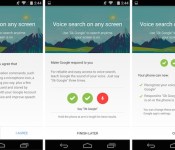
“OK Google.” The phrase is slowly working its way across Google’s mobile and web services, but the touchless control is about to get even better for many Android users. Previously limited to just the homescreen on Android 4.4 KitKat devices and anywhere on the Moto X (thanks to its always-on listening chip), the voice-activated command will soon be enabled on any screen, including the lockscreen, on your smartphone or tablet. That’s not all, either: Google’s also including a new Audio History feature that learns the sound of your voice to increase the accuracy of your searches.
The features come as part of an update to the Google Search app, which is currently rolling out slowly to devices following Google’s I/O keynote. Google is making the feature available on a phone-by-phone basis, meaning that even if you are able to grab the relevant app file, you still might not be able to use it. If you are eligible, however, all you have to do is navigate to your Google Now settings and enable the options inside the “OK Google Detection” menu.
[Image credit: Droid Life]
Filed under: Cellphones, Tablets, Internet, Software, Mobile, Google
Via: Droid Life
Source: Google Search (Play Store)
 AIVAnet