


U.S. Cellular now has the Samsung Galaxy Tab E for $0 down
U.S. Cellular, the fifth largest carrier in the U.S., has started selling the Samsung Galaxy Tab E online and in stores to new and existing customers.
The Samsung Galaxy Tab E will be available for $0 down and $8.75 for 24 months, or $129.99 with a two-year contract. It is a great alternative to higher priced tablets and will have LTE connectivity, a 1.2GHz 64-bit processor and a 5MP camera with expandable memory.
If you would like to learn more, head on over to U.S. Cellular by clicking this link.
Specs:
Technical Specifications
- 4G LTE B2/B4/B5/B12/B17/B25, 3G EVDO Rev.A, 1x CDMA
- Qualcomm MSM8916 Quad-Core 1.2GHz 64bit
- Android™ OS
- 5MP Camera and 2MP front-facing Webcam
- Wi-Fi Capable
- 5,000mAh Battery
- Usage Time: Wi-Fi up to 14hrs, 3G up to 12Hrs, 4G up to 13hrs*
- 16GB Storage**, microSD™ supported up to 128GB, 1.5GB Ram
- Dimensions: 8.70″ x 4.96″ x 0.35″
- Weight: less than 1 lb.
- Access to thousands of apps through Google Play
The post U.S. Cellular now has the Samsung Galaxy Tab E for $0 down appeared first on AndroidGuys.
Huawei Black Friday and Cyber Monday deals
Huawei has made a huge splash into the U.S. market this year with the Nexus 6P and the Android Wear Huawei Watch. The 6P is almost universally loved by tech reviewers, and the Huawei Watch is one of the best looking Android Wear smartwatches you can get your hands on, with a unique and virtually scratch-proof sapphire display. Huawei makes high-quality products and will hopefully be following up the 6P and Huawei Watch with more devices soon.

On Black Friday(Friday Nov. 27), Huawei is offering $50 to $100 off select watch models through GetHuawei.com, BestBuy.com, select Best Buy stores, Amazon.com, Target.com and Google Play store. I will personally be placing an order for the black model, as I love the unique look of the face in combination with the black link band. If you look closely at the watch face, the bezel is slightly different from the others, and at $100 off, it makes the Huawei Watch worth ordering. If you happen to miss the Black Friday deal, Huawei will also be offering the Huawei Watch at $50 off from Nov. 29 through Dec. 5.

 Huawei will also be offering the unlocked P8 lite at a savings of $50 for a total price of $200 through GetHuawei.com, Amazon.com and Target.com. This deal will go from Black Friday to Cyber Monday. Check out the specs below.

Specifications
- Form Factor
5.0″ bar smartphone
(L) 5.63 inches x 2.78 inches x (T) .30 inches
Power and Volume + and – keys
MicoUSB port
MicroSD card slot
Dual SIM card slot
Camera with flash (rear)
Camera (front)
3.5mm jack port
4.76 Oz. - Screen
Resolution 1280×720 enhanced HD
LTPS (Low Temperature Poly-Silicon), 20-30% more power efficiency
CABC (Content Adaptive Brightness Control) - Connection
3.5mm jack port
MicroUSB port - Speaker
1 Watt Speaker
- Function
4G LTE Cat 4 ultra high speed connectivity
- Color Options
Black & White
- Battery Capacity
Non-removable 2200 mAh (Typical)
- Bluetooth
4.0 BLE/EDR
Accessories
- Standard In Box
Huawei P8 Lite Smartphone
MicroUSB/Data Cable
A.C. Charger
Quick Start Guide, Warranty Card and Safety Information - Optional
Portable Power Pak (AP005) & (AP006)
Bluetooth Speaker (AM10)
Bluetooth Headset (AM04)
Hybrid Stereo Earphones (AM11)
Technology
- UMTS
Bands 1,2,4,5
- GSM
850/900/1800/1900
- EDGE
CLASS 12
- LTE
Band 2,4,5,12 & 17
- High Speed Data Connectivity
HSPA CAT 24
HSPA CAT 6
4G LTE CAT 4 - Wi-Fi
802.11 b, g, n
Wi-Fi
Bands 2.4G
Wi-Fi Display
Wi-Fi Direct
Hardware
- CPU
Qualcomm MSM8939
Quad-core 1.5 GHz Cortex-A53 & quad-core 1.0 GHz Cortex-A53 Processor - Internal Memory
2GB RAM & 16GB ROM
- External Memory
MicroSD card up to 32GB
- Accessibility
HAC (M3/T3)
- SIM Type
Micro SIM and Nano SIM
- Form Factor
5.0″ bar smartphone
(L) 5.63 inches x 2.78 inches x (T) .30 inches
Power and Volume + and – keys
MicoUSB port
MicroSD card slot
Dual SIM card slot
Camera with flash (rear)
Camera (front)
3.5mm jack port
4.76 Oz. - Screen
Resolution 1280×720 enhanced HD
LTPS (Low Temperature Poly-Silicon), 20-30% more power efficiency
CABC (Content Adaptive Brightness Control) - Connection
3.5mm jack port
MicroUSB port - Speaker
1 Watt Speaker
- Function
4G LTE Cat 4 ultra high speed connectivity
- Color Options
Black & White
- Battery Capacity
Non-removable 2200 mAh (Typical)
- Bluetooth
4.0 BLE/EDR
All of the details can be found at www.GetHuawei.com/offers-promotions.
The post Huawei Black Friday and Cyber Monday deals appeared first on AndroidGuys.
Pepsi Phone comes out of the blue in China

We don’t exactly know why, but China seems to have a thing for the Pepsi brand. Following the Pepsi edition Oppo N1, another company from the Far East is launching a new device that’s simply dubbed the Pepsi Phone. From afar, you may mistake this aluminum device as a rebadged Oppo R7 Plus, but it’s actually a variant of the $250 Koobee H7 featuring the same 5.5-inch 1080p display (maybe IPS LCD?) with 2.5D glass, MediaTek MT6592 1.7GHz octa-core processor, 16GB internal storage, 2GB RAM and backside touch fingerprint sensor — it’s likely an older version, though, judging by its thick metallic border like the one on the Huawei Mate 7. It also runs on Koobee’s customized Android 5.1 with a Pepsi theme out of the box.
Via: FoneArena
Source: JD
Get in shape with Google Fit
Software has come a long way in a short time, and our expectations are changing as we have access to incredibly well developed software. One of the best features to come with apps developed by Google is that they are free. Google offers free unlimited storage for high-resolution photos, document editors, maps, GPS, email and they even offer free software to help get you into shape.
That software is called Google Fit. Old habits die hard, as the number one New Years Resolution for 2015 was to get in shape, stay in shape and to lose weight. Many of us want to stay healthy for our children and family, want to look better and want to feel better. In order to do that we need to exercise and stay active.
Google is doing its part by offering free software to help us manage our health and to encourage us to exercise more. The excuses are running out when it comes to remembering to exercise, as fitness is just an app away.
Getting started with Google Fit
The first to-do item is to download the Google Fit app onto your Android smartphone by clicking here. If you don’t have a Google account, you need to create one in order to use the app. You can go to the Google sign-up page and get your free account which will keep track of your personal information.
Once the app is downloaded sign in with your account. Don’t worry if you don’t have an Android Wear device yet – you can simply carry your Android smartphone around with you to keep track of your activities. The Google Fit app will start tracking your activities instantly and will keep track of the data which can be viewed at https://www.google.com/fit/ when signed in.

You can fill out profile information like your height, weight, and gender, and set a personal fitness goal. To see the distance you’ve gone and how many calories you’ve burned, you’ll need to fill out your height, weight, and gender. Once you’ve filled out your physical information, you’re on your way to getting and staying healthy. Check out what Google Fit can do for you. (Google Fit help)
Enter your physical information
- Open the Google Fit app
.
- Touch Menu
> Settings.
- Enter your height, weight, and gender.
You can change which units Google Fit displays for weight, height, and distance. Touch Menu
Set a personal fitness goal
You can track your progress towards activity goals using Google Fit.
You can set daily goals for:
- Steps: How many steps you want to take.
- Active time: How much time you want to spend being active.
- Distance: The distance you want to walk, run, or bike.
- Calories: The number of calories you want to burn.
You’ll have a default goal to be active for one hour a day when you first get started with Fit. The app will show you a progress update. After you’ve tracked your activity for a few days, you’ll also see recommendations for future goals.

Change a personal fitness goal:
- Open the Google Fit app
- Touch Menu
- Touch the active goal.
- Enter your updated goal and touch Save.
What you can measure
When you record an activity, most of the time you can see estimates of:
- Time: How long you did a specific activity.
- Steps: How many steps you took.
- Calories: How many calories you burned.
- Distance: How far you walked or ran. This feature doesn’t work with stationary biking right now.
- Weight: How your weight changes over time. You’ll have to enter your weight manually to track it.
Note: To see the distance you’ve gone or how many calories you’ve burned, you’ll need to fill out your height, weight, and gender.
For the most accurate biking detection, carry your phone in your pocket when you’re riding rather than mounted or in a backpack.

Set goals for daily steps
You can set goals around how many steps you want to take every day. You can then check your watch to see how close you are to reaching your goal.
Your watch comes preset with a goal of 10,000 steps. To change the goal:
- If your screen is dim, touch the screen to wake up the watch.
- Touch anywhere on the background of the screen. You’ll see a white screen with a red “g.”
- Touch again anywhere on the screen to see a menu of things you can do.
- Touch Show me my steps.
- Swipe from ← right to left until you find the menu.
- Scroll down and touch Daily step goal.
- Scroll and touch the goal you want.
Use Fit on Android Wear devices
Google Fit comes preinstalled on most Android Wear watches, but not all of them. To check if it’s already installed, swipe from right to left on your watch and look for Fit in your list of apps. If you don’t have it, you can get the app from Google Play.
You’ll get the most out of Google Fit on your Android Wear watch when you install the Google Fit app on your mobile phone or tablet (available only on Android). But you can also use it on your Android Wear watch without installing Google Fit on your phone or tablet (iOS or Android).

Start a fitness activity for real-time stats
You can see real-time stats for your activities, such as pace during a run. Fit will use your GPS and other sensors to track your activity.
To start an activity:
- Open the Google Fit app
- Touch
> Start activity
.
- Select the activity you’re about to start.
Note: the workout information is automatically updated on every device you use Fit on. You can edit this activity later if it is not accurate.

Real-time voice updates
You can get real-time voice alerts of your distance and pace for runs, bike rides, and other distance-based activities. For example, Fit can tell you your pace every mile.
To select the frequency of voice alerts:
- Open the Google Fit app
- Touch Menu
- Choose your settings.
Note: You can also toggle the announcements on and off during the activity by touching the speaker icon 
Track your weight
You’re also able to track your weight with Google Fit and see how it changes over time. See how to add a weight measurement below, or connect to one of our partner weight tracking apps.
- Open the Google Fit app
- Touch the Add an Activity button
.
- Select Log your weight
.
Note: You can’t delete a weight measurement on Fit at this time.
Sync other apps with Fit to to show activity, nutrition, sleep and more
If you already use mobile apps to track your fitness, nutrition, or sleep, you can give them permission to share information with Google Fit. That way, you can keep all of your wellness data in one place. To see all of the apps you can connect to Fit, check out google.com/fit.
If they’re compatible, your other fitness apps will give you with the option to pair with Fit so you can see all your fitness data in one place.
To see apps you have connected to Fit and find apps to add:
- Open the Google Fit app
- Touch Menu
- Find apps to connect using the drop down menu
.
If you don’t want your other apps to share data with Fit, you can just disconnect them. You can disconnect apps from Fit using the Google Settings app.
View your daily progress
You can view your daily fitness progress on Fit including how many steps you’ve taken, how long your bike ride lasted, and how close you are to reaching your daily goals.
- For today: You can see fitness tracking for the current day at the top of the homepage on the Fit app or website.
- For a previous day: Scroll down the homepage or app to view information about a previous day’s activity.
To see more detailed tracking information like graphs and activity breakouts, find the activity or daily summary you want in your activity feed and click or touch it.

Google Fit is definitely worth a try today
If you want to get in shape or to stay in shape, give Google Fit a try today. It’s never too late to get started. Your loved ones with appreciate it and you’ll feel better too. Don’t wait for the new year to get started, take a step forward today. Anyone can get in shape. Make it easier on yourself with Google Fit.
Huawei Watch Android Wear
LG Urbane Android Wear
Moto 360 2 Android Wear
ASUS ZenWatch 2 Android Wear
Google Play Store – Google Fit link
Google Fit Help
The post Get in shape with Google Fit appeared first on AndroidGuys.
Google Photos’ new ad shows off improved image recognition feature

Google’s most recent advertisement posted on Android’s YouTube page shows off the advanced image recognition capabilities of the Photos app. Recently, we had seen similar commercials highlighting Play Music and the Google app.
The latest ad shows how Google Photos app helps a young woman find out that El Gato Loco, a freestyle wrestler, is actually her ex-boyfriend. The Photos app spots the similarity between the feline mask worn by the wrestler and the cat that the couple used to have, helping the young woman recognize El Gato Loco.
There is no doubt that Google Photos’ image recognition has seen a significant improvement since it started, but it still has a long way to go. There have been many gaffes in the past including the one where the app recognizes one African American user as a gorilla. In fact, my Photos app recognized a dancer friend as a dog, but that may have something to do with the pose or the makeup that they were wearing. However, a more accurate recognition will always be a welcome change.
Click here to view the embedded video.
Come comment on this article: Google Photos’ new ad shows off improved image recognition feature
Pre-order the incredible octa-core 5.5″ LTE Letv 1s at Gearbest.com for $225
You most likely have not heard of, let alone seen a Letv phone as they started selling phones just this year in China. The Letv 1s is being offered at Gearbest.com for less than the price of the OnePlusX and has even better specs, with an all metal build. The Letv 1s comes with a circular fingerprint reader on the back of the phone, similar to the latest Nexus devices, and also comes with the latest USB standard in USB type-C.

It doesn’t stop there. Powering the Letv 1s the Mediatek 2.2gHz octa-core processor and 3GB of RAM and for an ultra speedy smartphone. The Letv 1s comes unlocked with dual SIM capabilities making this the perfect phone for international travel.The display is a full 1080p 5.5″ LCD which should look absolutely stunning. The days of unlocked smartphones are here and are here to stay with powerhouses like the Letv 1s. Head on over to Gearbest.com to get your pre-order in today.

Letv 1s 5.5 inch 4G Phablet Android 5.1 MTK6795 64bit Octa Core 2.2GHz 3GB RAM 32GB ROM 5.0MP + 13.0MP Cameras
Main Features:
Display: 5.5 inch 1920 x 1080 FHD Screen
CPU: MTK6795 64bit Octa Core 2.2GHz
GPU: PowerVR G6200
System: Android 5.1
RAM + ROM: 3GB RAM + 32GB ROM
Camera: Dual Cameras, front camera 5.0MP camera, back camera 13.0MP
Sensor: Gravity Sensor, Proximity Sensor, Ambient Light Sensor and Fingerprint Sensor
Bluetooth: 4.0
Features: GPS, A-GPS, Glonass, Beidou
SIM Card: Dual SIM dual standby, one Nano SIM Card, one Micro SIM Card
Network:
2G: GSM 850/900/1800/1900MHz
3G: WCDMA 850/1900/2100MHz
4G: FDD-LTE 1800/2100/2600MHz


The post Pre-order the incredible octa-core 5.5″ LTE Letv 1s at Gearbest.com for $225 appeared first on AndroidGuys.
Google Fit gets real-time stats and grabs data from more wearables

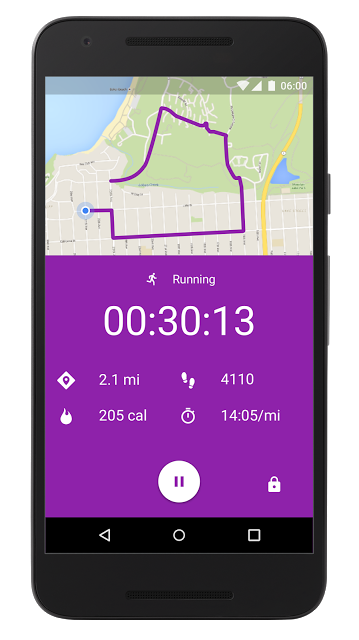
Just in time to outfit your holiday workout regimen, Google its updating its Fit app with a few new features. First, the activity-tracking software now provides real-time distance, steps, pace and calorie stats for your running, walking and riding workouts. When you come to a stop for some push-ups, sit-ups or squats, you can use your Android Wear device to keep a tally of your reps before adding the total to your daily activity log. Google Fit also pulls in sleep and nutrition info from other apps and fitness trackers. If you’re using MyFitnessPal (and a host of others) to track meals or Sleep as Android, Xiaomi Mi Band, Mi Band 1S, Sony Smartband 2 or the Basis Peak to keep tabs on how well you’re resting, you’ll be able access those details for a more complete picture of your overall wellness. Looking to give it a shot? You can grab the latest version of the Android app from Google Play right here.
Source: Google
Google Fit updated to recognize all of your activies
Tired of your pedometer simply counting your steps? With Google’s latest update to Google Fit, it will now recognize all of your activities: from cardio to strength training, what you eat plus how you rest, and coaches you every step of the way. I can actually confirm this, as my own Google Fit app knew I had been more active recently and asked me to increase my daily goal, which I begrudgingly did. But after one day with the new goal, I already achieved an additional 25 minutes of activity which will make me healthier.


Google Fit will now pull information from your favorite nutrition and sleep apps giving you the whole picture of your health. Diet apps such as MyFitnessPal, Fatsecret, Lifesum, or LoseIt are all compatible with Google Fit. And the compatible sleep apps: Sleep as Android, Xiaomi Mi Band and Mi Band 1S, Sony Smartband 2, or the Basis Peak.
Google Fit is bringing a whole new level of health monitoring just in time for those New Year’s Resolutions.
Here are the new features(Google):
Instant insights. See real-time stats for your runs, walks and rides on your phone. Google Fit will record your speed, pace, route, elevation, and more so you can stay motivated and on track.
Strength training. Want to add push-ups to your routine? If you have an Android Wear watch, you can start a daily challenge and your watch will automatically detect and count each sit-up, push-up, and squat. They’ll be added to your daily activity, so you get credit for each one.
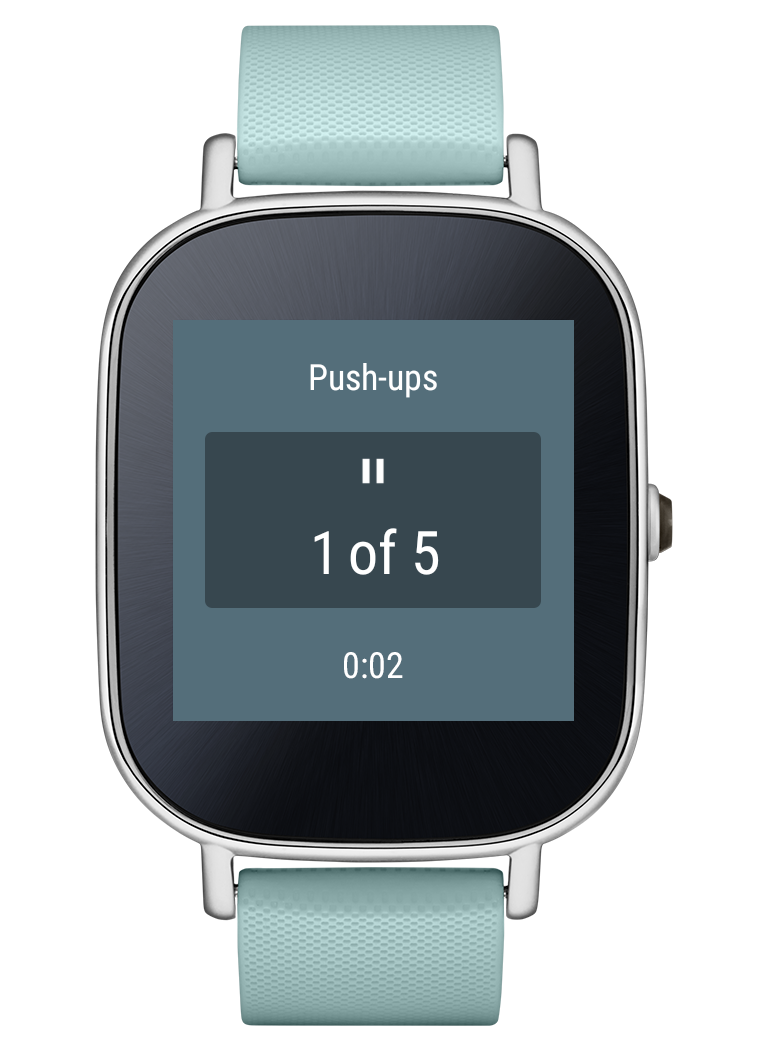
Just five push-ups?
Source – Google Blog
The post Google Fit updated to recognize all of your activies appeared first on AndroidGuys.
Fugoo Tough XL: Rugged, waterproof, dust proof, power bank and loaded with 8 speakers
Fugoo exploded onto the Bluetooth speaker scene last year with the Fugoo Go Anywhere wireless speaker. I was one of the fortunate reviewers who got to review Fugoo’s first speaker, and ever since that review have been waiting for its follow up Fugoo XL wireless speaker.
Bluetooth speakers are literally a dime a dozen. You have some that start in the tens of dollars, and for most consumer speakers, can run as high as $400-$500. Typically when you think of high-end Bluetooth speaker brands, you think of Bose, Harmon Kardon, JBL, Sony and so on. And those speakers tend to be the devices that line the shelves of places like Best Buy and Target stores. Customers love to go with brands they trust.
In comes the upstart Fugoo. When I first got my hands on the Fugoo Go Anywhere wireless speaker, I could instantly tell that Fugoo was not made up of a bunch of newcomers looking to make a quick dollar. With the design, high-quality sound, and ultra tough build of their first speaker, I could tell Fugoo was made up of people who saw an opportunity to fill a gap. Bluetooth speakers were over-priced, lacked true portability and for the most part fell short in sound quality.

According to Fugoo’s website, my guess was correct. According to Fugoo’s website,
Fugoo’s executive team is comprised of award-winning industry leaders who have been integral in the creation of many key technology industry milestones, including driving the development and industry adoption of Bluetooth. The executive team’s combined experience equals more than 100 years in design, innovation, and development at industry-leading companies including Acer, eMachines, Harmon Kardon, JBL, and Toshiba.
With the Fugoo XL, they have filled a gap with a speaker that can literally go anywhere – beach, campground, swimming pool, snowboarding, industry job site, and even the bedroom. It’s high-quality sound, durability, ability to personalize style and incredible battery life are simply unmatched.
Let’s check it out.

Design
Being outdoors is second nature to San Diegans. We have sunny days almost year around, and temperatures on the coast roughly stay in the 50-75F degree range almost 365 days a year. We have the beach, desert, mountains and urban areas as our personal playground, and it’s rare that you’ll find anyone here who doesn’t love the outdoors.
I opted to review the Fugoo Tough XL. The Tough XL is exactly what the name states – a speaker enclosed in a super rugged case which is designed to withstand the elements making it tough.
But let’s start from the core of the Fugoo Tough XL. The XL is a reference to being the big brother of the first Fugoo and by all means it is extra large. The speaker measures 13.18” (L) x 4.37” x 4.64” (H) and tips the scales at a hefty 4 pounds, 15 ounces – just one ounce short of five full pounds. There’s a reason for all of that heft – it comes with a best in class 35 hour battery life at 50% loudness and has an incredible eight drivers to provide full 360 degree sound. The breakdown of the speaker drivers, three on the long sides, and one each on the short sides:
- Two 28mm neodymium tweeters
- Two 39mm neodymium aluminum domed mid/woofers
- Two 43mm x 54mm passive radiators

Those drivers are powered by a full 38 watts which is enough to crank up over loud noises, but is also enough to feel the music.
The Fugoo XL is seriously loaded with features. It comes with Bluetooth 4.o technology which provides a range of 120 feet outdoors, and 33 feet indoors. It has a microUSB input for firmware updates, a USB out port for charging smartphones and accessories, is compatible with Google Now and Siri, and comes with a 3.5mm input jack for wired connections.

The Fugoo XL Core can be encased in three designs: the Style XL, Sport XL, and Tough XL. The Style XL comes in a Khaki jacket, the Sport XL comes in a black sporty mesh covering, and the Tough XL comes in a super rugged casing designed to protect it from the elements. If at anytime you decide you no longer like the look, or maybe you’ve taken it on one too many adventures, you can swap out the jacket with a new one at anytime.
The Fugoo XL is IP67 rated, mud proof, shock proof, snow proof and waterproof. It’s basically life proof and there are simply no other speakers that match this level of durability.
Sound
Without question, Fugoo truly put sound quality front and center. This might be a little hard to believe if you were to base the speaker based on looks alone since it looks fantastic. Most companies focus on one aspect and do it as best as they can, but Fugoo focused on everything. When you think of companies like Bose, you always know they think of sound first, but you would never associate Bose with being life proof or having incredible battery life. And typically you get what you pay for.
Eight drivers. I have two floor standing speakers in my office and those combine for a total of drivers! With the Fugoo XL you get the perfect balance of lows, mids and highs to create the perfectly balanced sound signature. The drivers are even angled at 8-degrees so the sound waves travel upwards rather than straight out. If you feel like rocking out or chilling out to some classical music, the Fugoo XL has all ranges covered.

I have been an audiophile for over a decade. I won’t admit to the exact number of dollars I have spent on audio equipment, but I will say I am experienced with audio products and lost count on over how many products I have tried. The only problem with making a claim to being an audiophile, is most of us audiophiles are quite snobby and can get very technical to prove our ability to judge sound. So for the brevity of this review, let’s just say I really love music and I truly love devices that can provide high-quality sound reproduction. If I got into the details that members of Headfi.org get into, you might be up all night reading this review as I would need charts and graphs to prove what I am hearing.
I was a subscriber of Spotify’s high-quality streaming service and switched over to Tidal’s CD quality music as soon as it became available. With most devices it can be easy to cover up poor sound quality by throwing in lots of bass which makes music sound fun. But doing that severely drops the quality in music reproduction. For the purposes of this review, I listened to hours and hours of classical music and I was picking out individual instruments like the flute, cello, oboe, piano, clarinet and more.
But the most important factor with the Fugoo XL was I found myself immersed in the music because it was so enjoyable. It’s rare these days for me to make time to sit and enjoy music, but with the Fugoo XL I found myself listening to music for multiple hours at a time.
First and foremost music is simply incredible with the Fugoo XL. The only speaker in this price range to come close to this level of sound reproduction is the Bose Soundlink 3. No matter where you put the Fugoo XL, you will hear sound as it fills the space around it a full 360 degrees. The eight drivers are incredibly balanced and detailed. If you truly love music, this speaker is for you.
Durability
Weekends are my favorite time of the week. My dog and I make it a habit to go to the beach or go on hikes every weekend. Even though the Fugoo XL is large, I brought it with me to test how it would handle the elements. At the beach it attracted sand, but as soon as I got home I would rinse it under the sink thoroughly until it was sand free. On our hikes, and one camping trip, it accumulated dirt and dust which I hate to have on my gadgets.
Gadgets are clearly an important part of any tech writer’s life, and we really do like to take care of our toys. So when my Fugoo XL got dirty or muddy, I simply rinsed it off and lightly wiped it down with a towel. After four trips to the beach, three days of camping, and two hikes the Fugoo XL still looks as good as new. I have no reservations about bringing the Fugoo XL along with me wherever I go. It is truly designed to withstand the abuse of an active lifestyle.

Extra features
The Fugoo XL has a selection of accessories you can buy – a hand strap, shoulder strap, anywhere mount strap and a remote control.
 The remote control retails for $49.99, and is one of the nicest remote controls you can get today. It is also waterproof and incredibly well built. It is made of a metal case with a rubberized front and is perfect for use at pools or at campsites where you don’t want to keep your phone nearby. Holding down the action button, the big circle at the bottom, activates Google Now and you can ask the Fugoo a question like “what was the score of the Laker game?” and it will answer. It even has a bottle opener built into the backside.
Another useful feature is having the ability to charge your phone or other USB powered devices with the Fugoo XL. I would charge my smartwatch and phone when I was out, and enjoyed not needing to bust out my portable battery. My LG Urbane 2nd Edition Android Wear watch has a magnetic charger, and when I wasn’t charging my device I would just stick it to the steel grill in order not to misplace it.
The Fugoo XL also has a microphone built-in for taking phone calls and with the latest echo cancelling technology, phone calls came through loud and clear. I even used it for a conference call at work and the people on the other end didn’t have any complaints.
The Fugoo XL is one of the most feature laden accessories on the market.
Specs
Audio Quality
Six proprietary, custom-designed acoustic drivers:
- Two 28mm neodymium tweeters
- Two 39mm neodymium aluminum domed mid/woofers
- Two 43mm x 54mm passive radiators
Drivers face all directions, with an 8-degree upward tilt for better dispersion
Full Range Frequency Response: 60Hz – 20KHz
Supports aptX® codec for high-quality Bluetooth stereo sound
Connectivity
Bluetooth 4.0 for wireless connectivity up to 10 meters/33 feet indoors and 36 meters/120 feet outdoors
Bluetooth Low Energy for remote control
Audio/Video Remote Control Profile (AVRCP 1.4) enables control from your audio device and the optional Remote Control.
Other Profiles: Advanced Audio Distribution Profile (A2DP) 1.3, Hands-Free Profile (HFP) 1.6, Headset Profile (HSP) 1.2
3.5mm stereo input for wired connection
Micro-USB for charging and updates
Microphone
Google Now™ / SIRI® Compatible
Omnidirectional microphone with echo cancellation
Full-duplex capable in speakerphone mode
Digital Signal Processor for wind and background noise reduction
Update Software Compatibility
Windows 8, Windows 7, Vista, XP
Mac OS 10.9, 10.8, 10.7, 10.6
Our international AC adapters (chargers) are compatible with standard household / mains current around the world. They operate from 110-240 volts AC, at either 50Hz or 60Hz.
Up to 40 hours continuous play at 50% loudness
Built-in Lithium-Ion rechargeable battery
Charged via USB or international AC Adapter included (3.5 hours for full charge)
Battery life displayed on supported devices
Summary
The Fugoo XL is a symbol of excellence and master craftsmanship. When you think of quality, Fugoo is a name that needs to come to mind. The Fugoo XL is just the second product from a company that is making waves in the Bluetooth speaker sector. As of right now, Fugoo doesn’t make anything other than two speakers, which means they can focus 100% of their attention on perfecting those speakers and they have achieved nothing short of that. But their speakers are so good I hope they plan on expanding into other areas so I can buy those products as well.
With unmatched durability, sound reproduction and battery life the Fugoo XL should be on your wish-list and is a must see item at Best Buy. It will literally blow your socks off.
Thank you Fugoo for making a great speaker that I will enjoy for many years to come.
Product links
Fugoo Tough XL($329.99) – Bestbuy.com or Fugoo.com
Fugoo Sport XL($299.99) – Amazon.com, Fugoo.com
Fugoo Style XL($279.99) – Fugoo.com
The post Fugoo Tough XL: Rugged, waterproof, dust proof, power bank and loaded with 8 speakers appeared first on AndroidGuys.
Skype updates Android app so you can save video messages

Next time you receive a memorable video message on Skype that you want to keep forever, you can tap it and then choose Save to Gallery if you’re using an Android device. The messaging application has released an update that adds the capability to its Android version, along with a few other features. For instance, you can now long-press a conversation on your Recents tab to bring up a new toolbar, which gives you quick access to delete, mark as read and mute notifications buttons. The new app gives you an easy way to share images from your gallery to a group convo and forward images from one conversation to another, as well. In addition, you can now forward Mojis (these are short reaction video clips similar to GIFs) and take advantage of a better search function. Skype has already rolled out its latest Android version, and you can download the app with all these features from Google Play if you haven’t yet.
Source: Skype
 AIVAnet