


Google introduces Shared Albums with Google Photos just in time for the holidays
Google is on a roll this week. Offline navigation is now available for Google Maps, family plans for Google Play Music are here for just $14.99, searching within Google Drive just got simpler, and now Google Photos just announced Shared Albums – a fast and simple way to pool your photos and videos that makes it easier to bring everyone’s memories together.
I think Google secretly worked through the Thanksgiving holiday to bring us these updates before Christmas.

Shared albums allow friends and family to add their own photos and videos to your collection making it a shared story. There’s no setup, all you have to do is select photos, make an album, and share the link with whomever you’d like. It doesn’t matter if that friend is using a tablet, desktop, laptop or smartphone running Android or iOS – everyone can add to the shared album if they are included through the link you provide. Try it out.
Create an album
Mobile app
- Open the Google Photos app
.
- At the top right, touch Create
.
- Select Album.
- Select the photos and videos you want to include.
- Touch DONE.
Share
- Open the Google Photos app
- To share individual photos or videos: Tap and hold an item to select it > select any other items
- To share an album, story, or movie: Open the album, story, or movie.
- At the top right, touch Share:
- Android:
- iOS:
- Android:
- Choose how you want to share:
- To an app.
- Copy link or Create link to send someone a link.
- Shared album to create an album that you can allow anyone to add to.


The post Google introduces Shared Albums with Google Photos just in time for the holidays appeared first on AndroidGuys.
Pre-order the all new Android Lollipop XiaoMi Mi Pad 2 for less than $250
Xiaomi is becoming a well known Chinese brand in the U.S. with devices like the all new Mi Pad 2. For less than $250 you can pre-order the all metal, ultra thin, Android 5.1, 64-bit, 7.9″ 2048 x 1536 (326 ppi) IPS Xiaomi Mi Pad 2 at Gearbest.com. The days of spending $400-800 on tablets are far behind us with examples like this.

7.9″ hits the sweet spot for tablets – The iPad Mini is exactly the same size as the Mi Pad 2 but is twice the price with an identical IPS high resolution display. Why pay more for less? The Mi Pad 2 runs Android 5.1 which is the same version that Samsung’s flagship Galaxy Tab S2 Android tablets run. There really is no longer any reason to pay outrageous prices for tablets these days. The Xiaomi Mi Pad 2 even comes with the latest USB type-C standard which Google’s most recent Nexus devices come with.

If you want to look for a weakness with the Mi Pad 2, you simply will not find one. At $250 you will get 64GB of internal storage, or for about $50 less you can get the 16GB version. It comes in Gold and Silver.
Gearbest.com offers free shipping to the U.S. and and 45 day 100% satisfaction guarantee on all of its products.
Check out the specs below. You can pre-order the Xiaomi Mi Pad 2 at gearbest.com.
LINK – 64GB

Specs
CPU: Intel Atom X5-Z8500 64bit Quad Core 2.2GHz, 14nm process
GPU: Intel HD Graphics
RAM + ROM: 2GB + 64GB gets the best out of gaming and HD videos with 2GB LPDDR3 RAM and 64GB eMMC 4.5 flash storage
Android 5.1 OS
7.9 inch screen: 2048 x 1536 (326 ppi) IPS display
6190mAh Lithium-ion Polymer Battery supports both 5V 2A power inputs
Dual cameras: With 1080P Full HD video recording and excellent low-light performance with back-side illuminated (BSI) CMOS sensors, videos and photos look outstanding captured from either the 8MP rear or 5MP front cameras. A huge f/2.0 aperture also lets you get more background blur and bokeh out of your images
Bluetooth 4.1: Supports fast transmission of data, pictures and files
Type-C: The Mi Pad 2 supports the new USB Type-C port with its transmission speed 10 times faster than the traditional USB 2.0. The USB plug is reversible. You can connect it to the phone in whichever way you want.
Sensor: Hall Sensor, Gravity Sensor, Ambient Light Sensor, Proximity Sensor, Gesture Sensor, E-compass, etc.


The post Pre-order the all new Android Lollipop XiaoMi Mi Pad 2 for less than $250 appeared first on AndroidGuys.
Google makes it easier to find your files in Google Drive
Google announced yesterday that they would be expanding the search capabilities of their Google Drive platform. You can now search all of your files at the same time without regard to which device the files were uploaded from.
Other new features include:
- Narrow your search to a file type from the search box on Android, iOS, and the web.
- Open advanced search instantly from the search box.
- Access recent files or search Drive from the home screen using 3D Touch on iOS.
- Search Drive using the iOS search bar without opening the Drive app.
- Search for shared files by file owner using their name or email address.
- Use advanced search options like the date a file was modified, words it contains, or who it was shared with.
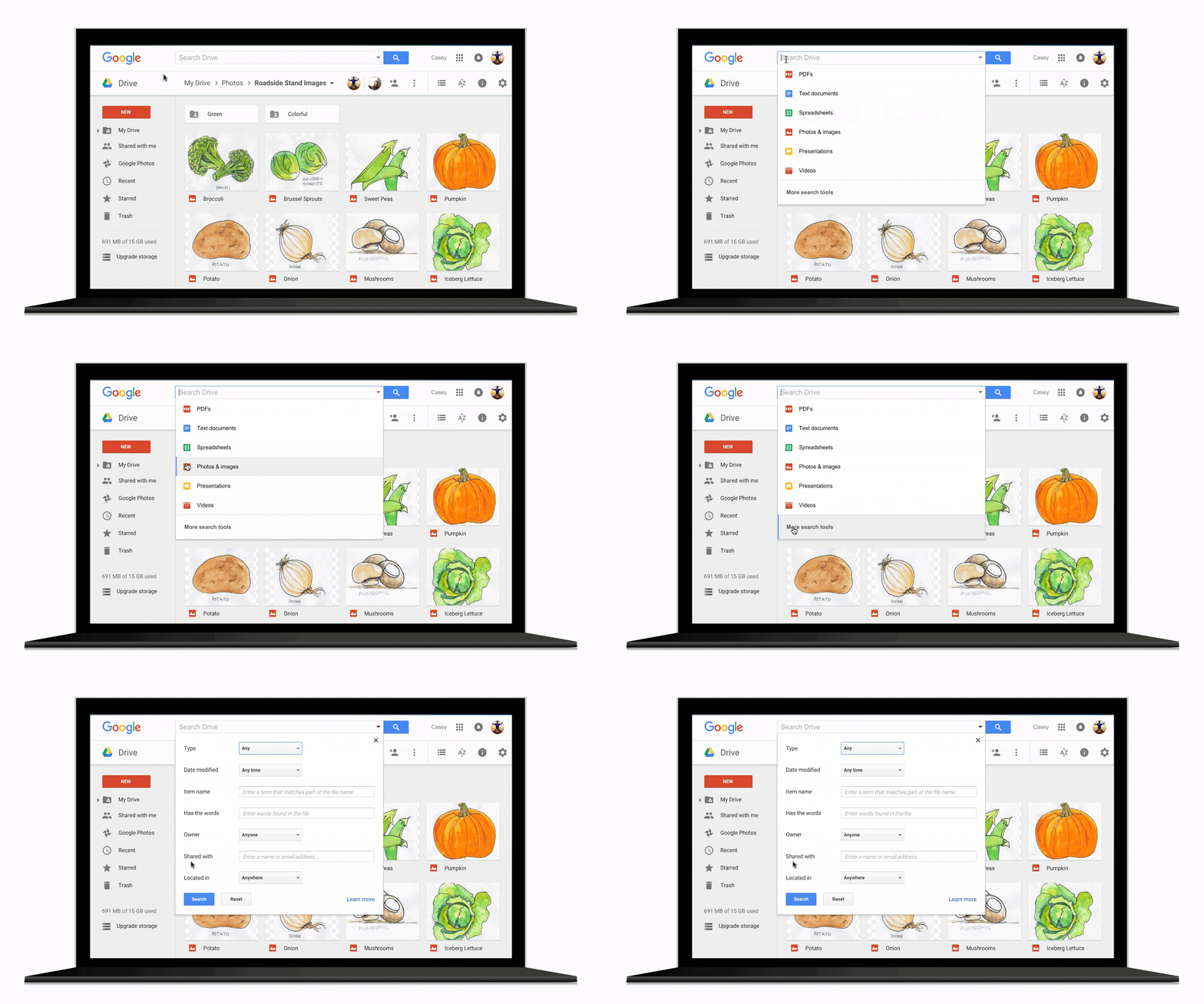
If you’re like me and you don’t organize your files within Google Drive, this will make finding the files you need extremely easy. Gmail, of course, has had this type of search functionality for a long time. It kind of makes me wonder, what took them so long? What do you think? Let us know in the comments below.
The post Google makes it easier to find your files in Google Drive appeared first on AndroidGuys.
Results mixed for Android, iOS growth in October report

Kantar Worldpanel released their report on smartphone market share through the end of October 2015 showing the battle between iOS and Android is both stable and in flux at the same time. Android continued to maintain a lead position with Samsung showing signs of a comeback, although Apple showed strong growth in some unexpected areas.
In Europe, results were a mixed bag as Android surged in Italy, France and Spain. However, interest in Great Britain and Germany cooled off, leading to a gain of 1.6 percent for the top five European markets, the EU5. At the same time, iOS declined in the EU5 for the first time since the August 2014 period. Android also saw some surprising growth in the U.S. where it surged by 9.5 percent year over year to 62.8 percent of the market. Traditionally, the U.S. market has been a nice stronghold for Apple’s iOS.
One area where Apple is enjoying some significant success is in the Chinese market. Android still controls a whopping 74.2 percent of the market, but that is down around 8 percent compared to a year earlier.
For manufacturers, Samsung posted its first period of year-over-year growth in 2015 for sales of their smartphones. The U.S., U.K. and French markets were especially strong improvements for Samsung. LG and Huawei also continued to grow their shares. In Europe, Apple unexpectedly lost some ground in Britain and Germany. Kantar Worldpanel notes that in Britain, Apple’s losses were at the hands of LG and Samsung.
Analysts looking ahead to the results of the holiday shopping season will be keeping an eye on how many smartphone owners decide to replace their devices with newer ones and whether they stick with their current platforms and manufacturers.
source: Kantar Worldpanel
via: PocketNow
Come comment on this article: Results mixed for Android, iOS growth in October report
Wal-Mart enters mobile payment war with Walmart Pay
Fret not if you forget your credit card at home the next time you visit Walmart, as you can simply pull out your smartphone and pay for groceries. Yes, the retail company is set to make your life easier with launch of ‘Walmart Pay,’ which will accept payments from Android as well as Apple devices.
The service will be launched in select Walmart stores on Thursday, while it will be available throughout the nation by the first half of 2016.
In order to use Walmart Pay during checkout, you are first required to set up the Walmart app on your phone by entering your credit, debit or Walmart gift card details. Walmart Pay is a free app and it comes integrated with the retailer’s mobile app.
During the checkout, you would be required to select Walmart Pay as the payment option. The app will then use your phone’s camera to scan the code displayed at the register, and then send you an e-receipt.
The company is also working on the integration of other payment options such as mobile wallets in the future.
Source: Reuters
The post Wal-Mart enters mobile payment war with Walmart Pay appeared first on AndroidGuys.
Starbucks full featured app makes coffee easy to order(App review)
I know almost all of you have heard of Starbucks. I love coffee and drink it on a regular basis, and one can argue that there are many coffee shops with better brew, but Starbucks is always there for you no matter where you go around the world. And its coffee is always reliable and its mixed drinks are second to none.
There have been 5,000,000-10,000,000 installs of the Starbucks app from the Google Play Store, but many people still don’t know the latest features in the app. Let’s check it out.
Starbucks Pay
Before Android Pay and Samsung Pay were released, Starbucks already had an easy way to pay using your smartphone. All you need to do is set up a credit card or PayPal account to fund your Starbucks account. Once sufficient funds are added to your account, you could just generate a barcode and place your device in front of a scanner after you place an order. You will hear a beep, and the record of your purchase would be logged in your history. It’s very simple to pay this way and you don’t need to bring an ID or wallet with you.
I happen to walk to my nearby Starbucks at night with my dog and grab a hot chocolate or eggnog latte for dessert. It’s really convenient not to have to carry my wallet around with me late at night.
Even though Starbucks doesn’t use Android Pay, I wish other places I frequent, like the grocery store, would allow me to make purchases the same way. Wallets are usually filled with back-up cards, reward cards, receipts, insurance cards, etc. It’s nice to leave my chunky wallet behind.
Mobile Order and Pay
From the Starbucks app you can look over the entire menu from your phone, and place an order before you pick it up. The menu at Starbucks is HUGE. Who knew you could order a strawberries & creme Frappuccino? There are teas, Refreshers, fresh juice, iced teas, iced coffees, espressos, Frappuccinos, hand-crafted sodas, smoothies, oh yeah, and fresh brewed coffee.

Rather than being rushed in line to pick what you want, you are free to take your time from the privacy of your own home or car to peruse the entire menu from the app. It’s worth looking over the entire menu because you might want to try something new. The strawberries & creme Frappuccino could be your new favorite drink that you never knew existed. Or if you’re in a rush and on a road trip, just place an order at a Starbucks on your route, run in and grab your order, and get back on your merry way.
Again, this is another feature I would love to see in more apps for other restaurants I frequent so I don’t have to wait in line.

Rewards – from the reward page
More than great drinks. Great rewards.
Enjoy all this and more with your membership to our Loyalty Program:
- Free drink or food rewards (some restrictions apply)
- Custom offers on items you enjoy when you opt in to receive My Starbucks Rewards email
- Early access to new products
- Easy payment with our mobile app

Here’s how it works
To enjoy free drink and food rewards, you’ll need to earn Stars. Get Stars when:
- You pay at a participating store with your registered Starbucks, Teavana or La Boulange Card or the mobile app
- You buy specially marked Starbucks products where you buy groceries
- You buy coffee or tea products at Starbucks Store online
Most of you frequent Starbucks already so why not take advantage of the free reward program? You can get free refills on coffee for a year just for earning five stars. If you earn 30 stars within 12 months you’re promoted to the Gold Level where you can earn a free drink or food item. You’ll also get a personalized Gold Card so your barista will know you are special.
App Usage
Using the app is as simple as it gets. Once you load credit onto your Starbucks app, ordering, paying and earning rewards are simple. Starbucks left out annoying advertisements, and click bait from within the app, and made a clean and simple user interface. Simplicity wins in this case. There’s nothing you don’t need to make the app more confusing than it really needs to be. You can even send gift cards through the app for your friends and family.

Summary
If you haven’t tried the Starbucks app yet, or if you haven’t used it in awhile, now is the time to download it again and start earning rewards. You don’t have to expose your credit/debit cards with the automated barcode generator within the app, and you don’t need your chunky wallet when you walk into the coffee shop. Better yet, you can order and pay in advance from the app so you can avoid waiting in line for your order.
The loyalty system is a great way to earn free food and coffee from Starbucks as well. I highly recommend the Starbucks app for you coffee lovers.
Download the Starbucks app at the Google Play Store.
The post Starbucks full featured app makes coffee easy to order(App review) appeared first on AndroidGuys.
Cortana exits beta, gets built in to Cyanogen OS
Cortana, the virtual assistant from Microsoft has officially left beta and will now be readily available for anyone to use across Windows, iOS and Android.
Microsoft bills Cortana, named after the Halo character, as a personal assistant with personality. Now you’ll be able to use Cortana cross platform to do things like set location based reminders one one device and have it pop up on another, get missed call alerts and respond to text messages on your Windows 10 computer, and track flights and packages.
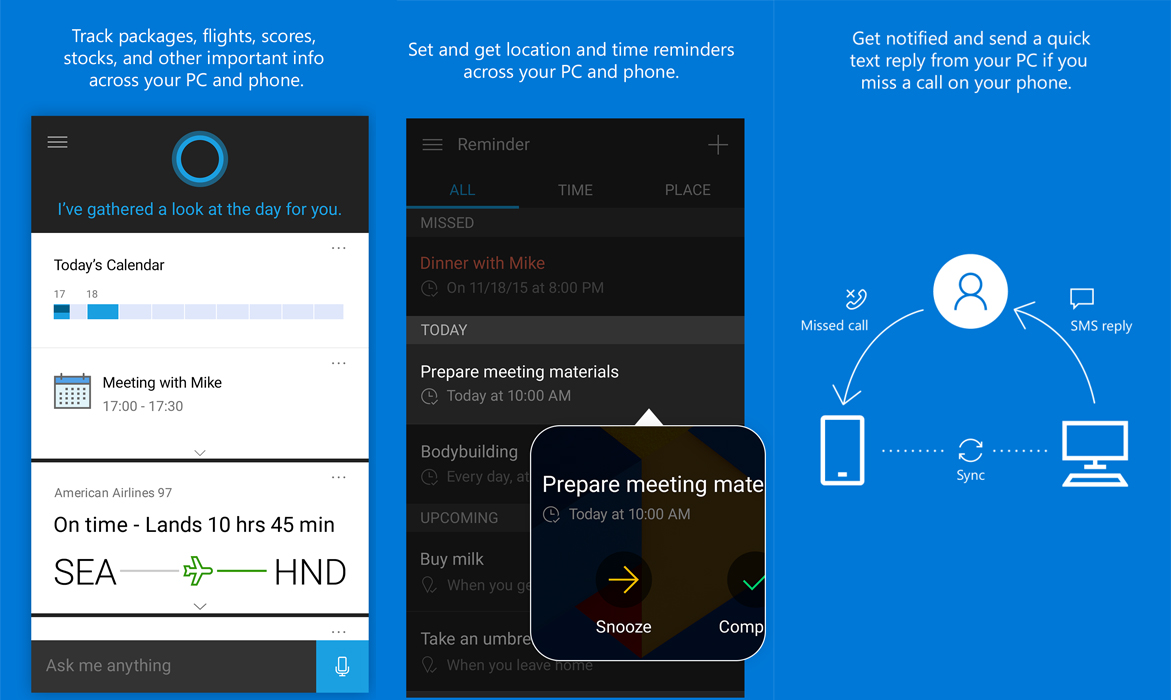
Microsoft says that Cortana will come with the same personality and features on mobile that it does on desktop. One of the main selling points of Cortana is the ability to give contextual suggestions for people, places and things that may interest you. Now the information and searches you use on one device will follow you to other devices so you’ll be able to pick up where you left off.
Even though Cortana will be fully featured on iOS and Android, due to some system limitations, it won’t be able to do some actions like toggling system settings or opening apps.
Another exciting tidbit is that on Cyanogen OS phones will now integrate Cortana much like Android Now is integrated into almost all Android Phones. You’ll now be able to say “Hey Cortana” from any screen and have the personal assistant pop up, ready to serve. With the increased integration comes more options. On Cyanogen OS phones you’ll be able to ask to have your phone powered down, enter Quiet Mode or have it toggle network modes.
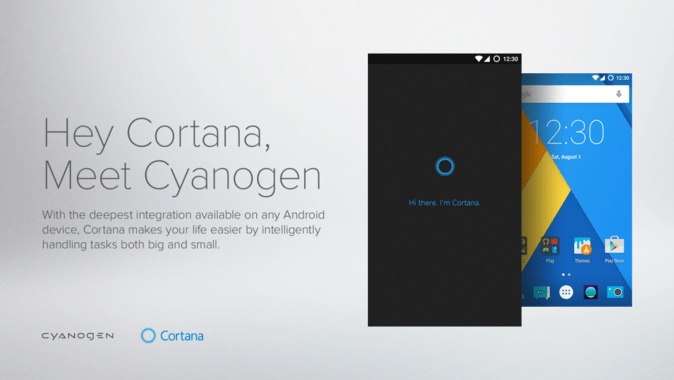
All of this is good news to those that find they like a little bit of personality in their personal assistant, but don’t want to jump over to iOS for the increasingly unreliable Siri.
Source: Microsoft
The post Cortana exits beta, gets built in to Cyanogen OS appeared first on AndroidGuys.
Cortana for Android officially debuts today

Cortana for Android, Microsoft’s own digital assistant, has left its public beta and is now officially available on Android. Cortana for Android will do just about anything Google Now can do, and more if you have a Windows 10-based computer.
Microsoft’s digital personal assistant will allow users to set reminders, appointments, and even dish out suggested interests. The big thing that differentiates it from Google Now is that those with a Windows 10-powered PC can send a text message reply when you miss a phone call on your smartphone.
The goal isn’t to recreate another Google Now, but to truly construct a connected and seamless digital assistant that is available to users wherever they are, whether that be on the PC or various mobile platforms like Windows Phone, Android, and iOS.
Microsoft released the public beta of Cortana for Android back in August and has been hard at work polishing it ever since. Microsoft around the same time began the public beta for iOS as well, which also came out of public beta and became official today.
Cortana for Android and iOS is also debuting in China today, allowing even more users to have a true digital assistant connection between their PC and mobile phones.
“With a Windows 10 PC in the mix we think we can do some pretty powerful things,” Marcus Ash, Microsoft’s Cortana program manager, told The Verge.
Cortana for Android and iOS won’t be everything it can be on these platforms, simply because of the developer restrictions. For instance, users won’t be able to say “Hey Cortana” to activate the digital assistant. That said, Microsoft is partnering with Cyanogen to make that possible on Cyanogen-powered smartphones.
Microsoft and Cyanogen’s partnership will also let Cortana toggle network modes, enable quiet mode, and other system features that aren’t accessible due to those aforementioned developer restrictions.
Aside from the partnership with Cyanogen, Cortana works best on Windows Phone since Microsoft is able to build it into the system on its own mobile operating system. Using Cortana on Windows Phone also opens up a much more seamless experience with Windows 10-based computers.
Despite developer restrictions, Microsoft will continue to update and polish Cortana for Android and iOS to make it the best digital assistant that it can be.


via: The Verge
Come comment on this article: Cortana for Android officially debuts today
Microsoft officially launches Cortana on iPhone and Android

After several months of beta testing, Microsoft’s virtual assistant Cortana is officially making her debut on competing platforms. You’ll be able to snag the Cortana app for iPhone and Android phones on their respective app stores, or via Microsoft’s Windows 10 companion app, starting today. It’ll also be deeply integrated into the Cyanogen OS-powered OnePlus One come December (with the 12.1.1 Cyanogen update). If you’ve been following along with the Cortana beta releases, there won’t be much new with these finalized apps: At the most basic level, you’ll be able to track reminders and notifications for things like flights and packages across all platforms, as well as manually ask Cortana questions. Beyond that, Cortana’s feature set will be different for each platform.
On Android, you can use the “Hey Cortana” command to shout questions when you’re in the app or on your home screen, and you can even get text notifications sent to your Windows 10 PC. Unfortunately, those are features iPhone users probably won’t see for a while, if ever, since Apple likely won’t open up iOS enough to make them possible.
 As for Cyanogen, Cortana will be pre-installed and you’ll be able to use the “Hey Cortana” command just about anywhere, even if you’re in another app. You’ll also be able to use the virtual assistant to do things like changing network modes, powering down your phone and going into silence mode. It’s not quite as extensive as Cortana’s Windows Phone capabilities, where it has access to a wider variety of settings and can even open and close apps, but it’s close.
“It’s been a fascinating experience to learn how you think about a personal assistant that runs across multiple platforms,” said Marcus Ash, a program manager at Microsoft who’s been heading up the Cortana iPhone and Android effort. Microsoft has been working since March to port Cortana, and while Ash’s team was able to take some notes from other teams that have built cross-platform apps, like the folks behind Office, OneDrive and Skype, this particular project presented entirely new challenges. For example, it’s still unclear how it’ll update the apps going forward, since they do very different things on each platform.
Unfortunately, the Cortana apps will only be available in US and China at launch. As with Cortana on the desktop, it’ll eventually make its way to other territories. You’ll need a device that’s running iOS 8 or Android 4.1.2, at the very least, to run the Cortana apps.
Source: Microsoft
Kantar: iOS Adoption Rises in China as Android Grows in U.S. and Europe
Kantar Worldpanel has released new smartphone operating system market share data for the third calendar quarter of 2015, providing a regional breakdown of Android, iOS, BlackBerry, Windows Phone and other mobile platform adoption in the U.S., Europe, China, Japan and elsewhere during the three-month period ending October.

In the U.S. market, Android led the third quarter with 62.8% market share, compared to 33.6% for iOS. The U.S. smartphone market continues to be virtually a two-horse race between Apple and Google, with iOS and Android combining for 96.4% market share in the October quarter. Windows Phone was a distant third place with just 2.7% market share.
“With 33.6% of the U.S. smartphone market, Apple’s share remained down year-over-year, but up quarter-over-quarter, as iPhone 6s became the third best-selling smartphone,” Milanesi added. “Samsung retained its leading position in the U.S. smartphone market and, for the first time in 2015, the South Korean brand was able to show year-on-year growth.”
Android continued to have the highest market share among mobile platforms worldwide, experiencing 1.6% year-over-year growth in Europe’s big five markets — United Kingdom, Germany, France, Italy and Spain. iOS adoption grew in China and Japan by 7% and 3.5% respectively compared to the year-ago quarter.
http://www.kantarworldpanel.com/global/smartphone-os-market-share/
Kantar Worldpanel data shows the iPhone 6s accounted for 24% of all iPhones sold in the U.S. in the three months ending October, compared to 33% for the iPhone 6 in 2014, and 22% for the iPhone 5s in 2013. Kantar says “overall volumes are pretty much identical to what was sold in 2013, while down 25% from 2014’s sales.”
Kantar Worldpanel’s latest data is also available in chart format for those that cannot view the embedded map above.
Discuss this article in our forums
 AIVAnet