


HTC Vivid review
 HTC’s been around this block before — the LTE one, that is. Back in March, the manufacturer was the first to hold Verizon’s hand as it tested the 4G waters with the Thunderbolt. That launch may have been fumbled (see: hotspot cycling and 3G connectivity for starters) and the device plagued by battery issues, but as far as head starts go, Big Red got a big leap. Now the time has come for AT&T to play catch-up, shedding its reliance on an HSPA+ faux-G crutch and shifting over to LTE wireless speeds.
To do this, the carrier’s enlisted HTC’s veteran expertise, taking advantage of its 700MHz know-how and offering the manufacturer a redemption song of sorts. This round two redux takes the form of the Vivid: an all-black, metal-backed unassuming plastic slab that houses a dual-core 1.2GHz processor and 8 megapixel rear camera with dual LED flash under a 4.5-inch qHD display. Impressive as its specs may be, AT&T’s not betting the entire farm on this phone and is trotting out the Samsung Galaxy S II Skyrocket alongside to shoulder the burden. But for a device once codenamed the Holiday, its battle for consumers’ attention and disposable dollars could prove to be anything but leisurely. Will LTE history and its battery draining missteps repeat themselves? Can AT&T get a leg up on its first place competition with this $199 device? And is the allure of “true” 4G even worth your hard-earned dollars? Follow us after the break as we find out.
Gingerbread Officially Most Popular Android Version

Gingerbread is officially the most popular version of Android. Gingerbread (Android 2.3.x) is on 44.4% of all devices, passing Froyo (Android 2.2.x) which now accounts for 40.7% of Androids. Somewhat surprising is Eclair (Android 2.1.x), accounting for 10.7% of all Androids. Honeycomb– which covers tablets only– accounts for roughly 2% of all Androids. Considering Google’s upcoming sweet treat should theoretically work on any 2.3 device, you can’t help but wonder how it will eat at Gingerbread’s overall lead of Android devices this time next year. Hit the break for an exact breakdown of Android’s software distribution after the break.
AT&T to expand 4G coverage and launch first LTE smartphones November 6th: HTC Vivid, Samsung Galaxy S II Skyrocket

AT&T’s starting to catch the LTE fever, as the carrier’s announced that its first two devices with the true 4G will be ready to grab as of this upcoming Sunday. First we have the Samsung Galaxy S II Skyrocket: the long-rumored device can be yours for $250 with a two-year commitment and will offer a 4.5-inch Super AMOLED Plus display, Android 2.3.5, 1.5GHz dual-core CPU, 8MP rear camera with a 2MP front-facing cam and 16GB of internal storage space. Next up is the HTC Vivid (Holiday), which will be offered in both black and white for $200 and appears to match the specs leaked to us a couple months ago: it uses a 4.5-inch qHD (960 x 540) display, 1.2GHz CPU, 8MP rear camera with f/2.2 28mm wide angle lens and 1080p HD video recording. What about the “4G” branding? Contrary to the carrier’s HSPA+ devices, neither device will have LTE or 4G as part of their official name. Both phones will be reverse compatible with AT&T’s HSPA+ network, in case you’re not using the phone in an LTE-capable area; speaking of which, AT&T also announced that the November 6th launch will also bring four additional markets live, including Boston, Washington DC, Baltimore and Athens GA. Data plans for AT&T’s LTE smartphones will remain the same, with $15 getting you 200MB per month, 2GB going for $25 and 4GB with mobile hotspot connectivity for $45. Check below for a press gallery and the full press release.
Acer Iconia Tab A100 review
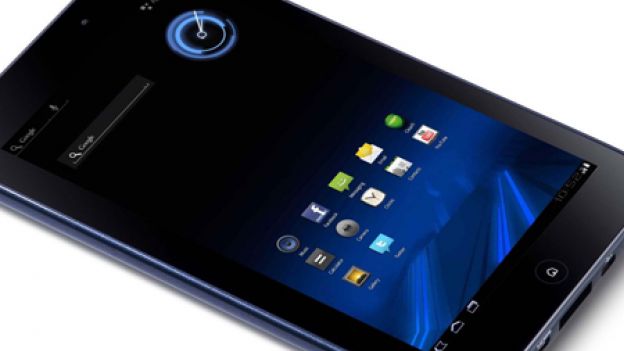
Acer’s Iconia Tab A100 has some great redeeming features in its dinky compact chassis. That said, even the cheaper price isn’t enough of an added impetus to go out and buy it.
Acer’s Iconia Tab A100: Build
Acer’s Iconia Tab A100 is one of the cheapest and dinkier tablets here, with a 7-inch screen that still does the job when watching movies or catching up with last night’s telly. An nVidia dual-core processor means the Iconia Tab is as adept as most tablets when it comes to playing games and messing around with apps. HD movies play with next to no stuttering and the built-in speakers are surprisingly loud, although they sound rather tinny on top volume.
Acer’s Iconia Tab A100: Screen
The 1024 x 600 resolution keeps images sharp, and you won’t get eye strain thanks to the comfortable brightness levels. The excellent viewing angles mean you can enjoy a movie with a fellow traveller without crushing your heads together.
Acer’s Iconia Tab A100: Features
Browsing the web is a silky smooth experience, thanks to the responsive touchscreen. Pages load almost instantly over a decent Wi-Fi connection, and Flash is supported so you can enjoy BBC iPlayer and other video streaming sites. The screen is responsive to swipe and prods, although it does gather fingerprints in seconds so make sure you keep a cloth handy.
Acer’s Iconia Tab A100: Battery
Battery life is sadly less impressive. We didn’t even get through four hours of TV before the Tab died, the worst result here. However, the light and compact body means it’s still highly portable. The 13mm body is just 405g, so you can slip it into a handbag or tiny manbag without busting its seams. We liked the curved corners and swirling pattern on the rear, a welcome break from the traditional black rectangular design.
Acer’s Iconia Tab A100: Verdict
If you need something tiny and light to carry around, and don’t mind the short battery life, the Iconia Tab is a worthy entertainment device.
Acer’s Iconia Tab A100 availability: Out now
Acer’s Iconia Tab A100 price: £259
Android 4.0 Ice Cream Sandwich now official, includes revamped design, enhancements galore
Google has taken the stage in Hong Kong to make the next version of Android OS, nicknamed Ice Cream Sandwich, a thing of reality. Better known as Android 4.0, the update offers a massive redesign to the user interface and adds a plethora of new features. Some of the highlights include an NFC-enabled feature called Android Beam, offline search in Gmail, new lock screen features and a fancy unlocking method called “Face Unlock,” which uses facial recognition to ensure strangers cant use your phone without permission. Ice Cream Sandwich also includes enhancements in almost every native app within Android itself. The SDK is already available for Android 4.0, and the update itself will make its first public appearance on the Samsung Galaxy Nexus, also unveiled tonight. After the break, well cover all of the nitty gritty details, along with some excellent screenshots below. So come along, why wont you?
Here’s some of the enhancements found in Ice Cream Sandwich:
- Option to use virtual buttons in the UI, instead of taking up capacitive touch buttons
- Widgets are in a new tab, listed in a similar list to apps
- Folders are much easier to create, with a drag-and-drop style similar to iOS
- A customizable launcher
- New phone app with visual voicemail functionality that lets you speed up or slow down voicemail messages
- Pinch-to-zoom functionality in the calendar
- Gmail has offline search, a two-line preview, and new action bar at the bottom
- Swipe left or right to switch between Gmail conversations
- Integrated screenshot capture by holding power and volume down buttons
- Improved error correction on the keyboard
- Ability to access apps directly from lock screen (similar to HTC Sense 3.x)
- Improved copy and paste
- Better voice integration
- Face Unlock, a facial recognition service
- New tabbed web browser, allowing up to 16 tabs
- Browser now automatically syncs your Chrome bookmarks
- Modern “Roboto” font
- Data Usage section in settings lets you set warnings when you reach a certain amount of use and disabling data when you go over your limit
- Ability to kill off apps that are using data in the background
- Camera app: zero shutter lag, time lapse settings, zoom while recording
- Built-in photo editor
- New gallery layout, organized by location and person
- Refreshed people app with social network integration, status updates and hi-res images
- Android Beam, a NFC feature that lets you exchange websites, contact info, directions, YouTube, etc.
- Don’t like some of those preloaded carrier apps? Disable ’em. Android Engineer Dan Morrill mentions that, among other new features, any app can be disabled, and while it will still take up space in ROM, it won’t be snatching any of your precious resources or clock cycles again if you
Pantech Vega LTE gets official for South Korea, dual-core 1.5GHz CPU and 4.5-inch HD display
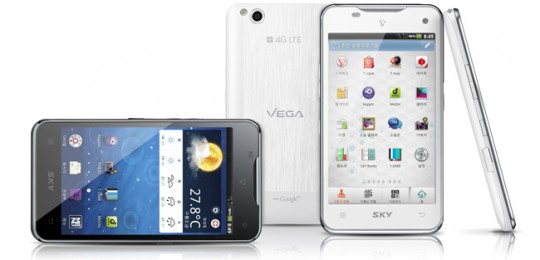
Pantech holds no punches in its home nation, where the company’s latest handset, the Vega LTE, has just become very official. In addition to 4G support, the phone features a dual-core 1.5GHz CPU, 1GB of RAM and a 4.5-inch display with a whopping 1280 x 800 resolution. Take a moment to savor that last part. Gingerbread is at the core of this large-and-in-charge beauty, which also includes an 8 megapixel auto-focus camera that captures video at 1080p, an LED flash, a 1.3MP front-facing shooter and 16GB of built-in storage. An 1830mAh battery powers the slab, which measures just 9.35mm thin and weighs 135.5g (4.8oz). Rounding out the internals, users will benefit from A-GPS, 802.11n, NFC and terrestrial DMB — that last one is specifically for the home crowd. With specs like these, we can only hope a domestic version makes its journey across the Pacific. If you’re looking for some mental exercise, a translated PR follows the break.
HTC Sensation XL review
 The HTC Sensation XL pushes out 4.7-inches of glorious display to fill with your Android ambitions. It’s the latest flagship phone to launch from HTC, much rumoured and leaked, and now unleashed upon the world. It picks up much of what the HTC Titan set out on Windows Phone 7 and effectively gives you the Android equivalent, but with a few treats thrown in.
But does this phone bite off more than it can chew? Is it big and clever? We got the chance to spend some time with the phone prior to launch to bring you our first impressions.
Design and build
Let’s start with the design. HTC have stuck to their tried and tested approach of a machined aluminium back, with a bottom section finished in rubberised plastic to ensure plenty of reception. Like the HTC Sensation, the entire back comes away from the front, so effectively all the innards are attached to the back of that massive screen.
It feels solid in the hand. There are no plastic sections to creak as you manipulate it, there are no odd panels or coloured sections. It’s just big, clean and white. But it isn’t as attractive in design as the regular Sensation which by comparison looks more sophisticated with it’s speaker cutout and contoured screen edges.
The flat front of the screen gives you four touch controls across the bottom, home, menu, back and search. On the top you have the normal standby button and 3.5mm headphone jack, with volume controls on the side. A single Micro-USB is on the bottom edge – there is no HDMI out, as you might find on rival devices. Read more 
HTC Sensation XL vs Samsung Galaxy S II
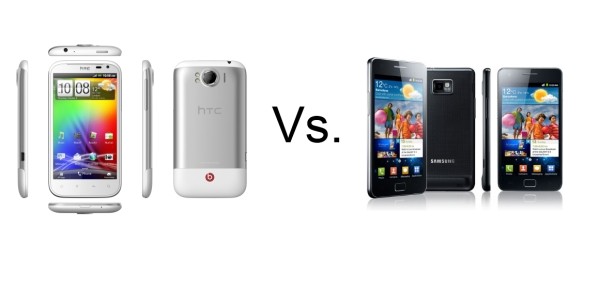 The HTC Sensation XL now makes that three flagship Android handsets from the Taiwanese mobile makers. Peter Chou and his team have also once again team up with Dr Dre and Jimmy Iovine to bring Beats Audio software and headphones to an HTC smartphone and that gives this package one hell of an extra shine, but is it quite shiny enough?
Lurking in the wings, as ever, is the current King of the Androids in the shape of the Samsung Galaxy S II begging the big question for any wouldbe buyer – just which one is the better phone? So, we’ve lined up these two smartphones’ spec sheets and worked it out on paper at least. It’s the HTC Sensation XL vs Samsung Galaxy S II.
Form Factor
- TIE: GALAXY S2 : 125.3 x 66.1 x 8.49mm, 117g
- TIE: SENSATION XL :132.5 x 70.7 x 9.9 mm, 163g
In terms of pure measurements, it’s the first round to the Samsung Galaxy S II. As ever, it’s all about how thin and how light a mobile phone is when it comes to something that’s going to be sitting in your pocket, weighing you down and interrupting the carefully tailored lines of your clothing. The SGS2 is a touch thinner and considerably lighter. The other possible disadvantage to the Sensation XL is that it’s physically bigger on the other dimensions as well, but that has its plus points later on, as we’ll see.
However, that said, we’re going to call the round a tie because, as far physical design goes, it’ll be the machined aluminium block of the Sensation XL that has the edge over the more plastic look and feel of the Galaxy S II for aesthetics and ergonomic pleasure. To be fair to the Samsung, though, that doesn’t mean that it comes across as low rent. It’s still a nice piece of kit to own. Just not as satisfying as all-metal handsets. Read more

iPhone 4S vs Samsung Galaxy S II
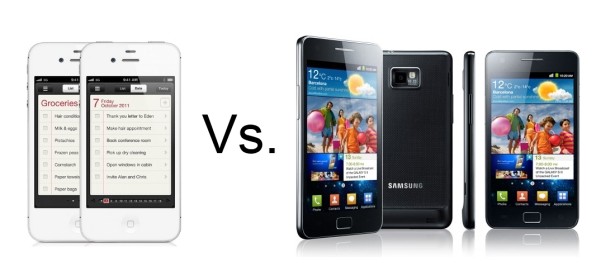 The iPhone 4S might be Apple’s top dog but Android has some pretty impressive breeds of its own. Right now, the No.1 in the Google mobile space has got to be the Samsung Galaxy S II with the LTE and even LTE HD editions to enjoy if you happen to live in the right parts of the world.
We’ve already seen how the iPhone 4S matches up to the iPhone 4 but there’s going to be an awful lot of people out there tempted to make the step over to Android given that the 2011 Apple phone announcement has been an S upgrade rather than an iPhone 5 in its own right. So, if that’s you, or if you just want to know how your Samsung superphone compares to the latest that Cupertino has to offer, then here’s Pocket-lint with the iPhone 4S vs Samsung Galaxy S II so you can see for yourself.
Form Factor
- 1ST: GALAXY S2 : 125.3 x 66.1 x 8.49mm, 117g
2ND: IPHONE 4S : 115.2 x 58.6 x 9.3mm, 140g
As far as pure design aesthetics and ergonomics go, this one’s a matter of horses for courses. Both the iPhone 4S and SGS2 are good looking devices with neither a knobble out of place. So, what the form factor contest comes down to is pocket space. What we always go on first are the mass and profile of the phones and it’s the Samsung Galaxy S II that’s both thinner and lighter. Yes, it’s longer and wider but these tend to be the dimensions of least importance when it comes down to taking up the room where your wallet and crumpled up tissues go. Ultimately, what you want is less weight to carry around and something that keeps the lining of your clothes as close to the way which your tailor intended. Read more
Hotmail application for Android phones
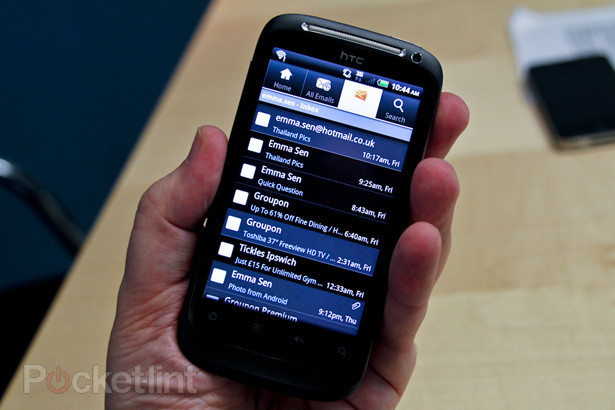
Microsoft has released an official Hotmail application for Android, and Pocket-lint was invited to the company’s London headquarters to check it out in advance of its public unveiling.
Demonstrated by Bryan Saftler, Hotmail product manager, Microsoft Consumer and Online UK, the new app offers cunning integration with the operating system, with a “you’ve got mail” icon appearing in the top left of the screen even when the screen is locked. The handset also vibrates to signify that an email has arrived. However, it’s not a native application, and is a free download on Android Market.
The layout of the screen is simple, offering tabulated access to the several different functions. There’s tabs for home, all emails, inbox and search, and one of the benefits is that you can add as many Hotmail accounts as you like. They’ll be split into separate inboxes or you can view all of the emails from all of the accounts together.
 AIVAnet