



Google’s Ingress to become a platform for other augmented reality games

Eventually, Google’s Niantic Labs will have to wind down Ingress’ storyline. However, that won’t be the end of the developer’s augmented reality efforts. Niantic tells The Verge that it’s working on programming kits that would let aspiring coders build their own games with chat layers, location info and (if necessary) in-game ads. Jut don’t expect to write your own title any time soon. Niantic doesn’t yet know when the tools will be ready, and their availability may depend on the kind of flexibility that the team wants to offer. If the developer plays its cards right, though, Ingress fans will have a lot more to look forward to than just the beta’s end or iOS support.
Filed under: Cellphones, Internet, Mobile, Google
Source: The Verge

Skype brings picture in picture video calls to Android tablets

For Skype’s latest Android update, the company turned to an unlikely source of inspiration: parent company Microsoft’s Windows 8.1 OS. Specifically, the Skype team wanted to achieve a Snap View-like feature for Android tablet users and that’s just what’s rolling out to users today. The new picture-in-picture option allows callers to continue browsing the web, reading email or even playing Candy Crush on their slates while they video chat away. A new pinch to browse alphabetically feature has also been bundled into the update, making it far easier to locate contacts without endlessly scrolling through a list. Existing Skype users should see the update hitting their Android devices soon though, take note, smartphone users will only benefit from included stability and bug fixes. You can’t have it all, people.
Filed under: Cellphones, Wireless, Software, Mobile, Microsoft, Google
Source: Skype blog, Google Play
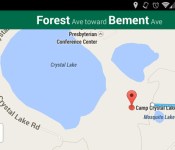
Google Maps Navigation for Android makes its way to 25 more countries

Eager to go on a driving trip to an exotic locale? You’ll be glad to hear that Google Maps Navigation is now available in 25 more countries. Most of the additions are in Africa, including Libya, Somalia and Tunisia. The rest of the coverage is scattered across the globe: Caribbean travelers can find their way through Guadeloupe and Haiti, while European visitors can navigate Andorra, Croatia and Serbia. There’s even support for relatively remote places like Bhutan and Vanuatu. Maps Navigation still isn’t a truly global service when it reaches 99 countries, but it now reaches far enough that it will be a surprise if you can’t get your bearings while traveling abroad.
Filed under: Cellphones, Mobile, Google
Via: Android Police
Source: Google Maps Support
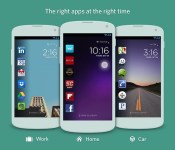
Cover’s context-aware Android lock screen launches on Google Play (video)

Context-sensitive interfaces like Aviate and Google Now are on the rise in the Android world, and Cover is taking advantage of that spotlight by releasing its dynamic lock screen on Google Play as a public beta. The updated front end works much as it did in the invitation-only test, automatically changing app shortcuts and settings as you move from place to place. It’s also easy to peek into apps or switch between them. Most of the improvements lie below the surface, Cover says — the new version maintains an app’s exact state while peeking, improves KitKat compatibility, includes tutorials and offers more customization. Whether or not you’re a Cover veteran, you’re now just a click or two away from trying the updated software for yourself.
Filed under: Cellphones, Mobile
Source: Google Play

[Giveaway] Win One of Three Android Holiday Cards Courtesy of Andy’s Vinyl

Kristian Bell has been involved with the Android community for many years; he’s a renaissance man of many talents and he’s done a little bit of everything. I had the pleasure of working with him in a team setting and he always produced top-notch work. His latest endeavor is Andy’s Vinyl, which is a decal, clothing print, and paper goods print shop.
The holidays are upon us and Andy’s Vinyl is selling boxes of Android-themed holiday greeting cards. Kristian has hooked us up with three of these cards to give away (he’s doing the same with Android Dissected simultaneously as well BTW, so enter there too if you want to double your chances). This is the easiest contest ever, to enter simply say what you’d like to see in the Andy’s Vinyl Store in the comments section below or on the AndroidSPIN G+ sharing of this giveaway post. We’ll randomly pick three winners by the end of day Saturday, December 14 (EST) and Kristian will send them out shortly thereafter. Easy. Simple. Happy. Holidays!


Moto X gets Android 4.4 KitKat and camera enhancements on Sprint and US Cellular

Sprint and US Cellular customers with Motorola’s $199 smartphone have finally joined the KitKat party. Starting today, Moto X users can enjoy Android 4.4′s streamlined interface and Google-licious features, courtesy of an OTA update.
In other Moto X news, the company updated its camera app with manual control of the focus and exposure. Users can select “Control focus & exposure” to adjust the aforementioned settings by dragging a green bracket to the desired location. In order to cash in on the update, you’ll need to hit up the Play store via our source link below.
Filed under: Cellphones, Google
Via: PhoneArena, Droid Life
Source: Motorola, Google Play

Only on Android: 6 Exclusive Features
For residents of upstate New York, you need a phone that you can take and use wherever you travel, whether you’re heading to the Finger Lakes for a vacation, traveling to the Big Apple on business, or spending the weekend in Philadelphia. When considering your next phone purchase, consider the following exclusive features only found on Android phones.

Replaceable Keyboards
When it comes to typing on your phone, it’s nice to have options. For example, with Android phones, you can choose from other keyboard layouts to get a keyboard that works best for you. One of the most common options is the Swype keyboard, which allows you to swipe over the letters to make a word without having to type each letter individually. This makes typing out text messages and email messages infinitely faster. Other options include Perfect Keyboard, SwiftKey, Thumb Keyboard and Kii Keyboard.
Near Field Communication (NFC)
A big part of the Android ecosystem is the use of NFC, or near field communication. This is a short-range wireless technology that makes it possible for two devices to interact through electromagnetic radio waves. With NFC, you can share things easily from one phone to another, such as pictures or documents. Not only that but you can buy NFC tags and program them to do simple tasks. LifeHacker details how this works if you want to learn more.
Dual User Profiles
With Android phones, you can create multiple user accounts. This allows you, as the owner, to restrict access when you give your phone to others to use. This is especially helpful for parents who want to let their children use their phones from time to time to play games, read books or watch video. This ensures they aren’t able to access adult apps or R-rated videos.
Customizable Features
With Android, there are tons of ways to customize the look and feel of your phone. With custom launchers, you can choose how you want the icons to appear on your screen so that your Android looks completely different than the Android user sitting next to you. You can also find custom icon packs that change the look and feel of your phone and how the icons look on your screen.
If you want to see what the weather will be like every time you open your phone, add a weather widget to your home screen. Many widgets are available including calendars, flashlights, Facebook, Twitter and stocks.
Access to Files
One of the major selling points of Android phones is easy access to the file systems. Where other phones might require you to connect the phone to your computer to see files (and may restrict access to certain file types), with Android you can open up the files and get to everything stored in the memory. Build your own structure with the files by adding folders and subfolders in a way that makes the most sense to you.
Remotely Access and Control Your PC
Though this is not technically an exclusive feature, having the ability to remotely access your personal computer is a great feature that should be mentioned. This is easily done with the Android app TeamViewer, which is free. For it to work well, you’ll need a fast and reliable connection. Buffalo residents have the option of connecting to FiOS, a great option because it provides speeds of up to 500 Mbps, over 16 times faster than the typical cable Internet connection.
This is just the tip of the iceberg when it comes to exclusive features to the Android phone. Features like these really make you wonder why everyone doesn’t own an Android.
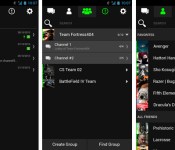
Razer Comms for Android keeps in-game chat alive when you leave your PC

It can be tough to leave in-game voice chats — step away to walk the dog and you may miss an important strategy session. You’ll stay in the loop with Razer’s new Comms for Android, though. The free app improves on rival clients from Steam and Teamspeak by supporting both voice chats and text while on the road; you won’t have to miss out on either team banter or private messages. Comms for Android is also useful if you’re still sitting at your desk, as it lets you respond to SMS and turn down calls through its Windows equivalent. The mobile software is available now through Google Play, and Razer promises that iOS users will get Comms sometime in the first quarter of 2014.
Filed under: Cellphones, Gaming, Tablets, Mobile
Via: Razer
Source: Google Play
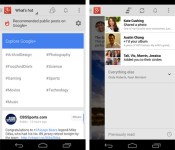
Google+ for Android update brings search and notification improvements, holiday cheer

Following last month’s update to enhance locations and photos, the folks in Mountain View are rolling out version 4.2.4 of Google+ for Android today. Added features this time around include the ability to search everything from the same box and content browsing by category from the What’s Hot stream. Notifications get a tweak as well, allowing users to control who’s able to buzz them immediately by adjusting “Who can notify me” in the settings menu. Finally, to show you’re in the proper seasonal spirit, shaking your device now adds animated snow to an open photo via Auto Awesome. A second shake will save the image for posterity. The updated software is making its way to Google Play “gradually,” so check back later if it’s not snowing… er, showing up just yet.
Filed under: Software, Mobile, Google
Source: Vic Gundotra (Google+), Google Play
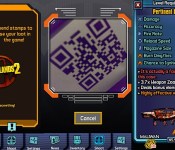
Borderlands 2 mobile app turns QR codes into absurd in-game armaments

Borderlands 2 is attempting the Herculean task of exciting people about QR codes. With its new LootTheWorld mobile app, Gearbox Software (Borderlands, Brothers in Arms and, er, Aliens: Colonial Marine) is turning any barcode or QR square into in-game gear like acid-burst armor or a flame-spewing sniper rifle with a 12x-zoom scope.
Whether you bought the game last year or just downloaded it for free from the PlayStation Store, this app could be one of the more useful mobile companions on your phone. Perhaps best of all, it’s free and available right now from iTunes and Google Play. We’ve reached out to Gearbox for info on how the loot is determined and will update this post if we hear back. You should hurry along though, Mercenary Day is almost upon us.
Introducing LootTheWorld, a free app for iOS and Android that enables you to hunt Borderlands 2 loot in real life: http://t.co/Ogo45IeYWr
– Gearbox Software (@GearboxSoftware) December 12, 2013
Filed under: Gaming, HD, Mobile
Via: Gearbox Community, Gearbox Software (Twitter)
Source: Google Play, iTunes
 AIVAnet