


LG’s L Series III budget smartphones tout KitKat and smart covers

LG isn’t just bringing high-end smartphones like the G Pro 2 to Mobile World Congress — it’s also launching its L Series III phones for the budget-minded among us. The 3.5-inch L40, 4.5-inch L70 and 4.7-inch L90 are subtle evolutions of the Optimus L II range in terms of hardware. All of them sport faster 1.2GHz dual-core processors and refined designs that are more in line with the company’s higher-end devices. There’s a larger 1GB of RAM on the L70 and L90, too. However, the real stars of the show are the L Series III’s software and accessories. They’re some of the first big-name budget phones to run Google’s efficient Android 4.4 KitKat; they’re also LG’s first non-flagship devices to support optional Quick Window covers, letting you check an incoming call without exposing the whole screen. There’s no word as to when these third-generation handsets will hit store shelves, although they’re built for markets where 3G data is the best you’ll get. In other words, don’t expect them to reach LTE-obsessed American carriers any time soon.
Filed under: Cellphones, Mobile, LG
Source: Korea Newswire (translated)
HTC: New Flagship devices to get major updates for 2 years
Hoping to open up a session to hear what their customers had to think, HTC hosted an Ask Me Anything on Reddit, taking questions on pretty much anything. Something we highlighted as predictably being a major topic for discussion was the updates situation on the devices, and as expected it was of hot discussion.
Going forward, HTC have committed to bringing all major Android updates to its new flagship devices for two years after their release date.
The controversy comes after the company announced that their once supposed flagship One X and X+ device won’t make it past Android 4.2.
The HTC One has since received fairly steady and quick updates, and it seems HTC want this to continue with their future flagship handsets – fantastic news for future HTC users that their expensive handset won’t become outdated within a few months of being released.
The post HTC: New Flagship devices to get major updates for 2 years appeared first on AndroidGuys.

FCC filing hints at a couple of new Samsung Galaxy tablets

Samsung may have more than the Galaxy S 5 to show at Mobile World Congress this year. It just passed a couple of unannounced tablets through the FCC. One is a 10-inch SM-T530 that is clearly isn’t one of the company’s pro models; the rear camera doesn’t have the telltale flash. As such, it’s most likely to be a fourth-generation entry in the lower-cost Galaxy Tab line. There isn’t any cellular data on this particular device, although we wouldn’t rule it out for additional variants that have popped up at the Bluetooth SIG and an Indian import tracker. We also spotted what looks to be an 8-inch SM-T330, which is rumored to be the Galaxy Tab 4 and was spotted on Bluetooth SIG a few weeks ago. It too doesn’t appear to sport any cellular bands, but as always, we wouldn’t rule out LTE versions later down the line. No matter what, it’s safe to presume that Samsung will have at least one more slate up its sleeve in the near future.

Nicole Lee contributed to this report

HTC will bring all ‘major Android updates’ to new flagship devices for two years (update: only in North America)

Members of HTC’s US product team have just started taking questions from Android fans over on Reddit, and they’re already dropping some goodies. After conceding that the company’s track record with updates isn’t spotless, they confirmed that HTC plans to bring “all major Android updates” to its forthcoming North American flagship devices for a full two years after they’ve been released.
We can hazard a guess at what those new flagships may be, but it’s heartening to see HTC pledge prolonged support for its new phones. After all, few things are as frustrating as buying a shiny new smartphone only to see its maker basically forget about it after a few months. Sadly, HTC isn’t a stranger to that stuff: the company caught flack for refusing to update the One X past Android 4.2, a decision it made to maintain a level of software parity between the Tegra and Snapdragon variants floating around out there. The move ruffled enough feathers to get HTC working on exploring the idea of an Android 4.4 update for the One X, but if the company sticks to its word such headaches will be a thing of the past.
Update: The original AMA post said HTC would “support all new flagship devices going forward with all major Android updates,” but the company has clarified that it meant North American flagships specifically.
Filed under: Mobile
Source: Reddit
How to get and hack Flappy Bird on Android
Flappy Bird might have already become the game of the year for 2014 due to a number a reasons. It’s addictive and frustrating, yes, but its simple premise keeps us coming back for more. Unfortunately, the game caused more stress than it did enjoyment, and as such the developer pulled it since it wasn’t what he had intended.
I am sorry ‘Flappy Bird’ users, 22 hours from now, I will take ‘Flappy Bird’ down. I cannot take this anymore.
— Dong Nguyen (@dongatory) February 8, 2014
The good news for Android users is that you can still get your hands on the addictive Flappy Birds game. This goes for those unfortunate enough to have not downloaded it before it was pulled from the Google Play Store as well as those who did.
Flappy Bird .apk Download Links
So now you’ve got your hands on Flappy Bird, or if you already had it and are looking to beat your high score, then keep on reading. Like any game that you can’t put down, as soon as you end up cheating, it usually spoils the fun, but at the same time will give you massive bragging rights with your friends.

Still in Google Play Store
Another way of trying to get the game is to log into the Google Play Store from the website. If you’ve ever downloaded it from the Google Play Store, you can still (today, at least) get it on other devices. Simply navigate to “My Android Apps” and scroll until you find the game listing and click. From there it should be business as usual; push the installation to whatever other phones or tablets you have.
Flappy Bird Score Hack
You’ll need to install ES File Explorer to start with, and also have your device rooted. Then, simply follow the below instructions.
- Open Flappy Bird and play at least one time. Probably the only time you’ll want to play. God I hate this game.
- Close it. Actually go to your app multitasking space and swipe it away.
- Open ES File Explorer, and swipe right to open the left-side menu. Tap the “Tools” line item and make sure “Root Explorer” is turned on.
- Then tap the “Local” line item, and choose “Device.” This puts you in the root of the System, and it’s where you need to start.
- Swipe the left menu away, and tap the folder named “data”. Look for another folder also named “data” and tap to open it.
- Scroll down to find the folder named “com.dotgears.flappy” and open it.
- Open the “shared_prefs” folder, and tap the FlappyBird.xml file. You’ll get a choice of ways to open it, choose ES Note Editor.
- Tap the three dots in the upper right, and choose Edit.
- The fourth line is what you need to change. Set the <int name=”score” value =”your_shitty_score” /> to something like <int name=”score” value =”999999″ />. Don’t boher trying to set a low number to try and fool anyone, because we all know that every score higher than 20 is totally a cheat. Go big or go home, son.
- When you’re done changing it, hit the back arrow in the upper left and save the file when prompted.
- Close ES File Explorer and open Flappy Bird. Play until you die, and you’ll see your new high score.
So there you have it. You can still enjoy Flappy Bird even though it’s been “pulled” from the Google Play Store, and you can also show off to your friends your amazing scores.
The post How to get and hack Flappy Bird on Android appeared first on AndroidGuys.
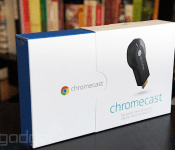
Google deems Android ready for more Chromecast apps, let the floodgates open

With Google’s latest update to Play Services, it shouldn’t be long before the Chromecast section of its app store gets a little more lively. Now that the Android SDK has support for the HDMI dongle baked in, developers can add the functionality to virtually any app they want, at-will. Google opened access to the streaming stick’s inner workings earlier this month, but, as Phandroid tells it, the search giant asked devs to hold onto their releases until the public’s phones and tablets had the framework, too. Now that it’s out, swaths of cast-capable apps could start hitting the Play store relatively quickly. It may have taken longer than some expected, but Google’s plan to embed the casting tech across an array of devices has finally come to fruition — and the users stand to reap the rewards.
Filed under: Home Entertainment, Peripherals, HD, Mobile, Google
Via: Phandroid
Source: Android Developers (G+)
Daily Roundup: LG G Pro 2 announced, Comcast acquiring TWC, and more!

You might say the day is never really done in consumer technology news. Your workday, however, hopefully draws to a close at some point. This is the Daily Roundup on Engadget, a quick peek back at the top headlines for the past 24 hours — all handpicked by the editors here at the site. Click on through the break, and enjoy.

Canon’s PowerShot G1 X Mark II
Meet the G1 X Mark II, Canon’s latest flagship PowerShot. This $800 camera packs a 24-120mm f/2-3.9 zoom lens, DIGIC 6 processor and a 1.5-inch sensor. Click on through and watch Engadget’s Zach Honig take the shooter for a spin.

Comcast and TWC merger
Earlier today, Comcast announced plans to acquire Time Warner Cable. The proposed deal must gain approval from the FCC and Justice Department first, but what would the $45 billion merger mean for its 30 million combined subscribers? Read on and find out.

Alternatives to Google’s Android apps
Engadget’s own Matt Brian investigates some alternatives for Google’s native mail, messaging, calendar and photo apps. Who knows, newfound productivity might only be a click away. Follow the link and learn more.

The LG G Pro 2
LG’s newly announced G Pro 2 smartphone doesn’t have a price tag or release date just yet, but we do know it packs a 5.9-inch screen, an upgraded knock-to-unlock feature and a 13-megapixel, 4K capable shooter. Click the link for additional details.
Filed under: Misc
Samsung Galaxy S4 on Sprint now getting Android 4.4 KitKat

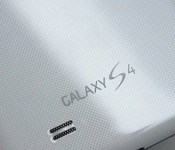
Though Samsung kindly bestowed Android 4.4 KitKat onto the Google Play edition of its Galaxy S4 late last year, the TouchWiz variants of the same phone have not received the same attention, at least in the US. That ends today, however, as Sprint is finally rolling out said update to the Galaxy S4, making it the first US carrier to do so. This means that GS4 users on Sprint will finally get to enjoy the benefits of KitKat, such as better security, full-screen mode and of course, the new Hangouts. Sprint’s changelog also indicates that the update will add Zact Mobile compatibility to the phone. There’s been a sizable user demand for KitKat from GS4 owners, so hopefully this update shows that their phone is still relevant. Especially, you know, as there might be a successor coming up any day now.
[Thanks to everyone who sent this in]
Filed under: Cellphones, Mobile, Samsung
Source: Sprint
Angry Birds Stella could be the next big hit for Rovio
Following Rovio’s announcement on Twitter that a big adventure was coming, they have just announced that the next big thing for the Angry Birds franchise is the introduction of a new character called Stella.
Stella and her friends bring players of the popular game to a part of Angry Birds that Rovio claims are yet to be seen.
“Angry Birds Stella is breaking the mold by introducing strong, passionate characters who really stand for something, while adding plenty of action and reality into the mix”,
Angry Birds Stella is about inspiration, empowerment, and other real issues, according to Rovio.
“The Angry Birds Stella story will live and evolve across physical and digital, bridging them in fun and innovative ways. Stella and her friends are here to stay, with plenty of adventures ahead of them.”
The Stella extension to Angry Birds is said to be delivered through a variety of games, animation, toys, books, and other retail products.
As to what Stella is exactly is purposefully left vague, but it seems that big adventure Rovio were hinting at previously revolves a whole lot around a new character called Stella.
The post Angry Birds Stella could be the next big hit for Rovio appeared first on AndroidGuys.

The best alternatives to Google’s own Android apps

As Android has evolved, Google’s worked increasingly hard to keep users locked into its ecosystem. The search giant creates new apps, retains users by giving them a thoroughly decent out-of-the-box experience and then charges device makers for a license to embed them on their phones and tablets. Its constant iteration has helped it stay ahead of the pack for some of its services, but many fall short, leaving users to find something better. The official Gmail app: it’s fine, really it is, but if you want unified inbox support, productivity features or the ability to pull emails from more than one place, you’re left wanting. This sort of limitation can be found across Google’s stable of apps, from messaging to the calendar and camera interface. We’ve trawled Google Play to find software alternatives that — dare we say it — do a better job, at least with certain tasks. So please, whip out your phone and give them a go.
What we’re looking for here is an app that can deliver Google-style levels of reliability, while also being open to non-Google inboxes and offering enhanced features for power users. Luckily for us, there’s no shortage of apps that can do just that.
CloudMagic (Free)

The clue’s in the name, really. Capable of integrating Gmail, Exchange, Yahoo, Outlook, iCloud, Office 365 and IMAP accounts at once, this app uses its cloud algorithms to make your emails easier to find. Unlike Gmail, the clean interface on show here offers a unified inbox that lets you left-swipe emails to perform any one of three actions, a bit like Tinder for the office.
AquaMail (Free/$4.99)

Optimized for both smartphones and tablets, AquaMail offers multi-account support and a simple user interface. Yes, it does look like Gmail, but the team behind AquaMail has constantly refined the interface to make it as easy to use as possible. This includes a dedicated attachments tab at the top of each email, fullscreen modes and a smart inbox. Grabbing the paid version removes the two-account limit and drops the promotional signature attached to all outgoing messages.
We also like: Evomail, Solmail and MailDroid.
Messaging
With the launch of Android 4.4 KitKat, Google ditched its pre-loaded SMS app to let users choose their own. Hangouts became the de-facto starting place, but plenty dislike the app’s inability to properly unify chats and texts under one contact. So here are some solid alternatives.
Textra (Free)

In the migration away from Hangouts, some have resorted to Textra, a messaging app that offers deep customization for notifications and a time-saving quick-reply popup that lets you respond to messages without fully opening the app. Simple in design, Textra handles huge inboxes with no noticeable slowdown, something you’ll appreciate if your friends don’t use Whatsapp.
Hello SMS (Free)

Dropping the inbox for tab-based interface, Hello SMS’ minimalist design puts interactions first with contact names and photos on its left sidebar. If you find yourself in a never-ending group text, the app will intelligently combine messages from up to 15 contacts so you’re not left with a messy inbox. Hello SMS’ one-touch camera interface also lets you send selfies to your friends in double-quick time.
EvolveSMS (Free)

Like Hello SMS, EvolveSMS uses a tabbed interface to showcase your messages. It’s better looking than its rival and displays important information like names, numbers, call options and attachment options inside conversations. While group messaging, message popups, gesture support and notification customization come as standard, additional features are available via in-app purchases. If you decide to upgrade, you’ll get extra theme options, social cover photo integration, scheduled messaging and backup options.
We also like: 8sms and chomp SMS.
Calendar
Calendar apps have pushed forward on iOS in the past year, but Android users have seen little change compared to their Apple-loving counterparts. Google’s own is functional and intuitive, but lacks inspiration. If you’re looking for something that goes beyond the traditional grid-based format, check these apps out.
Cal (Free)

Any.do decided to take a different approach with Cal. Sure, it still features gCal support, but it also includes a number of social and productivity features that stand out thanks to its stylish UI. If you have a task listed in Any.do, it’ll pop up in your schedule beneath your planned events. Connect your Facebook account and you’ll be notified of everybody’s birthday, letting you send them a text, email or post on their wall in celebration.
SolCalendar (Free)

With stickers and various themed widgets, SolCalendar is certainly different than most calendar apps on the Play Store. It might not be to everyone’s taste, but it’ll let you add events with a single touch, litter them with birthday cakes and smiley emoticons and display them using any of its 40 home screen widgets. SolCalendar’s neat weather notification also checks the elements, giving you the chance to pack an umbrella before you head out the door.
Agenda ($2)

Coming to Android a little while after iOS, Agenda’s, erm, agenda, is to display all of your calendars in a single and easy-to-read feed of upcoming events. All of the traditional daily, weekly and monthly views are there, letting you create appointments with a single tap. The simple black-and-white interface might not be for some, but it’s certainly helpful if you like to mix work, play and everything else in between.
Keep an eye out for: Sunrise — expected to launch on Android in the coming months.
Camera
One of the weakest built-in Android apps is the default camera app. Google admited it isn’t as good as it should be, prompting it to improve the camera on the Nexus 5 and roll out additional photography settings on newer Android devices. If you’re stuck with an older phone or want to try something new, try these camera app replacements.
ProCapture (Free/$3.99)

Apps like ProCapture go heavy on features and skimp on glitzy UI to make your photos stand out. It offers a high-quality panorama mode, timer, burst, wide shot mode and noise reduction, keeping the focus on shooting modes instead of after-effects. The full version includes support for higher resolutions and touch-to-focus, so we’d recommend the upgrade.
Camera Awesome ($1.87)

SmugMug’s Camera Awesome looks a bit like Apple’s iOS 6 camera app and comes packed with clever features like two-finger focal adjustments. Even better, you can tweak the ISO, white balance and exposure settings all from the screen. Add in a full screen shutter button, burst shot, HDR mode, timer, panorama and social sharing and you’ve got yourself a whole lot of camera app for very little money.
Camera Zoom FX ($2.99)

If filters and after-effects are exactly what you’re looking for, Camera Zoom FX has more than you could possibly need. Without ruining your original images, the app features over 90 built-in filters, frames and effects that range from the sublime to the ridiculous. If you ever wanted to have a virtual photo taken with the Queen, look no further.
We also like: Instagram, VSCO Cam and Pixlr Express
Productivity
While Google’s Keep is a supremely fast and extensive app, self-confessed productivity nuts may feel its simple approach doesn’t deliver enough features. Although Android is overflowing with apps focusing on lists, notes and photos, many don’t hit the right notes. Here are our recommendations.
Evernote (Free)

Evernote is a heavyweight note-taking app, in terms of both features and actual size, supporting lengthy text input. It provides an easy way to add lists and save audio notes, indexing them for later searching. With apps on every major platform (including the web), you can tweak your grocery list anywhere there’s an internet connection.
Any.do (Free)

Any.do, a to-do list app from the makers of Cal, is an amazingly powerful to-do manager that offers cloud sync, time-saving gestures, missed call integration (ever wanted to turn them into reminders?) and auto-suggestion features as standard. Once you become a little more acquainted with the app, you should try its voice support: not only will it transcribe your words into text, but you can do so in a variety of languages.
We also like: Todoist, Microsoft OneNote, Springpad, Quip and Remember The Milk
Wrap-Up
Before we finish up here, we can’t resist a few more recommendations. Google’s done a great job of porting Chrome from the desktop to mobile, but Dolphin Browser and Mozilla Firefox both offer unique features not found in the search giant’s app. If you wake up one day and find you don’t like the default Clock app, we suggest you check out Timely, even if it is now owned by Google. Also be sure to take a look at QuickPic if you’re after a solid replacement for Google’s Gallery and Photos apps — just don’t ask us why Google decided it needed two apps to handle the same function.
If sampling the best Google Play has to offer isn’t for you, Android’s default apps are constantly being refreshed to deliver additional features. Apps are one of the reasons why the OS has passed one billion activations, after all. Developers focusing only on a handful of apps may be the first to innovate, but it often prompts Google to incorporate features it’s seen elsewhere. While this list won’t stay up-to-date forever, some of these apps have remained popular since Android’s early days and the newer suggestions still have plenty of life in them yet. If you think you have better app recommendations, we’d love to hear them.
Filed under: Cellphones, Tablets, Internet, Software, Mobile

