


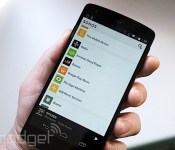
Google Play Music can now stream direct to Sonos on Android

Let’s face it, as cool as Sonos is, that Android app is ugly. You should definitely be rolling with the beta version. The new (and much cleaner, and less blue) look isn’t the big news though. That honor goes to the addition of Google Play Music to the list of streaming options you can enjoy from the Android app. Starting today, you’ll be able to access any music you’ve added to Google’s cloud service, plus all the music in the world (well, not quite, but a lot of it) if you’re fully paid up with All Access. There’s one more significant change to the world of Sonos today, and that’s the ability to stream music directly within the Play app to your hardware. The option will be under the same streaming button as if you were sending it to a Chromecast. So you might find yourself skipping that new slick controller app altogether. We’re no clairvoyants, but expect to see even more music services getting the same native support in the very near future.

Filed under: Home Entertainment, Internet
Source: Sonos
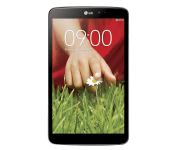
LG’s G Pad 8.3 gets Android 4.4.2 KitKat update early

LG have begun rolling out Android 4.4.2 KitKat to their LG G Pad 8.3 tablet via an over-the-air (OTA) update in Europe. LG were expected to release the update, so we knew it was coming, but LG jumped the gun and are issuing the update early.
The 4.4.2 KitKat update for the LG G Pad 8.3 weighs in at around 300MB so is quite a significant package for the tablet, which brings some added functionality:
- Android 4.4.2 OS upgrade.
- LG Knock Code.
- Improved system performance.
The Knock Code bundled with the update builds on the popular Knock On feature by LG, whereby you could tap on the screen to wake the device. Knock Code takes this one step further by enabling the user to unlock the device using any one of 86,367 different combinations.
You should see your device prompting you that an update is available on the LG G Pad 8.3, but if not it can be manually triggered in the Settings app.
The post LG’s G Pad 8.3 gets Android 4.4.2 KitKat update early appeared first on AndroidGuys.
Lenovo Announces New A-Series Android Tablets with May Launch

With the budget-conscious in mind, Lenovo has announced a new trifecta of android tablets focused on work and play. These A-Series tablets, as Lenovo VP Shao Tao puts it, “is designed to meet the demands of today’s young, active users who are always on the go, and have lifestyle requirements that are as diverse as their own personalities.”
Pricing starts out low, but there is a good reason for that. Starting at $129, these tablets don’ t come off as top spec’ed powerhouses. The specs are modest at best with MediaTek quad-core processors and 1GB of RAM under the hood. The tablets’ will also sport 4.2 JellyBean at launch. Rounding out the specifications is 16GB of onboard storage, front and rear cameras and 1280X800 displays.
The new Lenovo tablets will debut in May and come in the 7, 8, and 10 inch varieties with the 7 inch tablet focused on reading and web surfing, the 8 inch dedicated to media consumption, and the 10 inch designed for work and relaxation.
The post Lenovo Announces New A-Series Android Tablets with May Launch appeared first on AndroidGuys.
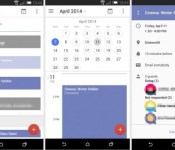
Here’s look at the future of Google Calendar for Android

See those images above? Those could become a familiar sight in the future if you religiously use Google’s Calendar app for Android. This crisper, cleaner Google Calendar was recently spotted by Geek.com (which also spilled the deets on a test version of Gmail) on a phone loaded with unreleased features. If you notice, the new interface gets rid of the app’s busy grids and lines, relying instead on blocks of color to distinguish one entry from the other.
What’s more intriguing, however, is a new feature called daily agenda, which automatically emails you the day’s full schedule. Since the updated calendar will also come with Google+ integration, or so the source claims, daily agenda emails will also include birthdays, giving you no excuse to forget anybody’s special day. Other than these changes, you’ll also reportedly see a parallax scrolling effect while flipping through months. Of course, the final product could be wildly different from what we’re seeing here. We might have to wait a few more months to find out, though — Geek.com believes Google will launch the redesigned calendar at the I/O conference in June.

Filed under: Cellphones, Tablets, Mobile, Google
Source: Geek

Say “Hello” to hello sms for Android [App of the Day]

Tired of your boring stock messaging app? Perhaps you’re always on the lookout for the best looking SMS app. Whatever your dilemma, hello sms is here to save you!
Stock SMS messaging apps are often known for being boring, lacking options, and overall just providing a bland user experience. Hello sms aims to fix the drab look, as well as give you a more organized and streamlined inbox.
Hello sms organizes your conversations unlike any other messaging app, and does so by sorting conversations in tabs that run along the left side of the inbox. It’s a very beautiful design that is obviously inspired by simplicity and ease of use. Perfect for the on-the-go texter who prefers a clean and polished look.

The app does a great job at making picture messaging and group messaging easy as well. It also has a neat feature that applies a dark color scheme to the app as night sets in. Oh, and did I mention that the app is completely ad-free? That’s definitely a plus for anybody!
Hello sms is a stylish app that simplifies organization in the inbox, and features quick and easy ways to send messages and media. So if you’re looking for a new messaging app, or just want to test it out for the fun of it, download hello sms, and fulfill your texting needs!
The post Say “Hello” to hello sms for Android [App of the Day] appeared first on AndroidGuys.

Momondo helps you prioritize your relationships by proximity and climate

Sure, it’s easy to plan out trips to visit your friends, but Momondo believes it can add a bit of fun to that process. The travel search engine’s app now features something called “friend compass” that shows your friends’ locations all over the world while you spin around. Since Momondo’s service shows the cheapest flights and hotels you can book, each friend that appears on the compass comes with info on the most affordable flight available — and yes, you can book one from within the app. If that travel itch has gotten so bad, you can also use the compass to find out which friend lives in the coldest or the hottest locations, the nearest or the farthest places and the ones who’ll cost you most and and least money to visit. The friend compass works using Facebook’s API and a smartphone’s GPS, so suffice it to say, it’ll only only show people in your Facebook list. Bummer.
Filed under: Cellphones, Mobile
Source: McCann London

What does Twitter want with Cover’s Android lock screen? A smarter smartphone, duh

Imagine your Twitter app immediately surfacing tweets about a nearby earthquake or disaster without you having to enter a single keyword search. Or one-step switching between Instagram and Twitter so you can see if that filtered photo of your cat received any favorites. Or a notification that brings up a favorite restaurant’s Twitter account around dinnertime so you can see its daily specials. And imagine if it was all only possible because you had an Android phone.
When the news broke yesterday that Twitter bought Cover, a company that makes an Android lock screen app, the first question that hit me, was, well, why? Much like Facebook’s Oculus buy, the deal doesn’t make much sense at first blush. The seemingly obvious answer would be that the company plans to build a Twitter-based lock screen — essentially a Twitter version of Facebook Home. Which, let’s face it, doesn’t sound like a great idea. Not only does it seem rather shortsighted for Twitter just to mimic another company’s mobile efforts, but also Facebook Home wasn’t exactly a resounding success. Instead, I think it’s another example of Twitter’s penchant for experimentation. If you combine Cover’s context-aware tricks along with Twitter’s desire to build a better Android experience, you could get one very intelligent Twitter app.
Much like Facebook’s Oculus buy, the deal doesn’t make much sense at first blush.
Twitter, as we already know, is not afraid of experiments. In a blog post published by the company last year, it states the developer and design teams constantly perform test trials in order to suss out what Twitter needs to evolve. Some efforts are more experimental than others of course, but the end goal is always to come up with a better product, be it improvements to login verification or simply a new profile page. Perhaps due to some criticism of its Android app, Twitter has been particularly keen on improving the experience on Google’s mobile OS. Indeed, it launched a beta tester program for Android users back in August and then an even earlier Alpha program in November, both of which were rich ground for these so-called experiments. Results have been mixed. A major redesign seeded out to testers late last year for example, was completely scrapped partially due to poor feedback. This is where Cover comes in.

In our interview with Cover co-founder Todd Jackson last October, he was extremely bullish on Android as a platform. “We’re making a huge bet on Android, that this will be the operating system that billions of users will adopt over the next several years,” he said. Not only can you not customize the iPhone’s lock screen to your heart’s desire, he told us, but also developers simply do not have the keys to the iPhone’s sensors like they would with Android.
“We’re making a huge bet on Android, that this will be the operating system that billions of users will adopt over the next several years,” Cover co-founder Todd Jackson said.
Tapping into those sensors is exactly how Cover differentiates itself from just an ordinary lock screen replacement. Rather than just a static list of app shortcuts, Cover utilizes the phone’s internals to surface the most oft-used apps depending on your location, time of day and even whether you’re in the car or on foot. If you’re at home, for example, your lock screen might float Netflix and Pandora to the top, while work-related apps like email and stocks would be more prominent when you’re in the office. More than just a lock screen replacement, Cover also works throughout the phone as a smarter app switcher. When you’re in the email app, for example, you can easily swap out to an app like the browser or maps, because those two are the ones you’d most likely reference while typing out a letter. “We want this to be like Alt-Tab for mobile, so you can jump directly between apps lightning fast,” said Jackson. You can test it out while Cover is still available from the Play Store.
I don’t doubt that it’s these unique quirks that won the hearts and minds at Twitter. In Cover’s announcement yesterday, the newly acquired firm stated: “Twitter, like Cover, believes in the incredible potential for Android. They share our vision that smartphones can be a lot smarter — more useful and more contextual — and together we’re going to make that happen.” And who wouldn’t want a smarter smartphone?
Filed under: Cellphones, Mobile, Google
Report: Samsung SM-T800 10.5″ AMOLED tablet specs

It is reported that Samsung will be adding a new tablet to their huge tablet line, codenamed as Samsung SM-T800. Folks over at SAMMobile are reporting that it is a 10.5-Inch tablet with Android 4.4.2 KitKat right out of the box, and a Super AMOLED display of 2560×1600 resolution. Check out what else is there:
- Quad-core Snapdragon processor (S801)
- 2GB of RAM
- 8-megapixel rear and 2-megapixel front-facing cameras
- 16/32/64GB of storage
- microSD slot
- USB 2.0 connectivity
- 7,900 mAh battery
The tablet is just Wi-Fi-only, but LTE supported model is also in the pipeline as well. Right now, no words on the release date and the price, but we will let you know as soon as they reveal it. Are you looking forward to it?
Source: SAMMobile
The post Report: Samsung SM-T800 10.5″ AMOLED tablet specs appeared first on AndroidGuys.

Android Wear smartwatch will need a paired smartphone to function

Google’s Android Wear platform is something that has created a lot of excitement for the future of smartwatches, but one aspect that has been up for debate was if the Android Wear smartwatches, such as the Moto 360, will work standalone or will require a paired smartphone to function.
However, jn a recent video on the Ask a Dev YouTube channel, Android engineer Sagar Seth explained that Android Wear will only allow developers to add support for smartwatches to their existing apps.
“Remember one thing: it’s not a full-fledged application sitting on the wearable itself,” Seth says. “It is just notifications. It is making the information available when you need it.”
What this means is that whilst Android Wear will provide the tools necessary to create graphics and notifications for the new smartwatch platform, the smartwatches themselves don’t actually run standalone Android apps and will require a connection to a smartphone.
The post Android Wear smartwatch will need a paired smartphone to function appeared first on SmarterWatching.
Read the rest at the source, SmarterWatching.com
The post Android Wear smartwatch will need a paired smartphone to function appeared first on AndroidGuys.

Distiller whiskey recommendations launches on Android [App of the Day]

The popular iOS app, Distiller, brings whiskey recommendations to your Android.
Where do people learn about different types of whiskey? Experience?
If you’ve never come in contact with different types of whiskey, it’s very hard to pick the right one. You may find yourself staring at a shelf for too long before deciding on something you have no idea about. Besides, whiskey can get pretty pricey, so maybe it’s best to know what you’re getting yourself into. Distiller is here to help you choose the right whiskey for the right occasion.
To begin, tap the “get a recommendation” button and answer a few simple questions. Are you looking for something new to try? What’s your experience level? In what environment will you be enjoying this drink?

After the questions are answered, Distiller will give you multiple suggestions based on your answers. What’s more, is that you can view customer reviews, purchase, or rate the whisky yourself, all from the app!
The Distiller recommendation engine factors in tens-of-thousands of different points to analyze different flavor profiles, price, reputation, and “giftability” of a whiskey name.
It’s a beautifully designed app that’s functional and informative. It’s basically a mobile-optimized version of the website, Drinkdistiller.com.
Download the app and find your new favorite bottle of whiskey!
Source: Distiller
The post Distiller whiskey recommendations launches on Android [App of the Day] appeared first on AndroidGuys.

