


Send SMS with your Android smartphone from any device with EndlessJabber (Review)

For years, one of the things I’ve always wanted was an easy way to be able to send text messages while on different devices, especially my laptop or desktop computer. This is one of the main reasons why services like Facebook Messenger and Google Hangouts have always been my go to messenger services since I could just pickup where I left off chatting, whether I was on my desktop at work, laptop at home, tablet or my smartphone.
While I’ve tried a few apps in the past, none were perfect. One of the first that I remember trying many years ago was Koush’s DeskSMS, which to me, wasn’t as reliable and didn’t have as nice an interface as EndlessJabber does.
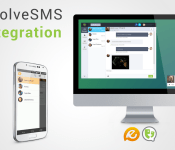
“To setup the app, it’s extremely simple. All you have to do is head to their website, www.endlessjabber.com, and click install, which will take you to Google Play where you can download the app on your Android smartphone. On your smartphone, go through the setup on the app, which the company says, “takes just 1 tap.” All you’re doing here is connecting the app to your Google account and granting the app access to your text messages, which will then sync all of your text messages to the app. Although they recommend using EvolveSMS from Klinker Apps, whom they partnered with, it works fine with other SMS apps, such as Google Hangouts, my default SMS app. With that done, all you need to do is go to www.endlessjabber.com/web on any other device and sign in to your Google account, then you can chat just as you would on your smartphone but through this web interface seen below.
 All of the text messages on your device will show up when you head to the web interface. Besides just sending messages, you are able to attach photos from the current device you’re using to the SMS, view all your contacts on your smartphone, view a Gallery of photos you’ve been texted and view statistics such as how many texts you’re sending in a day, who you’re texting the most, etc. EndlessJabber will also tell you the current time and how much juice is left in your phone’s battery, just so you can be sure it doesn’t die on you.
The app is very well polished and I think the only issue I noticed is that emoticons didn’t always show up as pictures as they would on your smartphone. They would show up while accessing the web interface on Mozilla Firefox, but didn’t always show up in Google Chrome, although they were unique ones like beer mugs and fireworks. It would also be nice if you were able to access the gallery on your smartphone, but that’s not a deal breaker at all.
EndlessJabber also has a few extras that I wanted to mention. Along with the Android app and web interface, EndlessJabber also has Chrome and Firefox Extensions which will give you a notification whenever you receive a message so you don’t always have to be on that tab to see the messages you receive.

One of the best things about the app is that it is free to use, unlike DeskSMS that was about $5 a year. Although I didn’t get to test it out, there is a paid version of the app, EndlessJabber Pro, that’s $1.99 a month after a free 7 day. It extends the experience with some “pro” features including JabberMode that enables you to instantly send and receive SMS messages by bypassing the free Google Cloud Messaging infrastructure, Search, so you can search for a specific text or bit of info you received, themes, the ability to schedule texts in advance to send at a later time, more analytics as well as XMPP integration to use it with other chat clients such as Pidgin and Trillian, among other features.
One last thing, EndlessJabber is currently seeking to raise funds through Kickstarter to help its app grow, since they are a small startup. Check out the campaign here.They note that funds from the campaign will be used to determine the appropriate marketing strategy to achieve their goals, find an appropriate marketing firm and execute on the marketing strategy. If you do decide to contribute, you can get nice rewards such as EndlessJabber Pro subscriptions, visibility on their site and social networks and even a t-shirt. Some of these rewards are pretty nice, especially since most will give you a discount on a pro subscription.
If EndlessJabber sounds like something you’ve been waiting for, don’t hesitate to check it out! If you need a little more help using EndlessJabber, here’s more info on their blog.
The post Send SMS with your Android smartphone from any device with EndlessJabber (Review) appeared first on AndroidGuys.
.CPlase_panel display:none;
Instant for Android Wear: Instagram lovers rejoice! You can now browse through your feed without getting out your phone [‘Watch’ This App]
If you like so many of us are an Instagram addict and lament the fact that there’s no good Instagram app for smartwatches, then get excited because Instant for Android Wear has come to the rescue. Gone are the days of having to pull out our phones whenever we want to scroll endlessly through our… Read more »
The post Instant for Android Wear: Instagram lovers rejoice! You can now browse through your feed without getting out your phone [‘Watch’ This App] appeared first on SmarterWatching.
Read the rest at SmarterWatching.com!
The post Instant for Android Wear: Instagram lovers rejoice! You can now browse through your feed without getting out your phone ['Watch' This App] appeared first on AndroidGuys.
.CPlase_panel display:none;
Google: The upcoming Android Wear update will come to all Android Wear devices
There’s been some talk lately about the upcoming Android Wear update (though it might come as two separate updates) and the array of devices Google will push it to. Google officially stated that all Android Wear-powered devices will receive that update, which is a great thing of course. What features are on the way to… Read more »
The post Google: The upcoming Android Wear update will come to all Android Wear devices appeared first on SmarterWatching.
Read the rest at SmarterWatching.com!
The post Google: The upcoming Android Wear update will come to all Android Wear devices appeared first on AndroidGuys.
.CPlase_panel display:none;
LG: The G Watch R will go on sale in October
As you all know, LG already has an Android Wear-powered smartwatch out on the market, the LG G Watch. LG did however announced their own circular Moto 360-like smartwatch which will feature a sporty look, the watch is called LG G Watch R. I guess the “R” stands for “Round”, though that’s besides the point…. Read more »
The post LG: The G Watch R will go on sale in October appeared first on SmarterWatching.
Read the rest at SmarterWatching.com!
The post LG: The G Watch R will go on sale in October appeared first on AndroidGuys.
.CPlase_panel display:none;

Microsoft MSN homepage reborn as a blend of news portal and online desktop

Visit the MSN portal right now and you’ll get a straightforward news site. It’s informative, but it’s busy, inflexible and doesn’t give you easy access to Microsoft services — a bit odd when it’s frequently your initial homepage on a shiny new Windows PC. Thankfully, Microsoft is aware that it needs to shake things up a bit if it wants to keep you coming back. It just launched a preview of a redesigned MSN that it hopes will not only be easier to browse, but should serve as a kind of web-based desktop that lets you accomplish many of your daily tasks. Read on to see what I mean.
Let’s start with the obvious: the new MSN looks a lot like Windows, and that’s not just because Microsoft is fond of brand synergy. The layout is both less cluttered and lets you personalize what you see; if you’re fond of cars but not entertainment gossip, you can easily add, remove and shuffle the appropriate sections. The company has teamed up with a whole host of content providers for different categories, including the New York Times, Conde Nast and, yes, our parent company AOL.
However, the real centerpiece is the much stronger emphasis on services that turns MSN into more of a hub than a starting point. The top of the site centers on a “Services Stripe” that lets you hover over icons to check your Outlook email, check Bing Maps or even take a quick glimpse at OneNote projects, if you use it. If you thrive in Microsoft’s cloud, you may stick around for quite a while. You’ll also find utilities like shopping lists, a symptom checker and a 3D body explorer. Moreover, a lot of your personalized content will sync across platforms. Microsoft plans to launch Android and iOS versions of previously Windows-only apps like Food & Drink and Sports — if you add a recipe or a favorite football team on the MSN website, you’ll also see it on your phone or tablet no matter what OS you’re using.
You can check out the preview today, although the old site will hang around for an unspecified amount of time. Microsoft hasn’t said when it hopes to roll out the site to the public at large, but the Android and iOS apps should arrive with the next few months.
Dana Wollman contributed to this report.
Filed under: Internet, Microsoft
Source: MSN Preview
.CPlase_panel display:none;

Google Glass can tell if you’re stressed out

It’s not always easy to tell when your stress levels are through the roof, and you may not always want to break out a heart rate sensor just to find out when it’s time to relax. You might not have to, if researchers at Georgia Tech and MIT have their way; they’ve developed BioGlass, an Android app that uses Google Glass to determine how frazzled you are. The software measures your heart and breathing rates by checking for tiny movements picked up by Glass’ accelerometer, gyroscope and front-facing camera. In theory, you’d only have to wear the smart eyepiece to know when it’s time to calm down.
The existing project doesn’t do more than record data, but future software could do a lot more. You could get instructions on stress-relieving breathing exercises, for example, or even queue up soothing songs at the very moment you need them. Glass also isn’t strictly necessary, if you’d rather not wear a $1,500 headset that occasionally causes stress. Any wearable with the right sensors would do the trick. The biggest challenge is getting an accurate reading while you’re moving. BioGlass currently requires that you stand still, but the hope is that it will eventually warn you when you’re literally hopping mad. If all goes well, you may always know when it’s time to chill out — and hopefully avoid a ton of health problems.
[Image credit: Nicholas Kamm/AFP/Getty Images]
Filed under: Wearables, Science, Google
Source: BioGlass
.CPlase_panel display:none;
Here’s what it’s like to use a watch as a phone

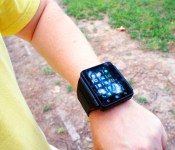
No one wants the smartwatch category to succeed more than I do. As a kid, I dreamed of enjoying TV on my watch, or video calling “HQ” (or more likely, my mum), just like Penny in Inspector Gadget. Most smartwatches offer a taste of this experience, but not the whole enchilada. Enter Neptune Pine. It’s a smartwatch by the loosest definition: it’s a small Android phone in a wrist-strap. Whatever you want to call it, it’ll do both of the above things, and more. It’s also a genuine Kickstarter success story — like, one, where the product came out and everything! It might not be the first smartwatch/phone mash-up, and it’s (definitely) not the last. But, it’s one of the more ambitious takes on the idea I’ve seen. I spent seven days with it (and no other phone) to see how my dream stands up to the reality — and whether a watch could ever replace your trusty mobile. The galleries tell much of the story, so be sure to jump in when you see them.

I’m not joking when I say it’s a small phone. It has a 2.4-inch (320 x 240) display, has a micro-SIM slot, runs Android (JellyBean), comes with 512MB of RAM (plus 16- or 32GB of storage) has front and rear cameras and, well, pretty much everything you’d expect from a phone (GPS, apps, headphone jack etcetera). It’s a chunky device — pretty much what you’d expect a wrist-phone to look like. It’s also undoubtedly bigger than any watch I have ever used. By some margin. Dive in to the gallery to see for yourself.

If the form factor isn’t an issue for you (the strap comes with two choices: like it, or lump it), there’s the software to consider. Most smartwatches come with a custom user interface (until Android Wear showed up). Neptune’s plumped for stock Android, just as you already know it. While the screen size is uncommon these days, the resolution isn’t wacky (HTC’s Wildfire, for example, was/is 320 x 240), so theoretically most apps should work. How well is something of a case by case journey of discovery. But, if you’re wondering what Facebooking, tweeting or dialling a number from your wrist would be like, you’ll see in the gallery below. In short, with a bit of work, the Pine can feel just like your a regular Android. But, not without some important caveats. This raises the question: If a proprietary interface can’t win people over, and stock Android has challenges, where to do watch-phones go from here?
Let’s tackle the (other) elephant in the room. The biggest barrier for wearables is how they look and feel — a nut that’s yet to be cracked, despite best efforts. This shouldn’t be a surprise though, given that, well, you’re wearing these things. The Neptune Pine is big, chunky, and a bit uncomfortable if worn for long periods. It also has no style customization options (at time of writing), and, well, it’s fairly ugly. Like babies, though, some parents (owners) will love it regardless — but it’s definitely high on the dorky scale. I’m okay with it, but others, many others, won’t be. Of course, that might not be a problem if the user experience is delightful. Sadly, that’s not quite how I’d describe it. The lack of Google services/Play store out of the box means it requires some noodling to get it just how you want it. For those mainstream consumers who could see past the exterior, the Play hurdle is likely enough to turn them off. Then there are the small idiosyncrasies, like having to take it out of the strap (which can be a clumsy task) if you want to take a picture — so no impulse snaps we’re afraid.
The minor gripes continue. The headphone experience is only worth thinking about if you’re using a Bluetooth set. I think it’s nice to have the option of a 3.5mm line out for a number of reasons, but practical headphone use isn’t one of them. Put on some headphones now, and tuck the cable under a watch — you’ll soon see what I mean. More pressing (no pun intended), are the issues with the display. The touch detection is frustrating. Typing is possible, but quite often it can feel like you’re drunk, as you mash the tiny keys and the wrong letters or options respond. It’s serviceable, but it’s not perfect — SwiftKey works, and improves the experience somewhat. But input is a fundamental that companies will need to figure out. It can also be a little uncomfortable holding your wrist in the right position for typing/watching video. This is exacerbated by the fact the Pine’s screen has fairly poor viewing angles. Worse, is that if worn on the left wrist (for most right-handers), it’s that angle you’ll be viewing from that suffers most. The last of the bad news is that the battery life is just okay enough to see you through a day. But it’s usually a close call. Displays, input and battery-life: none of them new challenges for smartwatches.

There are positives though. Using apps like Skype, maps, and fitness loggers is, dare I say it, an improvement on the experience you often get on a phone. Voice calls do work, and still feel kinda “fun” or futuristic. You’ll definitely want to have a hands-free ready, but it’s not a bad experience. It’s also a good general purpose media player. While you wouldn’t want to watch a film on a smartwatch, it can make a great mp3/music player, and there’s definitely a novelty factor to watching YouTube videos on one (that, plus Skype, satisfies my childhood dreams!).
The bottom line, though, is that Pine only proves what plenty already suspected — a watch can’t usurp your phone, at least not yet, not permanently. The Pine has enough going for it though that it deserves, and already looks to have, a dedicated fan-base. Android tweakers, tech-savvy folk who can tolerate low-level gripes for a device that does more things, hobby-hackers and lovers of geek-chic (I kinda warmed to the looks of it myself in the end) will get on well with Pine. There are other entrants into this market. Samsung’s new Gear S is definitely a more refined take on the idea (in design at least, but the UI is yet to be proven). Perhaps the hybrid watch/phone will mature into something more practical and public-ready. But that time isn’t now.
Filed under: Cellphones, Wearables, Mobile
Source: Neptune
.CPlase_panel display:none;

Motorola Migrate just got more powerful

The worst part about getting new phones is having to recollect all of your contacts. Well Motorola decided to make that easier. Motorola Migrate is a powerful tool by Motorola that enables users to transfer data from their old phones to their new Motorola handset. Initially, it would only work with your old Android phones, but a update later added compatibility for iPhones. Now in this latest update, you can also transfer your contacts from any Bluetooth enabled device!
This is especially useful because it is doubtful that your none smartphone device could sync your contacts with Google or has a SIM card that would fit into your new Moto phone. Now just about anyone can make sure that they retain all of their contact information when moving to a Motorola device.
With this update, Motorola also introduced a new icon for Migrate along with a new UI that is cleaner and easier to follow.
The post Motorola Migrate just got more powerful appeared first on AndroidGuys.
.CPlase_panel display:none;

Android-powered smart hard hat comes with augmented reality features

In Los Angeles, a startup called Daqri has designed a different kind of hard hat: an Android-powered one that’s capable of augmented reality. As such, it really looks more like a bike helmet than a hard hat, equipped with sensors, cameras and a transparent visor that functions as a head-up display. Unlike Google Glass that was designed with all kinds of consumers in mind, though, this high-tech hat was meant for industrial environments, to be used by engineers or blue-collar workers. It can show instructions and other digital elements superimposed against real-world equipment and objects without having to be manually operated. The hat can also give out early warning signals in case it catches anything that could be dangerous, or perform thorough quality checks on expensive machinery like satellites. If needed, it can pair up with smartwatches, phones and other devices, as well.
Daqri president Andy Lowery told the Wall Street Journal the company’s sparing no expense building the high-tech hat. Couple that with the fact that it’s going to need a lot of processing power — it runs on two Snapdragon processors and will save data on flash cartridges — and it’s easy to guess that it’ll be more expensive than other AR headsets. According to Lowery, it’ll probably be priced closer to laptops with military capabilities, but we won’t know how much for sure until its launch in October.

Filed under: Misc
Source: Daqri
.CPlase_panel display:none;

Google Glass lands in the Play Store next to phones and smartwatches

Itching to strap on a $1,500 face computer so you can follow directions floating in front of your head? Well, Google just made it a little easier to claim a head-mounted display of your own — it quietly added Google Glass to the Play Store the other day, and the search giant seems intent on making it sound, well, cool. To hear the Mountain View spinmasters put it, Glass Explorers aren’t just the people who need to try tech before the teeming millions. No no, they’re “bold and inspiring,” folks who “make move and marvel through Glass.” This isn’t the first time that Google has tried to broaden Glass’ reach — they opened up the Explorer program to all comers in the US back in May, but it insisted at the time that it was still very much a “beta” product. Between then and now we’ve seen a slightly tweaked version of Glass launch and a few software updates go live — none of those changes seem terribly earth-shaking, but it sure is interesting to see Google stop treating Glass like a special little flower that isn’t ready for public consumption.
Source: Google Play Store
.CPlase_panel display:none;

