



Google Now adds discounted flight notifications

Did you know that I can predict the future? Just last week I posted an article about the Future of Google Now, and one of the things I asked for was finer tuning of current functionality within Google Now, and went on to talk about flights. Well, this afternoon, Google took one step closer to making this a reality.
Okay, so I didn’t quite predict the future…
Today Google announced that after you use Flight Search in Google, Google Now will notify you when it finds cheaper flights. Currently to use this feature, you need to be in the U.S. with the latest version of Google app. Head to the Play Store to check for an update!
I’m going to see what else I can predict…
via 9to5google
Deals, Discounts, Freebies, and More! Click here to save today!
The post Google Now adds discounted flight notifications appeared first on AndroidGuys.
.CPlase_panel display:none;
Moto 360 receives minor software update
Motorola on Wednesday confirmed a minor software update has commenced for its Moto 360 smartwatch. Rolling out in phases, the KGW42R update addresses the following: Bluetooth connectivity – Improved Bluetooth connectivity between the watch and phone to reduce momentary disconnects experienced by some users. Charging notification – Added a message to confirm that Moto 360 is charging… Read more »
The post Moto 360 receives minor software update appeared first on SmarterWatching.
Deals, Discounts, Freebies, and More! Click here to save today!
Read the rest at SmarterWatching.com!
The post Moto 360 receives minor software update appeared first on AndroidGuys.
.CPlase_panel display:none;

Report: New Nexus devices in October, Android L due in November

Just a few days ago, WSJ reported that Google and HTC are working on a tablet together, reportedly Nexus 9, and Paul O’Brien also tweeted that it will be released on October 16. Now, we have some more confirmation from Android Authority on the tablet, and also they are talking about the rumored ‘Moto Nexus‘ as well, which will be the first ever Android L smartphone.
They agree with Paul on the release date of the Nexus 9, and also they further agree that Google will introduce Android L and a new Nexus hardware during mid October as well, but the final version of Android L won’t be officially available until November 1st. Well, that’s some confusion there. The source is unclear about it, because we don’t know whether it is the date when the new Nexus device will be sold or shipped. However, I am sure we will have some confirmation in near future.
One thing we know for sure is that Google got a few projects up their sleeves, and sooner or later, the cat will be out of the bag. What are you thoughts? Let us know in the comment box below.
Source: Android Authority
Deals, Discounts, Freebies, and More! Click here to save today!
The post Report: New Nexus devices in October, Android L due in November appeared first on AndroidGuys.
.CPlase_panel display:none;

Samsung Galaxy A pricing and launch details surface

Samsung is planning to release a trio of new smartphones under a new brand known as the Galaxy A. According to SAMMobile, the name of the phones will be Samsung Galaxy A3, Galaxy A5, and Galaxy A7. Samsung Galaxy A3 is the lowest end phone in the trio, and it will cost around $350 and $400. About the Galaxy A5 and A7, they will cost around $400-$450, and $450-$500 respectively.
Samsung is planning to release them during the third quarter of the year, however Galaxy A7 will hit selected markets. In the picture below, you can see the Galaxy A5.
 The smartphone is similar to the Samsung Galaxy Alpha. This series is probably focused towards people who are looking to get their hands on smartphones with premium feel yet affordable price tag.
Do you have any thoughts about the new series? Let us know in the comment box below.
Source: SAMMObile
Deals, Discounts, Freebies, and More! Click here to save today!
The post Samsung Galaxy A pricing and launch details surface appeared first on AndroidGuys.
.CPlase_panel display:none;

Findery: the crowdsourced travel guide

“Find yourself on this map,” Caterina Fake said enthusiastically. Fake, widely known as the co-founder of Flickr, had just greeted me into the Findery office, an airy loft tucked inside a nondescript building in the Hayes Valley district of San Francisco. Before I could take in the high ceilings and the afternoon light shining through a black pirate flag hanging from a railing, Fake directed my attention to what looked like a large, 16 x 20 framed portrait of a galaxy.
It was neither a galaxy, nor a map. Instead, it was a graphical depiction of what the Flickr community looked like in April 2005. Created by an avid Flickr user who goes by the name of GustavoG, the image showed hundreds of photo avatars linked to each other with blue lines indicating social connections. After pointing out where she was on the graph, I found my own Flickr avatar in just a few minutes. We were only a few connections away. “That cluster [the one my photo was in] represents all the early web people,” Fake said, as if we were old friends.
It’s been nearly six years since she left Yahoo-owned Flickr for greener pastures. A year later in 2009, she co-founded a startup called Hunch that promised to help users make better decisions based on a survey of their tastes and interests. Hunch eventually sold to eBay in 2011. Not one to stand still, Fake came up with yet another startup in 2012. She called it Pinwheel, but after a testy trademark dispute, it was renamed to Findery.

Findery, to put it simply, is an app that helps you find what’s interesting around you, but not in the traditional way of restaurant recommendations or trendy nightspots. Instead, Findery is about uncovering hidden secrets and local knowledge, all of which is entirely sourced from Findery users themselves. So instead of using the app to locate the nearest sushi spot, you’d use it to find out the meaning behind an unusual statue or the history behind that run-down building down the street from your hotel.
In other words, don’t mistake it for a Yelp or Foursquare competitor. “Discovery is not about ratings, reviews or restaurants. We want to be much more about discovery in the sense of discovering,” said Fake. “We feel very strongly that the ‘Where do we eat?’ problem has been solved a thousand times and it’s not very interesting. We very deliberately did not address that at all.”
Instead, Findery is about people and stories. It’s what Fake says has always mattered to longtime bloggers and those aforementioned “early web people” who were so crucial to Flickr’s success. The tips on Findery are the type you’d expect from a real person, rather than a disembodied tour guide. It’s much more personal, and therefore a lot more human. Fake describes Findery as somewhere in the continuum between Yelp and Wikipedia.

“We’re very liberal arts,” said Fake, invoking the famous Steve Jobs quote about the intersection of technology and liberal arts. “That intersection? We’re there. We want to be the people’s atlas.”
To do all that, Findery needed a large database of user-generated content. That’s the reason it was initially launched on the web — its developers wanted to make sure there was enough content all over the world from real users before apps were rolled out. It was only this year that the company released them — an iOS app debuted earlier this spring, while an Android one launched just last Thursday.
As I zoomed in and out of different parts of the Findery map, I noticed that some notes on the app tend toward the recommendation model (“This place has whiskey on tap!”), while others are more personal and unique. Fake showed me an intriguing photo of a crew setting up a fireworks display in Orlando, Florida. Underneath the photo was a note entitled “Monsters of Rock” that read: “On April 14th, 1979, Aerosmith, Blackfoot, Cheap Trick and Ted Nugent played at the Tangerine Bowl. I was on the fireworks crew and took this photo during setup.” In the comments of that photo, the author recounted enjoying the show next to none other than Nugent himself.

“Isn’t that cool?” asked Fake. It’s this sort of personal story that adds flavor to a place, the kind of info you might not find in a Lonely Planet or a Zagat. Another example is a photo of a colorful sidewalk taken in Larreynaga, a small city in Nicaragua, on Good Friday. The note reads: “People spent hours creating art on the street with painted sawdust knowing that it would be destroyed by foot traffic later that day.”
To surface the more interesting notes — Findery gets its fair share of spam — it uses an internal algorithm called “notability.” Sort of like the “interestingness” metric on Flickr, Findery’s algorithm figures out a note’s importance based on a variety of factors, including if it’s been blogged, if it’s received a lot of clicks, if the user has a good reputation and so forth.
Notes aren’t always short. I came across several that are paragraphs long, so much so they’re practically essays about a particular building or place. Some were long and meaningful narratives, while others were pithy and humorous. I found one photo of a couple of Stormtroopers in the Brussels Metro in Belgium, apparently on their way to a Greenpeace protest. The note title was simply “another day at work.”

It’s this serendipity that prompted Fake to create Findery in the first place and, unsurprisingly, Foursquare was one of the inspirations. “One of the things that was so great about it was when you would get these unexpected social encounters in some remote neighborhood,” said Fake, referring to Foursquare tips that would sometimes pop up on the phone. “You get this really lovely magic feeling of being time-shifted that you don’t really get anymore … It’s been lost in the immediacy of the everyday.”
While Findery doesn’t see Yelp and Foursquare as competitors, it does have one in Field Trip, Google’s point-of-interest app that does nearly the same thing. However, instead of relying on users to generate content, Field Trip uses information from guides like Thrillist, Zagat and local blogs. “I’ve always felt that it was really important for things to be written for the platform for which they are intended,” said Fake, pointing out that seeing a Thrillist or Zagat post pop up when you’re in a foreign locale can be a little jarring, while a more human note can feel more welcoming. Additionally, Field Trip doesn’t have the personal voice that Findery has, which she sees as a real asset.
“We were being accused of being a hipster app,” laughed Fake, remembering early reviews of the app. “Someone had opened it up in the Mission [San Francisco’s current hipster haven] … Well of course you’d see that!” But, she said, plenty of regular people from all over the world use Findery too.

Still, there remains a question of whether something as personal as this is what everyone wants. The popularity of Yelp and Foursquare attests to the generally accepted idea that people do want straightforward recommendations. Even Fake herself said that a lot of first-time users to Findery tend to review restaurants because people have just been trained to do that. But Fake believes that there’s room for something different.
“I really rebel against this tunnel view of the Valley that we get here all the time — sort of the Y-Combinator, young, urban male perspective on things,” said Fake. Instead, she said the communities that Findery supports and attracts are different, and deliberately so. She pointed out that technology isn’t just a Valley thing for the young and hip — it’s a global thing, for everyone. “I’m a 40-something mom. I’m not a typical demographic.”
It’s been a few days since the launch of Findery’s Android app, and Fake tells us it’s doing well.
“We feel that we’re in a really good space, that we’re forward-looking and not backward-looking,” said Fake. She added, “Screens are multiplying and they’re moving,” referring to Google Glass and the recent interest in wearables. Fake said the team is definitely looking into making some kind of watch-compatible app, be it for Android Wear or Apple’s WatchKit — it’s a natural fit for something like Findery.
“My absolute dream is to have Findery be on Virgin America,” she said. “You could look out your window and be like, ‘What’s that? Tell me about where I am.’ That’s the dream.”
Filed under: Internet
.CPlase_panel display:none;
Zillow update adds Android Wear support
Are you in the market for a new home? Ziillow is going to use Android Wear to help you find the perfect place to live. Now when you’re out and about town you’ll get an alert right on your smartwatch telling you that you are near a home that is for sale. If your interested,… Read more »
The post Zillow update adds Android Wear support appeared first on SmarterWatching.
Deals, Discounts, Freebies, and More! Click here to save today!
Read the rest at SmarterWatching.com!
The post Zillow update adds Android Wear support appeared first on AndroidGuys.
.CPlase_panel display:none;
tinyCam adds Android Wear support
TinyCam Monitor has released an update for their app which includes a nifty new feature: Android Wear support. Now you will be able to view your security camera feeds on your smartwatch. While smartwatch screens aren’t exactly great for viewing video, having the ability to check your camera feeds quickly could be a lifesaver. Imagine getting… Read more »
The post tinyCam adds Android Wear support appeared first on SmarterWatching.
Deals, Discounts, Freebies, and More! Click here to save today!
Read the rest at SmarterWatching.com!
The post tinyCam adds Android Wear support appeared first on AndroidGuys.
.CPlase_panel display:none;
Zumper: For those who have a smartwatch but need an apartment [‘Watch’ This App]
An apartment hunt in many cities can be a grueling process that requires you to constantly stay updated on apartments in their area, lest you miss out on your dream home. For those struggling to stay updated, I have some good news. The Zumper app is compatible with Android Wear devices. The Zumper app allows you to put in… Read more »
The post Zumper: For those who have a smartwatch but need an apartment [‘Watch’ This App] appeared first on SmarterWatching.
Deals, Discounts, Freebies, and More! Click here to save today!
Read the rest at SmarterWatching.com!
The post Zumper: For those who have a smartwatch but need an apartment ['Watch' This App] appeared first on AndroidGuys.
.CPlase_panel display:none;
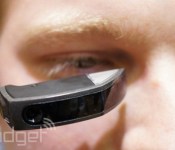
Vuzix brings offline Nuance voice control to its smart glasses

If the only news you’re waiting to hear from Vuzix is the smart sunglasses the company announced in January, well, this story isn’t for you. But if you have one of the company’s M100 smart glasses, then read on, because Vuzix has just released a big software update (version 2.0) with significant changes to the Android-based platform. Most significant, perhaps, is OS 2.0’s offline Nuance integration for voice control — and yes, that means it doesn’t need the internet, at all, to work. The upgraded platform also promises longer battery life and faster performance, comes with redesigned user interface and desktop launcher, and supports Bluetooth Low Energy for music streaming and phone calls. As a nice plus, you can now download future updates over the air, while devs get a new SDK. All M100s from here on out will come preloaded with OS 2.0, but if you already dropped a grand to get one long ago, you can download the updated software from the Vuzix website.
Filed under: Wearables, Mobile
Source: Vuzix
.CPlase_panel display:none;
Security: Android vs iOS and does it matter?

Security on our personal devices has never been a bigger issue. From the NSA, to malware, users have never been more aware of security concerns. Today, we’re going to look to see if there is a better option between Android and iOS.
Now, before everyone gets up in arms and calling their fellow fanboys, I want to assure that I’m not going to provide an exact answer. Instead, we’re going to take a look at the discussions, reports, articles, and other various things that provide the data. Discuss what threats are out there, and then how you can best avoid them. Whether iOS or Android is truly better than the other in terms of security will probably never be given an answer. Until it does, we’re hoping we can provide some thoughts and preventative measures you can take.
First and foremost, lets put something to rest: Everyone is at risk. Do not think because you have iOS or Android, and the latest gadget with the latest software that you are invincible. BGR.com ran an article a few months ago that details a report from Marble Security, stating that neither iOS or Android is better than the other. Even outside the OS, all mobile users are at risk of attacks from SMS scams, websites, and Wi-Fi hotspots.
Another thing that needs to be addressed is Android fragmentation. There’s no other way to slice it: yes, Android fragmentation causes security problems. We can talk all day about what that is or why that is, but plain and simple it does. This article discusses when Eric Schmidt last year declared Android more secure than iOS. In it there a few good sources (below) discussing this, but one of them is the Android Developer Dashboards. This shows the current numbers on Android fragmentation, and while things have certainly gotten better, they’re still not great. Schmidt points out that only ” a very tiny percentage of malicious apps can penetrate the latest, most security-hardened version of Android.” The problem here is at the time of this writing, 24.5% of Android devices have the latest software. See the issue?
Along with fragmentation, number of devices needs to be considered. IDC.com shows a report that as of Q2 of 2014, almost 85% of the smartphone market is dominated by Android, followed by 11.7% is iOS. So it follows that because a large majority of smartphones runs Android, that is the most targeted platform.
The good news is with the release of Android L, it seems that encryption will be turned on out of the box, leading to an overall safer experience on Android
Now just because Android is targeted more and overall is more vulnerable, doesn’t mean iOS isn’t. Although clearly biased, ZDNet.com has an article that discusses an experiment done by a team from Georgia Tech last year, showing that they were able to publish an app that bypasses Apple’s thorough app screening, and yet was capable of taking control of another device when the app was downloaded. We also all recall the recent leak of celebrity photos from iCloud, and this past February it was discovered iOS had a huge security flaw. Sorry iPhone lovers, iOS isn’t perfect.
Along with OSes as a whole, a large player in the mobile security world is where you get your apps. Translation, the App Store and the Play Store. Those who prefer iOS always claim victory here, as without a doubt Apple has a much more thorough screening process of their apps. But as I just pointed out, it’s not perfect. Google’s Play Store has gotten much better, especially since it changed from the “Android Market” to the “Play Store.” Every year at Google I/O, it seems they announce new plans for a safer Play Store, and they’re constantly taking steps to make it better, providing tools for developers to make better apps. Who knows, it may not be long before we can’t see a difference between the two app stores.
Be proactive
Now that we’ve gotten through all of that, how do we avoid all of this? The best answer is to be prepared. For starters, download Apple’s Find My iPhone app for iOS, and download Google’s Android Device Manager for Android. While not security apps per se, if your device is ever compromised by a virus, you can completely wipe your phone remotely from these apps. Let’s try to avoid even that, though.
iPhone users will need to Google some good security apps for iOS, as being an Android site we will provide Android apps (that and I don’t have an iPhone).
A quick search in the Play Store for “security” will give you many results, along with many options, of apps to choose from. One thing you may want to consider is what software company you have security on your computer from, as your registration could lead to some free mobile software as well. After that, I highly recommend Clean Master Phone Boost. Not only does it do regular maintenance and scans of apps, but it scans every app you download for any security concerns, as well as the capability to scan websites as you browse to keep you safe from malicious websites. It all comes down to your choice and preference here, but please find one and download it.
Another precaution you need to take is making sure your apps are always up to date. In the Play Store, you can go to Settings > Auto-update apps, and select one of those options to make sure you’re always up to date.
Also, be sure you’re on the latest software for your device. If you’re not sure what you need to be on, do a quick Google search or contact your mobile carrier for info on your specific device.
The only other thing to suggest is to upgrade your phone. If you still have an iPhone 3GS, or the original Samsung Galaxy S phone, or any other phone not running iOS 8 or Android 4.4, it’s time to spend a little money and get a new phone. If money is a concern, it’s very much worth looking at the new Moto G, or the even cheaper Moto E, both praised for their functionality despite their price tags. My mom and brother have the first gen Moto G, and they both love them.
Security is a big concern these days, as it should be. But there’s no need to lose sleep about it, as long as you take the proper precautions.
So, what’s better: Android, or iOS? I’d argue that when you consider all the factors, one isn’t necessarily better than the other. Disagree? Give me your thoughts below.
Sources: USATODAY, virusbtn, f-secure, symantec
Deals, Discounts, Freebies, and More! Click here to save today!
The post Security: Android vs iOS and does it matter? appeared first on AndroidGuys.
.CPlase_panel display:none;

