


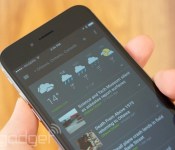
Google’s News and Weather app is now available on iOS

Dig Google’s card-based interfaces, but still in love with iOS? Don’t worry — the company has just ported another one of its Android apps to Apple’s platform: Google News and Weather is now available for iOS users. Like the Android version, this app curates headlines and weather from 65,000 sources and can be set to track weather conditions in multiple locations. It has the same swipe-able card system too, though the iOS version seems to distinguish itself with a darker color scheme. The app is available for all iOS devices running 7.0 or later, and it’s already optimized for both the iPhone 5 and 6. Check it out at the source link below.
Filed under: Software, Mobile, Apple, Google
Via: 9to5Mac
Source: App Store
.CPlase_panel display:none;

Samsung Galaxy A5, A7 details bubble to surface

A few weeks ago, we reported some details that leaked about the entire Samsung Galaxy A series (A3, A5, A7). Yesterday, some photos of the A3 and A5 leaked. Thanks to SamMobile, we have some new details regarding the A5 and A7.
Originally, it was thought these devices would be released in Q3. Considering we’re now in Q4 and have no official word, we have new information suggesting that the A5 will be released in November, and confirming a price of $400-450. Specs for this include a 5″ screen, a 13 MP camera, a Snapdragon 400, 16 GB of storage, Android 4.4, dual SIM slots, and a 2,330 mAh battery.
SamMobile also says that the A7 is now said to have a Full HD screen rather than just a regular HD screen, and measuring 5.5″.
What do you think of these new devices that are coming?
Deals, Discounts, Freebies, and More! Click here to save today!
The post Samsung Galaxy A5, A7 details bubble to surface appeared first on AndroidGuys.
.CPlase_panel display:none;

Tap Cash Review

Unless you’re currently reading this article on a yacht somewhere in Cabo, I’m guessing that you could probably stand to earn a little bit of money. What if I told you that you could get cash just by downloading a free app. If you’re thinking this sounds like a pretty sweet deal then it may be time to check out Tap Cash.
Overview
Tap Cash is an app that works on a credit system, wherein you exchange credits for certain “gifts” ranging from a $1 Paypal card for 1000 credits to a $10 Google Play gift card for 10000 credits. Every dollar is worth 1000 credits from the app. To get these credits you can download apps or share the app with your friends. The amount of credits you earn is based on the app. For example an app that all you have to do it download and start is going to be worth far fewer credits than one you have to provide information for. Furthermore sharing the app with others is worth more than most apps other than the ones that require a lot of personal information.
What’s especially interesting about this app though is that it creates a little game out of earning these credits. It shows the highest earners for the week, the month, and in total. So far the highest amount earned is about $262, a pretty good haul considering I’ve only managed to earn about ¢10 so far.
My Experience with Tap Cash
For the most part it seemed like a pretty great app. I never was able earn enough credits to be able to exchange it for “gifts”, but from other users reviews it’s clear that if you do manage to earn enough credits they will follow through and give you your money. The only problem of any significance is that sometimes I would download an app that would promise credits if I just started it, but even after doing so I wouldn’t get the credits. I would like to stress that this did not happen with every app I downloaded, but it did happen with a couple. It can also take quite a while to amass enough credits to get a sizable amount of money, but it is certainly possible to do so and many people have.
Will this app turn you into some King Midas figure? No, unfortunately it won’t turn stuff into gold. But will downloading this app be able to earn you a little money that involved little to no effort? Absolutely!
BONUS CREDITS!
Bonus! If you’d like a promo code for 300 credits here’s the link.
Deals, Discounts, Freebies, and More! Click here to save today!
The post Tap Cash Review appeared first on AndroidGuys.
.CPlase_panel display:none;

Six-inch Motorola phone hits the FCC looking like the new Nexus

If you believe all the rumors that’ve been floating around, Motorola’s hard at work on a new Nexus smartphone (codenamed “Shamu”) with a 6-inch screen. Well, guess what just popped in to make an appearance at the FCC? You nailed it: a Motorola smartphone with a 6-inch screen, and with support for AT&T and T-Mobile’s frequency bands to boot. As always, Motorola representatives have petitioned the FCC to keep all the really juicy bits confidential, so it’s far from a definitive nail in the Nexus rumor coffin. Still, it’s yet another piece of evidence that points to Motorola’s role in crafting Google’s latest Nexus smartphone. Why, just the other day it was spotted in Geekbench’s test database putting up some particularly strong numbers. The specifics of the radio should mean the GSM model comes first (which is really nothing new), but Verizon Wireless may be getting in on the fun come launch time, too. Bear in mind, those reports and appearance came to light within the past week — pretty soon (and if we’re lucky) there won’t be anything left to leak.
Source: FCC
.CPlase_panel display:none;

Toshiba’s new android ’employee’ uses sign language, speaks Japanese

Toshiba’s newest hire (of sorts) is called Aiko Chihara — and she’s manning a reception desk at the company’s booth at CEATEC 2014 in Japan. Oh, and she’s silcone-coated robot. Interaction isn’t in her repertoire just yet — a Toshiba spokesman said that it was certainly a possibility in the future — as Aiko only came into being last month. There’s 15 actuators inside the head for expression, while yet more are paired with air compressor to give (unerringly) smooth motion to the arms and hands. Toshiba collaborated with several universities, including Osaka University, to develop the robot and its sign language skills are geared for Japanese (with voice commands narrating along with it). While the bot is lifelike and fluid, there’s no intelligence to speak of: actions are all preprogrammed. The company says that there are also plans to teach Aiko American Sign Language in the future, as well as hoping to install the android and its (sign) language skills at other exhibitions and shows in the near future — something that a handful of other robots are already being tasked with. We’ve got video-based glimpse of the uncanny valley right after the break.
Filed under: Robots
.CPlase_panel display:none;

Virgin Mobile now selling $80 LG Tribute

LG’s latest budget friendly device is now available at Virgin Mobile. Introducing the LG Tribute, an Android powered device available for just $79.99 with prepaid plans. For an entry-level smartphone, the device comes with some decent specs.
 It is running on Android 4.4.2, with a 4.5-inch WVGA (800×480) display, a 1.2GHz quad-core Snapdragon 400 processor, 1GB of RAM, 4GB of internal storage, 5-megapixel rear-facing camera with 1080p video recording, a microSD card slot and 4G LTE connectivity.
For $79.99 off-contract, this is a pretty excellent deal. The device is available right now at Virgin Mobile’s website, are you planning to get one? Let us know in the comment box below.
Source: Virgin Mobile
Deals, Discounts, Freebies, and More! Click here to save today!
The post Virgin Mobile now selling $80 LG Tribute appeared first on AndroidGuys.
.CPlase_panel display:none;

NHL preps for hockey season with redesigned apps

With the beginning of a new season a mere couple of days away, The National Hockey League is putting the final touches on how it’s going to deliver digital content to fans worldwide. Accordingly, NHL today released a redesigned version of its mobile app for iOS and Android, featuring an overhauled scoreboard view, more integration with social networks and the addition of real-time video/audio highlights. The NHL application, previously known as NHL GameCenter, also brings redesigned menus that let you view more stuff with less taps, such as breaking news or other popular stories.
NHL GameCenter Live, the league’s premium video-streaming service, has been updated too. Watching multiple camera angles is now an option, while the video player’s new sidebar will make sure you keep up with stats from other games as they’re happening.
Of note, the app doesn’t appear to be live on Google Play yet — but don’t worry, it should be arriving any moment.
Filed under: Misc, Software, HD, Mobile
Source: App Store, Google Play
.CPlase_panel display:none;
LG G Watch R due October 14
LG’s first Android Wear smartwatch to feature a circular display, the G Watch R, is expected to go on sale next week. According to the hardware maker, the G Watch R is slated to arrive Tuesday, October 14. It’s not clear what price tag we might anticipate for the smartwatch in the United States; however, LG puts… Read more »
The post LG G Watch R due October 14 appeared first on SmarterWatching.
Deals, Discounts, Freebies, and More! Click here to save today!
Read the rest at SmarterWatching.com!
The post LG G Watch R due October 14 appeared first on AndroidGuys.
.CPlase_panel display:none;
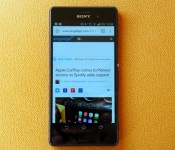
Sony Xperia Z3 review: a classy flagship with great battery life

When you’re trying to compete in the phone-making game, there are certain challenges. On the one hand, you want to dazzle customers with innovative features. On the other hand, you want to keep the suit-wearing shareholders happy with growth and strong, continued sales. The bottleneck in this equation is often technology. You can’t force it to progress. So once you’ve more or less caught up, you’re left with a choice: Innovate with software/hardware design, or take a risk with gimmicky features. Any of the above will do in lieu of the (unspeakable) alternative — not releasing a new model this year.
We’re not trying to preload this review of Sony’s new Z3 flagship, which arrives barely six months after its predecessor. Or maybe we are. What we’re definitely doing is spelling it out right here in the intro: The Z3 looks a lot like the Z2, and after a quick glance at the spec sheet, you might argue it sounds a lot like it too. This is pertinent because, by its own admission, Sony isn’t doing very well at competing in the phone-making game. Given the above, is the Z3 going to tempt existing customers to upgrade? Or perhaps lure those over from other brands? T-Mobile will be stocking it this fall, though the price isn’t yet known. Currently it’s £550 in the UK — a touch above the HTC One and Galaxy S5. Let’s have a look, shall we?
Hardware
http://www.engadget.com/embed-5min/?sid=577&playList=518443922&responsive=false
As we hinted in the intro, the Xperia Z3 has a lot in common with the Xperia Z2. When we reviewed that phone back in April, we had plenty of good things to say about it. Mostly how far along the display had come. The good news is, that’s one of the things the Z3 inherits — a 5.2-inch full HD Triluminos panel with X-Reality (you can watch Sony explain what those marketing terms mean here). The silicon is remarkably familiar too. The Z3 boats a 2.5GHz quad-core processor, up from 2.3GHz in the Z2. But both are Snapdragon 801 chips (MSM8974AB in the Z2 vs. the Z3’s MSM8974AC if you’re keeping score). Both handsets have a 20.7-megapixel camera and run Android 4.4 KitKat.
Then, of course, there’s the design. Xperia phones in general aren’t known for their bold and varied aesthetic, especially not the Z series. If you lined them up from the original Xperia Z through to the Z3, you’d mostly be picking at details to tell them apart. The original Xperia Z might cast more or less the same shadow as the Z3, but the newest flagship has a much more premium feel thanks to the matte-finish metal edges. The corners are actually nylon — to make them less prone to dings should you drop it — but you wouldn’t notice unless you were looking closely.

The buttons and ports are still hidden under sealable caps to help keep it waterproof, with micro-USB on the left side, and nano- (not micro-) SIM and a memory card slot on the right. There’s still a dedicated camera button on this side too, which is always nice. Other internals remain the same this time: 3GB of RAM and 16GB of onboard storage. If you were a fan of the slightly generous top and bottom bezels that Sony seems so fond of, well, good news — they’re still here too.
For all its familiarity, the Z3 is still its own phone. It’s slightly trimmer by about one millimeter in each dimension, and at 152 grams, it’s lighter than its 163-gram predecessor, making it less prone to butterfingers. It’s also more waterproof than before and is now fully dust-resistant (rated to IP65/68, up from IP55/58), which means it can sit in 1.5 meters of water for a full half-hour. Finally, the camera has some new features (more on that later), and the display is brighter.

All things considered, while Sony marketing is duty-bound to argue that this is the best Xperia Z ever, with reasonable improvements on many of the key specifications, we’re willing to roll with it. Not all specs are up, though: Weirdly, the battery capacity is actually down from 3,200mAh to 3,100mAh. More on that later, though.
| Sony Xperia Z3 | Sony Xperia Z2 | |
|---|---|---|
| Dimensions | 146 x 72 x 7.3mm | 146.8 x 73.3 x 8.2mm |
| Weight | 152g | 163g |
| Screen size | 5.2 inches | 5.2 inches |
| Screen resolution | 1,920 x 1,080 | 1,920 x 1,080 |
| Screen type | Triluminos LCD with 16.7 million colors | Triluminos LCD with 16.7 million colors |
| Battery | 3,100mAh Li-ion (non-removable) | 3,200mAh Li-ion (non-removable) |
| Ruggedness | IP65 and IP68 waterproof and dustproof | IP55 and IP58 waterproof and dustproof |
| Internal storage | 16GB (12GB free) | 16GB (12GB free) |
| External storage | MicroSDXC | MicroSDXC |
| Rear camera | 20.7MP (1/2.3-inch sensor, 25mm-equiv. focal length) | 20.7MP (1/2.3-inch sensor) |
| Front-facing cam | 2.2MP stills, 1080p video | 2.2MP stills, 1080p video |
| Video capture | 1080p, 4K | 1080p, 4K |
| NFC | Yes | Yes |
| Radios |
HSPA+ (850/900/1700/1900/2100); GSM GPRS/EDGE (850/900/1800/1900); LTE (Bands 1, 2, 3, 4, 5, 7, 8, 13, 17, 20) |
HSPA+ (850/900/1700/1900/2100); GSM GPRS/EDGE (850/900/1800/1900); LTE (Bands 1, 2, 3, 4, 5, 7, 8, 13, 17, 20) |
| Bluetooth | v4.0, aptX, A2DP | v4.0, aptX, A2DP |
| SoC | Qualcomm Snapdragon 801 (MSM8974AC) | Qualcomm Snapdragon 801 (MSM8974AB) |
| CPU | 2.5GHz quad-core Krait 400 | 2.3GHz quad-core Krait 400 |
| GPU | Adreno 330 | Adreno 330 |
| RAM | 3GB | 3GB |
| Entertainment | MHL, USB OTG, WiFi Direct, DLNA, Miracast, FM radio | MHL, USB OTG, WiFi Direct, DLNA, Miracast, FM radio |
| WiFi | Dual-band, 802.11a/b/g/n/ac | Dual-band, 802.11a/b/g/n/ac |
| Wireless Charging | No | No |
| Operating system | Android 4.4.4 (Sony-specific UI) | Android 4.4.2 (Sony-specific UI) |
Display

The display is sure to generate mixed feelings. There will be some who wish for Sony to up its game in the spec wars, and join the 2K club. But it hasn’t. It’s resolutely stayed put at 1080p. Battery life might be one reason; it certainly seems to take a toll on the 2K-capable LG G3, which is lucky to make it through the day. Given how far the displays on the Xperia Z line have come since the original Z, it looks like Sony’s taking the time to try and get things right before jacking up the pixel count. That is to say, the display on the Xperia Z3 is much nicer to look at than the original Z and Z1. Viewing angles are much improved; the color representation in my photo comparisons seems natural and more balanced than before. Also, as mentioned, at 660 nits, it’s brighter than last time around, too (the Z2 topped out at 428 nits).
Comparing photos and videos with source materials shows blacks to be deeper and darker than on the Z1 (harder to tell apart on the Z2), while colors are perhaps a little warmer. Still, it’s nowhere near the levels you might find on a Samsung GS4 or GS5. So, if you were hoping Sony’s experience with higher resolutions in the TV market meant its phones would be going 4K before everyone else, then you’ll be disappointed. But you shouldn’t be — the company’s apparently investing its efforts elsewhere.
As a complete package, there’s no doubt the Z3 is, in my opinion, the nicest Xperia phone I’ve ever laid my hands on. It’s perhaps the improved finish on the sides, or the way the port covers neatly click in place, or the dense (yet not-too-heavy) feel, or the upgraded display, or the all-round good specs. Perhaps through a combination of the above, in a “greater than the sum of its parts” kinda way, Sony’s finally made a phone that doesn’t feel blocky and flat next to the likes of the HTC One M8 or the Nexus 5.
Camera

For the last two generations of Sony flagships, there’s been a 20.7-megapixel camera. That’s still the case here. And frankly, we’re not surprised the megapixel count hasn’t gone up again. There are plenty of other ways to improve a camera other than bumping up the number of pixels. Sony’s addressed a few of them here. The biggest change on a hardware level is the wider 25mm lens. This means you get a little more in the shot with each photo (see below for an example).
Most of the other significant changes are software based. Sony already bundled a lot of custom features with its camera (such as Info-eye, and Picture effect modes), and now there’s more. Namely “Multi-camera” (which combines the shots of two Z3s) and a new “AR fun” mode. The merits of many of these features are open for debate. Some, like “Live on YouTube” or “Background defocus,” can be genuinely useful. But others, like AR fun (which lets you draw your own augmented reality critters on screen)? Not so much. Fun to use once; probably never to be used again.


Should all of these modes not be enough for you, there are a bunch of others you can download to further augment your camera’s functionality. These range from the productive (Evernote, PDF scanner) to the obscure (one claims to turn your camera into a global air-traffic radar!). I tinkered with a number of these modes, but found myself defaulting back to either full auto or manual, depending on what I wanted to shoot. I do still like the idea of being able to stream live to YouTube through my phone; I just need to find a reason to do so.
For all these features and modes, though, I find myself echoing the sentiments of our Z2 review. With the core camera functionality being so good (the 1/2.3-inch sensor sucks up light, and the image quality is high), it’s easily one of the best cameras in a phone right now. It isn’t quite up to Nokia Lumia 1020 standards, but it definitely beats Samsung’s GS5 and holds its own against the iPhone 6 from what I’ve seen. Low-light performance is good. There’s still evidence of noise in particularly dim conditions. I took some night shots around London’s River Thames, and without particularly trying to keep a steady hand, lines weren’t overly blurred as is often the case with longer-exposure photos.

The question is, why throw in all these party tricks? If the camera’s UI were more focused on manual exposure settings (still with an auto mode, of course), there’d be a good case for this being the Android-using street photographer’s go-to phone. Instead, it almost feels like Sony is scared it might lose some mainstream appeal. The result is a very good camera that shoots 4K video, does good time-lapses and more — that then gets demoted to producing augmented reality dinosaurs.
Software

Sony’s user interface is like a pair of comfortable shoes. They’re not your favorite, but they’re dependable, don’t have any surprises and they look snazzy… or they did a few years ago, anyway. There’s nothing egregious about the Xperia software experience, but you definitely need to wear it in. Mostly this involves deleting all the well-meaning widgets (mostly for Sony’s streaming services), and reverting it to something you’re more familiar with. Once you do de-brand it a little, it’s a fairly inoffensive take on Android KitKat. Sony does throw in a few handy custom features, like shortcuts on the multitasking screen, and the Lifelog app. I was quite fond of the app when I reviewed Sony’s SmartBand, though the phone can also log steps without the help of a wristband. Sony is also doing its bit to keep up with the Joneses (i.e., HTC) with a new feature that collates images and videos you shoot over a day (or days, even) and makes you a Zoe-esque highlight video. You can turn it off of course, but after a busy day out with friends, getting a little video recap was a nice surprise.
One software feature I really do like is one that you could miss completely if you weren’t looking for it. Long-press the power button on the side and you’ll see an option for screen recording on the menu where you normally choose to power down or go into airplane mode. Now you can record what you’re doing with your phone, and share that video with people. This is great for a number of use cases. Tutorials, obviously, but also recording games, demonstrating phone or website bugs, creating cutaway video clips for phone reviews (like this one) and, of course, keeping a permanent record of SnapChats (we know that’s what you were all thinking). Android KitKat sorta, kinda has screen recording by default, but it’s such a pickle to get it working that it’s mostly not worth the bother. Likewise, if you’ve ever trawled the Play store for screen recorders, you’ll know it’s a bit of a minefield. Sony’s taken care of all that by baking one in. Nice work.
Performance and battery life

This section can be explained in one sentence: The Xperia Z3 performs well and has epic battery life. There. Done. Really, you don’t need to know more. But if you do… I’d add that the battery life is the reason why this phone will be remembered. In my personal usage, I regularly got two days of full use, or so near to two days that I’m loath to mark it down for the odd 10PM finish on the second day. This is with pretty constant “Engadget editor” sort of use too. It feels weird — unnatural almost. Like, I knew I didn’t have to charge it every night, and that felt moderately exhilarating. Reckless and liberating. OK, maybe I’m getting carried away, but it really is head and shoulders above any other flagship in the last few years. In our more official video-looping test (with WiFi and data on, and brightness at 50 percent), it racked up a solid 12 hours and 13 minutes. This is actually about the same time as the Z2 and Z1, but the savings in real use apparently come from how Sony updates the screen (or not — it saves energy by only refreshing the display when needed). Hence, why constantly playing video might break the magic spell.
Our benchmark tests are a little less exciting. The Z3 delivers generally good performance across the board. With nearly the same silicon as the last-gen model, it unsurprisingly comes quite close on most metrics. Real-world usage is equally inconspicuous. That’s to say, there’s never really any moment, even right out of the box, when I find myself thinking “Wow, this is so next-level fast!” But equally, it never left me wanting. Not once did I notice any apps hanging, nor did any of the games I played struggle to keep up. Like I said at the beginning of this section: The Xperia Z3 performs well, and has epic battery life.
That leaves data and calls. Using London’s O2 network, I was regularly able to pull down between 20 and 50 Mbps, depending on the time of day and location. This is about as fast as you can expect in the big smoke, so no complaints there. Calls are loud and clear, but to be fair, it’s been a long time (when signal is good) that that hasn’t been the case with every phone.
The competition
Right now, the most obvious rivals for the Xperia Z3 are the Moto X, Samsung Galaxy S5, the LG G3, the HTC One (M8) and, possibly the soon-to-be-refreshed Nexus 5. All of these are strong Android phones in their own right. Each has its own stand out feature, like Moto’s software tricks, Samsung’s heart-rate monitor, LG’s QHD display and HTC’s quirky Duo Camera. The Z3 has none of these things. But, that might be exactly why you want it. None of the fuss, just a flagship phone. Potentially, the biggest competition might actually come from Sony’s own lineup, in the form of the Z3 Compact. The two phones are almost identical save for their size (5.2 vs. 4.6 inches). That said, the Z3 Compact does have a smaller battery, so if endurance is the thing that’s interested you most about the phone so far, you’ll need to weigh the pros and cons of screen size over battery life.
Wrap-up

I’ll be honest and say that while I know intellectually that the Z1 and Z2 were good phones, they weren’t my cup of tea. But there’s something about the Z3 that makes it the first Xperia phone I’d be happy to own. As of this writing, my daily driver is an LG G3. That’s a phone I’ve become very fond of. I thought for the period of time I was reviewing the Xperia Z3 that I’d find myself cheating on it with the G3. But I didn’t. The hardware, for the first time, looks and feels as sharp as some of the other well-dressed competition (the M8s and Samsung Galaxy Alphas of the world). That might sound shallow, but when you’re paying flagship prices, you want that flagship feel. The Z3 has it in spades.
If you owned the Z2, or even the Z1, there might not quite be enough new here to bother upgrading — unless, of course, you’re just due a new phone anyway, and you like what Sony is putting down with the Z series. But, if you’re currently in the market for a top-flight Android handset and are particularly interested in good battery life, this might be your best bet. Even if battery life isn’t a priority, the Z3 is still worthy of your attention — even if it’s just because it’s the dictionary definition of an all-rounder.
Filed under: Cellphones, Mobile, Sony
.CPlase_panel display:none;
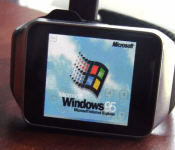
Because Android Wear is so 2014: Someone has put Windows 95 on a Samsung Gear Live
 As part of the tech community, sometimes it is the most awe-inspiring thing to simply look back at what we have achieved over the years and how technology that exists today eclipses what we had even imagined was possible just a handful of years ago. Take Windows 95 for example – the operating system was widely lauded in its time and many of us had our whole lives running through the system. Well, 19 years after its release, someone has managed to get Windows 95 on a Samsung Gear Live. That someone is Corbin Davenport, and while it’s not the smoothest running thing (or the clearest), it is an amazing feat to see – even if Windows 95 was designed to run on much more basic systems. Check it out running in the video below:
Now practically, don’t expect everyone to go rushing and putting Windows 95 on their Gear Lives. But it does serve as a nice reminder, if just a nostalgic one, of how far our devices – even wrist wearable devices – have come over the last 20 years. If anything, it should make us appreciate Android Wear even more as it enables us to do things that we previously only dreamed of doing on our wrists, and now we’re living the dream. Tears, much?
What do you think of running Windows 95 on a Samsung Gear Live? Let us know your thoughts in the comments below.
//<![CDATA[
ord = window.ord || Math.floor(Math.random()*1E16);
document.write('‘);
//]]>
The post Because Android Wear is so 2014: Someone has put Windows 95 on a Samsung Gear Live appeared first on AndroidSPIN.
.CPlase_panel display:none;

