


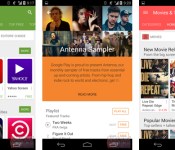
Google Play on Android has its flattest design yet

With how many of Google’s core apps are getting the update to its new, flatter Material Design lately, the release of Android L can’t be too much further away. While we wait for that, however, the Google Play redesign leaked not too long ago is available for sideloading right now, as spotted by Droid Life. With it, the “What’s New” section’s been moved back to the top of the store and you’ll now be able to create device-specific profiles (like one for phones and another for tablets) for restoring a custom set of apps per gizmo-type. If you’d rather not wait your turn for the update from Mountain View, DL has the APK, while Android Police has a smattering of screenshots if you want an advance look of what you’re getting into. If you haven’t started a betting pool for when Android L will hit, now just might be the time.
Filed under: Cellphones, Tablets, Software, Mobile, Google
Source: Droid Life, Android Police
.CPlase_panel display:none;
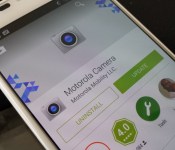
Motorola Camera app updates, adds Android Wear remote shutter support
An update to the Motorola Camera app has landed on the Play Store today. The app brings in the usual listing for performance and bug fixes. However, there is a much more exciting addition that the joint owners of a Motorola device and a Android Wear powered device will be excited about. Now you can use your watch as a remote shutter.

This is just for Motorola devices and the Motorola camera app. If you use the Google Camera, you have had that ability for a while. Head to the Play Store and grab the app update. Give the remote shutter a test run and let us know how it works out for you.
//<![CDATA[
ord = window.ord || Math.floor(Math.random()*1E16);
document.write('‘);
//]]>
The post Motorola Camera app updates, adds Android Wear remote shutter support appeared first on AndroidSPIN.
.CPlase_panel display:none;
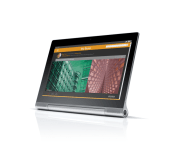
Lenovo Yoga Tablet 2 Pro brings a 13.3-inch Android tablet with a 2k display and embedded pico projector
Lenovo took to the stage today with Ashton Kutcher to announce a refreshed line up of Yoga tablets for the holiday season. We caught some leaked details about the tablets earlier in the week that gave us a pretty good idea as to what they would announce. However, leaks don’t always get everything. Among the new 8 and 10 inch offerings was the new Yoga Tablet 2 Pro.

This Pro version of the Yoga line brings in a 13.3-inch QHD screen with a resolution of 2560 X 1440 quad HD. It uses the Intel Atom Z3745 quad-core processor clocked at 1.86 GHz and offers up 2GB of RAM. Internal storage is 32GB and also offers an SD card slot. There is a 8MP f2.2 rear camera with auto focus and a 1.6MP front facing camera for selfies and video calls. As for connectivity the tablet offers Wi-Fi 802.11b/g/n dual-band (2.4 and 5 GHz). There is an optional 4G variant of the device, but sadly it won’t be in the US. Sticking to the original design the Yoga Tablet 2 Pro offers up a set of front facing speakers with 1.5W output each. Here is where it gets a little cooler though. On the rear is a 5W JBL subwoofer. That totals 8W of audio output. On a tablet. Battery life on the Yoga line has always been a huge focus. They beefed up the battery to support the larger screen-size and resolution to a whopping 9600 mAh battery that is rated for 15 hours of continuous use. Not quite the 18 hours of the smaller variants, but still impressive. Physical size is 13.1 x 808 x 01. – 0.5 inches. The thinness variance accounts for the round battery down to just the screen. All of this only weighs in at 2.09 pounds too.
There is more though. Ashton made mention of something in a YouTube video that Lenovo released a few days ago. He proposed this question: “What if there was a projector that put the screen on the wall?” Yup, Lenovo did that. The Yoga Tablet 2 Pro offers up a pico projector built -in on the side of battery cylinder with an on/off switch. It projects a 50-inch image of the screen to a wall at 2 meters. It won’t be in the same resolution that the screen is, cause that would just be crazy. The resolution is 854 x 480 at 40-50 lumens bright.

 Along with the pico projector, the crazy hi-res screen and the outstanding battery life you will also find the kickstand that lets you use the tablet in more ways than a typical slab. The kickstand lets you place the tablet in stand or tilt mode, but it also has one more trick added to its abilities. It now can rotate a full 180 degrees and has a cut out in the aluminium so you can hang it.
Put all that together with Android 4.4 and you have to be looking at somewhere in the neighborhood of $800, right? Nope, Lenovo has the tablet priced at a very competitive $499.
I am personally really excited about Yoga Tablet 2 Pro. It packs in so much for such an affordable price. Be on the look out for these at Lenovo.com and stay tuned for a review a bit later. I can’t wait to put a big movie on in my sons room with some popcorn and soda. It is going to be awesome.
//<![CDATA[
ord = window.ord || Math.floor(Math.random()*1E16);
document.write('‘);
//]]>
The post Lenovo Yoga Tablet 2 Pro brings a 13.3-inch Android tablet with a 2k display and embedded pico projector appeared first on AndroidSPIN.
.CPlase_panel display:none;
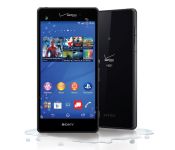
Verizon calls up Sony Xperia Z3v for October 23

The Sony Xperia Z3 is one helluva device. A FHD 5.2″ screen, water and dust proof, Snapdragon 801, 3 GB RAM, 20.7 MP camera, 4K recording, 3,100 mAh battery with a STAMINA Power Saving Mode, and more. Well, good news Verizon users.
Verizon announced Thursday that it will be releasing the Sony Xperia Z3v on October 23. In its announcement, it details a lot of features of the Xperia Z3v, including the specs mentioned before, and PlayStation 4 Remote Play, and more all on Verizon’s 4G LTE network. With the phone you will get 30 days of Music Unlimited and 6 pre-selected blockbuster movies to download. You’ll also get $200 off a Sony Xperia Z2 tablet for a limited time. It will cost $199 on a new two-year contract, and on Verizon Edge.
Who’s excited for this phone?
via Verizon Wireless
Deals, Discounts, Freebies, and More! Click here to save today! |
The post Verizon calls up Sony Xperia Z3v for October 23 appeared first on AndroidGuys.
.CPlase_panel display:none;

Google wants to bring its Android copyright battle to the US Supreme Court

Google and Oracle are still arguing over code at the foundation of Google’s mobile operating system, Android. Google this week filed a petition with the United States Supreme Court, which appealed a lower court’s ruling that Oracle can legally copyright foundational code. The decisions have gone back and forth over the course of the last four years: first a judge in California ruled in favor of Google, then an appeals court ruled in favor of Oracle, and now Google’s pushing for the Supreme Court to get involved.
But what are the two internet giants even arguing about? At the heart of Android are a set of Java APIs that Oracle is claiming aren’t available for commercial use without a licensing fee (approximately $1 billion). Google argues that the API code is functional — not a “creative work” — and therefore isn’t copyrightable. The case is of course far more complex than our explanation, but that’s the big picture (our own Chris Velazco goes into far more background detail right here).
Will the Supreme Court get involved? That remains to be seen. The two previous courts took vastly different perspectives on the case, and the case’s ultimate outcome is precedent-setting. Should Oracle win, the door is potentially open for many more copyright claims on API code. One piece of Google’s argument is that, had API code been copyrightable when Google started, the company wouldn’t have succeeded. Essentially, Google argues that if the foundational pieces of computing technology were locked away behind licensing agreements, innovation wouldn’t be quite so rapid.
Should the Supreme Court choose not to see the case, there’s not a lot Google can do. We could find out as early as November whether the Supreme Court will see the case or not. If it does, expect to hear a lot more from Oracle v. Google in 2015.
[Image credit: Getty Images/Flickr RF]
Source: US Supreme Court, Reuters
.CPlase_panel display:none;
Choose Your Own Android Giveaway: Win a free, top of the line, phone of your choice [Deal of the Day]

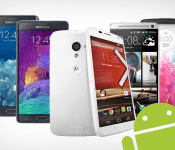
Ready for a new handset but aren’t prepared to shell out the clams for an upgrade? Today just might be your day. We’re giving away a top-tier handset of your choice to ONE lucky winner in the Choose Your Own Android Giveaway!
The winner will choose between a Samsung Galaxy Note 4, Motorola Moto X, HTC One M8, LG G3, or Samsung Galaxy Note Edge. Brand new and ready to use! One of these may have your name written all over it.There’s no purchase necessary and no complicated forms to fill out. All you’ll have to do is visit our contest page, click ENTER NOW, and submit your email address. It’s as easy as that. Sharing via social media gains you more entries. Good luck!
Check this deal out, and many others at deals.androidguys.com!
Deals, Discounts, Freebies, and More! Click here to save today! |
The post Choose Your Own Android Giveaway: Win a free, top of the line, phone of your choice [Deal of the Day] appeared first on AndroidGuys.
.CPlase_panel display:none;
Droid Turbo manual confirms specs, reveals software features

We’ve been hearing things about a Droid Turbo device all the way back in August where some specs were leaked, and then a few weeks ago got another leak that contained photos. Well, if you were looking for some more solid confirmation, we might have it.


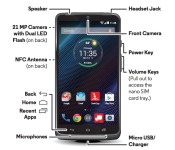
DROIDLIFE reported on some leaked manual shots that you can see above, as well as in the title picture. These pictures confirm some of the specs we had reported last time: a 5.2″ screen, dual flash, a long-lasting battery. There doesn’t appear to be a front-facing speaker though, and it turns out the navigation buttons are just like stock android (on-screen rather than physical) instead of something else like we thought. Also, Motorola’s turbo charger will be included, though it will be interesting if it’s the same as the new Moto X, or better (given it has the name “Droid Turbo”). What’s new information is a 21 MP camera on the back, NFC support, Qi wireless charging, and inclusion of many of the Moto X features like Moto Voice and Display.
It seems Verizon is taking a refreshingly different approach to this phone. Stay tuned for more updates as we get them.
via DROIDLIFE
Deals, Discounts, Freebies, and More! Click here to save today! |
The post Droid Turbo manual confirms specs, reveals software features appeared first on AndroidGuys.
.CPlase_panel display:none;

Cartoon Network’s new app offers bite-sized content for kids

In an effort to beam content to viewers who are more likely to stare at a mobile device than a television, Cartoon Network has a new app that dishes out short clips of content. The Cartoon Network Anything app for iOS and Android packs 10 to 15-second snippets from Adventure Time, Regular Show, Gumball and Teen Titans Go with games, quizzes, puzzles and more sprinkled in. Variety reports that one goal is to lure the channel’s core audience back to its TV programming by promoting shows with the mobile software. There’s no way to control the flow of clips and other items, so kids won’t know what’s coming next. The idea is that every time little Joey taps on the app, there will be something he hasn’t seen before. Of course, there’s the opportunity for ad revenue in the future as well, which could take the form of branded video segments with the network’s characters. And in what should come as a shock to no one, McDonald’s signed on as the launch sponsor. If your kids (or you, no judgement here) are big fans of the CN, both versions of the app are available now via their respective repositories.
Filed under: Software, HD, Mobile
Via: Variety
Source: Google Play, iTunes
.CPlase_panel display:none;
Turn your text messages into comic strips with this app

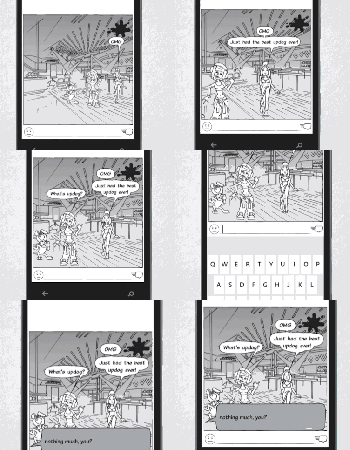
Regardless of which platform you’re on, text-message windows are pretty boring. The folks behind comiXchat think they have the solution to that, however, with an app that turns your 160-character correspondences into comic strips. More than just throwing avatars onto a static background, though, the app promises real-time changes to character position, facial expression and camera angles among other things, based on implied emotion, tone and attitude. And if any of that goes horribly wrong, you can share the comics either per-pane or the entire conversation via your social media network of choice. For it to work, you need to rope your friends into downloading it too. Ad-supported, free versions are available on Android, iOS and Windows Phone and if you’d like a preview of what it all looks like in action, there’s a dubstep-accompanied video just below.
Filed under: Cellphones, Software, Mobile
Via: comiXchat
Source: ComiXchat (Google Play), (App Store), (Windows Phone)
.CPlase_panel display:none;
Google’s Android emulator is ready to help developers make 64-bit apps

There’s a lot to look forward to in Android’s next major update, but hardware nerds are focusing in one one key feature: official support for 64-bit mobile chips. It’s the mobile OS’ inevitable future, and chip-makers have been preparing for it for quite awhile. Now app developers can jump in, too: Google announced today that a x86 64-bit Android L developer preview emulator image is available for developers that want to take their apps to the next generation. Not every dev will need to rebuild, however — apps built in Java will automatically benefit from the 64-bit release’s increased accessibility to memory and registers. Choose another language? Well, you’ll need to recompile: head over to the source to start testing your apps in 64-bit.
Filed under: Google
.CPlase_panel display:none;

