


Google Earth for Android is now faster, better at 3D exploration

Heads up, Android fans: Google Earth for your phones is about to get a lot better. That’s what the folks in Mountain View are promising, anyway — they’ve released an update to the app brings with it snappier performance and improved labels for maps (you’ll never wonder where Foster City and Redwood Shores begin and end again). Perhaps the biggest change, though — a completely rebuilt 3D rendering engine — means those cityscapes and mountain ranges you pore over should show up with more crispness and clarity. Try not to lord that over your friends using Apple Maps, will you? Throw in a way to import your own custom .KML files into the app from Google Drive and you’ve got all the makings of a pretty momentous update. Itching to take it for a spin? Mosey on over to the Google Play Store to get your globetrotting fix.
Filed under: Mobile
Source: Google

Microsoft Garage brings new Android app alternatives

Microsoft seemingly cannot decide whether it is for Google or against Google. Nevertheless, for those wanting some Microsoft love on their Android devices can get it through Microsoft Garage.
Microsoft Garage is a project by Microsoft looking to bring projects to reality from hackers, interns, employees, etc. Part of what has come to fruition is a trio of new apps available from the Play Store.
First, Torque is an app for Android Wear where you can twist your wrist, prompting a voice search in Bing. Essentially a Google Now replacement for Android Wear.
Next Lock Screen is an app that allows you to access apps and functions directly from the lock screen. If your device isn’t getting Android Lollipop anytime soon, but you like the idea of interactive notifications on your lock screen might look to this as an alternative.
Journeys & Notes is a way to discover things in between two places by looking at notes left by others. You can also leave your own notes about things you know of and find.
If you want to look at the project more, hit the link below. If you want to try any of the apps, click on one of the widgets below.
Do any of these apps interest you?
via Microsoft Garage
 |
The post Microsoft Garage brings new Android app alternatives appeared first on AndroidGuys.

Android 5.0 will be made available to the public on November 3

Google has confirmed in a note to developers asking them to ready their apps for the public release of Android 5.0 Lollipop scheduled for a November 3rd launch.
Requesting “we recommend that you test your apps and publish any needed updates to the Play Store”, Google wants to ensure that there are plenty of apps with material design and tested on Android 5.0 Lollipop for when it is released to the public.
Android Lollipop will come preloaded on the Nexus 9 (which releases on November 3rd) the Nexus 6, and inevitably will trickle down to other supported devices in the following weeks.
|
The post Android 5.0 will be made available to the public on November 3 appeared first on AndroidGuys.

Google Earth for Android gets updated 3D rendering engine

Google has announced a major update for their Google Earth for Android app. According to their announcement, the key to the update is a new 3D rendering engine, the first overhaul since Earth launched over 10 years ago. Google says the new engine will provide “faster, smoother, and crisper transitions.”
In addition to the 3D enhancements, Google says their maps will update quicker and they are making it easier to view KML files. Updates to Earth maps will now correspond to updates in their Google Maps product. Google says they have given roads and labels a fresh new look in Earth as well to make it easier for users to find what they are looking for. Users who have created their own maps and generated KML files will now be able to load them directly from Google Drive.
If you want to give Google Earth for Android a try, just hit the download link below.


source: Google Maps Blog
Come comment on this article: Google Earth for Android gets updated 3D rendering engine

My Tracks gets updated to support Android Wear
For those of you who have a Android Wear and use the My Tracks will be happy to hear that Google has updated their app to support My Tracks. Google+ Rens Blom noticed this and shared with the public this news. You won’t be able to take just your smartwatch without your smartphone, but it’s… Read more »
The post My Tracks gets updated to support Android Wear appeared first on SmarterWatching.
|
Read the rest at SmarterWatching.com!
The post My Tracks gets updated to support Android Wear appeared first on AndroidGuys.

Moto 360 update brings Smart Battery Saving, other features
Motorola continues to try to deliver a “timeless” timepiece with the Moto 360. A new update has struck with additional features like “Timely Time Checks” and “Mood Lighting”. You can view what this update entails below, or visit the Official Motorola Blog to read about what they have to say about their system update. Smart… Read more »
The post Moto 360 update brings Smart Battery Saving, other features appeared first on SmarterWatching.
|
Read the rest at SmarterWatching.com!
The post Moto 360 update brings Smart Battery Saving, other features appeared first on AndroidGuys.
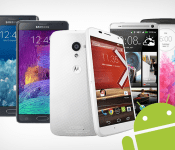
Choose Your Own Android Giveaway (Updated): Win a free, top of the line, phone of your choice [Deal of the Day]

UPDATE: The Nexus 6 has been added to the choices of handsets available to the winner!
Ready for a new handset but aren’t prepared to shell out the clams for an upgrade? Today just might be your day. We’re giving away a top-tier handset of your choice to ONE lucky winner in the Choose Your Own Android Giveaway!
The winner will choose between a Samsung Galaxy Note 4, Nexus 6, Motorola Moto X, HTC One M8, LG G3, or Samsung Galaxy Note Edge. Brand new and ready to use! One of these may have your name written all over it.There’s no purchase necessary and no complicated forms to fill out. All you’ll have to do is visit our contest page, click ENTER NOW, and submit your email address. It’s as easy as that. Sharing via social media gains you more entries. Good luck!
Check this deal out, and many others at deals.androidguys.com!
|
The post Choose Your Own Android Giveaway (Updated): Win a free, top of the line, phone of your choice [Deal of the Day] appeared first on AndroidGuys.
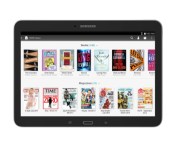
Barnes & Noble announces 10.1-inch Samsung Galaxy Tab 4 NOOK 10.1

Earlier this year Barnes & Noble released the Samsung Galaxy Tab 4 Nook 7.0, a collaboration effort with Samsung to provide the functionality of a normal tablet and the benefits of an eReader. Well, on Wednesday they announced another tablet, the Samsung Galaxy Tab 4 Nook 10.1.
Despite the long name, B&N looks to provide more options to consumers when it comes to the eReader tablet market, with the option to choose between a 7-inch model, and now a 10.1-inch model. What’s great about this is you can get a Samsung Galaxy Tab 4 for $300, and included is over $200 worth of free content from the Nook store. I don’t care who you are, that’s a good deal.
The tablet will be available at B&N bookstores nationwide, as well as on bn.com and nook.com immediately. Evidently you’ll get a refreshed version of the Nook interface as an over-the-air update once you purchase it that will have a refreshed look, more content searching tools, and more.
Would you get this tablet? Even if just for the Samsung Galaxy Tab 4 10.1″ for cheap?
via Business Wire
|
The post Barnes & Noble announces 10.1-inch Samsung Galaxy Tab 4 NOOK 10.1 appeared first on AndroidGuys.

Samsung’s big Galaxy Tab 4 gets the Barnes & Noble treatment

We weren’t terribly fond of Samsung and Barnes & Noble’s first tablet mashup, but it seems at least a few people were. If you happen to fall into that category, congratulations — that odd couple has something else that might be up your alley. The new Galaxy Tab 4 Nook 10.1 is technically the largest Nook ever released (only because Samsung already did the heavy lifting with design and production) and once again it’s basically a stock tablet with BN apps like Nook Library and Nook Shop sprinkled into the mix for good measure. Everything else — from the 1.2GHz Qualcomm chipset running the show, to the 10.1-inch display running at 1280×800, to the full eye-searing load of Samsung software tweaks — is a well-known quantity so you’ll know exactly what you’re getting into. On the plus side at least, the Nook-ified version of the Tab 4 10.1 costs the same $199 as the bog-standard version (after instant rebate, at least) and comes with $200 of sweet, sweet content gratis. Interest piqued? You can pick up yours starting today, but you should only do so after thinking about it really, really hard.
Source: Barnes & Noble

Switching from iOS to Android: A helpful guide

When I made the switch from iOS to Android, it was pretty easy. I was already using Google services for as much as I possibly could. It was part of the reason I decided to switch. Why use Apple products to access Google services when I could use Google products to access Google services?
So when it came time to transfer over my contacts, calendar, photos, music, email and other services I used Google to log into, it was just a matter of entering my log-in credentials. And because I’m a nerd who likes to plan out technology changes like this, I made a list of all the apps I couldn’t live without, found them in the Google Play store, and bookmarked them so that when I got my first Android device, it would just take a few taps to complete the switch from iOS to Android.
Sadly, not everyone is like me. Some people use other services. Some people use Apple products to access Apple services.

For you unfortunate people out there, Google has created a handy-dandy guide for switching from iOS to Android.
It will take a bit of work, but it will make the switch pretty painless, and at the end of the day, you will have the following data on your shiny new Android device,
- Photos/Video
- Contacts
- Apps
- Music
Are you planning to make the switch from iOS to Android? Let us know in the comments how helpful Google’s guide was.
via [Google Operating System]
source [Android]
|
The post Switching from iOS to Android: A helpful guide appeared first on AndroidGuys.

