


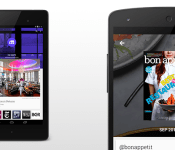
Download and Install Newsstand version 3.3.1 APK (Material Design)

Google aren’t done when it comes to updating their app lineup with material design, and it’s Newsstand that is next in line to get the treatment bringing it to version 3.3.1.
You’ll recall that Newsstand actually got the official Material Design makeover in an earlier version, but 3.3.1 brings in a few minor UI tweaks to offer the finishing touches. This is purely a visual change for Google Newsstand and contains no added functionality. So, what’s new?
– New animation when the articles are refreshed.
– The ‘Get Started’ pane has been given a redesign with solid colours.
– Background for the search page has been switched to a thicker magnifying glass icon.
– The hamburger pull-out menu has also received a UI redesign.
The official Newsstand version 3.3.1 can be downloaded by clicking here.
Why Download?
If you’re the type of person who likes to stay on the cutting edge of software then you’ll want to get your hands on the file. And, given software updates can take days or weeks to fully roll out, this ensures you’re moving up in the line.
What’s the Risk?
We’ll only share files or links to files that we feel can be trusted. Google does a great job of signing apps, checking them for malware, and protecting users. If you’re not sure whether you want to download the app at this time, simply wait for your update to arrive. No harm, no foul.
The post Download and Install Newsstand version 3.3.1 APK (Material Design) appeared first on AndroidGuys.
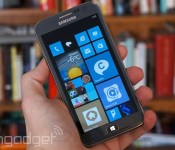
Samsung worries that its Microsoft royalty payments amount to collusion

Samsung was quick to cite the acquisition of Nokia as a reason for holding out on Microsoft’s royalty payments, but there weren’t many details. Just what had it spooked? Thanks to some new court filings, we now have a clearer sense of its motivations. Simply put, the Korean tech giant is worried about “charges of collusion” now that Microsoft is a direct competitor in the smartphone business. The patent deal requires that Samsung not only make Windows Phones, but hand over sensitive business details — both big problems when Microsoft could use them to gain a competitive edge. Samsung already stopped handing over those trade secrets over jitters that American antitrust regulators would step in.
It’s not clear that the court will buy this argument. While there is a real concern about working too closely with a competitor, that doesn’t necessarily give the company an escape from its current agreement — it may still have to pay up, at least in the short term. Whether or not it does, it’s clear that Samsung doesn’t believe the royalty arrangement should continue as-is.
Filed under: Cellphones, Mobile, Samsung, Microsoft
Source: Reuters

Is multi-platform communication coming to Android via new “Copresence” service?
 Cross-platform synergy between Android and iOS has always been a finicky affair, however a new service allegedly named “Copresence” is about to make things a lot easier. The service was found after digging around in the newest Google Play Services APK and talks about making cross-platform communication via Bluetooth, Wi-Fi and location data possible. The tip had this to say about the new service:
“Google is going to launch a service titled “Copresence” in the coming weeks. The goal of the service will be to allow cross communication between Android and iOS devices through Bluetooth, Wifi (possibly Wifi Direct?) and Location based data.
I located a large quantity of files referencing the service in the latest Google Play Services APK, including banner images for setup, explanations of how the service works and XML’s defining the layouts of the setup app.
Upon investigation, I noticed that Google already has patents in the works for a service titled “Copresence”, allowing data retrieval from a device using a server and then feeding back relevant data. There is also numerous Chrome code review comments referring to a service called “Copresence” stating that it will not require a Google account to use, and confirming that it will be in fact multi-platform.”
If what the above is true, and having patents pending is definitely a good indicator, then we may see more ways for Android and iOS devices to interact beyond via apps – this would open the door for devices of all platforms to interact with passive services like “Nearby” which would allow other users to know when you are, well, nearby, and much more.
What do you think about a service like “Copresence”? Let us know your thoughts in the comments below.
Source: TechAeris via TalkAndroid
//<![CDATA[
ord = window.ord || Math.floor(Math.random()*1E16);
document.write('‘);
//]]>
The post Is multi-platform communication coming to Android via new “Copresence” service? appeared first on AndroidSPIN.
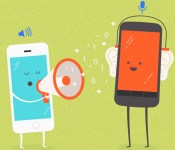
Google wants you to easily share files between Android and iOS

As handy as services like AirDrop or Android Beam may be for shuffling content between nearby devices, they’re platform-exclusive. That’s not much help if you want to share photos from your Android phone to an iPhone, or vice versa. However, Google may soon overcome that barrier. Android Police, Techaeris and GigaOM all have evidence of Copresence, a service that would let Android and iOS devices swap content over WiFi. Reportedly, it uses location data (including Bluetooth) to set up the connection; after that, you can send directions, photos and other info without having to either bump devices or rely on cloud storage options like Google Drive or Dropbox. The technique shouldn’t require a Google account, either.
It the details are accurate, Copresence should be available within a matter of weeks. Having said this, you shouldn’t expect a file sharing Utopia. The feature is most likely to be limited to Google apps at first, and it’s probably not going to be a system-wide feature on at least iOS — you may have to be satisfied with exchanging files through a handful of programs. Still, that’s better than the walled-off sharing you likely deal with today.
Filed under: Cellphones, Networking, Internet, Mobile, Google
Source: Android Police, Techaeris, GigaOM

Latest Play Services APK findings show new “Copresence” app is on the way

If a line of code hidden within Google’s latest Play Services APK and pending patents are anything to go by, it certainly looks as if the search engine giant is preparing to release a new mobile communication service, entitled “Copresence,” which should make sharing data between Android and iOS incredibly easy.
This system sounds an awful lot like Android Beam, which made its debut appearance alongside Ice Cream Sandwich (4.0) back in October, 2011 and Bump for iOS back in November, 2009. Both of these apps were developed for their own respective operating systems. Copresence, however, is believed to be a cross-platform application and completely contactless.


While Google is still yet to announce or even confirm the existence of its Copresence service, Simon Tucker recently discovered the application in a leaked patent filing and spotted several files linked to the project in the latest Play Services package.
And if that’s not enough proof, Tucker also found several Chrome code review comments referring to an in-house service called “Copresence” that will not require the use of a Google account. He explained all of his findings in an exclusive email to TechAeris — which you can see below.
Google is going to launch a service titled “Copresence” in the coming weeks. The goal of the service will be to allow cross communication between Android and iOS devices through Bluetooth, Wi-Fi and Location-based data.
I located a large quantity of files referencing the service in the latest Google Play Services APK, including banner images for setup, explanations of how the service works and XML’s defining the layouts of the setup app.
Upon investigation, I noticed that Google already has patents in the works for a service titled “Copresence”, allowing data retrieval from a device using a server and then feeding back relevant data.
There is also numerous Chrome code review comments referring to a service called “Copresence” stating that it will not require a Google account to use, and confirming that it will be in fact multi-platform.
We don’t know for certain if Copresence will come to fruition; only time will tell, but it definitely looks like it’s on its way.
Source: TechAeris
Come comment on this article: Latest Play Services APK findings show new “Copresence” app is on the way

iOS vs Android represented in a visual interactive map

Here we revisit the age-old debate of the two most popular mobile operating systems and which has the upper hand over the other. We all know that they both have their advantages and disadvantages, where both excel in their different use cases, but what about pure user base?
The visual displayed below is an interactive map that shows the mobile and tablet operating system market share based on web traffic for iOS and Android (and Windows Phone) in Europe.

Simply click on the various European countries to see the distribution of each OS visually presented in percentage of population. The full version of the graph can be found here if the embed doesn’t work for you.
Surprised? Drop us a comment below.
The post iOS vs Android represented in a visual interactive map appeared first on AndroidGuys.
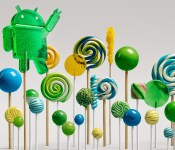
Lollipop to make it easier to control bloatware

Do you like bloatware? I don’t like bloatware. No one likes bloatware. So why do we have bloatware? Well luckily, Android Lollipop is going to make it easier to control bloatware.
Ars Technica sat down with Google’s Gabe Cohen, who described how Lollipop will deal with bloatware. Essentially, the apps will not be installed on the system partition, but will be installed via a SIM card. So technically you could uninstall any bloatware loaded onto your phone. However this will likely only be available on Nexus and Google Play Edition devices, as carrier will probably disable this function on their devices. Still, it’s good to know that Google is doing everything they can to allow bloatware to be removed.
Do you like this new functionality?
The post Lollipop to make it easier to control bloatware appeared first on AndroidGuys.
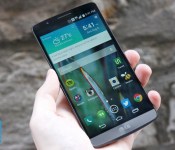
Living with the G3: Can LG’s newest flagship be as good as its predecessor?

You typically expect the latest smartphones to represent clear steps forward over their predecessors. However, I’ve been hearing a lot of people characterize the LG G3 as a baby step ahead of the G2, or even a step backward. That had me more than a little worried. Was I going to hate the follow-up to one of my favorite phones from 2013? There was only one way to find out, so I spent a few weeks with the G3 to see if those fears were overblown.
To start: a lot of the sacrifices made to get that extra-sharp Quad HD screen don’t matter that much in real life. The G3’s LCD isn’t as eye-searingly bright as the G2’s, but it’s still good enough that I could easily see it outdoors. I also didn’t run into the heat-related brightness throttling that some complain about, although I don’t doubt that it happens. Battery life wasn’t as strong as it was on the G2, but that older handset seemingly lasted forever — my G3 could still handle a day full of email, Instagram and Twitter, even with a Pebble smartwatch adding to the energy drain. If you were enticed by that larger, sharper screen in a (relatively) small body, you can relax. For the most part, the screen is as good as you’d hope, and it’s definitely your best bet if you feel the Galaxy Note 4 and iPhone 6 Plus are too unwieldy for the display area you get.
With that said, LG went a bit overboard with sharpening in an attempt to emphasize that super-high resolution. There were several times when I could see a halo around text that was clearly the result of excessive image processing, and you have to resort to unofficial software to turn it off. While the effect doesn’t really sour the experience for what’s otherwise a pleasing screen, it’s prominent enough that I’d point you to the Note 4 if you want a large Quad HD display without significant quirks.

The G3’s camera is a tougher call. The laser focus does lock on to subjects a bit faster than on the G2 (and many other 2013 phones), but it didn’t produce a night-and-day difference in my ability to capture a scene. As with the last-gen model, the G3’s 13-megapixel shooter is frequently good, but rarely great. While I could usually count on it to produce a quality shot, the muted colors and slightly reduced low-light performance left me underwhelmed. The apparent step backward certainly wouldn’t dissuade me from getting a G3 all by itself. However, I’d prefer Sony’s Xperia Z3 series (for the higher resolution) or Apple’s iPhone 6 lineup (for more lifelike colors) if I were looking for a tangible upgrade over the G2’s cam.
It may be worth trading up for the software, which feels like a breath of fresh air. The G2’s take on Android was overly flashy, with too many unhelpful features and on-by-default animations; the G3’s interface isn’t exactly stripped down, but it rarely seemed to get in my way. About my biggest gripe was Smart Notice, which tries too hard to mimic Google Now with less-than-useful alerts (“the temperature will change” isn’t a revelation, LG). I’d say HTC’s fast, minimalist Sense and Motorola’s lightly customized stock interface are my picks for the best Android launchers, but the G3’s software front end trumps both what I’ve seen on the G2 and recent Samsung phones.
Would I get a G3 if I were suddenly in the market for a phone? I have to admit, that combination of a large screen with a small profile is tempting. This is the only 5.5-inch phone I’ve used that doesn’t put strain on my hands or my pocket. And as a whole, I enjoyed using it. While it rarely did anything spectacularly well, it was a reliable workhorse that seldom let me down. In a sense, though, that’s the problem. The G2 was exciting partly because it pushed the boundaries of what you expected from smartphones with a seemingly physics-defying screen and epic-length battery life. The G3 pushes the boundaries a bit further and is indeed an improvement over the G2, but it’s ultimately more of the same. Although I’d get one over its ancestor or the equally familiar-feeling Galaxy S5, I’d prefer the new Moto X, One M8 or Xperia Z3 if I wanted a 5-inch or larger Android phone. They’re not always better than the G3, but they clearly stand out where LG’s device only occasionally gets ahead of the pack.
Filed under: Cellphones, Mobile, LG

Gmail for Android is ready to handle all your email accounts

The new version of Gmail for Android is slated to make its way to Google Play in the near future, but if you cannot wait to use it, you can download the APK right now and load it up. You’ll notice some major changes the moment you launch it, since it’ll ask what kind of email addresses you’d like to add: version 5 works not only with Gmail addresses, but also with Outlook, Yahoo and any IMAP- or Exchange-based email accounts. To choose the inbox you want to check, simply tap one of your accounts on the left-hand menu. Also, it comes with a Material Design interface makeover (there’s a lot more red now) and a thread email system similar to what you get through Inbox. We can’t say which Android flavors it’s compatible with exactly, but we’ve installed it on an Ice Cream Sandwich tablet, so it’ll likely work with all newer platforms. To find out for yourself, or to take a break from Google’s busy Inbox app, head over to Android Police to download the file.

Filed under: Misc, Internet, Software, Mobile, Google
Source: Android Police
10 of the hottest new Android apps this week (November 1)

Welcome back to the regular series aimed at helping Android users get more from their devices. If you’re looking for some new apps or games check out we have a handful of popular new titles to get you started. What you’ll find below are some of the hottest trending apps of the last seven days. We’re certain you will find something fun to play with this weekend. Let’s get to it!

Taco Bell
Play Store Description: Taco Bell® Mobile Ordering is Here.
Customize. Order. Pay. All from the new app. Now you can easily select a local Taco Bell, customize your favorite items and pay for your order. No need to select a pick-up time. We make your food when you arrive because just-prepared food is the best. Then skip the in-store line like you own the place. Plus, reordering your favorites is as easy as a twist of the wrist.
We say: Taco Bell seems to think you don’t get your food fast enough. So, they’ve released this app in the Play Store to help expedite the process. You can now order and pay before you even arrive, and then skip the line, get your food, and leave. People seem to like it, as it already has over 10,000 downloads and 4.6 stars.

djay 2
Play Store Description: djay transforms your Android device into a full–featured DJ system. Seamlessly integrated with Spotify and all the music on your device, djay gives you direct access to mix your favorite songs and playlists instantly. You can perform live, record mixes on–the–go, or enable Automix mode to let djay create a seamless mix for you automatically. Whether you are a professional DJ or a beginner who just loves to play with music, djay offers you the most intuitive yet powerful DJ experience on an Android device.
We say: The popular app from Mac and iOS has finally come over to Android. With Spotify integration, this app allows you to become a DJ without all of the fancy equipment. It will cost you $2.99, but from what I gather its well worth your money. Check out the widget below to download.

Google Fit
Play Store Description:
Effortlessly track your activity:
• Just carry your phone and get access to your walking, running and cycling activity.
Reach your fitness goals:
• Set goals based on either duration or steps and see your progress throughout the day.
• Receive performance-based recommendations for activity goals.
A comprehensive view of your fitness:
• Connect third party devices and apps to Fit and we’ll show you all of your fitness data in one place.
Available everywhere:
• Compatible with all Android Wear devices.
• Also access Google Fit on the web at http://www.google.com/fit and on your tablet.
We say: Google has had a busy month, between announcing the biggest update to Android yet, Android Lollipop, a new round of Nexus devices, and then last week releasing Inbox. Now, they’ve released the long-awaited Google Fit that they announced back at Google I/O. Google Fit works with your other fitness apps to compile all your health information into one place for you to analyze. It works with your phone and your Android Wear, along with other devices. Already has over 100,000 downloads with a 4.2 stars. Check out Google’s latest offering.

Hype Machine
Play Store Description: Discover the most talked-about music from blogs around the world. This is Hype Machine in your pocket.
Every day, thousands of people around the world write about music they love — and it all ends up on Hype Machine. We watch for new posts on over 800 of the most interesting blogs and make it easy to follow this chaotic world.
We say: Some times it’s hard to find new music. There are tons of music apps that help with music discovery, but they all rely on similar sounds and people’s opinions that you don’t see. Hype Machine looks to solve this by compiling information from hundreds of popular music blogs, and tell you what the new music is and what it’s like. It allows you to know what people think exactly, and saves you hours searching on the internet and through blogs. Check it out.

The Wolf Among Us
Play Store Description: The Wolf Among Us is a five-part (Episodes 2-5 can be purchased in-app) from the creators of The Walking Dead, winner of over 90 Game of the Year awards. Fairytale characters are being murdered in this hard-boiled, violent and mature thriller based on the award-winning Fables comic book series (DC Comics/Vertigo) by Bill Willingham. As Bigby Wolf – THE big bad wolf – you will discover that a brutal, bloody murder is just a taste of things to come in a game series where your every decision can have enormous consequences.
We say: The Wolf Among Us has done fairly well with its video game on Xbox and PlayStation, and has been a popular comic book series. Now, they’ve released a new mobile game that seems to look pretty good. It has 4.5 stars, so it must be good. Check it out for yourselves.
The post 10 of the hottest new Android apps this week (November 1) appeared first on AndroidGuys.

