


Is Android Lollipop more stable than iOS 8? Crittercism seems to think so
In the endless war between Android and iOS, we’re at a pretty interesting juncture where Android has had quite a sizeable overhaul in Android Lollipop and iOS has had its usual yearly improvements in iOS 8. Stability has always been paramount to both platforms but considering that Android Lollipop is just a few months old, […]
The post Is Android Lollipop more stable than iOS 8? Crittercism seems to think so appeared first on AndroidSPIN.
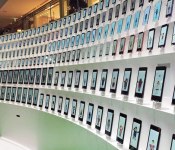
Watch Google’s Android Chorus bring 300 devices together in tinny harmony
 In the hope of drawing attention to its Androidify app (and the fact that you’ve been able to make your own for almost four years now), Google programmed 300 devices (and their Android character) to ‘sing’ (and flail the limbs around, roughly in time, in the middle of a classy shopping center in upscale Omotesando, Tokyo, Japan. Like a bonafide real chorus, the devices were separated out into parts, though we could also pick out a smattering of beatboxing droids too. If you have entirely not enough pride, you could even take a turn as a conductor, with a gesture sensor conveying your hand movements to your Google singing group. For such overtly public shaming, you were rewarded with a free Android t-shirt. The performances will continue through this Valentine Day weekend, and it will all sound a little something like this:
#fivemin-widget-blogsmith-image-351755display:none; .cke_show_borders #fivemin-widget-blogsmith-image-351755, #postcontentcontainer #fivemin-widget-blogsmith-image-351755width:570px;display:block;
 trydocument.getElementById(“fivemin-widget-blogsmith-image-351755″).style.display=”none”;catch(e)
Filed under: Cellphones, Tablets, Software, Mobile, Google
Source: Google Japan (Japanese)
Half Alive: Zombies go home Android app Review
Everyone loves Zombies, right? Combine a Zombie with anything and it instantly becomes awesome. The same goes for Half Alive: Zombies go home, an addictive casual puzzle game developed by Rock-Inspired.
The goal is simple – help the Zombies reach their homes, sounds easy right?
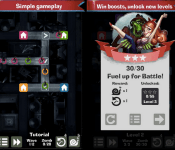
The Zombies’ homes are located at the end of a variety of roads that have directional arrows on them. By tapping the arrows, you’re able to manipulate the direction the Zombie is walking in, and the goal is to match the colour of the Zombie to the correct house.

Obviously it starts off easy with only 3-4 directional changes, but quickly escalates to really challenge your speed and reactions.
The UI is very well laid out, with the action buttons location at the bottom of the screen. You have 3 options whilst in a game, and that is to speed up the Zombies for if you’re super confident and the pace is too slow, simply press and hold the fast forward button. You can use the fast forward button as many times as you like. The slow down snail button is also located at the bottom of the screen for when the pace is just too much – these are limited to a number of uses; and finally the reset button in case you’ve really messed up.
I had a few hiccups on my first run with Half Alive: Zombies go home where the game would freeze on my Galaxy Note 4, but the developer quickly responded and fixed the issue – I couldn’t have asked for better support.
With a variety of wave types, increasing difficutly, and Zombies, what’s not to like? Half Alive: Zombie go home is a great game that will be sure to find a permanent place on your Android device.
Check it out for free using the link below.
(function() var script = document.createElement(‘script’);script.src = ‘https://stacksocial.com/widget.js?publisher=androidguys&type=editorial_post_widget_preferences’;script.async = true;var entry = document.getElementsByTagName(‘script’)[0];entry.parentNode.insertBefore(script, entry);)();
http://www.androidguys.com/pubgalaxy/728×90.html
The post Half Alive: Zombies go home Android app Review appeared first on AndroidGuys.

Google publishes new Dunk-A-Thon ad

To promote the launch of a new NBA themed update for its Androidify app, Google has today published a brand new ad over on its Android YouTube channel entitled “Dunk-A-Thon”. In the video, various Droid’s jump around wearing the latest basketball tops whilst taking shots at the hoop. One Droid even uses a cannon to make the drop.
Hit the break below to see the video.
Click here to view the embedded video.
Come comment on this article: Google publishes new Dunk-A-Thon ad

Google rigged 300 devices to sing the ultimate Android chorus
“Be Together. Not the Same.” Android’s new motto is pretty much perfect. It describes the dual nature of Android and it’s a great reminder that, at the end of the day, we’re all just tech fans no matter the brands or models we prefer.
Google’s last Android ad had cute animals, lots of them. But for this newest project, Google’s getting back to the funky Androidified characters first introduced in the days before Lollipop’s arrival.
Google’s Japanese team set up a mesmerizing rig comprising 300 Android phones and tablets, each with its own animated character, each singing their part in the ultimate Android chorus. The result is an exuberant interpretation of Ode to Joy, sang in a distinctly… Googley fashion.
If you happen to be in Tokyo, you can see the Android chorus for yourself at Omotesando Hills until this Sunday.
Now, how can I make this my ringtone?
Droid Unlatch Reveiw
If you are like me and have multiple devices or are just not good at remembering passwords this is a must have app. Droid unlatch is the best solution for people who just can not remember their device password. Let’s face it security in a mobile world is becoming more and more important. Our phones are becoming our livelihood and tablets replacing or computers. Unfortunately you can not leave you device unattended without someones wandering eye gathering information about you. This leads to a predicament for the mobile user. Surely you do not want every device to have the same pattern, pin, or password. If you have one and someone figured it out now they have access to everything from personal pictures, accounts, wallets, messages, social media accounts, ect.
Android will lock a phone after several incorrect password attempts. This forces you to take the phone to the carrier and or manufacturer to unlock the device. Typically the unlock method is a factory data reset meaning starting back over. Most users have a vast majority of there devices customized and countless hours in apps and settings getting it to there liking. To start all over is a daunting task requiring multiple downloads and time getting everything back in your order.
Droid unlatch avoids this completely by providing a master pin via email and messaging. Forget the pass code three times and instead of aggravation your phones code has been changed to the master pin. The app works with or without a connection. Input the master pin and your phone is free to use again. With droid unlatch there is no more worry of forget a complicated password. It also allows the user to use more challenging pins or passwords providing more security for your device.
I attempted this on my daily phone to up the stakes as high as it would go. Without my phone for even short periods of time is devastating. First wrong pin, second wrong pin, third wrong pin “sweating heart rate elevating” enter and droid unlatch comes up. Still worried I input the master pin and like magic the device is unlocked. The app is very simple to set up with a simple set up. Warning make sure you have set up droid unlatch before trying once you lock the phone there is no going back. Another point is that after droid unlatch has saved the day you must go in setting and change the pass code. If you have not set it no worries your new pin is the master code until you change it. The is a must have for the power user with many devices or the forgetful.
(function() var script = document.createElement(‘script’);script.src = ‘https://stacksocial.com/widget.js?publisher=androidguys&type=editorial_post_widget_preferences’;script.async = true;var entry = document.getElementsByTagName(‘script’)[0];entry.parentNode.insertBefore(script, entry);)();
http://www.androidguys.com/pubgalaxy/728×90.html
The post Droid Unlatch Reveiw appeared first on AndroidGuys.

Samsung and Microsoft come to terms over billion dollar license fee dispute

Microsoft has long been the recipient of license fees for patents related to each and every Android device sold. Samsung has long been the number one seller of Android devices sold around the globe, but have been refusing to pay said licensing fees for a while now.
This dispute hit the courts last year, with Microsoft looking to sue for damages estimated to be in excess of $1 billion. As most major cases go, many months have passed with no results, and little progress, until today. The two companies have come to terms in a private arrangement.
While the exact terms have not been disclosed, and there is a good chance they never will be, both companies took to their own blogs to post the same message:
“Samsung and Microsoft are pleased to announce that they have ended their contract dispute in U.S. court as well as the ICC arbitration. Terms of the agreement are confidential.” – Samsung’s Jaewan Chi, Executive Vice President and Global Legal Affairs & Compliance Team and Microsoft’s David Howard, Corporate Vice President and Deputy General Counsel.
It would be great to see what the terms of this agreement are. More importantly, we are eager to see what impact this will have for all of the other Android device manufacturers out there still paying their dues.
What do you think, for how long should Microsoft be able to collect license fees for patents relating to Android technology?
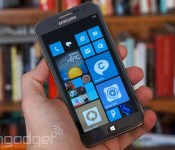
Microsoft and Samsung settle their fight over Android royalties

It looks like Microsoft and Samsung aren’t eager to drag out their dispute over Android patent royalties. The two tech giants have reached an agreement that ends Microsoft’s lawsuit over interest payments and otherwise smooths things over. The circumstances surrounding the deal are “confidential,” so it’s unclear who made the most concessions. However, it’s more likely that Microsoft came out on top. Unless the Windows developer was willing to walk away empty-handed (which is doubtful given its aggressive licensing strategy), Samsung probably had to cough up more money than it originally planned.
Filed under: Cellphones, Tablets, Mobile, Samsung, Microsoft
Android tablets just got a little more useful with Microsoft Office, Dropbox integration

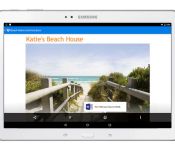
When it comes to productivity, users are always looking for ways to cut out unnecessary steps in their workflows. On mobile devices, one way developers address this need is to integrate apps with each other so the end user is not forced to jump around between different apps. An example of this is the integration between Microsoft Office apps and Dropbox which was rolled out to some mobile devices last fall. A piece that was missing, integration on the Android tablet versions of these apps, has been eliminated with an update that was announced today.
The integration of Microsoft Office apps Word, Excel and Powerpoint with the Dropbox app meant users could view and edit documents from with Dropbox, but using the Office tools. This is a handy feature for sure, especially for users who have not been able to transition to some other integrated solution like Google Drive and Google’s office apps. However, the ability to edit documents on a platform no larger than a smart phone is still a bit limiting.
The extension of the integration to Android tablets means users can now work unfettered on larger devices. If a user takes advantage of this integration and adds in a larger tablet with a keyboard, they will be bordering on laptop territory, but in a much more convenient form factor.
source: Dropbox
Come comment on this article: Android tablets just got a little more useful with Microsoft Office, Dropbox integration

Download these 1080p wallpapers for your Android device


(function() var script = document.createElement(‘script’);script.src = ‘https://stacksocial.com/widget.js?publisher=androidguys&type=editorial_post_widget_preferences’;script.async = true;var entry = document.getElementsByTagName(‘script’)[0];entry.parentNode.insertBefore(script, entry);)();
http://www.androidguys.com/pubgalaxy/728×90.html
The post Download these 1080p wallpapers for your Android device appeared first on AndroidGuys.
 AIVAnet