


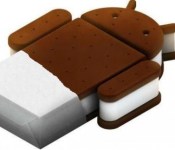
Google putting Chrome on Ice Cream Sandwich in the freezer

Citing the movement of users to newer versions of Android and the increasing complexity to support older devices, Google’s Chrome team announced today they will bring development of updates for the Chrome browser on Ice Cream Sandwich to a halt. The change in status for the browser will take place with Chrome’s 42nd release after which the browser will be put in the virtual deep freeze on Ice Cream Sandwich. Users will be able to continue to use Chrome on their devices, but there will be no more updates.
Google software engineer Aurimas Lutikas noted that since Chrome was first made available on Android 4.0, there have been three new versions of Android released including Jellybean, KitKat and now Lollipop. During that same period of time, there have been 24 new releases of Chrome. As users replace smartphones with newer devices running newer versions of Android or upgrade their devices, the number of users with Ice Cream Sandwich has dropped by thirty percent in just the first year. This shrinking base makes it hard to justify continued development and support for older devices instead of building new features and capabilities used by the majority of users.
source: Chromium Blog
Come comment on this article: Google putting Chrome on Ice Cream Sandwich in the freezer

Waze poised to join the list of pre-installed apps on Android phones

At MWC 2015, Waze announced they have been added to the list of apps that phone manufacturers and carriers can include as a pre-installed app on new Android devices. Waze says the list of apps are part of the Google Mobile Service. The move makes sense since Waze was purchased by Google last year and the people-provided traffic information can show up in the Google Maps platform on mobile devices. As part of their announcement, Waze shared that they are up to 50 million users.
Waze spokesperson Julie Mossler thinks the inclusion of Waze as a pre-installed app will grow the user base even more as users who may have been unfamiliar with it give it a try. Waze relies on human reports of road conditions and has been described as a “social traffic app.” Mossler thinks availability to Waze means
“a meaningful part of the population would immediately have access to blocked roads, dangerous intersections traffic and more in real time.”
If a new Android phone is not in your immediate future and you want to check Waze out, hit one of the download links below.
source: PC World
Come comment on this article: Waze poised to join the list of pre-installed apps on Android phones
Google’s got a slam dunk with their latest Android commercial
Did you need a 15 second distraction to get you pumped up about Android today? Good, that is exactly what Google’s latest Android commercial is for, jam packed with cameras, it is a slam dunk, of sorts.
There is very little to say about the commercial itself, more Androidify characters grace the screen, sports are involved, and everyone is taking a photo with their Android device. It is fun.
Highlighting the wide range of camera sizes, styles and capabilities available across Android devices is subtly masked behind the action here. Camera technology has come a long way on Android, ranging from the single digit MP sensors often used for front facing, or ‘selfie’ cameras all the way up to the 20.7MP Sony sensor found on many last generation higher-end device and beyond.

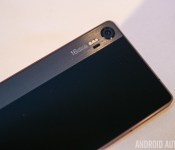
Although we did not see or hear a whole bunch about the cameras and capabilities on the recently announced HTC One M9 or the Samsung Galaxy S6 flagship devices, Lenovo came to MWC with a treat. The Lenovo Vibe Shot is a well equipped mid-range device with a focus on photography. Packing a 16MP OIS camera and dedicated camera buttons, we see a great example of Google’s point, we can all use Android, but we don’t have to use the same equipment.
Surprised we could get so much out of this 15 second spot? Us too. Here, check out some of the older Android commercials and Androidify goodness before you go.
- High fives and fist bumps, here’s Google’s latest Android commercial
- Androidify app gets big update and tie-in with Google’s new Android ads
- Androidify Winter Update – Holiday Gear For Your Android Buddy
- Google takes out a gargantuan billboard ad in Times Square
- Google shows off watches, tablets, and phones in 4 new Android commericals
Take a look at all the HTC One M9 themes right here
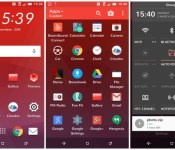
HTC have included theming with their new One M9 device which allows you to completely overhaul the entire look and feel of your device in one hit, and you can see them all below.
Theming changes every element of the user interface of your device from the way the icon looks to the wallpaper, right down to the font used. HTC have bundled a variety of themes giving different that can give different looks to your HTC One M9 right from within the built-in settings.
Traction Theme

Tilt Theme

Pastorale Theme

Origami Theme

Nimbus Theme

Innerspace Theme

Numero Theme

Cascadia Theme

Stock Theme

Which one is your favourite? Let us know in the comments below.
The post Take a look at all the HTC One M9 themes right here appeared first on AndroidGuys.
Sony introduces new mid-range Xperia M4 Aqua
Fresh of Sony’s announcement of the Xperia Z4 tablet Sony also introduced the Xperia M4 Aqua. Sony claims to set the new mid-range standard with the M4 Aqua. Sony has been knows to create some of the best tablets and phones on the market for android. The Xperia M4 Aqua boast no compromise in features offering the most popular features from their Xperia Z line of tablets.
The phone will with some high end specs for a mid-range device. Sony states that the M4 will come with a 13MP camera with F2.0 aperture, octa-core 64-bit Snapdragon 615, and be water proof. The device will be launching in 80 countries worldwide and more than 100 carriers in Spring of 2015. The M4 Aqua comes in white, black, coral, and silver. The device itself comes with a metallic and tempered glass with cues from the Sony OmniBalance design.
With a crowded smartphone market Sony appears to be opting for dominance in the more affordable mid range line of smartphones while still offering a premium look and feel. Another key about the M4 Aqua is in the name itself boasting being waterproof, a feature dropped from the Galaxy line this year. Will it be enough to go head to head with other phones in the mid-range such as the Moto G and E? Or is this Sony backing away from the high end Android game?
The post Sony introduces new mid-range Xperia M4 Aqua appeared first on AndroidGuys.
Inateck BP2001 Bluetooth Speaker review
The great people over at Inateck have sent us another awesome product, the BP2001 Bluetooth speaker. While finding a Bluetooth speaker nowadays is by no means a hard task, finding one at an affordable price while still retaining quality is where you begin to have a difficult time. The BP2001 delivers on both fronts and demonstrates that you do not need to spend a small fortune to still get a decent product.
Design

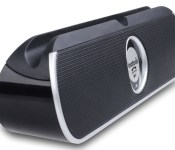
The BP2001 can be best described as a pill shaped Bluetooth speaker. Starting with the front you get a lovely silver ring in the center that showcases the only button on the BP2001. The button acts as the play, pause and pairing button. On the sides you are greeted with a great silver ring that goes from side to side, minus on top. This really gives the BP2001 a great look, as the silver is a great contrast to the black color scheme of the rest of the speaker. One of the things I really liked about the design of the BP2001 is the cradle that is built on top of the device. This allows you to be able to place your smartphone or tablet right on top and be able to create a fun music area anywhere you go. The cradle is built in such a way that it does not take away from the device but if anything augments the modern look.
On the back you get another neat feature, an adjustable stand. The BP2001 is capable of standing upright on its own but the stand is there for when you place larger devices on the cradle to add that second layer of support. Right beneath the adjustable stand you have the power switch, an audio jack and the charger port. Nice and clean, as to not take away from the design of the BP2001.
Overall, the design of the BP2001 is modern, sleek and to be honest, luxurious. Just by looking at the device you would forget that it costs way less than other comparable
Functionality

The BP2001 is for all intents and purposes a speaker. A portable Bluetooth speaker. It does not profess to be anything else and it does what is was built to do. To get started, you turn on the device using the power switch on the back which then allows you to start paring your devices. From there its as simple pressing the silver button on front. The silver button also acts as a play and pause button and will switch functions once a device has been paired. Otherwise pressing the button activated the paring feature on the BP2001 to make it available for paring for your Bluetooth capable device.
Once you get is ready to go, playing music is as simple as pressing play on your preferred music app. The sound was nice and clear and I had no issue enjoying my favorite artists while jamming out in the shower. With that said though, do not expect to hear audiophile quality sound as that is not what the BP2001 was intended for. The BP2001 was intended to provide you a nice easy way to listen to your songs on the go while not having to sacrifice too much music quality but there will be some small degradation, compared to using your headphones or earbuds.
Final Thoughts
The BP2001 is a fantastic little speaker with great looks and good sound. While it will not blow away anyone with its music quality, you will be able to enjoy listening to that new Katy Perry album while trying to dance like Left Shark next time you are home alone. You can purchase the BP2001 speaker by heading over to Amazon or by going directly to Inateck’s webpage, where you can also browse their other tech goodies. Also, if you head over today you can save an extra five dollars by using promo code: W5TEVQMD during checkout. Now there really is no reason to purchase one!
The post Inateck BP2001 Bluetooth Speaker review appeared first on AndroidGuys.

Google’s new mobile payment platform is called Android Pay

It’s shaping up to be a big year for mobile payments, what with Apple Pay enjoying rapid adoption and Samsung finally getting in the game too. Google also has a presence, but it’s only very recently decided to ramp up its efforts in this space. Last week, we saw the company team up with AT&T, Verizon and T-Mobile to preload its Wallet mobile payment app on new Android phones, and now it’s creating a new framework to power payments across its OS.
Speaking at Mobile World Congress in Barcelona, Google SVP Sundar Pinchai confirmed the existence of Android Pay, a platform that will allow developers to build payments into their apps. Don’t think of it as a separate app like Wallet (especially as Wallet will utilize the Android Pay platform), but as an OS-level service that makes it easy for app makers or retailers to let you to buy things using your Android device.
While Apple Pay lets iPhone users purchase goods in physical stores using NFC, it also provides tools to let retailers offer online checkout tools using its platform. Pinchai didn’t go into too much detail as to how Android Pay will work, but did confirm that it will offer similar features to its rival. One is the use of tokenized card numbers, which reduce fraud by generating a one-time credit card number for each transaction. It’s also a standard that Visa, Mastercard and American Express all support.
Filed under: Cellphones, Software, Mobile, Google
Vodafone deal makes Dropbox a part of your smartphone backups

Dropbox just scored a huge deal that will not only put its cloud storage in front of a lot of people, but help you safeguard your smartphone’s data. The company has forged a partnership with Vodafone that both gives the carrier’s Android and iPhone users 25GB of free space for a year and integrates Dropbox into Vodafone’s new Backup+ service. Rather than depend on a specialized backup space, you simply save your valuable files to Dropbox — you can restore content on other devices and share it with friends without having to use two services or limit the kind of data you protect. The Backup+ app will be available as soon as the end of March, although the service itself will take a few months to reach “most” Vodafone areas.
Filed under: Cellphones, Storage, Internet, Mobile
Source: Dropbox Blog, Vodafone

Jolla takes on Android with a promise not to sell your data

When Jolla launched its tablet on Indiegogo, it was an instant success. Today that tablet is being shown to the media for the first time at MWC. But, that’s not all that the plucky mobile start-up has to reveal. With the new tablet comes the second version of Jolla’s Sailfish OS. Version 2.0 not only brings some features you’d expect (like easy scaling between phones and tablets — to accommodate its new hardware) but also some new, bigger picture additions like support for Intel’s Atom x3 chipset, a new push to into licensing with OEM hardware, and a couple of direct swipes at Android, and how it gathers your data.
At MWC, Marc Dillon, the company’s Head of Software, made it clear that Android is too dominant, and requires that all its partners invest heavily in the software’s ecosystem. Jolla, on the other hand, wants to work more closely with hardware manufacturers to accommodate their requirements (and not ask that it bends to theirs). Perhaps Dillon’s more damning attack on Android was on the topic of security, claiming that Google’s OS was “designed to collect data from its users” with the explicit motive of selling it. “We are not going to sell user data” was Dillon’s emphatic response. If there had been a table in front of him, he would have slammed his fist on it.
In a related theme, Sailfish 2.0’s other big push is security. Jolla is working with SSH Communications Security to develop of version of the operating system robust enough for use by government agencies, or the user who wants added layers of privacy. Conceptually, this would be similar to Knox from Samsung. This would make Sailfish the first European-based mobile software suitable for use (it hopes) by official agencies.
What about regular folk like you and me? Well there are software tweaks in v2.0 that should make our lives easier, too. The latest Sailfish comes with new user interface gestures and notifications that should be easier to get along with than what we saw last time we tried it. Jolla’s so keen to simplify its OS experience that it’s done away with the power button (double tap to wake, basically), and there are no on screen buttons at all, with gestures filling those roles. In reality, this means a thumb-swipe will take you home, and swipe up from the bottom for apps — a similar way to how BlackBerry’s PlayBook handled such things. Will security, more hardware support and a promise of not selling your data be enough? We’ll have to wait for a chance to get to know the OS better, but with our first time with the tablet being today, and the product shipping in Q2 this year, it shouldn’t be too long to find out.
Filed under: Cellphones, Tablets, Mobile
BlackBerry wants to bring some of its best features to every device

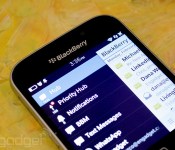
BlackBerry has only been willing to give out tiny pieces of its smartphone experience so far, like BBM and its enterprise servers, but it’s going to be much more liberal in the near future. It’s launching BlackBerry Experience Suite, a collection of apps and services that bring some of its biggest features to Android, iOS and Windows gear in hopes of making them mainstays of the working world. Some of them are more behind-the-scenes features that keep your corporate info both secure and separate from your personal affairs. However, others are very conspicuously borrowed from BlackBerry 10 smartphones. The company is promising the BlackBerry Hub (which unifies BB10’s messaging), universal search and even its own input method — yes, you may get a BlackBerry keyboard on your phone without resorting to a Typo case. The suite won’t be available until later in the year, but it may be just the ticket if you (or your office) wants to try BlackBerry features while keeping the hardware and apps you already use.
Filed under: Cellphones, Mobile, Blackberry
Source: BlackBerry (1), (2)
 AIVAnet