


Android 5.1 Officially Announced!
Since the release of Android 5.0 Lollipop, many have complained about a lot of bugs, the biggest being poor RAM management. A few months ago, AndroidPIT had reported on a list of changes that would be coming to Android 5.1. There was also a lot of evidence that the new version of Lollipop was going to be released this week. It seems that evidence was correct, as Google announced today on the Android Blog Android 5.1!
This new version of Android An Device Protection keeps your lost or stolen phone protected until you log in to your Google Account, even through a factory reset. Support for multiple SIM cards allows for easier switching between SIM cards on devices with multiple SIM card slots. HD Voice calling is for networks that are starting to release the technology such as T-Mobile and Verizon.
Other features that are supposed to be included are the following:
- Silent mode added after missing on Android 5.0
- General improvements in system stability
- Improved RAM management
- Fixes for sudden app closures
- Improved battery management
- Excessive consumption of network devices when used Wi-Fi fixed
- Issues with wireless connections fixed
- Problems with Okay Google function solved
- Notifications problems solved
- Some sound problems experience by certain devices fixed
- Other improvements and changes
- Changes in the Material Design color palette (after users complaints, possibly for a higher version though)
However, there has yet to be an official changelog to present itself. We’ll be sure to report on it when we see it!
Nexus devices are supposed to start receiving the update today, as far as other devices there has yet to be any news.
Android 5.1 will hopefully bring a lot of fixes to some of the problems that came from Android 5.0, and we hope to see it on a device near us soon.
The post Android 5.1 Officially Announced! appeared first on AndroidGuys.
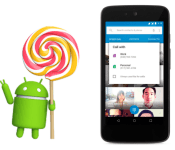
Android 5.1 Lollipop Announced. Keep on Licking.

Long gestating in the hearts of minds of the Android faithful, today Google officially announced the update for Android Lollipop to version 5.1. No more extra decimal points for you.
The update, announced via the official Android blog by VP of Android Platform David Burke, brings with it a number of subtle refinements aside from the usual stability and performance improvements. Android 5.1 actually allows the use of more than one SIM card on devices with multiple SIM slots. The image above shows an example of this at work, giving the user a choice of which phone line to use to make a call. Pretty nifty.
Device Protection will allow a lost or stolen device to remain locked until one signs in with a Google account, even if a ne’er-do-well attempts to perform a factory reset.
Another new addition is high definition voice calling on compatible devices. The Android team doesn’t specify, but we assume this is voice carried over data and not the usual cellular connection. But we could be wrong.
Bluetooth connections will now be able to be managed directly from Quick Settings. No longer will you need to go through a whopping two levels of UI to reach those precious connections. But really, it’ll be nice to have that in the forefront.
Surely other updates will come to light as 5.1 starts rolling out, presumably first to Nexus devices, but sometimes other manufacturers, like Motorola, even manage to beat Google to the punch.
Let us know if you get an upgrade notification. Google’s notice says that “today” they are “rolling out” a new version of Android, but it’s unclear whether that means “rolling out” in the sense of a big reveal or actual OTA updates. So just hit your “Check for Updates” button over and over and over until something happens.
Source: Official Android Blog
Come comment on this article: Android 5.1 Lollipop Announced. Keep on Licking.

VSCO Cam adds batch editing for your mobile snapshots

Adobe delivered the ability to copy and paste edits to multiple images in Lightroom for iOS last month, and now you can do the same with VSCO Cam. With version 4.1 for iOS and 3.2 for Android, the preset-driven app adds a tool that will allow you place edits on multiple shots in your library with a few simple taps. If you’re looking to give a dozen images from last weekend the same treatment, this is sure to make the task much easier. And if you mess up, there’s a handy undo button to avoid any permanent blunders. Of course, VSCO Cam is free to use (unless you want to buy more presets, natch), while the aforementioned Adobe option requires a Creative Cloud subscription. Both the iOS and Android updates are available in iTunes and Google Play now, if you’re feelin’ the itch to take ‘em a spin.
Filed under: Cameras, Software, Mobile
Source: VSCO, Google Play

Google working on new version of Android for virtual reality

Google’s efforts in virtual reality are moving much further than it would seem after taking a look at Cardboard. The company, according to The Wall Street Journal, has put together a team of engineers and other staff members to develop a new version of Android geared towards virtual reality.
The business model for this upcoming platform will be identical to Android because hardware manufacturers can use it at no cost. Google provides the software and relies upon sales in its online store while hardware manufacturers put the pieces together.
The leader in virtual reality right now is Oculus, which was purchased by Facebook in 2014 for $2 billion. Facebook has allowed Oculus to continue operating at its own pace but with the inclusion of additional funds. The competition between Google and Facebook can be seen in the poaching of one of the former’s executives. Mary Lou Jepsen, who now works for Oculus, specializes in display technology.
Oculus has an all-in-one approach to virtual reality while Google wants to mirror what he has going on with Android on other devices.
This month has made it quite clear that virtual reality is a field in which everyone wants involvement. Both Samsung and HTC (with Valve) introduced new virtual reality headsets to carry them into the next year. The Gear VR headset was adjusted for the Galaxy S6 and S6 Edge while a partnership between HTC and Valve bloomed the Vive. These products, as well as Oculus’ hardware, were put on display at MWC and GDC all week.
Source: The Wall Street Journal
Come comment on this article: Google working on new version of Android for virtual reality

Anker Aluminum Portable Bluetooth Speaker review
Anker’s take on portable Bluetooth speakers is one of luxury and affordability. While this is a combination that few attempt and still fewer accomplish, Anker shows that fortune really does favor the bold.
Aluminum Shell
The aluminum shell of Anker’s Aluminum speaker is one of its top selling points, if not the top. One of my first thoughts when I first took the speaker out of its box was how magnificent it looked. How it gave the impression that it had been carved from a single slab of aluminum. Anker made some really great design choices and they tried hard to keep the device as slim and minimal as possible by only adding the necessary ports into strategic locations.

Up front you have the speaker grills, which as you can see from the image above, give the speaker a silvery, distinct look. On top you are greeted with the menu button, with the volume buttons on either side. The power switch has made its home on the right side of the speaker, while the aux jack, microSD card slot, and charging port are on the left. It all blends together to give the Anker Aluminum speaker its luxurious look.
Sound Quality
Now for the true purpose of the Anker Aluminum speaker, playing your favorite songs. After I hooked it up to my M8, I went through my usual morning playlist to see how the speaker fared. I am going to start off by saying that I was surprised. Surprised in the fact that a speaker that looks fantastic could also sound fantastic. My music came out clear and rich, which made my morning routine with Shakira another great experience.
8-Hour Battery Life
The Anker’s Aluminum speaker has a battery life of 8 hours but from personal testing I found that to be more like a solid 7, give or take thirty minutes. 7 hours is still a very long time considering that you will most likely not be listening to music for 7 hours straight, and if you are you can still always hook it up to a charger to keep your tunes going.
MicroSD Card Support

This is something that I was actually somewhat surprised to see. A microSD card slot built right into the speaker itself. Pleasantly surprised though, as I immediately took out the SD card from my phone to see if I could make the speaker play my music without me having to make any type of adjusted to the card. As it turned out, I didn’t. The speaker registered my music straight away and I was able to play my music without having to have my phone at all. While the purpose of buying a Bluetooth speaker is usually so that you hook it up to a Bluetooth device, I can see this being a handy feature for those days when your phones battery dies out and you still need to jam out to relive the days stress.
Final Thoughts

The Anker Aluminum speaker provides fantastic sound, great portability, and an overall premium experience. If you are in the market for a new speaker that sounds and looks good at the same time, then look no further than the Anker Aluminum speaker. To get more information and to purchase one, you can head over to Anker’s website or to Amazon.
The post Anker Aluminum Portable Bluetooth Speaker review appeared first on AndroidGuys.

Could the Samsung Galaxy S6 have a major hardware fault before it’s even launched?
Samsung have chosen to completely refine their design and move away from the previously criticised ‘cheap’ looking handsets to a more premium build.
However, the move to a completely new frame and bezel setup may have resulted in the Galaxy S6 developing a quote significant hardware flaw before it’s even been launched.
According to some research and testing captured on a YouTube video, the flaw involves the screen not registering input near the bezel and will only recognise touch from a few millimetres into the screen.
This is what it should look like:
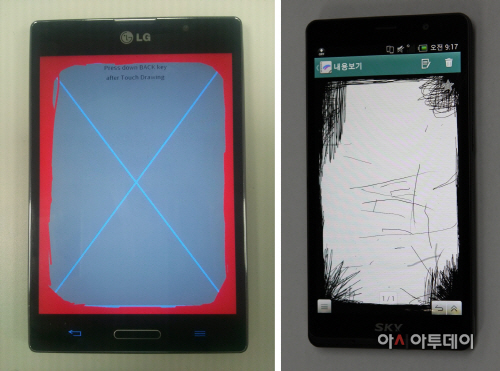
It seems like this isn’t just something that can solved with hardware and is in fact a fundamental flaw in the hardware of the Galaxy S6.
Can Samsung fix it before launch? Is this intended? Let us know what you think in the comments below.
The post Could the Samsung Galaxy S6 have a major hardware fault before it’s even launched? appeared first on AndroidGuys.

What We’re Rockin’: Homescreen setups
The power of Android allows the user to do just about anything with their homescreens, and that’s not an exaggeration. From the way your homescreen works, to the look of the app icons, and the placement of widgets, there are countless ways to make your homescreen unique and just right for you. Here’s what some of the writers here at AndroidGuys are rockin’:
Dan Bartram
- Nova Launcher
- Moko Icon Pack
- Muzei Wallpaper

Benton Trerise
- Action Launcher 3
- Slider Widget
- Power Control Widget

Scott Webster
- Axis Icon Pack
- Minima Pro Live Wallpaper
- Timely clock widget

Jack McNenny
- Moonshine Icons
- Action Launcher 3
- Phoenix for Zooper widget

Anthony McAfee
- Google Now Launcher
- stock icons

Adam Pollich
- Google Now launcher
- Weather Bug widget
- Timely widget

Juan Vega
- FlatCons White Icons
- Nova Launcher

Derrik Miyao
- Google Now Launcher
- Stock everything

Cooper Le
- Glare Icons
- Action Launcher 3
- ZBB2 widget

Robert Nelson
- Google Now Launcher
- Timely widget

The post What We’re Rockin’: Homescreen setups appeared first on AndroidGuys.
Sonos Controller for Android updated to version 5.3
Sonos has officially pushed out version 5.3 from Beta its controller app for Android and brings some important changes when navigating screens within the app.
- Three taps to party mode. Put the finishing touches on your party prep with a playlist to set the mood throughout the house. Use the new drop-down at the top center of our app to easily group or ungroup rooms in just a few taps.
- Retrace your steps. Change your mind on what you want to play? Swipe down to instantly go from Now Playing to browsing. To go back one step further to the menu, swipe right from the far left to view all of your music sources.
- Distractions welcome. If you want to go back to listen to a part you missed, the track progression bar is now more prominently displayed in your Now Playing screen, just below the album art. Drag it to whatever point in the song you want to play.
The big one here is the way in which you can swipe between screens; the amount of time I’ve hit the back button only to be returned to the music source screen.
If you’re a Sonos user on Android you’ll want to grab the update, and you can do so below.
The post Sonos Controller for Android updated to version 5.3 appeared first on AndroidGuys.

Glympse for Auto shares your car’s location without distractions

You no longer have to fiddle with your smartphone (or an in-car interface) to share your location while on the road. Glympse has trotted out Glympse for Auto, an Android app that lets you send your position with a minimum of distractions. You only have to tell it who can see your whereabouts and for how long using a big, car-friendly interface — after that, you’re free to focus on driving. It’ll even show up on your infotainment display if you’re using either Pioneer’s AppRadio 3 or MirrorLink-equipped cars from Volkswagen and Peugeot (more in-car systems will work soon, Glympse says). While this hands-off approach won’t get you home any faster, it should spare you from taking risks just to prove that you’re still stuck in traffic.
Filed under: Cellphones, Transportation, Mobile
Source: Google Play, Glympse (Marketwired)

Security flaw from the ’90s leaves Apple and Android users open to attack

A team of cryptographers have discovered that a security flaw from way back in the ’90s still leaves users today vulnerable to cyberattacks. They’ve dubbed it “Factoring attack on RSA-EXPORT Key” or FREAK, and it renders everyone who uses Safari on Mac and iOS devices or Android’s stock browser susceptible to hacking when they visit certain “secure” websites. The researchers listed these affected websites on the study’s official page, and notable entries include government-owned ones, such as Whitehouse.gov, NSA.gov and FBI.gov. To understand what FREAK is, we need to go back to the early 1990s when SSL was in the midst of being developed.
Apparently, the US government required companies to use weaker, 512-bit encryption for visitors from overseas, and stronger encryption for visitors stateside. In order to do that, SSL’s developers designed a mechanism that could deliver both. While the government eventually pulled the requirement, it was too late: this mechanism propagated and ended up being used on various software. That’s why during the research, the team managed to force browsers to use the weaker encryption, which one member was able to break within seven hours using the power of 75 computers. In comparison, a 1024-bit encryption would require a team of crackers, the power of a few million PCs, and around a year to hack into.
According to Johns Hopkins research professor Matthew Green, this “export-grade” encryption was, in theory, “designed to ensure that the NSA would have the ability to ‘access’ communications, while allegedly providing crypto that was still ‘good enough’ for commercial use.” If this fossil from the era of JNCO pants and MC Hammer can still haunt us today, one has to wonder how NSA’s alleged backdoor entries into company websites and devices can affect us in the future.
The researchers can’t say whether anyone already exploited the flaw, but they’ve proved that it can be used to steal a visitor’s personal info, as well as to hack into the affected website itself. Both Apple and Google are already working on a patch: iOS and Mac users can expect the fix for their devices to roll out next week. Android users, however, will have to wait for their manufacturers or carriers to issue an update, so it may be best to switch to Chrome for mobile, which isn’t vulnerable to the flaw, according to The Washington Post.
PS: Want to read FREAK’s more technical details? Check out the researchers’ “State Machine AttaCKs” website.
[Image credit: Shutterstock]
Filed under: Internet
Source: The Washington Post, Tracking the FREAK Attack, Cryptographic Engineering, Reuters, SMACK
 AIVAnet