


Dropbox adds PDF viewer and text search to its Android app

The folks at Dropbox continue a run of handy updates with another addition that keeps you from having to venture outside of the cloud repository’s app. In the latest version, Android users will notice a built-in PDF viewer, complete with all the sharing tools needed to distribute files. What’s more, you can now search the text of PDFs, Word documents and PowerPoint files to find the exact item you need. Looking to edit a single slide for an upcoming presentation? Swiping over to the file and entering a keyword takes you right to it. The new version should arrive in the Play Store in the next few days, and your trusty mobile device will most likely alert you when it’s available.
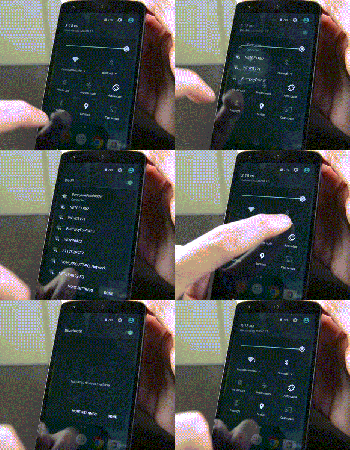
Android 5.1 Lollipop – Here’s what’s new!
brightcove.createExperiences();
Android 5.1 Lollipop is officially in the wild and it comes with a metric ton of changes. However, most of them are under the hood and the actual interface only saw a few minor tweaks here and there. Let’s take a look at what’s different in 5.1.

Quick Settings tweaks
The Quick Settings in Android 5.1 Lollipop saw a couple of tweaks. They include:
- You can now connect to WiFi and Bluetooth devices without being required to go into the Settings app. Simply click the down arrow and continue from there.
- There is a new animation for the portrait mode toggle (more on that later).

Screen Pinning improvements
Screen Pinning is a feature (under Security in the Settings) that allows you to lock someone into a single application. This is great for kids or if someone is borrowing your phone.
- The verbiage in the Settings has been changed for clarification purposes.
- When you pin an application, Android now shows you which buttons to press in order to leave Screen Pinning mode. Otherwise, the feature works exactly as it did before.

Contacts app improvements
The Contacts app has undergone a couple of minor improvements:
- There is no longer any color overlays on contact pictures.
- Google+ photos are no longer used for contact pictures.
- Other minor tweaks here and there.

System Volume tweaks
The lack of silent mode is a sore spot for many Lollipop users, although HTC and Samsung have managed to (generally) re-add the feature in their skins. With Android 5.1, Google didn’t give us silent mode back but they did make some other tweaks:
- The icons of Priority Mode and No Interruptions Mode now appear in the selection window. This is so people new to the OS understand what the icons mean when they show up in the status bar (shown in the gif above).
- No Interruptions Mode will now still deliver notifications and you’ll still see the notification light blinking. It’s no silent mode, but it works pretty much the same. The only real gripe is that alarms still don’t go off so you’ll still need to create a tweaked Priority Mode (where alarms are okay, but everything else is turned off) in order to get a “truer” silent mode.
- You can now access system volume even while watching video, listening to music, or otherwise engaging in media. Simply click the bell icon on the right side (see video for a demonstration) and the media volume will disappear, replaced by the system volume.
- Other small tweaks are there, including the ability to better manage Priority Mode.

New animations
A few new animations have made their way into Android 5.1.
- The four icons at the top of the Clock app are now animated.
- The Portrait/Landscape toggle in Quick Settings is also now animated.

Other various tweaks
Some of the other highlights from the Android 5.1 update include:
- NuPlayer officially takes over for AwesomePlayer as the default streaming player.
- When you receive a heads-up notification (when they appear at the top and are clickable), you can swipe up to hide the notification but it will remain in the notification drop-down for you to check later. In Android 5.0, swiping up on the heads-up notification dismissed the notification entirely.
- Device Protection mode is now a thing that exists. This nifty new feature keeps your device locked down even if it has been factory reset, preventing thieves from getting around your security. Sadly, this is only available on the Nexus 6 and Nexus 9 as well as, according to Google, all Lollipop devices launched going forward.
- HD Voice Calling is now included. Devices on compatible carrier networks that support HD Voice will be able to use the feature. Reportedly, this only works with the Nexus 6 for right now.
- Dual-SIM support is now baked right into the OS.
- Unless otherwise stated, we believe the memory leak has finally been fixed.
- There were over 14000 additional tweaks, fixes, and other changes that came to Android 5.1 that improved everything from performance to battery. To see them all, here’s the full changelog.

The new “no SIM card” icon.
What we’re still waiting on
While the 5.1 update was huge in its own right, it didn’t bring everything. Here are a few features many people are still waiting on.
- A true silent mode where notifications come in, alarms act as normal, but the device doesn’t vibrate or ring.
- T-Mobile Nexus 6 users are still waiting for WiFi Calling but that should be coming soon.
- There is still no reboot option. When long pressing the power button, you still only have the option to Power Down.

Overall
Overall, the update is a big step forward for Lollipop and dare we say, the Lollipop we probably should have had to begin with. Performance on the Nexus 5 (at least) has been noticeably better and the inclusion of the new features gives a more full and complete feeling to the UI and experience overall. Let us know what you thought of the Android 5.1 Lollipop update. Did Google address all of your concerns or are there still some things you wish they had?
The best Apps for your Rooted Android device
So you managed to root your Android device? Good going! Now what?
We’ve compiled the best Apps for your newly rooted Android device to get you started.
Titanium Backup
The first App I always install on my newly rooted device to recover from any failures or to easily restore my Apps and settings after flashing a custom ROM. Titanium Backup can backup everything from message and call logs to Apps and the data stored within them. Backup and restore is as easy as a single click.
Screenshot
Many Apps allow you to take a screenshots of your Android device that require root access, but ShootMe never fails to complete the task. If taking screenshots isn’t built into the ROM you’re running, then you’ll find many root screenshot Apps to do the job.
Xposed Framework
Customise your rooted Android device with different modules without the need on flashing specific custom ROMs. This installer opens the gateway to modules to be downloaded for many different purposes. You can grab the Xposed Framework installer here.
Flashify
Flash your boot.img, recovery.img and zip files right away using Flashify without the need to boot into recovery. You can even do full nandroid backups when using a supported recovery.
Superuser
The hub of root access – grant and manage superuser root access on a per app basis. Other Superuser apps do exist.
SetCPU
SetCPU is a tool for changing the CPU settings on a rooted Android phone or tablet. SetCPU works with a great variety of Android devices and ROMs, including the HTC One series, Samsung Galaxy series, and Nexus devices. SetCPU allows you to set up powerful profiles to change your settings under certain conditions, such as what app is running, when the phone is asleep or charging, when the battery level drops below a certain point, when the phone’s temperature is too high, or during certain times of day.
Tasker
Whilst root access is not specifically required for Tasker to function, some of the tasks that the App can perform require root access and is a lot more powerful with elevated privileges.
SSH Tunnel
Keep your traffic private by tunnelling it through a secure SSH tunnel.
Root Browser
Root Browser is the ultimate file manager for rooted users. Explore all of Android’s file systems and take control of your Android device.
Seen an App that we’ve missed out which you think is essential for root users? Let us know in the comments below.
The post The best Apps for your Rooted Android device appeared first on AndroidGuys.
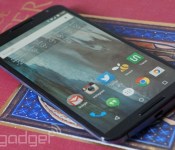
Google’s Nexus 6 will finally reach Verizon on March 12th

Yes, the rumors were true — after a months-long wait, Verizon has confirmed that it’ll launch the Nexus 6 on March 12th, with stores picking it up on March 19th. The Google-powered phone will still be relatively expensive, at $250 on a two-year contract or $27 per month on Edge, but you will get both HD voice calling (Android 5.1 comes standard) and a free 6-month subscription to Google Play Music All Access for your trouble. Is it worthwhile at this point? That’s hard to say. This is still the latest and greatest Android flagship phone, but there’s no question that Verizon missed the boat, as it sometimes does. If you wanted a relatively pure Android experience on Big Red, you probably bought a Droid Turbo or Moto X last fall.
Filed under: Cellphones, Mobile, Google, Verizon
Source: Verizon
Anker 2nd Gen Astro3 12800mAh Battery review
Design
Anker® 2nd Gen Astro3 12800mAh

The Astro3 does not stray from the traditional look of modern external batteries, as Anker decided to keep with the conventional square frame. Made from a matte black silicon material, the Astro3 feels great to the touch and is able to fit in discretely in any environment.

There are not physical button on the Astro3 as the external battery utilizes a motion sensor for most of its actions. On the right side you do get a break from the seamless look of the Astro3, as that’s where the three external charging ports and the Astro3’s own charging port is located. Aside from that, there is nothing else that takes away from the Astro3’s seamless appearance.
Features
Anker decided to do away with any physical buttons on the Astro3 and instead opted to use a built in motion sensor to activate the device. This means that whenever you need to charge the devices hooked up to the Astro3, all you have to do is give the battery pack a small shake. This motion also activates the white LED indicator on the front that allows you to see how much charge is left on the device.
The Astro3 comes with Anker’s proprietary battery charging technology, dubbed Power IQ. Every device has a certain amp current limit that it can be charged at. Modern devices are smart enough that they will only get the necessary amount of current that they were built to receive. The issue though is that most charging methods, unless you are using the official charger that came with the device, are going to charge your device at a slower rate. This is especially true when you try to charge you device using your desktop or laptop charger. This is where Power IQ comes in, the Astro3 has the capability to charge your device up to 4 amps, more than enough current for almost all portable devices. The Power IQ detects how much current it can send over to your device and will send over the maximum amount. This in turn makes ensures that your device will charge at the maximum rate, lowering your wait time.
Real World Testing
I must say, I was thoroughly impressed with the results of the Astro3. Straight out of the box, I decided to see how it would fare, so I hooked up my HTC One M8 which I had forgotten to charge the night before. It did not take long for the Astro3 to have my M8 go from 15% to 100% with the Power IQ technology and ready for the day ahead. I was able to charge my M8 three more times before the Astro3 finally needed to be charged itself. That is really impressive by today’s standards and the Astro3 did a remarkable job putting other external batteries to shame.

Charging the Astro3 itself did take some time though, as is to be expected from such a big battery, so I left it charging overnight and was delighted to see it fully charged by morning come. I am sure I would have been able to squeeze another charge out of the Astro3 for my M8 had it been fully charged when it came out of the box, but three full charges is still no laughing matter. Especially for a device that is relatively inexpensive when you consider like products and what you are getting in return.
Final Thoughts
The Astro3 is fantastic external battery that makes for the perfect gift for any tech fan. Being able to keep your devices charged at all times is a necessity in today’s busy world and the Astro3 is more than capable in assisting with that need. You can purchase an Astro3 and find more information regarding the device by heading over to Amazon using the links provided.
The post Anker 2nd Gen Astro3 12800mAh Battery review appeared first on AndroidGuys.
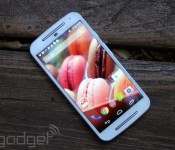
Motorola’s best budget smartphone just got even better

It’s no surprise that the Moto G is the bestselling smartphone in Motorola’s history — it’s always had solid specs and featured a class-leading display. Perhaps the only complaint that can be levelled at it is the fact that neither the first or second generation handsets launched with 4G support. That isn’t to say Motorola isn’t including it, it’s just that it takes a while. Now, finally, the company is making the best budget phone you can buy even faster.
The Moto G with 4G comes unlocked and you can pick one up direct from Motorola’s website right now for £159. That’s nearly ten pounds less than its 3G counterpart. It’ll also be available to by from Tesco, Carphone Warehouse, Amazon, Argos, Sainsbury’s and Asda from March 16th. Although the second-generation Moto G is available to buy in the US, there’s no LTE support for now, meaning you’ll have to wait a little while longer to get your hands on Motorola’s bestseller.
Filed under: Cellphones, Mobile, Google
Source: Motorola

Twitter profiles on Android look much better now

Twitter’s mobile app has seen a fair bit of newness as of late, and its latest tweak brings the Android version’s profile pages in line with iOS’. What’s so different? Let’s start at the top. Header images and avatar photos have gotten a bump in size for starters, and, what’s more, the bio has its own bit of screen real-estate now instead of being a swipe to the left. Rather than only the three most recent tweets showing, now you can scroll through an infinite amount of a user’s 140-character updates too — same goes for photos and favorites.
Thankfully, this has streamlined profiles a ton and eliminates the need for lots of tapping to navigate. You can swipe right or left anywhere on your device’s display, for example, to move from tweets to photos to favorites, respectively, while the bio, avatar and header stay static. The simplicity is quite refreshing, to be honest. Compared to how the timeline itself has evolved (for better and for worse), it’d be surprising if this ruffles users’ feathers the way incessant ads for a certain mobile game has.
We’re rolling out new profiles on Twitter for Android: it’s now easier to view bios, Tweets and photos. https://t.co/MMnvuuHaxh
– Twitter (@twitter) March 10, 2015
Filed under: Cellphones, Mobile
Source: Twitter (Twitter)
HTC One E9 specs and images surface
Whilst the HTC One M9 was only just released, it doesn’t mean HTC have sat back and relaxed. According to a new leak, a handset called the HTC One E9 is in the works which gives a flatter design.
With a 5.5-inch display, which reportedly may be Quad-HD, the E9 is said to be powered by a 64-bit MediaTek processor and feature a 13-megapixel front camera and 4-megapixel UltraPixel camera on the back.
There’s currently no launch date or pricing, but if you don’t like the curves of the newly announced HTC One M9 then this may be for you.
The post HTC One E9 specs and images surface appeared first on AndroidGuys.
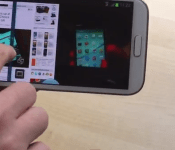
Multi-window support could soon be coming to Android

One of the best features that has been on the Samsung Galaxy Note series for a while is the ability to put apps into a window, allowing you to view multiple apps at once. This is otherwise known as “multi-window” support. It seems with the latest code commit of AOSP after the announcement of Android 5.1 yesterday, there is a line of code that suggests multi-window support could be coming to stock Android.
Phandroid reports this line of code, and mentions that the feature is almost mentioned in passing, and that’s it. You can see the full commit below.
commit ed7698c8ed66b959d723caa7bfe01530d306fb8d
Author: Craig Mautner cmautner@google.com
Date: Tue Jan 27 11:44:59 2015 -0800
Defer tap outside stack until multiwindows
Taps outside of the stack boundary were causing the current app to
lose focus. This led to timeouts waiting for the app to respond.
Disabling the tap recognition keeps the focus from changing. It will
be reenabled for multiwindows.
There is no other mention of this found elsewhere, and there is no knowing when this feature could be implemented, if even at all. However, with Google I/O coming up, anything is possible, and if nothing else we could get an announcement that the feature is in the works.
The post Multi-window support could soon be coming to Android appeared first on AndroidGuys.
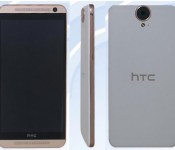
HTC’s bigger, flatter One E9 smartphone poses for the camera

If you thought HTC’s One M9 was just too small or too bulky, you’ll be glad to hear that the company has something bigger in store… yes, literally. Chinese regulators recently spoiled the surprise for the One E9, a 5.5-inch cousin to the 5-inch M9 that ditches the curved metal back for a flatter (and somewhat Desire Eye-like) body. This isn’t just a re-skin à la the One E8, folks. There may be big changes under the hood, too. Well-known tipster Upleaks claims that the E9 will switch from a Snapdragon 810 processor to a 64-bit octa-core MediaTek chip, and that you’ll get a super-sharp Quad HD screen instead of the M9’s 1080p display. A “standard” version could also ship with a regular 13-megapixel front camera, while a “high” version would carry the M9’s low light friendly 4MP UltraPixel cam.
Whether or not you get the One E9 in your corner of the globe is up in the air. The E8 made it to the US through Sprint, but there’s no guarantees that its successor will make the same leap. Also, it’s not certain just when HTC will pull the trigger. The company recently teased more big news in mid-to-late March, but there’s no guarantee that it was referring to the E9.
Filed under: Cellphones, Mobile, HTC
Via: Engadget Chinese (translated), Tech Times
Source: TENAA (translated)
 AIVAnet